Looking Beyond the TP-Link Omada 24-Port Gigabit Switch? 6 Alternatives Worth a Look
As an Amazon Associate we earn from qualifying purchases. Links on this page are affiliate links.
The TP-Link Omada SG3428X delivers robust connectivity with its 24 Gigabit ports and four 10G SFP+ uplinks. It supports smart managed features and Omada SDN control, making it ideal for scalable networks. However, you might look for TP-Link Omada SG3428x alternatives if you need different specifications. Some users require PoE support for connected devices. Others may prefer a fanless design for silent operation. Budget constraints or a desire for unmanaged simplicity can also drive your search. This list highlights options that share key traits with the original model.
We selected these 6 alternatives because their specifications overlap with the SG3428X. Each option provides 24 to 26 ports, ensuring you can connect all your wired devices. We included models with SFP uplinks for flexible fiber connectivity. The selection covers smart managed, unmanaged, and PoE+ variants. You will find choices with rackmount capabilities for office environments. Some options focus on basic management, while others offer advanced routing. This guide helps you compare port counts, speeds, and management types. You can find a switch that matches your exact network requirements without compromising on essential performance.
Our top pick: TP-Link Omada 24-Port Gigabit Switch with 10G SFP+.
Comparing These Switch Alternatives
NETGEAR 26-Port PoE+ Smart Switch
The NETGEAR GS724TPP offers 24 Gigabit ports with PoE+ support, delivering a 380W power budget for connected devices. This contrasts with the TP-Link Omada SG3428X, which lacks PoE entirely. While the TP-Link provides four 10G SFP+ uplinks for high-speed data aggregation, the NETGEAR model includes only two 1G SFP ports. You should choose the NETGEAR option if you need to power cameras or access points directly through the switch. The TP-Link remains better for pure data throughput and Omada ecosystem integration. Both devices support smart managed features for network control.
MokerLink 26-Port Gigabit Managed Switch
The MokerLink 26-Port Gigabit Managed Switch provides a fanless design for silent operation in offices. This differs from the TP-Link Omada SG3428X, which requires active cooling. The MokerLink includes 24 Gigabit ports and SFP uplinks, similar to the TP-Link, but it lacks the 10G SFP+ slots found on the Omada model. You should pick the MokerLink if noise reduction is critical for your environment. The TP-Link offers superior uplink speeds and Omada SDN management. The MokerLink focuses on basic smart features and rackmount compatibility without the advanced routing capabilities of the TP-Link switch.
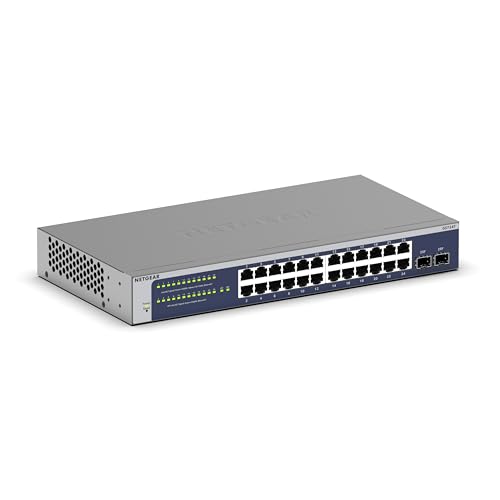
NETGEAR 24-Port Fanless Smart Managed Switch
The NETGEAR GS724T is a fanless 24-Port Smart Managed Switch designed for quiet environments. Unlike the TP-Link Omada SG3428X, it does not include any SFP uplink ports. The TP-Link model provides four 10G SFP+ slots for high-bandwidth connections, while the NETGEAR relies solely on copper Gigabit ports. You should choose the NETGEAR option if you need silent operation and do not require fiber connectivity. The TP-Link is better for users needing scalable uplink speeds and Omada cloud management. Both switches offer smart managed features for basic network segmentation and control.
Zyxel 24-Port Gigabit Switch with SFP
The Zyxel GS1100 is an unmanaged 24-Port Gigabit Switch with two SFP uplink ports. This contrasts sharply with the TP-Link Omada SG3428X, which is a smart managed switch with extensive configuration options. The Zyxel lacks VLAN support, QoS, and remote management capabilities found in the TP-Link model. However, it includes SFP uplinks similar to the TP-Link. You should choose the Zyxel if you need plug-and-play reliability without complex setup. The TP-Link is superior for users needing advanced network control and Omada integration. The Zyxel is a simpler, passive option for basic connectivity needs.
TP-Link 24-Port Gigabit Smart Managed Switch
The TP-Link TL-SG1024DE is a 24-Port Gigabit Easy Smart Switch with enhanced features. Like the Omada SG3428X, it supports smart management, but it lacks 10G uplink ports entirely. The TL-SG1024DE focuses on basic VLANs and QoS, while the SG3428X offers static routing and Omada SDN control. You should choose the TL-SG1024DE if you need reliable 24-port connectivity without the cost or complexity of 10G uplinks. The SG3428X is better for users requiring high-speed aggregation and centralized cloud management. Both models provide Gigabit copper ports and smart managed interfaces for network configuration.
Real HD 24-Port Gigabit PoE+ Switch
The Real HD 24-Port Unmanaged PoE+ Switch provides power delivery for devices like cameras. This differs from the TP-Link Omada SG3428X, which is unmanaged and lacks PoE support. The Real HD model includes SFP uplinks, similar to the TP-Link, but it offers no smart management features. You should choose the Real HD option if you need simple PoE power without network configuration. The TP-Link is better for users requiring advanced routing, VLANs, and Omada control. The Real HD switch is a straightforward solution for basic PoE deployments where management complexity is unnecessary.
Quick picks
Our 7 picks

TP-Link Omada 24-Port Gigabit Switch with 10G SFP+
Best for: Users needing 10G uplinks and Omada SDN control
- Port Count
- 24
- Port Speed
- 10/100/1000 Mbps
- Management Type
- L2+ Smart Managed
- Uplink Ports
- 4 x 10G SFP+
- Number of Ports
- 24 Ports
- Dimensions
- 17.3 × 7.09 × 1.73 inches
View on Amazon: TP-Link Omada 24-Port Gigabit Switch with 10G SFP+ Affiliate link
This TP-Link Omada switch offers 24 Gigabit Ethernet ports and four 10G SFP+ uplinks for high-bandwidth connectivity. It supports L2+ features like static routing and advanced security settings. You can manage it via the Omada SDN platform, hardware controller, or standalone mode. The device includes a five-year warranty and measures 17.3 inches long. It suits users needing flexible port configurations and centralized network control.
Pros
- Four 10G SFP+ slots for high-speed uplinks
- L2+ management with static routing capabilities
- Supports Omada SDN for centralized control
- Includes 802.1Q VLAN and port security features
- Comes with a five-year warranty
Cons
- Cloud controller features are marked as coming soon
- Additional fees may apply for cloud-based controller use
- No PoE support for connected devices
Good fit if
- You need 10G uplinks for high-bandwidth connections
- You want L2+ management with static routing
- You plan to use the Omada SDN platform
Skip if
- You require PoE ports for powered devices
- You need immediate cloud controller availability
- You prefer unmanaged switch simplicity
Verdict: TP-Link Omada 24-Port Gigabit L2+ Switch provides robust uplink options and management features for users building scalable networks with the Omada ecosystem. It fits those who value flexible port speeds and centralized control over basic unmanaged setups.

NETGEAR 26-Port PoE+ Smart Switch
Best for: High-power PoE deployments with fiber uplinks
- Port Count
- 26
- Port Speed
- 1.0 Gbps
- Management Type
- Smart Managed
- PoE Support
- PoE+
- PoE Power Budget
- 380W
- Uplink Ports
- 2 x 1G SFP
View on Amazon: NETGEAR 26-Port PoE+ Smart Switch Affiliate link
This NETGEAR switch gives you 24 Gigabit PoE+ ports with a 380W budget. It includes two 1G SFP uplinks for fiber connections. The smart managed interface allows for secure setup and SNMP management via NETGEAR Insight. Its compact metal design supports desktop or rack mounting. You get one year of remote management included. It suits users needing substantial power for connected devices.
Pros
- 24 Gigabit Ethernet ports with PoE+ support
- 380W total PoE power budget
- Two 1G SFP uplink ports
- Smart managed with SNMP and NETGEAR Insight
Cons
- Larger footprint at 20.7 inches long
- Heavier build at 1.32 pounds
- Limited to Smart Managed features, not full enterprise
Good fit if
- You need to power many devices like cameras or access points
- You want fiber uplink options via SFP ports
- You prefer a metal chassis for durability
Skip if
- You require full enterprise-grade L3 routing
- You have limited rack space for a larger unit
- You only need unmanaged plug-and-play connectivity
Verdict: NETGEAR GS724TPP 24-Port PoE Smart Switch delivers high power budget and fiber uplinks for dense device setups. It fits users who need managed control without enterprise complexity.

MokerLink 26-Port Gigabit Managed Switch
Best for: Silent, fanless office networking with SFP uplinks
- Port Count
- 26
- Port Speed
- 1 Gbps
- Management Type
- L2 Smart Web Managed
- Uplink Ports
- 2 x 1G SFP
- Switching Capacity
- 52 Gbps
- Mounting Type
- 1U rackmount
View on Amazon: MokerLink 26-Port Gigabit Managed Switch Affiliate link
The MokerLink 26-Port Gigabit Managed Switch offers 24 RJ45 ports and two 1G SFP uplinks for flexible connectivity. It supports L2 web management, including VLAN, QoS, and security features like ACL. With a 52 Gbps switching capacity and a fanless, rackmount design, it suits small businesses needing reliable, silent operation. This unit provides essential smart features without the bulk of higher-end models.
Pros
- 24 Gigabit Ethernet ports plus 2 SFP uplinks
- L2 Smart Web Managed interface with CLI support
- Fanless design for silent operation
- 1U rackmount form factor
- 52 Gbps switching capacity
Cons
- Only supports 1 Gbps speeds, not 2.5G or 10G
- L2 management lacks advanced Layer 3 routing features
- No mention of PoE support for connected devices
Good fit if
- You need a silent, fanless switch for a quiet office
- You want to use SFP uplinks for fiber connections
- You require basic VLAN and QoS management
Skip if
- You need Power over Ethernet (PoE) for cameras or APs
- You require 10 Gigabit uplink speeds
- You want a desktop-friendly, compact form factor
Verdict: The MokerLink 26-Port Gigabit Managed Switch fits small offices needing silent, rackmount connectivity with basic smart features. It is a practical choice for users who prioritize SFP uplinks and quiet operation over high-speed ports or PoE.
NETGEAR 24-Port Fanless Smart Managed Switch
Best for: Silent Gigabit switching with basic smart management
- Port Count
- 24
- Port Speed
- 1.0 Gbps
- Management Type
- Smart Managed
- Uplink Ports
- 2 x 1G SFP
- Mounting Type
- Desktop, Rack Mount
- Number of Ports
- 24 Ports
View on Amazon: NETGEAR 24-Port Fanless Smart Managed Switch Affiliate link
This NETGEAR GS724T is a 24-port Gigabit switch with smart managed features. It includes two 1G SFP ports for fiber uplinks. The fanless design keeps noise low while reducing power use. You get remote management via NETGEAR Insight for one year. Its compact metal build fits desktops or racks. This unit suits users needing basic layer 2 control without complex configuration.
Pros
- 24 Gigabit Ethernet ports for high-speed connectivity
- Two 1G SFP ports for fiber expansion
- Fanless design ensures silent operation
- Includes one year of NETGEAR Insight remote management
- Supports desktop or rack mounting
Cons
- Smart managed features are less advanced than full L3+ options
- No PoE support for connected devices
- Remote management requires a subscription after the first year
Good fit if
- You need basic VLAN or traffic management without full enterprise complexity
- You want a silent, fanless switch for office or home use
- You require fiber uplink options via SFP ports
Skip if
- You need Power over Ethernet (PoE) to power devices
- You require advanced Layer 3 routing capabilities
- You want free lifetime cloud management access
Verdict: NETGEAR GS724T 24-Port Smart Managed Switch is a solid choice for users who need reliable Gigabit connectivity with basic management tools and silent operation. It fits small offices or advanced home labs that do not require PoE or complex routing.

Zyxel 24-Port Gigabit Switch with SFP
Best for: silent, unmanaged home or office networking
- Port Count
- 24
- Port Speed
- Gigabit
- Management Type
- Unmanaged
- Uplink Ports
- 2x SFP
- Mounting Type
- Rack Mount
- Number of Ports
- 24 Ports
View on Amazon: Zyxel 24-Port Gigabit Switch with SFP Affiliate link
The Zyxel GS1100-24 is a 24-port unmanaged Gigabit switch designed for straightforward home or office networking. It includes two SFP uplink ports for fiber connections and features a fanless design for quiet operation. The unit supports Green Ethernet for energy efficiency and auto MDI/MDI-X for plug-and-play connectivity. It suits users who need reliable wired connections without the complexity of managed settings.
Pros
- 24 Gigabit Ethernet ports for high-speed local connections
- Two SFP uplink ports for fiber optic expansion
- Fanless design ensures silent operation in quiet spaces
- Green Ethernet feature helps reduce power consumption
Cons
- Unmanaged interface lacks remote configuration and monitoring tools
- No PoE support for powering connected devices
- Desktop form factor limits rack-mount installation options
Good fit if
- You need a simple plug-and-play switch for a small office
- You require SFP uplinks for long-distance fiber connections
- You prefer silent operation without fan noise
Skip if
- You need to manage VLANs or traffic prioritization
- You require PoE to power cameras or access points
- You need remote management capabilities via an app
Verdict: The Zyxel GS1100 24-Port Unmanaged Gigabit Switch is a solid choice for users who prioritize silent, reliable wired connectivity without the need for advanced network management features.

TP-Link 24-Port Gigabit Smart Managed Switch
Best for: Basic network segmentation and management
- Port Count
- 24
- Port Speed
- Gigabit
- Management Type
- Easy Smart
- Mounting Type
- Desktop/Rackmount
- Number of Ports
- 24 Ports
- Dimensions
- 11.6 × 7.1 × 1.7 inches
View on Amazon: TP-Link 24-Port Gigabit Smart Managed Switch Affiliate link
This TP-Link TL-SG1024DE is a 24-port Gigabit switch with Easy Smart Managed features. It supports 9K Jumbo frames for large file transfers and includes VLAN segmentation for security. You get port-based QoS for latency-sensitive traffic and IGMP Snooping for multicast apps. The unit measures 11.6 by 7.1 inches and weighs 3.75 pounds. It is a solid choice for users needing basic management without full enterprise complexity.
Pros
- 24 Gigabit Ethernet ports for high-speed connectivity
- 9K Jumbo frame support for efficient large data transfers
- VLAN features for network traffic segmentation and security
- Port-based QoS to prioritize latency-sensitive traffic
Cons
- Limited to Easy Smart Managed features rather than full L3 routing
- No SFP uplink ports included in the port count
- No mention of PoE support for connected devices
Good fit if
- You need a 24-port switch for basic network management
- You want VLAN segmentation without complex configuration
- You prefer a compact desktop switch over rack-mount units
Skip if
- You require PoE power for cameras or access points
- You need full Layer 3 routing capabilities
- You want SFP uplink ports for fiber connectivity
Verdict: TP-Link 24-Port Gigabit Easy Smart Switch fits users who need reliable 24-port connectivity with basic management features like VLANs and QoS, but it lacks the advanced routing or PoE options found in higher-end models.

Real HD 24-Port Gigabit PoE+ Switch
Best for: high-power plug-and-play surveillance or access point networks
- Port Count
- 24
- Port Speed
- Gigabit
- Management Type
- Unmanaged
- PoE Support
- PoE+ (IEEE 802.3af/at)
- PoE Power Budget
- 400W
- Uplink Ports
- 2 x 1G RJ45, 2 x 1G SFP
View on Amazon: Real HD 24-Port Gigabit PoE+ Switch Affiliate link
The Real HD 24-Port Gigabit PoE+ Switch provides unmanaged connectivity with a 400W total power budget across 24 gigabit PoE+ ports. It includes two dedicated gigabit RJ45 uplinks and two 1G SFP slots for fiber runs. This switch suits you if you need straightforward plug-and-play power delivery for cameras or access points without configuring software or virtual networks.
Pros
- 400W total PoE power budget with up to 30W per port
- Four dedicated uplinks including two 1G RJ45 and two 1G SFP ports
- Plug-and-play unmanaged setup with no software configuration needed
- Long-distance PoE extension mode supports cable runs up to 600 feet
Cons
- Unmanaged operation provides no web interface, IP address, or VLAN controls
- Does not support 24V passive PoE devices
- PoE extension mode reduces port transmission speed to 10Mbps
Good fit if
- You need high-budget 802.3af/at PoE+ power for up to 24 connected devices.
- You prefer an unmanaged plug-and-play switch that requires no software setup.
- You want dedicated copper and SFP uplinks to keep all 24 PoE ports free.
Skip if
- You need managed L2 features, VLANs, or a browser configuration interface.
- You run passive 24V hardware such as specific wireless access points.
Verdict: Real HD 24-Port Gigabit PoE+ Switch delivers a heavy 400W power pool and four dedicated uplinks for buyers who want zero-configuration hardware. It fits network setups that prioritize high PoE capacity over managed software controls.
Specifications side by side
| Spec | TP-Link Omada 24-Port Gigabit Switch with 10G SFP+ | NETGEAR 26-Port PoE+ Smart Switch | MokerLink 26-Port Gigabit Managed Switch | NETGEAR 24-Port Fanless Smart Managed Switch | Zyxel 24-Port Gigabit Switch with SFP | TP-Link 24-Port Gigabit Smart Managed Switch | Real HD 24-Port Gigabit PoE+ Switch |
|---|---|---|---|---|---|---|---|
| Port Count | 24 | 26 | 26 | 24 | 24 | 24 | 24 |
| Port Speed | 10/100/1000 Mbps | 1.0 Gbps | 1 Gbps | 1.0 Gbps | Gigabit | Gigabit | Gigabit |
| Management Type | L2+ Smart Managed | Smart Managed | L2 Smart Web Managed | Smart Managed | Unmanaged | Easy Smart | Unmanaged |
| PoE Support | not stated | PoE+ | not stated | not stated | not stated | not stated | PoE+ (IEEE 802.3af/at) |
| PoE Power Budget | not stated | 380W | not stated | not stated | not stated | not stated | 400W |
| Uplink Ports | 4 x 10G SFP+ | 2 x 1G SFP | 2 x 1G SFP | 2 x 1G SFP | 2x SFP | not stated | 2 x 1G RJ45, 2 x 1G SFP |
| Switching Capacity | not stated | not stated | 52 Gbps | not stated | not stated | not stated | not stated |
| Mounting Type | not stated | Desktop, Rackmount | 1U rackmount | Desktop, Rack Mount | Rack Mount | Desktop/Rackmount | Rack Mount, Desktop, Wall-Mount |
| Number of Ports | 24 Ports | 24 Ports | 24 Ports | 24 Ports | 24 Ports | 24 Ports | 24 Ports |
| Uplink Port Type | SFP | SFP | SFP | SFP | SFP | not stated | SFP |
| Dimensions | 17.3 × 7.09 × 1.73 inches | 20.7 × 13.8 × 4.09 inches | not stated | 16.2 × 10.7 × 4.6 inches | 5.16 × 17.4 × 1.73 inches | 11.6 × 7.1 × 1.7 inches | 17.3 × 8.1 × 1.7 inches |
| Weight | 4.3 pounds | 1.32 pounds | 6.6 pounds | 5.54 pounds | 4.41 pounds | 3.75 pounds | 9.4 pounds |
| Size | 24 Port + 4 10GE SFP+ | 24 Port, PoE+ @ 380W, 2 x 1G SFP | not stated | 24 Port | 24-Port | 2x SFP | 24 Port | Enhanced Features | not stated |
| Color | black | grey | black | Gray | Black | Black | Black |
| Model | TL-SG3428X | GS724TPP-300NAS | 26*1G Managed | GS724T-600NAS | GS1100-24 | TL-SG1024DE | 24 port poe gigabit switch |
Frequently asked questions
Which switch is best for high-power PoE devices?
The NETGEAR GS724TPP is the top choice for high-power PoE deployments. It provides a 380W power budget across its 24 Gigabit ports. This supports dense device setups like cameras and access points. It also includes two 1G SFP uplinks for fiber connectivity. This model fits users needing managed control without enterprise complexity.
What is the best budget-friendly managed option?
The MokerLink 26-Port Gigabit Managed Switch is the best budget pick. It offers silent, fanless operation suitable for small offices. The unit supports rackmount installation for organized cabling. It includes SFP uplinks for flexible connectivity. This switch prioritizes quiet performance and basic smart features over high-speed ports or PoE capabilities.
Which switch is best for silent home labs?
The NETGEAR GS724T is ideal for silent Gigabit switching. It provides 24 ports with basic smart management tools. The fanless design ensures quiet operation in home labs or small offices. It does not support PoE or complex routing. This makes it a solid choice for reliable connectivity without noise or advanced feature requirements.
Is there an unmanaged option with SFP uplinks?
Yes, the Zyxel GS1100-24 is a strong unmanaged choice. It features 24 Gigabit ports and two SFP uplinks. This switch prioritizes silent and reliable wired connectivity. It lacks advanced network management features, making it simple to use. It fits users who want plug-and-play performance with fiber uplink options.
Which switch supports basic VLANs and QoS?
The TP-Link TL-SG1024DE supports basic network segmentation and management. It offers 24 Gigabit ports with features like VLANs and QoS. This model lacks advanced routing or PoE options found in higher-end units. It fits users needing reliable connectivity with essential management tools for network optimization.
What is a good unmanaged PoE switch?
The Real HD 24-Port Unmanaged PoE+ Switch is a straightforward option. It provides basic PoE power delivery over Ethernet for cameras. The unit supports rackmount installation and includes SFP uplinks. It lacks network management settings, fitting users who need simple power delivery without complex configuration or smart features.
Which switch has the highest uplink speed?
The TP-Link Omada SG3428X offers the highest uplink speed with four 10G SFP+ ports. It provides 24 Gigabit ports for standard connectivity. This model supports Omada SDN control for centralized management. It fits users building scalable networks who value flexible port speeds and robust uplink options over basic setups.