Best NETGEAR Network Switches: 9 Models Compared
As an Amazon Associate we earn from qualifying purchases. Links on this page are affiliate links.
Choosing a NETGEAR network switch depends on your port density, power delivery, and management needs. NETGEAR offers unmanaged and smart managed switches ranging from 5 to 48 ports, featuring Gigabit and 2.5G speeds, PoE+ budgets up to 190W, and compact or rack-mountable metal enclosures.
The NETGEAR 5-Port Gigabit Unmanaged Switch leads our list for basic plug-and-play home wired expansion because it provides silent Gigabit connectivity in a metal chassis without configuration overhead. We compared 9 models strictly using their published listing specifications so you can find the right match for your setup.
Quick picks
Our 9 picks

NETGEAR 5-Port Gigabit Unmanaged Switch
Best for: basic plug-and-play home wired expansion
- Port Count
- 5
- Port Speed
- 1.0 Gbps
- Management Type
- Unmanaged
- Mounting Type
- Desktop, Wall-Mount
- Number of Ports
- 5 Ports
- Dimensions
- 4.02 × 1.06 × 3.9 inches
This NETGEAR switch gives you five auto-negotiating Gigabit Ethernet ports in a compact, fanless metal enclosure. It operates as an unmanaged plug-and-play unit, meaning you connect your cables without any software setup or configuration menus. Supporting IEEE 802.3az Energy Efficient Ethernet, it runs silently on a desk or wall. It suits you if you need to expand wired connectivity for a few nearby home office or entertainment devices.
Pros
- Five auto-negotiating 1.0Gbps Gigabit Ethernet ports
- Fanless metal chassis for silent operation
- Plug-and-play setup with zero software configuration
- Supports both desktop and wall mounting
Cons
- No Power over Ethernet (PoE) output
- Unmanaged with no VLAN or traffic control options
- Hardware compatibility specified for US and Canada only
Good fit if
- You need a simple plug-and-play switch to add four wired Gigabit ports to your router.
- You want silent, fanless operation on a desk or mounted to a wall.
Skip if
- You require Power over Ethernet (PoE) to power cameras or access points.
- You need managed switch features such as VLANs or web configuration.
Verdict: NETGEAR 5-Port Gigabit Unmanaged Switch delivers reliable, silent wired expansion in a sturdy metal chassis for basic network setups. It provides straightforward plug-and-play Gigabit connectivity without requiring management software.

NETGEAR 10-Port Fanless Smart Managed PoE+ Switch
Best for: silent PoE+ setups needing fiber uplinks
- Port Count
- 10
- Port Speed
- 1.0Gbps
- Management Type
- Smart Managed
- PoE Support
- PoE+
- PoE Power Budget
- 190W
- Uplink Ports
- 2 x 1G SFP
View on Amazon: NETGEAR 10-Port Fanless Smart Managed PoE+ Switch
This NETGEAR switch gives you eight Gigabit PoE+ Ethernet ports and two dedicated 1G SFP fiber uplinks. It provides a 190W total PoE power budget to run access points, cameras, and VoIP phones across your home network. A fanless metal chassis ensures silent operation on a desk or inside an equipment rack. It suits you if you need smart management features like SNMP alongside high-budget PoE delivery.
Pros
- Eight Gigabit PoE+ ports with a 190W total power budget
- Two 1G SFP ports for fiber uplinks and network expansion
- Fanless metal chassis for silent desktop or rack-mounted use
- Smart management software interface with SNMP support
Cons
- Limited to 1Gbps maximum port speeds without multi-gigabit support
- Hardware compatibility restricted to the United States and Canada
Good fit if
- You need up to 190W of PoE+ power across eight Gigabit devices.
- You require silent, fanless operation in a living area or office.
- You plan to integrate fiber connections via dedicated SFP slots.
Skip if
- You need multi-gigabit or 2.5G Ethernet connections for your hardware.
- You intend to use the switch outside the United States or Canada.
Verdict: NETGEAR 10-Port Smart Managed PoE+ Switch delivers 190W of PoE+ capacity and dual SFP slots in a silent, fanless enclosure. It handles managed network controls without adding fan noise to your room.
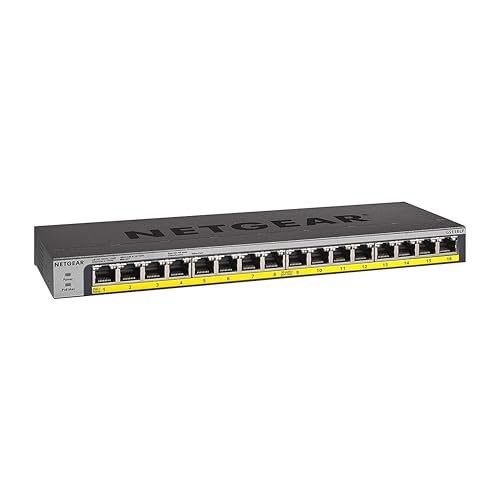
NETGEAR 16-Port Gigabit Fanless PoE+ Switch
Best for: silent 16-port plug-and-play PoE networks
- Port Count
- 16
- Port Speed
- 1.0Gbps
- Management Type
- Unmanaged
- PoE Support
- PoE+
- PoE Power Budget
- 76W
- Mounting Type
- Desktop, Wall-mount, Rack-mount
This NETGEAR unit gives you 16 Gigabit Ethernet ports that all supply PoE+ power across a 76W total budget. Its unmanaged design means you plug devices in with no software setup required. With a fanless metal housing, it operates silently on a desk, wall, or rack. It fits your setup if you need to run multiple powered devices like access points or cameras without dealing with switch management interfaces.
Pros
- All 16 Gigabit ports support PoE+
- Fanless metal chassis for silent operation
- Supports desktop, wall, or rack placement
- Expandable PoE budget up to 183W with optional power module
Cons
- Base PoE budget is limited to 76W out of the box
- Unmanaged design lacks VLAN and traffic management options
- Ports cap at 1.0Gbps with no Multi-Gig support
Good fit if
- You need 16 silent PoE+ ports for desktop, rack, or wall mounting.
- You prefer plug-and-play installation without managing network settings.
- You run PoE devices within an initial 76W total power threshold.
Skip if
- You need managed switch controls like VLANs or QoS.
- You require more than 76W of PoE capacity out of the box.
- You need network throughput speeds above 1.0Gbps.
Verdict: NETGEAR 16-Port Gigabit PoE+ Unmanaged Switch provides silent, plug-and-play connectivity for setups needing 16 powered Ethernet drops without complex setup. It delivers dependable gigabit speeds in a compact metal chassis that fits on a desk, wall, or rack.

NETGEAR 48-Port Unmanaged Gigabit Switch
Best for: silent high-density wired gigabit network expansion
- Port Count
- 48
- Port Speed
- 1.0Gbps
- Management Type
- Unmanaged
- Mounting Type
- Desktop, Rack-mount
- Number of Ports
- 48 Ports
- Dimensions
- 8 × 17.3 × 1.7 inches
This NETGEAR 48-Port Gigabit Unmanaged Switch expands your wired home or office network with 48 auto-negotiating gigabit Ethernet ports. It features a fanless metal housing designed for silent desktop or rack-mount installation. Because it is an unmanaged switch, setup requires no software configuration or network management. It suits you if you need to connect dozens of wired devices over Cat5e or Cat6 cables without dealing with setup menus or fan noise.
Pros
- 48 auto-negotiating gigabit Ethernet ports
- Fanless design for silent operation
- Supports desktop or rack-mount installation
- IEEE 802.3az Energy Efficient Ethernet compliance
Cons
- No Power over Ethernet (PoE) capability
- Lacks management software or traffic configuration options
- Restricted to operation in the US and Canada
Good fit if
- You need 48 wired gigabit connections in a single silent chassis.
- You want plug-and-play installation without configuring software.
- You plan to install your switch in a rack or on a desk.
Skip if
- You need Power over Ethernet to power devices directly.
- You require managed switch features like VLANs or traffic control.
- You reside outside the United States or Canada.
Verdict: NETGEAR 48-Port Gigabit Unmanaged Switch delivers high-density wired connectivity with silent fanless operation and zero setup requirements. It gives you 48 gigabit ports in a rack-mountable metal chassis without software management overhead.

NETGEAR 5-Port Gigabit Smart Managed Switch
Best for: small networks needing VLAN and QoS control
- Port Count
- 5
- Port Speed
- 1.0Gbps
- Management Type
- Easy Smart Managed
- Mounting Type
- Desktop or wall-mount
- Number of Ports
- 5 Ports
- Dimensions
- 3.7 × 3.9 × 1.1 inches
This compact switch gives you five gigabit Ethernet ports with smart managed capabilities. You can configure VLANs, prioritize network traffic with QoS, and monitor ports through software. Its fanless metal chassis supports desktop or wall mounting and operates silently using energy-efficient Ethernet. It suits you if you need basic traffic segmentation and network control across a few wired devices without moving up to larger hardware.
Pros
- Five auto-negotiating gigabit Ethernet ports
- Smart management software with VLAN and QoS controls
- Fanless design for silent desktop or wall-mounted operation
- Metal construction with IEEE 802.3az energy efficiency
Cons
- No Power over Ethernet support listed
- Limited to five 1.0Gbps connections
- Restricted to US and Canada regional compatibility
Good fit if
- You need VLAN separation and QoS traffic prioritization on a small setup.
- You want a fanless metal switch for silent desktop or wall installation.
- You connect five or fewer wired gigabit devices.
Skip if
- You need Power over Ethernet to run access points or security cameras.
- You need multi-gigabit connection speeds beyond 1.0Gbps.
- You require more than five network ports for your wired gear.
Verdict: NETGEAR 5-Port Smart Managed Gigabit Switch delivers essential network management, VLAN support, and silent operation in a compact metal enclosure. It provides practical configuration options for small setups without physical clutter.

NETGEAR 8-Port Smart Managed Gigabit Switch
Best for: silent 8-port smart managed network setups
- Port Count
- 8
- Port Speed
- 1.0Gbps
- Management Type
- Smart Managed
- Mounting Type
- Desktop, Wall-Mount
- Number of Ports
- 8 Ports
- Dimensions
- 4.13 × 6.22 × 1.06 inches
This NETGEAR switch gives you eight Gigabit Ethernet ports in a compact metal chassis. It operates as a smart managed unit with SNMP support and includes one year of NETGEAR Insight remote management. You get one power delivery port for compatible hardware alongside fanless, silent cooling and wall-mounting options. It suits you if you need granular network management and silent operation across eight wired connections without a rack enclosure.
Pros
- Eight auto-negotiating Gigabit Ethernet ports
- Smart management software with SNMP support
- Includes one year of NETGEAR Insight remote management
- Fanless design for silent desktop or wall-mount use
- One Power Delivery port for connected equipment
Cons
- Maximum speed capped at 1.0Gbps per port
- Provides only eight total Ethernet ports
- Only one port supports power delivery
Good fit if
- You need smart managed network controls like SNMP for eight wired devices.
- You want silent, fanless operation for desktop or wall-mount installations.
- You plan to manage your switch remotely using NETGEAR Insight.
Skip if
- You need network speeds higher than 1.0Gbps.
- You need more than eight wired network ports.
- You require power delivery across multiple connections.
Verdict: NETGEAR 8-Port Smart Managed Switch gives you silent smart management and flexible mounting for eight Gigabit connections. It handles small wired setups that require software configuration without the noise of an internal fan.

NETGEAR 24-Port Gigabit Unmanaged Switch with PoE+
Best for: silent high-density PoE plug-and-play networks
- Port Count
- 24
- Port Speed
- 1.0 Gbps
- Management Type
- Unmanaged
- PoE Support
- PoE+
- PoE Power Budget
- 190W
- Mounting Type
- Desktop, Rack-mount
View on Amazon: NETGEAR 24-Port Gigabit Unmanaged Switch with PoE+
This NETGEAR unit gives you 24 Gigabit Ethernet ports inside a metal chassis designed for desktop or rack-mount setups. Sixteen of the ports supply PoE+ power backed by a 190W total budget and dynamic power allocation. Because it operates without an internal fan, it runs silently while powering your access points or cameras. It suits you if you need high port density and plug-and-play PoE without software management.
Pros
- 16 PoE+ ports with a 190W total power budget
- Fanless design for silent desktop or rack operation
- Dynamic PoE allocation automatically redistributes unused wattage
- Sturdy metal housing supports rack-mount and desktop placement
Cons
- Unmanaged design provides no software controls or network settings
- PoE+ power is limited to 16 of the 24 ports
- Port speeds max out at 1.0Gbps with no multi-gigabit support
Good fit if
- You need up to 16 PoE+ connections within a 190W power budget.
- You want a silent, fanless switch with 24 total Gigabit ports.
- You prefer zero-configuration, plug-and-play hardware.
Skip if
- You require managed switch features such as VLANs or web control.
- You need PoE power across all 24 ports.
- You want port speeds faster than standard 1.0Gbps Gigabit.
Verdict: NETGEAR 24-Port PoE+ Gigabit Switch delivers silent, unmanaged connectivity with 16 PoE+ ports and a 190W power budget. It is a dependable choice when you need expansive port capacity without software complexity.

NETGEAR 5-Port Gigabit PoE+ Smart Switch
Best for: powering small PoE setups with smart management
- Port Count
- 5
- Port Speed
- 1.0Gbps
- Management Type
- Easy Smart Managed
- PoE Support
- PoE+
- PoE Power Budget
- 63W
- Mounting Type
- Desktop or wall-mount
This NETGEAR switch gives you five gigabit ports in a compact metal housing. Four of the ports supply PoE+ power with a 63W total budget, allowing you to run access points or cameras directly over Ethernet cables. It includes Easy Smart management features for configuring VLANs and traffic prioritization with QoS. A fanless design keeps operation silent, making it a practical fit if you need managed power delivery on a small desk or wall.
Pros
- Four PoE+ ports with a 63W total power budget
- Easy Smart management software with VLAN and QoS traffic prioritization
- Fanless metal chassis for silent operation
- Supports desktop or wall-mount placement
Cons
- Only four of the five ports deliver PoE power
- Limited to standard 1.0Gbps gigabit speeds rather than multi-gigabit
Good fit if
- You need up to four PoE+ connections under a 63W total budget.
- You want basic network management features like VLANs and QoS traffic controls.
- You require silent desktop or wall-mounted operation.
Skip if
- You need more than four powered PoE devices or more than 63W of total power.
- You require multi-gigabit speeds faster than 1.0Gbps.
- You need more than five total Ethernet ports.
Verdict: NETGEAR 5-Port Gigabit PoE+ Smart Switch provides compact smart-managed networking with 63W of total PoE+ delivery across four ports. It gives you traffic control and silent operation without unnecessary hardware bulk.

NETGEAR 5-Port 2.5G Unmanaged Switch
Best for: plug-and-play 2.5G desktop network expansion
- Port Count
- 5
- Port Speed
- 2.5 Gbps
- Management Type
- Unmanaged
- Mounting Type
- Desktop, Wall-Mount
- Number of Ports
- 5 Ports
- Dimensions
- 4 × 9 × 9 inches
The NETGEAR 5-Port 2.5G Unmanaged Switch adds multi-gigabit speeds to your wired network without configuration. It features five auto-negotiating 2.5Gbps Ethernet ports that operate over standard Cat5e or Cat6 cables. The compact metal enclosure supports desktop or wall mounting and uses a fanless design for silent operation. This switch suits you if you need faster wired bandwidth for multi-gigabit devices while keeping your network setup strictly plug-and-play.
Pros
- Five 2.5Gbps auto-negotiating multi-gigabit Ethernet ports
- Fanless metal chassis for silent operation
- Compatible with existing Cat5e and Cat6 cabling
- Supports desktop and wall-mount placement
Cons
- No Power over Ethernet (PoE) support
- Unmanaged design provides no traffic management or VLAN configuration
- Regional compatibility limited to the U.S. and Canada
Good fit if
- You need 2.5Gbps wired transfer speeds across up to five devices.
- You want silent, fanless operation in a work area or living space.
- You prefer plug-and-play hardware without software setup.
Skip if
- You need Power over Ethernet to run access points or cameras.
- You require managed switch capabilities like VLANs or QoS controls.
- You operate outside the U.S. and Canada.
Verdict: NETGEAR 5-Port 2.5G Unmanaged Switch delivers silent multi-gigabit connectivity without requiring network management or software setup. It gives you an easy speed upgrade for local devices if you do not need PoE or port configuration.
Specifications side by side
| Spec | NETGEAR 5-Port Gigabit Unmanaged Switch | NETGEAR 10-Port Fanless Smart Managed PoE+ Switch | NETGEAR 16-Port Gigabit Fanless PoE+ Switch | NETGEAR 48-Port Unmanaged Gigabit Switch | NETGEAR 5-Port Gigabit Smart Managed Switch | NETGEAR 8-Port Smart Managed Gigabit Switch | NETGEAR 24-Port Gigabit Unmanaged Switch with PoE+ | NETGEAR 5-Port Gigabit PoE+ Smart Switch | NETGEAR 5-Port 2.5G Unmanaged Switch |
|---|---|---|---|---|---|---|---|---|---|
| Port Count | 5 | 10 | 16 | 48 | 5 | 8 | 24 | 5 | 5 |
| Port Speed | 1.0 Gbps | 1.0Gbps | 1.0Gbps | 1.0Gbps | 1.0Gbps | 1.0Gbps | 1.0 Gbps | 1.0Gbps | 2.5 Gbps |
| Management Type | Unmanaged | Smart Managed | Unmanaged | Unmanaged | Easy Smart Managed | Smart Managed | Unmanaged | Easy Smart Managed | Unmanaged |
| PoE Support | not specified | PoE+ | PoE+ | not specified | not specified | not specified | PoE+ | PoE+ | not specified |
| PoE Power Budget | not specified | 190W | 76W | not specified | not specified | not specified | 190W | 63W | not specified |
| Uplink Ports | not specified | 2 x 1G SFP | not specified | not specified | not specified | not specified | not specified | not specified | not specified |
| Mounting Type | Desktop, Wall-Mount | Desktop, Rack-mount | Desktop, Wall-mount, Rack-mount | Desktop, Rack-mount | Desktop or wall-mount | Desktop, Wall-Mount | Desktop, Rack-mount | Desktop or wall-mount | Desktop, Wall-Mount |
| Number of Ports | 5 Ports | 10 Ports | 16 Ports | 48 Ports | 5 Ports | 8 Ports | 24 Ports | 5 Ports | 5 Ports |
| Uplink Port Type | not specified | SFP | not specified | not specified | not specified | not specified | not specified | not specified | not specified |
| Dimensions | 4.02 × 1.06 × 3.9 inches | 18 × 9.02 × 3.11 inches | 4.02 × 1.06 × 11.3 inches | 8 × 17.3 × 1.7 inches | 3.7 × 3.9 × 1.1 inches | 4.13 × 6.22 × 1.06 inches | 13 × 8.1 × 1.7 inches | 6.2 × 4 × 1.1 inches | 4 × 9 × 9 inches |
| Weight | 7.05 ounces | 1 pounds | 1.94 pounds | 8.6 pounds | 8.8 ounces | 15.2 ounces | 5.38 pounds | 2.2 pounds | 1.06 pounds |
| Size | 5-Port | 8 Port, PoE+ @ 190W, 2 x 1G SFP | 16 Port, PoE+ @ 76W | 48 Port | 5-Port | 8 Port | 24 Port, PoE+ @ 190W | 5 Port, PoE+ @ 63W | 5 Port, 2.5G, Unmanaged |
| Color | Gray | Black | Silver / black | Black | black | Black | silver | black | Black |
| Model | GS105NA | GS510TPP-100NAS | GS116LP-100NAS | GS348-100NAS | GS305E-100NAS | GS108Tv3 | GS324P-100NAS | GS305EP-100NAS | MS305-100NAS |
Comparing the NETGEAR Switch Lineup
Unmanaged switches suit you if you need basic plug-and-play expansion without configuration. Models like the NETGEAR 5-Port Gigabit Unmanaged Switch provide compact desktop expansion for standard peripherals, while the NETGEAR 5-Port 2.5G Unmanaged Switch supplies multi-gigabit throughput for faster local data transfers. These options serve users who prioritize zero-setup hardware for everyday devices.
If you deploy powered equipment like access points or cameras, look at PoE+ models. The NETGEAR 16-Port Gigabit Fanless PoE+ Switch supplies plug-and-play power across multiple ports, whereas the NETGEAR 10-Port Fanless Smart Managed PoE+ Switch adds SFP uplinks and software management for granular traffic control. These units fit shoppers building surveillance arrays or structured wired setups.
Where the NETGEAR Lineup Fits
NETGEAR fits setups requiring silent hardware ranging from 5-port desktop models to 48-port rack-mountable hardware. This selection suits you if you need standard Gigabit connections, unmanaged simplicity, or smart management features like VLAN and QoS controls.
Specific hardware gaps remain across the catalog. You will not find fully managed switches or speeds beyond 2.5G. Multi-gigabit support appears only on a single 5-port unmanaged switch, with no PoE attached. Fiber connectivity tops out at 1G SFP slots on a single 10-port model, and high-density switches like the 48-port unit provide no PoE support at all.
If you need automated lighting controls instead of Ethernet hardware, review the best SONOFF smart switches for home automation setups.
Choosing the Right NETGEAR Switch
-
Match Port Count to Devices
Check how many wired clients you need to connect. Always factor in an uplink port connecting to your router. A 5-port model yields 4 usable client connections, while large setups need significantly more. If you plan extensive wired networking across multiple rooms, the NETGEAR 48-Port Unmanaged Gigabit Switch provides high-density connectivity in a single unit. Count your current endpoints and reserve spare ports for upcoming gear.
-
Assess Your Port Speed Needs
Standard Gigabit switches handle up to 1000 Mbps, which satisfies typical internet connections and everyday file transfers. If your local network requires faster data movement between storage devices or high-bandwidth endpoints, consider multi-gigabit hardware. The NETGEAR 5-Port 2.5G Unmanaged Switch supports 2.5G port speeds for increased local throughput. Verify that your client devices and network interface cards support 2.5G before selecting a multi-gigabit model over standard Gigabit.
-
Calculate PoE Wattage Requirements
Power over Ethernet delivers electrical power and network data through one cable. You must verify both the number of PoE ports and the total wattage budget. For smaller deployments of access points or cameras, the NETGEAR 5-Port Gigabit PoE+ Smart Switch supplies a 63W power budget across four powered ports. Sum the maximum wattage requirements of all your connected PoE endpoints. Ensure your total device power draw remains below the switch wattage ceiling.
-
Choose Unmanaged or Smart Managed
Unmanaged switches function immediately with zero software configuration, directing network traffic automatically. Smart managed models provide web-based control interfaces for advanced features such as traffic prioritization and VLAN segmentation. The NETGEAR 5-Port Gigabit Smart Managed Switch offers VLAN and QoS controls for segmenting home office traffic or prioritizing streaming devices. Choose smart management if you need to isolate IoT hardware or shape bandwidth; pick unmanaged if you prefer simple plug-and-play operation.
-
Check Uplink Port Options
Most desktop switches use standard RJ45 Ethernet ports for all connections. When connecting across longer physical distances, dedicated fiber uplink interfaces become valuable. The NETGEAR 10-Port Fanless Smart Managed PoE+ Switch includes two 1G SFP slots alongside its standard copper ports. SFP slots allow you to run fiber optic cabling directly to other switches or core networking gear. Choose models with SFP uplinks if your layout spans distant buildings or separate network cabinets.
-
Verify Dimensions and Mounting Options
Switch dimensions dictate where the device physically fits in your home or office. Compact models weigh under a pound and sit unobtrusively on a shelf or desk. Larger models feature wide metal enclosures designed for specific environments. The NETGEAR 16-Port Gigabit Fanless PoE+ Switch comes in a metal chassis that supports desktop, wall, or rack mounting. Measure your available space and verify wall-mount slot spacing or standard 19-inch rack clearance before selecting hardware.
Frequently asked questions
Which NETGEAR switches support Power over Ethernet (PoE)?
Several models provide Power over Ethernet for cameras, access points, and VoIP hardware. The GS510TPP-100NAS provides 190W across its PoE+ ports, while the GS324P-100NAS supplies 190W across 16 PoE+ ports. For smaller installations, the GS116LP-100NAS delivers a 76W budget across 16 ports, and the GS305EP-100NAS supplies 63W across four PoE+ ports.
What is the difference between unmanaged and smart managed NETGEAR switches?
Unmanaged switches operate immediately with zero configuration, while smart managed switches provide software-level traffic administration. Models like the GS105NA and GS348-100NAS pass traffic automatically without web interfaces. In contrast, smart switches such as the GS305E-100NAS, GS108Tv3, and GS510TPP-100NAS allow you to segment traffic using VLANs, optimize priorities with QoS settings, and monitor connection status across your local network.
Do any of these NETGEAR switches include fiber SFP uplink ports?
Yes, the NETGEAR 10-Port Fanless Smart Managed PoE+ Switch (GS510TPP-100NAS) includes two dedicated 1G SFP uplink slots. These optical ports let you run high-speed fiber uplinks to secondary switches or routers across longer physical distances than standard copper twisted-pair cables permit. The remaining eight ports deliver standard Gigabit Ethernet with PoE+ capabilities in a fanless chassis.
Are high-port-count NETGEAR switches loud during operation?
Many high-density models run silently without mechanical fans. For example, the 48-port GS348-100NAS uses a passive, fanless metal enclosure to deliver 48 Gigabit connections without noise. Similarly, the 24-port GS324P-100NAS and the 16-port GS116LP-100NAS provide silent power delivery and data distribution, making them suitable for home offices or media rooms where background acoustic noise must be avoided.
Can you achieve faster than Gigabit speeds with these switches?
Yes, you can achieve multi-gigabit speeds using the NETGEAR 5-Port 2.5G Unmanaged Switch (MS305-100NAS). Each of its five network ports supports 2.5G data transfer rates alongside standard Gigabit connections. This bandwidth suits high-speed network-attached storage or multi-gigabit internet drops, operating entirely as an unmanaged plug-and-play device without requiring complex software configurations.
How compact is the smallest 5-port NETGEAR switch?
The unmanaged GS105NA measures 1.06 inches high, 3.9 inches wide, and 4.02 inches long, weighing just 7.05 ounces. For smart managed options, the GS305E-100NAS measures 1.1 inches high, 3.9 inches wide, and 3.7 inches long at 0.55 pounds. Both models fit easily on small desks, media stands, or crowded shelves where physical space is limited.
Which NETGEAR model should you choose for rack mounting?
The NETGEAR 48-Port Unmanaged Gigabit Switch (GS348-100NAS) fits standard server enclosures with its 17.3-inch width and metal rack-mountable design. If you need fewer ports alongside PoE+ hardware support, the compact 16-port GS116LP-100NAS also supports rack mounting in addition to wall or desktop placement, providing flexible installation options depending on your equipment rack layout.