Wifi Repeaters Buying Guide (2026): What Matters and 8 Picks
As an Amazon Associate we earn from qualifying purchases. Links on this page are affiliate links.
This wifi repeater buying guide helps you choose the right wireless extender for your home network. You will learn how to evaluate speed ratings, Wi-Fi standards, and physical dimensions. The recommendations below were selected strictly from published specifications, ensuring every pick matches specific technical needs. You can compare features like dual-band support, Ethernet port speeds, and coverage area claims to find a device that fits your space. Some units offer compact wall-plug designs, while others provide higher throughput for demanding environments. Understanding these specs prevents you from buying hardware that cannot handle your internet plan or device count. The list includes options ranging from basic single-band extenders to advanced Wi-Fi 7 mesh systems. You will see how port speeds and antenna configurations impact real-world performance. This guide walks you through the key decisions, from selecting the correct frequency band to determining if a wired backhaul option is necessary for your setup. The 8 picks cover various use cases, ensuring you find a solution that works for your specific layout and bandwidth requirements.
Our top pick: eero Max 7 Wi-Fi 7 Mesh System 3-Pack.
Key Specs for Choosing a Repeater
Wi-Fi Standard Generation
The Wi-Fi standard determines your maximum theoretical speed and efficiency. Newer standards like Wi-Fi 7 and Wi-Fi 6 handle more data simultaneously than older Wi-Fi 5 or 802.11n models. If you stream 4K video or game online, newer standards reduce lag. Older N300 or AC750 devices suffice only for basic web browsing. Choose the latest standard your router supports to ensure future compatibility. For example, the eero Max 7 supports Wi-Fi 7 for multi-gigabit speeds, while the NETGEAR AX1800 offers Wi-Fi 6 for solid dual-band performance.
- Check for Wi-Fi 6 or newer labels
- Verify compatibility with your current router
- Avoid outdated 802.11n only models
Frequency Band Selection
Dual-band extenders use both 2.4GHz and 5GHz frequencies. The 2.4GHz band travels farther but is slower and crowded. The 5GHz band is faster but has shorter range. Single-band units only use 2.4GHz, limiting speed significantly. Most modern homes benefit from dual-band support to balance range and throughput. Look for devices that automatically select the best band. The Linksys AC750 and TP-Link AC1750 both offer dual-band coverage, providing flexibility for different devices in your home.
- Ensure dual-band support for better range
- Avoid single-band 2.4GHz only units
- Check for automatic band steering
Speed Rating Classification
Speed ratings like AC1750 or AX1800 indicate the combined maximum throughput of all bands. Higher numbers mean faster potential speeds for large files or multiple users. However, real-world speeds depend on your internet plan and distance. An N300 rating is very slow by modern standards, suitable only for light tasks. AC750 is basic. AC1750 and above handle moderate to heavy usage. The NETGEAR AC1900 offers higher throughput than the AC750, making it better for larger homes with more traffic.
- Match rating to your internet plan speed
- Look for AX or AC1750+ ratings
- Ignore N300 for modern needs
Wired Port Availability
Many extenders include an Ethernet port to connect stationary devices like TVs or game consoles. This creates a wired link through the wireless signal, which is more stable than Wi-Fi. Gigabit ports support speeds up to 1Gbps. Some basic models lack ports entirely. If you need to connect multiple devices, check for switch capabilities. The Tenda 5-Port Gigabit Switch adds five wired connections, though it is not a wireless extender. Most repeaters like the NETGEAR AX1800 include one Gigabit port for key devices.
- Look for at least one Gigabit port
- Check port type if connecting wired devices
- Verify port speed matches your needs
Physical Size and Form Factor
Size affects where you can place the unit. Wall-plug models are compact and plug directly into outlets, saving desk space. Larger units with external antennas may offer better range but take up more room. Dimensions matter for tight spaces or travel. The Edimax Mini N300 is very small, fitting easily into any outlet. The eero Max 7 is larger, designed for placement on shelves or floors. Measure your available space before buying to ensure it fits your intended location.
- Measure available space or outlet height
- Choose wall-plug for compactness
- Check dimensions for shelf placement
Device Capacity Limits
Some extenders specify a maximum number of connected devices. Higher capacity units handle more smartphones, tablets, and smart home gadgets simultaneously. If you have many devices, a low-capacity extender may become a bottleneck. The TP-Link AC1750 supports up to 32 devices, which is adequate for small to medium households. Larger mesh systems like the eero Max 7 handle more connections due to advanced architecture. Check specifications if you plan to connect many devices to the extender.
- Check listed device connection limits
- Ensure capacity matches your household size
- Prefer higher limits for smart homes
Types of Mesh WiFi Systems
Multi-gigabit Mesh Systems
These units offer 10 Gbps networking support for large properties. The eero Max 7 3-Pack exemplifies this class with Wi-Fi 7 standards. It delivers multi-gigabit wired and wireless speeds across extensive square footage. You get built-in smart home controls alongside high throughput. The trade-off is size and cost, as these are designed for demanding environments rather than small apartments. This type suits users who need maximum bandwidth for multiple 4K streams or heavy data transfers.
Wi-Fi 6 Wall Extenders
Compact wall-plug designs like the NETGEAR AX1800 provide dual-band coverage. They integrate current-generation Wi-Fi 6 technology into a small form factor. An Ethernet port adds wired connectivity for stationary devices. This type is ideal for filling dead zones in medium-sized homes without bulky antennas. The main limitation is the dual-band speed rating of AX1800, which handles moderate traffic well but may bottleneck under extreme load compared to tri-band or Wi-Fi 7 alternatives.
Basic Wi-Fi 5 Extenders
Older standards like Wi-Fi 5 still serve specific needs. The TP-Link AC1750 and NETGEAR AC1900 offer dual-band coverage for areas up to 2,100 square feet. They support up to 32 devices and include Gigabit Ethernet ports. These units are practical for moderate data demands and older hardware. The trade-off is lower efficiency and speed compared to newer standards. You should choose this type if your existing router is Wi-Fi 5 and you need simple, reliable range expansion without upgrading the entire network.
Common Mistakes When Buying Repeaters
Ignoring Wi-Fi standard compatibility with your router
Pairing an old Wi-Fi 4 extender with a modern router creates a bottleneck. Your network speed drops to the lowest common denominator. Check the standard on both devices. Match or exceed your router’s generation to maintain high throughput and efficient data handling throughout your home network.
Placing the repeater too far from the main router
If you place the extender in a dead zone, it receives a weak signal. It then broadcasts that weak signal, doubling the latency. Place the repeater halfway between your router and the dead zone. This ensures it receives a strong signal and extends coverage effectively without slowing you down.
Assuming one repeater covers an entire large home
A single extender has limited range and power. It cannot penetrate multiple thick walls or cover vast square footage alone. You may need multiple units or a mesh system for large homes. Evaluate your home’s layout and size. Plan for strategic placement to ensure consistent coverage in every room.
Overlooking dual-band versus tri-band capabilities
Single-band repeaters use the same frequency for backhaul and client connections. This halves your available bandwidth. Tri-band models dedicate one band for communication with the router. This preserves speed for your devices. Check the bands supported. Choose tri-band if you need maximum performance for streaming or gaming.
Quick picks
Our 8 picks
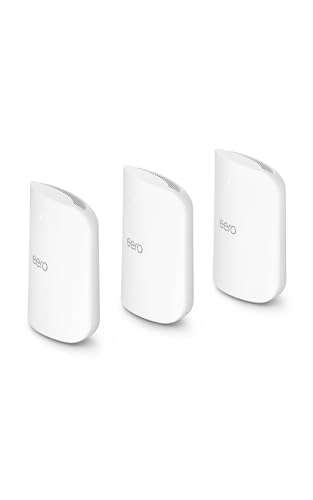
eero Max 7 Wi-Fi 7 Mesh System 3-Pack
Best for: multi-gigabit coverage across large homes
- Wi-Fi Standard
- Wi-Fi 7
- Coverage Area
- Up to 7,500 sq. ft.
- Pack Size
- 3-Pack
- Port Speed
- 10G
- Dimensions
- 7.24 × 8.74 × 3.54 inches
- Weight
- 3.2 pounds
The Amazon eero Max 7 3-pack is a whole-home Wi-Fi 7 mesh system designed for high-throughput networks. Unlike basic plug-in extenders, it provides up to 7,500 square feet of coverage and supports more than 750 connected devices. Each unit features two 10 Gigabit Ethernet ports for wired speeds up to 9.4 Gbps. It suits you if you need multi-gigabit backhaul and built-in smart home support for Thread, Matter, and Zigbee devices.
Pros
- Wi-Fi 7 wireless speeds reaching up to 4.3 Gbps
- Two 10 Gigabit Ethernet ports supporting wired speeds up to 9.4 Gbps
- Coverage up to 7,500 square feet with support for 750+ devices
- Built-in smart home hub for Thread, Matter, and Zigbee
Cons
- Large footprint measuring 8.74 by 7.24 inches per unit
- Full digital security capabilities require an optional eero Plus subscription
- Zigbee and Matter functionality operates as controller only
Good fit if
- You have multi-gigabit internet plans up to 10 Gbps.
- You need up to 7,500 square feet of whole-home wireless coverage.
- You manage smart devices using Thread, Zigbee, or Matter standards.
Skip if
- You prefer compact wall-plug repeaters over tabletop hardware.
- You want all advanced digital security features without a subscription.
- You only require single-band or basic single-room Wi-Fi extension.
Verdict: eero Max 7 Wi-Fi 7 Mesh System 3-Pack delivers multi-gigabit wired and wireless speeds across large properties. It provides 10 Gbps networking support and built-in smart home controls for demanding home environments.

NETGEAR AX1800 Dual-Band WiFi 6 Extender
Best for: compact dual-band WiFi 6 wall-plug coverage
- Wi-Fi Standard
- WiFi 6
- Speed Rating
- AX1800
- Frequency Bands
- Dual-Band
- Ethernet Ports
- 1 x Ethernet
- Operating Modes
- Mesh Extender
- Placement
- Wall plug
This wall-plug extender uses the WiFi 6 standard to expand your wireless network. It offers AX1800 dual-band speeds across 2.4GHz and 5GHz channels to handle streaming and browsing. You plug it directly into an outlet without consuming desk space. It also includes a single Ethernet port to link a wired device directly to your network. It suits you if you want modern WiFi 6 support in a compact footprint.
Pros
- WiFi 6 standard with AX1800 speed rating
- Dual-band operation across 2.4GHz and 5GHz frequencies
- Compact wall-plug form factor
- One built-in Ethernet port for wired hardware
Cons
- Limited to a single Ethernet port
- Dual-band design lacks a dedicated third backhaul band
Good fit if
- You need a WiFi 6 extender that plugs directly into an outlet.
- You want to connect one wired device like a gaming console or TV.
Skip if
- You require multiple Ethernet ports for several wired devices.
- You need a tri-band system to manage heavy network traffic.
Verdict: NETGEAR AX1800 WiFi 6 Wall Extender adds current-generation dual-band coverage and an Ethernet port to your setup using a simple wall-plug design.
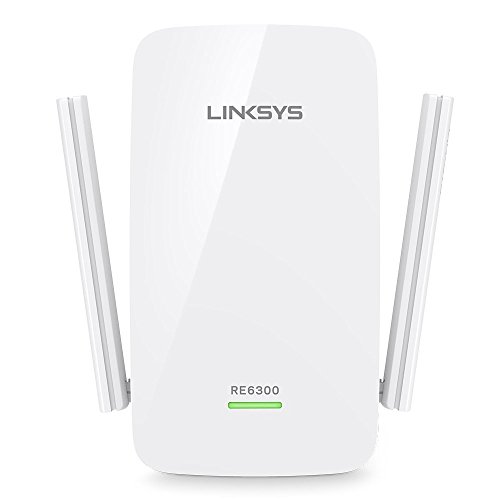
Linksys AC750 Dual-Band Gigabit Extender
Best for: large areas needing basic dual-band Wi-Fi coverage
- Speed Rating
- AC750 (N300 + AC433 Mbps)
- Frequency Bands
- Dual-Band
- Coverage Area
- Up to 6,500 sq ft
- Ethernet Ports
- Gigabit
- Operating Modes
- Range Extender, Repeater
- Dimensions
- 3.43 × 2.36 × 4.76 inches
The Linksys AC750 Dual-Band Range Extender is a plug-in Wi-Fi repeater designed to expand signal across large layouts. It delivers dual-band speeds rated at up to N300 plus AC433 Mbps, while providing coverage reaching up to 6,500 square feet. It also provides a Gigabit Ethernet port for hardwired hardware. This certified refurbished unit suits you if you need broad reach and a wired port on standard Wi-Fi 5 hardware.
Pros
- Coverage area reaching up to 6,500 square feet
- Gigabit Ethernet port for a wired connection
- Dual-band throughput rated at N300 plus AC433 Mbps
- Push Button Connect and Spot Finder Technology for setup
Cons
- Capped at AC750 speeds across both bands
- Manufacturer refurbished hardware with a 90-day warranty
Good fit if
- You need coverage extending across spaces up to 6,500 square feet.
- You want a physical Gigabit Ethernet connection for a stationary device.
- You prefer push-button pairing and visual placement guidance.
Skip if
- You require high-bandwidth speeds higher than the AC750 standard.
- You prefer a brand-new retail package over refurbished equipment.
Verdict: Linksys AC750 Dual-Band Range Extender delivers wide coverage reaching up to 6,500 square feet alongside a Gigabit Ethernet port. Its throughput limits to AC750 speeds, making it practical for moderate data demands.
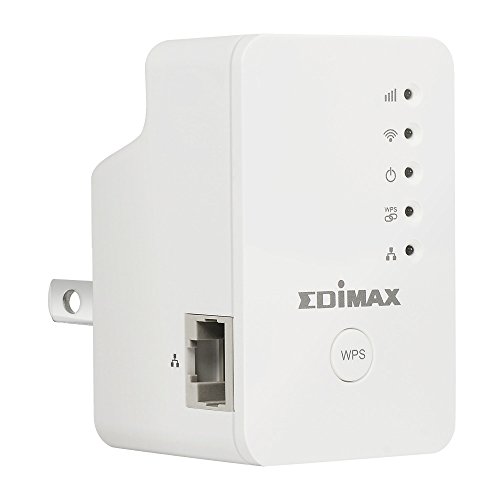
Edimax Mini N300 Wi-Fi Extender
Best for: basic single-band wireless coverage expansion
- Speed Rating
- N300
- Ethernet Ports
- Ethernet port
- Operating Modes
- Range Extender, AP, Bridge
- Placement
- Wall plug
- Dimensions
- 2.56 × 2.5 × 1.75 inches
- Weight
- 7.2 ounces
The Edimax N300 Wall Plug Range Extender is a compact wireless device that plugs directly into your wall outlet. It supports 802.11b/g/n Wi-Fi networks with N300 speed ratings and includes a single Ethernet port to act as an access point or bridge. It suits you if you need to extend basic legacy wireless coverage into a dead zone or attach one wired device without running long cables through your home.
Pros
- Supports range extender, access point, and wireless bridge modes
- Single Ethernet port connects wired equipment
- Signal strength LED assists with wall placement
- EdiRange app provides Wi-Fi scheduling and guest network controls
Cons
- Limited to 802.11b/g/n standards with N300 throughput
- Provides only one Ethernet port
Good fit if
- You need a compact wall-plug unit for legacy 802.11b/g/n equipment.
- You want switchable modes between range extender, bridge, and access point.
- You need Wi-Fi scheduling and guest network configuration via an app.
Skip if
- You need modern dual-band Wi-Fi 5 or Wi-Fi 6 speeds.
- You require multiple wired Ethernet connections.
Verdict: Edimax N300 Wall Plug Range Extender is a versatile, compact unit designed for extending basic 802.11n networks or bridging a single wired client. Its N300 rating limits performance compared to modern dual-band options.

TP-Link AC1750 Dual-Band Wi-Fi Extender
Best for: medium spaces requiring Wi-Fi 5 extension
- Speed Rating
- AC1750 (Up to 1750Mbps)
- Frequency Bands
- Dual Band
- Coverage Area
- Up to 2000 sq ft
- Ethernet Ports
- Gigabit Ethernet port
- Antenna Count
- 3 external
- Wi-Fi Standard
- Wi-Fi 5
The TP-Link AC1750 Dual Band WiFi Extender is a plug-in Wi-Fi 5 range extender designed to expand your wireless coverage up to 2,000 square feet. It delivers dual-band throughput up to 1,300 Mbps on 5 GHz and 450 Mbps on 2.4 GHz, supporting up to 32 connected devices. An integrated Gigabit Ethernet port provides a wired connection for stationary hardware. This suits you if you need to eliminate dead zones across medium-sized spaces.
Pros
- Up to 2,000 square feet of coverage
- Dual-band speeds up to 1,300 Mbps on 5 GHz and 450 Mbps on 2.4 GHz
- One Gigabit Ethernet port for wired connectivity
- Three adjustable external antennas
Cons
- Wi-Fi 5 standard rather than newer Wi-Fi 6
- Only one Ethernet port provided
- Operating temperature limited to 86°F (30°C)
Good fit if
- You need to extend wireless coverage up to 2,000 square feet.
- You want a Gigabit Ethernet port for a wired device.
- You manage up to 32 connected devices.
Skip if
- You require the Wi-Fi 6 standard.
- You need multiple wired Ethernet ports.
Verdict: TP-Link AC1750 Dual Band WiFi Extender delivers Wi-Fi 5 coverage for areas up to 2,000 square feet and handles up to 32 connected devices. Its Gigabit Ethernet port ensures a solid wired link for stationary equipment.

NETGEAR AC1900 Dual-Band WiFi Extender
Best for: extending WiFi 5 coverage across large spaces
- Wi-Fi Standard
- WiFi 5
- Speed Rating
- 1.9 Gbps (AC1900)
- Frequency Bands
- Two bands
- Coverage Area
- Up to 2,100 sq ft
- Ethernet Ports
- Gigabit Ethernet port
- Placement
- Wall outlet
This wall-outlet unit is a dual-band WiFi 5 extender designed to expand your existing wireless network across areas up to 2,100 square feet. It delivers transfer rates up to 1.9 Gbps across two bands and handles up to 35 connected devices. A built-in Gigabit Ethernet port lets you plug in a wired device directly. It suits you if you need reliable coverage using your current router.
Pros
- Up to 2,100 sq ft of wireless coverage
- Dual-band speeds up to 1.9 Gbps across 6 streams
- One Gigabit Ethernet port for wired devices
- Supports WPA3 wireless security
Cons
- Uses WiFi 5 rather than newer WiFi 6 standards
- Provides only a single Ethernet port
Good fit if
- You need to cover up to 2,100 square feet and connect up to 35 devices.
- You want a direct wall-plug design that keeps floors and shelves clear.
- You need a Gigabit Ethernet port to connect a smart TV or console directly.
Skip if
- You require the newer WiFi 6 standard for your network.
- You need multiple Ethernet ports to wire several devices at once.
Verdict: NETGEAR AC1900 Wall Outlet WiFi Extender provides dual-band WiFi 5 coverage up to 2,100 square feet with a Gigabit Ethernet port for stationary hardware. It pairs with your existing router setup without requiring proprietary hardware.

TP-Link AC2600 Quad-Antenna Dual-Band Wi-Fi Extender
Best for: high-throughput Wi-Fi 5 range expansion
- Speed Rating
- AC2600
- Frequency Bands
- Dual Band
- Ethernet Ports
- Gigabit Ethernet port
- Wi-Fi Standard
- Wi-Fi 5
- Dimensions
- 3.4 × 6.4 × 1.6 inches
- Weight
- 14.1 ounces
View on Amazon: TP-Link AC2600 Quad-Antenna Dual-Band Wi-Fi Extender
This TP-Link dual-band range extender adds Wi-Fi 5 coverage across your home using four external antennas. It delivers up to 1733 Mbps on the 5 GHz band and 800 Mbps on the 2.4 GHz band. You get MU-MIMO Wave 2 for handling simultaneous data streams, plus one Gigabit Ethernet port for wired hardware. It fits your space if you need high Wi-Fi 5 throughput for gaming or streaming setups without replacing your existing router.
Pros
- Up to 1733 Mbps on 5 GHz and 800 Mbps on 2.4 GHz
- Quad external antennas with beamforming and MU-MIMO Wave 2
- Gigabit Ethernet port for connecting a wired client
- Smart signal lights indicate proper positioning between devices
Cons
- Uses Wi-Fi 5 instead of newer wireless standards
- Only includes a single wired Ethernet port
- Substantial plug-in footprint measuring 6.4 inches tall
Good fit if
- You need dual-band Wi-Fi 5 coverage with dedicated 4x4 stream capacity.
- You want a Gigabit Ethernet connection for a stationary wired device.
- You rely on onboard signal indicator lights to find an optimal wall outlet.
Skip if
- You require the Wi-Fi 6 standard to match modern client hardware.
- You need multiple wired LAN ports for nearby accessories.
Verdict: TP-Link AC2600 Dual-Band Wi-Fi Extender delivers high-spec Wi-Fi 5 speeds using its quad-antenna array and single Gigabit Ethernet port. It offers dependable dual-band range expansion without requiring a router upgrade.

Tenda 5-Port Gigabit Switch
Best for: adding wired Gigabit Ethernet connections
- Ethernet Ports
- 5-Port Gigabit
- Management Type
- Unmanaged
- Dimensions
- 3.94 × 2.52 × 0.98 inches
- Weight
- 6 ounces
The Tenda 5-Port Unmanaged Gigabit Switch is a wired desktop switch rather than a wireless repeater. You get five Gigabit Ethernet ports to expand your wired network setup. Measuring 3.94 inches long and weighing 6 ounces, this compact unmanaged unit handles local device traffic without configuration. It suits you if you need to connect multiple wired network devices together at Gigabit speeds.
Pros
- Five Gigabit Ethernet ports
- Compact footprint measuring 3.94 by 2.52 by 0.98 inches
- Lightweight 6-ounce design
- Unmanaged setup requiring no configuration
Cons
- No Wi-Fi or wireless repeater capability
- No management interface or network configuration controls
Good fit if
- You need five Gigabit wired ports for local Ethernet devices.
- You want a compact, lightweight 6-ounce switch for simple plug-and-play wiring.
Skip if
- You need a wireless Wi-Fi repeater to extend wireless coverage.
- You require managed switch software or network traffic controls.
Verdict: Tenda 5-Port Unmanaged Gigabit Switch provides five Gigabit wired ports in a compact 6-ounce housing. It functions strictly as an unmanaged wired switch rather than a wireless Wi-Fi repeater.
Specifications side by side
| Spec | eero Max 7 Wi-Fi 7 Mesh System 3-Pack | NETGEAR AX1800 Dual-Band WiFi 6 Extender | Linksys AC750 Dual-Band Gigabit Extender | Edimax Mini N300 Wi-Fi Extender | TP-Link AC1750 Dual-Band Wi-Fi Extender | NETGEAR AC1900 Dual-Band WiFi Extender | TP-Link AC2600 Quad-Antenna Dual-Band Wi-Fi Extender | Tenda 5-Port Gigabit Switch |
|---|---|---|---|---|---|---|---|---|
| Wi-Fi Standard | Wi-Fi 7 | WiFi 6 | not specified | not specified | not specified | WiFi 5 | not specified | not specified |
| Speed Rating | not specified | AX1800 | AC750 (N300 + AC433 Mbps) | N300 | AC1750 (Up to 1750Mbps) | 1.9 Gbps (AC1900) | AC2600 | not specified |
| Frequency Bands | not specified | Dual-Band | Dual-Band | not specified | Dual Band | Two bands | Dual Band | not specified |
| Coverage Area | Up to 7,500 sq. ft. | not specified | Up to 6,500 sq ft | not specified | Up to 2000 sq ft | Up to 2,100 sq ft | not specified | not specified |
| Ethernet Ports | not specified | 1 x Ethernet | Gigabit | Ethernet port | Gigabit Ethernet port | Gigabit Ethernet port | Gigabit Ethernet port | 5-Port Gigabit |
| Operating Modes | not specified | Mesh Extender | Range Extender, Repeater | Range Extender, AP, Bridge | not specified | not specified | not specified | not specified |
| Antenna Count | not specified | not specified | not specified | not specified | 3 external | not specified | not specified | not specified |
| Placement | not specified | Wall plug | not specified | Wall plug | not specified | Wall outlet | not specified | not specified |
| Frequency Band | not specified | Dual-Band | Dual-Band | not specified | Dual-Band | not specified | Dual-Band | not specified |
| Number of Ports | not specified | not specified | not specified | not specified | not specified | not specified | not specified | 5 Ports |
| Pack Size | 3-Pack | not specified | not specified | not specified | not specified | not specified | not specified | not specified |
| Port Speed | 10G | not specified | Gigabit | not specified | not specified | not specified | not specified | Gigabit |
| Management Type | not specified | not specified | not specified | not specified | not specified | not specified | not specified | Unmanaged |
| Operating Mode | not specified | not specified | not specified | Access Point Mode, Bridge Mode | not specified | not specified | not specified | not specified |
| Dimensions | 7.24 × 8.74 × 3.54 inches | not specified | 3.43 × 2.36 × 4.76 inches | 2.56 × 2.5 × 1.75 inches | 3 × 6.4 × 2.6 inches | 5.56 × 6.93 × 3.82 inches | 3.4 × 6.4 × 1.6 inches | 3.94 × 2.52 × 0.98 inches |
| Weight | 3.2 pounds | 1.26 pounds | 6.4 ounces | 7.2 ounces | 12.3 ounces | 10.6 ounces | 14.1 ounces | 6 ounces |
| Size | 3-pack | not specified | re6300-rm3 For US Only | not specified | AC1750 | 1.9 Gbps, 2100 sq.ft. | AC2600 | 5×1G Ports |
| Color | WHITE | White | For Canada Only | White | White | white | white | Grey |
| Model | V010001 | EAX15-100NAS | RE6300-RM | EW-7438RPn Mini | RE450 | EX6400-100NAS | RE650 | TEG1005D |
If you also plan to build a media server, our processor buying guide details core counts and clock speeds.
Frequently asked questions
Does a Wi-Fi repeater slow down my internet speed?
Yes, repeaters typically halve your bandwidth because they use the same radio to receive and transmit data. This is especially true for dual-band models like the NETGEAR AX1800 or TP-Link AC1750. You can minimize this loss by choosing a tri-band unit or a mesh system with dedicated backhaul, such as the eero Max 7.
What is the difference between a Wi-Fi extender and a mesh system?
Extenders like the Linksys AC750 create a separate network name, often requiring manual switching. Mesh systems like the eero Max 7 use a single network name across multiple nodes. This allows devices to roam seamlessly between units. Mesh also tends to offer better performance in larger homes with consistent speeds.
Do I need a Wi-Fi 6 or Wi-Fi 7 extender?
You need newer standards if your router supports them and you have many connected devices. Wi-Fi 6 models like the NETGEAR AX1800 handle modern traffic better than older Wi-Fi 5 units. Wi-Fi 7, found in the eero Max 7, offers 10 Gbps support for extreme throughput. Match the extender to your router’s capability for best results.
Can I use a Wi-Fi repeater to add an Ethernet port?
Yes, many extenders include an Ethernet port for wired devices. The NETGEAR AX1800 and Linksys AC750 both provide Gigabit Ethernet ports. This allows you to connect stationary equipment like smart TVs or game consoles. It creates a stable wired link through the wireless connection from your main router.
How far can a Wi-Fi extender reach?
Coverage varies by model and environment. The Linksys AC750 claims up to 6,500 square feet of coverage. The TP-Link AC1750 covers approximately 2,000 square feet. Physical obstructions like walls reduce this range. Place the extender halfway between your router and the dead zone for optimal signal strength.
Is a single-band extender still worth buying?
Single-band units like the Edimax N300 are limited to older 802.11n speeds. They are best for basic connectivity needs or bridging a single wired client. Modern dual-band or tri-band options offer significantly higher speeds and better performance. Consider single-band only for legacy devices or very low-bandwidth tasks.