Best Network Switches for Office in 2026: 9 Picks Ranked by Specs
As an Amazon Associate we earn from qualifying purchases. Links on this page are affiliate links.
A dedicated network switch for office setups provides stable wired connectivity for computers, printers, and access points. It expands your router's ports without introducing signal loss or software complexity.
The D-Link 5-Port Gigabit Metal Switch leads our list because its five unmanaged Gigabit ports deliver silent, plug-and-play wired expansion in a compact metal chassis. We evaluated 9 models strictly using the specifications published on their listings. This guide helps you choose the right port density, management type, and transfer speeds for your workspace.
Quick picks
The best fit for you
- You need silent wired expansion for your office desk D-Link 5-Port Gigabit Metal Switch This unmanaged switch delivers five Gigabit ports within a compact 3.86-inch metal chassis.
- You need many plug-and-play wired office connections Linksys 16-Port Gigabit Unmanaged Switch It offers 16 unmanaged Gigabit ports with desktop and wall mounting flexibility.
- You need faster network speeds for office storage links D-Link 5-Port 2.5G Unmanaged Switch Five unmanaged 2.5G ports provide multi-gigabit bandwidth without requiring software configuration.
- You need traffic control across sixteen wired office devices Goalake 16-Port Fanless Gigabit Easy Managed Switch It pairs 16 Gigabit ports with managed VLAN configuration in a fanless chassis.
Our 9 picks

D-Link 5-Port Gigabit Metal Switch
Best for: small office desks needing silent wired expansion
- Recommended Use
- Office (what this guide is about)
- Port Count
- 5
- Port Speed
- 1 Gbps
- Management Type
- Unmanaged
- Switching Capacity
- 10 Gbps
- Mounting Type
- Desktop, Wall-Mount
This unmanaged switch gives you five auto-negotiating Gigabit ports backed by a 10 Gbps switching capacity. Its fanless metal chassis operates silently on a desk or mounted to a wall. Built-in 802.1p QoS and IGMP snooping handle basic traffic prioritization automatically without configuration. It suits small office setups needing dependable wired connectivity for a computer, printer, and NAS without complex network management.
Pros
- 10 Gbps non-blocking switching capacity across five Gigabit ports
- Fanless, silent all-steel chassis with desktop and wall-mount options
- Hardware 802.1p QoS and IGMP snooping for automated traffic handling
- Built-in ±4 kV surge and ESD protection
Cons
- Unmanaged design provides no manual configuration, web interface, or VLAN support
- No Power over Ethernet (PoE) support to power connected network hardware
- Five-port total leaves only four usable connections when linked to a router
Good fit if
- You need plug-and-play Gigabit expansion for up to four office devices.
- You want silent, fanless operation in a durable metal desktop or wall-mounted enclosure.
- You prefer automated traffic prioritization without configuring network settings.
Skip if
- You require managed features such as VLAN tagging or web administration.
- You need Power over Ethernet (PoE) for access points or IP phones.
- You have more than four wired office devices to connect.
Verdict: D-Link 5-Port Gigabit Unmanaged Switch delivers silent, durable wired expansion with zero setup required. It provides essential Gigabit throughput and automated traffic prioritization for compact office workspaces.

Linksys 16-Port Gigabit Unmanaged Switch
Best for: high-port-count plug-and-play office networks
- Recommended Use
- Office (what this guide is about)
- Port Count
- 16
- Port Speed
- Gigabit
- Management Type
- Unmanaged
- Mounting Type
- Wall Mount or Desktop
- Number of Ports
- 16 Ports
The Linksys 16-Port Gigabit Switch provides wired networking for your office setup. You get sixteen auto-sensing Gigabit ports housed in a metal casing. The switch supports Quality of Service traffic prioritization and 802.3az Energy Efficient Ethernet without requiring configuration. It mounts on a desktop or wall. This unit suits you if you need a high-capacity, plug-and-play wired network without managing software settings.
Pros
- 16 auto-sensing Gigabit Ethernet ports
- Metal housing with desktop or wall mount options
- Quality of Service (QoS) traffic prioritization
- 802.3az Energy Efficient Ethernet compliance
Cons
- Unmanaged switch with no configuration interface
- No Power over Ethernet (PoE) support listed
- Maximum wired speed limited to 1000 Mbps
Good fit if
- You need 16 wired Gigabit connections for office hardware.
- You prefer a plug-and-play unmanaged switch with zero setup.
- You want wall or desktop mounting flexibility.
Skip if
- You require managed switch features or web administration.
- You need Power over Ethernet to power devices directly.
- You want network speeds exceeding 1000 Mbps.
Verdict: Linksys 16-Port Gigabit Switch delivers plug-and-play wired expansion with QoS prioritization in a durable metal chassis. It provides dependable port density for offices that do not require complex management settings.

Tenda 5-Port Gigabit Desktop Switch
Best for: compact desktop and mesh node expansion
- Recommended Use
- Office (what this guide is about)
- Port Count
- 5
- Port Speed
- 10/100/1000Mbps
- Management Type
- Unmanaged
- Mounting Type
- Desktop, Wall-Mount
- Number of Ports
- 5 Ports
This Tenda switch expands your office network connection through five auto-negotiating gigabit RJ45 ports. Because it operates as an unmanaged plug-and-play unit, you do not need software or manual configuration to route traffic between your mesh system, router, and work devices. Its compact 2.6 by 3.66-inch footprint supports both desktop placement and wall mounting, making it suitable if your workstation has limited desk space.
Pros
- Five auto-negotiating 10/100/1000Mbps RJ45 ports
- Supports both desktop and wall-mount installation
- Plug-and-play operation with no software setup required
- Compact dimensions of 2.6 by 3.66 by 0.9 inches
Cons
- Limited to five total network ports
- Unmanaged design provides no traffic control or VLAN support
- Lacks Power over Ethernet capabilities
Good fit if
- You need to connect up to four wired devices to a single network drop.
- You want simple unmanaged gigabit speeds without configuring settings.
- You need a compact switch that can mount to a wall or sit on a small desk.
Skip if
- You need more than five Ethernet connections for your office setup.
- You require managed switch features to segment network traffic.
- You need PoE to deliver power to phones or wireless access points.
Verdict: Tenda 5-Port Gigabit Desktop Ethernet Switch provides basic, unmanaged gigabit port expansion with minimal desk space requirements. It handles simple office device wiring where advanced network configuration is not required.

D-Link 5-Port 2.5G Unmanaged Switch
Best for: multi-gigabit desktop setups and fast storage links
- Recommended Use
- Office (what this guide is about)
- Port Count
- 5
- Port Speed
- 2.5 Gbps
- Management Type
- Unmanaged
- Switching Capacity
- 25Gbps
- Number of Ports
- 5 Ports
This D-Link switch provides five 2.5 Gbps Ethernet ports with a total switching capacity of 25 Gbps for your office. It features auto-negotiating multi-gigabit connections, a fanless metal housing, and unmanaged plug-and-play operation. It suits your workspace if you need high-bandwidth links for Wi-Fi 6 access points, network-attached storage, or local workstations without configuring complex network software.
Pros
- Five 2.5 Gbps multi-speed ports with 25 Gbps switching capacity
- Fanless metal chassis for silent operation and heat dissipation
- Auto-negotiating ports supporting 100 Mbps, 1 Gbps, and 2.5 Gbps
- Unmanaged plug-and-play design requires no software setup
Cons
- Unmanaged design provides no web interface or custom VLAN controls
- No Power over Ethernet support for powering connected access points
Good fit if
- You need 2.5 Gbps wired throughput for fast storage or Wi-Fi 6 hardware.
- You want a quiet, fanless metal switch that requires zero setup.
Skip if
- You need more than five ports to wire your office devices.
- You require managed network features or Power over Ethernet.
Verdict: D-Link 5-Port 2.5G Unmanaged Switch delivers silent 2.5 Gbps multi-gigabit connectivity across five ports for high-bandwidth office setups. It gives you straightforward plug-and-play performance without the need to configure network software.
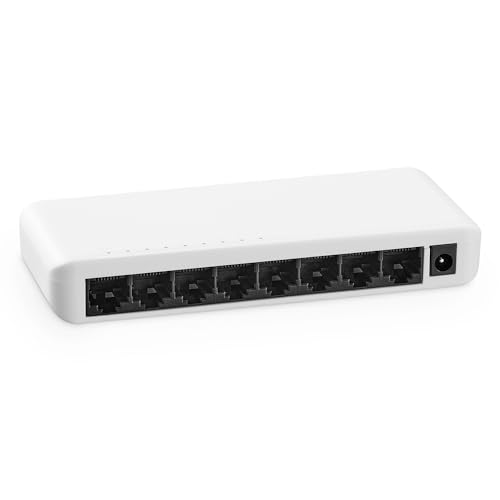
MokerLink 8-Port Gigabit Unmanaged Switch
Best for: quiet basic office desktop network expansion
- Recommended Use
- Office (what this guide is about)
- Port Count
- 8
- Port Speed
- 10/100/1000 Mbps
- Management Type
- Unmanaged
- Mounting Type
- Desktop, Wall-Mount
- Number of Ports
- 8 Ports
The switch gives you eight Gigabit Ethernet ports in an unmanaged, plug-and-play design. Its fanless plastic casing keeps operation silent while drawing minimal energy on your office desk or wall mount. Auto-negotiation and auto MDI/MDIX handle connections automatically without software setup. If your small office needs straightforward wired ports for computers, servers, or access points without network configuration, this unit meets those core networking requirements reliably.
Pros
- Eight 10/100/1000 Mbps auto-negotiating Ethernet ports
- Silent fanless operation with low energy consumption
- Desktop and wall-mount support
- Plug-and-play setup with auto MDI/MDIX
Cons
- Plastic casing instead of metal
- Unmanaged switch with no VLAN or traffic control
- No Power over Ethernet (PoE) support
Good fit if
- You need eight basic Gigabit Ethernet ports for office gear.
- You want a silent, fanless switch for a desktop or wall.
- You prefer a zero-configuration plug-and-play setup.
Skip if
- You need managed features like VLAN segmentation or QoS.
- You require Power over Ethernet (PoE) to power devices.
- You want multi-gigabit speeds above 1000 Mbps.
Verdict: MokerLink 8-Port Gigabit Fanless Switch provides eight quiet, unmanaged Gigabit connections for basic office setups. It handles standard wired networking simply without configuration overhead.

Goalake 16-Port Fanless Gigabit Easy Managed Switch
Best for: silent 16-port office networks needing VLAN control
- Recommended Use
- Office (what this guide is about)
- Port Count
- 16
- Port Speed
- 10/100/1000 Mbps
- Management Type
- Easy Managed
- Mounting Type
- Desktop, Wall-Mount
- Number of Ports
- 16 Ports
View on Amazon: Goalake 16-Port Fanless Gigabit Easy Managed Switch
The Goalake 16-Port Gigabit Easy Managed Switch provides sixteen 10/100/1000 Mbps ports inside a fanless metal housing. You configure traffic via a web browser or the Amitres IOT mobile app, giving you access to 802.1Q VLAN segmentation, QoS traffic prioritization, and port mirroring without using a command line. It suits small offices needing high port density, silent operation, and managed network controls for office workstations, printers, and storage.
Pros
- Sixteen full gigabit (10/100/1000 Mbps) Ethernet ports
- Management via Amitres IOT mobile app and web browser
- Supports 802.1Q VLAN, QoS prioritization, and port mirroring
- Silent fanless metal enclosure suitable for desktop or wall mounting
Cons
- Lacks a command-line interface (CLI) for advanced network scripting
- Port speeds max out at standard gigabit without 2.5G support
Good fit if
- You need 16 gigabit ports to connect multiple office computers, NAS units, and printers.
- You want app or browser management for VLANs and QoS without complex configuration.
- You need completely silent, fanless operation on an office desk or wall.
Skip if
- You require multi-gigabit speeds such as 2.5 Gbps or higher.
- You require traditional enterprise console or command-line configuration.
Verdict: Goalake 16-Port Gigabit Easy Managed Switch delivers 16 wired connections with app- and web-based VLAN and QoS configuration in a silent, fanless chassis. It is a practical fit for offices that require traffic control across multiple devices without enterprise management complexity.

Ztyuav 8-Port Gigabit Smart Managed Switch
Best for: small offices needing managed 1Gbps traffic control
- Recommended Use
- Office (what this guide is about)
- Port Count
- 8
- Port Speed
- 10/100/1000Mbps
- Management Type
- Smart Web Managed
- Switching Capacity
- 16Gbps
- Mounting Type
- Desktop or Wall Mount
The Ztyuav 8-Port Gigabit Smart Managed Switch provides eight 10/100/1000Mbps Ethernet ports with a 16Gbps switching capacity in a compact metal housing. It features Layer 2 management tools including VLAN, QoS, Link Aggregation, and IGMP multicast, configured via web browser or mobile app. Its fanless design keeps office setups silent. This switch suits you if your office network requires traffic segmentation and monitoring across eight wired connections.
Pros
- Eight 10/100/1000Mbps ports with 16Gbps switching capacity
- Layer 2 management tools including VLAN, QoS, and Link Aggregation
- Dual management options via web interface and mobile app
- Fanless metal chassis supporting desktop and wall mounting
Cons
- No Power over Ethernet (PoE) output support
- No SFP fiber slots or multi-gigabit ports
Good fit if
- You need Layer 2 controls like VLANs and QoS to segment office traffic.
- You prefer managing your network using either a web browser or a mobile app.
- You require silent operation from a fanless desktop or wall-mounted metal unit.
Skip if
- You need Power over Ethernet to supply power to access points or VoIP phones.
- You require 2.5Gbps, 10Gbps, or SFP uplink ports for higher bandwidth.
Verdict: Ztyuav 8-Port Gigabit Smart Managed Switch delivers detailed Layer 2 network controls and silent operation for offices needing managed 1Gbps connectivity. It offers app and web administration across eight non-PoE ports.
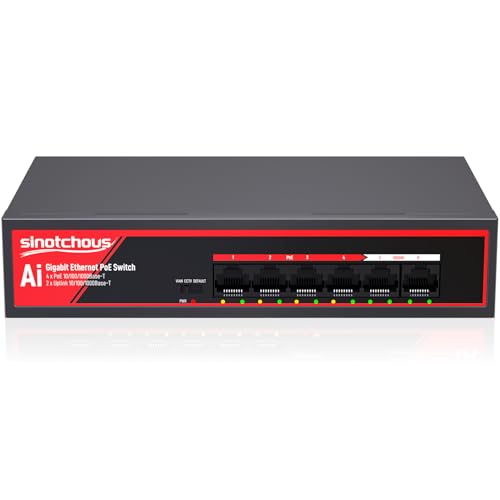
Sinotchous 6-Port Gigabit PoE Switch
Best for: small office IP camera setups
- Recommended Use
- Office, IP Cameras (what this guide is about)
- Port Count
- 6
- Port Speed
- 1 Gbps
- Management Type
- Unmanaged
- PoE Support
- PoE+ (802.3af/at)
- PoE Power Budget
- 65W
The Sinotchous 6-Port Gigabit PoE Switch provides four 802.3af/at PoE+ ports and two dedicated Gigabit uplink ports with an internal 65W power supply. It delivers up to 30W per PoE port for powering hardware like IP cameras. Physical toggle switches enable CCTV mode for extended transmission up to 820 feet or VLAN isolation. It suits small office spaces requiring simple, fanless power delivery for networked monitoring equipment.
Pros
- 65W internal power budget with up to 30W per PoE port
- Two dedicated Gigabit uplink ports for router or NVR links
- CCTV mode extends PoE data transmission up to 820 feet
- Fanless metal design ensures completely silent desktop operation
Cons
- Unmanaged design lacks web interface or software configuration
- Provides only four PoE-enabled ports
- Does not support 24V passive PoE without a separate splitter
Good fit if
- You need to power up to four standard 48V PoE IP cameras or access points.
- You want dedicated uplink ports for your NVR and router without sacrificing PoE ports.
- You need extended transmission runs up to 820 feet for remote cameras.
Skip if
- You require web-managed traffic controls or software-based VLAN settings.
- You need more than four PoE-powered network connections.
Verdict: Sinotchous 6-Port Gigabit PoE Switch delivers 65W of plug-and-play PoE+ power with dedicated uplinks and extended transmission modes. It is a practical, fanless unmanaged solution for small office camera installations.

WAVLINK 5-Port Gigabit Unmanaged Switch
Best for: compact office desks needing basic wired expansion
- Recommended Use
- Office (what this guide is about)
- Port Count
- 5
- Port Speed
- 10/100/1000Mbps
- Management Type
- Unmanaged
- Switching Capacity
- 10Gbps
- Mounting Type
- Desktop, Wall Mount
This WAVLINK unit is an unmanaged desktop and wall-mountable switch designed to expand wired connectivity in your office. It gives you five gigabit Ethernet ports alongside a 10Gbps switching capacity to handle concurrent local traffic. Built-in support for 9K jumbo frames improves large file transfers between networked devices. If you need simple plug-and-play operation inside a sturdy metal housing without configuration steps, this switch fits your desk setup.
Pros
- 10Gbps switching capacity handles all five ports concurrently
- Supports 9K jumbo frames for higher throughput during file transfers
- Metal enclosure supports both desktop placement and wall mounting
- IEEE 802.3x flow control and Auto MDI/MDIX on all RJ45 ports
Cons
- Unmanaged design provides no VLAN, QoS, or web configuration tools
- Provides only five total Ethernet ports for network expansion
Good fit if
- You need a compact plug-and-play switch with five gigabit ports.
- You move large data payloads and want 9K jumbo frame support.
- You prefer a durable metal chassis that can be mounted to a wall or desk.
Skip if
- You need smart or managed network controls such as VLAN segmenting.
- You have more than four wired client devices to connect.
Verdict: WAVLINK 5-Port Gigabit Unmanaged Switch provides dependable, plug-and-play connectivity backed by a 10Gbps switching capacity and 9K jumbo frame support. It is a solid choice for small office desks requiring compact hardware without setup overhead.
Specifications side by side
| Spec | D-Link 5-Port Gigabit Metal Switch | Linksys 16-Port Gigabit Unmanaged Switch | Tenda 5-Port Gigabit Desktop Switch | D-Link 5-Port 2.5G Unmanaged Switch | MokerLink 8-Port Gigabit Unmanaged Switch | Goalake 16-Port Fanless Gigabit Easy Managed Switch | Ztyuav 8-Port Gigabit Smart Managed Switch | Sinotchous 6-Port Gigabit PoE Switch | WAVLINK 5-Port Gigabit Unmanaged Switch |
|---|---|---|---|---|---|---|---|---|---|
| Port Count | 5 | 16 | 5 | 5 | 8 | 16 | 8 | 6 | 5 |
| Port Speed | 1 Gbps | Gigabit | 10/100/1000Mbps | 2.5 Gbps | 10/100/1000 Mbps | 10/100/1000 Mbps | 10/100/1000Mbps | 1 Gbps | 10/100/1000Mbps |
| Management Type | Unmanaged | Unmanaged | Unmanaged | Unmanaged | Unmanaged | Easy Managed | Smart Web Managed | Unmanaged | Unmanaged |
| PoE Support | not specified | not specified | not specified | not specified | not specified | not specified | not specified | PoE+ (802.3af/at) | not specified |
| PoE Power Budget | not specified | not specified | not specified | not specified | not specified | not specified | not specified | 65W | not specified |
| Uplink Ports | not specified | not specified | not specified | not specified | not specified | not specified | not specified | 2 x Gigabit Ethernet | not specified |
| Switching Capacity | 10 Gbps | not specified | not specified | 25Gbps | not specified | not specified | 16Gbps | not specified | 10Gbps |
| Mounting Type | Desktop, Wall-Mount | Wall Mount or Desktop | Desktop, Wall-Mount | not specified | Desktop, Wall-Mount | Desktop, Wall-Mount | Desktop or Wall Mount | not specified | Desktop, Wall Mount |
| Number of Ports | 5 Ports | 16 Ports | 5 Ports | 5 Ports | 8 Ports | 16 Ports | 8 Ports | not specified | 5 Ports |
| Use Case | Gaming | not specified | not specified | Gaming | not specified | not specified | not specified | not specified | not specified |
| Recommended Use | Office | Office | Office | Office | Office | Office | Office | Office, IP Cameras | Office |
| Intended Use | not specified | Home | Home | not specified | Home | Home | Home | not specified | Home |
| Dimensions | 3.94 × 3.86 × 1.1 inches | 4.72 × 11 × 0.98 inches | 2.6 × 0.9 × 3.66 inches | 3.54 × 3.85 × 1.14 inches | 9.84 × 7.87 × 3.15 inches | 10 × 3.14 × 1.02 inches | 5.24 × 2.64 × 1.3 inches | 7.87 × 4.72 × 1.57 inches | not specified |
| Weight | 9.6 ounces | 1.72 pounds | 2.4 ounces | 8.48 ounces | 6.74 ounces | 1.8 ounces | 9.28 ounces | 1.41 pounds | not specified |
| Size | 5-Port Switch | 16-Port | 5-Port | 5 Port Multi-Gig 2.5Gb | not specified | 16 Ports | Easy Managed | 8x1G | not specified | 5 Port |
| Color | Black | Black/Blue | Charcoal | Black | not specified | Blue | Black | Black-gigabit PoE Ethernet Switch | Non-PoE |
| Model | 124889 | LGS116-AMZ | SG105 | DMS-105 | 8*1G | 16 Gigabit Ports|Easy Managed | Easy Managed | 8x1G | 6 Gigabit Ports|65W 4xPoE+ | NW905G1 |
How to Choose an Office Network Switch
-
Calculate Your Port Count
Count every wired piece of office hardware before deciding on a switch size. Remember that one port connects directly to your router or uplink feed, leaving the remaining ports open for computers, printers, and storage units. If you have four devices today, a 5-port model leaves zero room for future expansion. Choosing a higher density option like the Linksys 16-Port Gigabit Unmanaged Switch gives your office sufficient wired headroom without cluttering desks with multiple daisy-chained switches.
-
Choose Unmanaged or Managed
Determine whether your office needs custom traffic segmentation or pure plug-and-play simplicity. Unmanaged switches forward traffic automatically without software setup, making them ideal for simple office desks. Managed and smart managed switches introduce web or mobile app interfaces for configuring VLANs and traffic prioritization. If you need to isolate guest traffic, segment departments, or monitor port health, select a model like the Goalake 16-Port Fanless Gigabit Easy Managed Switch. Offices without dedicated network staff generally benefit most from unmanaged units.
-
Verify Mounting and Dimensions
Check the physical footprint and mounting specifications to match your office workspace. Compact desktop units sit cleanly beside a workstation monitor or mesh node, while larger metal chassis often support wall mounting. If your desk has limited surface area, look at dimensions and mounting bracket slots. The Tenda 5-Port Gigabit Desktop Switch weighs only 2.4 ounces with a compact footprint, making it suitable for tight corners or vertical wall placement. Always verify whether the chassis includes wall-mount slots before planning vertical installations.
-
Check Throughput and Jumbo Frames
Look beyond individual port speeds to review the internal switching capacity and frame support. Total switching capacity measures how much simultaneous traffic the switch fabric processes without packet loss. For full non-blocking performance on a 5-port Gigabit model, you need a 10Gbps switching capacity. In addition, support for 9K jumbo frames allows larger data packets to pass across local connections, improving large file transfers between office workstations and local storage. The WAVLINK 5-Port Gigabit Unmanaged Switch includes both specifications, ensuring consistent data movement across busy local links.
-
Check Acoustic Cooling Design
Office workspaces require quiet equipment, especially when placed directly on a desk next to your workstation. Switches with internal cooling fans produce persistent background noise that can disrupt phone calls and daily concentration. Look for a fanless design that uses passive heat dissipation through its chassis instead of motorized fans. The MokerLink 8-Port Gigabit Unmanaged Switch features fanless operation to deliver silent connectivity across eight ports. Choosing fanless hardware ensures your wired network expansion remains completely noiseless during operation.
Frequently asked questions
What is the difference between an unmanaged and a managed switch for an office?
An unmanaged switch works immediately without configuration, while a managed switch provides software tools for network control. Plug-and-play models like the Linksys 16-Port Gigabit Unmanaged Switch forward data automatically. Managed options like the Goalake 16-Port Easy Managed Switch and Ztyuav 8-Port Smart Managed Switch let you configure traffic prioritization, VLAN division, and Layer 2 controls through web or mobile interfaces.
Can you mount an office network switch to a wall?
Yes, many office switches support both desktop placement and wall mounting. Units such as the Linksys 16-Port Gigabit Unmanaged Switch, Tenda 5-Port Gigabit Desktop Switch, and MokerLink 8-Port Gigabit Unmanaged Switch include wall-mount hardware support. This allows you to mount the chassis against a flat vertical surface to save workspace or keep connected patch cables organized.
What does PoE provide on an office network switch?
Power over Ethernet delivers electrical power and network connectivity across a single Ethernet line to supported devices. The Sinotchous 6-Port Gigabit PoE Switch supplies a 65W PoE+ power budget across four ports alongside dedicated uplink ports. This setup lets you run equipment like office IP cameras directly without routing separate power adapters or installing extra electrical wall outlets.
Do you need a 2.5G network switch instead of Gigabit for office work?
You only need a 2.5G switch if your office hardware handles large local transfers across high-bandwidth lines. Standard units like the D-Link 5-Port Gigabit Metal Switch cap speed at 1 Gbps, which handles general office tasks. The D-Link 5-Port 2.5G Unmanaged Switch provides 2.5 Gbps per port, accelerating local network storage backups and multi-gigabit computer links.
Are network switches quiet enough for open office desks?
Yes, many desktop network switches run silently because they use fanless passive cooling. Models like the MokerLink 8-Port Gigabit Unmanaged Switch and the Goalake 16-Port Fanless Gigabit Easy Managed Switch operate with zero fan noise. This fanless design prevents audible distractions, making them practical additions to open desk layouts and small shared conference rooms.
What does jumbo frame support do on an office switch?
Jumbo frame support allows a switch to pass data packets that exceed standard 1,500-byte Ethernet limits. The WAVLINK 5-Port Gigabit Unmanaged Switch features 9K jumbo frame support alongside a 10Gbps switching capacity. Processing larger data payloads reduces packet overhead on connected computers, improving overall throughput efficiency during heavy local file transfers across your wired network.
How many ports should you choose for an office switch?
Count your active wired devices and select a switch with enough room for additional hardware. The 9 picks in 2026 range from compact 5-port hardware like the Tenda 5-Port Gigabit Desktop Switch to 16-port models like the Linksys Gigabit Switch. Remember that one port must connect back to your upstream router, leaving the remaining connections for your office equipment.