Best Network Switches with Gigabit Uplink: 13 Spec-Based Picks
As an Amazon Associate we earn from qualifying purchases. Links on this page are affiliate links.
Adding a reliable network switch with gigabit uplink expands your wired connections while preventing data bottlenecks back to your router. The BV 8-Port Gigabit PoE+ Switch takes the top spot because it supplies full 1000Mbps speeds across all eight ports alongside a dependable 120W PoE+ power budget.
We compared 13 options strictly against the specifications published on the listings. This guide helps you choose the right port count, PoE power delivery, and management style for your setup.
Quick picks
The best fit for you
- You need all-Gigabit PoE+ connections for access points BV 8-Port Gigabit PoE+ Switch It provides 1000Mbps speeds across every port and a 120W PoE+ power budget.
- You need a high-power switch for twenty-four devices Davuaz 24-Port 400W PoE+ Wall Mount Switch Its 400W power budget and 24 ports support large deployments over Gigabit uplinks.
- You need a compact switch for desktop setups Tenda 5-Port Gigabit PoE+ Switch Its five Gigabit ports and compact dimensions fit small spaces without extra bulk.
- You need managed traffic control with Gigabit uplinks Reidubo 10-Port Gigabit Managed PoE+ Switch It delivers managed traffic controls and ten Gigabit ports with Gigabit uplinks.
Our 13 picks

BV 8-Port Gigabit PoE+ Switch
Best for: all-Gigabit PoE+ camera and access point setups
- Uplink Port Type
- Gigabit Uplink (what this guide is about)
- Port Count
- 10
- Port Speed
- 10/100/1000 Mbps
- Management Type
- Unmanaged
- PoE Support
- PoE+
- PoE Power Budget
- 120W
This unmanaged switch gives you eight Gigabit PoE+ ports and two dedicated Gigabit uplink ports. All ten ports run at 1000Mbps speeds, backed by a 120W total PoE power budget delivering up to 30W per port. Built with an internal power supply and a compact metal chassis, it suits you if you need reliable gigabit connections for IP cameras, wireless access points, and network hardware without configuration.
Pros
- All 10 ports operate at full 1000Mbps Gigabit speed
- 120W total PoE+ budget with up to 30W per port
- Internal power supply eliminates external adapter bricks
- Two dedicated Gigabit uplink ports for network expansion
Cons
- Unmanaged operation offers no VLAN or software management options
- Total PoE power is limited to 120W across eight powered ports
Good fit if
- You want full Gigabit throughput across all ports instead of 100Mbps downlinks.
- You prefer an internal power supply to keep your setup clean.
- You need simple plug-and-play installation without network configuration.
Skip if
- You require managed switch features like VLANs or remote monitoring.
- You run high-draw PoE equipment needing more than a 120W aggregate budget.
Verdict: BV-Tech 8-Port Gigabit PoE+ Switch with 2 Uplinks provides straightforward 1000Mbps speeds across every port and a dependable 120W PoE+ power budget. It gives you a clean, plug-and-play backbone for high-bandwidth devices without bulky power bricks.

Real HD 16-Port Fast Ethernet PoE+ Switch
Best for: IP camera setups needing high PoE power
- Uplink Port Type
- Gigabit Uplink (what this guide is about)
- Port Count
- 16
- Port Speed
- 10/100 Mbps
- Management Type
- Unmanaged
- PoE Support
- PoE+ (802.3af/at)
- PoE Power Budget
- 300W
The Real HD 16-Port PoE Switch is an unmanaged network switch built for high-power device setups. You get 16 Fast Ethernet PoE+ ports backed by a 300W total power budget and 2 dedicated Gigabit uplink ports for your router or NVR. With a fanless metal housing, port isolation VLAN, and extended 250m transmission range, it suits your multi-camera surveillance deployment or low-bandwidth networked hardware.
Pros
- 300W total PoE power budget with up to 30W per port
- 2 dedicated Gigabit Ethernet uplink ports
- Fanless metal chassis for silent operation
- Extend mode supports data and power transmission up to 250m
Cons
- Access ports operate at 10/100 Mbps Fast Ethernet speeds rather than Gigabit
- Unmanaged architecture provides no software configuration or web interface
Good fit if
- You need a substantial 300W power pool to run multiple IP cameras or access points
- You require silent, fanless operation in an office or home environment
- You need cable runs up to 250m using hardware Extend mode
Skip if
- You need Gigabit data transfer rates across local client ports
- You want advanced managed switch features like web administration or QoS controls
Verdict: Real HD 16-Port PoE Switch with Gigabit Uplink provides heavy-duty 300W power delivery and silent operation for multi-device setups. Its 10/100 Mbps client ports limit local bandwidth, but dual Gigabit uplinks prevent throughput bottlenecks to your router.

Tenda 5-Port Gigabit PoE+ Switch
Best for: small desktop PoE setups and IP cameras
- Uplink Port Type
- Gigabit Uplink (what this guide is about)
- Port Count
- 5
- Port Speed
- Gigabit
- Management Type
- Unmanaged
- PoE Support
- PoE+ (IEEE 802.3af/at)
- PoE Power Budget
- 63W
The Tenda 5-Port Gigabit PoE+ Switch is an unmanaged desktop and wall-mountable switch equipped with four 802.3af/at PoE+ ports and one dedicated Gigabit uplink port. It provides a total PoE budget of 63W with up to 30W per port. If you need a compact, fanless unit to run a few IP cameras, access points, or VoIP phones with one-key VLAN isolation, this switch fits your small network setup.
Pros
- Four PoE+ ports with 63W total power budget (up to 30W per port)
- Dedicated Gigabit uplink port for network connections
- One-key VLAN switch isolates PoE+ ports 1–4 from each other
- Fanless metal housing ensures silent operation
Cons
- Only one Gigabit uplink port available
- Total PoE power capped at 63W across all ports
- Offers only 5 total Ethernet ports
Good fit if
- You need to power up to four PoE devices requiring under 63W combined.
- You want silent, fanless operation in a desktop or wall-mounted space.
- You want basic port isolation via a physical VLAN toggle switch.
Skip if
- You need two separate Gigabit uplink ports for simultaneous router and NVR connections.
- You require more than four PoE+ ports or exceed 63W total power draw.
Verdict: Tenda 5-Port Gigabit PoE+ Switch delivers reliable PoE+ power and hardware VLAN isolation in a silent, compact design with a dedicated Gigabit uplink. It gives you a practical solution for powering up to four local network devices.

YuanLey 10-Port Fast Ethernet PoE+ Switch
Best for: long-distance IP camera and access point setups
- Uplink Port Type
- Gigabit Uplink (what this guide is about)
- Port Count
- 10
- Port Speed
- 10/100 Mbps
- Management Type
- Unmanaged
- PoE Support
- PoE+ (802.3af/at)
- PoE Power Budget
- 120W
The YuanLey 8-Port PoE+ Switch with 2 Gigabit Uplinks gives you eight 10/100Mbps PoE+ ports with a 120W power budget and two dedicated 1000Mbps Gigabit uplink ports. It operates as an unmanaged plug-and-play unit inside a metal chassis with bilateral heat dissipation. You also get an extend mode for 250-meter runs at 10Mbps and port isolation VLAN support, making it practical for IP cameras or access points.
Pros
- Two 1000Mbps Gigabit uplink ports for router connections
- 120W total power budget supporting IEEE 802.3af/at up to 30W per port
- Extend mode supports cable runs up to 250 meters at 10Mbps
- VLAN isolation switch for ports 1 through 8
- Durable metal housing with bilateral heat dissipation
Cons
- PoE downstream ports run at 10/100Mbps rather than Gigabit
- Incompatible with 24V passive PoE equipment
- Unmanaged design provides no software management interface
Good fit if
- You need Gigabit uplink throughput paired with standard 10/100Mbps PoE+ ports.
- You deploy surveillance cameras requiring cable distances up to 250 meters.
- You want unmanaged hardware with physical VLAN isolation support.
Skip if
- You require Gigabit transfer speeds across every connected PoE client.
- You rely on 24V passive PoE hardware instead of IEEE 802.3af/at.
- You need managed switch controls for network configuration.
Verdict: YuanLey 8-Port PoE+ Switch with 2 Gigabit Uplinks delivers a 120W PoE+ budget and extended transmission reach for surveillance setups that run on 10/100Mbps client ports. Its dual Gigabit uplinks keep your core router connection clear of data bottlenecks.

STEAMEMO 16-Port 240W Managed PoE+ Switch
Best for: silent multi-camera PoE setups needing managed uplinks
- Uplink Port Type
- SFP, Gigabit Uplink (what this guide is about)
- Port Count
- 16
- Port Speed
- 100 Mbps
- Management Type
- Managed
- PoE Support
- PoE+ (802.3at)
- PoE Power Budget
- 240W
The STEAMEMO 16-Port Managed PoE+ Switch gives you 16 10/100 Mbps PoE+ ports backed by a 240W power budget, alongside two dedicated Gigabit uplink ports and one 1.25G SFP slot. It suits you if you deploy multiple IP cameras or access points requiring remote network control, 802.1Q VLAN segmentation, and QoS traffic prioritization without introducing fan noise to your workspace.
Pros
- Two Gigabit uplink ports plus one 1.25G SFP slot
- 240W total PoE budget with up to 30W per port
- L2 management with 802.1Q VLAN, QoS, and DHCP snooping
- Fanless design for silent desktop or wall-mounted operation
Cons
- 16 PoE+ access ports are limited to 100Mbps speeds
- SFP slot maxes out at 1.25Gbps rather than 10Gbps
Good fit if
- You need a 240W budget to power multiple PoE cameras or smart devices.
- You want smart L2 management like VLANs and QoS with Gigabit uplinks.
- You require silent, fanless operation for a desktop or home office setup.
Skip if
- You require Gigabit speeds across all 16 access ports for high-bandwidth local transfers.
- You need multi-gigabit or 10G optical uplink connectivity.
Verdict: STEAMEMO 16-Port Managed PoE+ Switch balances high 240W PoE capacity and silent operation with dual Gigabit and SFP uplinks. It is a solid choice when you need managed traffic control for low-bandwidth endpoints like IP cameras.
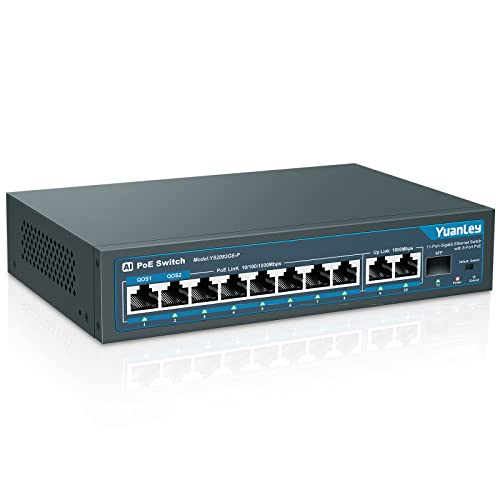
YuanLey 8-Port Gigabit PoE+ Switch with SFP
Best for: setups needing Gigabit PoE and fiber uplink
- Uplink Port Type
- SFP, Gigabit Uplink (what this guide is about)
- Port Count
- 11
- Port Speed
- 1000Mbps
- Management Type
- Unmanaged
- PoE Support
- 802.3af/at
- PoE Power Budget
- 120W
The YuanLey 8-Port Gigabit PoE+ Switch gives you 11 total Gigabit connections: eight PoE+ ports, two copper Gigabit uplink ports, and one Gigabit SFP fiber slot. With a 120W internal power budget, it delivers up to 30W per port without an external power brick. This switch suits you if you need high-bandwidth Gigabit uplinks alongside fiber expansion for remote access points, IP cameras, or home lab hardware.
Pros
- Two Gigabit Ethernet uplink ports plus one Gigabit SFP port
- All eight PoE+ ports operate at full 1000Mbps Gigabit speed
- 120W total PoE budget with a built-in internal power supply
- Hardware AI watchdog and QoS priority on ports 1 and 2
Cons
- Incompatible with 24V passive PoE devices
- Unmanaged design lacks web-based configuration or SNMP management
Good fit if
- You need an SFP fiber uplink alongside dual copper Gigabit uplinks.
- You run high-bandwidth equipment requiring Gigabit speeds across all PoE ports.
- You want automated recovery for offline PoE hardware via AI watchdog.
Skip if
- You need 24V passive PoE power for specific network hardware.
- You require managed switch software features like L2 routing or manual VLAN setup.
Verdict: YuanLey 8-Port Gigabit PoE+ Switch with SFP delivers full Gigabit throughput across all eight PoE+ ports, backed by dual copper and SFP uplinks. It provides reliable, plug-and-play power delivery without requiring an external power brick.

Davuaz 24-Port 400W PoE+ Wall Mount Switch
Best for: High-power multi-camera PoE installations
- Uplink Port Type
- Gigabit Uplink (what this guide is about)
- Port Count
- 24
- Port Speed
- 100 Mbps
- Management Type
- Unmanaged
- PoE Support
- PoE+ (802.3af/at)
- PoE Power Budget
- 400W
The Davuaz 24-Port PoE+ Switch with Gigabit Uplink gives you 24 PoE+ ports paired with two dedicated 1000Mbps uplink ports. It delivers up to 400W of total PoE power under the IEEE 802.3af/at standard, supporting up to 30W per port. An integrated VLAN isolation mode confines downstream traffic to the uplink connections. This unmanaged switch suits you if you need high-power delivery across dozens of IP cameras or access points without software configuration.
Pros
- 400W total power budget with up to 30W per port
- Two dedicated 1000Mbps Gigabit uplink ports
- Port isolation VLAN mode separating ports 1 through 24
- Plug-and-play unmanaged design with auto-detection
Cons
- Downstream PoE ports operate at up to 100Mbps rather than Gigabit
- Unmanaged design with no web or software management interface
- Mounting options limited to desktop and wall mount
Good fit if
- You need up to 400W of total power for numerous PoE access points or cameras.
- You want hardware-based VLAN isolation between connected client ports.
- You prefer an unmanaged plug-and-play setup that requires no software configuration.
Skip if
- You require Gigabit speeds on all 24 downstream PoE ports.
- You need managed switch features such as custom QoS or SNMP monitoring.
- You require a rackmount-ready chassis.
Verdict: Davuaz 24-Port PoE+ Switch with Gigabit Uplink combines a high 400W power budget and dedicated Gigabit uplinks for large device deployments. It provides straightforward unmanaged PoE expansion when 100Mbps per client port meets your network requirements.

NICGIGA 10-Port PoE+ Switch with 2 Gigabit Uplinks
Best for: IP surveillance setups needing long-range PoE connections
- Uplink Port Type
- Gigabit Uplink (what this guide is about)
- Port Count
- 10
- Port Speed
- 100 Mbps
- Management Type
- Unmanaged
- PoE Support
- PoE+ (802.3af/at)
- PoE Power Budget
- 120 W
View on Amazon: NICGIGA 10-Port PoE+ Switch with 2 Gigabit Uplinks
The NICGIGA 10-Port Switch with 2 Gigabit Uplinks pairs eight 100Mbps PoE+ ports with two dedicated Gigabit uplinks. You get an internal power budget of 120W that provides up to 30W per port under 802.3af/at standards. An extend mode toggle allows 250-meter transmissions at 10Mbps alongside port isolation. It suits you if you need stable power and uplink capacity for IP cameras.
Pros
- Two dedicated Gigabit uplink ports
- 120W total PoE+ power budget with up to 30W per port
- Extend mode supports 250m range at 10Mbps with VLAN isolation
- 4KV lightning protection built into a metal housing
Cons
- Downstream PoE+ ports are limited to 10/100Mbps speeds
- Unmanaged architecture provides no software management interface
Good fit if
- You need dedicated Gigabit uplinks paired with 100Mbps PoE+ connections.
- You run surveillance cameras that require cable runs up to 250 meters.
- You want plug-and-play installation with a 120W overall power budget.
Skip if
- You need Gigabit data transfer rates on every PoE port.
- You require managed switch features like browser-based VLAN configuration.
Verdict: NICGIGA 10-Port Switch with 2 Gigabit Uplinks delivers a 120W PoE+ budget and extended transmission range for unmanaged camera setups. Its dual Gigabit ports preserve network throughput back to your router or recorder.

Ztyuav 26-Port 400W Fast Ethernet PoE Switch
Best for: high-density IP camera and surveillance setups
- Uplink Port Type
- Gigabit Uplink (what this guide is about)
- Port Count
- 26
- Port Speed
- 10/100Mbps
- Management Type
- Unmanaged
- PoE Support
- PoE+
- PoE Power Budget
- 400W
View on Amazon: Ztyuav 26-Port 400W Fast Ethernet PoE Switch
This unmanaged 26-port switch gives you 24 Fast Ethernet PoE+ ports backed by a substantial 400W power budget, alongside two dedicated Gigabit uplink ports for your router or core network. It features an AI watchdog to reboot unresponsive devices, built-in 6KV lightning protection, and an extend mode for runs up to 250 meters. It suits you if you need to power dozens of IP cameras or access points without bottlenecking local uplinks.
Pros
- 400W total PoE power budget across 24 PoE+ ports
- 2 dedicated Gigabit uplink ports prevent network bottlenecks
- Extend mode supports transmissions up to 250 meters at 10Mbps
- AI Watchdog automatically detects disconnected devices and cycles power
Cons
- Downstream PoE ports are limited to 10/100Mbps Fast Ethernet speeds
- Unmanaged design provides no web interface or remote software configuration
- Built-in cooling fan produces active operational noise
Good fit if
- You need to power up to 24 PoE devices with a high 400W total capacity.
- You want Gigabit uplinks to route surveillance feeds into a central network.
- You run cabling up to 250 meters for remote security cameras.
Skip if
- You need Gigabit transmission speeds on every downstream port.
- You require managed switch features like port mirroring or VLAN configuration interfaces.
- You need a fanless unit for silent desktop deployment.
Verdict: Ztyuav 26-Port PoE Switch with Gigabit Uplink delivers an expansive 400W power pool and 24 PoE+ connections paired with dual high-speed uplinks. It provides a simple, plug-and-play hardware solution for multi-camera deployments that do not require Gigabit downstream bandwidth.
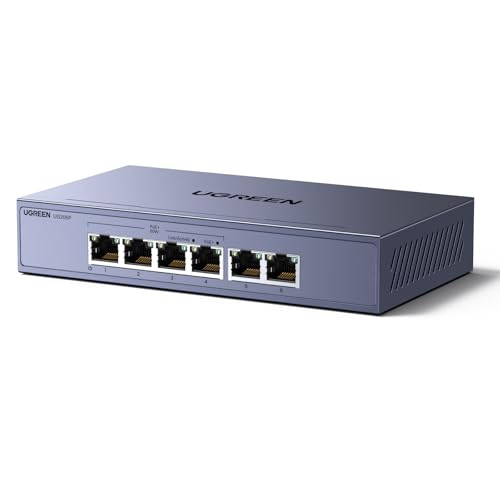
UGREEN 6-Port Gigabit PoE Switch
Best for: small setups needing dual Gigabit uplinks
- Uplink Port Type
- Gigabit Uplink (what this guide is about)
- Port Count
- 6
- Port Speed
- 1000Mbps
- Management Type
- Unmanaged
- PoE Support
- PoE+ (802.3at/af)
- PoE Power Budget
- 60W
This unmanaged switch gives you four Gigabit PoE+ ports and two dedicated Gigabit uplink ports. You get a 60W total power budget with up to 30W per port, plus hardware toggle modes for port isolation and extended runs up to 820 feet. It suits you if you need compact, high-speed connectivity for a handful of IP cameras, access points, or desktop devices without overcomplicating your setup.
Pros
- Two Gigabit uplink ports alongside four Gigabit PoE+ ports
- Hardware switch for Standard, Port Isolation, and Extend modes
- Supports transmission up to 820 feet in Extend mode
- Priority-based port shutoff to prevent power overloads
Cons
- 60W total power budget limits simultaneous high-draw PoE+ devices
- Provides only four PoE ports for device connections
- Unmanaged switch without software-based network configuration
Good fit if
- You need dual Gigabit uplinks for a small four-device PoE setup.
- You run long-distance cable spans up to 820 feet using Extend mode.
- You want basic port isolation without configuring managed network settings.
Skip if
- You require more than 60W of total PoE power across your gear.
- You need more than four powered Ethernet connections.
- You require full web-managed switch controls or advanced software features.
Verdict: UGREEN 6-Port Gigabit PoE Switch delivers compact Gigabit performance with dual uplinks and simple toggle modes for small setups. It provides an efficient solution when you only need to power up to four devices within a 60W envelope.

SICSOLINK 24-Port 400W PoE+ Switch
Best for: Large surveillance setups needing high PoE power
- Uplink Port Type
- Gigabit Uplink (what this guide is about)
- Port Count
- 26
- Port Speed
- 10/100Mbps
- Management Type
- Unmanaged
- PoE Support
- PoE+
- PoE Power Budget
- 400W
This rackmount unmanaged switch provides 24 Fast Ethernet PoE+ ports alongside two Gigabit uplink ports. With a 400W total PoE budget and up to 30W per port, you can power high-draw hardware like PTZ cameras and access points across a single chassis. It includes one-key VLAN isolation and an extend mode reaching up to 250 meters, making it practical if you manage extensive surveillance setups.
Pros
- 400W total PoE budget with up to 30W per port
- Two dedicated Gigabit uplink ports
- Fanless 1U rackmount metal casing
- Hardware VLAN isolation and 250m extend mode
Cons
- PoE downstream ports are limited to 10/100Mbps Fast Ethernet speeds
- Unmanaged design lacks software configuration options
Good fit if
- You need to power up to 24 PoE devices under a high 400W total budget.
- You want dedicated Gigabit uplinks to connect your cameras to an NVR or core network.
- You need long cable runs up to 250 meters using extend mode.
Skip if
- You require Gigabit speeds on all 24 local PoE ports.
- You need a managed switch with software controls and traffic monitoring.
Verdict: SICSOLINK 24-Port 400W PoE+ Switch provides a high 400W power budget and dual Gigabit uplinks for large surveillance deployments. It offers quiet, fanless operation without requiring network configuration.

Hohtouying 8-Port Gigabit PoE Switch
Best for: silent IP camera setups with Gigabit uplinks
- Uplink Port Type
- Gigabit Uplink (what this guide is about)
- Port Count
- 10
- Port Speed
- 1000 Mbps
- Management Type
- Unmanaged
- PoE Support
- PoE+ (802.3af/at)
- PoE Power Budget
- 120W
This unmanaged switch gives you eight Gigabit PoE+ ports and two Gigabit uplink ports backed by a built-in 120W power supply. It delivers up to 30W per port for standard 48V hardware like IP cameras and access points. A hardware switch lets you toggle VLAN isolation or CCTV mode for extended runs up to 820 feet. Its fanless design ensures silent operation for your connected network gear.
Pros
- Two dedicated Gigabit uplink ports for NVR or router connections
- Eight Gigabit PoE+ ports with a 120W internal power budget
- Fanless design for completely silent operation
- CCTV mode supports cable runs up to 820 feet
Cons
- Unmanaged architecture provides no software configuration options
- Incompatible with 24V passive PoE devices without an external splitter
Good fit if
- You need eight Gigabit PoE+ ports alongside two dedicated Gigabit uplinks.
- You want silent, fanless operation without an external power brick.
- You require hardware modes for VLAN isolation or extended wiring runs.
Skip if
- You require a managed switch with browser-based network controls.
- You need native support for 24V passive PoE hardware.
Verdict: Hohtouying 8-Port Gigabit PoE Switch provides a straightforward unmanaged solution with dual Gigabit uplinks and 120W of total PoE power. It delivers silent performance and extended range options suited for IP camera setups.

Reidubo 10-Port Gigabit Managed PoE+ Switch
Best for: managed setups needing PoE scheduling and Gigabit uplinks
- Uplink Port Type
- Gigabit Uplink (what this guide is about)
- Port Count
- 10
- Port Speed
- Gigabit
- Management Type
- Managed
- PoE Support
- PoE+ (IEEE 802.3af/at)
- PoE Power Budget
- 120W
The Reidubo 10-Port Managed Gigabit PoE Switch provides eight Gigabit PoE+ ports backed by a 120W total power budget, alongside two dedicated Gigabit uplink ports. You get cloud and local web management features, including 802.1Q VLAN segmentation, QoS traffic prioritization, and a PoE power scheduler. This setup suits you if you run powered access points or cameras and require remote traffic control alongside dedicated Gigabit backhaul channels.
Pros
- Two dedicated Gigabit uplink ports for network expansion
- 120W total PoE budget with up to 30W per port
- Full Gigabit speeds across all eight PoE+ ports
- Cloud and web management with 802.1Q VLAN and QoS
- PoE scheduling to automate connected device power cycles
Cons
- 120W total budget averages 15W per port if all eight PoE ports are loaded simultaneously
- Does not deliver power to passive PoE hardware
Good fit if
- You need cloud or web-based management for port isolation and traffic control.
- You want to automate connected device runtimes using a PoE scheduler.
- You require two Gigabit uplink ports alongside eight Gigabit PoE+ ports.
Skip if
- You need more than 120W of total PoE power across your connected devices.
- You use passive 24V PoE hardware that requires passive power delivery.
Verdict: Reidubo 10-Port Managed Gigabit PoE+ Switch pairs eight Gigabit PoE+ ports and dual Gigabit uplinks with web and cloud control features. It delivers precise port-level power scheduling and traffic isolation for managed networks.
Specifications side by side
| Spec | BV 8-Port Gigabit PoE+ Switch | Real HD 16-Port Fast Ethernet PoE+ Switch | Tenda 5-Port Gigabit PoE+ Switch | YuanLey 10-Port Fast Ethernet PoE+ Switch | STEAMEMO 16-Port 240W Managed PoE+ Switch | YuanLey 8-Port Gigabit PoE+ Switch with SFP | Davuaz 24-Port 400W PoE+ Wall Mount Switch | NICGIGA 10-Port PoE+ Switch with 2 Gigabit Uplinks | Ztyuav 26-Port 400W Fast Ethernet PoE Switch | UGREEN 6-Port Gigabit PoE Switch | SICSOLINK 24-Port 400W PoE+ Switch | Hohtouying 8-Port Gigabit PoE Switch | Reidubo 10-Port Gigabit Managed PoE+ Switch |
|---|---|---|---|---|---|---|---|---|---|---|---|---|---|
| Port Count | 10 | 16 | 5 | 10 | 16 | 11 | 24 | 10 | 26 | 6 | 26 | 10 | 10 |
| Port Speed | 10/100/1000 Mbps | 10/100 Mbps | Gigabit | 10/100 Mbps | 100 Mbps | 1000Mbps | 100 Mbps | 100 Mbps | 10/100Mbps | 1000Mbps | 10/100Mbps | 1000 Mbps | Gigabit |
| Management Type | Unmanaged | Unmanaged | Unmanaged | Unmanaged | Managed | Unmanaged | Unmanaged | Unmanaged | Unmanaged | Unmanaged | Unmanaged | Unmanaged | Managed |
| PoE Support | PoE+ | PoE+ (802.3af/at) | PoE+ (IEEE 802.3af/at) | PoE+ (802.3af/at) | PoE+ (802.3at) | 802.3af/at | PoE+ (802.3af/at) | PoE+ (802.3af/at) | PoE+ | PoE+ (802.3at/af) | PoE+ | PoE+ (802.3af/at) | PoE+ (IEEE 802.3af/at) |
| PoE Power Budget | 120W | 300W | 63W | 120W | 240W | 120W | 400W | 120 W | 400W | 60W | 400W | 120W | 120W |
| Uplink Ports | 2 x Gigabit | 2 Gigabit Uplink Ethernet Ports | 1 x Gigabit | 2 x Gigabit | 2 x Gigabit Uplink, 1 x 1.25G SFP | 2 Gigabit uplink, 1 SFP | 2 x 1 Gbps | not specified | 2 Gigabit UpLink Ports | 2 x Gigabit | 2 Gigabit | 2 x Gigabit | 2 x Gigabit |
| Mounting Type | not specified | Rack Mount, desktop or a wall | Desktop, Wall-Mount | not specified | Wall Mount, Rack Mount | not specified | Desktop, Wall Mount | Desktop, Rackmount | Desktop, Wall-Mount, Rackmount | not specified | Rackmount | not specified | not specified |
| Number of Ports | 8 Ports | 16 Ports | 5 Ports | 10 Ports | 16 Ports | 8 Ports | 24 Ports | 10 Ports | not specified | not specified | 24 Ports | 8 Ports | 10 Ports |
| Uplink Port Type | Gigabit Uplink | Gigabit Uplink | Gigabit Uplink | Gigabit Uplink | SFP, Gigabit Uplink | SFP, Gigabit Uplink | Gigabit Uplink | Gigabit Uplink | Gigabit Uplink | Gigabit Uplink | Gigabit Uplink | Gigabit Uplink | Gigabit Uplink |
| Recommended Use | not specified | not specified | not specified | not specified | not specified | not specified | not specified | not specified | not specified | not specified | not specified | IP Cameras | not specified |
| Dimensions | 11.3 × 1.75 × 7 inches | not specified | 3.94 × 3.94 × 1.02 inches | 7.9 × 4.7 × 1.7 inches | 10.6 × 7 × 1.8 inches | 7.9 × 4.7 × 1.7 inches | not specified | not specified | 10.6 × 7.13 × 1.73 inches | not specified | 10.6 × 7.12 × 1.73 inches | 7.87 × 4.72 × 1.57 inches | not specified |
| Weight | not specified | 4.3 pounds | not specified | 2.12 pounds | 3.88 pounds | 2.13 pounds | not specified | not specified | 3.53 pounds | not specified | 1.6 pounds | not specified | not specified |
| Color | Black | Black | White | Blue | black | Blue | silver | Black | Black | Gray | Black | black- Gigabit | Black4 |
| Model | POE-SW802G | 16 port poe switch | TEG1105P | 10 Port | 8*PoE+ (120w) | 19 Ports|240W 16xPoE+ | 11 Port | 8*PoE+ (1000Mbps) (120w) | DA-F2420GBL-A | 10 Port | 8x PoE+ 120W + 2x UPLink | 26 Ports|24 PoE+Gigabit Uplink 400W | 35371US | 26 Ports | 24*PoE+2*Uplink (400 W) | 10 Gigabit Ports|120W 8xPoE+ | 8 Port Gigabit Managed PoE Switch |
| Size | not specified | not specified | 5 Port w/4 PoE+ Port | 10 Port | 8*PoE+ (120w) | 19 Ports | 240 W 16 x PoE+ | 11 Port | 8*PoE+(1000Mbps) (120w) | 24 PoE(400W, 100bps) + 2x1G Uplink | not specified | A-24 PoE(100Mbps) 400W+2x1G Uplink | not specified | Standard | not specified | not specified |
If you need power automation instead of wired networking, you can compare published specifications for the best shelly smart switches.
How to Choose a Gigabit Uplink Switch
-
Calculate Total PoE Wattage
Review the total power consumption of your planned devices before selecting a switch. Switches provide varying PoE budgets, ranging from 60W on compact units to 400W on larger models like the Davuaz 24-Port switch. Sum the maximum wattage requirements of all your connected access points or security cameras. If your devices draw more power than the switch budget allows, hardware may shut down unexpectedly. Choose a switch with a wattage rating that comfortably exceeds your combined device requirements.
-
Match Physical Port Counts
Select a port density that accommodates your current hardware and immediate expansion plans. The switches in this guide range from compact 5-port options up to 26-port units. If you only need to connect a router and three endpoints, a small unit like the Tenda 5-Port switch avoids excess clutter. For extensive multi-room setups, high-density switches keep all connections grouped on a single unit. Always reserve at least one port for your uplink connection to the primary router or modem.
-
Determine Management Requirements
Decide whether you require software control over your local network traffic. Unmanaged switches offer plug-and-play simplicity, making them ideal if you want devices to communicate immediately without configuration. Conversely, managed models like the Reidubo 10-Port switch provide web-based interfaces for advanced tasks. These tasks include traffic isolation, port status monitoring, and PoE power scheduling for connected hardware. If you do not plan to configure virtual local area networks or monitor individual ports, an unmanaged switch simplifies your installation.
-
Evaluate SFP Fiber Uplinks
Check whether your network infrastructure requires fiber-optic connectivity between switches or across long distances. Most switches use standard copper RJ45 ports for their Gigabit uplinks, which connect directly via Ethernet cabling. However, switches like the YuanLey 8-Port Gigabit PoE+ Switch with SFP include dedicated optical slots. SFP ports allow you to insert fiber transceivers to link separate buildings or remote network racks without signal degradation. Choose an SFP-equipped switch if your backbone connection exceeds the standard distance limits of copper cabling.
-
Verify Mounting and Placement
Consider where you intend to install your switch before purchasing. High-capacity models frequently include mounting hardware designed for standardized server enclosures. For example, the SICSOLINK 24-Port switch lists rackmount capability, making it well suited for structured wiring closets. Compact desktop switches rest directly on flat surfaces, while other models specify wall-mounting slots to save shelf space. Check the physical dimensions and mounting specifications of the switch to ensure it fits securely in your designated workspace or equipment enclosure.
Frequently asked questions
What is a gigabit uplink port on a network switch?
A gigabit uplink port connects your switch to an upstream device, such as your main router, core gateway, or another switch, at 1000 Mbps speeds. Having a dedicated uplink ensures that all traffic aggregated from your connected local equipment moves to your broader network without consuming your client-facing ports. This setup preserves your primary connections for endpoints like wireless access points and network cameras.
Can you use a standard Ethernet port as an uplink?
Yes, you can use any standard Ethernet port as an uplink connection because modern network switches support auto-MDI/MDIX cable detection. However, dedicated uplink ports offer a distinct advantage. On units like the Tenda 5-Port or UGREEN 6-Port switches, dedicated uplinks free up your PoE-enabled ports, allowing you to use every powered port exclusively for client hardware like access points, surveillance cameras, and desktop hardware.
Why do some switches pair Fast Ethernet ports with Gigabit uplinks?
Manufacturers use this configuration to balance hardware requirements for surveillance equipment while keeping total system throughput smooth. Individual devices like IP cameras rarely exceed 100 Mbps data rates, making Fast Ethernet client ports practical. Models such as the Real HD 16-Port and Davuaz 24-Port switches combine these ports with dual Gigabit uplinks so the combined video streams can reach your router or NVR without bottlenecking.
What is the difference between an SFP uplink and a copper Gigabit uplink?
A copper Gigabit uplink uses standard RJ45 cabling to connect devices over shorter runs, whereas an SFP port accepts fiber-optic modules. Hardware like the YuanLey 8-Port and STEAMEMO 16-Port switches feature SFP uplinks alongside copper ports. This gives you the flexibility to run fiber connections over long distances between separate buildings or server closets without suffering from electromagnetic signal interference.
Do you need a managed switch or an unmanaged switch with Gigabit uplinks?
You only need an unmanaged switch if you want a plug-and-play setup that directs network traffic automatically without extra configuration. If you require advanced control over your network, choose a managed switch. Models like the Reidubo 10-Port and STEAMEMO 16-Port offer managed interfaces, enabling you to set up VLAN isolation, monitor port traffic, and schedule PoE power delivery for your connected devices.
How can you use dual Gigabit uplink ports on a single switch?
You can use dual Gigabit uplink ports to route your data concurrently to two separate network destinations. For example, you can connect one uplink directly to your internet router and the second to a dedicated network video recorder or network attached storage unit. Switches such as the NICGIGA 10-Port provide two Gigabit uplinks to handle local recording traffic while maintaining an uninterrupted link to your router.
Can a Gigabit uplink switch power access points and cameras simultaneously?
Yes, as long as your switch provides PoE support and the combined wattage of your access points and cameras fits within the total power budget. For example, the BV 8-Port Gigabit PoE+ switch supplies 120W of total PoE capacity across its client ports, allowing you to power cameras and access points together while its Gigabit uplinks pass data upstream at 1000 Mbps speeds.