Best Wifi Routers with Dual WAN in 2026: 8 Picks Ranked by Specs
As an Amazon Associate we earn from qualifying purchases. Links on this page are affiliate links.
Dual WAN connectivity keeps your internet online by balancing two internet lines or switching to a backup connection. Finding the best wifi routers with Dual WAN requires matching hardware specifications like port speeds and wireless standards to your setup.
We compared 8 products based strictly on the specifications published on the listings. The ASUS Dual-Band WiFi 7 Dual-WAN Router leads our ranking because it integrates the Wi-Fi 7 standard with a 2.5G port and Dual WAN support. This guide helps you determine which model fits your needs for port speeds, VPN tunneling, and failover redundancy.
Quick picks
The best fit for you
- You need built-in Wi-Fi 7 and dual WAN failover ASUS Dual-Band WiFi 7 Dual-WAN Router It provides Wi-Fi 7 speeds, a 2.5G port, and dual WAN redundancy in a single dual-band router.
- You need multi-gigabit speeds for demanding wired connections NETGEAR Multi-Gigabit Dual WAN Router It features 10G and Gigabit port speeds alongside dual WAN redundancy for external access point setups.
- You need integrated cellular backup with dual WAN routing PUSR Industrial Dual-SIM LTE Dual-WAN Router It features LTE Cat4 cellular capability with dual-SIM support alongside dual wired WAN routing.
- You have sub-100 Mbps internet connections and wired hardware Cisco Dual-WAN 4-Port VPN Router It provides four Fast Ethernet ports and dual WAN routing for low-bandwidth wired networks.
Our 8 picks

ASUS Dual-Band WiFi 7 Dual-WAN Router
Best for: homes needing Wi-Fi 7 and cellular backup
- Features
- VPN, Parental Controls, Dual WAN (what this guide is about)
- Wi-Fi Standard
- Wi-Fi 7
- Frequency Bands
- Dual-Band
- Max Port Speed
- 2.5 Gbps
- Dimensions
- 7.6 × 2.3 × 9.37 inches
- Weight
- 1.01 pounds
You get a dual-band Wi-Fi 7 router with integrated dual WAN support, a 2.5G port, and wireless speeds up to 3600 Mbps. It features AI WAN detection and a USB port configured for 4G or 5G mobile tethering backup. You can create up to three dedicated SSIDs for IoT devices and parental controls. This setup suits you if you need reliable backup internet alongside modern multi-link Wi-Fi connectivity.
Pros
- Wi-Fi 7 wireless speeds up to 3600 Mbps with 4096-QAM
- Dual WAN support with AI detection and USB 4G/5G tethering
- Equipped with a 2.5G port
- Multi-link operation (MLO) for concurrent band connections
Cons
- Dual-band design lacks a dedicated 6 GHz frequency band
- Wireless throughput caps at 3.6 Gbps unlike higher-tier variants
Good fit if
- You want automated failover using a USB cellular modem or dual wired WAN.
- You need integrated Wi-Fi 7 with Multi-link operation on a 2.5G connection.
- You manage isolated networks for IoT hardware using up to three SSIDs.
Skip if
- You need a tri-band router with access to 6 GHz channels.
- You require wireless bandwidth beyond the 3.6 Gbps dual-band limit.
Verdict: ASUS Dual-Band WiFi 7 Dual-WAN Router delivers modern wireless speeds alongside flexible backup internet options using a 2.5G port and USB mobile tethering. It provides full dual WAN redundancy without requiring standalone access points.
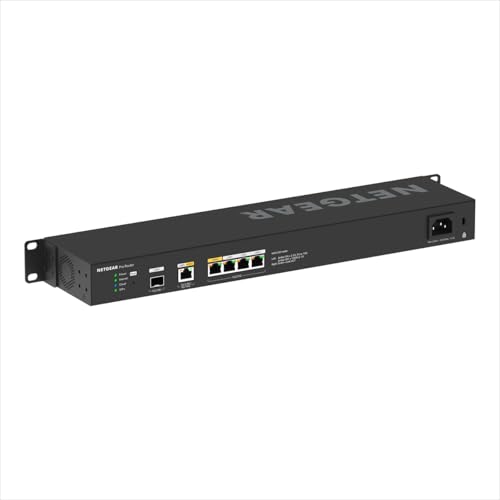
NETGEAR Multi-Gigabit Dual WAN Router
Best for: multi-gigabit wired networks needing dual-WAN redundancy
- Features
- Dual WAN (what this guide is about)
- Device Capacity
- 100 devices
- Max Port Speed
- 10 Gbps
This wired dual-WAN router provides multi-gigabit routing for high-bandwidth connections. You get a dedicated 2.5G WAN port alongside a configurable 10G LAN/WAN port, supporting automated failover and traffic load balancing. The hardware also includes three 2.5G LAN ports and a 10G SFP+ port for fiber backhaul. It handles up to 100 client devices and 30 simultaneous VPN tunnels, making it suitable if you need multi-gigabit failover across wired networks.
Pros
- Configurable 10G LAN/WAN port plus a dedicated 2.5G WAN port for dual-WAN failover and load balancing
- Dedicated 10G SFP+ port for long-distance high-speed backhaul
- Supports up to 30 VPN tunnels across WireGuard, OpenVPN, and IPSec protocols
- Hardware support for segmenting network traffic across up to 32 VLANs
Cons
- Lacks integrated Wi-Fi radios and requires separate access points for wireless devices
- Capacity capped at 100 connected client devices
- Bundled cloud management subscription is limited to one year
Good fit if
- You have multi-gigabit internet connections requiring 2.5G or 10G dual-WAN routing.
- You need hardware support for up to 30 simultaneous VPN tunnels.
- You already manage or plan to deploy separate wireless access points.
Skip if
- You want an all-in-one desktop router with built-in Wi-Fi antennas.
- You need to connect more than 100 client devices to a single gateway.
Verdict: NETGEAR 10G Multi-Gig Dual WAN Router delivers high-throughput failover and load balancing using 10G and 2.5G ports for demanding wired setups. It provides robust VPN protocol options and multi-gigabit switching for networks relying on external access points.

D-Link Gigabit Dual WAN VPN Router
Best for: wired Gigabit failover and remote VPN tunnels
- Features
- VPN, Dual WAN (what this guide is about)
- Max Port Speed
- 1 Gbps
- Number of Ports
- 4 Ports
- Dimensions
- 7.5 × 4.75 × 1.5 inches
- Weight
- 2 pounds
This wired Gigabit VPN router provides redundant internet connectivity and secure remote access for your office. It features one dedicated Gigabit WAN port, one configurable Gigabit LAN/WAN port, and three Gigabit LAN ports. With 950 Mbps firewall throughput, load balancing, and support for up to 75 VPN tunnels, it suits you if you need automatic connection failover and hardware-based encryption without complex network hardware.
Pros
- Dual WAN support with automatic failover and load balancing
- 950 Mbps firewall throughput with up to 50,000 concurrent sessions
- Supports up to 75 VPN tunnels across OpenVPN, IPsec, PPTP, and L2TP
- Configurable Gigabit LAN/WAN port alongside dedicated Gigabit WAN
Cons
- No integrated Wi-Fi connectivity
- Maximum Ethernet port speed capped at 1 Gbps
Good fit if
- You need a wired router with dual WAN failover to maintain continuous uptime.
- You require hardware-level VPN support for up to 75 tunnels across standard protocols.
- You want NDAA and TAA compliance for regulated business deployments.
Skip if
- You require built-in Wi-Fi rather than separate access points.
- You have an internet plan faster than 1 Gbps.
Verdict: D-Link Gigabit Dual WAN VPN Router delivers reliable wired dual WAN failover and 950 Mbps firewall throughput for offices needing continuous connectivity. It handles essential VPN tunneling and load balancing across standard Gigabit connections.

Cisco Dual-WAN 4-Port VPN Router
Best for: sub-100 Mbps dual WAN wired offices
- Features
- VPN, Dual WAN (what this guide is about)
- Max Port Speed
- 100 Mbps
- Ethernet Ports
- 4
- Number of Ports
- 4 Ports
- Dimensions
- 8 × 6 × 3 inches
- Weight
- 2 pounds
This Cisco router provides dual WAN connectivity alongside four 10/100 Fast Ethernet LAN ports and built-in VPN support. You can connect two separate internet lines to manage network uptime across small office setups. Because port speeds top out at 100 Mbps, this unit handles sub-100 Mbps broadband connections rather than gigabit tiers. If you need simple wired failover for basic office hardware, this compact router serves your space.
Pros
- Dual WAN ports for two separate internet connections
- Four 10/100 Fast Ethernet LAN ports
- Hardware VPN network support for remote access
- Compact chassis measuring 8 by 6 by 3 inches
Cons
- Maximum port speed capped at 100 Mbps
- No integrated Wi-Fi capabilities
- Supplied as a renewed hardware unit
Good fit if
- You use broadband connections running at or below 100 Mbps.
- You need dual WAN redundancy with wired VPN support.
- You require four wired 10/100 Ethernet client ports.
Skip if
- You subscribe to gigabit or multi-gigabit internet plans.
- You need built-in wireless access for Wi-Fi devices.
- You require factory-new hardware instead of renewed equipment.
Verdict: Cisco Dual WAN Fast Ethernet VPN Router delivers dual-line management and VPN support for internet connections up to 100 Mbps. It serves small offices that rely strictly on low-bandwidth wired hardware.

TP-Link Dual WAN Gigabit VPN Router
Best for: wired dual-WAN balancing and VPN tunneling
- Features
- VPN, Dual WAN (what this guide is about)
- Max Port Speed
- Gigabit
- Weight
- 1.46 pounds
The TP-Link Gigabit Dual WAN VPN Router provides wired networking with dual WAN ports designed for load balancing. You get Gigabit port speeds across your connections, along with hardware-level security like an SPI firewall, DoS defense, and IPsec, PPTP, and L2TP VPN support. It suits you if you need reliable dual-internet failover and centralized Omada cloud management for a small office or home workspace, paired with separate wireless access points.
Pros
- Dual WAN ports with integrated load balancing
- Gigabit maximum port speed
- Hardware security with SPI firewall and DoS defense
- Support for IPsec, PPTP, and L2TP VPN protocols
- Centralized setup via Omada app and cloud monitoring
Cons
- No integrated Wi-Fi connectivity listed
- Port speeds capped at standard Gigabit rather than multi-Gigabit
Good fit if
- You want load balancing across two distinct broadband connections.
- You need integrated IPsec, PPTP, or L2TP VPN protocols for secure remote access.
- You manage network hardware using the Omada app or cloud interface.
Skip if
- You need integrated Wi-Fi broadcasting directly from the router.
- You require multi-Gigabit wired ports exceeding 1 Gbps.
Verdict: TP-Link Gigabit Dual WAN VPN Router delivers dedicated dual-WAN load balancing and broad VPN protocol support for wired network setups. It is an effective core gateway when you plan to deploy dedicated wireless access points.
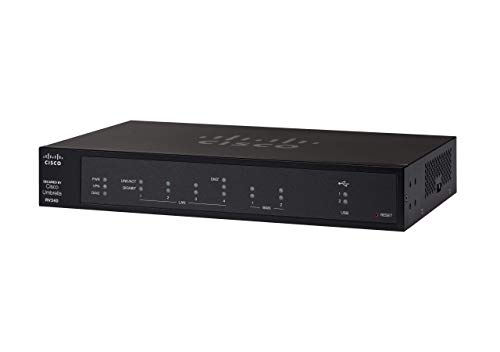
Cisco 4-Port Dual WAN VPN Router
Best for: small offices needing dual WAN and AnyConnect VPN
- Features
- VPN, Dual WAN (what this guide is about)
- Max Port Speed
- Gigabit
- Number of Ports
- 4 Ports
- Dimensions
- 6.75 × 11 × 1.75 inches
- Weight
- 2.6 pounds
This Cisco router provides dual Gigabit WAN Ethernet connectivity for network failover and load balancing. You get an integrated four-port Gigabit Ethernet switch for wired clients and 1024 MB of memory storage capacity. It includes hardware-based VPN functionality supporting IPsec, L2TP over IPsec, and Cisco AnyConnect Secure Mobility Client. It suits you if you need redundant wired internet connections paired with dedicated business-grade VPN tunneling.
Pros
- Dual Gigabit Ethernet WAN ports for failover and load balancing
- Four-port integrated Gigabit Ethernet switch
- Supports Cisco AnyConnect, IPsec, and L2TP over IPsec VPN protocols
- 1024 MB onboard memory storage capacity
Cons
- Ethernet ports peak at Gigabit speeds with no multi-gigabit support
- Four LAN ports restrict direct wired network expansions
Good fit if
- You need Dual WAN Ethernet for automated failover and traffic balancing.
- You require Cisco AnyConnect or IPsec protocols for remote device access.
- You deploy VLANs to isolate guest wireless network traffic.
Skip if
- You need WAN or LAN throughput exceeding 1 Gbps.
- You require more than four onboard LAN switch ports.
Verdict: Cisco Dual WAN Gigabit VPN Router delivers dependable internet redundancy and load balancing via dual WAN ports. It provides enterprise-ready remote access with integrated IPsec and Cisco AnyConnect support.

PUSR Industrial Dual-SIM LTE Dual-WAN Router
Best for: cellular failover with dual WAN connectivity
- Features
- VPN, Dual WAN (what this guide is about)
- Ethernet Ports
- 5
View on Amazon: PUSR Industrial Dual-SIM LTE Dual-WAN Router
The PUSR Industrial Dual-SIM LTE Dual-WAN Router gives you redundant wired and cellular connectivity. It features five Ethernet ports configured as one WAN, one flexible WAN/LAN, and three LAN ports. Dual SIM slots offer single-standby auto-switching on global LTE Cat4 networks when primary links fail. Supported VPN protocols include IPsec, OpenVPN, GRE, PPTP, and L2TP. This unit suits you if you need failover across dual broadband lines and mobile networks.
Pros
- Dual WAN support via dedicated WAN and switchable WAN/LAN Ethernet ports
- Dual SIM single-standby capability with automatic network switching
- Wide VPN protocol support including IPsec, OpenVPN, GRE, PPTP, and L2TP
- Five physical Ethernet ports for flexible LAN and WAN setup
Cons
- Cellular performance is limited to LTE Cat4 speeds
- Dual SIM operates in single standby rather than concurrent active mode
Good fit if
- You need automated cellular backup alongside dual wired WAN links.
- You require multiple VPN protocol options such as OpenVPN, IPsec, and GRE.
- You want automatic network switching between two distinct SIM cards.
Skip if
- You need mobile speeds beyond standard LTE Cat4 specifications.
- You require both SIM cards to transmit data at the same time.
Verdict: PUSR Industrial Dual-SIM LTE Dual-WAN Router pairs dual wired WAN routing with redundant LTE Cat4 cellular connectivity. It delivers secure multi-protocol VPN capabilities and automatic failover for high-uptime setups.

Linksys Business Dual WAN Gigabit VPN Router
Best for: wired dual-network setups needing site-to-site VPN
- Features
- VPN, Dual WAN (what this guide is about)
- Max Port Speed
- 1 Gbps
- Dimensions
- 7.52 × 5.12 × 1.57 inches
- Weight
- 1.58 pounds
View on Amazon: Linksys Business Dual WAN Gigabit VPN Router
This Linksys wired router provides Dual WAN connectivity with Gigabit Ethernet ports to balance two internet connections. You get a 900 Mbps firewall throughput and 110 Mbps IPsec throughput. It supports up to 50 IPsec tunnels alongside 5 OpenVPN tunnels for mobile clients. This unit suits you if you need reliable wired dual-line failover and site-to-site encryption for a small office or home business setup without integrated wireless.
Pros
- Dual WAN support with 1 Gbps Gigabit Ethernet ports
- 900 Mbps firewall throughput
- Up to 50 IPsec tunnels for site-to-site and client-to-site VPN
- 5 OpenVPN tunnels dedicated for mobile devices
Cons
- No integrated Wi-Fi connectivity
- IPsec throughput limited to 110 Mbps
- OpenVPN capacity restricted to 5 tunnels
Good fit if
- You need wired Dual WAN routing with Gigabit Ethernet speeds.
- You require site-to-site VPN connections supporting up to 50 IPsec tunnels.
Skip if
- You need built-in wireless networking on the router.
- You require IPsec VPN speeds higher than 110 Mbps.
Verdict: Linksys Business Dual WAN Gigabit VPN Router delivers dependable wired dual-connection routing with hardware firewall performance up to 900 Mbps. It provides practical site-to-site encryption capacity for wired small business networks.
Specifications side by side
| Spec | ASUS Dual-Band WiFi 7 Dual-WAN Router | NETGEAR Multi-Gigabit Dual WAN Router | D-Link Gigabit Dual WAN VPN Router | Cisco Dual-WAN 4-Port VPN Router | TP-Link Dual WAN Gigabit VPN Router | Cisco 4-Port Dual WAN VPN Router | PUSR Industrial Dual-SIM LTE Dual-WAN Router | Linksys Business Dual WAN Gigabit VPN Router |
|---|---|---|---|---|---|---|---|---|
| Wi-Fi Standard | Wi-Fi 7 | not specified | not specified | not specified | not specified | not specified | not specified | not specified |
| Frequency Bands | Dual-Band | not specified | not specified | not specified | not specified | not specified | not specified | not specified |
| Device Capacity | not specified | 100 devices | not specified | not specified | not specified | not specified | not specified | not specified |
| Max Port Speed | 2.5 Gbps | 10 Gbps | 1 Gbps | 100 Mbps | Gigabit | Gigabit | not specified | 1 Gbps |
| Ethernet Ports | not specified | not specified | not specified | 4 | not specified | not specified | 5 | not specified |
| Number of Ports | not specified | not specified | 4 Ports | 4 Ports | not specified | 4 Ports | not specified | not specified |
| Features | VPN, Parental Controls, Dual WAN | Dual WAN | VPN, Dual WAN | VPN, Dual WAN | VPN, Dual WAN | VPN, Dual WAN | VPN, Dual WAN | VPN, Dual WAN |
| Port Speed | Gigabit, 2.5G | Gigabit, 10G | Gigabit | Fast Ethernet | Gigabit | Gigabit | not specified | Gigabit |
| Dimensions | 7.6 × 2.3 × 9.37 inches | not specified | 7.5 × 4.75 × 1.5 inches | 8 × 6 × 3 inches | not specified | 6.75 × 11 × 1.75 inches | not specified | 7.52 × 5.12 × 1.57 inches |
| Weight | 1.01 pounds | not specified | 2 pounds | 2 pounds | 1.46 pounds | 2.6 pounds | not specified | 1.58 pounds |
| Size | Dual-Band | not specified | 4-Port Gigabit LAN, 1-Port Gigabit WAN + USB | One Size | not specified | not specified | not specified | 191 x 130 x 40 mm |
| Color | BLACK | not specified | Multicolor | grey and black | not specified | Black | not specified | Black/blue |
| Model | RT-BE58U | PR60X-100NAS | DSR-250V2 | RV042-cr | ER605-Cloth | RV340 | USR-G805s-G | LRT214-EU |
If you are also renovating your kitchen, the guide covering the best dual fuel cooktops details their specifications.
How to Choose a Dual WAN Router
-
Evaluate WAN Port Speeds
Port speed ratings determine the maximum bandwidth your router accepts from each internet provider. If your ISP plans deliver under 100 Mbps, Fast Ethernet ports handle the load. For modern broadband connections, Gigabit ports provide necessary headroom. For lines faster than 1 Gbps, verify multi-gigabit specifications. The NETGEAR Multi-Gigabit Dual WAN Router provides 10G and Gigabit port speeds to prevent connection throttling. Check your subscribed ISP download and upload speeds to match them against the router port specifications.
-
Check Available LAN Ports
Check the physical port count specification to determine how many devices you can wire directly. Dual WAN hardware dedicates at least two ports to incoming internet lines, leaving remaining jacks for local hardware. The Cisco 4-Port Dual WAN VPN Router provides 4 ports, letting you connect local servers, access points, or workstations directly. If you have several wired clients, verify the total port count so you know whether your installation requires an additional network switch immediately.
-
Review Built-In VPN Support
Review the features list for VPN specifications if you need encrypted remote access or branch-to-branch links. Dual WAN hardware often handles both load balancing across internet feeds and site-to-site encrypted connections. The Linksys Business Dual WAN Gigabit VPN Router provides integrated VPN capabilities with a 900 Mbps firewall rating. If your network needs remote worker access or secure data transfers between physical locations, verify supported VPN features before matching the unit to your dual internet connections.
-
Assess Cellular Backup Options
Examine how the router provides failover connectivity if one internet provider drops offline. Some units use secondary wired Ethernet lines, whereas others incorporate cellular data channels. The PUSR Industrial Dual-SIM LTE Dual-WAN Router features integrated dual-SIM LTE Cat4 connectivity alongside wired WAN options. If your secondary provider is a mobile cellular carrier, look for integrated SIM slots to ensure continuous internet availability without relying on external USB tethering adapters or third-party mobile hotspots.
-
Compare Firewall Throughput Ratings
Wired Gigabit ports do not always mean you receive 1,000 Mbps of real-world routing. Hardware firewall processing limits actual data rates when inspecting continuous traffic flows across dual connections. The D-Link Gigabit Dual WAN VPN Router specifies 950 Mbps firewall throughput, maintaining near-gigabit speeds during active filtering. Check the manufacturer firewall throughput rating against your combined WAN bandwidth to ensure the router processes full internet line speeds without creating a network bottleneck during peak usage.
-
Verify Dimensions and Footprint
Verify the physical dimensions and weight specifications to confirm the hardware fits your intended workspace. Networking equipment ranges from compact desktop boxes to wider commercial units. The Cisco Dual-WAN 4-Port VPN Router measures 6 inches wide, 3 inches high, and 8 inches long, weighing 2 pounds. Measure your shelf, media cabinet, or desk space before buying. Comparing dimension specifications ensures the router fits your layout comfortably and maintains adequate physical clearance for cables and airflow.
Frequently asked questions
Do all dual WAN routers include built-in Wi-Fi?
No, many dual WAN units function exclusively as wired gateways without wireless radios. Models like the TP-Link ER605-Cloth or NETGEAR PR60X-100NAS handle multi-line routing and require separate access points for wireless devices. In contrast, units like the ASUS RT-BE58U integrate Wi-Fi 7 directly into the chassis. If your deployment lacks dedicated wireless hardware, you must verify integrated wireless specifications before selecting a gateway.
What is the difference between dual WAN failover and load balancing?
Failover switches traffic to a secondary link only when the primary connection drops, whereas load balancing distributes traffic across both links simultaneously. Routers such as the D-Link DSR-250V2 and Linksys LRT214-EU support these modes to maintain uptime or maximize connection capacity. Load balancing shares ongoing sessions between two internet service providers, while automated failover preserves continuous connectivity during unexpected line outages without manual intervention.
Can you use a cellular connection for dual WAN redundancy?
Yes, cellular data can act as an alternate WAN connection alongside wired broadband. Devices like the PUSR USR-G805s-G feature integrated dual-SIM LTE Cat4 radios to establish automatic failover over mobile networks. Alternatively, routers like the ASUS RT-BE58U offer USB mobile tethering to turn a cellular phone or mobile modem into a backup line. This configuration maintains critical internet access when standard wired services fail.
Why do dual WAN routers include hardware VPN capabilities?
Integrated VPN capabilities allow a dual WAN router to create secure encrypted tunnels for remote workers or between branch offices. Hardware like the Cisco RV340 provides dedicated IPsec and AnyConnect support, while the D-Link DSR-250V2 provides continuous site-to-site connectivity. Because dual WAN units manage multiple gateways, onboard VPN services can route secure office traffic seamlessly across the active provider line if one connection disconnects.
When should you select a Fast Ethernet dual WAN router?
You should select a Fast Ethernet router only when your combined internet service tiers remain below 100 Mbps. Hardware like the Cisco RV042-cr utilizes 100 Mbps interfaces designed strictly for basic, low-bandwidth business connectivity. If your provider supplies faster bandwidth, Fast Ethernet ports cap incoming throughput below full line speed. For connections delivering higher speeds, selecting Gigabit or multi-gigabit hardware avoids physical interface bottlenecks.
What hardware specifications dictate dual WAN firewall throughput?
Internal processing components and port specifications govern total firewall throughput across your WAN interfaces. For instance, the D-Link DSR-250V2 specifies 950 Mbps firewall throughput, while the Linksys LRT214-EU is rated up to 900 Mbps. When configuring dual internet links, total network traffic cannot exceed the router's stated firewall capacity. Verifying these throughput ratings ensures your gateway handles concurrent traffic flows without dropping packets.