Best Network Switches Under $500 in 2026: 9 Picks Ranked by Specs
As an Amazon Associate we earn from qualifying purchases. Links on this page are affiliate links.
Finding the best network switches under $500 requires careful attention to port density, speed, and management features. This guide compares 9 options ranked by their published specifications to help you choose the right hardware for your network.
The TRENDnet 12-Port 10G Web Smart Switch leads because it offers dedicated 10G uplinks for high-speed server connections in a compact form factor. Each selection is based strictly on the technical data provided by manufacturers. Use these comparisons to decide which switch fits your bandwidth and port needs.
Quick picks
The best fit for you
- You need 10G uplinks and basic management TRENDnet 12-Port 10G Web Smart Switch It offers 10G port speed and web smart management in a compact rack-mount form factor.
- You want the most compact model on the list TRENDnet 12-Port 10G Web Smart Switch Its height is only 1.74 inches, making it the thinnest device in this group.
- You need PoE power for many devices YuanLey 48-Port Gigabit PoE+ Managed Switch It provides 48 PoE+ ports with L3 managed features for high-density power delivery.
- You require silent operation for high port counts NETGEAR 48-Port Smart Managed Fanless Switch It is a fanless 48-port switch that delivers quiet Gigabit connectivity.
- You need simple high-density 2.5G connectivity NICGIGA 48-Port 2.5G Unmanaged Switch It offers 48 ports of 2.5G speed without the complexity of managed settings.
Our 9 picks

TRENDnet 12-Port 10G Web Smart Switch
Best for: Small business 10G uplinks and server connections
- Port Count
- 12
- Port Speed
- 10G
- Management Type
- Web Smart
- Uplink Ports
- 4 x 10G SFP+
- Switching Capacity
- 240Gbps
- Mounting Type
- 1U 19" Rack mountable
This switch gives you eight 10GBASE-T ports and four 10G SFP+ uplinks for high-speed connections. It delivers 240Gbps of switching capacity to handle heavy traffic. You get web-based management for VLANs, QoS, and access control lists. The 1U rack-mountable design fits standard equipment racks. It supports IPv6 and various link aggregation protocols for flexible network integration.
Pros
- Eight 10GBASE-T copper ports for fast wired connections
- Four 10G SFP+ slots for high-speed uplinks
- 240Gbps switching capacity for low latency
- Web smart management with VLAN and QoS features
Cons
- Only 12 total ports limit expansion for large setups
- No PoE support for powering connected devices
- Web interface only lacks a dedicated mobile app
Good fit if
- You need fast 10G connections for NAS or servers
- You want to manage VLANs and QoS via a web browser
- You require rack-mountable hardware for a server room
Skip if
- You need to power devices like cameras or phones via Ethernet
- You require more than 12 ports for your network
- You prefer a fully managed CLI interface over web settings
Verdict: TRENDnet 12-Port 10G Web Smart Switch fits users who need high-speed 10G uplinks and basic managed features in a compact rack-mount form factor.

NETGEAR 26-Port PoE+ Smart Switch
Best for: Small networks needing PoE and fiber uplinks
- Port Count
- 26
- Port Speed
- 1.0Gbps
- Management Type
- Smart Managed
- PoE Support
- PoE+
- PoE Power Budget
- 380W
- Uplink Ports
- 2 x 1G SFP
This NETGEAR switch gives you 24 Gigabit Ethernet ports with PoE+ support and a 380W power budget. It includes two 1G SFP uplinks for fiber connections. The smart managed interface allows for secure setup and SNMP management via the NETGEAR Insight app. You get one year of remote management access. It mounts on desktops or in racks.
Pros
- 24 PoE+ ports with 380W total budget
- 2 x 1G SFP fiber uplink ports
- Smart managed with SNMP support
- Desktop or rack-mountable metal design
Cons
- Only 2 SFP uplink ports
- Smart managed, not fully managed
- Larger footprint than unmanaged options
Good fit if
- You need to power 24 devices via PoE+
- You want smart managed features for basic control
- You require SFP fiber uplinks
Skip if
- You need full layer 3 management
- You require more than 2 SFP ports
- You only need unmanaged plug-and-play switching
Verdict: NETGEAR 24-Port PoE Smart Switch suits users needing substantial PoE power and fiber uplinks without full management complexity. It is a solid choice for small to medium networks requiring remote monitoring.

YuanLey 48-Port Gigabit PoE+ Managed Switch
Best for: Businesses needing high PoE density and L3 control
- Port Count
- 54
- Port Speed
- 10/100/1000 Mbps
- Management Type
- L3 Managed
- PoE Support
- PoE+ (802.3at/af)
- PoE Power Budget
- 460W
- Uplink Ports
- 6 x 10G SFP+
This switch offers 48 Gigabit PoE+ ports and six 10G SFP+ uplinks. It delivers a 460W power budget for connected devices. The L3 management supports VLANs, QoS, and security features. You get fanless operation for quiet performance. This unit suits businesses needing high port density and advanced network control.
Pros
- 48 Gigabit PoE+ ports with 30W per port support
- Six 10G SFP+ slots for high-speed uplinks
- 460W total PoE power budget
- L3 managed features including VLAN and QoS
- Fanless design for silent operation
Cons
- Blue chassis may not match standard black rack equipment
- No mention of included rackmount ears or mounting hardware
- Only 460W budget limits total connected device count
Good fit if
- You need many PoE ports for cameras or access points
- You require 10G uplink capacity for backbone connections
- You want L3 management for VLANs and security
Skip if
- You need a PoE budget over 460W
- You require a standard black rackmount finish
- You prefer unmanaged switches for simplicity
Verdict: YuanLey 48-Port L3 Managed PoE+ Switch provides robust L3 features and ample 10G uplinks for growing business networks. It fits users who prioritize port density and advanced management over standard aesthetics.

TRENDnet 28-Port Managed SFP Switch
Best for: fiber-heavy SMB networks
- Port Count
- 28
- Management Type
- Layer 2 Managed
- Uplink Ports
- 4 x 10G SFP+
- Switching Capacity
- 128Gbps
- Port Speed
- Gigabit, 10G
- Dimensions
- 17.3 × 10.6 × 1.73 inches
This TRENDnet switch offers 24 Gigabit SFP ports and four 10G SFP+ uplinks. It provides 128Gbps switching capacity with Layer 2 management. You can configure it via web interface or CLI. Features include VLANs, QoS, and link aggregation. It suits users needing fiber connectivity and high-speed uplinks for SMB networks.
Pros
- 24 Gigabit SFP ports for fiber connections
- 4 dedicated 10G SFP+ uplink ports
- 128Gbps non-blocking switching capacity
- Layer 2 managed with VLAN and QoS support
- Lifetime Manufacturer Protection included
Cons
- Only Layer 2 management; no Layer 3 routing
- No RJ-45 Gigabit copper ports included
- Console port only; no included management software
Good fit if
- You need fiber connectivity for most devices
- You require 10G uplinks for server connections
- You want Layer 2 features like VLANs
Skip if
- You need Layer 3 routing capabilities
- You require built-in Gigabit copper ports
- You prefer plug-and-play unmanaged simplicity
Verdict: TRENDnet 28-Port Layer 2 SFP Switch is ideal for networks prioritizing fiber connectivity and 10G uplinks. It fits users who need Layer 2 management without the cost of Layer 3 routing.

NETGEAR 48-Port Smart Managed Fanless Switch
Best for: Silent, high-density Gigabit networking
- Port Count
- 48
- Port Speed
- 1.0 Gbps
- Management Type
- Smart Managed
- Uplink Ports
- 4 x 1G SFP
- Mounting Type
- Desktop, Rack-mount
- Number of Ports
- 48 Ports
View on Amazon: NETGEAR 48-Port Smart Managed Fanless Switch
This NETGEAR GS748T offers 48 Gigabit Ethernet ports and four 1G SFP uplinks for fiber expansion. It features a fanless, silent metal design that supports both desktop and rack mounting. The smart managed interface allows for secure setup and SNMP management via the NETGEAR Insight app. It is suitable for users who need reliable, energy-efficient connectivity without the noise of active cooling.
Pros
- 48 Gigabit Ethernet ports for high-speed connectivity
- Four 1G SFP ports for fiber optic expansion
- Fanless design ensures silent operation
- Supports desktop and rack-mount placement
Cons
- Only four SFP uplink ports available
- Smart managed features are less extensive than fully managed models
- No mention of Power over Ethernet (PoE) support
Good fit if
- You need a large number of Gigabit ports
- You require silent operation for office or home use
- You want basic smart management features
Skip if
- You need Power over Ethernet for devices
- You require 10G uplink speeds
- You need fully managed Layer 3 features
Verdict: NETGEAR 48-Port Gigabit Smart Switch provides a quiet, high-density solution for users who need basic smart management and fiber uplinks without the bulk of a fully managed enterprise switch.

TRENDnet 28-Port 2.5G Web Smart Switch
Best for: Dense multi-gigabit networks
- Port Count
- 28
- Port Speed
- 2.5 Gbps
- Management Type
- Web Smart
- Uplink Ports
- 4 x 10G SFP+
- Dimensions
- 17.3 × 10 × 1.73 inches
- Weight
- 7.51 pounds
This 28-port switch gives you 24 RJ-45 ports running at 2.5 Gbps and four 10G SFP+ uplinks. You get web-based management without complex software. The unit measures 10 by 17.3 inches and weighs 7.51 pounds. It supports cloud configuration via TRENDnet’s service. You should choose this if you need multi-gigabit speeds for most devices and high-speed uplinks for your core network.
Pros
- 24 ports support 2.5 Gbps speeds
- Four 10G SFP+ uplink ports
- Web smart management interface
- Lifetime manufacturer protection
Cons
- No PoE support on the 2.5G ports
- Cloud management may require an additional fee
- Web interface lacks advanced Layer 3 features
Good fit if
- You need high-speed connections for many devices
- You want simple web-based configuration
- You require 10G uplinks for backhaul
Skip if
- You need PoE to power devices
- You require full Layer 3 routing
- You prefer mobile app management
Verdict: TRENDnet 28-Port 2.5G Web Smart Switch fits users who need many 2.5G ports and 10G uplinks without the cost of PoE. It is a solid choice for dense home or small office networks.

TP-Link 48-Port Gigabit Fanless PoE Switch
Best for: Silent, high-port-count PoE networks
- Port Count
- 48
- Port Speed
- 1 Gbps
- Management Type
- Managed
- Number of Ports
- 48 Ports
- PoE Support
- PoE
- Dimensions
- 17.3 × 13 × 1.7 inches
The TP-Link SG2452LP is a 48-port Gigabit Ethernet switch designed for fully managed network environments. It supports PoE to power connected devices and features a fanless design for quiet operation. You get comprehensive security options like 802.1X and VLAN segmentation, plus centralized management via the Omada platform. This unit suits users needing robust port density and advanced control in a compact, silent chassis.
Pros
- 48 Gigabit Ethernet ports for high-density connections
- PoE support to power devices like cameras and APs
- Fanless design ensures quiet operation in offices or homes
- Fully managed with VLAN, QoS, and security features
Cons
- Only supports Gigabit speeds, lacking 2.5Gb or 10Gb uplinks
- No SFP+ fiber ports for high-speed backbone connections
- Heavy 14.6-pound build requires sturdy mounting
Good fit if
- You need a large number of ports for a business or dense home setup
- You require PoE to power connected devices without separate power supplies
- You want silent operation in a living space or office
Skip if
- You need 2.5Gb or 10Gb Ethernet speeds for future-proofing
- You require fiber connectivity for long-distance or high-bandwidth links
- You prefer a lightweight, plug-and-play unmanaged switch
Verdict: The TP-Link SG2452LP 48-Port Gigabit Managed Switch delivers dense, quiet PoE connectivity for users who need full control over a large network. It fits well in environments where silent operation and port count matter more than multi-gigabit speeds.
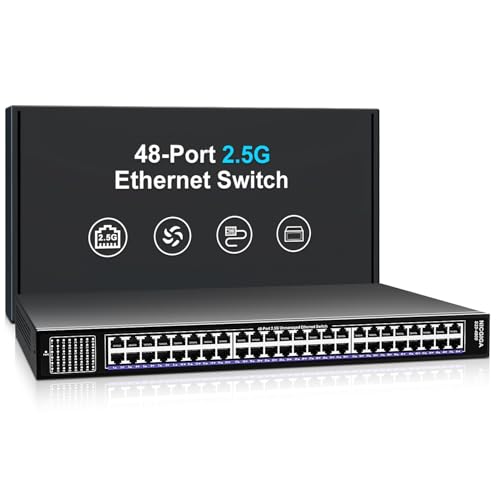
NICGIGA 48-Port 2.5G Unmanaged Switch
Best for: high-density 2.5G home networks
- Port Count
- 48
- Port Speed
- 2.5 Gbps
- Management Type
- Unmanaged
- Switching Capacity
- 240Gbps
- Mounting Type
- Rackmount, Desktop
- Number of Ports
- 48 Ports
This NICGIGA switch offers 48 ports of 2.5 Gbps Ethernet with a 240 Gbps switching capacity. It is an unmanaged unit designed for plug-and-play operation. The metal shell includes industrial cooling fans for heat dissipation. You get 4 KV lightning protection and 19-inch rack mounting options. It suits users needing high bandwidth for multiple 2.5G devices without configuration complexity.
Pros
- 48 ports with 2.5 Gbps speed
- 240 Gbps switching capacity
- Metal housing with cooling fans
- 4 KV lightning protection
Cons
- Unmanaged design lacks configuration options
- No SFP uplink ports listed
- 1-year warranty is standard
Good fit if
- You need many 2.5G ports
- You want plug-and-play setup
- You require rack mounting
Skip if
- You need managed features
- You need SFP ports
- You want longer warranty
Verdict: NICGIGA 48-Port 2.5G Unmanaged Switch fits users who need high port density for 2.5G devices without management software. It is a solid choice for simple, high-bandwidth deployments.

NETGEAR 48-Port Fanless Unmanaged Switch
Best for: Simple high-density Gigabit connectivity
- Port Count
- 48
- Port Speed
- 1.0Gbps
- Management Type
- Unmanaged
- Mounting Type
- Desktop, Rackmount
- Number of Ports
- 48 Ports
The NETGEAR GS748 provides 48 Gigabit Ethernet ports in a compact metal chassis. It is an unmanaged switch, meaning you get plug-and-play connectivity with no software or configuration required. The fanless design ensures silent operation, while IEEE 802.3az support reduces power consumption. It supports desktop or rack-mount placement. This unit is suitable for users who need high port density without the complexity of managed features.
Pros
- 48 Gigabit Ethernet ports for extensive device connectivity
- Fanless design for silent operation
- Supports desktop and rack-mount mounting
- IEEE 802.3az Energy Efficient Ethernet support
Cons
- Unmanaged interface lacks advanced configuration options
- No SFP uplink ports for fiber connectivity
- Limited to U.S. and Canada regional compatibility
Good fit if
- You need a simple, high-density Gigabit connection for many devices
- You prefer a silent, fanless operation in your workspace
- You want a straightforward plug-and-play setup without software
Skip if
- You require managed features like VLANs or QoS
- You need SFP ports for fiber optic connections
- You live outside the U.S. or Canada
Verdict: NETGEAR 48-Port Gigabit Unmanaged Switch is a practical solution for users who need maximum port density without managing network settings. It fits homes or small offices that prioritize simplicity and silent operation over advanced control.
Specifications side by side
| Spec | TRENDnet 12-Port 10G Web Smart Switch | NETGEAR 26-Port PoE+ Smart Switch | YuanLey 48-Port Gigabit PoE+ Managed Switch | TRENDnet 28-Port Managed SFP Switch | NETGEAR 48-Port Smart Managed Fanless Switch | TRENDnet 28-Port 2.5G Web Smart Switch | TP-Link 48-Port Gigabit Fanless PoE Switch | NICGIGA 48-Port 2.5G Unmanaged Switch | NETGEAR 48-Port Fanless Unmanaged Switch |
|---|---|---|---|---|---|---|---|---|---|
| Port Count | 12 | 26 | 54 | 28 | 48 | 28 | 48 | 48 | 48 |
| Port Speed | 10G | 1.0Gbps | 10/100/1000 Mbps | not specified | 1.0 Gbps | 2.5 Gbps | 1 Gbps | 2.5 Gbps | 1.0Gbps |
| Management Type | Web Smart | Smart Managed | L3 Managed | Layer 2 Managed | Smart Managed | Web Smart | Managed | Unmanaged | Unmanaged |
| PoE Support | not specified | PoE+ | PoE+ (802.3at/af) | not specified | not specified | not specified | not specified | not specified | not specified |
| PoE Power Budget | not specified | 380W | 460W | not specified | not specified | not specified | not specified | not specified | not specified |
| Uplink Ports | 4 x 10G SFP+ | 2 x 1G SFP | 6 x 10G SFP+ | 4 x 10G SFP+ | 4 x 1G SFP | 4 x 10G SFP+ | not specified | not specified | not specified |
| Switching Capacity | 240Gbps | not specified | 216 Gbps | 128Gbps | not specified | not specified | not specified | 240Gbps | not specified |
| Mounting Type | 1U 19" Rack mountable | Desktop, Rackmount | Rackmount | not specified | Desktop, Rack-mount | not specified | not specified | Rackmount, Desktop | Desktop, Rackmount |
| Number of Ports | not specified | 24 Ports | 48 Ports | not specified | 48 Ports | not specified | 48 Ports | 48 Ports | 48 Ports |
| Uplink Port Type | not specified | SFP | SFP | SFP | not specified | SFP | not specified | not specified | not specified |
| Dimensions | 12.8 × 9.06 × 1.74 inches | 20.7 × 13.8 × 4.09 inches | not specified | 17.3 × 10.6 × 1.73 inches | 20.5 × 14.3 × 4.25 inches | 17.3 × 10 × 1.73 inches | 17.3 × 13 × 1.7 inches | not specified | not specified |
| Weight | 4.31 pounds | 1.32 pounds | not specified | 8.42 pounds | 10 pounds | 7.51 pounds | 14.6 pounds | not specified | not specified |
| Size | 12-Port 10G | 24 Port, PoE+ @ 380W, 2 x 1G SFP | 54 Port PoE Switch(Managed) | not specified | 48 Port | not specified | 48 Port, 1 Gigabit | not specified | 48 Port, Rack Mount |
| Color | Black | grey | Blue | black | Gray | Black | Black | not specified | not specified |
| Model | TEG-7124WS | GS724TPP-300NAS | 54 Port | 48*PoE+ (1000Mbps) | TL2-F70284 | GS748T-600NAS | TEG-3284WS | SG2452LP | 48 Port | 48x 2.5G RJ45 | GS748-100NAS |
If you plan to connect dedicated local drives, compare ports against the best network attached storages under 500.
How to Choose the Right Switch
-
Check port speed needs
You must match the switch speed to your devices. The TRENDnet 12-Port 10G Web Smart Switch offers 10G ports for high-speed server connections. The NETGEAR 28-Port 2.5G Web Smart Switch provides 2.5G ports for dense home networks. If you only have Gigabit devices, a standard Gigabit switch is sufficient. Avoid paying for higher speeds you do not need. Check the attributes list for Port Speed to ensure compatibility with your current hardware.
-
Assess PoE requirements
Power over Ethernet allows you to power devices like cameras and access points through the cable. The NETGEAR 26-Port PoE+ Smart Switch includes PoE support with 380W of power budget. The TP-Link 48-Port Gigabit Fanless PoE Switch also offers dense PoE connectivity. If you do not need to power devices, you can save money on an unmanaged option. Check the PoE Support attribute to see if the switch delivers power to connected equipment.
-
Decide on management level
Management type determines how much control you have over network traffic. Unmanaged switches like the NICGIGA 48-Port 2.5G Unmanaged Switch plug in and work immediately. Smart Managed switches, such as the NETGEAR 48-Port Smart Managed Fanless Switch, offer basic remote monitoring. Fully Managed switches, like the YuanLey 48-Port Gigabit PoE+ Managed Switch, provide advanced Layer 3 routing. Choose based on your need for configuration flexibility versus simplicity.
-
Consider port density
Port density determines how many devices you can connect. The YuanLey 48-Port Gigabit PoE+ Managed Switch offers 48 ports for large deployments. The TRENDnet 12-Port 10G Web Smart Switch has only 12 ports, fitting smaller spaces. If you have many devices, look for 48-port models. For small offices, 12 to 24 ports may suffice. Check the Number of Ports attribute to ensure you have enough connections for your current and future devices.
-
Evaluate physical size
Switch dimensions affect where you can place the device. The TRENDnet 12-Port 10G Web Smart Switch is only 1.74 inches high, making it suitable for tight rack spaces. The NETGEAR 48-Port Fanless Unmanaged Switch is larger and may require more room. Some models support rack mounting, while others are desktop only. Measure your available space before buying. Check the width, height, and length specifications to ensure the switch fits your installation location comfortably.
Frequently asked questions
Which switch has the most ports for high-density networks?
The YuanLey 48-Port Gigabit PoE+ Managed Switch and the NICGIGA 48-Port 2.5G Unmanaged Switch both offer 48 ports. These models suit users who need maximum connectivity in a single unit. The NETGEAR 48-Port Smart Managed Fanless Switch also provides 48 ports for quiet operation. Choose these if you have many devices to connect simultaneously.
Can I use a switch for silent home office setups?
Yes, several options are fanless for silent operation. The NETGEAR 48-Port Smart Managed Fanless Switch and the TP-Link 48-Port Gigabit Fanless PoE Switch remove noise from your workspace. The NETGEAR 48-Port Fanless Unmanaged Switch is another quiet choice. These models prioritize low noise over high-speed multi-gigabit performance.
Do any switches support Power over Ethernet for cameras?
Several models support PoE to power devices like cameras or access points. The NETGEAR 26-Port PoE+ Smart Switch provides 380W of PoE power. The YuanLey 48-Port Managed Switch and the TP-Link 48-Port Gigabit Managed Switch also include PoE support. Check the PoE wattage requirements of your devices before purchasing.
Which switch is best for fiber optic connections?
Look for models with SFP uplink ports for fiber connectivity. The NETGEAR 26-Port PoE+ Smart Switch includes two 1G SFP ports. The TRENDnet 28-Port Managed SFP Switch is designed for fiber-heavy networks. The YuanLey 48-Port Managed Switch also offers 10G uplinks via SFP. These ensure fast backbone connections.
Is a managed switch necessary for small business use?
Managed switches offer control over network traffic and security. The TRENDnet 12-Port 10G Web Smart Switch provides basic management for small offices. The YuanLey 48-Port Switch offers Layer 3 control for complex routing. Smart managed options like the NETGEAR 48-Port model offer remote monitoring without full enterprise complexity. Choose based on your configuration needs.
Which switch fits in a standard 19-inch rack?
Many models support rack mounting for organized installations. The TRENDnet 12-Port 10G Switch and the YuanLey 48-Port Switch are explicitly rack-mountable. The NICGIGA 48-Port 2.5G Switch supports both desktop and rack mounting. The NETGEAR 48-Port Fanless Unmanaged Switch also includes rack mounting options. Verify your rack depth before buying.
What is the difference between 2.5G and 10G ports?
2.5G ports offer higher speed than Gigabit for modern devices, while 10G ports provide maximum throughput for servers. The TRENDnet 28-Port 2.5G Web Smart Switch uses 2.5G for dense client connections. The TRENDnet 12-Port 10G Switch uses 10G for high-speed uplinks. Match the port speed to your devices' capabilities for optimal performance.