8 Best Network Switches for IP Cameras, Compared
As an Amazon Associate we earn from qualifying purchases. Links on this page are affiliate links.
Choosing the best network switches for IP Cameras requires balancing port counts, power delivery, and network speed. The Real HD 10-Port Gigabit PoE+ Switch leads the list because it delivers 120W of total PoE power across gigabit ports in a rackmount build.
To help you find the right model, we compared 8 options strictly by the specifications published on their product listings. This guide helps you decide which port count, PoE power budget, and uplink speed match the specific requirements of your surveillance hardware.
Quick picks
The best fit for you
- You want a rackmount switch for eight IP cameras Real HD 10-Port Gigabit PoE+ Switch It delivers 10 gigabit ports, a rackmount form factor, and 120W total PoE power.
- You need a compact desktop switch for four cameras Sinotchous 6-Port Gigabit PoE Switch Its desktop chassis supplies 65W across four PoE+ ports with dual gigabit uplinks.
- You require high-speed 10G SFP+ fiber uplinks Ztyuav 10-Port 2.5G PoE+ Switch with 10G SFP+ Dual 10G SFP+ uplink ports pair with 2.5G PoE+ ports for high-bandwidth connections.
- You need silent operation for sixteen IP cameras Ztyuav 18-Port 250W Fanless PoE Switch A fanless design delivers 250W across 16 PoE ports without cooling noise.
Our 8 picks

Real HD 10-Port Gigabit PoE+ Switch
Best for: eight-camera IP surveillance deployments
- Recommended Use
- IP Cameras (what this guide is about)
- Port Count
- 10
- Port Speed
- 10/100/1000Mbps
- PoE Support
- PoE+ (802.3af/at)
- PoE Power Budget
- 120W
- Uplink Ports
- 2 x 1000Mbps
The Real HD 10-Port Gigabit PoE+ Switch delivers network connectivity and power to your IP cameras. You get eight 10/100/1000Mbps PoE+ ports with a 120W total power budget, plus two dedicated gigabit uplink ports. Each PoE port provides up to 30W following the IEEE 802.3af/at standard. It suits you if you need a plug-and-play, rack-mountable setup for standard security cameras without software configuration.
Pros
- Eight gigabit PoE+ ports plus two gigabit uplink ports
- 120W total PoE power budget with up to 30W per port
- Automatic PD detection protects non-PoE hardware
- Sturdy metal housing with included rack-mount ears
Cons
- Does not support 24V passive PoE hardware
- Unmanaged design provides no network configuration options
Good fit if
- You need to power up to eight standard 802.3af/at IP cameras.
- You want dedicated gigabit uplink ports to connect a router or NVR.
- You plan to install your switch in a standard equipment rack.
Skip if
- You deploy 24V passive PoE devices such as specific access points.
- You require managed switch capabilities like VLANs or traffic monitoring.
Verdict: Real HD 10-Port Gigabit PoE+ Switch delivers straightforward gigabit networking and 120W of total PoE power for multi-camera deployments. Its metal rack-mount build and unmanaged setup make installation direct and reliable.
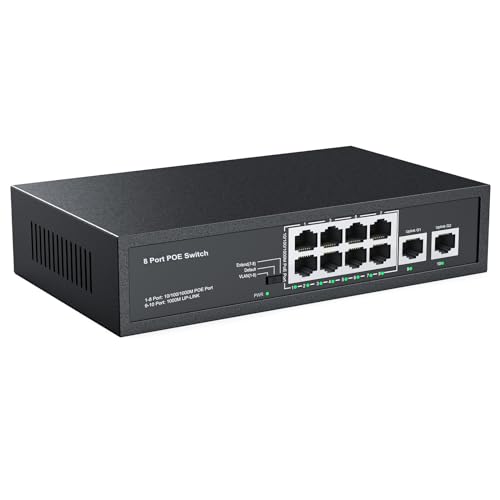
Real HD 10-Port Fast Ethernet PoE+ Switch
Best for: budget 8-camera setups needing long cable runs
- Recommended Use
- IP Cameras (what this guide is about)
- Port Count
- 10
- Port Speed
- 10/100 Mbps
- Management Type
- Unmanaged
- PoE Support
- PoE+ (802.3af/at)
- PoE Power Budget
- 120W
This is an unmanaged 10-port switch built for IP camera networks. You get eight 10/100 Mbps PoE+ ports and two dedicated 10/100 Mbps uplink ports. Its 120W power budget supplies up to 30W per port for standard 802.3af and 802.3at hardware. An extend mode reaches cameras up to 250 meters away at 10 Mbps. It suits you if you run standard or HD surveillance setups.
Pros
- 120W total PoE power budget with up to 30W per port
- Extend mode supports data runs up to 250 meters at 10 Mbps
- Two dedicated 10/100 Mbps uplink ports
- Internal power supply built into metal housing
Cons
- Port speeds capped at 10/100 Mbps with no Gigabit support
- Does not support rack mounting
- Incompatible with 24V passive PoE devices
Good fit if
- You need to power up to eight standard 802.3af/at IP cameras.
- You have long camera cable runs up to 250 meters.
- You want an unmanaged desktop switch with an internal power supply.
Skip if
- You require Gigabit or 2.5G network speeds for high-bandwidth gear.
- You plan to mount your network equipment in a server rack.
- You use 24V passive PoE hardware.
Verdict: Real HD 10-Port Fast Ethernet PoE+ Switch delivers 120W of reliable power across eight PoE+ ports for straightforward IP camera installations. It provides extended 250-meter range when standard 100-meter Ethernet limits fall short.

Hohtouying 8-Port Gigabit PoE Switch
Best for: eight-camera IP surveillance setups
- Recommended Use
- IP Cameras (what this guide is about)
- Port Count
- 10
- Port Speed
- 1000 Mbps
- Management Type
- Unmanaged
- PoE Support
- PoE+ (802.3af/at)
- PoE Power Budget
- 120W
This unmanaged switch gives you eight Gigabit PoE+ ports and two dedicated Gigabit uplink ports with a 120W internal power supply. It delivers up to 30W per port for standard 48V 802.3af/at devices, alongside a CCTV mode extending range up to 820 feet and port isolation via VLAN mode. It suits you if you need to run up to eight IP cameras without an external power brick.
Pros
- 120W internal power supply eliminates external power bricks
- Two dedicated Gigabit uplink ports for NVR and router connections
- CCTV mode extends transmission distances up to 820 feet
- Fanless design ensures completely silent operation
Cons
- Unmanaged operation provides no browser interface or software configuration
- Incompatible with 24V passive PoE devices without a separate splitter
- Ports top out at 1 Gbps with no multi-gigabit options
Good fit if
- You need to power up to eight standard 48V PoE cameras from one unit.
- You want dedicated Gigabit uplink ports to connect both an NVR and a router.
- You require silent, fanless hardware in a living space or home office.
Skip if
- You use 24V passive PoE hardware that requires proprietary power injection.
- You need advanced Layer 2 managed features like SNMP or traffic prioritization.
Verdict: Hohtouying 8-Port Gigabit PoE+ Switch with 2 Uplinks provides straightforward, fanless 120W power delivery and extended range modes for up to eight standard IP cameras.

NICGIGA 18-Port 2.5G PoE+ Switch
Best for: high-bandwidth multi-gigabit IP camera networks
- Recommended Use
- IP Cameras (what this guide is about)
- Port Count
- 18
- Port Speed
- 2.5 Gbps
- Management Type
- Unmanaged
- PoE Support
- PoE+ (802.3at)
- PoE Power Budget
- 250W
This unmanaged switch gives you sixteen 2.5 Gbps PoE+ ports alongside two 10 Gbps uplinks for high-bandwidth storage or router connections. With a 250W total power budget delivering up to 30W per port, it delivers enough capacity to run multiple 4K surveillance cameras or access points. A fanless metal chassis ensures completely silent operation, making it a strong fit if you need high data throughput without acoustic noise.
Pros
- 250W total PoE power budget with up to 30W per port
- Sixteen 2.5 Gbps PoE+ ports and two 10 Gbps uplinks
- Fanless metal chassis for silent operation
- Built-in 6KV lightning protection
Cons
- Unmanaged design provides no VLAN or QoS configuration options
- Only supports 44V to 57V PoE devices with no 24V passive PoE support
Good fit if
- You need high-bandwidth 2.5 Gbps connections for multi-camera setups or access points.
- You require silent, fanless operation in your workspace or rack.
- You want unmanaged plug-and-play installation without network configuration.
Skip if
- You need managed switch capabilities like VLANs or remote port controls.
- You use passive 24V PoE cameras or equipment.
Verdict: NICGIGA 18-Port 2.5G PoE+ Switch delivers fast multi-gigabit throughput and 250W of power in a silent, fanless metal housing. It is an ideal high-bandwidth backbone for powering multi-camera IP systems without software setup.

YuanLey 18-Port 2.5G PoE+ Switch
Best for: multi-gigabit IP camera deployments needing 10G uplinks
- Recommended Use
- IP Cameras (what this guide is about)
- Port Count
- 18
- Port Speed
- 2.5 Gbps
- Management Type
- Unmanaged
- PoE Support
- PoE+ (802.3at)
- PoE Power Budget
- 250W
This unmanaged switch gives you sixteen 2.5GbE PoE+ ports and two 10G RJ45 uplink ports inside a metal rack-mountable chassis. With a total PoE budget of 250 watts delivering up to 30 watts per port, it powers multi-gigabit IP cameras, access points, and network recorders. It fits your setup if you need high-bandwidth aggregation without complex network configuration.
Pros
- Sixteen 2.5GbE PoE+ ports delivering up to 30W each
- Two 10G RJ45 uplink ports for high-speed aggregation
- 250W total PoE power budget
- Supports both desktop and rackmount installation
- Built-in 6KV lightning protection
Cons
- Unmanaged with no VLAN or traffic control settings
- Uses active fan cooling rather than a fanless design
Good fit if
- You need 16 multi-gigabit PoE+ ports for high-resolution IP cameras or access points.
- You require 10G RJ45 uplinks to send camera feeds to a core switch or storage server.
- You prefer plug-and-play operation without software setup.
Skip if
- You need managed switch features such as VLAN segmentation or remote port management.
- You require a completely silent, fanless switch for a desktop environment.
Verdict: YuanLey 18-Port 2.5G PoE+ Switch delivers substantial multi-gigabit capacity and a 250W power budget for IP camera networks needing fast uplinks. Its unmanaged design keeps installation straightforward when you do not need custom network management.
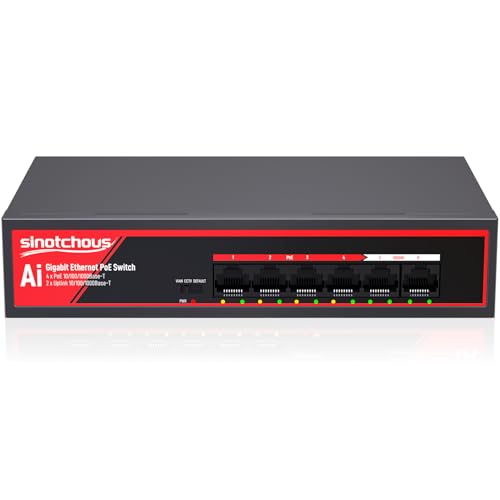
Sinotchous 6-Port Gigabit PoE Switch
Best for: small desktop IP camera setups
- Recommended Use
- Office, IP Cameras (what this guide is about)
- Port Count
- 6
- Port Speed
- 1 Gbps
- Management Type
- Unmanaged
- PoE Support
- PoE+ (802.3af/at)
- PoE Power Budget
- 65W
The Sinotchous 6-Port Gigabit Desktop PoE Switch gives you four 802.3af/at PoE+ ports alongside two dedicated gigabit uplink ports. With a 65W built-in power supply and fanless passive cooling, it delivers up to 30W per port without desktop fan noise. It suits you if you run up to four IP cameras and need direct uplinks to both an NVR and a router.
Pros
- Fanless design ensures silent desktop operation
- Built-in 65W power supply eliminates external power bricks
- Two dedicated 1000 Mbps uplink ports for NVR and router
- CCTV mode extends PoE transmission up to 820 feet
Cons
- Limited to four PoE-enabled ports
- Unmanaged switch without web configuration options
- Does not support 24V passive PoE without an adapter
Good fit if
- You need to power up to four standard 48V PoE cameras on a desk
- You want separate gigabit uplink ports for your router and NVR
- You require silent operation in an office or living space
Skip if
- You need to connect more than four PoE devices
- You require managed switch features like custom VLAN web interfaces
- You deploy 24V passive PoE equipment
Verdict: Sinotchous 6-Port Gigabit Desktop PoE Switch provides compact, silent desktop power for up to four cameras with dual dedicated uplinks. Its built-in 65W power supply and extended transmission mode make it a practical plug-and-play choice for small camera installations.

Ztyuav 10-Port 2.5G PoE+ Switch with 10G SFP+
Best for: IP camera networks needing 10G SFP+ uplinks
- Recommended Use
- IP Cameras (what this guide is about)
- Port Count
- 10
- Port Speed
- 2.5 Gbps
- Management Type
- Unmanaged
- PoE Support
- IEEE 802.3af/at
- PoE Power Budget
- 120W
View on Amazon: Ztyuav 10-Port 2.5G PoE+ Switch with 10G SFP+
This unmanaged switch gives you eight 2.5Gbps PoE+ ports alongside two 10Gbps SFP+ uplink ports. It provides a total PoE power budget of 120W following IEEE 802.3af/at standards, backed by an 80Gbps switching capacity. A physical toggle enables VLAN mode to isolate camera ports and limit broadcast traffic. It suits your setup if you need high-bandwidth fiber uplinks and multi-gigabit connections for high-resolution IP cameras.
Pros
- Two 10Gbps SFP+ uplink ports for high-bandwidth connections
- Eight 2.5Gbps PoE+ ports with 120W total power budget
- Hardware toggle for VLAN port isolation
- Fanless metal chassis for silent operation
Cons
- Unmanaged operation offers no browser interface or remote configuration
- 120W total budget limits high-draw PoE+ devices across all eight ports
Good fit if
- You need 10Gbps SFP+ uplinks to connect to a high-speed fiber backbone
- You run up to eight IP cameras requiring 2.5Gbps connectivity and IEEE 802.3af/at power
- You want silent, fanless operation in your workspace or rack area
Skip if
- You need managed switch capabilities like SNMP, L2 features, or remote control
- You require more than 120W of combined power for demanding motorized cameras
Verdict: Ztyuav 10-Port 2.5G PoE+ Switch with 10G SFP+ pairs multi-gigabit PoE ports with dual 10G fiber uplinks in a silent, metal build. It is a practical fit when your surveillance setup requires high uplink throughput without management complexity.

Ztyuav 18-Port 250W Fanless PoE Switch
Best for: silent 16-camera surveillance networks
- Recommended Use
- IP Cameras (what this guide is about)
- Port Count
- 18
- Port Speed
- 10/100Mbps
- Management Type
- Unmanaged
- PoE Support
- IEEE 802.3af/at
- PoE Power Budget
- 250W
This unmanaged switch gives you 16 Fast Ethernet PoE+ ports and two Gigabit uplinks backed by a 250W total power budget. Built-in AI PoE watchdog monitors connected IP cameras and power cycles them automatically if they drop offline. You can also engage an extend mode that reaches cameras up to 250 meters away at 10 Mbps. It suits multi-camera security systems needing silent, fanless operation.
Pros
- 250W total PoE budget with up to 30W per port
- AI PoE watchdog automatically restarts unresponsive cameras
- VLAN and extend mode supports up to 250-meter cable runs at 10 Mbps
- Fanless metal chassis for silent operation
- Two dedicated Gigabit uplink ports
Cons
- Downlink PoE ports run at 10/100 Mbps rather than Gigabit speeds
- Unmanaged with no web management or software traffic control
Good fit if
- You need to power up to 16 IP cameras on a single silent switch.
- You have long cable runs up to 250 meters that require VLAN isolation.
- You want an automatic watchdog to reboot frozen cameras without manual intervention.
Skip if
- You require Gigabit data rates across all camera downlink ports.
- You need a managed switch for advanced traffic shaping and network monitoring.
Verdict: Ztyuav 18-Port 250W Fanless PoE Switch delivers a generous power budget, silent cooling, and automatic camera recovery for multi-camera setups. Its 10/100 Mbps camera ports fit standard surveillance feeds without excess network overhead.
Specifications side by side
| Spec | Real HD 10-Port Gigabit PoE+ Switch | Real HD 10-Port Fast Ethernet PoE+ Switch | Hohtouying 8-Port Gigabit PoE Switch | NICGIGA 18-Port 2.5G PoE+ Switch | YuanLey 18-Port 2.5G PoE+ Switch | Sinotchous 6-Port Gigabit PoE Switch | Ztyuav 10-Port 2.5G PoE+ Switch with 10G SFP+ | Ztyuav 18-Port 250W Fanless PoE Switch |
|---|---|---|---|---|---|---|---|---|
| Port Count | 10 | 10 | 10 | 18 | 18 | 6 | 10 | 18 |
| Port Speed | 10/100/1000Mbps | 10/100 Mbps | 1000 Mbps | 2.5 Gbps | 2.5 Gbps | 1 Gbps | 2.5 Gbps | 10/100Mbps |
| Management Type | not specified | Unmanaged | Unmanaged | Unmanaged | Unmanaged | Unmanaged | Unmanaged | Unmanaged |
| PoE Support | PoE+ (802.3af/at) | PoE+ (802.3af/at) | PoE+ (802.3af/at) | PoE+ (802.3at) | PoE+ (802.3at) | PoE+ (802.3af/at) | IEEE 802.3af/at | IEEE 802.3af/at |
| PoE Power Budget | 120W | 120W | 120W | 250W | 250W | 65W | 120W | 250W |
| Uplink Ports | 2 x 1000Mbps | 2 x 10/100Mbps Ethernet | 2 x Gigabit | 2 x 10G RJ45, 2 x 10G SFP+ | 2 x 10G RJ45 | 2 x Gigabit Ethernet | 2 x 10G SFP+ | 2 x Gigabit |
| Switching Capacity | not specified | not specified | not specified | not specified | not specified | not specified | 80Gbps | 16Gbps |
| Mounting Type | Rack Mount | not specified | not specified | not specified | Desktop, Rackmount | not specified | not specified | Desktop, Wall-Mount, Rackmount |
| Wi-Fi Standard | not specified | not specified | not specified | Wi-Fi 6 | Wi-Fi 6 | not specified | not specified | not specified |
| Number of Ports | 10 Ports | 10 Ports | 8 Ports | 16 Ports | 18 Ports | not specified | not specified | not specified |
| Use Case | not specified | not specified | not specified | not specified | Gaming | not specified | not specified | not specified |
| Uplink Port Type | not specified | not specified | Gigabit Uplink | not specified | not specified | not specified | SFP | Gigabit Uplink |
| Recommended Use | IP Cameras | IP Cameras | IP Cameras | IP Cameras | IP Cameras | Office, IP Cameras | IP Cameras | IP Cameras |
| Operating Mode | not specified | not specified | not specified | Access Point Mode | Access Point Mode | not specified | not specified | not specified |
| Dimensions | 7.8 × 4.6 × 1.7 inches | 7.8 × 4.6 × 17 inches | 7.87 × 4.72 × 1.57 inches | not specified | not specified | 7.87 × 4.72 × 1.57 inches | 10.6 × 7.13 × 1.73 inches | 10.6 × 7.13 × 1.73 inches |
| Weight | 2.47 pounds | 2.09 pounds | not specified | not specified | not specified | 1.41 pounds | 2.43 pounds | 3.21 pounds |
| Size | 8 POE Port | not specified | not specified | not specified | not specified | not specified | 2.5G | 8 PoE+2x10G SFP@120W | A-16 PoE(100Mbps) 250W+2x1G Uplink |
| Color | black | Black | black- Gigabit | Black | Black | Black-gigabit PoE Ethernet Switch | Black | Black |
| Model | 8 port poe gigabit switch | 8 port poe switch | 10 Gigabit Ports|120W 8xPoE+ | 18 Port| 16x 2.5G PoE+250W+2x 10G RJ45 | 16 Port 2.5G PoE Switch | 6 Gigabit Ports|65W 4xPoE+ | Z-QWPE0802 | 18 Ports|16 PoE+Gigabit Uplink 250W |
If you plan your switch deployment, compare power specifications across the best anpviz security cameras.
How to Choose an IP Camera Switch
-
Check Cable Run Distances
Standard Ethernet cabling maxes out at 100 meters between the switch and your camera. If you run wiring to detached garages, exterior perimeters, or long hallways, verify whether the switch supports extended range modes. Some models extend signal reach up to 250 meters over network cable. The Real HD 10-Port Fast Ethernet PoE+ Switch provides an extended 250-meter range for long runs. Selecting a switch with extended range capabilities ensures your distant surveillance cameras stay connected without adding intermediate repeaters.
-
Select the Uplink Interface
Uplink ports send aggregated video traffic from the switch to your router or network video recorder. Look closely at the physical interface type. Standard copper RJ45 ports suit local rack or desk connections. If you need to route traffic across longer distances without electromagnetic interference, choose a switch equipped with optical SFP or SFP+ slots. The Ztyuav 10-Port 2.5G PoE+ Switch with 10G SFP+ includes dual 10G SFP+ ports. This setup lets you run high-speed optical fiber back to your core server.
-
Match Camera Port Bandwidth
Examine the network speed rating of each PoE port before buying. Standard surveillance video streams need only 10/100 Mbps Fast Ethernet to transmit clear footage smoothly. However, modern high-resolution or multi-sensor cameras generate larger data volumes that require multi-gigabit throughput. The NICGIGA 18-Port 2.5G PoE+ Switch provides 2.5G port speeds alongside 10G uplinks. Choose Fast Ethernet ports for basic camera networks to minimize overhead, but prioritize 2.5G PoE ports if you deploy high-throughput cameras that demand faster local data delivery across the switch.
-
Account for Acoustic Noise
Check the thermal design of the switch if you install it in occupied living spaces or quiet work environments. Switches with internal cooling fans can create steady background noise. A fanless design cools components passively through a metal chassis, maintaining silent operation throughout the day. The Hohtouying 8-Port Gigabit PoE Switch features a fanless build that operates without noise. If you place your switch inside an open office, residential bedroom, or media console, verify that the unit specifies fanless cooling before completing your installation plans.
-
Count Dedicated Uplink Ports
Do not confuse total port count with available camera ports. Connecting your surveillance switch to a router and an NVR requires dedicated uplink channels. If a switch lacks dedicated uplinks, plugging in network cables subtracts from the ports available for powering cameras. The Sinotchous 6-Port Gigabit PoE Switch provides four PoE+ ports and two dedicated uplink ports. This configuration lets you link to both an upstream router and a storage system simultaneously while leaving all four powered ports completely open for your connected security cameras.
-
Confirm Management Type Requirements
Determine whether your network architecture requires software administration or plug-and-play simplicity. Managed switches offer port controls, VLANs, and traffic shaping, but require manual browser or console configuration. Unmanaged switches forward packets immediately upon connection without software setup or firmware adjustments. The YuanLey 18-Port 2.5G PoE+ Switch uses an unmanaged architecture that functions instantly when connected. If your IP camera installation relies on direct hardware connectivity and does not require custom virtual network segmenting, selecting an unmanaged switch keeps setup straightforward and eliminates maintenance tasks.
Frequently asked questions
Do you need a managed or unmanaged switch for IP cameras?
Unmanaged switches work well for most dedicated IP camera installations because they require no software setup. You plug in camera cables and the hardware forwards traffic automatically. For example, switches like the Real HD 10-Port Gigabit switch and NICGIGA 18-Port switch operate unmanaged. This design avoids configuration errors, isolates network traffic efficiently, and ensures cameras maintain steady video transmission without manual virtual network adjustments.
What PoE power budget do you need for an IP camera switch?
You must calculate the total wattage your connected cameras consume under full operation, including infrared night vision. Smaller setups with four cameras can operate on a 65W budget, as seen on the Sinotchous 6-Port switch. Larger systems with eight to sixteen cameras require between 120W on models like the Hohtouying 8-Port and 250W on high-capacity hardware like the YuanLey 18-Port switch to prevent sudden power drops.
Can Fast Ethernet switches handle modern IP camera video streams?
Yes, Fast Ethernet ports easily handle individual IP camera feeds because most surveillance streams use under 15 Mbps. Switches like the Ztyuav 18-Port 250W model provide 10/100 Mbps ports for sixteen cameras alongside gigabit uplinks. This setup directs individual camera streams smoothly through lower-bandwidth ports while relying on the faster gigabit uplink ports to carry the aggregated footage back to your recorder or main network switch.
When should you use an IP camera switch with SFP ports?
You should select an SFP switch when you must connect your camera switch across long fiber-optic distances or require high-throughput data backbones. The Ztyuav 10-Port 2.5G PoE+ Switch includes dual 10G SFP+ uplink ports specifically for this scenario. Fiber uplinks bypass copper cable distance barriers and reduce electromagnetic interference, allowing you to feed multi-camera streams directly to a central server or core switch located in another building.
What does automatic camera recovery do on a surveillance network switch?
Automatic camera recovery monitors responsive communication between the switch port and connected IP cameras. If an individual camera freezes or stops transmitting video, the switch automatically power-cycles that specific PoE port to reboot the device. The Ztyuav 18-Port 250W switch includes this feature, saving you from having to visit the physical hardware location or climb ladders just to unplug and restart non-responsive security cameras.
Why do IP camera network switches include dedicated uplink ports?
Dedicated uplink ports preserve your PoE ports strictly for camera connections while routing data to your router or network video recorder. For example, switches like the Hohtouying 8-Port and Sinotchous 6-Port feature dedicated uplink ports. If an eight-port switch lacked uplinks, connecting to your router would consume a PoE port, reducing your usable camera connections down to seven. Dedicated uplinks ensure maximum port availability for your surveillance devices.
What are the advantages of a fanless PoE switch for IP cameras?
Fanless PoE switches eliminate internal fan noise and prevent dust accumulation inside the metal chassis. Models such as the NICGIGA 18-Port 2.5G switch and Ztyuav 18-Port 250W switch operate fanless while managing multi-camera networks. Passive cooling eliminates moving parts that could wear out or fail over time, ensuring quiet, dependable continuous operation when you install your camera switch inside home offices, retail spaces, or living areas.