Best 1-Pack Mesh Wifi Systems: 15 Spec-Based Picks
As an Amazon Associate we earn from qualifying purchases. Links on this page are affiliate links.
A 1-Pack mesh wifi system provides a standalone network foundation that you can expand with extra nodes as coverage needs grow. To help you evaluate your options, 15 products were compared based on the specifications published on their listings. The TP-Link Deco X55 WiFi 6 Mesh Router leads the list by offering an AX3000 speed rating and three Gigabit ports for up to 2,500 square feet of coverage.
This guide helps you decide which wireless standard, coverage footprint, and Ethernet port speeds best match your home layout and connected devices.
Quick picks
The best fit for you
- You need standalone coverage up to 2,500 square feet. TP-Link Deco X55 WiFi 6 Mesh Router It provides AX3000 Wi-Fi 6 throughput, three Gigabit ports, and up to 2,500 square feet of coverage.
- You have many smart devices in a compact home. Amazon eero 6 Wi-Fi 6 Router (1-Pack) It handles 75+ devices, integrates Zigbee hardware, and covers spaces up to 1,500 square feet.
- You need 10 Gbps ports with Wi-Fi 7 coverage. TP-Link Deco 7 Pro Tri-Band Wi-Fi 7 Router This tri-band Wi-Fi 7 model delivers 10 Gbps wired ports and coverage up to 3,300 square feet.
- You want a router powered directly through Ethernet cables. TP-Link Deco AX3000 PoE Mesh Router It features PoE+ power support, dual 2.5 Gbps ports, and AX3000 Wi-Fi 6 throughput.
Our 15 picks

TP-Link Deco X55 WiFi 6 Mesh Router
Best for: standalone coverage in medium-sized homes
- Pack Size
- 1-Pack (what this guide is about)
- Wi-Fi Standard
- WiFi 6
- Speed Rating
- AX3000
- Coverage Area
- up to 2500 sq ft
- Port Speed
- Gigabit
- Dimensions
- 4.33 × 4.33 × 4.49 inches
The TP-Link Deco AX3000 WiFi 6 Router is a standalone single-pack mesh node designed to anchor your home network. It delivers dual-band Wi-Fi 6 speeds up to 2402 Mbps on 5 GHz and 574 Mbps on 2.4 GHz. With three Gigabit Ethernet ports and coverage reaching up to 2,500 square feet, this unit suits you if you need reliable wireless performance across a medium-sized home without extra satellites.
Pros
- Three Gigabit Ethernet ports supporting wired backhaul
- Wi-Fi 6 speeds reaching 2402 Mbps on 5 GHz and 574 Mbps on 2.4 GHz
- Up to 2,500 square feet of standalone wireless coverage
- Includes HomeShield basic security, parental controls, and QoS
Cons
- No multi-gigabit Ethernet ports
- Lacks 6 GHz band support
Good fit if
- You have a home up to 2,500 square feet needing standalone Wi-Fi 6 coverage.
- You need three Gigabit Ethernet ports for wired devices or backhaul.
- You plan to expand coverage later with additional Deco units.
Skip if
- You require multi-gigabit wired connections faster than 1 Gbps.
- You want tri-band connectivity utilizing 6 GHz frequencies.
Verdict: TP-Link Deco AX3000 WiFi 6 Router provides solid dual-band throughput and three Gigabit ports for up to 2,500 square feet of coverage. It serves as a dependable standalone base that can scale across larger homes as needed.

TP-Link Deco Tri-Band WiFi 6E Router 1-Pack
Best for: standalone Wi-Fi 6E tri-band home networking
- Pack Size
- 1-Pack (what this guide is about)
- Wi-Fi Standard
- WiFi 6E
- Speed Rating
- AXE5400
- Frequency Bands
- Tri-Band
- Device Capacity
- 200 devices
- Dimensions
- 4.13 × 4.13 × 6.65 inches
This 1-pack Wi-Fi 6E standalone router functions as an independent unit or as the anchor for a modular mesh setup. It delivers tri-band coverage across 2.4 GHz, 5 GHz, and the 6 GHz frequency band, reaching aggregated speeds up to 5,400 Mbps. It supports up to 200 connected devices via AI-driven traffic routing. You will find it suitable if you want dedicated 6 GHz capacity for compatible client hardware in single-node coverage areas.
Pros
- Tri-band AXE5400 throughput with up to 2,402 Mbps on 6 GHz, 2,402 Mbps on 5 GHz, and 574 Mbps on 2.4 GHz
- Access to the clear 6 GHz band for dedicated backhaul or Wi-Fi 6E client connections
- Network capacity designed to handle up to 200 connected devices
- Basic TP-Link HomeShield security scan, parental controls, and Quality of Service included
- Full compatibility with all other TP-Link Deco mesh units
Cons
- Includes only a single node, requiring additional units for multi-room coverage
- Defaults the 6 GHz band to backhaul mode unless manually configured for client access
- Advanced HomeShield network protection requires features beyond the free basic tier
Good fit if
- You have Wi-Fi 6E devices and need access to the uncongested 6 GHz band.
- You need a single standalone router capable of handling up to 200 connected clients.
- You plan to build a mesh setup gradually by pairing it with other Deco nodes later.
Skip if
- You need immediate whole-home coverage across multiple rooms from a multi-pack kit.
- You do not own any Wi-Fi 6E hardware to take advantage of the 6 GHz frequency.
Verdict: TP-Link Deco XE75 WiFi 6E 1-Pack delivers tri-band AXE5400 speeds and opens the 6 GHz band for lower network interference. It serves as a capable standalone router that easily expands into a larger Deco mesh system whenever you need more coverage.

Amazon eero 6 Wi-Fi 6 Router (1-Pack)
Best for: device-heavy smart homes up to 1,500 sq ft
- Pack Size
- 1-Pack (what this guide is about)
- Wi-Fi Standard
- Wi-Fi 6
- Speed Rating
- up to 900 Mbps
- Coverage Area
- up to 1,500 sq. ft.
- Device Capacity
- 75+
- Dimensions
- 3.91 × 3.82 × 2.42 inches
The Amazon eero 6 Wi-Fi 6 Router (1-Pack) provides standalone mesh coverage for spaces up to 1,500 square feet. It supports internet speeds up to 900 Mbps and manages 75 or more connected devices with Wi-Fi 6. A built-in Zigbee hub directly pairs compatible smart home gear. This router fits you if you operate many smart devices within a standard apartment or compact floor plan.
Pros
- Supports 75+ connected devices
- Built-in Zigbee smart home hub
- Wi-Fi 6 coverage up to 1,500 square feet
- Compatible with internet plans up to 900 Mbps
Cons
- Caps speed support at 900 Mbps
- Single-unit coverage limited to 1,500 square feet
Good fit if
- You have up to 75+ active smart devices and clients
- You need a built-in Zigbee hub for Alexa automation
- You require network coverage up to 1,500 square feet
Skip if
- You subscribe to an internet service tier faster than 900 Mbps
- You need more than 1,500 square feet of coverage from a single device
Verdict: Amazon eero 6 Wi-Fi 6 Router (1-Pack) delivers dependable Wi-Fi 6 performance and Zigbee integration for high-density smart homes. It serves spaces up to 1,500 square feet with internet connections up to 900 Mbps.

Eero Pro 7 Tri-Band Wi-Fi 7 Router
Best for: 2,000 sq ft homes needing multi-gigabit speeds
- Pack Size
- 1-Pack (what this guide is about)
- Wi-Fi Standard
- Wi-Fi 7
- Coverage Area
- up to 2,000 sq. ft.
- Frequency Bands
- Tri-band
- Device Capacity
- 200+
The Amazon eero Pro 7 is a standalone Wi-Fi 7 router built for spaces up to 2,000 square feet. It features tri-band connectivity with support for multi-link operation and internet plans up to 5 Gbps. You can connect over 200 devices simultaneously. It also includes integrated smart home hub support for Thread, Zigbee, and Matter controllers. This unit suits you if you run a high-density, multi-gigabit smart home network.
Pros
- Supports internet service plans up to 5 Gbps
- Tri-band Wi-Fi 7 architecture with multi-link operation
- Built-in smart home hub for Thread, Zigbee, and Matter controllers
- Handles over 200 connected devices
Cons
- Ad blocking and parental controls require an optional eero Plus subscription
- Single unit coverage reaches its ceiling at 2,000 square feet
- Matter and Zigbee compatibility is limited to controller roles
Good fit if
- You subscribe to multi-gigabit internet plans up to 5 Gbps.
- You manage a dense setup with up to 200 connected devices in a 2,000 sq ft space.
- You need direct hub control for Thread, Zigbee, and Matter smart home gear.
Skip if
- You want network-level parental controls and ad blocking without an extra subscription.
- You need a single unit that covers more than 2,000 square feet.
Verdict: Amazon eero Pro 7 Wi-Fi 7 Router delivers 5 Gbps network support, tri-band performance, and integrated smart hub hardware for up to 200 devices. It is an ideal anchor for high-bandwidth setups within 2,000 square feet.

TP-Link Deco S4 1-Pack
Best for: expanding an existing Deco mesh network
- Pack Size
- 1-Pack (what this guide is about)
- Coverage Area
- up to 2,000 sq. ft.
- Intended Use
- Home
- Dimensions
- 3.6 × 3.6 × 6.4 inches
The TP-Link Deco S4 1-Pack is a single home mesh unit measuring 3.6 by 3.6 by 6.4 inches. You can deploy it alongside other Deco hardware to add up to 2,000 square feet of coverage under a single network name. It includes built-in parental controls for content filtering and supports Alexa guest controls with mobile app setup. It suits you if you need to expand Deco coverage easily.
Pros
- Compatible with all TP-Link Deco mesh systems
- Adds up to 2,000 sq. ft. of coverage when paired with Deco units
- Profile-based parental controls for time limits and website blocking
- Supports Alexa voice commands for guest network management
Cons
- Full 2,000 sq. ft. coverage claim requires pairing with additional Deco units
- Requires a separate modem for service with most internet providers
Good fit if
- You want to expand coverage on an existing TP-Link Deco mesh system.
- You need profile-based parental controls to set time limits and restrict sites.
- You manage guest Wi-Fi access via Alexa voice controls.
Skip if
- You need a multi-node kit in one package to cover a large home immediately.
- You do not have the modem required by your internet service provider.
Verdict: TP-Link Deco S4 1-Pack delivers seamless coverage expansion and app-based parental controls for your home network. It integrates directly with existing Deco hardware to add up to 2,000 square feet of coverage.

TP-Link Deco Wi-Fi 6 Mesh Router (1-Pack)
Best for: modest homes on 1 Gbps internet plans
- Pack Size
- 1-Pack (what this guide is about)
- Wi-Fi Standard
- WiFi 6
- Speed Rating
- AX1800
- Coverage Area
- up to 2,200 square feet
- Dimensions
- 4.33 × 4.33 × 4.49 inches
- Weight
- 1.3 pounds
The TP-Link Deco X20 is a standalone Wi-Fi 6 mesh unit designed to cover spaces up to 2,200 square feet. It uses AX1800 speeds and works with internet service plans up to 1 Gbps. You get built-in parental controls to manage connected profiles, OFDMA and MU-MIMO support for multiple devices, and Alexa voice integration. It suits you if you need a compact single-node setup for moderate-speed broadband.
Pros
- Covers up to 2,200 square feet with Wi-Fi 6
- Supports AX1800 speeds and broadband plans up to 1 Gbps
- Includes OFDMA and MU-MIMO for simultaneous device connections
- Works with Alexa for voice-controlled guest Wi-Fi
Cons
- Capped at entry-level AX1800 throughput specs
- Provides only one unit for coverage without purchasing add-on nodes
Good fit if
- You need up to 2,200 square feet of coverage from a single mesh router.
- You have an internet service plan up to 1 Gbps.
- You want profile-based parental controls and Deco app management.
Skip if
- You subscribe to multi-gigabit broadband tiers above 1 Gbps.
- You need a multi-node pack immediately for multi-story coverage.
Verdict: TP-Link Deco X20 Wi-Fi 6 Mesh Router provides reliable AX1800 coverage across up to 2,200 square feet with solid device management features. It serves as a practical, expandable foundation for homes on gigabit or sub-gigabit connections.

NETGEAR Orbi 770 Tri-Band WiFi 7 Satellite
Best for: expanding existing Orbi 770 Wi-Fi 7 networks
- Pack Size
- 1-Pack (what this guide is about)
- Wi-Fi Standard
- WiFi 7
- Speed Rating
- Up to 11 Gbps
- Coverage Area
- Up to 2,750 sq ft
- Frequency Bands
- Tri-band
This NETGEAR unit is a dedicated Wi-Fi 7 add-on satellite designed specifically to expand an existing Orbi 770 Series system. It delivers tri-band speeds up to 11 Gbps and adds up to 2,750 square feet of coverage using enhanced backhaul technology. If you already run a compatible Orbi 770 router setup and need to eliminate dead zones without creating a separate network name, this satellite fits your setup.
Pros
- Tri-band Wi-Fi 7 speeds up to 11 Gbps
- Adds up to 2,750 square feet of coverage
- Dedicated enhanced backhaul keeps traffic moving
- Backward compatible with Wi-Fi 6 and Wi-Fi 5 clients
Cons
- Requires an existing Orbi 770 Series system and cannot work as a standalone router
- Incompatible with other Orbi series or third-party mesh routers
- Specified for operation in the United States only
Good fit if
- You already own an Orbi 770 Series router system (RBE771, RBE772, or RBE773).
- You need up to 2,750 square feet of extra Wi-Fi 7 coverage.
- You want tri-band capability supporting throughput up to 11 Gbps.
Skip if
- You need a standalone primary router to set up a brand-new network.
- You use a non-770 Orbi system or a different mesh brand.
- You intend to operate the equipment outside the United States.
Verdict: NETGEAR Orbi 770 WiFi 7 Add-On Satellite provides high-throughput expansion for compatible Orbi 770 networks, adding up to 2,750 square feet of tri-band coverage. Because it cannot function as a standalone router, it is strictly an expansion unit for an existing setup.

Google Nest Wifi AC2200 1-Pack Router
Best for: standalone coverage up to 2,200 square feet
- Pack Size
- 1-Pack (what this guide is about)
- Speed Rating
- AC2200
- Coverage Area
- 2200 Sq Ft
- Dimensions
- 4.33 × 4.33 × 3.56 inches
- Weight
- 1 pounds
The Google Nest Wifi is a single-pack mesh router designed to cover homes up to 2,200 square feet. It uses an AC2200 speed rating across its wireless bands and measures 4.33 inches wide by 3.56 inches tall. If you need standalone coverage for standard internet tasks across a medium-sized floor plan, this compact unit provides practical hardware.
Pros
- Covers up to 2,200 square feet
- AC2200 wireless speed rating
- Compact footprint measuring 4.33 by 3.56 inches
- Lightweight unit at 1 pound
Cons
- Uses older Wi-Fi 5 (AC) standard rather than Wi-Fi 6 or Wi-Fi 7
- Single-pack option excludes additional mesh points
Good fit if
- You need up to 2,200 square feet of single-node coverage.
- You want an AC2200 router with a small physical footprint.
Skip if
- You require newer Wi-Fi 6, 6E, or Wi-Fi 7 protocols.
- You need multi-node hardware to cover areas larger than 2,200 square feet.
Verdict: Google Nest Wifi AC2200 1-Pack Router provides dependable AC2200 coverage for spaces up to 2,200 square feet in a compact standalone enclosure. It offers an effective single-unit setup for homes that do not require newer Wi-Fi generation protocols.

TP-Link Deco XE75 Pro Tri-Band WiFi 6E Router
Best for: multi-gigabit internet and Wi-Fi 6E homes
- Pack Size
- 1-Pack (what this guide is about)
- Wi-Fi Standard
- WiFi 6E
- Speed Rating
- AXE5400
- Frequency Bands
- Tri-Band
- Port Speed
- 2.5 Gbps
- Device Capacity
- 200 devices
View on Amazon: TP-Link Deco XE75 Pro Tri-Band WiFi 6E Router
The TP-Link Deco XE75 Pro WiFi 6E Router gives you tri-band Wi-Fi 6E connectivity in a single standalone unit. It features an AXE5400 speed rating across 2.4 GHz, 5 GHz, and 6 GHz bands to handle up to 200 connected devices. A built-in 2.5 Gbps port supports multi-gigabit internet connections alongside two gigabit ports. This setup suits you if you need fast wired throughput and clear 6 GHz wireless channels for modern devices.
Pros
- Dedicated 6 GHz band provides up to 2402 Mbps with no legacy interference
- One 2.5 Gbps port supports multi-gigabit internet or wired device speeds
- Tri-band AXE5400 capacity connects up to 200 client devices
- Compatible with all TP-Link Deco mesh models for future network expansion
Cons
- Includes only one 2.5 Gbps port while the remaining two operate at 1 Gbps
- Requires a separate modem to establish an internet connection
Good fit if
- You subscribe to an internet service tier faster than 1 Gbps
- You have Wi-Fi 6E client devices ready to use the 6 GHz band
- You plan to build a mesh network later with additional Deco nodes
Skip if
- You need more than one multi-gigabit wired Ethernet port
- You only have legacy client devices that cannot use 6 GHz frequencies
Verdict: TP-Link Deco XE75 Pro WiFi 6E Router delivers tri-band Wi-Fi 6E performance and multi-gigabit wired capability in a single expandable node. It provides modern bandwidth access if you want clear 6 GHz airwaves and a 2.5 Gbps port.
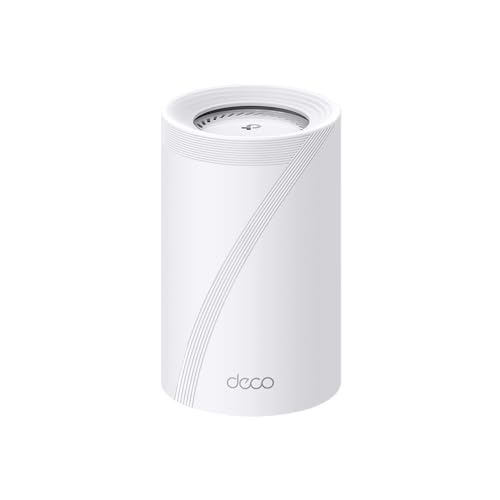
TP-Link Deco 7 Pro Tri-Band Wi-Fi 7 Router
Best for: multi-gigabit home networks needing 10 Gbps ports
- Pack Size
- 1-Pack (what this guide is about)
- Wi-Fi Standard
- Wi-Fi 7
- Speed Rating
- BE17000
- Coverage Area
- Up to 3,300 sq. ft.
- Frequency Bands
- Tri-Band
- Port Speed
- 10 Gbps
This standalone unit acts as a primary router or mesh node covering up to 3,300 square feet. It provides BE17000 tri-band Wi-Fi 7 connections across 6 GHz, 5 GHz, and 2.4 GHz bands. Hardware includes a 10 Gbps WAN/LAN port, a 2.5 Gbps port, a 1 Gbps port, and a USB 3.0 port. You get multi-gigabit wired flexibility for over 200 devices, making it suitable if you need high local throughput.
Pros
- Features a 10 Gbps WAN/LAN port and a 2.5 Gbps LAN port
- Covers up to 3,300 square feet and handles over 200 devices
- Delivers up to 11,530 Mbps on the 6 GHz band
- Includes an integrated USB 3.0 port
Cons
- Backhaul functionality requires at least two Deco units
- Requires a separate broadband modem to connect to the internet
- Measures over 10.5 inches in length
Good fit if
- You have a multi-gigabit plan requiring a 10 Gbps Ethernet port.
- You use devices that take advantage of 6 GHz Wi-Fi 7 bands.
- You need standalone wireless coverage for up to 3,300 square feet.
Skip if
- You want mesh backhaul features without purchasing extra hardware.
- You have limited shelf space for a 10.57-inch long unit.
Verdict: TP-Link Deco Tri-Band Wi-Fi 7 Router delivers 10 Gbps wired ports and tri-band Wi-Fi 7 coverage up to 3,300 square feet. It functions as a high-throughput standalone router that can expand with additional Deco units later.

TP-Link Deco AX3000 PoE Mesh Router
Best for: ceiling mounting and PoE-powered setups
- Pack Size
- 1-Pack (what this guide is about)
- Wi-Fi Standard
- WiFi 6
- Speed Rating
- AX3000
- Frequency Bands
- Dual-Band
- Port Speed
- 2.5 Gbps
- PoE Support
- PoE
This 1-pack Wi-Fi 6 mesh unit delivers dual-band AX3000 speeds, reaching up to 2402 Mbps on 5 GHz and 574 Mbps on 2.4 GHz. It features two 2.5 Gbps Ethernet ports and supports PoE+ power, letting you run both data and power through one cable for ceiling mounting. It suits you if you want multi-Gig wired backhaul and flexible mounting without needing a nearby power outlet.
Pros
- PoE+ support allows power and data delivery over one cable
- Two 2.5 Gbps Ethernet ports for multi-Gig connections
- AX3000 Wi-Fi 6 speeds up to 2402 Mbps on 5 GHz and 574 Mbps on 2.4 GHz
- Supports ceiling mounting and standard power plug operation
Cons
- PoE+ switch is not included for PoE operation
- Dual-band design lacks a third band or 6 GHz frequency
- Offers only two wired Ethernet ports
Good fit if
- You have Ethernet cabling and want to power your node via PoE+.
- You want ceiling mounting to place the node in open spaces.
- You need 2.5 Gbps wired ports for multi-Gigabit network gear.
Skip if
- You want tri-band connectivity or access to the 6 GHz band.
- You need more than two wired Ethernet ports on the node.
- You do not plan to use PoE installation or ceiling mounts.
Verdict: TP-Link Deco AX3000 PoE Mesh Router provides multi-Gigabit connectivity and flexible ceiling mounting through its PoE+ input and dual 2.5 Gbps ports. It is an ideal pick if you have wired Ethernet infrastructure ready for power delivery.

ASUS ZenWiFi BD4 1-Pack WiFi 7 Router
Best for: multi-gigabit wired setups needing Wi-Fi 7 coverage
- Pack Size
- 1-Pack (what this guide is about)
- Wi-Fi Standard
- WiFi 7
- Speed Rating
- 3.6 Gbps
- Coverage Area
- 2450 sq.ft.
- Frequency Bands
- Dual-band
- Port Speed
- 2.5G
The ASUS ZenWiFi WiFi 7 Dual-Band Router is a single-node mesh unit built for multi-gigabit wired setups and modern wireless standards. It delivers Wi-Fi 7 speeds up to 3,600 Mbps and covers up to 2,450 square feet. With dual 2.5G Ethernet ports and a quad-core 1.5 GHz processor, it suits you if you need fast wired throughput for an incoming multi-gigabit internet connection and a local wired backhaul or device.
Pros
- Dual 2.5G Ethernet ports with auto-detection
- Wi-Fi 7 speeds up to 3,600 Mbps with MLO and 4K-QAM
- Coverage reaches up to 2,450 square feet
- Quad-core 1.5 GHz CPU
Cons
- Dual-band operation lacks a dedicated third frequency band
- Only includes two Ethernet ports total
Good fit if
- You have a multi-gigabit internet plan requiring a 2.5G WAN port.
- You need a standalone Wi-Fi 7 unit covering up to 2,450 square feet.
- You plan to expand coverage later using AiMesh-compatible hardware.
Skip if
- You need tri-band connectivity with a dedicated wireless backhaul.
- You require more than two physical Ethernet ports without a switch.
Verdict: ASUS ZenWiFi WiFi 7 Dual-Band Router delivers modern Wi-Fi 7 speeds and dual 2.5G wired connectivity in a compact single-pack form factor. It provides a solid foundation for multi-gigabit home networks that can expand with AiMesh later.

Google Wifi AC1200 Mesh Router 1-Pack
Best for: basic AC1200 coverage in small spaces
- Pack Size
- 1-Pack (what this guide is about)
- Speed Rating
- AC1200
- Coverage Area
- 1500 Sq Ft
- Dimensions
- 4.17 × 4.18 × 2.7 inches
- Weight
- 12 ounces
The Google Wifi AC1200 1-Pack is a standalone mesh router designed to cover up to 1,500 square feet. It uses the AC1200 speed standard and integrates directly with the Google Home app for network management. You can prioritize specific devices, set parental screen time controls, and integrate it into existing Google Wifi or Nest Wifi networks. It suits small spaces needing basic wireless coverage.
Pros
- Coverage reaches up to 1,500 square feet for a single unit
- Works with Google Home app for speed checks and device prioritization
- Built-in parental controls to pause access and manage screen time
- Compatible with existing Google Wifi points and Nest Wifi systems
Cons
- Uses older AC1200 speed rating rather than Wi-Fi 6 or newer standards
- Coverage limited to 1,500 square feet without additional mesh points
Good fit if
- You need wireless coverage for areas up to 1,500 square feet.
- You want an expansion node for an existing Google Wifi or Nest Wifi network.
- You manage your home network through the Google Home app.
Skip if
- You require modern Wi-Fi 6, 6E, or Wi-Fi 7 throughput.
- You need standalone coverage for homes larger than 1,500 square feet.
Verdict: Google Wifi AC1200 Mesh Router 1-Pack delivers 1,500 square feet of coverage using AC1200 dual-band speeds. It operates as a compact standalone router or an expansion point for compatible Google networks.

Google Nest WiFi Pro 1-Pack
Best for: standalone Wi-Fi 6E home coverage
- Pack Size
- 1-Pack (what this guide is about)
- Wi-Fi Standard
- Wi-Fi 6E
- Coverage Area
- up to 2200 square feet
- Intended Use
- Home
- Dimensions
- 5.16 × 4.65 × 3.35 inches
Google Nest Wifi Pro delivers Wi-Fi 6E tri-band connectivity across 2.4 GHz, 5 GHz, and 6 GHz frequencies in a single standalone unit. You get up to 2,200 square feet of wireless coverage suitable for medium homes. It manages network traffic automatically to prioritize calls and streaming. This router suits you if you want modern tri-band Wi-Fi 6E access without complex manual configuration, provided you do not plan to mesh with older hardware.
Pros
- Tri-band support across 2.4 GHz, 5 GHz, and 6 GHz bands
- Coverage up to 2,200 square feet from a single unit
- Automatic network performance and traffic prioritization
- Built-in secure booting and automated software updates
Cons
- Incompatible with older Google Wifi or Nest Wifi hardware
- Single pack limited to 2,200 square feet without adding extra nodes
Good fit if
- You want a standalone Wi-Fi 6E router with 6 GHz band access.
- You need up to 2,200 square feet of coverage from one device.
- You prefer automated traffic prioritization for video calls and web browsing.
Skip if
- You plan to expand an existing setup using older Google Wifi or Nest Wifi nodes.
- You need more than 2,200 square feet of coverage without buying extra units.
Verdict: Google Nest Wifi Pro 6E Router brings tri-band Wi-Fi 6E performance and 2,200 square feet of coverage to modern standalone setups. It gives you automated optimization, provided you do not need compatibility with older Google mesh nodes.

Google Wifi AC1200 1-Pack Mesh Router
Best for: compact homes needing basic AC1200 coverage
- Pack Size
- 1-Pack (what this guide is about)
- Wi-Fi Standard
- 802.11ac Wave 2
- Speed Rating
- 1200 MPBS
- Coverage Area
- up to 1,500 sq ft
- Intended Use
- Home
- Dimensions
- 4.17 × 4.17 × 2.7 inches
The Google Wifi 1-Pack gives you an 802.11ac Wave 2 mesh router built for modest home layouts. It delivers throughput up to 1200 Mbps and covers spaces up to 1,500 square feet from a single unit. Measuring 4.17 by 4.17 by 2.7 inches, it keeps a minimal footprint on your shelf. This unit suits you if you need basic wireless management, device prioritization, and straightforward single-point coverage.
Pros
- Covers up to 1,500 square feet with a single unit
- Throughput up to 1200 Mbps via 2x2 802.11ac Wave 2
- Compact 4.17 x 4.17 x 2.7 inch profile weighing 0.74 pounds
- App controls include device prioritization and network pausing
Cons
- Uses older 802.11ac standard rather than WiFi 6 or newer
- Maximum throughput is capped at 1200 Mbps
Good fit if
- You need up to 1,500 square feet of standalone coverage.
- You want mobile app features like device prioritization and parental pauses.
Skip if
- You require WiFi 6, WiFi 6E, or WiFi 7 connectivity.
- You subscribe to an internet tier demanding more than 1200 Mbps throughput.
Verdict: Google Wifi AC1200 Mesh Router provides reliable 802.11ac connectivity and 1,500 square feet of coverage in a compact design. It delivers essential network controls for small spaces that do not require newer wireless standards.
Specifications side by side
| Spec | TP-Link Deco X55 WiFi 6 Mesh Router | TP-Link Deco Tri-Band WiFi 6E Router 1-Pack | Amazon eero 6 Wi-Fi 6 Router (1-Pack) | Eero Pro 7 Tri-Band Wi-Fi 7 Router | TP-Link Deco S4 1-Pack | TP-Link Deco Wi-Fi 6 Mesh Router (1-Pack) | NETGEAR Orbi 770 Tri-Band WiFi 7 Satellite | Google Nest Wifi AC2200 1-Pack Router | TP-Link Deco XE75 Pro Tri-Band WiFi 6E Router | TP-Link Deco 7 Pro Tri-Band Wi-Fi 7 Router | TP-Link Deco AX3000 PoE Mesh Router | ASUS ZenWiFi BD4 1-Pack WiFi 7 Router | Google Wifi AC1200 Mesh Router 1-Pack | Google Nest WiFi Pro 1-Pack | Google Wifi AC1200 1-Pack Mesh Router |
|---|---|---|---|---|---|---|---|---|---|---|---|---|---|---|---|
| Wi-Fi Standard | WiFi 6 | WiFi 6E | Wi-Fi 6 | Wi-Fi 7 | not specified | WiFi 6 | WiFi 7 | not specified | WiFi 6E | Wi-Fi 7 | WiFi 6 | WiFi 7 | not specified | Wi-Fi 6E | 802.11ac Wave 2 |
| Speed Rating | AX3000 | AXE5400 | up to 900 Mbps | not specified | not specified | AX1800 | Up to 11 Gbps | AC2200 | AXE5400 | BE17000 | AX3000 | 3.6 Gbps | AC1200 | not specified | 1200 MPBS |
| Coverage Area | up to 2500 sq ft | not specified | up to 1,500 sq. ft. | up to 2,000 sq. ft. | up to 2,000 sq. ft. | up to 2,200 square feet | Up to 2,750 sq ft | 2200 Sq Ft | not specified | Up to 3,300 sq. ft. | not specified | 2450 sq.ft. | 1500 Sq Ft | up to 2200 square feet | up to 1,500 sq ft |
| Frequency Bands | not specified | Tri-Band | not specified | Tri-band | not specified | not specified | Tri-band | not specified | Tri-Band | Tri-Band | Dual-Band | Dual-band | not specified | not specified | not specified |
| Pack Size | 1-Pack | 1-Pack | 1-pack | 1-pack | 1-Pack | 1-Pack | 1 Pack | 1 pack | 1 Pack | 1-Pack | 1-Pack | 1 Pack | 1 pack | 1 Pack | 1-Pack |
| Port Speed | Gigabit | not specified | not specified | not specified | not specified | not specified | not specified | not specified | 2.5 Gbps | 10 Gbps | 2.5 Gbps | 2.5G | not specified | not specified | not specified |
| Device Capacity | not specified | 200 devices | 75+ | 200+ | not specified | not specified | not specified | not specified | 200 devices | Over 200 | not specified | not specified | not specified | not specified | not specified |
| Frequency Band | not specified | Tri-Band | not specified | not specified | not specified | not specified | not specified | not specified | Tri-Band | Tri-Band | not specified | not specified | not specified | not specified | not specified |
| PoE Support | not specified | not specified | not specified | not specified | not specified | not specified | not specified | not specified | not specified | not specified | PoE | not specified | not specified | not specified | not specified |
| Intended Use | not specified | not specified | not specified | not specified | Home | not specified | not specified | not specified | Home | Home | not specified | not specified | not specified | Home | Home |
| Dimensions | 4.33 × 4.33 × 4.49 inches | 4.13 × 4.13 × 6.65 inches | 3.91 × 3.82 × 2.42 inches | not specified | 3.6 × 3.6 × 6.4 inches | 4.33 × 4.33 × 4.49 inches | not specified | 4.33 × 4.33 × 3.56 inches | 4.13 × 4.13 × 6.65 inches | 10.6 × 1.87 × 6.02 inches | 6.1 × 6.1 × 2.7 inches | 5.51 × 2.76 × 5.51 inches | 4.17 × 4.18 × 2.7 inches | 5.16 × 4.65 × 3.35 inches | 4.17 × 4.17 × 2.7 inches |
| Weight | not specified | 1.17 pounds | 10.6 ounces | not specified | not specified | 1.3 pounds | not specified | 1 pounds | 2.65 pounds | 2.09 pounds | 1.26 pounds | 1.21 pounds | 12 ounces | not specified | 11.8 ounces |
| Size | 1 Pack | 1 Pack | 1 router | not specified | 1 - Pack | 1 Pack | 1 Pack | One Pack | 1 Pack | 1 Pack | 1 Pack | 1 Packs | 1 pack | 1 Pack | 4.17 x 4.17 x 2.7 inches |
| Model | Deco X55(1-pack) | Deco XE75(1-pack) | N010111 | not specified | Deco S4(1-pack) | Deco X20(1-pack) | RBE770-100NAS | GA00595-US | Deco XE75 Pro(1-pack) | Deco BE77(1-Pack) | Deco X50-PoE(1-pack) | BD4 (W-1-PK) | GA02430-US | Google Nest | NLS-1304-25 |
| Color | not specified | Black | WHITE | WHITE | Black | White | not specified | white | Black and White | White | White | WHITE | Snow | Snow | white |
Is a 1-Pack Mesh System Worth It?
A 1-pack setup concentrates wireless hardware at one physical location in your home. You route power and wired Ethernet to a single area instead of placing hardware across multiple rooms. Listed units cover footprints ranging from 1,500 square feet up to 3,300 square feet and handle between 75 and 200 devices from one unit. This setup simplifies placement if your floor plan allows centralized positioning. When your space falls within a single unit's rated coverage area, one device delivers your wireless signal without extra outlet demands.
Worth it if
- You have a home up to 3,300 square feet that needs only one broadcast location.
- You want to support up to 200 devices using a single router footprint.
Skip it if
- You need direct coverage across an area larger than 3,300 square feet.
- You require multiple physical units to route signals around distant rooms.
When sizing small room gear alongside your networking hardware, you can review capacity specifications for the best 1 Gallon humidifiers.
How We Picked 1-Pack Systems
You can use a 1-pack mesh system for standalone coverage or expanding an existing network. Each model is included when its Amazon listing states a single-pack size in the title or feature list. To keep your choices distinct, only one variant from each product family is shown. All details come directly from published manufacturer specifications without physical product handling.
The 15 picks are ordered with products in stock first, then by Amazon sales rank (better-selling products first). This layout highlights widely chosen hardware while accounting for active availability. Published specifications like Wi-Fi standards, coverage area, and port speeds allow you to compare how each standalone unit performs in your home.
How to Choose a Single Mesh Router
-
Match the Wireless Generation
Evaluate the Wi-Fi standard to fit your client hardware. Older AC standards provide basic performance for light web traffic. Modern Wi-Fi 6 hardware manages congested networks efficiently, while Wi-Fi 6E adds access to clean 6 GHz channels. The newest Wi-Fi 7 standard provides higher throughput and lower latency for cutting-edge devices. If you plan to connect 6 GHz devices, choose a Wi-Fi 6E model such as the TP-Link Deco XE75 Pro. Check the Wi-Fi standard attribute on the specifications sheet before matching a single unit to your devices.
-
Check Physical Coverage Area
Look closely at the rated coverage area to make sure one node covers your floor plan. Single-pack mesh units range from compact 1,500 square foot coverage up to broad layouts reaching 3,300 square feet. Smaller footprints work well for apartments, while larger square footage ratings handle multi-story spaces without creating dead zones. If you have a large home, select a model like the TP-Link Deco 7 Pro Tri-Band Wi-Fi 7 Router, which is rated for up to 3,300 square feet. Always align listed coverage against your property dimensions.
-
Verify Wired Port Speeds
Inspect the Ethernet port speeds if you connect switches, gaming consoles, or multi-gigabit modems. Standard Gigabit ports cap wired throughput at 1 Gbps, which suffices for common internet tiers. For high-speed fiber internet plans exceeding 1 Gbps, seek nodes equipped with 2.5 Gbps, 5 Gbps, or 10 Gbps ports. The ASUS ZenWiFi BD4 1-Pack WiFi 7 Router includes 2.5G port speeds, preventing wired bottlenecks when sending data across local cables. Review your internet subscription and wired hardware requirements before deciding on the port speed specification.
-
Review Device Capacity Limits
Consider total client hardware count when reviewing specifications. Modern households frequently link dozens of smart plugs, streaming media players, and phones to a single router. Models built for lighter density support around 75 devices, whereas high-capacity units can handle 200 or more concurrent connections without dropping packets. The Amazon eero Pro 7 Tri-Band Wi-Fi 7 Router supports over 200 devices, suiting smart homes with extensive automation gear. Check device capacity attributes to guarantee your network manages all active clients without performance degradation.
-
Consider Power Over Ethernet
Examine your mounting location and power delivery preferences before choosing a system. Most standalone nodes require proximity to a standard AC wall outlet. If you prefer to place hardware high on a wall or ceiling for unobstructed signal paths, select a unit with Power over Ethernet capability. The TP-Link Deco AX3000 PoE Mesh Router accepts power and network traffic through an Ethernet cable via PoE+ input. If you already have network cabling installed in your walls, PoE hardware simplifies placement significantly.
-
Select Dual Versus Tri-Band
Check the frequency band specification to understand how traffic flows across your wireless network. Dual-band systems split traffic between 2.4 GHz and 5 GHz bands. Tri-band systems introduce a third band, either an extra 5 GHz band or a high-frequency 6 GHz band. The third channel relieves congestion when numerous wireless devices transmit at the same time. The TP-Link Deco Tri-Band WiFi 6E Router 1-Pack uses tri-band architecture to unlock the clear 6 GHz spectrum. Choose tri-band hardware if your household frequently handles concurrent bandwidth-heavy tasks.
Frequently asked questions
Can a single-pack mesh system function as a primary router?
Yes, most single-pack mesh units operate as complete standalone routers. Standalone models connect directly to your modem to broadcast Wi-Fi and manage network traffic. For example, units like the ASUS ZenWiFi BD4 and TP-Link Deco X20 serve as primary routers immediately. However, dedicated satellite units like the NETGEAR Orbi 770 require an existing compatible Orbi system and cannot establish a network independently.
How many connected devices can a 1-pack mesh router support?
Device capacity depends entirely on the hardware specifications of the individual router. Entry-level units like the Amazon eero 6 officially support 75 or more connected devices across smart home setups. High-performance models like the eero Pro 7 feature hardware engineered to handle 200 or more concurrent devices. Choosing a router that lists sufficient device handling ensures stable network operation in busy environments.
Which wired port speeds are available on single-pack mesh units?
Single-pack mesh units offer wired Ethernet speeds ranging from standard Gigabit up to multi-gigabit connections. The TP-Link Deco X55 features three Gigabit ports for local devices. Advanced options like the ASUS ZenWiFi BD4 and Deco X50-PoE incorporate 2.5 Gbps Ethernet ports. For extreme throughput, the TP-Link Deco BE77 includes 10 Gbps wired ports to accommodate high-speed multi-gigabit network backbones.
Are single-pack mesh routers capable of being powered over Ethernet?
Yes, select single-pack units support Power over Ethernet to eliminate the need for nearby AC wall outlets. The TP-Link Deco AX3000 PoE Mesh Router (Deco X50-PoE) includes PoE+ input alongside dual 2.5 Gbps ports. This specification allows you to route both power and high-speed data through a single network cable, simplifying ceiling or wall installations where power outlets are unavailable.
What square footage does a single Wi-Fi 7 mesh node cover?
Coverage varies by model design, antenna hardware, and internal radio engineering. The eero Pro 7 covers spaces up to 2,000 square feet with its tri-band Wi-Fi 7 design. The NETGEAR Orbi 770 satellite adds up to 2,750 square feet of coverage to an existing network. Meanwhile, the TP-Link Deco BE77 delivers standalone tri-band Wi-Fi 7 coverage across footprints up to 3,300 square feet.
Can you connect different mesh models together when expanding later?
Most brands let you mix compatible units within their ecosystem, but restrictions exist between hardware generations. TP-Link Deco models like the Deco S4, Deco X20, and Deco XE75 link together within the Deco app. Similarly, ASUS supports expansion through AiMesh on models like the ZenWiFi BD4. In contrast, Google Nest Wifi Pro does not maintain backwards compatibility with older-generation Google Wifi or Nest nodes.
What is the difference between dual-band and tri-band single mesh units?
Dual-band routers broadcast across standard 2.4 GHz and 5 GHz frequencies, whereas tri-band routers add a third dedicated radio frequency band. Models like the TP-Link Deco XE75, Deco XE75 Pro, and Google Nest Wifi Pro add the 6 GHz band under Wi-Fi 6E. This extra band provides cleaner transmission pathways with reduced wireless interference for compatible client devices across your home network.