How to Choose Wireless Access Points: A Complete Buying Guide for 2026
As an Amazon Associate we earn from qualifying purchases. Links on this page are affiliate links.
Finding the right network hardware starts with this wireless access point buying guide for 2026. You will be able to decide which model matches your exact coverage demands, physical environment, and network architecture. Adding dedicated access points expands your wireless footprint and offloads client traffic without replacing your core router. By understanding technical metrics, you can choose hardware that delivers stable throughput to all your connected devices.
This guide walks you through key technical decisions, including Wi-Fi generations like Wi-Fi 5 and Wi-Fi 6, Power over Ethernet options, and Gigabit port speeds. You will also evaluate physical installation requirements, distinguishing between weather-resistant outdoor casings and indoor ceiling mounts. The 8 recommended products on our list are evaluated strictly by their published specifications, ensuring you find reliable hardware for your layout.
Our top pick: VSVABEFV Dual-Band Gigabit PoE Access Point.
What to Look for in Access Points
Wi-Fi Standard Generation
The Wi-Fi generation of your access point establishes baseline capacity, efficiency, and communication protocols. Wi-Fi 6 units handle multiple simultaneous devices through modern scheduling features. This standard fits busy networks with high client counts like smart home gear and streaming screens. Wi-Fi 5 hardware delivers proven dual-band stability for standard homes that stream, browse, and conference. Older Wi-Fi 4 standards cap connections at legacy speeds and limit long-term utility for dense setups. Choosing newer Wi-Fi 6 hardware requires modern client devices to unlock maximum protocol benefits. If your devices use older networking cards, they fall back to legacy speeds. Wi-Fi 5 hardware remains functional for basic browsing and lighter duties without protocol overhead. Match the standard to your current hardware inventory and future upgrade plans. The TP-Link Omada AX1800 Access Point provides Wi-Fi 6 support to keep modern local traffic moving efficiently.
- Wi-Fi 6 specification for congested device environments
- Wi-Fi 5 standard for everyday dual-band home traffic
Wireless Speed Rating
Speed ratings reflect the cumulative theoretical bandwidth distributed across all active wireless bands. Ratings such as AX1800 or AC1200 combine throughput figures from 2.4 GHz and 5 GHz radios. Higher speed ratings matter when several users stream high-bitrate video, transfer local files, or download substantial updates at once. A single-band N300 access point limits maximum throughput to basic 2.4 GHz frequencies. It suits background smart sensors or low-demand setups where fast data transfers are unnecessary. Dual-band ratings give modern phones and laptops access to faster, less congested 5 GHz channels. The trade-off centers on device density and channel allocation. Extra wireless speed headroom will not accelerate your external internet plan past its provisioned cap, but it prevents local data bottlenecks. The TP-Link Omada N300 Outdoor Access Point targets single-band utility with its basic 300 Mbps bandwidth rating.
- AC1200 or AX1800 dual-band ratings for multimedia traffic
- N300 single-band bandwidth for basic low-demand background devices
Power over Ethernet Support
Power over Ethernet delivers electrical energy and data through an individual twisted-pair cable. This architecture removes the necessity for nearby wall outlets near ceilings, exterior walls, or attics. Deploying hardware in high or central spaces ensures balanced signal distribution across your target zones. Standardized 802.3af PoE hardware interfaces smoothly with compatible PoE switches and network injectors. Other access points accept passive PoE, which demands matched voltage injectors and dedicated wiring precautions. The trade-off involves power source planning. If your core networking switch lacks PoE capability, you must install power injectors or choose hardware that accepts standard DC adapters. Relying purely on traditional DC inputs restricts your physical installation locations to zones near electrical outlets. The VSVABEFV Dual-Band Gigabit PoE Access Point supports PoE powering to simplify ceiling installations without running separate electrical lines.
- Active 802.3af PoE support for universal switch interoperability
- Single-cable installation requirements to avoid running dedicated electrical wiring
Physical Placement and Weatherproofing
Access points are tailored for specific indoor or outdoor physical placements. Indoor ceiling and wall units focus on discreet, compact enclosures that vent heat passively inside climate-controlled structures. Placing standard indoor models in garages, backyards, or exposed breezeways exposes delicate internal circuit boards to humidity, moisture, and temperature fluctuations. Dedicated outdoor access points feature weatherproof enclosures designed to resist rain, dust, and direct sunlight. These models often use specialized antenna seals and sealed cable grommets to prevent water intrusion. However, outdoor enclosures are bulkier, heavier, and visibly utilitarian compared to sleek indoor discs. Selecting outdoor hardware for an indoor living space often results in an awkward installation. Conversely, installing indoor hardware outside will lead to physical component failure. The TP-Link Omada AC1200 Outdoor Access Point provides dedicated weather-resistant hardware specifically meant for exterior wireless coverage expansion.
- Weatherproof enclosure ratings for patio, yard, or exterior walls
- Compact ceiling or wall enclosures for climate-controlled indoor spaces
Ethernet Uplink Port Speed
The wired Ethernet port serves as the physical backbone connecting your access point to the local router or switch. A Gigabit port allows up to 1000 Mbps of bidirectional data flow over standard copper patch cables. This port speed ensures that combined wireless traffic on both radio bands passes into your core network without physical throughput constraints. Access points limited to Fast Ethernet ports restrict total data flow to 100 Mbps, regardless of theoretical wireless speeds advertised on the chassis. Choosing a Gigabit interface is vital if you subscribe to fast internet connections or transfer large files across local storage servers. The trade-off involves assessing your actual uplink requirements. Fast Ethernet ports may suffice for legacy systems or simple monitoring sensors, but they choke higher-speed Wi-Fi traffic. The TP-Link Omada Dual-Band PoE Access Point includes a Gigabit port to maintain uninterrupted wire-speed data delivery.
- Gigabit Ethernet uplink port for data transfers beyond 100 Mbps
- Port compatibility matching your existing router or switch specifications
Mesh and Standalone Operating Modes
Access points function in standalone configurations, controller-managed architectures, or wireless mesh topologies. Standalone access points operate independently, requiring individual configuration interfaces. This setup works well for adding a single Wi-Fi hotspot to an existing router. Mesh-capable access points communicate wirelessly with adjacent nodes, repeating data signals across spaces where pulling Ethernet cabling is impractical or structurally impossible. Controller-managed environments let you coordinate radio channels, transmission power, and guest credentials across multiple units from a unified interface. The operational trade-off focuses on throughput versus wiring convenience. Wireless mesh links consume radio airtime to relay traffic between nodes, cutting peak speeds compared to hardwired connections. Dedicated hardwired access points maximize throughput and eliminate wireless hop penalties. The Ubiquiti Networks UniFi AC Mesh Access Point supports mesh networking to bridge spaces where running physical cabling is unfeasible.
- Mesh wireless backhaul support when running physical Ethernet is impossible
- Dedicated access point mode for direct, zero-loss wired connections
Types of Wireless Access Points
Indoor Ceiling-Mount Access Points
Indoor ceiling-mount access points distribute wireless signals downward across rooms. These models mount to flat drywall or ceiling tiles and receive data and electricity via a single PoE cable. This layout suits residential corridors, open-plan offices, and centralized multi-room coverage needs. Units like the TP-Link Omada AX1800 Access Point use gigabit ports to handle heavy local traffic while keeping cables hidden inside the ceiling structure. The main trade-off is the installation requirement. You must run physical Ethernet cabling through ceiling spaces or attics to reach each mounting location. Relocating these units after installation requires moving cables and patching holes.
Outdoor Weather-Resistant Access Points
Outdoor access points feature sealed enclosures engineered to operate in open environments exposed to temperature shifts and moisture. These units provide Wi-Fi coverage across exterior areas such as patios, yards, and perimeter zones. They mount to external poles or exterior building walls and draw electricity through PoE injectors or PoE switches. An example is the TP-Link Omada AC1200 Outdoor Access Point, which delivers dual-band Wi-Fi 5 signals outside your home. The trade-off centers on throughput and hardware options. Outdoor access points frequently prioritize weatherproofing and radio range over the highest throughput classes, meaning speed ratings often cap at AC1200 or N300 rather than cutting-edge Wi-Fi generations.
Wireless Mesh Access Points
Wireless mesh access points connect to each other over the air to propagate network coverage without dedicated Ethernet drops at every station. These units suit properties where drilling walls or routing network cables between different rooms is impractical or impossible. Models such as the Ubiquiti Networks UniFi AC Mesh Access Point link into your local network architecture and communicate back to the primary gateway over wireless frequencies. The primary trade-off is transmission speed. Because the access points use wireless spectrum for backhaul communication to route packets between nodes, total throughput drops compared to fully wired connections, especially when multiple client devices transmit data concurrently over the shared wireless channels.
Common Wireless Access Point Buying Mistakes
Ignoring PoE standard wattage requirements between switch and access point
Access points require specific Power over Ethernet standards such as 802.3af, 802.3at, or 802.3bt. If your switch or injector delivers lower wattage than your access point demands, the hardware fails to boot or disables radios. Check the wattage specification on both devices before purchase. Match switch port output power directly to access point requirements.
Setting channel widths too wide in dense physical areas
Selecting 802.11 channel widths like 80MHz or 160MHz increases theoretical throughput but reduces available non-overlapping channels. Co-channel interference increases when neighboring access points share spectrum. Confined or multi-unit layouts perform better with narrower 20MHz or 40MHz allocations. Check spectrum congestion specs in your management interface and set widths according to your ambient radio interference.
Pairing multi-gigabit wireless access points with standard gigabit Ethernet ports
High-spec access points aggregate multi-gigabit wireless traffic across several spatial streams. If the physical uplink Ethernet port tops out at 1Gbps, physical throughput bottlenecks at the switch. Look closely at the Ethernet uplink specifications. Select access points equipped with 2.5GbE or 10GbE RJ-45 ports if your local switch architecture supports faster wired data rates.
Placing multiple access points too close at full transmit power
Overlapping coverage areas with high radio transmit power prevents client devices from roaming cleanly. Devices stick to distant nodes instead of handing off to nearer hardware. Dense deployments require manually lowering transmit power in decibel-milliwatts (dBm) per radio band. Space your access points appropriately to allow 15 to 20 percent signal overlap across your floorplan.
Overlooking software controller requirements for advanced multi-unit roaming features
Fast roaming standards like 802.11r, 802.11k, and 802.11v frequently require a centralized hardware or software controller. Running mixed standalone hardware prevents synchronized handoffs across access points. Verify whether your chosen model operates independently or mandates an always-on controller instance. Choose uniform hardware within a shared controller ecosystem if seamless physical roaming is a strict priority for your setup.
Quick picks
Our 8 picks

VSVABEFV Dual-Band Gigabit PoE Access Point
Best for: indoor ceiling networks needing versatile power
- Wi-Fi Standard
- 802.11ac
- Speed Rating
- 1200 Mbps
- Frequency Band
- Dual-Band (2.4 GHz, 5.8 GHz)
- PoE Support
- 802.3af PoE+, 48V Passive PoE
- Operating Mode
- Access Point, Repeater, Mesh
- Ethernet Port Speed
- Gigabit
This ceiling-mounted unit provides AC1200 dual-band speeds over 802.11ac, splitting throughput between 300 Mbps on 2.4 GHz and 900 Mbps on 5.8 GHz. It features a gigabit Ethernet port and accepts three power methods: 802.3af PoE+, 48V passive PoE, or the included 12V DC adapter. You can operate it in access point, repeater, or mesh modes. It suits environments needing flexible ceiling deployment without relying on nearby wall outlets.
Pros
- Supports 802.3af PoE+, 48V passive PoE, and included 12V DC power
- Gigabit Ethernet port ensures full-speed wired backhaul
- Operates in access point, repeater, and mesh modes
- Integrated watchdog, ESD protection, and lightning resistance
Cons
- Uses older 802.11ac technology rather than Wi-Fi 6
- Ceiling form factor requires overhead or surface mounting
Good fit if
- You need flexible power options including standard PoE switches or DC adapters
- You plan to mount your access point directly to a ceiling or wall
- You want support for mesh, repeater, and access point configurations
Skip if
- You require the higher throughput and capacity of Wi-Fi 6
- You prefer a free-standing desktop unit without installation hardware
Verdict: VSVABEFV Dual-Band AC1200 Ceiling Access Point delivers versatile power options and dual-band 802.11ac performance for indoor spaces. Its multi-mode support makes it adaptable to mesh, repeater, or standard access point setups.

Ubiquiti Networks UniFi AC Mesh Access Point
Best for: PoE-powered mesh network deployments
- Speed Rating
- 1167Mbit/s
- PoE Support
- Power Over Ethernet (PoE)
- Operating Mode
- Mesh
- Dimensions
- 13.9 × 1.35 × 1.81 inches
- Weight
- 1.46 pounds
View on Amazon: Ubiquiti Networks UniFi AC Mesh Access Point
The Ubiquiti UniFi AC Mesh Access Point is a mesh-capable wireless unit powered via Power over Ethernet. It delivers a maximum speed rating of 1167 Mbit/s for your local network traffic. Measuring 13.9 inches long and weighing 5.44 ounces, it offers a slim physical profile. This unit suits you if you need a lightweight access point that integrates into a mesh setup without running separate electrical wiring.
Pros
- Supports Power over Ethernet (PoE)
- Mesh operating mode support
- 1167 Mbit/s speed rating
- Lightweight build at 5.44 ounces
Cons
- Speed rating capped at 1167 Mbit/s
- Long 13.9-inch profile requires adequate vertical mounting space
Good fit if
- You need an access point that supports mesh operating mode.
- You plan to supply network connectivity and power via a single PoE connection.
- You prefer a lightweight hardware unit under 6 ounces.
Skip if
- You require throughput ratings higher than 1167 Mbit/s.
- You lack PoE infrastructure to power the unit.
Verdict: Ubiquiti UniFi AC Mesh Access Point delivers reliable mesh connectivity and 1167 Mbit/s throughput using single-cable PoE infrastructure. It is a solid choice when you need a lightweight, mesh-ready access point for your network.

Ubiquiti UniFi White Access Point
Best for: dedicated vertical access point installations
- Operating Mode
- Access Point
- Dimensions
- 7.13 × 2.37 × 13.5 inches
- Weight
- 1.4 pounds
This Ubiquiti access point operates strictly in access point mode to deliver network connectivity to your space. Measuring 13.5 inches tall, 7.13 inches long, and 2.37 inches wide, this unit carries a 1.4-pound weight. Its white enclosure fits vertical mounting surfaces where you need dedicated access point functionality. You will find it suitable if your network configuration requires a standalone access point unit rather than an all-in-one router.
Pros
- Dedicated access point operating mode
- 1.4-pound total unit weight
- Neutral white exterior finish
Cons
- Large chassis measuring 13.5 inches tall
- No alternate router operating modes listed
Good fit if
- You need a dedicated access point for your network infrastructure.
- You have clearance for a 13.5-inch tall vertical unit.
Skip if
- You require a compact unit measuring under 10 inches tall.
- You need an all-in-one device supporting router mode.
Verdict: Ubiquiti UniFi Access Point provides dedicated access point operation within a 13.5-inch tall, 1.4-pound frame. It serves setups that require standalone access point hardware.

TP-Link Omada Dual-Band PoE Access Point
Best for: Omada SDN managed dual-band indoor networks
- Wi-Fi Standard
- WiFi 5
- Speed Rating
- AC1350
- Frequency Band
- Dual Band
- PoE Support
- 802.3af PoE, Passive PoE
- Operating Mode
- Access Point, Mesh
- Ethernet Port Speed
- Gigabit
This TP-Link dual-band access point provides AC1350 wireless connectivity with Gigabit Ethernet backhaul. It supports 802.3af PoE and passive PoE, with a PoE adapter included in the box. You can manage it locally or integrate it into an Omada SDN setup for centralized control. It suits you if you need a wired access point with seamless roaming protocols and optional wireless mesh capability for expanding local network coverage.
Pros
- Supports both standard 802.3af PoE and passive PoE
- Integrates with Omada SDN for centralized cloud and app management
- Supports 802.11k and 802.11v seamless roaming protocols
- Equipped with Gigabit Ethernet and MU-MIMO technology
Cons
- Uses Wi-Fi 5 AC1350 speeds rather than newer Wi-Fi 6 standards
- Provides only a single Gigabit Ethernet port without pass-through
Good fit if
- You need flexible power options using standard 802.3af PoE or passive PoE.
- You want centralized network control using the Omada SDN platform.
- You require 802.11k and 802.11v roaming support for moving clients.
Skip if
- You require Wi-Fi 6 speeds or multi-gigabit Ethernet connectivity.
- You need additional Ethernet ports to daisy-chain wired devices.
Verdict: TP-Link Omada Dual-Band AC1350 Access Point delivers dependable dual-band coverage with flexible PoE powering and centralized Omada SDN management. It serves standard indoor networking setups that do not demand newer Wi-Fi 6 hardware.

TP-Link Omada AC1200 Outdoor Access Point
Best for: outdoor Wi-Fi expansion on dual-band networks
- Wi-Fi Standard
- 802.11ac Wave 2, WiFi 5
- Speed Rating
- AC1200, up to 1200 Mbps
- Frequency Band
- Dual-Band (2.4 GHz, 5 GHz)
- PoE Support
- 802.3af/at PoE, Passive PoE
- Operating Mode
- Access Point, Standalone, Mesh
- Weatherproof Rating
- IP65
This TP-Link outdoor access point brings dual-band Wi-Fi 5 coverage to exterior spaces with an IP65 weatherproof enclosure. It delivers speeds up to 1200 Mbps across 2.4 GHz and 5 GHz bands and supports both standard 802.3af/at and Passive PoE power options. It suits you if you need to extend network access to yards or open lots using standalone setup or centralized Omada SDN management.
Pros
- IP65-rated weatherproof casing for outdoor environmental resistance
- Supports both 802.3af/at PoE and Passive PoE inputs
- Dual-band 802.11ac Wave 2 Wi-Fi with MU-MIMO up to 1200 Mbps
- Integrates into Omada SDN controller or functions in standalone mode
Cons
- Limits wireless connectivity to Wi-Fi 5 rather than Wi-Fi 6
- Provides lower maximum throughput than AX1800 class alternatives
Good fit if
- You need an outdoor-rated access point capable of withstanding rain and dust.
- You use standard 802.3af/at switches or passive PoE injectors for power delivery.
- You want central cloud management via the Omada SDN platform or a standalone unit.
Skip if
- You require newer Wi-Fi 6 connectivity for your client devices.
- You need higher wireless transfer rates than 1200 Mbps aggregate speed.
Verdict: TP-Link Omada Outdoor Dual-Band Access Point delivers weather-resistant Wi-Fi 5 connectivity with versatile PoE choices for open spaces. It is a solid outdoor networking solution for standalone installations or Omada-managed environments.

TP-Link Omada N300 Outdoor Access Point
Best for: basic long-range outdoor wireless coverage
- Speed Rating
- N300, up to 300 Mbps
- PoE Support
- Passive PoE
- Operating Mode
- Access Point
- Intended Use
- Outdoors
- Dimensions
- 3.7 × 8.2 × 1.7 inches
- Weight
- 4.16 ounces
This outdoor wireless access point from TP-Link provides N300 Wi-Fi speeds of up to 300 Mbps using 2x2 MIMO technology. It features high-gain antennas for long-range coverage and runs on Passive Power over Ethernet for streamlined cabling. You can manage deployments using the free Auranet Controller Software. It suits you if you need basic outdoor wireless coverage and per-SSID rate limits without requiring modern dual-band or gigabit speeds.
Pros
- Supports Wi-Fi speeds up to 300 Mbps with 2x2 MIMO
- Equipped with high-gain antennas for long-range outdoor coverage
- Features 802.1X RADIUS authentication and rogue access point detection
- Supports Passive Power over Ethernet for flexible installation
Cons
- Maximum throughput is capped at legacy N300 speeds
- Requires Passive PoE rather than standard 802.3af PoE
Good fit if
- You need long-range outdoor Wi-Fi coverage for basic internet tasks.
- You want to enforce per-SSID bandwidth rate limits across connected devices.
- You use Passive PoE infrastructure to deliver power and data over one cable.
Skip if
- You require high-speed dual-band Wi-Fi or gigabit throughput.
- You need an access point compatible with standard 802.3af PoE switches.
Verdict: TP-Link Omada N300 Outdoor Access Point is a dedicated outdoor unit providing up to 300 Mbps with Passive PoE and centralized software control. It delivers essential long-range wireless connectivity for basic outdoor network deployments.
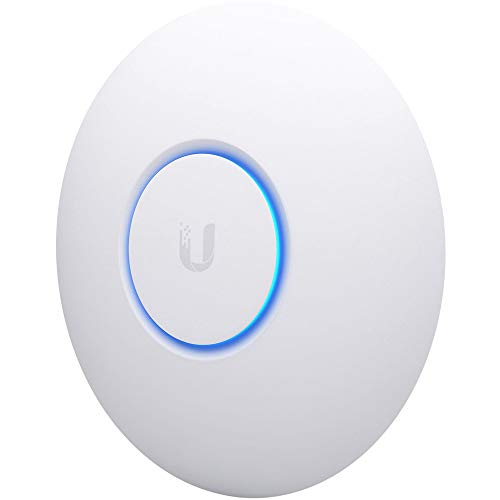
Ubiquiti UniFi nanoHD Wave 2 Access Point
Best for: high-density indoor networks requiring compact PoE hardware
- Wi-Fi Standard
- 802.11ac Wave 2
- PoE Support
- 802.3af PoE
- Operating Mode
- Access Point
- Features
- MU-MIMO
- Dimensions
- 6.3 × 6.3 × 1.3 inches
- Weight
- 0.64 ounces
The Ubiquiti UniFi nanoHD is a compact indoor access point designed for high-density environments. You get four-stream 802.11ac Wave 2 connectivity with MU-MIMO support, allowing the unit to handle more than 200 concurrent users. It operates via standard 802.3af PoE, removing the need for a separate electrical outlet. This unit suits you if you need reliable multi-user wireless throughput inside a compact 6.3-inch footprint without running dedicated AC power cords.
Pros
- Four-stream 802.11ac Wave 2 MU-MIMO technology
- Supports over 200 concurrent users
- Standard 802.3af PoE compatibility
- Compact 6.3-inch diameter and 1.3-inch profile
Cons
- Uses Wi-Fi 5 (802.11ac) rather than Wi-Fi 6
- Custom mounting covers are sold separately
- Limited to standalone access point operating mode
Good fit if
- You need an access point capable of handling over 200 concurrent users.
- You run an existing 802.3af PoE setup for data and power.
- You want a compact ceiling or wall footprint measuring 6.3 inches.
Skip if
- You require the newer Wi-Fi 6 standard.
- You want custom-colored enclosure covers included in the box.
Verdict: Ubiquiti UniFi nanoHD Wave 2 Access Point delivers dense multi-user capacity and 802.3af PoE support in a compact chassis. It provides stable four-stream 802.11ac connectivity for high-traffic environments.

TP-Link Omada AX1800 Access Point
Best for: upgrading Omada networks to Wi-Fi 6
- Wi-Fi Standard
- Wi-Fi 6
- Speed Rating
- AX1800, up to 1800 Mbps
- Frequency Band
- Dual-Band
- PoE Support
- 802.3at PoE+, 48V/0.5A Passive PoE
- Operating Mode
- Access Point, Mesh, Standalone
- Ethernet Port Speed
- 1G
This dual-band Wi-Fi 6 access point delivers wireless speeds up to 1800 Mbps across four spatial streams. It features a single 1G Ethernet port and supports multiple power options, including 802.3at PoE+, passive PoE, or the included DC power adapter. It suits you if you want modern Wi-Fi 6 capability integrated into the Omada management ecosystem with standalone setup or cloud control without recurring controller fees.
Pros
- Wi-Fi 6 connectivity with dual-band speeds up to 1800 Mbps
- Flexible power via 802.3at PoE+, passive PoE, or included DC adapter
- Free Omada Essentials cloud management and standalone mode
- Five-year manufacturer warranty
Cons
- Ethernet uplink speed capped at 1 Gbps
- Mesh networking and seamless roaming require an Omada SDN controller
Good fit if
- You need a Wi-Fi 6 access point with an included standard DC power adapter.
- You manage networks via TP-Link Omada SDN hardware, software, or cloud controllers.
- You want basic standalone deployment without mandatory subscription fees.
Skip if
- You need multi-gigabit Ethernet ports exceeding 1 Gbps.
- You want mesh or seamless roaming without running an Omada controller.
Verdict: TP-Link Omada AX1800 Wi-Fi 6 Access Point gives you dual-band Wi-Fi 6 speeds, versatile PoE or DC power options, and a five-year warranty for Omada-managed environments.
Specifications side by side
| Spec | VSVABEFV Dual-Band Gigabit PoE Access Point | Ubiquiti Networks UniFi AC Mesh Access Point | Ubiquiti UniFi White Access Point | TP-Link Omada Dual-Band PoE Access Point | TP-Link Omada AC1200 Outdoor Access Point | TP-Link Omada N300 Outdoor Access Point | Ubiquiti UniFi nanoHD Wave 2 Access Point | TP-Link Omada AX1800 Access Point |
|---|---|---|---|---|---|---|---|---|
| Wi-Fi Standard | 802.11ac | not specified | not specified | WiFi 5 | 802.11ac Wave 2, WiFi 5 | not specified | 802.11ac Wave 2 | Wi-Fi 6 |
| Speed Rating | 1200 Mbps | 1167Mbit/s | not specified | AC1350 | AC1200, up to 1200 Mbps | N300, up to 300 Mbps | not specified | AX1800, up to 1800 Mbps |
| Frequency Band | Dual-Band (2.4 GHz, 5.8 GHz) | not specified | not specified | Dual Band | Dual-Band (2.4 GHz, 5 GHz) | not specified | not specified | Dual-Band |
| PoE Support | 802.3af PoE+, 48V Passive PoE | Power Over Ethernet (PoE) | not specified | 802.3af PoE, Passive PoE | 802.3af/at PoE, Passive PoE | Passive PoE | 802.3af PoE | 802.3at PoE+, 48V/0.5A Passive PoE |
| Operating Mode | Access Point, Repeater, Mesh | Mesh | Access Point | Access Point, Mesh | Access Point, Standalone, Mesh | Access Point | Access Point | Access Point, Mesh, Standalone |
| Weatherproof Rating | not specified | not specified | not specified | not specified | IP65 | not specified | not specified | not specified |
| Ethernet Port Speed | Gigabit | not specified | not specified | Gigabit | not specified | not specified | not specified | 1G |
| Features | not specified | not specified | not specified | not specified | not specified | not specified | MU-MIMO | not specified |
| Port Speed | Gigabit | not specified | not specified | Gigabit | not specified | not specified | not specified | Gigabit |
| Management Type | not specified | not specified | not specified | Managed | Managed | not specified | not specified | not specified |
| Intended Use | not specified | not specified | not specified | not specified | Outdoors | Outdoors | not specified | not specified |
| Placement | not specified | not specified | not specified | not specified | Outdoor | Outdoor | not specified | not specified |
| Dimensions | 11.5 × 7.6 × 2.3 inches | 13.9 × 1.35 × 1.81 inches | 7.13 × 2.37 × 13.5 inches | 8.09 × 7.15 × 1.47 inches | 8.46 × 1.81 × 1.05 inches | 3.7 × 8.2 × 1.7 inches | 6.3 × 6.3 × 1.3 inches | 6.3 × 6.3 × 1.32 inches |
| Weight | 1.1 pounds | 1.46 pounds | 1.4 pounds | 1.1 pounds | 5.92 ounces | 4.16 ounces | 0.64 ounces | 13.8 ounces |
| Size | Compact | not specified | not specified | 1G Port | 1 Count | N300 | 1-Pack | AX1800, 1G Port |
| Color | Dual-band Gigabit 1200Mbps | not specified | White | PVC | White | White | White | white |
| Model | AP240 | UAP-AC-M | UAP-AC-M-PRO | EAP225 | EAP225-Outdoor | EAP110-Outdoor V3 | UAP-NANOHD-US | EAP610 |
If you plan to mount units outdoors, see the cover buying guide for environmental ratings and enclosure dimensions.
Frequently asked questions
What is the difference between an indoor and outdoor wireless access point?
Outdoor access points feature weather-resistant enclosures built to withstand open environmental conditions, unlike indoor models designed exclusively for dry spaces. For instance, models such as the TP-Link Omada EAP225-Outdoor and EAP110-Outdoor are engineered for exterior placement across yards or patios. Indoor units like the VSVABEFV AP240 or TP-Link EAP225 mount to interior ceilings and walls without exposure protection.
Can a wireless access point operate in multiple networking modes?
Yes, certain access points support multiple operating modes beyond standard broadcast operations. While dedicated hardware like the Ubiquiti UniFi UAP-AC-M-PRO operates exclusively in access point mode, other models offer greater deployment versatility. For example, the VSVABEFV AP240 supports access point, repeater, and mesh setups. Multi-mode support allows you to repurpose hardware if your home or business network architecture changes.
How does MU-MIMO support benefit your wireless network?
MU-MIMO allows an access point to communicate with multiple client devices simultaneously rather than serving them sequentially. This capability reduces communication delays across busy networks. For example, the Ubiquiti UniFi nanoHD includes MU-MIMO technology to manage dense multi-user traffic over four-stream 802.11ac connections. You get smoother connectivity when family members or coworkers stream data, place calls, and transfer files simultaneously.
What speed rating do you need for basic outdoor Wi-Fi coverage?
An N300 speed rating provides adequate bandwidth for essential outdoor tasks like managing smart yard devices or basic browsing. Hardware like the TP-Link Omada EAP110-Outdoor V3 delivers up to 300 Mbps for basic long-range coverage. If your exterior setup requires faster throughput for continuous video streaming, dual-band AC1200 hardware like the TP-Link EAP225-Outdoor offers higher overall data capacity across open spaces.
Can access points connect together wirelessly as a mesh network?
Yes, specific access points feature mesh support that allows them to link wirelessly without running dedicated backhaul cables between every unit. Models such as the Ubiquiti UniFi AC Mesh provide 1167 Mbit/s throughput while connecting across wireless hops. You only need to provide power over an Ethernet line, simplifying deployments in areas where routing structural data cables through walls is difficult.
What power options do wireless access points use?
Most access points draw electricity through Power over Ethernet, though select models also accept direct-current power adapters. Single-cable PoE powers units like the Ubiquiti UniFi AC Mesh and TP-Link EAP225 cleanly without nearby wall outlets. Meanwhile, units such as the TP-Link Omada AX1800 provide versatile PoE or DC power options, giving you flexibility if your existing network switch lacks PoE output.
When should you choose a Wi-Fi 6 access point over Wi-Fi 5?
Choose a Wi-Fi 6 access point when your environment includes newer client devices designed to utilize the standard. Hardware like the TP-Link Omada AX1800 EAP610 delivers dual-band Wi-Fi 6 speeds with Gigabit wired connectivity. While Wi-Fi 5 models like the EAP225 adequately handle routine browsing at AC1200 speeds, Wi-Fi 6 hardware provides greater headroom for modern laptops, tablets, and smartphones.