Best Network Switches with 48 Ports in 2026: 7 Picks Ranked by Specs
As an Amazon Associate we earn from qualifying purchases. Links on this page are affiliate links.
A 48-port switch serves a full patch panel in one box. The TP-Link TL-SG1048 is our top pick: fanless, non-blocking and the cheapest 48-port in this list. For power, the YuanLey 48-port gives PoE+ on every port; for management, the Omada SG3452 adds L2+ routing. We ranked these on listing specs, not lab results.
Our top pick: TP-Link 48-Port Gigabit Unmanaged Switch.
Quick picks
The best fit for you
- A plain gigabit patch panel TP-Link 48-Port Gigabit Unmanaged Switch 48 ports, fanless, lowest price.
- VLANs and routing for an Omada site TP-Link Omada 48-Port Smart Managed Switch L2+ with four SFP slots.
- PoE on every port for little money YuanLey 48-Port 800W Gigabit PoE+ Switch 800 W across 48 PoE+ ports.
- PoE in a quiet office NETGEAR 48-Port Fanless PoE+ Unmanaged Switch 24 PoE+ ports and no fan.
- A 10G fibre backbone YuanLey 48-Port Gigabit PoE+ Managed Switch Six 10G SFP+ uplinks.
- Dozens of 2.5G workstations NICGIGA 48-Port 2.5G Unmanaged Switch 48 ports at 2.5G.
Our 7 picks

TP-Link 48-Port Gigabit Unmanaged Switch
Best for: Office wiring closets
- Number of Ports
- ✓ 48 Ports
- Port Count
- 48
- Port Speed
- 10/100/1000 Mbps
- Management Type
- Unmanaged
- Switching Capacity
- 96 Gbps
- Mounting Type
- Rackmount
View on Amazon: TP-Link 48-Port Gigabit Unmanaged Switch Affiliate link
TP-Link TL-SG1048: forty-eight gigabit ports, 96 Gbps non-blocking, metal rackmount case with shielded ports, fanless and plug and play, with a three-year warranty; it is also the lowest-priced 48-port here.
Pros
- Cheapest 48-port in this list
- Fanless rack switch
- Three-year warranty
Cons
- No SFP uplinks
- No PoE or management
Good fit if
- An office patch panel has forty-plus drops and needs plain gigabit
Skip if
- You need fibre uplinks to another closet
Verdict: The simple, quiet 48-port.

NETGEAR 48-Port Unmanaged Gigabit Switch
Best for: NETGEAR offices
- Number of Ports
- ✓ 48 Ports
- Port Count
- 48
- Port Speed
- 1.0Gbps
- Management Type
- Unmanaged
- Mounting Type
- Desktop or Rack Mount
- Dimensions
- 8 × 17.3 × 1.7 inches
View on Amazon: NETGEAR 48-Port Unmanaged Gigabit Switch Affiliate link
NETGEAR GS348: forty-eight gigabit ports in a fanless metal case for desk or rack, with 802.3az Energy Efficient Ethernet; made for the U.S. and Canada.
Pros
- Fanless
- Desk or rack
- Energy saving
Cons
- Costs a little more than the TP-Link
- Stock listed as low
Good fit if
- You standardise on NETGEAR hardware in the rack
Skip if
- Fibre uplinks are required
Verdict: NETGEAR's plain 48-port.

TP-Link Omada 48-Port Smart Managed Switch
Best for: Small businesses
- Number of Ports
- ✓ 48 Ports
- Port Count
- 48
- Port Speed
- 10/100/1000 Mbps
- Management Type
- L2+ Smart Managed
- Uplink Ports
- 4 x Gigabit SFP
- Dimensions
- 17.3 × 8.66 × 1.73 inches
View on Amazon: TP-Link Omada 48-Port Smart Managed Switch Affiliate link
Omada SG3452: forty-eight gigabit ports plus four gigabit SFP slots, L2+ static routing, ACLs, 802.1Q VLANs, DHCP snooping, web/CLI/SNMP management or Omada cloud control, five-year protection.
Pros
- Static routing and ACLs
- Four SFP slots
- Five-year protection
Cons
- Gigabit SFP only, no 10G
- Takes time to configure
Good fit if
- A business wants VLANs per floor and an Omada controller for everything
Skip if
- You want zero configuration
Verdict: Managed 48-port for Omada networks.

YuanLey 48-Port 800W Gigabit PoE+ Switch
Best for: Large camera systems
- Number of Ports
- ✓ 48 Ports
- Port Count
- 50
- Port Speed
- 10/100/1000 Mbps
- Management Type
- Unmanaged
- PoE Support
- PoE+ (802.3af/at)
- PoE Power Budget
- 800W
View on Amazon: YuanLey 48-Port 800W Gigabit PoE+ Switch Affiliate link
YuanLey 48-port PoE: forty-eight gigabit PoE+ ports sharing an 800 W built-in supply, two gigabit SFP uplinks, 4 kV lightning protection and an industrial fan, unmanaged; one-year warranty.
Pros
- PoE+ on all 48 ports
- 800 W budget
- Two SFP uplinks
Cons
- Fan noise
- One-year warranty only
Good fit if
- A large camera or access point install needs power on every port
Skip if
- The switch sits near people working
Verdict: Most PoE watts per dollar here.

NETGEAR 48-Port Fanless PoE+ Unmanaged Switch
Best for: Offices with phones and APs
- Number of Ports
- ✓ 48 Ports
- Port Count
- 48
- Port Speed
- 1.0Gbps
- Management Type
- Unmanaged
- PoE Support
- PoE+
- PoE Power Budget
- 380W
View on Amazon: NETGEAR 48-Port Fanless PoE+ Unmanaged Switch Affiliate link
NETGEAR GS348PP: forty-eight gigabit ports, twenty-four of them PoE+ with a 380 W budget and dynamic allocation, fanless metal for desk or rack, 802.3az energy saving.
Pros
- Silent despite PoE
- Dynamic PoE allocation
- Desk or rack
Cons
- Only half the ports are PoE
- Costs about twice the YuanLey
Good fit if
- You need PoE in a quiet office or a cabinet near desks
Skip if
- Every port needs power
Verdict: Quiet 48-port with PoE.

YuanLey 48-Port Gigabit PoE+ Managed Switch
Best for: Larger sites
- Number of Ports
- ✓ 48 Ports
- Port Count
- 54
- Port Speed
- 1 Gbps
- Management Type
- Managed
- PoE Support
- PoE+ (802.3at/af)
- PoE Power Budget
- 460 W
View on Amazon: YuanLey 48-Port Gigabit PoE+ Managed Switch Affiliate link
YuanLey 48-port L3: forty-eight gigabit PoE+ ports with a 460 W supply and six 10G SFP+ slots, L3 management by web, CLI (console, Telnet) and SNMP, VLANs, QoS, ACL and IGMP, 802.3az.
Pros
- Six 10G SFP+ uplinks
- Layer 3 managed
- PoE+ on every port
Cons
- 460 W limits full PoE+ load
- Lesser-known brand support
Good fit if
- A campus or warehouse needs PoE everywhere and a 10G fibre backbone
Skip if
- You only need a plain switch
Verdict: Managed PoE with 10G uplinks.
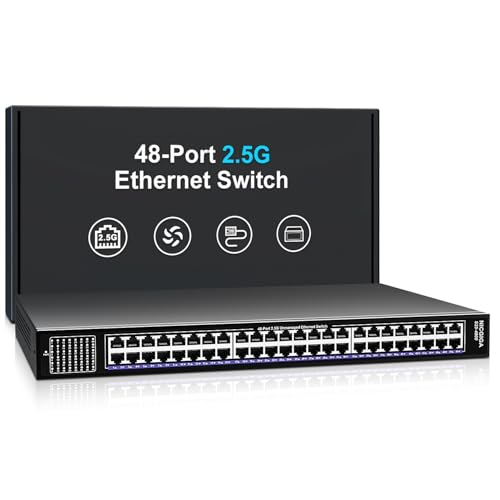
NICGIGA 48-Port 2.5G Unmanaged Switch
Best for: Multi-gig offices
- Number of Ports
- ✓ 48 Ports
- Port Count
- 48
- Port Speed
- 2.5Gbps
- Management Type
- Unmanaged
- Switching Capacity
- 240Gbps
- Mounting Type
- 19-Inch Rackmount / Desktop
View on Amazon: NICGIGA 48-Port 2.5G Unmanaged Switch Affiliate link
NICGIGA 48-port 2.5G: forty-eight 2.5G RJ45 ports (100M/1G/2.5G), 240 Gbps switching, unmanaged, 19-inch rackmount or desktop, industrial fans and 4 kV surge protection.
Pros
- 2.5G on all 48 ports
- Rack or desk
- Plug and play
Cons
- Fans
- No SFP+ uplinks
Good fit if
- A studio or lab is moving dozens of workstations to 2.5G
Skip if
- Your clients are all gigabit
Verdict: The multi-gig 48-port.
Specifications side by side
| Spec | TP-Link 48-Port Gigabit Unmanaged Switch | NETGEAR 48-Port Unmanaged Gigabit Switch | TP-Link Omada 48-Port Smart Managed Switch | YuanLey 48-Port 800W Gigabit PoE+ Switch | NETGEAR 48-Port Fanless PoE+ Unmanaged Switch | YuanLey 48-Port Gigabit PoE+ Managed Switch | NICGIGA 48-Port 2.5G Unmanaged Switch |
|---|---|---|---|---|---|---|---|
| Port Count | 48 | 48 | 48 | 50 | 48 | 54 | 48 |
| Port Speed | 10/100/1000 Mbps | 1.0Gbps | 10/100/1000 Mbps | 10/100/1000 Mbps | 1.0Gbps | 1 Gbps | 2.5Gbps |
| Management Type | Unmanaged | Unmanaged | L2+ Smart Managed | Unmanaged | Unmanaged | Managed | Unmanaged |
| PoE Support | not stated | not stated | not stated | PoE+ (802.3af/at) | PoE+ | PoE+ (802.3at/af) | not stated |
| PoE Power Budget | not stated | not stated | not stated | 800W | 380W | 460 W | not stated |
| Uplink Ports | not stated | not stated | 4 x Gigabit SFP | 2 x Gigabit SFP | not stated | 6 x 10G SFP+ | not stated |
| Switching Capacity | 96 Gbps | not stated | not stated | 56Gbps | not stated | 216 Gbps | 240Gbps |
| Mounting Type | Rackmount | Desktop or Rack Mount | not stated | Desktop, Rackmount | Desktop or Rack Mount | Rackmount | 19-Inch Rackmount / Desktop |
| Number of Ports | 48 Ports | 48 Ports | 48 Ports | 48 Ports | 48 Ports | 48 Ports | 48 Ports |
| Uplink Port Type | not stated | not stated | SFP | SFP | not stated | SFP | not stated |
| Dimensions | 17.3 × 8.66 × 1.73 inches | 8 × 17.3 × 1.7 inches | 17.3 × 8.66 × 1.73 inches | 22.4 × 14.2 × 3.54 inches | 17.3 × 10.2 × 1.73 inches | not stated | not stated |
| Weight | 9.22 pounds | 8.6 pounds | 7.43 pounds | 10.3 pounds | 10.1 pounds | not stated | not stated |
| Size | 48 Port, 1 Gigabit | 48 Port | 48 Port + 4 SFP Slots | 50 Port | 48*PoE+ (1000Mbps)(800w) | 48 Port, PoE+ @ 380W | 54 Port PoE Switch(Managed) | not stated |
| Color | Black | Black | black | Blue | Black | Blue | black |
| Model | TL-SG1048 | GS348-100NAS | TL-SG3452 | 50 Port | 48*PoE+ (1000Mbps) (800w) | GS348PP-100NAS | 54 Port | 48*PoE+ (1000Mbps) | 48 Port | 48x 2.5G RJ45 |
Buying a 48-port switch
-
Rack space and depth
48-port switches are full-width 19-inch units; check rack depth and leave room for patch cables.
-
Total PoE, not per-port
800 W or 380 W is shared across ports; work out what your cameras and access points draw together.
-
Uplinks avoid bottlenecks
With 48 users, gigabit uplinks can saturate; SFP or SFP+ uplinks to the core keep traffic moving.
-
Fans and placement
Fan-cooled PoE units are best in a closet or server room, away from desks.
Frequently asked questions
Which 48-port switch here is fanless?
The TP-Link TL-SG1048, NETGEAR GS348 and NETGEAR GS348PP are described as fanless; both YuanLey units and the NICGIGA use fans.
Does every port on the GS348PP supply PoE?
No. Twenty-four of its 48 ports are PoE+, sharing 380 W.
Which has 10G uplinks?
Only the YuanLey L3 model, with six 10G SFP+ slots.
Can I buy the NETGEAR GS348 for use in Europe?
NETGEAR limits this listing to the U.S. and Canada, so look elsewhere for other regions.
See also
- best network switches with gigabit uplink
- best network switches for office
- best network switches with 18 Ports
- best mesh wifi systems under 100
- best mesh wifi systems under 150
- Best Mesh Wifi Systems Under $200: 10 Spec-Based Picks
- 9 Best Mesh Wifi Systems Under $300, Compared
- Best Mesh Wifi Systems Under $500 in 2026: 8 Picks Ranked by Specs
- best 48 oz blenders
- 48-Inch computer workstation