Best TP-Link Wi-Fi 6 Wifi Routers: 15 Spec-Based Picks
As an Amazon Associate we earn from qualifying purchases. Links on this page are affiliate links.
Choosing the right TP-Link Wi-Fi 6 wifi router requires matching your bandwidth needs and connected devices directly to hardware capabilities. Across 15 options evaluated strictly against their published specifications, the TP-Link Archer AX1800 Wi-Fi 6 Router earns the top spot because its AX1800 speed rating delivers reliable dual-band performance for everyday household use.
Other models on the list feature multi-gigabit ports, tri-band frequencies, or mesh coverage. This guide helps you compare these verified hardware attributes to select the router that fits your space, wired port needs, and network demands.
Quick picks
The best fit for you
- You want standard Wi-Fi 6 for everyday home networking TP-Link Archer AX1800 Wi-Fi 6 Router This router provides AX1800 dual-band Wi-Fi 6 speeds alongside built-in VPN server support.
- You need a lightweight travel router with multi-gigabit speeds TP-Link Roam 6 AX3000 Travel Router It packs AX3000 speeds and a 2.5 Gbps wired port into a 0.33-pound chassis.
- You need whole-property coverage reaching outdoor yard areas TP-Link AX3000 Outdoor Mesh System 3-Pack This 3-pack system delivers 6,000 square feet of AX3000 coverage with IP65 weatherproofing.
- You want many wired connections for gaming equipment TP-Link Tri-Band Wi-Fi 6 Gaming Router It includes eight Gigabit Ethernet ports alongside a 2.5 Gbps port and tri-band Wi-Fi 6.
Our 15 picks

TP-Link Archer AX1800 Wi-Fi 6 Router
Best for: everyday dual-band home Wi-Fi 6 setups
- Wi-Fi Standard
- Wi-Fi 6 (what this guide is about)
- Speed Rating
- AX1800
- Frequency Bands
- Dual-Band
- Dimensions
- 10.3 × 5.3 × 1.61 inches
- Weight
- 1.1 pounds
The TP-Link AX1800 Dual-Band Wi-Fi 6 Router provides up to 1.8 Gbps total bandwidth, split into 1200 Mbps on the 5 GHz band and 574 Mbps on the 2.4 GHz band. It incorporates four high-gain antennas with beamforming and OFDMA support for simultaneous data transmission across multiple devices. This standalone router fits standard home networks needing reliable dual-band coverage and built-in OpenVPN or PPTP VPN server functionality without extra hardware.
Pros
- Up to 1.8 Gbps total throughput (1200 Mbps on 5 GHz, 574 Mbps on 2.4 GHz)
- Built-in OpenVPN and PPTP VPN server support
- Four high-gain antennas with beamforming and FEM chipset
- OFDMA support for simultaneous multi-device transmission
Cons
- No support for the 6 GHz frequency band
- Requires a separate standalone modem
Good fit if
- You want dual-band Wi-Fi 6 speeds up to 1.8 Gbps total bandwidth.
- You need native OpenVPN or PPTP VPN server hosting.
Skip if
- You require the 6 GHz wireless band.
- You need an integrated modem unit rather than a separate device.
Verdict: TP-Link AX1800 Dual-Band Wi-Fi 6 Router delivers standard dual-band Wi-Fi 6 speeds alongside built-in VPN server support. It serves as a practical, dependable foundation for typical household networking setups.

TP-Link Archer Dual-Band WiFi 6 Router
Best for: entry-level dual-band Wi-Fi 6 home setups
- Wi-Fi Standard
- Wi-Fi 6 (what this guide is about)
- Frequency Bands
- Dual-Band
- Max Port Speed
- Gigabit
- Ethernet Ports
- 4
- Dimensions
- 10.2 × 4.96 × 1.3 inches
- Weight
- 13.4 ounces
The TP-Link Archer Dual-Band Wi-Fi 6 Router provides entry-level 802.11ax wireless connectivity for your home network. It features dual-band speeds reaching up to 1201 Mbps on the 5 GHz band and 300 Mbps on the 2.4 GHz band, driven by a 900MHz dual-core processor. With four Gigabit LAN ports and OneMesh compatibility, this unit suits you if you need wired stability and essential Wi-Fi 6 coverage for everyday devices.
Pros
- Up to 1201 Mbps on 5 GHz band via Wi-Fi 6
- Four Gigabit LAN ports for wired connections
- OneMesh support for compatible TP-Link range extenders
- Dual-core 900MHz processor handles simultaneous traffic streams
Cons
- 2.4 GHz band limited to 802.11n speeds up to 300 Mbps
- No multi-gigabit Ethernet ports included
- No USB ports listed for network storage
Good fit if
- You want up to 1201 Mbps Wi-Fi 6 throughput on the 5 GHz band.
- You need four Gigabit Ethernet ports for wired consoles or PCs.
- You plan to expand coverage using TP-Link OneMesh extenders.
Skip if
- You require Wi-Fi 6 speeds on the 2.4 GHz frequency band.
- You have an internet plan faster than 1 Gbps needing multi-gig ports.
- You want built-in USB ports for networked shared storage.
Verdict: TP-Link Archer Dual-Band Wi-Fi 6 Router delivers standard Gigabit wired switching and 1201 Mbps 5 GHz wireless speeds for everyday household networks. It is a practical entry point if you want basic Wi-Fi 6 features and OneMesh expandability without complex hardware.

TP-Link Roam 6 Portable Wi-Fi 6 Router
Best for: secure Wi-Fi 6 networking while traveling
- Wi-Fi Standard
- Wi-Fi 6 (what this guide is about)
- Speed Rating
- AX1500
- Frequency Bands
- Dual-Band
- Device Capacity
- Up to 60 devices
- Max Port Speed
- 1 Gbps
- Ethernet Ports
- 2
The TP-Link Roam 6 is a compact Wi-Fi 6 travel router designed for mobile network setups. It delivers AX1500 dual-band speeds with up to 1,201 Mbps on the 5 GHz band and 300 Mbps on 2.4 GHz. You can power it through a USB-C port using an adapter or a portable power bank. It suits you if you frequently need built-in VPN support, captive portal login, and wired Ethernet ports while traveling.
Pros
- Pocket-sized 0.42-pound body with USB-C power input
- AX1500 dual-band speeds up to 1,201 Mbps on 5 GHz
- Built-in OpenVPN and WireGuard encryption support
- Two 1 Gbps Ethernet ports for WAN and LAN connections
Cons
- 2.4 GHz throughput capped at 300 Mbps
- Limited to two total Gigabit Ethernet ports
- Maximum capacity limited to 60 simultaneous devices
Good fit if
- You need a portable Wi-Fi 6 router powered by a 5V/3A USB-C power bank.
- You want hardware-level OpenVPN or WireGuard security on public Wi-Fi networks.
- You require multiple operating modes including router, access point, range extender, and client.
Skip if
- You need more than two physical Gigabit Ethernet ports for wired devices.
- You want faster 2.4 GHz transfer rates beyond 300 Mbps.
- You must support more than 60 concurrent connected devices.
Verdict: TP-Link Roam 6 Portable Travel Router provides AX1500 Wi-Fi 6 performance and robust VPN support in a pocket-sized package. It gives you an effective networking solution for secure travel connections without carrying bulky equipment.

TP-Link Deco AX3000 Mesh System 3-Pack
Best for: large homes with multi-gigabit internet plans
- Wi-Fi Standard
- Wi-Fi 6 (what this guide is about)
- Speed Rating
- AX3000
- Coverage Area
- 6,500 square feet
- Device Capacity
- more than 150 devices
- Max Port Speed
- 2.5 Gbps
- Pack Size
- 3-Pack
This is a three-pack Wi-Fi 6 mesh system designed for large spaces. It provides AX3000 dual-band speeds, reaching up to 2,402 Mbps on 5 GHz and 574 Mbps on 2.4 GHz. Each node includes two 2.5 Gbps Ethernet ports for multi-gigabit wired backhaul or fast local connections. If you need coverage up to 6,500 square feet and have an internet plan over 1 Gbps, this system fits your home.
Pros
- Dual 2.5 Gbps Ethernet ports on every unit
- Covers up to 6,500 square feet with three units
- Dual-band Wi-Fi 6 speeds up to 2,402 Mbps on 5 GHz
- Supports over 150 connected devices
Cons
- Only two Ethernet ports per unit
- Dual-band design lacks a dedicated third backhaul band
- No USB ports for external storage
Good fit if
- You have an internet plan over 1 Gbps and need 2.5G ports.
- You need Wi-Fi coverage across an area up to 6,500 square feet.
- You want to connect up to 150 smart devices across your home.
Skip if
- You need more than two wired LAN ports per node.
- You prefer a tri-band mesh system with a dedicated wireless backhaul.
- You require USB connectivity for local network storage.
Verdict: TP-Link Deco Wi-Fi 6 Mesh System 3-Pack delivers broad whole-home coverage and multi-gigabit connectivity via two 2.5G ports per unit. It provides reliable throughput across large spaces without needing complex setup.

TP-Link Archer Dual-Band Wi-Fi 6 Router
Best for: entry-level Wi-Fi 6 home setups
- Wi-Fi Standard
- Wi-Fi 6 (what this guide is about)
- Speed Rating
- AX1450
- Frequency Bands
- Dual-Band
- Weight
- 13.4 ounces
This renewed dual-band Wi-Fi 6 router delivers combined wireless speeds up to 1.45 Gbps, splitting 1201 Mbps across the 5 GHz band and 250 Mbps on 2.4 GHz. It uses four antennas alongside beamforming and OFDMA to manage device connections with reduced latency. Target Wake Time assists connected devices with power efficiency. You get a lightweight 0.84-pound setup managed via the Tether app, ideal for standard household wireless coverage.
Pros
- Up to 1.45 Gbps total speed with 1201 Mbps on 5 GHz
- Four antennas with beamforming focus signal to devices
- OFDMA and Target Wake Time optimize multi-device communication
- Setup handled via the TP-Link Tether app
Cons
- Renewed model rather than brand-new factory hardware
- 2.4 GHz band bandwidth capped at 250 Mbps
- No Ethernet port or USB specifications provided
Good fit if
- You need entry-level Wi-Fi 6 dual-band wireless coverage.
- You want mobile management through the TP-Link Tether app.
- You use devices that benefit from Target Wake Time battery savings.
Skip if
- You prefer brand-new equipment over renewed hardware.
- You require 2.4 GHz transfer rates higher than 250 Mbps.
- You need verified physical Gigabit Ethernet port counts.
Verdict: TP-Link Archer Dual-Band Wi-Fi 6 Router provides entry-level 1.45 Gbps wireless speeds and four antennas for basic home networks. It offers standard Wi-Fi 6 features like OFDMA and Target Wake Time in a renewed package.

TP-Link AX6000 Dual-Band Wi-Fi 6 Router
Best for: multi-gigabit internet connections needing high dual-band bandwidth
- Wi-Fi Standard
- Wi-Fi 6 (what this guide is about)
- Speed Rating
- AX6000
- Frequency Bands
- Dual Band
- Max Port Speed
- 2.5 Gbps
- Dimensions
- 9.84 × 7.87 × 3.15 inches
- Weight
- 2 pounds
The TP-Link AX6000 Dual-Band Router delivers Wi-Fi 6 throughput reaching up to 4804 Mbps on the 5 GHz band and 1148 Mbps on the 2.4 GHz band. It features a dedicated 2.5 Gbps multi-gigabit port for fast internet feeds, eight high-gain antennas with beamforming, and built-in VPN client support. This setup fits your home if you want multi-gigabit wired speeds and high dual-band bandwidth without moving to a tri-band system.
Pros
- Wi-Fi 6 speeds up to 4804 Mbps on 5 GHz and 1148 Mbps on 2.4 GHz
- One 2.5 Gbps multi-gigabit port for high-speed wired input
- Eight high-gain antennas with beamforming coverage
- Built-in VPN client to connect network devices without extra software
- OneMesh support for linking compatible range extenders
Cons
- Dual-band architecture lacks an additional 5 GHz band
- Provides only one 2.5 Gbps port rather than multiple multi-gig ports
- Free HomeShield plan includes only basic security and parental controls
Good fit if
- You subscribe to an internet service plan exceeding 1 Gbps.
- You want high dual-band throughput backed by eight external antennas.
- You need router-level VPN client capabilities for your home devices.
Skip if
- You need a tri-band router to separate device traffic across three bands.
- You require multiple multi-gigabit Ethernet ports for wired hardware.
Verdict: TP-Link AX6000 Dual-Band Router combines 2.5 Gbps wired connectivity with high-capacity dual-band Wi-Fi 6 throughput. It gives you fast wired and wireless speeds across eight antennas without the complexity of a tri-band setup.

TP-Link Roam 6 AX3000 Travel Router
Best for: secure Wi-Fi 6 networking while traveling
- Wi-Fi Standard
- Wi-Fi 6 (what this guide is about)
- Speed Rating
- AX3000
- Frequency Bands
- Dual-Band
- Max Port Speed
- 2.5 Gbps
- Ethernet Ports
- 2
- Use Case
- Travel
The TP-Link Roam 6 AX3000 Travel Router is a portable dual-band Wi-Fi 6 router designed for mobile network setups. You get wireless speeds reaching 2402 Mbps on 5 GHz and 574 Mbps on 2.4 GHz, paired with a 2.5 Gbps WAN/LAN port and a 1 Gbps LAN port. Built-in WireGuard and OpenVPN client and server support let you encrypt connections on public networks. It suits you if you frequently travel and need secure personal networking.
Pros
- Dedicated 2.5 Gbps WAN/LAN port and 1 Gbps LAN port
- WireGuard and OpenVPN client and server encryption
- USB-C powered via standard adapter or 5V power bank
- Integrated USB 3.0 port and microSD slot up to 512GB
Cons
- Only two total Ethernet ports
- Dual-band design lacks 6 GHz band access
Good fit if
- You need a portable Wi-Fi 6 router powered via USB-C or a power bank.
- You want built-in WireGuard or OpenVPN encryption for public hotspots.
- You require a 2.5 Gbps wired network port on a travel device.
Skip if
- You need more than two wired Ethernet ports for home equipment.
- You require tri-band connectivity with 6 GHz support.
Verdict: TP-Link Roam 6 AX3000 Travel Router delivers high-speed dual-band Wi-Fi 6 and 2.5 Gbps wired connectivity in a compact 0.33-pound chassis. Its integrated VPN protocols and USB-C power options make it an efficient networking tool on the road.

TP-Link Omada AX3000 VPN Router
Best for: multi-WAN networking and versatile VPN tunnels
- Wi-Fi Standard
- Wi-Fi 6 (what this guide is about)
- Speed Rating
- AX3000
- Max Port Speed
- 1 Gbps
- Ethernet Ports
- 6
- Features
- VPN
- Dimensions
- 14.7 × 8.9 × 1.4 inches
The TP-Link Omada AX3000 Wi-Fi 6 VPN Router combines dual-band wireless routing with specialized network control. It delivers up to 2402 Mbps on 5 GHz and 574 Mbps on 2.4 GHz. Featuring five Gigabit RJ45 ports, one Gigabit SFP slot, and broad VPN support including WireGuard and OpenVPN, this unit suits you if you need multi-WAN load balancing and mesh integration with Omada access points.
Pros
- AX3000 speeds reaching 2402 Mbps on 5 GHz and 574 Mbps on 2.4 GHz
- One Gigabit SFP slot plus five Gigabit RJ45 ports
- Multi-WAN load balancing across up to five WAN ports
- Extensive VPN support including WireGuard, OpenVPN, and IPSec
- Meshes directly with Omada access points without added switches
Cons
- Lacks 2.5 Gbps or faster multi-gigabit ports
- No USB port included for network storage
- Dual-band design lacks a dedicated third wireless band
Good fit if
- You need multi-WAN load balancing across multiple internet connections.
- You run secure remote tunnels using WireGuard, IPSec, or OpenVPN.
- You plan to expand coverage using compatible Omada mesh access points.
Skip if
- You require wired speeds exceeding 1 Gbps.
- You want a tri-band router to separate client traffic.
Verdict: TP-Link Omada AX3000 Wi-Fi 6 VPN Router provides robust multi-WAN routing and comprehensive VPN capabilities for controlled network environments. It serves as a dependable wired and wireless gateway if you manage multiple internet lines and Omada hardware.

TP-Link Indoor and Outdoor Mesh WiFi 6 3-Pack
Best for: combined indoor and outdoor whole-property coverage
- Wi-Fi Standard
- Wi-Fi 6 (what this guide is about)
- Speed Rating
- AX3000
- Frequency Bands
- Dual-Band
- Coverage Area
- up to 4,500 sq. ft.
- Device Capacity
- over 150 devices
- Pack Size
- 3-Pack
View on Amazon: TP-Link Indoor and Outdoor Mesh WiFi 6 3-Pack
This TP-Link system is an AX3000 dual-band Wi-Fi 6 mesh kit that includes an IP65 weatherproof outdoor unit alongside indoor units. It provides coverage up to 4,500 square feet indoors and 2,500 square feet outdoors, supporting over 150 connected devices. If you need steady wireless networking across both living spaces and open yards, this setup handles the transition without separate outdoor extenders.
Pros
- IP65 weatherproof enclosure protects against dust and moisture outdoors
- Coverage up to 4,500 sq. ft. indoors and 2,500 sq. ft. outdoors
- AX3000 speeds up to 2402 Mbps on 5 GHz and 574 Mbps on 2.4 GHz
- Supports connections for over 150 devices
Cons
- Dual-band design lacks a dedicated third wireless backhaul band
- No multi-gigabit Ethernet ports listed in specifications
Good fit if
- You need reliable Wi-Fi coverage across an outdoor yard as well as indoor rooms.
- You connect up to 150 devices across a combined area reaching up to 7,000 square feet.
Skip if
- You want a tri-band mesh system with a dedicated wireless backhaul band.
- You only need indoor coverage and do not plan to mount hardware outside.
Verdict: TP-Link Indoor and Outdoor Mesh WiFi 6 3-Pack delivers robust whole-property coverage by pairing indoor nodes with an IP65 weatherproof outdoor unit. It provides seamless roaming when you require continuous Wi-Fi across indoor rooms and exterior spaces.

TP-Link Festa Wi-Fi 6 VPN Router
Best for: cloud-managed multi-WAN small business networks
- Wi-Fi Standard
- Wi-Fi 6 (what this guide is about)
- Speed Rating
- AX3000
- Frequency Bands
- Dual-Band
- Max Port Speed
- Gigabit
- Ethernet Ports
- 6
- Features
- VPN
The TP-Link Festa Wi-Fi 6 VPN Router is an AX3000 dual-band router engineered for multi-WAN networks and secure remote access. You get speeds up to 2402 Mbps on 5 GHz and 574 Mbps on 2.4 GHz, paired with six gigabit ports including an SFP slot and load balancing across up to five WAN ports. It suits small offices and home businesses that need built-in VPN tunnels, cellular backup via USB, and centralized cloud configuration.
Pros
- Six gigabit ports including one SFP port with load balancing across up to five WAN links
- Dual-band Wi-Fi 6 speeds reaching 2402 Mbps on 5 GHz and 574 Mbps on 2.4 GHz
- Hardware VPN support for up to 100 IPsec, 55 OpenVPN, 50 L2TP, and 50 PPTP tunnels
- USB 3.0 port supports 4G/3G modems for automated mobile broadband backup
Cons
- Requires Festa Cloud to manage and does not support standalone offline mode
- Incompatible with TP-Link Omada controllers and ecosystems
- Lacks 2.5 Gbps or faster multi-gigabit ethernet ports
Good fit if
- You need multi-WAN load balancing across multiple wired internet providers.
- You manage secure remote connections requiring high-capacity IPsec or OpenVPN tunnels.
- You plan to build a business network using compatible Festa mesh access points.
Skip if
- You currently run or plan to expand an existing TP-Link Omada ecosystem.
- You want local router management without mandatory cloud registration.
- You require multi-gigabit wired speeds beyond standard 1 Gbps connections.
Verdict: TP-Link Festa Wi-Fi 6 VPN Router provides reliable multi-WAN redundancy and robust VPN tunneling for small offices operating on the Festa platform. It is an effective networking hub if you want centralized cloud administration without requiring local standalone setup.

TP-Link AX3000 Dual-Band Wi-Fi 6 Router
Best for: homes needing integrated parental controls and security
- Wi-Fi Standard
- Wi-Fi 6 (what this guide is about)
- Speed Rating
- AX3000
- Frequency Bands
- Dual Band
- Max Port Speed
- Gigabit
- Features
- Parental Controls, MU-MIMO
- Dimensions
- 13 × 2.95 × 9.65 inches
This dual-band Wi-Fi 6 router delivers combined wireless speeds up to 3000 Mbps, allocating 2402 Mbps to the 5 GHz band and 574 Mbps to the 2.4 GHz band across four streams. It includes built-in TP-Link HomeCare tools, giving you network-level antivirus, QoS prioritization, and parental controls. Powered by an Intel dual-core processor with Gigabit ports, it suits households that want centralized family content filtering and low-latency Wi-Fi 6 connectivity.
Pros
- Includes TP-Link HomeCare with parental controls, antivirus, and QoS
- AX3000 dual-band speeds reach up to 2402 Mbps on 5 GHz and 574 Mbps on 2.4 GHz
- OFDMA and MU-MIMO support for multi-device data transmission
- Target Wake Time technology helps extend connected device battery life
Cons
- Dual-band design lacks a dedicated third band for traffic separation
- Requires a separate standalone modem from your internet provider
Good fit if
- You need integrated parental controls and network security without extra subscriptions.
- You want 4-stream Wi-Fi 6 speeds reaching up to 2402 Mbps on the 5 GHz band.
- You connect multiple client devices simultaneously using OFDMA and MU-MIMO.
Skip if
- You require a tri-band router for dedicated backhaul or heavy traffic offloading.
- You need multi-gigabit wired Ethernet ports faster than standard Gigabit.
Verdict: TP-Link AX3000 Dual-Band Wi-Fi 6 Router provides balanced AX3000 wireless performance paired with built-in HomeCare parental controls and security tools. It gives you dependable multi-device management and Gigabit connectivity for everyday home networking.
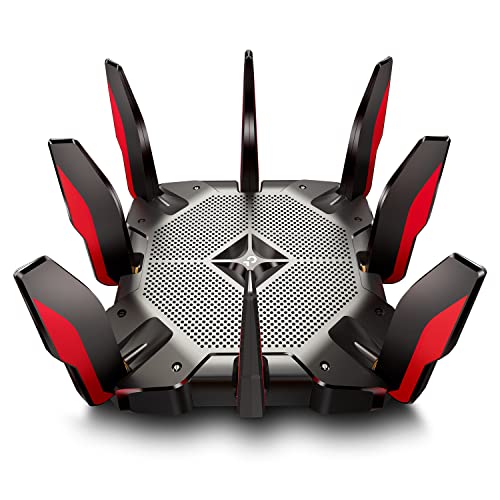
TP-Link Tri-Band Wi-Fi 6 Gaming Router
Best for: homes needing eight wired Gigabit connections
- Wi-Fi Standard
- Wi-Fi 6 (what this guide is about)
- Speed Rating
- AX10000
- Frequency Bands
- Tri-Band
- Max Port Speed
- 2.5 Gbps
- Use Case
- Gaming
- Features
- VPN
The TP-Link Tri-Band Wi-Fi 6 Gaming Router is a high-bandwidth router built for demanding home setups. You get tri-band Wi-Fi 6 output reaching up to 10 Gbps across three bands, eight Gigabit LAN ports, and a dedicated 2.5 Gbps WAN port. It features a 1.8 GHz quad-core processor and two USB 3.0 ports. This setup suits you if you run many wired consoles alongside heavy wireless network traffic.
Pros
- Eight Gigabit LAN ports and one 2.5 Gbps WAN port
- Tri-band Wi-Fi 6 with cumulative speeds up to 10 Gbps
- Two USB 3.0 ports in Type-A and Type-C configurations
- Quad-core 1.8 GHz processor with three coprocessors
Cons
- Large physical footprint measuring 14.37 by 11.42 inches
- LAN ports top out at 1 Gbps instead of multi-gigabit speeds
- Heavy chassis weighing 4 pounds
Good fit if
- You need eight wired Gigabit LAN connections for consoles and PCs.
- You subscribe to an internet service tier that uses a 2.5 Gbps WAN port.
- You want two separate 5 GHz bands to isolate gaming and streaming traffic.
Skip if
- You have limited shelf space for a chassis wider than 14 inches.
- You require multi-gigabit transfer speeds between your local wired LAN devices.
Verdict: TP-Link Tri-Band Wi-Fi 6 Gaming Router pairs eight Gigabit Ethernet ports with a 2.5 Gbps WAN input and tri-band Wi-Fi 6 capacity. It gives multi-device households ample physical ports and dedicated wireless bandwidth without bottlenecking fast incoming internet tiers.

TP-Link Archer Tri-Band Gaming Router
Best for: tri-band Wi-Fi 6 gaming setups
- Wi-Fi Standard
- Wi-Fi 6 (what this guide is about)
- Speed Rating
- AX11000
- Frequency Bands
- Tri-Band
- Max Port Speed
- Gigabit
- Use Case
- Gaming
- Dimensions
- 14.4 × 11.4 × 4.72 inches
The TP-Link Archer Tri-Band Gaming Router is a Wi-Fi 6 router designed for dedicated gaming setups. It operates across three wireless frequency bands to separate your traffic and includes standard gigabit ports for wired devices. Measuring 14.37 by 11.42 inches, this unit is built for heavy traffic households where you want dedicated tri-band wireless capacity and wired gigabit connectivity across multiple client devices without relying on dual-band hardware.
Pros
- Wi-Fi 6 tri-band wireless operation
- Gigabit Ethernet wired ports
- Configured for dedicated gaming use cases
Cons
- Large chassis footprint measuring 14.37 by 11.42 inches
- No multi-gigabit port speeds specified
Good fit if
- You need tri-band Wi-Fi 6 bandwidth to split your network traffic.
- You want gigabit Ethernet connectivity for wired gaming hardware.
- You have adequate desk space for a 14.37-inch wide router.
Skip if
- You require wired port speeds faster than standard gigabit.
- You need a compact router with a small physical footprint.
Verdict: TP-Link Archer Tri-Band Gaming Router delivers dedicated tri-band Wi-Fi 6 coverage and gigabit wired ports for high-demand networks. It is a solid choice if you need multi-band wireless management and have desk space for its larger chassis.
TP-Link AX3000 Outdoor Mesh System 3-Pack
Best for: large properties needing 6,000 sq ft coverage
- Wi-Fi Standard
- Wi-Fi 6 (what this guide is about)
- Speed Rating
- AX3000
- Frequency Bands
- Dual-Band
- Coverage Area
- Up to 6,000 sq ft
- Pack Size
- 3-Pack
- Intended Use
- Outdoors
This TP-Link AX3000 system is a dual-band Wi-Fi 6 mesh setup supplied as a three-pack. Designed for both indoor and outdoor placement, the units carry an IP65 weatherproof rating to resist outdoor exposure. With a total rated coverage area of 6,000 square feet, it suits you if you need consistent network access across large residential properties, yards, or detached outbuildings without switching between separate network names.
Pros
- Covers areas up to 6,000 square feet
- IP65-rated weatherproof build for outdoor deployment
- Dual-band Wi-Fi 6 with AX3000 total speed class
- Includes three mesh nodes in the box
Cons
- Dual-band operation lacks a dedicated third backhaul band
- AX3000 throughput is lower than tri-band Wi-Fi 6 models
Good fit if
- You need up to 6,000 square feet of Wi-Fi 6 coverage across indoor and outdoor spaces.
- You want weather-resistant hardware with an IP65 rating for yard or patio placement.
Skip if
- You require a tri-band system with a dedicated wireless backhaul band.
- You live in a smaller home where a multi-node 6,000-square-foot system exceeds your space.
Verdict: TP-Link AX3000 Outdoor Mesh System 3-Pack delivers expansive 6,000-square-foot Wi-Fi 6 coverage across both indoor areas and outdoor yards with IP65 weatherproofing.

TP-Link Archer Tri-Band Wi-Fi 6 Router
Best for: tri-band Wi-Fi 6 home gaming setups
- Wi-Fi Standard
- Wi-Fi 6 (what this guide is about)
- Speed Rating
- AX6600
- Frequency Bands
- Tri Band
- Max Port Speed
- Gigabit
- Use Case
- Gaming
- Intended Use
- Home
The TP-Link Archer Tri-Band Wi-Fi 6 Router gives you home networking built for gaming and heavy wireless traffic. It features an AX6600 speed rating across three Wi-Fi 6 frequency bands, letting you separate high-bandwidth devices from routine network tasks. With Gigabit wired port speed and a tri-band design, it suits you if you run multiple active wireless clients at home.
Pros
- AX6600 wireless speed rating
- Tri-band Wi-Fi 6 connectivity
- Gigabit wired Ethernet port speed
Cons
- Wired ports limited to Gigabit speeds
- Single-unit footprint without included mesh nodes
Good fit if
- You need an AX6600 speed rating across three wireless bands.
- You want a dedicated Wi-Fi 6 router for home gaming.
Skip if
- You require multi-gigabit wired Ethernet ports.
- You want a multi-unit mesh system out of the box.
Verdict: TP-Link Archer Tri-Band Wi-Fi 6 Router delivers high-bandwidth AX6600 performance across three Wi-Fi 6 bands for home gaming. It provides reliable Gigabit wired speeds in a standalone desktop form factor.
Specifications side by side
| Spec | TP-Link Archer AX1800 Wi-Fi 6 Router | TP-Link Archer Dual-Band WiFi 6 Router | TP-Link Roam 6 Portable Wi-Fi 6 Router | TP-Link Deco AX3000 Mesh System 3-Pack | TP-Link Archer Dual-Band Wi-Fi 6 Router | TP-Link AX6000 Dual-Band Wi-Fi 6 Router | TP-Link Roam 6 AX3000 Travel Router | TP-Link Omada AX3000 VPN Router | TP-Link Indoor and Outdoor Mesh WiFi 6 3-Pack | TP-Link Festa Wi-Fi 6 VPN Router | TP-Link AX3000 Dual-Band Wi-Fi 6 Router | TP-Link Tri-Band Wi-Fi 6 Gaming Router | TP-Link Archer Tri-Band Gaming Router | TP-Link AX3000 Outdoor Mesh System 3-Pack | TP-Link Archer Tri-Band Wi-Fi 6 Router |
|---|---|---|---|---|---|---|---|---|---|---|---|---|---|---|---|
| Wi-Fi Standard | Wi-Fi 6 | Wi-Fi 6 | Wi-Fi 6 | Wi-Fi 6 | Wi-Fi 6 | Wi-Fi 6 | Wi-Fi 6 | WiFi 6 | Wi-Fi 6 | Wi-Fi 6 | Wi-Fi 6 | Wi-Fi 6 | Wi-Fi 6 | Wi-Fi 6 | WiFi 6 |
| Speed Rating | AX1800 | not specified | AX1500 | AX3000 | AX1450 | AX6000 | AX3000 | AX3000 | AX3000 | AX3000 | AX3000 | AX10000 | AX11000 | AX3000 | AX6600 |
| Frequency Bands | Dual-Band | Dual-Band | Dual-Band | not specified | Dual-Band | Dual Band | Dual-Band | not specified | Dual-Band | Dual-Band | Dual Band | Tri-Band | Tri-Band | Dual-Band | Tri Band |
| Coverage Area | not specified | not specified | not specified | 6,500 square feet | not specified | not specified | not specified | not specified | up to 4,500 sq. ft. | not specified | not specified | not specified | not specified | Up to 6,000 sq ft | not specified |
| Device Capacity | not specified | not specified | Up to 60 devices | more than 150 devices | not specified | not specified | not specified | not specified | over 150 devices | not specified | not specified | not specified | not specified | not specified | not specified |
| Max Port Speed | not specified | Gigabit | 1 Gbps | 2.5 Gbps | not specified | 2.5 Gbps | 2.5 Gbps | 1 Gbps | not specified | Gigabit | Gigabit | 2.5 Gbps | Gigabit | not specified | Gigabit |
| Ethernet Ports | not specified | 4 | 2 | not specified | not specified | not specified | 2 | 6 | not specified | 6 | not specified | not specified | not specified | not specified | not specified |
| Frequency Band | not specified | Dual-Band | Dual-Band | not specified | Dual-Band | Dual-Band | Dual-Band | not specified | Dual-Band | not specified | Dual-Band | Tri-Band | Tri-Band | Dual-Band | Tri-Band |
| Pack Size | not specified | not specified | not specified | 3-Pack | not specified | not specified | not specified | not specified | 3-Pack | not specified | not specified | not specified | not specified | 3-Pack | not specified |
| Use Case | not specified | not specified | Travel | not specified | not specified | not specified | Travel | not specified | not specified | not specified | not specified | Gaming | Gaming | not specified | Gaming |
| Features | not specified | not specified | not specified | not specified | not specified | not specified | not specified | VPN | not specified | VPN | Parental Controls, MU-MIMO | VPN | not specified | not specified | not specified |
| Port Speed | not specified | Gigabit | not specified | 2.5G | not specified | not specified | not specified | Gigabit | not specified | Gigabit | Gigabit | Gigabit, 2.5G | Gigabit | not specified | Gigabit |
| Intended Use | not specified | not specified | not specified | Home | not specified | not specified | not specified | not specified | Outdoors | not specified | not specified | Home | not specified | Outdoors | Home |
| Placement | not specified | not specified | not specified | not specified | not specified | not specified | not specified | not specified | Outdoor | not specified | not specified | not specified | not specified | Outdoor | not specified |
| Dimensions | 10.3 × 5.3 × 1.61 inches | 10.2 × 4.96 × 1.3 inches | 4.09 × 1.1 × 3.54 inches | 4.33 × 4.33 × 4.48 inches | not specified | 9.84 × 7.87 × 3.15 inches | 3.6 × 1.18 × 4.13 inches | 14.7 × 8.9 × 1.4 inches | not specified | 7.17 × 3.11 × 14.8 inches | 13 × 2.95 × 9.65 inches | 14.4 × 11.4 × 4.72 inches | 14.4 × 11.4 × 4.72 inches | not specified | 10.9 × 7.32 × 2.16 inches |
| Weight | 1.1 pounds | 13.4 ounces | 6.72 ounces | 2.91 pounds | 13.4 ounces | 2 pounds | 5.28 ounces | not specified | not specified | 2.34 pounds | 2.2 pounds | 4 pounds | 2.61 pounds | not specified | not specified |
| Size | WiFi 6, AX1800 | WiFi 6 Router | Portable | 3 Pack | not specified | 10.9 x 7.2 x 2.3 inches | Compact | 8.9 x 5.15 x 1.38 inches | not specified | not specified | not specified | not specified | 190.47 cubic inches | not specified | 1.5 x 10.2 x 5.3 inches |
| Color | Black | Black | Black | White/Black | not specified | Black | Black | black | White with Black Accents | White | Black | Black and Red | Black/Red | White with Black Accents | Black |
| Model | Archer AX21 | Archer AX10 | TL-WR1512X | Deco X55 Pro(3-Pack) | not specified | Archer AX80 | TL-WR3002X | ER706W | not specified | Festa FR365 | Archer AX50 | Archer AX10000 | Archer AX11000 | Deco WM9000(3-pack) | Archer XX |
If you want client hardware that matches these router speeds, review the best motherboards with Wi-Fi 6 to verify their wireless controller specifications.
How to Choose a TP-Link Wi-Fi 6 Router
-
Assess Speed Ratings for Bandwidth
Check the speed rating to match your internet tier and throughput needs. TP-Link Wi-Fi 6 hardware ranges from entry-level AX1500 and AX1800 ratings up to AX6000 and AX6600. Lower ratings provide sufficient bandwidth for standard streaming and basic browsing across moderate device counts. If your household runs simultaneous data-heavy streams or large file transfers, select an AX6000 model like the TP-Link AX6000 Dual-Band Wi-Fi 6 Router. Higher speed ratings provide greater theoretical wireless capacity across both the 2.4 GHz and 5 GHz bands.
-
Check Ethernet Port Speeds
Inspect the wired Ethernet ports to avoid restricting your local network speeds. Standard Gigabit ports max out at 1,000 Mbps, which suits internet service tiers at or below 1 Gbps. If your internet service provider offers speeds above 1 Gbps, or if you maintain a fast local storage server, prioritize hardware with 2.5G ports. The TP-Link Deco AX3000 Mesh System 3-Pack includes two 2.5G ports per unit, enabling higher wired throughput. Verifying port speeds ensures your physical connections match your incoming broadband tier.
-
Select Dual-Band or Tri-Band
Review the frequency band specification to manage wireless traffic across your home. Dual-band models supply one 2.4 GHz band and one 5 GHz band, which easily accommodates standard smart home devices and general media streaming. Tri-band routers add a second 5 GHz band to isolate intensive activities like gaming and high-resolution video conferencing from standard household traffic. If your network experiences wireless contention between numerous active clients, choose a tri-band router such as the TP-Link Archer Tri-Band Gaming Router to allocate bandwidth effectively without signal degradation.
-
Count Dedicated LAN Ports
Check the number of physical Ethernet ports if you plan to connect several stationary wired devices. Most standard Wi-Fi 6 routers include three to four LAN ports, which can limit setups that contain gaming consoles, desktop computers, network-attached storage, and smart home hubs. If you want to connect all wired gear directly without buying an external switch, pick a model equipped with expanded connectivity. The TP-Link Tri-Band Wi-Fi 6 Gaming Router provides eight Gigabit Ethernet ports, giving you substantial direct wired capacity right from the rear panel.
-
Evaluate Router Form Factor
Consider physical dimensions and weight when determining where the equipment will reside. Standard desktop routers weigh between one and four pounds and require dedicated surface area to ensure adequate ventilation for their external antennas. Conversely, dedicated travel models weigh under half a pound and fit into luggage pockets. If you need portable networking for hotel rooms or temporary work sites, look at the TP-Link Roam 6 Portable Wi-Fi 6 Router. Its compact 0.42-pound build and dual-band AX1500 capabilities provide mobile connectivity without the footprint of full-size hardware.
-
Check Business Management Features
Determine whether your deployment requires multi-WAN redundancy or centralized management across multiple sites. Standard residential routers use standalone configuration menus designed for basic local networks. If your setup demands secondary internet failover or unified multi-device management, choose a business-oriented gateway. The TP-Link Festa Wi-Fi 6 VPN Router provides multi-WAN support and integrates with cloud-based centralized administration. This spec enables you to manage VPN tunnels and network performance remotely across distributed office environments without relying on consumer-tier firmware.
Frequently asked questions
What is the advantage of a tri-band TP-Link Wi-Fi 6 router over a dual-band model?
A tri-band TP-Link Wi-Fi 6 router adds a second 5 GHz band to separate high-demand traffic. This extra band prevents congestion when multiple devices stream or game simultaneously. Models such as the Archer AX11000, Archer AX10000, and Archer GX90 use tri-band architectures to reserve dedicated wireless capacity for intense tasks, whereas dual-band routers share a single 5 GHz band across all connected devices.
Which TP-Link Wi-Fi 6 routers include 2.5 Gbps Ethernet ports?
Several TP-Link Wi-Fi 6 routers include 2.5 Gbps ports for internet plans exceeding standard Gigabit speeds. You can find 2.5G connections on standalone routers like the Archer AX80, Archer AX10000, and Archer GX90. Compact travel hardware like the TL-WR3002X and mesh systems like the Deco X55 Pro also feature 2.5 Gbps ports to avoid wired throughput bottlenecks.
When should you choose a TP-Link Deco mesh system over a standalone Archer router?
Choose a TP-Link Deco mesh system if you need to eliminate dead zones across large properties or outdoor areas. A standalone Archer router broadcasts from a single location, which suits standard layouts. In contrast, multi-node setups like the Deco X55 Pro or the IP65-rated outdoor Deco WM9000 spread wireless coverage evenly across separate rooms, floors, and outdoor spaces using coordinated nodes.
Do TP-Link Wi-Fi 6 routers support VPN connections?
Yes, selected TP-Link Wi-Fi 6 routers include built-in VPN support. Models designed for secure mobility, such as the Roam 6 TL-WR1512X and TL-WR3002X, feature integrated VPN protocols for remote travel networks. Business-focused models like the Omada ER706W and Festa FR365 support versatile VPN tunnels, while home routers like the Archer AX21 and Archer AX10000 provide built-in VPN server capabilities.
What is the purpose of multi-WAN support on TP-Link Wi-Fi 6 routers?
Multi-WAN support allows you to connect multiple incoming internet service lines to a single router for redundancy and link balancing. If your primary internet connection fails, the router switches traffic to a backup line. TP-Link models like the Omada ER706W and the Festa FR365 include multi-WAN routing specifically to maintain continuous connectivity in small business or controlled home office networks.
Can TP-Link Wi-Fi 6 routers be installed outdoors?
Most TP-Link Wi-Fi 6 routers are strictly for indoor use, but specific mesh systems include weather-resistant hardware. Systems such as the TP-Link Indoor and Outdoor Mesh 3-Pack and Deco WM9000 feature IP65 weatherproof ratings. This ingress protection allows an outdoor node to withstand outdoor weather conditions while maintaining seamless roaming with your indoor Wi-Fi network across the property.
How do parental controls function on TP-Link Wi-Fi 6 routers?
Parental controls let you manage household internet access by restricting specific content and scheduling online time for connected devices. On routers like the Archer AX50, integrated HomeCare features provide built-in controls directly within the hardware management interface. This lets you enforce safety profiles and manage usage across client devices without needing to configure external third-party software on every individual phone or tablet.