Best Network Switches Under $50: 15 Spec-Based Picks
As an Amazon Associate we earn from qualifying purchases. Links on this page are affiliate links.
Finding the best network switches under $50 comes down to port count, port speeds, and whether your devices require power over Ethernet. We compared 15 models based strictly on the specifications published on their listings. The TP-Link 8-Port Gigabit Switch with 4 PoE+ Ports leads because it provides four PoE+ ports alongside four standard Gigabit ports in a desktop chassis.
This guide helps you decide which model matches your setup based on port speeds, PoE power budgets, and unmanaged or managed hardware controls.
Quick picks
The best fit for you
- You need both PoE and standard Gigabit connections. TP-Link 8-Port Gigabit Switch with 4 PoE+ Ports It provides four PoE+ ports and four standard Gigabit ports in an eight-port metal chassis.
- You want smart management controls for your network. NETGEAR 8-Port Smart Managed Gigabit Switch It features smart managed operation across eight Gigabit ports in a compact fanless design.
- You need to connect many standard wired devices. UGREEN 16-Port Gigabit Switch It offers 16 unmanaged Gigabit ports inside a silent metal chassis for expansive wired setups.
- You want multi-gigabit speeds with fast fiber uplinks. Davuaz 10-Port 2.5G Switch with 10G SFP+ It includes eight 2.5G ports and dual 10G SFP+ uplinks for high-bandwidth unmanaged connections.
Our 15 picks

TP-Link 8-Port Gigabit Switch with 4 PoE+ Ports
Best for: mixed PoE and standard Gigabit home setups
- Port Count
- 8
- Port Speed
- 10/100/1000 Mbps
- Management Type
- Unmanaged
- PoE Support
- PoE+ (802.3at/af)
- PoE Power Budget
- 64 W
- Mounting Type
- Desktop, Wall-Mount
View on Amazon: TP-Link 8-Port Gigabit Switch with 4 PoE+ Ports
This TP-Link switch gives you eight Gigabit Ethernet ports in a compact, fanless metal enclosure. Four of the eight ports deliver PoE+ power under the 802.3at/af standard, backed by a 64 W total power budget and up to 30 W per port. It operates as an unmanaged plug-and-play device with 802.1p/DSCP QoS traffic prioritization. It suits you if you need reliable wired power and data for access points or cameras.
Pros
- Four PoE+ (802.3at/af) ports with up to 30 W per port and 64 W total budget
- Fanless design for silent desktop or wall-mounted operation
- Built-in 802.1p/DSCP QoS and IGMP snooping for traffic prioritization
- Plug-and-play unmanaged setup requiring no software configuration
Cons
- Only four of the eight ports deliver PoE power
- Unmanaged design lacks VLAN configuration options
- Speeds are capped at 1 Gbps without multi-gigabit support
Good fit if
- You need to power up to four PoE devices like access points or IP cameras.
- You want silent, fanless Gigabit networking for a desk or wall setup.
- You prefer simple plug-and-play hardware without software management.
Skip if
- You need PoE power across all eight ports.
- You require managed switch features such as custom VLAN tagging.
- You need multi-gigabit transfer speeds above 1 Gbps.
Verdict: TP-Link 8-Port Gigabit PoE Switch delivers a balanced mix of four PoE+ ports and four standard Gigabit ports in a silent metal chassis. It provides dependable power and basic traffic prioritization without complicating your network setup.

TP-Link 5-Port Gigabit PoE+ Switch
Best for: small multi-device PoE network setups
- Port Count
- 5
- Port Speed
- 10/100/1000 Mbps
- PoE Support
- PoE+ (802.3at/af)
- PoE Power Budget
- 65W
- Mounting Type
- Desktop, Wall-Mount
- Number of Ports
- 5 Ports
The TP-Link 5-Port Gigabit PoE+ Switch expands your wired network with five 10/100/1000 Mbps ports housed in a fanless metal enclosure. Four ports support 802.3at/af PoE+ power up to 30W individually, sharing a 65W total pool to run access points, cameras, or IP phones. With desktop or wall-mount options, plug-and-play operation, and hardware-level traffic prioritization, this switch suits you if you need compact, quiet power delivery without complex setup.
Pros
- 65W total PoE budget with up to 30W per PoE+ port
- Five 10/100/1000 Mbps RJ45 ports for full Gigabit connectivity
- Fanless metal casing supports desktop or wall mounting
- Integrated 802.1p/DSCP QoS and IGMP Snooping traffic management
Cons
- Only four of five ports supply PoE power
- Unmanaged operation provides no software configuration interface
Good fit if
- You need to power up to four PoE access points or cameras.
- You want silent, fanless operation in a metal chassis.
- You prefer unmanaged plug-and-play deployment without software setup.
Skip if
- You need more than four PoE-capable ports.
- You require multi-gigabit speeds such as 2.5Gbps.
Verdict: TP-Link 5-Port Gigabit PoE+ Switch provides four 802.3at/af PoE+ ports backed by a 65W power pool and silent, fanless operation. It delivers straightforward Gigabit connectivity for small installations without needing configuration.

TP-Link 5-Port Fast Ethernet PoE Switch
Best for: budget IP camera and VoIP installations
- Port Count
- 5
- Port Speed
- 10/100 Mbps
- PoE Support
- PoE+ (802.3at/af)
- PoE Power Budget
- 67W
- Mounting Type
- Desktop, Wall-Mount
- Number of Ports
- 5 Ports
This unmanaged switch gives you four PoE+ ports and one standard uplink port running at 10/100 Mbps Fast Ethernet speeds. With a 67W total power budget, it delivers up to 30W per port for powered hardware like surveillance cameras or VoIP phones. A fanless metal chassis ensures silent operation on a desk or wall. It suits you if you need dedicated power for basic, low-bandwidth networked hardware.
Pros
- 67W total PoE power budget with up to 30W per port
- PoE Auto Recovery automatically detects and reboots unresponsive devices
- Extend Mode supports power and data transmission up to 250 meters
- Fanless metal chassis provides silent desktop or wall-mounted operation
Cons
- Port speeds are limited to 10/100 Mbps Fast Ethernet instead of Gigabit
- Extend Mode reduces transmission speeds down to 10 Mbps
- Offers only five total ports with a single non-PoE uplink port
Good fit if
- You need to power up to four low-bandwidth devices like IP cameras or VoIP phones.
- You want silent, fanless operation in a durable metal desktop or wall-mount enclosure.
- You require extended cable runs up to 250 meters for remote surveillance endpoints.
Skip if
- You need Gigabit or multi-gigabit speeds for high-bandwidth data transfers.
- You need more than five total Ethernet ports for your network setup.
- You need managed switch capabilities, software controls, or custom network configuration.
Verdict: TP-Link 5-Port Fast Ethernet PoE+ Switch delivers steady power and long-distance reach for basic surveillance or phone setups. It trades away Gigabit speeds to focus strictly on powering low-bandwidth devices within a 67W power budget.

NETGEAR 8-Port Smart Managed Gigabit Switch
Best for: compact, silent smart-managed gigabit networks
- Port Count
- 8
- Port Speed
- 1.0Gbps
- Management Type
- Smart Managed
- Mounting Type
- Desktop, Wall-Mount
- Number of Ports
- 8 Ports
- Dimensions
- 4.13 × 6.22 × 1.06 inches
This NETGEAR unit gives you eight 1.0Gbps Gigabit Ethernet ports in a compact metal housing. It operates as a smart managed switch, offering SNMP support and a one-year Insight subscription for network controls. The fanless design keeps hardware noise at zero, while one power delivery port connects compatible hardware. It suits you if you need entry-level managed traffic controls on a quiet wired network setup.
Pros
- Smart managed interface with SNMP support and Insight management
- Fanless metal chassis for silent operation
- One power delivery port for running compatible devices
- Flexible desktop or wall-mount installation options
Cons
- Limited to 1.0Gbps port speeds with no 2.5G support
- Provides only one power delivery port across the eight connections
Good fit if
- You need smart managed network capabilities like SNMP on an eight-port switch.
- You want silent, fanless operation with flexible wall or desktop mounting.
Skip if
- You need 2.5Gbps or faster Ethernet connections for high-speed devices.
- You require multiple PoE power output ports across your local network.
Verdict: NETGEAR 8-Port Gigabit Smart Managed Switch delivers silent, fanless operation alongside smart network management. It provides eight standard gigabit ports suitable for compact desktop or wall-mounted deployments.

YuanLey 8-Port Gigabit 120W PoE Switch
Best for: powering multiple PoE+ devices without noise
- Port Count
- 8
- Port Speed
- 1000 Mbps
- Management Type
- Unmanaged
- PoE Support
- PoE+ (802.3af/at)
- PoE Power Budget
- 120W
- Switching Capacity
- 12 Gbps
This YuanLey switch gives you eight Gigabit Ethernet ports that all supply 802.3af/at PoE+ power. It delivers up to 30W per port with a 120W total power budget and a 12 Gbps switching capacity. Built with an internal power supply and fanless metal housing, it works well if you need silent desktop or wall-mounted power for several access points or IP cameras without software setup.
Pros
- All 8 Gigabit ports supply PoE+ up to 30W per port
- 120W total PoE power budget
- Fanless metal chassis for silent operation
- Built-in internal power supply
Cons
- Unmanaged operation provides no VLAN tagging or traffic management
- 12 Gbps switching capacity falls short of 16 Gbps full wire speed
Good fit if
- You need PoE+ power delivered across all eight connected Ethernet ports.
- You want a high 120W power budget for multiple cameras or access points.
- You prefer a quiet, fanless metal unit with an internal power supply.
Skip if
- You need managed networking capabilities such as VLANs or port mirroring.
- You require multi-gigabit data rates above 1000 Mbps.
Verdict: YuanLey 8-Port Gigabit 120W PoE+ Switch delivers high PoE+ capacity across all eight ports in a silent, plug-and-play metal chassis. It is an effective option for powering multiple network devices when you do not need managed software controls.

TP-Link 9-Port Fast Ethernet PoE Switch
Best for: multi-camera IP surveillance setups
- Port Count
- 9
- Port Speed
- 10/100 Mbps
- PoE Support
- 802.3at/af
- PoE Power Budget
- 65W
- Number of Ports
- 8 Ports
- Dimensions
- 6.73 × 3.86 × 1.06 inches
This unmanaged switch gives you nine Fast Ethernet ports, including eight 802.3at/af PoE+ ports backed by a 65W total power budget. Built-in toggle modes let you prioritize traffic on the first two ports, isolate client traffic, or extend power delivery up to 250 meters. It suits you if you need to deploy multiple IP cameras or VoIP phones without needing Gigabit speeds across your connected devices.
Pros
- 8 PoE+ ports delivering up to 30W each
- 65W total PoE power budget
- Extend Mode supports transmission up to 250 meters
- Priority and Isolation hardware modes
- 3-year warranty with weekday technical support
Cons
- Port speeds limited to 10/100 Mbps Fast Ethernet
- Extend Mode downgrades port speed to 10 Mbps
Good fit if
- You need to power up to eight low-bandwidth PoE devices like security cameras.
- You require extended cable runs up to 250 meters for remote hardware.
Skip if
- You need Gigabit or 2.5G transfer speeds for local network storage or PCs.
- You require a total PoE power budget higher than 65W.
Verdict: TP-Link 9-Port Fast Ethernet PoE Switch delivers dedicated power across eight ports for surveillance systems that do not require Gigabit bandwidth.

YuLinca 8-Port 2.5G Switch with 10G SFP+
Best for: multi-gigabit gaming setups and fast NAS links
- Port Speed
- 2.5 Gbps
- Management Type
- Unmanaged
- Uplink Ports
- 1 x 10G SFP
- Switching Capacity
- 60Gbps
- Number of Ports
- 8 Ports
- Use Case
- Gaming
The YuLinca 8-Port 2.5G Switch provides eight multi-gigabit RJ-45 ports and a dedicated 10G SFP+ slot. Its 60 Gbps switching capacity delivers full bandwidth across all connections without bottlenecks. The silent, fanless metal chassis fits easily into a home office or entertainment setup. If you run a high-speed gaming rig, a multi-gig NAS, or a Wi-Fi 6 access point, this unmanaged unit upgrades your local wired network with zero configuration.
Pros
- Eight 2.5 Gbps Ethernet ports for multi-gigabit wired gear
- One 10G SFP+ uplink slot for high-speed fiber or DAC connections
- 60 Gbps backplane switching capacity
- Fanless metal chassis for silent operation
Cons
- SFP module is not included in the box
- Unmanaged design lacks VLAN and traffic management settings
- No Power over Ethernet support
Good fit if
- You need 2.5 Gbps wired speeds for gaming PCs, a NAS, or Wi-Fi 6 hardware.
- You want a dedicated 10G SFP+ uplink to connect directly to a server or core switch.
- You prefer plug-and-play operation with no software setup required.
Skip if
- You require Power over Ethernet to run access points or security cameras directly.
- You need managed L2 features such as VLAN segmentation or QoS controls.
Verdict: YuLinca 8-Port 2.5G Switch with 10G SFP+ gives your local network high-bandwidth 2.5 Gbps connectivity and a fast 10G uplink in a silent, plug-and-play build. It handles demanding gaming systems and multi-gig file transfers without software complexity.
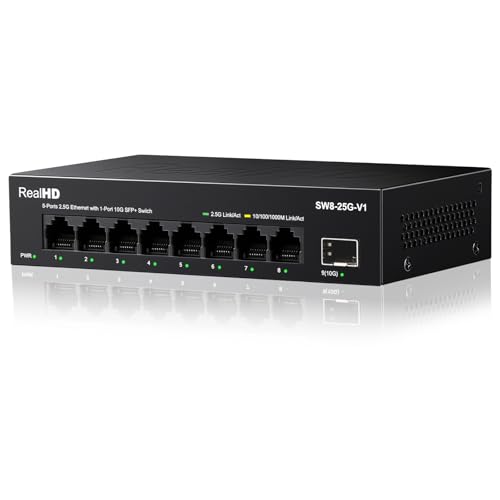
Real HD 8-Port 2.5G Switch with 10G SFP+
Best for: quiet 2.5G networking with 10G SFP+ uplinks
- Port Count
- 8
- Port Speed
- 2.5 Gbps
- Management Type
- Unmanaged
- Uplink Ports
- 1 x 10G SFP+
- Switching Capacity
- 60G
- Number of Ports
- 8 Ports
The Real HD 8-port switch provides multi-gigabit speeds for your home or office network. You get eight 2.5 Gbps RJ45 ports alongside a single 10G SFP+ uplink port for high-bandwidth connections. It features a fanless metal enclosure and delivers a 60 Gbps switching capacity without software configuration. This setup fits you well if you need fast wired transfers between 2.5G computers, WiFi 6 access points, and network-attached storage devices.
Pros
- Eight 2.5 Gbps RJ45 Ethernet ports
- One 10G SFP+ uplink port
- 60 Gbps total switching capacity
- Fanless metal chassis with 4KV lightning protection
Cons
- Does not support Power over Ethernet (PoE)
- Unmanaged design lacks VLAN configuration and traffic monitoring
Good fit if
- You need 2.5 Gbps wired connectivity for up to eight local devices.
- You want a 10G SFP+ port to link a high-speed NAS or uplink switch.
- You prefer a silent, plug-and-play metal unit with no software setup.
Skip if
- You need to power access points or cameras over Ethernet cabling.
- You require smart or managed switch features such as port isolation.
Verdict: Real HD 8-Port 2.5G Switch with 10G SFP+ gives your wired network eight multi-gigabit connections and a high-bandwidth fiber uplink. It is a capable unmanaged choice if you want silent 2.5G networking without needing PoE.

Aumox PRO 8-Port Gigabit 120W PoE Switch
Best for: multi-device PoE+ setups needing silent operation
- Port Count
- 8
- Port Speed
- 10/100/1000Mbps
- Management Type
- Unmanaged
- PoE Support
- PoE+ (802.3af/at)
- PoE Power Budget
- 120W
- Switching Capacity
- 16Gbps
This unmanaged switch gives you eight Gigabit Ethernet ports that all supply 802.3af/at PoE+ power. Its 120W power budget delivers up to 30W per port for IP cameras, access points, and VoIP hardware. The fanless metal enclosure keeps operation silent while handling 16Gbps switching capacity. You can place it on a desk or mount it to a wall. It suits setups needing high PoE capacity without configuration.
Pros
- All 8 Gigabit ports support 802.3af/at PoE+
- 120W total PoE power budget with up to 30W per port
- Fanless design for silent operation
- Durable metal housing with desktop and wall-mount support
Cons
- Unmanaged switch without VLAN or traffic control options
- No dedicated uplink ports
- Port speeds capped at 1Gbps without multi-gigabit support
Good fit if
- You need up to 120W of total PoE+ power across eight devices.
- You want silent, fanless operation on a desk or wall.
- You prefer plug-and-play hardware without software configuration.
Skip if
- You need managed switch features such as VLANs or QoS.
- You require network speeds exceeding 1Gbps.
Verdict: Aumox PRO 8-Port Gigabit 120W PoE Switch delivers full PoE+ across all eight ports with a generous power budget in a silent metal chassis. It is a dependable plug-and-play choice when you need simple power delivery without network management.

Davuaz 10-Port 2.5G Switch with 10G SFP+
Best for: silent 2.5G networking with 10G uplinks
- Port Count
- 8
- Port Speed
- 2.5 Gbps
- Management Type
- Unmanaged
- Uplink Ports
- 2 x 10G SFP+
- Switching Capacity
- 80 Gbps
- Number of Ports
- 10 Ports
This Davuaz network switch expands your wired setup with eight 2.5G Base-T RJ45 ports and two 10G SFP+ uplink slots. It delivers an 80 Gbps switching capacity inside a fanless metal housing for silent operation. Because it is an unmanaged plug-and-play unit, you connect your cables without software setup. It suits you if you need multi-gigabit connections for a NAS, gaming PC, and high-speed uplinks across ten total ports.
Pros
- Eight 2.5G Base-T Ethernet ports
- Two 10G SFP+ uplink ports
- 80 Gbps switching capacity
- Fanless silent metal housing
Cons
- No Power over Ethernet support
- Unmanaged with no configuration interface
Good fit if
- You need eight 2.5G ports and two 10G uplinks on one device.
- You want a silent, fanless metal unit for a workspace.
- You prefer plug-and-play installation without managing settings.
Skip if
- You require Power over Ethernet to power access points or cameras.
- You need management features like VLANs or link aggregation.
Verdict: Davuaz 10-Port 2.5G Switch with 10G SFP+ gives you eight multi-gigabit ports and dual 10G uplinks in a silent, unmanaged chassis. It provides straightforward high-bandwidth networking without requiring configuration.

Ztyuav 6-Port 2.5G PoE+ Switch with 10G SFP+
Best for: compact multi-gigabit PoE setups with 10G uplinks
- Port Count
- 6
- Port Speed
- 100/1000/2500Mbps
- Management Type
- Unmanaged
- PoE Support
- PoE+ (IEEE 802.3af/at)
- PoE Power Budget
- 75W
- Uplink Ports
- 2 x 10G SFP+
View on Amazon: Ztyuav 6-Port 2.5G PoE+ Switch with 10G SFP+
This unmanaged switch gives you four 2.5 Gbps PoE+ ports alongside two 10G SFP+ uplinks. It supplies a total power budget of 75 watts across the Ethernet ports, supporting IEEE 802.3af and 802.3at standards. A manual VLAN mode isolates traffic across the network ports to prevent broadcast storms. It suits you if you need multi-gigabit speeds and power delivery for access points or security cameras without complex network management.
Pros
- Four 2.5 Gbps Ethernet ports with PoE+ support
- Two 10G SFP+ slots for high-speed uplinks
- 75W total PoE power budget
- Hardware VLAN mode for port isolation
- Desktop and wall-mount installation options
Cons
- Unmanaged with no web interface or software controls
- Provides only four standard RJ45 ports
Good fit if
- You need multi-gigabit PoE+ ports for Wi-Fi access points or cameras.
- You require 10G SFP+ uplink ports to connect to a NAS or router.
- You prefer plug-and-play operation without software setup.
Skip if
- You need web management, SNMP monitoring, or custom Layer 2 configuration.
- You need more than four RJ45 Ethernet ports for wired devices.
Verdict: Ztyuav 6-Port 2.5G PoE+ Switch with 10G SFP+ provides multi-gigabit transfer rates and 75W of power for compact setups. Its dual 10G uplinks and hardware VLAN switch make it a practical unmanaged option for high-speed endpoints.

Ztyuav 25-Port Smart Managed Gigabit Switch
Best for: high-density office wired networking
- Port Count
- 25
- Port Speed
- 10/100/1000Mbps
- Management Type
- Smart Managed
- Uplink Ports
- 1 x SFP
- Switching Capacity
- 50Gbps
- Recommended Use
- Office
This Ztyuav switch provides 24 Gigabit Ethernet ports alongside one dedicated Gigabit SFP slot for fiber uplinks. It features a 50Gbps switching capacity, a 4M cache buffer, and smart management accessible via web interface or mobile app. You can deploy VLAN segmentation, traffic monitoring, and link aggregation directly across your network. It suits busy office spaces requiring substantial wired connections for workstations, network printers, and local storage devices.
Pros
- 24 Gigabit Ethernet ports and 1 Gigabit SFP port
- 50Gbps switching capacity with 4M cache buffer
- Smart management via web browser and mobile app
- Physical DIP switch for instant port VLAN isolation
Cons
- Lacks Power over Ethernet (PoE) capability
- Equipped with an internal cooling fan rather than fanless design
- SFP uplink port is limited to 1Gbps throughput
Good fit if
- You need to wire dozens of office devices to a single central switch.
- You want smart network controls like VLAN, QoS, and link aggregation.
- You prefer toggling port isolation quickly via a physical DIP switch.
Skip if
- You need PoE to power access points or VoIP phones directly.
- You require multi-gigabit transfer rates above 1Gbps.
- You require completely silent, fanless operation in a quiet room.
Verdict: Ztyuav 25-Port Smart Managed Gigabit Switch gives high-density office networks 25 managed ports and 50Gbps switching capacity. It combines extensive wired connectivity with flexible web and mobile app configuration.

TRENDnet 5-Port 2.5G Switch
Best for: silent multi-gigabit networking in small spaces
- Port Count
- 5
- Port Speed
- 2.5Gbps
- Switching Capacity
- 25Gbps
- Mounting Type
- Wall mountable
- Number of Ports
- 5 Ports
- Dimensions
- 4.76 × 2.95 × 1 inches
The TRENDnet 5-Port 2.5G Switch provides multi-gigabit connectivity across five 2.5GBase-T Ethernet ports with a 25Gbps switching capacity. Its fanless metal build operates silently on a desk or mounted to a wall using existing Cat5e or better wiring. If you need to connect a small cluster of multi-gigabit devices like a NAS, access point, and PC without fan noise, this compact switch delivers high throughput in tight spaces.
Pros
- Five 2.5GBASE-T RJ45 ports supporting up to 2.5Gbps speeds
- 25Gbps total switching capacity
- Fanless metal chassis for silent operation
- Wall-mountable design with durable housing
- NDAA and TAA compliant
Cons
- Five-port capacity limits overall network expansion
- No Power over Ethernet (PoE) functionality
- Lacks dedicated 10G SFP+ uplink ports
Good fit if
- You need 2.5Gbps connection speeds using existing Cat5e or better network cables.
- You want a silent, fanless switch suitable for quiet offices or wall installations.
- You require hardware meeting NDAA and TAA compliance standards.
Skip if
- You need to power network hardware using PoE.
- You have more than four wired client devices to connect.
- You require a 10G fiber uplink to your core network.
Verdict: TRENDnet 5-Port 2.5G Switch delivers quiet, high-speed multi-gigabit switching in a rugged metal housing. It is a solid choice if you need basic 2.5Gbps expansion for a few high-bandwidth home network devices.

UGREEN 16-Port Gigabit Switch
Best for: high-density silent wired network expansions
- Port Count
- 16
- Port Speed
- 1000Mbps
- Mounting Type
- Wall-mount or desktop
- Number of Ports
- 16 Ports
- Dimensions
- 9.3 × 4 × 1 inches
This unmanaged switch provides 16 dedicated Gigabit Ethernet ports in a compact, fanless metal enclosure. You get standard or VLAN hardware modes to isolate traffic across ports 1 through 14 while linking to ports 15 and 16. It supports Wake-on-LAN and includes 6KV surge protection. This switch suits you if you need to wire numerous standard-speed office or home network clients silently without complex software configuration.
Pros
- 16 Gigabit RJ45 ports with Auto MDI/MDIX
- Hardware VLAN isolation mode for ports 1 through 14
- Fanless silent operation in a metal chassis
- Supports Wake-on-LAN and 6KV surge protection
Cons
- No Power over Ethernet (PoE) support
- Port speeds capped at 1 Gbps with no multi-gigabit options
- No web or managed software interface
Good fit if
- You need to connect up to 16 wired Gigabit devices on a single switch
- You want port isolation without configuring software VLANs
- You need silent, fanless operation for a desktop or wall setup
Skip if
- You need Power over Ethernet to power access points or cameras
- You require 2.5Gbps or faster transfer speeds for local storage
Verdict: UGREEN 16-Port Gigabit Switch delivers high port density and simple hardware VLAN isolation for wired setups. It gives you 16 reliable Gigabit connections in a silent, durable metal build.

NICGIGA 8-Port 2.5G Fanless Switch
Best for: silent multi-gigabit Wi-Fi 6 and NAS setups
- Port Count
- 8
- Port Speed
- 2.5 Gbps
- Management Type
- Unmanaged
- Switching Capacity
- 40 Gbps
- Wi-Fi Standard
- Wi-Fi 6
- Number of Ports
- 8 Ports
This unmanaged switch gives you eight 2.5 Gbps RJ45 Ethernet ports with a 40 Gbps switching capacity. It automatically negotiates speeds between 100 Mbps, 1 Gbps, and 2.5 Gbps to handle devices such as Wi-Fi 6 access points, network-attached storage, and desktop computers. Built in a fanless metal housing with side cooling vents, it runs silently across temperatures from -10 to 50°C for straightforward multi-gigabit local network setups.
Pros
- Eight 2.5 Gbps RJ45 Ethernet ports
- 40 Gbps non-blocking switching capacity
- Silent fanless metal housing with side cooling
- Auto-negotiates between 100 Mbps, 1 Gbps, and 2.5 Gbps
Cons
- No PoE output to deliver power over Ethernet cables
- Unmanaged design provides no VLAN or QoS configuration controls
Good fit if
- You need 2.5 Gbps wired connections for Wi-Fi 6 access points, a NAS, or PCs.
- You prefer silent, fanless operation in a metal enclosure.
- You want plug-and-play installation without configuring network management software.
Skip if
- You require Power over Ethernet to run access points or cameras.
- You need managed switch features such as VLAN tagging or traffic shaping.
Verdict: NICGIGA 8-Port 2.5G Fanless Switch provides straightforward multi-gigabit wired connectivity across eight auto-negotiating ports with zero fan noise. It is an effective hardware choice if you want to eliminate 1 Gbps bottlenecks for Wi-Fi 6 access points and storage devices.
Specifications side by side
| Spec | TP-Link 8-Port Gigabit Switch with 4 PoE+ Ports | TP-Link 5-Port Gigabit PoE+ Switch | TP-Link 5-Port Fast Ethernet PoE Switch | NETGEAR 8-Port Smart Managed Gigabit Switch | YuanLey 8-Port Gigabit 120W PoE Switch | TP-Link 9-Port Fast Ethernet PoE Switch | YuLinca 8-Port 2.5G Switch with 10G SFP+ | Real HD 8-Port 2.5G Switch with 10G SFP+ | Aumox PRO 8-Port Gigabit 120W PoE Switch | Davuaz 10-Port 2.5G Switch with 10G SFP+ | Ztyuav 6-Port 2.5G PoE+ Switch with 10G SFP+ | Ztyuav 25-Port Smart Managed Gigabit Switch | TRENDnet 5-Port 2.5G Switch | UGREEN 16-Port Gigabit Switch | NICGIGA 8-Port 2.5G Fanless Switch |
|---|---|---|---|---|---|---|---|---|---|---|---|---|---|---|---|
| Port Count | 8 | 5 | 5 | 8 | 8 | 9 | not specified | 8 | 8 | 8 | 6 | 25 | 5 | 16 | 8 |
| Port Speed | 10/100/1000 Mbps | 10/100/1000 Mbps | 10/100 Mbps | 1.0Gbps | 1000 Mbps | 10/100 Mbps | 2.5 Gbps | 2.5 Gbps | 10/100/1000Mbps | 2.5 Gbps | 100/1000/2500Mbps | 10/100/1000Mbps | 2.5Gbps | 1000Mbps | 2.5 Gbps |
| Management Type | Unmanaged | not specified | not specified | Smart Managed | Unmanaged | not specified | Unmanaged | Unmanaged | Unmanaged | Unmanaged | Unmanaged | Smart Managed | not specified | not specified | Unmanaged |
| PoE Support | PoE+ (802.3at/af) | PoE+ (802.3at/af) | PoE+ (802.3at/af) | not specified | PoE+ (802.3af/at) | 802.3at/af | not specified | not specified | PoE+ (802.3af/at) | not specified | PoE+ (IEEE 802.3af/at) | not specified | not specified | not specified | not specified |
| PoE Power Budget | 64 W | 65W | 67W | not specified | 120W | 65W | not specified | not specified | 120W | not specified | 75W | not specified | not specified | not specified | not specified |
| Uplink Ports | not specified | not specified | not specified | not specified | not specified | not specified | 1 x 10G SFP | 1 x 10G SFP+ | not specified | 2 x 10G SFP+ | 2 x 10G SFP+ | 1 x SFP | not specified | not specified | not specified |
| Switching Capacity | not specified | not specified | not specified | not specified | 12 Gbps | not specified | 60Gbps | 60G | 16Gbps | 80 Gbps | 60Gbps | 50Gbps | 25Gbps | not specified | 40 Gbps |
| Mounting Type | Desktop, Wall-Mount | Desktop, Wall-Mount | Desktop, Wall-Mount | Desktop, Wall-Mount | not specified | not specified | not specified | not specified | Desktop, Wall-Mount | not specified | Desktop, Wall-Mounted | not specified | Wall mountable | Wall-mount or desktop | not specified |
| Wi-Fi Standard | not specified | not specified | not specified | not specified | not specified | not specified | not specified | not specified | not specified | not specified | not specified | not specified | not specified | not specified | Wi-Fi 6 |
| Number of Ports | 8 Ports | 5 Ports | 5 Ports | 8 Ports | 8 Ports | 8 Ports | 8 Ports | 8 Ports | 8 Ports | 10 Ports | not specified | not specified | 5 Ports | 16 Ports | 8 Ports |
| Use Case | not specified | not specified | not specified | not specified | not specified | not specified | Gaming | not specified | not specified | not specified | not specified | not specified | not specified | not specified | not specified |
| Uplink Port Type | not specified | not specified | not specified | not specified | not specified | not specified | SFP | SFP | not specified | SFP | SFP | SFP | not specified | not specified | not specified |
| Recommended Use | not specified | not specified | not specified | not specified | not specified | not specified | not specified | not specified | not specified | not specified | not specified | Office | not specified | not specified | not specified |
| Intended Use | not specified | not specified | not specified | not specified | not specified | not specified | not specified | not specified | not specified | not specified | not specified | Home | not specified | not specified | not specified |
| Dimensions | 3.9 × 6.7 × 1.1 inches | 3.94 × 3.86 × 0.98 inches | 3.93 × 3.86 × 0.98 inches | 4.13 × 6.22 × 1.06 inches | 9.06 × 7.48 × 2.76 inches | 6.73 × 3.86 × 1.06 inches | not specified | 7.5 × 3.9 × 1.1 inches | 7.9 × 4.6 × 1.7 inches | not specified | 7.87 × 4.65 × 1.73 inches | 10.6 × 7.13 × 1.73 inches | 4.76 × 2.95 × 1 inches | 9.3 × 4 × 1 inches | not specified |
| Weight | 1.15 pounds | 1.76 pounds | 8.47 ounces | 15.2 ounces | 2.16 pounds | 12.7 ounces | 1.48 pounds | 1.17 pounds | 1.98 pounds | not specified | 1.38 pounds | 2.46 pounds | 8.11 ounces | not specified | not specified |
| Size | 8 Port w/ 4-Port PoE+ | 5 Port, 1 Gigabit | 5 Port w/ 4-Port PoE+ | 8 Port | 8 Port | 8*PoE+ (120w) | 9 Port | not specified | not specified | 8|8 Port PoE Gigabit 120W | 8 x 2.5G RJ45+2 x 10G SFP+ | 2.5G | 4 PoE+2x10G SFP@75W | Easy Managed | 24x1G+1x1G SFP | not specified | not specified | not specified |
| Color | Black | black | 5-Port | Black | Black | black | Black | Black | Black | black | Black | Black | Black | Gray | Black |
| Model | TL-SG1008P | TL-SG1005P | TL-SF1005P | GS108Tv3 | 8 Port 1G PoE Unmanaged Switch (120W) | TL-SF1009P | 8x2.5G + 1x10G SFP Unmanaged | 8 port 2.5G ethernet switch without PoE | 8 Port| 8 Port PoE Gigabit 120W | Da-K10802WS | Z-QWPE0402 | 25 Gigabit Port | 1 SFP+ | TEG-S351 | not specified | 10 Port | 8x 2.5G + 2x 10G SFP+ |
If you require VLAN support or traffic management features, compare the best smart switches under 50 to evaluate web-managed options for your local network.
How to Choose the Best Network Switch
-
Calculate Total PoE Wattage
When powering access points or security cameras, check the switch power pool rather than just port count. Every connected PoE device pulls electrical wattage from a shared pool. If your hardware draws more combined power than the internal supply provides, endpoints disconnect or fail to power up. Look for the overall wattage rating on the specification sheet. For instance, the YuanLey 8-Port Gigabit 120W PoE Switch provides a 120W total supply across its ports, giving you enough capacity to run multiple powered devices simultaneously without brownouts.
-
Choose Unmanaged or Smart Management
Decide whether you require software controls or basic plug-and-play operation. Unmanaged switches pass traffic automatically and need no setup, making them ideal for simple desktop expansions. Smart managed switches introduce web browser or app interfaces for segmenting local traffic, monitoring ports, and setting up virtual networks. If you operate isolated guest networks, smart home gear, or business equipment, management features keep your traffic organized. The NETGEAR 8-Port Smart Managed Gigabit Switch provides these configuration controls, whereas basic unmanaged units prioritize quick installation without any adjustable software parameters.
-
Check for Dedicated SFP Uplinks
Switches with SFP or SFP+ ports give you dedicated uplinks to connect backbones, network attached storage, or core routers. Standard switches require using an RJ45 port for incoming data, reducing the ports available for your client devices. SFP+ slots accept fiber modules or direct-attach copper cables operating at up to 10 Gbps speeds. Choosing a switch like the Davuaz 10-Port 2.5G Switch with 10G SFP+ lets you bridge multi-gigabit switches together across your property without sacrificing any of your primary Ethernet access ports to uplink duties.
-
Plan Your Required Port Density
Count how many wired connections you need today and include room for future equipment. Remember that connecting the switch to your router consumes one port immediately, leaving a five-port switch with only four usable ports for client hardware. Small installations with a desktop PC and printer fit compact five-port designs easily. However, centralized network cabinets serving multiple rooms or high-density entertainment setups benefit from larger units. The UGREEN 16-Port Gigabit Switch delivers sixteen connections in a single chassis, avoiding the need to connect multiple smaller switches together.
-
Verify Dimensions and Mounting Options
Network switches vary noticeably in chassis size, weight, and mounting style. Before buying, measure the shelf space, media box, or wall area where you plan to install the hardware. Compact designs fit into cramped desks and entertainment centers, weighing under ten ounces. Larger high-port or high-wattage units require deeper clearance and support desktop or wall placements. For tight spaces, the TRENDnet 5-Port 2.5G Switch measures just 2.95 inches wide and 4.76 inches long, making it easy to tuck away where larger metal switch enclosures cannot physically fit.
Frequently asked questions
What is the difference between an unmanaged and a smart managed switch?
An unmanaged switch works immediately without setup, while a smart managed switch lets you configure settings like VLANs and traffic controls. For example, the NETGEAR GS108Tv3 provides a management interface for monitoring ports and network traffic. In contrast, unmanaged models like the TP-Link TL-SG1008P deliver straightforward plug-and-play operation. You simply connect your Ethernet cables, and the switch directs local traffic without requiring extra software configuration.
Can a PoE switch damage devices that do not support PoE?
Standard PoE switches will not damage non-PoE hardware because they use active negotiation before delivering power. Switches like the TP-Link TL-SG1008P or YuanLey 8-Port Gigabit Switch verify whether a connected client accepts power. When you plug in an ordinary computer or game console, the port transmits standard data signals without voltage. You can safely attach non-PoE equipment directly to PoE-capable ports without harming your hardware.
Why would you choose an SFP+ port on a network switch?
An SFP+ port provides a dedicated high-speed uplink beyond conventional Gigabit RJ45 connections. Switches like the YuLinca 8-Port 2.5G switch and the Davuaz 10-Port switch feature 10G SFP+ slots. These high-bandwidth ports let you link switches together or connect directly to a high-speed router or storage server. This uplink prevents data bottlenecks when multiple connected 2.5G devices transfer files across your local network simultaneously.
Can you use a 2.5G switch with standard Gigabit devices?
Yes, 2.5G switch ports automatically negotiate down to match standard Gigabit or Fast Ethernet hardware. Multi-gigabit models like the TRENDnet TEG-S351 and the NICGIGA 8-Port Fanless Switch adapt to each connected device speed. If you plug a 1 Gbps laptop or media player into a 2.5G port, it operates reliably at 1 Gbps. This allows you to upgrade your central switch now while upgrading endpoints later.
Do network switches produce fan noise in home environments?
Most compact desktop switches operate silently because they use fanless passive cooling. Units such as the TP-Link TL-SG1005P, TRENDnet TEG-S351, and YuanLey 8-Port Gigabit Switch dissipate heat directly through their metal housings. Because these designs lack mechanical fans, they generate zero operating noise. You can place them on an office desk, behind a television, or inside a bedroom workspace without dealing with unwanted hums or whirring fans.
What is a hardware VLAN switch on an unmanaged network switch?
A hardware VLAN switch isolates individual client ports from each other using a physical toggle switch. Models like the UGREEN 16-Port Gigabit Switch and the Ztyuav 6-Port PoE+ switch include this feature. When activated, connected devices communicate only with the uplink port rather than each other. This prevents connected surveillance cameras or smart home devices from accessing your private computers without needing complex software setup.