15 Best Wi-Fi 6E Wifi Routers, Compared
As an Amazon Associate we earn from qualifying purchases. Links on this page are affiliate links.
Upgrading to the best Wi-Fi 6E wifi routers gives you access to clean 6 GHz channels for lower latency and reduced interference. We compared 15 options based on the specifications published on the listings.
The Smart Air Minions Tri-Band Wi-Fi 6E Router leads the rankings because it pairs tri-band AXE5400 throughput with a 2.5G port. This guide helps you evaluate frequency bands, Ethernet port speeds, and wireless coverage areas to decide which unit fits your setup.
Quick picks
The best fit for you
- You want a novelty desktop setup for wireless PCVR Smart Air Minions Tri-Band Wi-Fi 6E Router It provides AXE5400 tri-band Wi-Fi 6E performance and a 2.5G port in a unique design.
- You need mesh coverage for large multi-room homes ASUS ZenWiFi Tri-Band Mesh System 3-Pack This 3-pack tri-band system covers up to 7,800 square feet with integrated parental controls.
- You run a multi-gigabit network requiring 10G ports ASUS ROG Rapture Quad-Band Wi-Fi 6E Router It features dual 10G ports, a 2.5G port, and quad-band Wi-Fi 6E transmission.
- You require portable cellular internet access during travel NETGEAR Nighthawk M6 Pro 5G Mobile Hotspot This mobile hotspot provides Wi-Fi 6E connectivity using built-in 5G cellular technology.
Our 15 picks

Smart Air Minions Tri-Band Wi-Fi 6E Router
Best for: wireless PCVR and novelty desktop setups
- Wi-Fi Standard
- Wi-Fi 6E (what this guide is about)
- Speed Rating
- AXE5400
- Frequency Bands
- Tri-Band
- Device Capacity
- 128 devices
- Max Port Speed
- 2.5 Gbps
- Ethernet Ports
- 2
This upright Wi-Fi 6E router delivers tri-band coverage across 2.4GHz, 5GHz, and dedicated 6GHz frequencies with an AXE5400 speed rating. You get a 2.5GbE WAN port for multi-gig internet connections, a single Gigabit LAN port, and capacity for up to 128 devices. It suits you if you need dedicated 6GHz bandwidth for wireless PCVR or gaming in a compact collectible chassis.
Pros
- Tri-band AXE5400 theoretical throughput across 2.4GHz, 5GHz, and 6GHz bands
- 2.5GbE WAN port accommodates multi-gigabit incoming internet service
- Supports router, bridge, access point, and mesh configurations
- Handles up to 128 connected devices using 160MHz channels and OFDMA
Cons
- Only two total Ethernet ports on the device
- Single Gigabit LAN port restricts wired device expansion
Good fit if
- You need an uncrowded 6GHz connection for wireless PCVR headsets or gaming.
- You subscribe to an internet tier higher than 1 Gbps that uses a 2.5GbE port.
- You want network hardware that supports router, bridge, extender, or mesh modes.
Skip if
- You need multiple wired LAN connections for gaming consoles, PCs, and storage.
- You prefer conventional enterprise or minimalist networking hardware designs.
Verdict: Smart Air Minions Kevin Wi-Fi 6E Router combines multi-gigabit WAN connectivity and dedicated 6GHz tri-band performance inside a distinctive character form factor. It gives you capable AXE5400 speeds and flexible networking modes if your wired port requirements remain modest.

TP-Link Tri-Band WiFi 6E Router
Best for: single-unit Wi-Fi 6E home setups
- Wi-Fi Standard
- Wi-Fi 6E (what this guide is about)
- Speed Rating
- AXE5400
- Frequency Bands
- Tri-Band
- Dimensions
- 12.9 × 10.4 × 4.72 inches
- Weight
- 1.52 pounds
This standalone tri-band router brings Wi-Fi 6E connectivity to your home network. You get maximum theoretical speeds of 2402 Mbps on the 6 GHz band, 2402 Mbps on 5 GHz, and 574 Mbps on 2.4 GHz. It runs on a 1.0 GHz dual-core processor with 512 MB of memory and supports EasyMesh expansion. This router suits you if you want dedicated 6 GHz channel access for compatible devices without buying a multi-node mesh system upfront.
Pros
- Dedicated 6 GHz band reaching up to 2402 Mbps
- EasyMesh compatibility for adding compatible nodes later
- Built-in VPN server and client supporting OpenVPN, PPTP, and L2TP
- 1.0 GHz dual-core CPU with 512 MB high-speed memory
Cons
- Requires a separate modem for most internet service providers
- Included HomeShield features limited to basic security and parental tiers
Good fit if
- You want a dedicated 6 GHz frequency band for high-speed Wi-Fi 6E devices.
- You plan to expand network range over time using EasyMesh-compatible hardware.
- You need built-in VPN client or server support for OpenVPN, PPTP, or L2TP.
Skip if
- You do not have a standalone modem for your internet service connection.
- You need comprehensive security and parental reporting beyond the basic free tier.
Verdict: TP-Link AXE5400 Tri-Band WiFi 6E Router delivers dedicated 6 GHz channel speeds and EasyMesh expandability in a single unit. It gives you reliable Wi-Fi 6E performance and integrated VPN functionality for your connected home.

Google Nest Wifi Pro Wi-Fi 6E Router
Best for: single-unit homes up to 2,200 square feet
- Wi-Fi Standard
- Wi-Fi 6E (what this guide is about)
- Frequency Bands
- three bands
- Coverage Area
- up to 2200 square feet
- Pack Size
- 1-Pack
- Intended Use
- Home
- Dimensions
- 5.16 × 4.65 × 3.35 inches
The Google Nest Wifi Pro 1-Pack is a tri-band Wi-Fi 6E router built for home networking. Operating across the 2.4 GHz, 5 GHz, and 6 GHz frequency bands, it delivers standalone wireless coverage for spaces up to 2,200 square feet. It suits you if you need reliable single-unit performance with automatic traffic prioritization and the flexibility to expand coverage later.
Pros
- Operates across 2.4 GHz, 5 GHz, and 6 GHz frequency bands
- Provides up to 2,200 square feet of Wi-Fi 6E coverage
- Automatically prioritizes traffic for video calls and web loading
- Built-in self-monitoring and secure booting protection
Cons
- Not compatible with previous-generation Google Wifi or Nest Wifi devices
- Provides coverage for only up to 2,200 square feet without additional units
Good fit if
- You need Wi-Fi 6E coverage for a space up to 2,200 square feet.
- You want an automated router that diagnoses and repairs common network issues.
- You plan to build a mesh system using only Nest Wifi Pro units.
Skip if
- You want to connect existing older Google Wifi or Nest Wifi nodes.
- You require out-of-the-box coverage exceeding 2,200 square feet.
Verdict: Google Nest Wifi Pro 1-Pack provides reliable tri-band Wi-Fi 6E coverage up to 2,200 square feet with automated network tuning. It is a solid single-node starting point if you do not rely on older Google networking hardware.

MSI Radix Tri-Band Wi-Fi 6E Gaming Router
Best for: multi-device gaming with 8-stream MU-MIMO
- Wi-Fi Standard
- Wi-Fi 6E (what this guide is about)
- Speed Rating
- AXE6600
- Frequency Bands
- Tri-Band
- Use Case
- Gaming
- Features
- MU-MIMO
- Port Speed
- Gigabit
The MSI Radix Tri-Band WiFi 6E Router delivers tri-band coverage across 2.4GHz, 5GHz, and 6GHz bands with AXE6600 speed ratings. It features an 8-stream architecture with MU-MIMO support and a 1.8 GHz quad-core processor to handle traffic across your network. You also get gigabit Ethernet ports, AI QoS packet prioritization, and onboard RGB lighting. This standalone router suits you if you want dedicated 6GHz bandwidth for gaming and high-demand devices.
Pros
- Tri-band operation across 2.4GHz, 5GHz, and 6GHz bands
- 8-stream transmission with MU-MIMO support
- 1.8 GHz quad-core processor
- AI QoS traffic prioritization
Cons
- Wired connectivity tops out at gigabit port speeds
- Substantial footprint measuring 13.3 by 8.8 inches
- Comes as a single unit without mesh extension nodes included
Good fit if
- You want 8-stream MU-MIMO support across 2.4GHz, 5GHz, and 6GHz bands.
- You need AI QoS to prioritize data packets for gaming.
- You want hardware powered by a 1.8 GHz quad-core processor.
Skip if
- You require wired port speeds faster than standard gigabit.
- You need a multi-node mesh pack included in the box.
Verdict: MSI Radix Tri-Band WiFi 6E Router pairs an 8-stream MU-MIMO setup with a 1.8 GHz quad-core processor for demanding household traffic. It provides dedicated 6GHz access and automated AI QoS management in a standalone unit.

TP-Link Quad-Band Wi-Fi 6E Router
Best for: multi-gigabit wired and quad-band wireless networks
- Wi-Fi Standard
- Wi-Fi 6E (what this guide is about)
- Speed Rating
- AXE16000
- Frequency Bands
- Quad-Band
- Max Port Speed
- 10 Gbps
- Use Case
- Gaming
- Dimensions
- 9.13 × 9.13 × 2.68 inches
The TP-Link AXE16000 Quad-Band Wi-Fi 6E Router is a standalone networking unit designed for high-throughput home environments. You get quad-band capability reaching up to 15.6 Gbps across four distinct bands, including dedicated 6 GHz and dual 5 GHz frequencies. It features two 10 Gbps ports and an additional 2.5 Gbps port for ultra-fast wired connections. This setup suits you if you run multi-gigabit internet, network-attached storage, or numerous bandwidth-heavy devices simultaneously.
Pros
- Dual 10 Gbps ports including an SFP+/RJ45 combo connection
- Quad-band layout with dedicated 6 GHz and dual 5 GHz bands
- AXE16000 rating with cumulative speeds up to 15.6 Gbps
- Hardware VPN server and client supporting OpenVPN, PPTP, and L2TP
Cons
- Dual 10 Gbps and 2.5 Gbps ports cannot serve as concurrent WAN connections
- Requires a 9.13 by 9.13-inch footprint weighing 3.37 pounds
- Advanced HomeShield network protection requires upgrading beyond the free basic features
Good fit if
- You need 10 Gbps wired interfaces for multi-gigabit fiber or local NAS transfers.
- You manage many active devices across separate 6 GHz and dual 5 GHz wireless channels.
- You run OpenVPN, PPTP, or L2TP protocols directly on your network hardware.
Skip if
- You require simultaneous multi-WAN failover across your multi-gigabit ports.
- You have tight space constraints that cannot accommodate a large square desktop chassis.
- You only need standard 1 Gbps connections for your home setup.
Verdict: TP-Link AXE16000 Quad-Band Wi-Fi 6E Router pairs high wireless capacity with dual 10 Gbps ports for multi-gigabit networking. It provides extensive bandwidth across four separate bands for high-density home setups.

TP-Link Archer Tri-Band Wi-Fi 6E Router
Best for: multi-gigabit internet plans with high device density
- Wi-Fi Standard
- Wi-Fi 6E (what this guide is about)
- Speed Rating
- AXE7800
- Frequency Bands
- Tri-Band
- Device Capacity
- Up to 200 devices
- Max Port Speed
- 2.5 Gbps
- Dimensions
- 12 × 20 × 4 inches
This renewed TP-Link router delivers tri-band Wi-Fi 6E networking with aggregated speeds up to 7.8 Gbps. You get access to the clear 6 GHz band alongside standard frequencies, plus a 2.5 Gbps WAN/LAN port to handle multi-gigabit broadband connections. It supports up to 200 connected devices across your home network. It suits you if you need high device capacity and multi-gigabit throughput without purchasing a factory-sealed unit.
Pros
- Up to 7.8 Gbps total bandwidth across three wireless bands
- Dedicated 6 GHz band reduces wireless network congestion
- Single 2.5 Gbps Ethernet port for fast WAN or LAN connections
- Handles up to 200 connected devices simultaneously
Cons
- Renewed condition rather than brand-new equipment
- Large 20-inch wide chassis requires significant shelf space
Good fit if
- You want multi-gigabit wired speed via a 2.5 Gbps port.
- You have modern Wi-Fi 6E hardware to use the 6 GHz band.
- You need to connect up to 200 devices simultaneously.
Skip if
- You prefer factory-new networking equipment over renewed products.
- You lack space for a large 20 by 12 inch chassis.
Verdict: TP-Link Tri-Band Wi-Fi 6E Router (Renewed) provides multi-gigabit wired speeds and 7.8 Gbps tri-band bandwidth. It gives you solid Wi-Fi 6E capability for up to 200 devices.

NETGEAR Nighthawk M6 Pro 5G Mobile Hotspot
Best for: portable 5G cellular Wi-Fi 6E connectivity
- Wi-Fi Standard
- Wi-Fi 6E (what this guide is about)
- Coverage Area
- 2,000 sq. ft.
- Device Capacity
- 32 devices
- Use Case
- Travel
- Dimensions
- 4.14 × 4.14 × 0.85 inches
- Weight
- 1.34 pounds
The NETGEAR Nighthawk M6 Pro is a portable Wi-Fi 6E router powered by 5G mmWave cellular connectivity. You can broadcast Wi-Fi 6E coverage across up to 2,000 square feet when plugged in with the battery removed, and connect up to 32 client devices at once. This unit suits you if you need mobile internet for travel, remote work, or cellular home backup across major cellular carriers.
Pros
- Wi-Fi 6E connectivity with 5G mmWave support
- Covers up to 2,000 sq. ft. when plugged into wall power without battery
- Supports up to 32 simultaneous connected devices
- 2.8-inch color LCD touch screen for settings and data monitoring
- Unlocked for AT&T, T-Mobile, Verizon, and international carriers
Cons
- Supports a maximum of 32 connected devices, lower than desktop home routers
- Requires an activated cellular data SIM card for operation
- Reaches 2,000 sq. ft. coverage only when stationary with power adapter
Good fit if
- You need portable Wi-Fi 6E connectivity while traveling or working remotely.
- You want a cellular 5G mmWave backup connection for home or office outages.
- You prefer configuring settings and monitoring data usage directly on a touch screen.
Skip if
- You need to connect more than 32 devices simultaneously.
- You want a standard wired cable or fiber home router without cellular data plans.
Verdict: NETGEAR Nighthawk M6 Pro 5G Mobile Hotspot brings Wi-Fi 6E performance and 5G mmWave speeds into a compact, battery-powered form factor. It gives you flexible connectivity for international travel, remote deployment, or emergency cellular home failover.

NETGEAR Nighthawk Tri-Band Wi-Fi 6E Router
Best for: mid-sized homes needing 2.5G connectivity
- Wi-Fi Standard
- Wi-Fi 6E (what this guide is about)
- Speed Rating
- AXE7800
- Frequency Bands
- Tri-Band
- Coverage Area
- up to 2,500 sq. ft.
- Device Capacity
- 40 Devices
- Max Port Speed
- 2.5G
The NETGEAR Nighthawk Tri-Band Wi-Fi 6E Router is a standalone unit providing AXE7800 wireless speeds up to 7.8Gbps. It operates across 2.4GHz, 5GHz, and dedicated 6GHz frequencies. A 1.7GHz quad-core processor manages connections for up to 40 devices across 2,500 square feet. With one 2.5G port and four 1G Ethernet ports, you can connect high-speed wired gear. It suits you if you need multi-gigabit wired capability and fast 6GHz wireless coverage.
Pros
- Tri-band AXE7800 speeds reaching up to 7.8Gbps
- One 2.5G multi-gigabit Ethernet port and four 1G ports
- Dedicated 6GHz band for Wi-Fi 6E hardware
- Coverage reaches up to 2,500 square feet
Cons
- NETGEAR Armor protection requires renewal after 30-day trial
- Device connection capacity capped at 40 devices
- Requires a separate modem or modem router to function
Good fit if
- You need wireless coverage up to 2,500 square feet.
- You want a 2.5G wired Ethernet port for fast local networking.
- You connect modern devices compatible with the 6GHz frequency band.
Skip if
- You need coverage beyond 2,500 square feet without adding extra hardware.
- You need to connect more than 40 devices at once.
- You want built-in advanced security software without an expiring trial.
Verdict: NETGEAR Nighthawk Tri-Band Wi-Fi 6E Router delivers AXE7800 speeds and 2.5G Ethernet connectivity for mid-sized homes. Its tri-band architecture reliably serves up to 40 devices across 2,500 square feet.

ASUS ZenWiFi Tri-Band Mesh System 3-Pack
Best for: large homes needing whole-home Wi-Fi 6E coverage
- Wi-Fi Standard
- Wi-Fi 6E (what this guide is about)
- Frequency Bands
- Tri-Band
- Coverage Area
- Up to 7,800 sq ft
- Pack Size
- 3-Pack
- Features
- Parental Controls
- Intended Use
- Home
This ASUS ZenWiFi setup is a tri-band Wi-Fi 6E mesh system that comes in a three-pack. It delivers total speeds up to 7800 Mbps and provides coverage for spaces up to 7,800 square feet. You get dedicated access to the 6 GHz band along with built-in parental controls for your home network. It suits you if you need wide coverage across multiple rooms without relying on a single router.
Pros
- Covers spaces up to 7,800 square feet
- Tri-band system with 6 GHz support and 7800 Mbps speeds
- Three-pack configuration provides multi-point home coverage
- Includes built-in parental controls
Cons
- Available only in white
- Three separate hardware units require placement space
Good fit if
- You have a large home up to 7,800 square feet needing Wi-Fi 6E reach.
- You want a three-node tri-band mesh system to eliminate dead zones.
- You require built-in parental controls to manage home devices.
Skip if
- You live in a smaller home where a three-pack system is unnecessary.
- You prefer black networking hardware rather than white units.
Verdict: ASUS ZenWiFi Tri-Band Mesh Wi-Fi 6E 3-Pack provides up to 7,800 square feet of coverage with high-speed 6 GHz support across three units. It offers reliable whole-home distribution and parental controls for multi-room layouts.

ASUS Tri-Band WiFi 6E Router
Best for: tri-band Wi-Fi 6E with 2.5G connectivity
- Wi-Fi Standard
- Wi-Fi 6E (what this guide is about)
- Frequency Bands
- Tri-Band
- Max Port Speed
- 2.5G
- Features
- VPN, Parental Controls
- Dimensions
- 8.27 × 9.49 × 2.44 inches
- Weight
- 2.28 pounds
This ASUS tri-band Wi-Fi 6E router provides wireless connectivity across three bands, including the dedicated 6 GHz frequency, with combined speeds reaching 7800 Mbps. It features a 2.5G port for high-speed wired access and supports AiMesh expansion to link with compatible hardware. Built-in network security tools include AiProtection Pro and Instant Guard VPN. It suits you if you need multi-gigabit wired capability alongside dedicated 6 GHz wireless coverage.
Pros
- Tri-band Wi-Fi 6E connectivity with 6 GHz band access
- Combined speeds up to 7800 Mbps
- 2.5G maximum port speed
- AiMesh support for expanding coverage with compatible hardware
- Built-in AiProtection Pro security and Instant Guard VPN
Cons
- Single-unit package with no extra mesh nodes included
- Single 2.5G port limits multi-gigabit wired distribution
Good fit if
- You have devices that connect to the 6 GHz Wi-Fi 6E band.
- You need a 2.5G port for a high-speed wired connection.
- You plan to expand coverage later using AiMesh-compatible units.
Skip if
- You need a multi-node mesh system straight out of the box.
- You require more than one 2.5G Ethernet port.
Verdict: ASUS Tri-Band Wi-Fi 6E Router delivers high-bandwidth 6 GHz wireless access paired with a 2.5G port and built-in security features. It serves well as a standalone unit that can integrate into a broader AiMesh setup.

ASUS ZenWiFi Tri-Band WiFi 6E Mesh 2-Pack
Best for: Homes up to 5,500 square feet
- Wi-Fi Standard
- Wi-Fi 6E (what this guide is about)
- Frequency Bands
- Tri-band
- Coverage Area
- 5,500 sq.ft
- Pack Size
- 2-Pack
- Features
- Parental Controls
- Intended Use
- Home
This ASUS ZenWiFi system comes as a two-pack operating on the Wi-Fi 6E standard across tri-band frequencies. It provides total speeds up to 7800 Mbps and covers spaces up to 5,500 square feet using dedicated 6GHz capacity. The system includes built-in Trend Micro security tools and advanced parental controls. It suits you if you require wide mesh coverage and network protection for connected devices.
Pros
- Covers up to 5,500 square feet with two compact units
- Tri-band Wi-Fi 6E speeds up to 7800 Mbps utilizing 6GHz capacity
- Subscription-free network security and parental controls powered by Trend Micro
- Built-in one-click shareable Secure VPN
Cons
- Offered only in a white finish
- Ethernet port counts and physical connection specs are not listed
- Requires stepping up to the 3-pack for spaces larger than 5,500 square feet
Good fit if
- You need up to 5,500 square feet of Wi-Fi 6E coverage.
- You want tri-band connectivity supporting speeds up to 7800 Mbps.
- You want integrated, subscription-free network security.
Skip if
- You require detailed Ethernet port counts before purchasing.
- You need a router system in a finish other than white.
- You need more than 5,500 square feet of coverage out of the box.
Verdict: ASUS ZenWiFi Tri-Band WiFi 6E 2-Pack delivers up to 5,500 square feet of coverage and 7800 Mbps speeds across three wireless bands. It pairs 6GHz performance with integrated security features for your home network.

NETGEAR Nighthawk Tri-Band Wi-Fi 6E Router
Best for: standalone multi-gigabit Wi-Fi 6E home setups
- Wi-Fi Standard
- Wi-Fi 6E (what this guide is about)
- Speed Rating
- AXE11000
- Frequency Bands
- Tri-Band
- Coverage Area
- 3,500 sq. ft.
- Device Capacity
- 60 devices
- Max Port Speed
- 2.5G
The NETGEAR Nighthawk Tri-Band Wi-Fi 6E Router is a standalone wireless router built for high-throughput home networks. It delivers AXE11000 wireless speeds across 2.4GHz, 5GHz, and 6GHz bands using 12 Wi-Fi streams. You get coverage for areas up to 3,500 square feet and connectivity for up to 60 devices. With a dedicated 2.5G Ethernet port alongside four gigabit ports, it suits households with multi-gigabit internet plans and demanding devices.
Pros
- AXE11000 tri-band wireless throughput across 2.4GHz, 5GHz, and 6GHz bands
- One 2.5G Ethernet port alongside four 1G Ethernet ports
- Coverage reaches up to 3,500 square feet and supports up to 60 devices
- 12 simultaneous Wi-Fi streams powered by a 1.8GHz quad-core processor
Cons
- Requires a separate modem or modem-router to connect to internet service
- NETGEAR Armor protection requires a ongoing paid subscription after the included 30-day trial
Good fit if
- You need a dedicated 6GHz frequency band for compatible Wi-Fi 6E client devices.
- You have an internet service plan up to 2Gbps and want a 2.5G Ethernet port.
- You need standalone wireless coverage for an area up to 3,500 square feet.
Skip if
- You want an all-in-one modem router rather than running a standalone unit.
- You require more than one multi-gigabit Ethernet port for wired hardware.
Verdict: NETGEAR Nighthawk Tri-Band Wi-Fi 6E Router pairs AXE11000 tri-band bandwidth with a 2.5G Ethernet port for high-bandwidth Wi-Fi 6E devices. It delivers expansive 3,500-square-foot coverage for large standalone home setups.
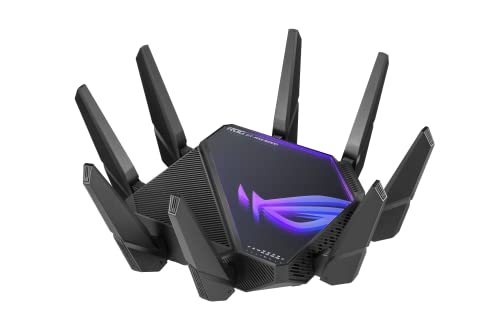
ASUS ROG Rapture Quad-Band Wi-Fi 6E Router
Best for: multi-gigabit local networks needing 10G ports
- Wi-Fi Standard
- Wi-Fi 6E (what this guide is about)
- Speed Rating
- AXE16000
- Frequency Bands
- Quad-Band
- Max Port Speed
- 10 Gbps
- Use Case
- Gaming
- Dimensions
- 13.9 × 13.9 × 7.6 inches
This ASUS ROG Rapture is a quad-band Wi-Fi 6E router built for high-demand networks. It delivers AXE16000 total speed ratings across four frequency bands, including the dedicated 6 GHz channel. Wired connections feature dual 10 Gbps WAN/LAN ports alongside a dedicated 2.5 Gbps WAN port. If you run a high-bandwidth local network or have multi-gigabit internet service, this unit provides the throughput and port speeds you need.
Pros
- Dual 10 Gbps WAN/LAN ports for multi-gigabit wired transfer speeds
- Dedicated 2.5 Gbps WAN port for multi-gigabit internet connections
- Quad-band configuration with access to the 6 GHz frequency band
- AXE16000 speed rating supporting up to 16000 Mbps theoretical throughput
Cons
- Large physical footprint measuring 13.9 by 13.9 inches
- Heavy unit at 5.35 pounds requiring sturdy placement
Good fit if
- You need 10 Gbps wired Ethernet connections for high-speed local data transfers.
- You have multi-gigabit internet that requires a 2.5 Gbps or 10 Gbps WAN port.
- You want quad-band connectivity with access to the uncongested 6 GHz band.
Skip if
- You have limited shelf space for a router chassis over 13 inches wide.
- You only require basic gigabit Ethernet ports for your wired devices.
Verdict: ASUS ROG Rapture Quad-Band 10G Wi-Fi 6E Router delivers high-speed wired and wireless performance with dual 10 Gbps ports and quad-band capability. It is a capable choice if you manage a demanding multi-gigabit home network.

TP-Link Tri-Band Wi-Fi 6E Router
Best for: gigabit homes wanting tri-band Wi-Fi 6E
- Wi-Fi Standard
- Wi-Fi 6E (what this guide is about)
- Speed Rating
- AXE5400
- Frequency Bands
- Tri-Band
- Max Port Speed
- 1 Gbps
- Use Case
- Gaming
- Features
- VPN
This TP-Link router provides Wi-Fi 6E connectivity across three wireless frequency bands with an AXE5400 speed rating. It includes built-in VPN support and uses standard Gigabit Ethernet ports with a 1 Gbps maximum transfer speed. You get access to the 6 GHz band for dedicated Wi-Fi 6E devices alongside legacy network bands. It fits home setups and gaming environments that rely on standard gigabit internet connections rather than multi-gigabit wired infrastructure.
Pros
- Tri-band Wi-Fi 6E support including the 6 GHz band
- AXE5400 total rated wireless speed
- Built-in VPN feature support
Cons
- Maximum port speed limited to 1 Gbps with no multi-gigabit support
- Large physical footprint measuring 12.9 by 10.4 inches
Good fit if
- You need tri-band Wi-Fi 6E coverage with an AXE5400 speed rating.
- You have an internet service plan of 1 Gbps or lower.
- You want integrated VPN functionality on your primary router.
Skip if
- You require multi-gigabit wired Ethernet ports above 1 Gbps.
- You have limited shelf space that cannot fit a 12.9-inch wide device.
Verdict: TP-Link Tri-Band WiFi 6E Gigabit Router delivers tri-band AXE5400 wireless performance and built-in VPN functionality for standard gigabit network connections.

ARRIS SURFboard Thruster Wi-Fi 6E Bridge Kit
Best for: dedicated 6 GHz wireless bridge gaming setups
- Wi-Fi Standard
- Wi-Fi 6E (what this guide is about)
- Max Port Speed
- 2.5 Gbps
- Use Case
- Gaming
- Dimensions
- 11.5 × 8 × 5.5 inches
- Weight
- 12.8 ounces
View on Amazon: ARRIS SURFboard Thruster Wi-Fi 6E Bridge Kit
The ARRIS Surfboard Thruster Wi-Fi 6E Gaming Bridge Kit is a dedicated point-to-point wireless bridge designed to extend your existing network. It includes two pre-paired hardware units that connect over a dedicated 6 GHz Wi-Fi 6E link, each equipped with a 2.5 Gbps Ethernet port. This setup suits you if you want high-speed wired connectivity for a gaming console or PC without running long cables.
Pros
- Dedicated 6 GHz wireless band creates an isolated bridge connection
- 2.5 Gbps Ethernet port provides multi-gigabit wired throughput
- Pre-paired out of the box for quick setup
- Includes two bridge units, two Ethernet cables, and two power adapters
Cons
- Functions as an add-on bridge kit rather than a standalone router replacement
- Provides only one Ethernet port per unit
Good fit if
- You want to connect a gaming console or PC via a dedicated 6 GHz link.
- You need a 2.5 Gbps wired link without running cables across your home.
- You already have a working router and only need an add-on bridge.
Skip if
- You need a standalone primary router to manage your entire network.
- You require multiple Ethernet LAN ports at your gaming station.
Verdict: ARRIS Surfboard Thruster Wi-Fi 6E Gaming Bridge Kit delivers a dedicated 6 GHz link and 2.5 Gbps ports to connect distant devices without running wires. It serves as an add-on acceleration bridge rather than a full router replacement for your home.
Specifications side by side
| Spec | Smart Air Minions Tri-Band Wi-Fi 6E Router | TP-Link Tri-Band WiFi 6E Router | Google Nest Wifi Pro Wi-Fi 6E Router | MSI Radix Tri-Band Wi-Fi 6E Gaming Router | TP-Link Quad-Band Wi-Fi 6E Router | TP-Link Archer Tri-Band Wi-Fi 6E Router | NETGEAR Nighthawk M6 Pro 5G Mobile Hotspot | NETGEAR Nighthawk Tri-Band Wi-Fi 6E Router | ASUS ZenWiFi Tri-Band Mesh System 3-Pack | ASUS Tri-Band WiFi 6E Router | ASUS ZenWiFi Tri-Band WiFi 6E Mesh 2-Pack | NETGEAR Nighthawk Tri-Band Wi-Fi 6E Router | ASUS ROG Rapture Quad-Band Wi-Fi 6E Router | TP-Link Tri-Band Wi-Fi 6E Router | ARRIS SURFboard Thruster Wi-Fi 6E Bridge Kit |
|---|---|---|---|---|---|---|---|---|---|---|---|---|---|---|---|
| Wi-Fi Standard | Wi-Fi 6E | WiFi 6E | Wi-Fi 6E | WiFi 6E | Wi-Fi 6E | WiFi 6E | WiFi 6E | WiFi 6E | WiFi 6E | WiFi 6E | WiFi 6E | WiFi 6E | WiFi 6E | WiFi 6E | Wi-Fi 6E |
| Speed Rating | AXE5400 | AXE5400 | not specified | AXE6600 | AXE16000 | AXE7800 | not specified | AXE7800 | not specified | not specified | not specified | AXE11000 | AXE16000 | AXE5400 | not specified |
| Frequency Bands | Tri-Band | Tri-Band | three bands | Tri-Band | Quad-Band | Tri-Band | not specified | Tri-Band | Tri-Band | Tri-Band | Tri-band | Tri-Band | Quad-Band | Tri-Band | not specified |
| Coverage Area | not specified | not specified | up to 2200 square feet | not specified | not specified | not specified | 2,000 sq. ft. | up to 2,500 sq. ft. | Up to 7,800 sq ft | not specified | 5,500 sq.ft | 3,500 sq. ft. | not specified | not specified | not specified |
| Device Capacity | 128 devices | not specified | not specified | not specified | not specified | Up to 200 devices | 32 devices | 40 Devices | not specified | not specified | not specified | 60 devices | not specified | not specified | not specified |
| Max Port Speed | 2.5 Gbps | not specified | not specified | not specified | 10 Gbps | 2.5 Gbps | not specified | 2.5G | not specified | 2.5G | not specified | 2.5G | 10 Gbps | 1 Gbps | 2.5 Gbps |
| Ethernet Ports | 2 | not specified | not specified | not specified | not specified | not specified | not specified | not specified | not specified | not specified | not specified | 5 | not specified | not specified | not specified |
| Frequency Band | Tri-Band | Tri-Band | not specified | Tri-Band | Quad-Band | Tri-Band | not specified | Tri-Band | Tri-Band | Tri-Band | Tri-Band | Tri-Band | Quad-Band | Tri-Band | not specified |
| Pack Size | not specified | not specified | 1-Pack | not specified | not specified | not specified | not specified | not specified | 3-Pack | not specified | 2-Pack | not specified | not specified | not specified | not specified |
| Use Case | Gaming | not specified | not specified | Gaming | Gaming | not specified | Travel | not specified | not specified | not specified | not specified | not specified | Gaming | Gaming | Gaming |
| Features | not specified | not specified | not specified | MU-MIMO | not specified | not specified | not specified | not specified | Parental Controls | VPN, Parental Controls | Parental Controls | not specified | not specified | VPN | not specified |
| Port Speed | Gigabit, 2.5G | not specified | not specified | Gigabit | not specified | not specified | not specified | Gigabit | not specified | 2.5G | not specified | Gigabit | 2.5G, 10G | Gigabit | 2.5G |
| Intended Use | not specified | not specified | Home | not specified | not specified | not specified | not specified | not specified | Home | not specified | Home | not specified | not specified | not specified | not specified |
| Dimensions | 4.2 × 4.8 × 9.6 inches | 12.9 × 10.4 × 4.72 inches | 5.16 × 4.65 × 3.35 inches | 13.3 × 8.8 × 7.8 inches | 9.13 × 9.13 × 2.68 inches | 12 × 20 × 4 inches | 4.14 × 4.14 × 0.85 inches | 13.6 × 8.16 × 6.47 inches | 6.3 × 2.95 × 6.38 inches | 8.27 × 9.49 × 2.44 inches | 6.3 × 2.95 × 6.38 inches | 13 × 9.81 × 5.52 inches | 13.9 × 13.9 × 7.6 inches | 12.9 × 10.4 × 4.72 inches | 11.5 × 8 × 5.5 inches |
| Weight | not specified | 1.52 pounds | not specified | not specified | 3.37 pounds | 1.94 pounds | 1.34 pounds | 2.23 pounds | 1.57 pounds | 2.28 pounds | 1.57 pounds | 3.2 pounds | 5.35 pounds | 1.52 pounds | 12.8 ounces |
| Color | Yellow, Blue | Black, White, Gray | Fog | Multicolor | Black | Black | not specified | Black | WHITE | BLACK | WHITE | Black | BLACK | Black | Black |
| Model | AXE-5400 | Archer AXE75 | Google Nest | RADIX AXE6600 | Archer AXE300 | AXE7800 | MR6550-100PAS | RAXE300-100NAS | ET9 | RT-AXE7800 | ET9 (W-2-PK) | RAXE500-100NAS | GT-AXE16000 | AXE75 | W6B |
| Size | not specified | WiFi 6E, Tri-Band AXE5400 | 1 Pack | Pack of 1 | Quad-Band Wi-Fi 6E AXE16000 Gaming | Large | not specified | Large | Compact | 199.97 cubic inches | Compact | not specified | not specified | not specified | 11.5 x 8 x 5.5 inches |
To utilize the 6 GHz band on a desktop computer, you can compare the best motherboards with Wi-Fi 6E based on their integrated networking chipsets.
How to Choose Wi-Fi 6E Routers
-
Select Frequency Band Count
Review the band configuration before buying. Standard Wi-Fi 6E units operate as tri-band hardware. They broadcast across 2.4 GHz, 5 GHz, and 6 GHz frequencies. This setup isolates modern 6 GHz devices from legacy traffic. If your network handles extreme congestion, inspect quad-band options. The TP-Link Quad-Band Wi-Fi 6E Router supplies four separate wireless bands. This architecture distributes device loads across additional wireless channels, preventing contention among high-bandwidth gaming consoles, streaming hardware, and smart appliances.
-
Match Wired Port Speeds
Examine local Ethernet port ratings to avoid bottlenecks. Base routers provide standard 1 Gbps ports, which cap wired speeds below faster internet tiers. If your internet service exceeds one gigabit, select models with 2.5G or 10G ports. The ASUS ROG Rapture Quad-Band Wi-Fi 6E Router provides dual 10 Gbps ports alongside 2.5G ports. Fast ports let you link high-speed storage arrays or multi-gig switches directly. Verify both WAN input speed and LAN output speeds match your local hardware.
-
Compare Wireless Speed Ratings
Check the AXE speed rating on the specification sheet. This rating indicates combined theoretical bandwidth across all frequency bands. Entry-level units deliver AXE5400 throughput, which suits moderate multi-device households. High-density networks benefit from larger tiers like AXE11000. The NETGEAR Nighthawk Tri-Band Wi-Fi 6E Router with model RAXE500-100NAS uses an AXE11000 profile. Higher classes allocate wider channels and greater data capacity to active 6 GHz and 5 GHz connections. Choose higher bandwidth ratings when multiple users transfer large media files or stream concurrently.
-
Check Connected Device Capacity
Calculate how many active devices your household runs at peak hours. Every phone, camera, laptop, and smart appliance consumes router processing resources. Some base models handle forty clients before degrading. In contrast, heavy-traffic environments demand verified capacity for over a hundred clients. The TP-Link Archer Tri-Band Wi-Fi 6E Router lists support for up to 200 devices. Ensuring your hardware specification exceeds your total connected client count prevents unprompted disconnects, packet drops, and buffer bloat across your home automation setup.
-
Inspect Spatial Stream Counts
Review the spatial stream architecture and MU-MIMO specifications. Multi-user multiple-input multiple-output technology determines how many simultaneous data conversations the router maintains with connected clients. Standard equipment limits concurrent transmission paths, forcing devices to wait. The MSI Radix Tri-Band Wi-Fi 6E Gaming Router incorporates an 8-stream MU-MIMO setup paired with a 1.8 GHz quad-core processor. More spatial streams reduce latency spikes when family members game, stream, and conduct video calls simultaneously. Check the stream count to maintain responsive connections.
-
Verify Deployment Form Factor
Determine whether you need stationary residential hardware or portable connectivity. Desktop routers require dedicated wall power and permanent cable connections to a modem or fiber ONT. If your workflow involves travel, field work, or mobile failover, evaluate battery-powered cellular options. The NETGEAR Nighthawk M6 Pro 5G Mobile Hotspot packages Wi-Fi 6E with 5G mmWave cellular access in a compact frame. Selecting a mobile form factor provides wireless 6 GHz networking anywhere cellular signals reach without needing a wired home broadband line.
Frequently asked questions
What is the difference between a tri-band and a quad-band Wi-Fi 6E router?
A quad-band Wi-Fi 6E router adds a fourth frequency band to supply extra wireless capacity for dense smart home and gaming setups. Standard tri-band units broadcast across single 2.4 GHz, 5 GHz, and 6 GHz bands. Quad-band hardware like the TP-Link Archer AXE300 and ASUS ROG Rapture GT-AXE16000 offers four separate bands and AXE16000 speed ratings to distribute heavy network traffic across more wireless channels.
Do you need multi-gigabit Ethernet ports on a Wi-Fi 6E router?
You only need multi-gigabit Ethernet ports if your internet plan exceeds 1 Gbps or you move data across a high-speed local network. Standard gigabit ports limit transfers to 1,000 Mbps. Options like the ASUS RT-AXE7800 feature 2.5G ports, while the ASUS ROG Rapture GT-AXE16000 provides 2.5G and 10G ports to handle high-bandwidth wired connections without creating throughput bottlenecks.
Can you use a Wi-Fi 6E router for portable or travel setups?
Yes, dedicated battery-powered mobile hotspots allow you to deploy Wi-Fi 6E connectivity outside your home. The NETGEAR Nighthawk M6 Pro MR6550-100PAS provides portable Wi-Fi 6E access powered by 5G cellular data. Weighing 1.34 pounds with a 4.14-inch footprint, it serves travel needs, field deployments, or emergency cellular home failover without needing a traditional fixed wired internet line.
What hardware features help manage multiple simultaneous gaming connections?
High-stream MU-MIMO configurations and multi-core processors help manage simultaneous connections efficiently. The MSI Radix AXE6600 features an 8-stream MU-MIMO architecture alongside a 1.8 GHz quad-core processor and automated AI QoS management. These hardware specifications allow the router to transmit data to multiple gaming devices at once, preventing traffic queues and maintaining responsive network performance across heavy household usage.
How does a wireless bridge kit differ from a standard Wi-Fi 6E router?
A wireless bridge kit acts as a dedicated point-to-point wireless link rather than replacing your home router. The ARRIS SURFboard Thruster W6B kit provides a dedicated 6 GHz connection paired with 2.5 Gbps ports. You add it to your current router setup to link gaming consoles or PC setups across rooms without running Ethernet cables throughout the house.
How many devices can a high-density Wi-Fi 6E router support?
Device capacity varies based on the router specifications and network design. A mid-sized standalone unit like the NETGEAR Nighthawk RAXE300 lists capacity for up to 40 devices across 2,500 square feet. For high-density smart homes, larger routers like the TP-Link AXE7800 support up to 200 devices across their wireless bands, ensuring active smart accessories do not overwhelm the system.
What router features help protect your family and home network traffic?
Integrated VPN clients and hardware-level parental controls provide key security for your local network. Models like the ASUS RT-AXE7800 and ASUS ZenWiFi ET9 2-Pack include built-in parental controls to manage connected client devices. Furthermore, routers like the TP-Link Archer AXE75 and ASUS RT-AXE7800 offer native VPN support, allowing you to secure all outbound household traffic directly through the router.