15 Best Network Switches with 16 Ports, Compared
As an Amazon Associate we earn from qualifying purchases. Links on this page are affiliate links.
Adding a network switch with 16 Ports gives your setup reliable wired capacity when your router runs out of local ethernet jacks. We compared 15 models based strictly on the specifications published on their listings.
The NETGEAR 16-Port Gigabit Unmanaged Switch leads the list by delivering silent plug-and-play Gigabit wired expansion in a sturdy metal chassis. This guide helps you decide whether you need standard unmanaged Gigabit speeds, PoE power delivery, or smart management features for your wired devices.
Quick picks
The best fit for you
- You need plug-and-play gigabit expansion for your wall NETGEAR 16-Port Gigabit Unmanaged Switch It features sixteen unmanaged gigabit ports with desktop and wall mount support.
- You need managed traffic controls and VLAN segmentation TP-Link 16-Port Smart Managed Gigabit Switch Smart managed software adds VLANs, QoS traffic controls, and cable diagnostics to sixteen gigabit ports.
- You need fiber uplink capability with PoE power TP-Link 16-Port Unmanaged PoE+ Switch It supplies sixteen PoE ports alongside dedicated SFP uplink ports for fiber connections.
- You need basic networking for standard 100Mbps devices TP-Link 16-Port Fast Ethernet Switch Sixteen unmanaged Fast Ethernet ports deliver dedicated 100Mbps connections for basic network hardware.
Our 15 picks

NETGEAR 16-Port Gigabit Unmanaged Switch
Best for: silent plug-and-play Gigabit wired network expansion
- Number of Ports
- 16 Ports (what this guide is about)
- Port Count
- 16
- Port Speed
- 1.0 Gbps
- Management Type
- Unmanaged
- Mounting Type
- Desktop, Wall-Mount
- Dimensions
- 16.9 × 6.57 × 2.76 inches
This NETGEAR unit gives you 16 auto-negotiating Gigabit Ethernet ports in a compact metal chassis. It operates without a fan for silent placement on a desk or mounted to a wall. You do not need to configure settings or install software because it uses plug-and-play operation. It supports IEEE 802.3az energy-efficient standards. It suits you if you need straightforward wired capacity for home or office networking gear.
Pros
- 16 auto-negotiating 1.0 Gbps Gigabit Ethernet ports
- Fanless metal design ensures silent operation
- Flexible desktop or wall-mount installation
- IEEE 802.3az Energy Efficient Ethernet support
Cons
- Unmanaged design lacks traffic management controls
- No Power over Ethernet support listed
- Regional compatibility restricted to US and Canada
Good fit if
- You need 16 Gigabit ports with simple plug-and-play installation.
- You require silent operation on a desk or wall without fan noise.
- You connect hardware using existing Cat5e or Cat6 cables.
Skip if
- You require Power over Ethernet to power access points or cameras directly.
- You need managed switch controls for software configuration.
- You intend to deploy equipment outside the US or Canada.
Verdict: NETGEAR 16-Port Gigabit Unmanaged Switch provides silent, zero-configuration wired expansion in a sturdy metal chassis. It delivers standard Gigabit connectivity across the 15 switches without operational complexity.

D-Link 16-Port Fanless Gigabit Switch
Best for: silent plug-and-play Gigabit wired expansion
- Number of Ports
- 16 Ports (what this guide is about)
- Port Count
- 16
- Port Speed
- Gigabit
- Management Type
- Unmanaged
- Mounting Type
- Desktop, Rackmount, Wall-Mount
- Dimensions
- 11 × 4.95 × 1.73 inches
This D-Link switch expands your wired network with 16 Gigabit Ethernet ports inside a metal chassis. Its unmanaged plug-and-play design requires no setup, while the fanless build ensures completely silent operation on a desk or rack. Built-in network safeguards include flow control, storm control, and port isolation. It suits you if you need reliable wired capacity for home or small office gear without configuration complexity.
Pros
- 16 auto-sensing Gigabit Ethernet ports
- Fanless metal chassis for silent operation
- Hardware-level flow control, storm control, and port isolation
- Energy-Efficient Ethernet and link status power management
Cons
- Unmanaged design provides no manual VLAN or traffic configuration
- Does not support Power over Ethernet (PoE)
Good fit if
- You need 16 silent Gigabit ports for desktop or rack deployment.
- You prefer zero software setup and instant plug-and-play operation.
- You want automatic energy-saving features on unused network ports.
Skip if
- You need Power over Ethernet to power access points or cameras.
- You require managed switch features like remote administrative control.
Verdict: D-Link 16-Port Fanless Gigabit Switch delivers silent 16-port networking with built-in hardware traffic controls and zero setup. It is a solid expansion choice when you do not need PoE or managed configuration.

TP-Link 16-Port Gigabit Unmanaged Switch
Best for: plug-and-play high-capacity unmanaged network expansion
- Number of Ports
- 16 Ports (what this guide is about)
- Port Count
- 16
- Port Speed
- Gigabit
- Management Type
- Unmanaged
- Switching Capacity
- 32Gbps
- Dimensions
- 17.3 × 7.1 × 1.7 inches
You get an unmanaged 16-port Gigabit Ethernet switch designed to handle high-bandwidth local connections. It provides a 32Gbps switching capacity with non-blocking wire-speed forwarding across all sixteen ports. The unit measures 17.3 by 7.1 by 1.7 inches, fitting standard network setups, and requires zero software setup via plug-and-play operation. It suits you if you need straightforward wired expansion without VLANs, management settings, or complex configurations.
Pros
- 32Gbps total switching capacity
- 16 Gigabit ports with non-blocking wire-speed forwarding
- IEEE 802.3x flow control and backpressure support
- Auto MDI/MDIX removes need for crossover cables
Cons
- No Power over Ethernet support
- No management interface, VLANs, or traffic controls
- Large 17.3-inch width requires substantial mounting space
Good fit if
- You need 16 Gigabit ports with plug-and-play installation.
- You want full 32Gbps non-blocking switching throughput for local wired devices.
Skip if
- You need Power over Ethernet to run access points or IP cameras.
- You want web management, VLAN separation, or port monitoring.
Verdict: TP-Link 16-Port Gigabit Unmanaged Switch delivers reliable plug-and-play capacity with 32Gbps non-blocking throughput across sixteen Gigabit ports. It gives you simple local network expansion without the overhead of managed switch setup.

Tenda 16-Port Gigabit Unmanaged Switch
Best for: silent rackmount or desktop Gigabit expansion
- Number of Ports
- 16 Ports (what this guide is about)
- Port Count
- 16
- Port Speed
- 10/100/1000 Mbps
- Management Type
- Unmanaged
- Mounting Type
- Rackmount, Desktop
- Dimensions
- 11.6 × 7.08 × 1.73 inches
The Tenda 16-Port Gigabit Unmanaged Switch gives you 16 auto-negotiating Gigabit RJ45 ports inside a fanless steel chassis. It supports full-duplex transmission up to 2000 Mbps and includes integrated IV-class lightning protection on all ports. Designed for rackmount or desktop placement without configuration software, it suits network setups where you need silent operation, plug-and-play wired capacity, and hardware surge defense across sixteen connected devices.
Pros
- 16 Gigabit RJ45 ports supporting up to 2000 Mbps full-duplex transfer
- Fanless full-steel chassis for silent, dust-free operation
- Integrated IV-class lightning protection on all 16 ports
- Plug-and-play deployment with no configuration or software needed
Cons
- Unmanaged design lacks VLAN, QoS, and custom traffic controls
- No Power over Ethernet (PoE) support
Good fit if
- You need 16 silent Gigabit connections in a metal rackmount or desktop housing.
- You want built-in IV-class lightning protection across all Ethernet ports.
- You prefer a plug-and-play switch with no software setup required.
Skip if
- You need Power over Ethernet (PoE) to power network hardware.
- You require managed switch features such as VLAN tagging or bandwidth limits.
Verdict: Tenda 16-Port Gigabit Unmanaged Switch delivers silent Gigabit networking in a durable steel case with integrated lightning protection. It provides straightforward wired expansion for setups that do not need PoE or managed traffic tools.

TP-Link 16-Port Fast Ethernet Switch
Best for: basic 100Mbps network connections
- Number of Ports
- 16 Ports (what this guide is about)
- Port Count
- 16
- Port Speed
- 10Mbps, 100Mbps
- Management Type
- Unmanaged
- Switching Capacity
- 3.2Gbps
- PoE Support
- PoE
This unmanaged switch gives you 16 Fast Ethernet ports for basic local networking. It features a fanless design for silent operation, a 3.2Gbps switching capacity, and 9K jumbo frame support. Auto-negotiation ports handle 10Mbps and 100Mbps hardware without configuration. This device suits you if you connect standard-speed client devices and do not need Gigabit throughput across your local setup.
Pros
- Fanless design ensures quiet operation
- 16 auto-negotiation 10/100Mbps ports
- 3.2Gbps non-blocking switching capacity
- 9K jumbo frame support for large data transfers
- Plug and play with no configuration required
Cons
- Port speed maxes out at 100Mbps Fast Ethernet
- Switching capacity is limited to 3.2Gbps
Good fit if
- You need 16 wired connections for 10Mbps or 100Mbps hardware.
- You require quiet, fanless operation in your workspace.
- You want a simple unmanaged setup with zero configuration.
Skip if
- You require Gigabit 1000Mbps transfer speeds.
- You need managed switch features to configure network traffic.
Verdict: TP-Link 16-Port Fast Ethernet Switch provides silent, plug-and-play connectivity for equipment that operates on standard 100Mbps bandwidth.

Zyxel 16-Port Fanless Unmanaged Gigabit Switch
Best for: silent desktop and wall-mounted wired network expansion
- Number of Ports
- 16 Ports (what this guide is about)
- Port Count
- 16
- Port Speed
- Gigabit
- Management Type
- Unmanaged
- Mounting Type
- Desktop, Wall-Mount
- Dimensions
- 5.24 × 8.46 × 1.65 inches
View on Amazon: Zyxel 16-Port Fanless Unmanaged Gigabit Switch
This 16-port gigabit switch gives you non-blocking wire-speed connectivity in an unmanaged format. It features fanless silent operation, automatic MDI/MDI-X cable detection, and energy-saving adjustments based on cable length. Measuring under 8.5 inches wide and weighing two pounds, you can mount it to a wall or set it on a desk. It suits you if you need quiet, maintenance-free wired expansion for office hardware.
Pros
- Fanless design for silent desktop or workspace operation
- 16 non-blocking gigabit ports with auto MDI/MDI-X detection
- Supports wall mounting and desktop placement
- Green Ethernet power adjustment based on cable length and activity
Cons
- Unmanaged with no web interface, QoS, or VLAN controls
- No Power over Ethernet (PoE) ports
- No multi-gigabit or SFP uplink ports
Good fit if
- You need a quiet, fanless 16-port gigabit switch for a desk or wall.
- You want plug-and-play operation without software configuration or setup.
- You want energy-saving hardware that scales power use to cable length.
Skip if
- You need Power over Ethernet to run access points or security cameras.
- You require managed switch features like VLAN segmentation or traffic monitoring.
Verdict: Zyxel 16-Port Fanless Unmanaged Gigabit Switch delivers straightforward wire-speed networking in a silent, compact enclosure. It is a practical fit for expanding desktop ethernet connections without any configuration overhead.

Linksys 16-Port Gigabit Unmanaged Switch
Best for: unmanaged wired home and office networks
- Number of Ports
- 16 Ports (what this guide is about)
- Port Count
- 16
- Port Speed
- Gigabit
- Management Type
- Unmanaged
- Mounting Type
- Wall Mount or Desktop
- Recommended Use
- Office
This Linksys 16-Port Gigabit Unmanaged Switch provides sixteen auto-sensing Gigabit Ethernet ports in a metal housing designed for desktop or wall mounting. It supports wired speeds up to 1000 Mbps, integrates Quality of Service traffic prioritization, and complies with IEEE 802.3az Energy Efficient Ethernet standards. It gives you straightforward plug-and-play network expansion suited for a busy home office or small workspace where you need reliable wired connections without software setup.
Pros
- 16 auto-sensing Gigabit Ethernet ports up to 1000 Mbps
- Quality of Service (QoS) traffic prioritization
- Meets IEEE 802.3az Energy Efficient Ethernet standard
- Supports desktop and wall mount installation
Cons
- Unmanaged design provides no VLAN or management settings
- No Power over Ethernet (PoE) support
- No rackmount brackets included
Good fit if
- You need 16 plug-and-play Gigabit ports for desktop or wall mounting.
- You want automatic QoS traffic prioritization without software configuration.
- You need an energy-efficient switch for a home or office environment.
Skip if
- You need Power over Ethernet to run access points or cameras.
- You require managed switch features like VLANs or port monitoring.
Verdict: Linksys 16-Port Gigabit Unmanaged Switch delivers plug-and-play wired connectivity with built-in QoS traffic prioritization and energy efficiency. It provides reliable wired port expansion for desktop and wall-mounted office setups.

TP-Link 16-Port Smart Managed Gigabit Switch
Best for: managed networks requiring traffic segmentation
- Number of Ports
- 16 Ports (what this guide is about)
- Port Count
- 16
- Port Speed
- Gigabit
- Management Type
- Easy Smart Managed
- Dimensions
- 15.8 × 9.84 × 3.15 inches
- Weight
- 2 pounds
View on Amazon: TP-Link 16-Port Smart Managed Gigabit Switch
The TP-Link 16-Port Smart Managed Gigabit Switch gives you sixteen Gigabit Ethernet ports with network management features. You get traffic segmentation through VLANs, port and tag-based QoS for latency-sensitive traffic, and IGMP snooping for multicast data. It also supports 9K jumbo frames and port mirroring for monitoring. This switch suits you if you need granular control over your wired connections rather than basic unmanaged connectivity.
Pros
- Sixteen Gigabit Ethernet ports with 9K jumbo frame support
- Port and tag-based QoS for latency-sensitive traffic
- Traffic segmentation via built-in VLAN features
- Diagnostic tools including port mirroring, loop prevention, and cable diagnostics
Cons
- No Power over Ethernet (PoE) functionality listed
- Technical support availability limited to weekdays from 6am to 6pm PST
Good fit if
- You need VLAN support to segment and secure traffic across your local network.
- You want diagnostic utilities such as loop prevention, cable testing, and port mirroring.
- You require QoS prioritization for latency-sensitive wired hardware.
Skip if
- You need Power over Ethernet to run access points or security cameras directly.
- You prefer a strictly plug-and-play unmanaged switch without configuration settings.
Verdict: TP-Link 16-Port Smart Managed Gigabit Switch delivers traffic control features like VLANs, QoS, and cable diagnostics across sixteen Gigabit ports. It is an effective option when you require network segmentation and monitoring on a Gigabit setup.
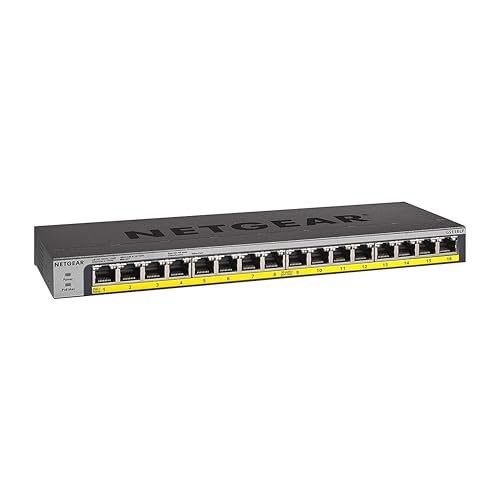
NETGEAR 16-Port Gigabit Fanless PoE+ Switch
Best for: silent plug-and-play PoE+ equipment setups
- Number of Ports
- 16 Ports (what this guide is about)
- Port Count
- 16
- Port Speed
- 1.0Gbps
- Management Type
- Unmanaged
- PoE Support
- PoE+
- PoE Power Budget
- 76W
This NETGEAR switch gives you 16 gigabit Ethernet ports that all support PoE+, backed by a 76W base power budget. Its unmanaged plug-and-play design requires no configuration or software setup. Because it uses a fanless metal housing, it operates silently on a desktop, wall, or rack. It suits you if you need to power multiple network devices without managing software or complex switch settings.
Pros
- All 16 gigabit ports support PoE+
- Fanless metal chassis ensures silent operation
- Supports desktop, wall-mount, and rack-mount placement
- PoE budget can expand to 183W with a separate power module
Cons
- Base PoE budget is limited to 76W out of the box
- Unmanaged switch with no VLAN or traffic control options
Good fit if
- You need PoE+ power across all 16 Gigabit ports.
- You need silent, fanless operation in an active work area.
- You want simple plug-and-play installation without configuring settings.
Skip if
- You need managed network features such as VLANs or QoS.
- You exceed 76W of total PoE draw and do not want to purchase an additional power adapter.
Verdict: NETGEAR 16-Port Gigabit PoE+ Switch delivers quiet, plug-and-play network connectivity with PoE+ capabilities across all ports. It provides reliable wired expansion when you do not need software configuration tools.

TP-Link 16-Port Gigabit Unmanaged Switch
Best for: silent plug-and-play home network expansion
- Number of Ports
- 16 Ports (what this guide is about)
- Port Count
- 16
- Port Speed
- 10/100/1000Mbps
- Management Type
- Unmanaged
- Mounting Type
- Desktop or Wall-mounting
- PoE Support
- PoE
This switch expands your wired home network with 16 Gigabit Ethernet ports inside a compact metal casing. It operates quietly without internal fans and supports desktop placement or wall mounting. You get basic traffic prioritization through port-based QoS and IGMP snooping without needing manual software setup. It suits you if you need silent, reliable wired connections across multiple rooms without configuring virtual networks or managing settings.
Pros
- 16 Gigabit RJ45 ports with auto-negotiation and auto MDI/MDIX
- Fanless metal chassis built for silent desktop or wall-mount placement
- Hardware-level traffic optimization via 802.1p/DSCP QoS and IGMP snooping
- Three-year warranty with weekday technical support
Cons
- Unmanaged design lacks virtual network configuration or a web management interface
- Lacks rackmount brackets in the specified package dimensions
Good fit if
- You need 16 silent Gigabit Ethernet ports for desktop or wall-mounted setups.
- You want automated traffic prioritization without logging into management software.
- You prefer an unmanaged, plug-and-play installation for your connected devices.
Skip if
- You need managed switch capabilities like manual VLAN assignment.
- You require multi-gigabit transfer speeds beyond standard Gigabit rates.
Verdict: TP-Link 16-Port Gigabit Unmanaged Switch delivers silent plug-and-play wired expansion with traffic prioritization in a compact metal chassis. It provides dependable local networking without configuration overhead.

TP-Link 16-Port Smart Managed Switch
Best for: managed desktop or wall-mounted wired networks
- Number of Ports
- 16 Ports (what this guide is about)
- Port Count
- 16
- Port Speed
- 10/100/1000Mbps
- Management Type
- Easy Smart Managed
- Mounting Type
- Desktop/Wall-Mount
- Dimensions
- 11.3 × 4.4 × 1 inches
This TP-Link network switch gives you 16 Gigabit Ethernet ports with smart management controls. You can set it up as a basic plug-and-play unit or access traffic controls through a web interface and downloadable utility. Its metal housing supports desktop or wall mounting to fit your physical workspace. It suits you if you need basic network configuration options beyond standard unmanaged hardware while maintaining full gigabit speeds across all sixteen connected wired devices.
Pros
- 16 Gigabit (10/100/1000 Mbps) RJ45 Ethernet ports
- Smart management through web interface and utility software
- Supports both desktop and wall mounting
- Durable metal casing
Cons
- No Power over Ethernet support listed in specifications
- Lacks rackmount hardware support
Good fit if
- You need smart management features across 16 wired gigabit connections
- You want flexible placement on a desk or mounted to a wall
Skip if
- You need Power over Ethernet to run access points or cameras
- You require a switch designed for server rack installation
Verdict: TP-Link 16-Port Smart Managed Gigabit Switch balances plug-and-play simplicity with web-based configuration tools in a durable metal chassis. It delivers reliable multi-device connectivity when you need traffic management without jumping to complex enterprise gear.

Real HD 16-Port Fast Ethernet PoE+ Switch
Best for: IP surveillance setups needing high PoE power
- Number of Ports
- 16 Ports (what this guide is about)
- Port Count
- 16
- Port Speed
- 10/100 Mbps
- Management Type
- Unmanaged
- PoE Support
- PoE+ (802.3af/at)
- PoE Power Budget
- 300W
This unmanaged switch gives you 16 Fast Ethernet ports alongside two Gigabit uplink ports. It delivers up to 30W per port with a 300W total PoE power budget for IP cameras and wireless access points. A fanless metal chassis ensures quiet operation on a desktop or rack. It suits you if you need dedicated surveillance connectivity with extended transmission ranges up to 250 meters.
Pros
- 300W total PoE power budget with up to 30W per port
- Two dedicated Gigabit uplink Ethernet ports
- Extend mode supports power and data delivery up to 250 meters
- Fanless metal chassis designed for silent heat dissipation
Cons
- Standard ports run at 10/100 Mbps Fast Ethernet rather than Gigabit speed
- Unmanaged design provides no software configuration or web interface
Good fit if
- You need high PoE capacity up to 300W for IP cameras or access points.
- You run surveillance cables requiring extended ranges up to 250 meters.
- You want silent, fanless operation in a durable metal chassis.
Skip if
- You need Gigabit data transfer speeds across all 16 connected devices.
- You require managed switch capabilities like software-based traffic control.
Verdict: Real HD 16-Port PoE+ Switch provides a heavy 300W power budget and long-range extend mode for network cameras. Its 10/100 Mbps downstream ports prioritize steady device power over high-speed local file transfers.

TP-Link 16-Port Unmanaged PoE+ Switch
Best for: PoE camera networks needing SFP fiber uplinks
- Number of Ports
- 16 Ports (what this guide is about)
- Port Speed
- 10/100 Mbps
- Management Type
- Unmanaged
- PoE Support
- PoE+ (802.3at/af)
- PoE Power Budget
- 250W
- Uplink Ports
- 2 × Gigabit SFP
This unmanaged switch gives you 16 Fast Ethernet PoE+ ports with a 250W power budget, delivering up to 30W per port. It includes two Gigabit RJ45 uplinks alongside two Gigabit SFP slots for fiber connectivity. Specialized hardware toggles let you extend transmission reach up to 250 meters, isolate traffic, or prioritize ports 1 through 8. It suits surveillance camera networks and powered devices requiring dedicated high-speed uplinks.
Pros
- Total PoE power budget of 250W with up to 30W per port
- Two dedicated Gigabit SFP slots and two Gigabit RJ45 uplinks
- Extend mode supports cable runs up to 250 meters at 10 Mbps
- Hardware toggles for port isolation and traffic prioritization
Cons
- Main 16 PoE ports operate at 10/100 Mbps Fast Ethernet speeds rather than Gigabit
- Unmanaged architecture offers no software configuration interface
Good fit if
- You need Gigabit SFP fiber slots alongside standard RJ45 uplinks.
- You run IP cameras or PoE hardware requiring up to a 250W budget.
- You require extended range connections up to 250 meters for remote devices.
Skip if
- You require Gigabit transfer speeds across all 16 client ports.
- You need managed switch features such as web-based configuration.
Verdict: TP-Link 16-Port PoE+ Switch with SFP pairs high-wattage power delivery with fiber uplink options for multi-device network deployments. It offers a plug-and-play solution where Fast Ethernet client speeds are sufficient for connected endpoints.

NETGEAR 16-Port Fanless PoE+ Unmanaged Switch
Best for: silent, plug-and-play desktop or wall PoE setups
- Number of Ports
- 16 Ports (what this guide is about)
- Port Count
- 16
- Port Speed
- 1.0 Gbps
- Management Type
- Unmanaged
- PoE Support
- PoE+
- PoE Power Budget
- 115W
View on Amazon: NETGEAR 16-Port Fanless PoE+ Unmanaged Switch
This NETGEAR switch gives you 16 gigabit Ethernet ports that all deliver PoE+ power from a 115W total budget. Its unmanaged design requires no software setup or manual configuration, running quietly with fanless cooling in desktop or wall-mount setups. It suits your setup if you need to run low-power PoE hardware like IP cameras and access points without dealing with management software or noisy cooling fans.
Pros
- 16 gigabit Ethernet ports with PoE+ support
- 115W total PoE power budget with dynamic power allocation
- Silent fanless operation in a compact metal housing
- Supports both desktop and wall-mount placement
Cons
- Total 115W PoE budget averages under 7.2W per port across all 16 ports
- Unmanaged switch lacks traffic monitoring, VLAN support, and remote configuration
Good fit if
- You want silent, fanless desktop or wall-mounted PoE hardware.
- You need to power low-draw PoE devices up to a shared 115W total budget.
- You prefer unmanaged plug-and-play setup without software configuration.
Skip if
- You require managed features such as VLAN segmentation or traffic prioritization.
- You plan to connect multiple high-power PoE+ devices that exceed 115W combined.
- You need a standard rackmount installation.
Verdict: NETGEAR 16-Port Gigabit PoE+ Unmanaged Switch provides silent, plug-and-play gigabit connectivity with 115W of total PoE+ power for modest multi-device deployments. It delivers straightforward unmanaged network expansion for desktops and walls without fan noise.

YuanLey 16-Port PoE+ Switch with 2 Gigabit Uplinks
Best for: PoE IP camera setups needing high power
- Number of Ports
- 16 Ports (what this guide is about)
- Port Count
- 18
- Port Speed
- 10/100 Mbps
- Management Type
- Unmanaged
- PoE Support
- PoE+ (802.3af/at)
- PoE Power Budget
- 250W
View on Amazon: YuanLey 16-Port PoE+ Switch with 2 Gigabit Uplinks
This unmanaged switch gives you 16 Fast Ethernet PoE+ ports alongside two dedicated Gigabit uplinks. It provides an overall power budget of 250W under IEEE 802.3af/at standards, supplying up to 30W per port. An extend mode isolates ports and carries data up to 250 meters at 10Mbps. You will find it well suited if you need to run multiple IP cameras, access points, or IP phones without complex network configuration.
Pros
- 250W total PoE budget supporting IEEE 802.3af/at
- Two dedicated Gigabit uplink ports for high-speed network connections
- Extend mode supports cable runs up to 250 meters at 10Mbps with VLAN isolation
- Durable metal chassis with internal industrial cooling fan
Cons
- 16 PoE ports operate at 10/100Mbps rather than Gigabit speeds
- Active cooling fan produces operational noise
- Does not support passive PoE devices
Good fit if
- You need to power multiple IP cameras or access points under a 250W budget.
- You require long-range cabling runs up to 250 meters with hardware port isolation.
- You want an unmanaged plug-and-play setup with Gigabit uplinks to your router.
Skip if
- You need full Gigabit speeds across all 16 client access ports.
- You use devices that require passive PoE power.
- You require a fanless, completely silent network switch for a quiet desk.
Verdict: YuanLey 16-Port PoE+ Switch with 2 Gigabit Uplinks delivers substantial 250W power for surveillance cameras and access points via dedicated uplinks. It provides an effective long-range unmanaged solution if Fast Ethernet bandwidth meets your needs.
Specifications side by side
| Spec | NETGEAR 16-Port Gigabit Unmanaged Switch | D-Link 16-Port Fanless Gigabit Switch | TP-Link 16-Port Gigabit Unmanaged Switch | Tenda 16-Port Gigabit Unmanaged Switch | TP-Link 16-Port Fast Ethernet Switch | Zyxel 16-Port Fanless Unmanaged Gigabit Switch | Linksys 16-Port Gigabit Unmanaged Switch | TP-Link 16-Port Smart Managed Gigabit Switch | NETGEAR 16-Port Gigabit Fanless PoE+ Switch | TP-Link 16-Port Gigabit Unmanaged Switch | TP-Link 16-Port Smart Managed Switch | Real HD 16-Port Fast Ethernet PoE+ Switch | TP-Link 16-Port Unmanaged PoE+ Switch | NETGEAR 16-Port Fanless PoE+ Unmanaged Switch | YuanLey 16-Port PoE+ Switch with 2 Gigabit Uplinks |
|---|---|---|---|---|---|---|---|---|---|---|---|---|---|---|---|
| Port Count | 16 | 16 | 16 | 16 | 16 | 16 | 16 | 16 | 16 | 16 | 16 | 16 | not specified | 16 | 18 |
| Port Speed | 1.0 Gbps | Gigabit | Gigabit | 10/100/1000 Mbps | 10Mbps, 100Mbps | Gigabit | Gigabit | Gigabit | 1.0Gbps | 10/100/1000Mbps | 10/100/1000Mbps | 10/100 Mbps | 10/100 Mbps | 1.0 Gbps | 10/100 Mbps |
| Management Type | Unmanaged | Unmanaged | Unmanaged | Unmanaged | Unmanaged | Unmanaged | Unmanaged | Easy Smart Managed | Unmanaged | Unmanaged | Easy Smart Managed | Unmanaged | Unmanaged | Unmanaged | Unmanaged |
| PoE Support | not specified | not specified | not specified | not specified | not specified | not specified | not specified | not specified | PoE+ | not specified | not specified | PoE+ (802.3af/at) | PoE+ (802.3at/af) | PoE+ | PoE+ (802.3af/at) |
| PoE Power Budget | not specified | not specified | not specified | not specified | not specified | not specified | not specified | not specified | 76W | not specified | not specified | 300W | 250W | 115W | 250W |
| Uplink Ports | not specified | not specified | not specified | not specified | not specified | not specified | not specified | not specified | not specified | not specified | not specified | 2 Gigabit Uplink Ethernet Ports | 2 × Gigabit SFP | not specified | 2 x Gigabit |
| Switching Capacity | not specified | not specified | 32Gbps | not specified | 3.2Gbps | not specified | not specified | not specified | not specified | not specified | not specified | not specified | not specified | not specified | 12 Gbps |
| Mounting Type | Desktop, Wall-Mount | Desktop, Rackmount, Wall-Mount | not specified | Rackmount, Desktop | not specified | Desktop, Wall-Mount | Wall Mount or Desktop | not specified | Desktop, Wall-mount, Rack-mount | Desktop or Wall-mounting | Desktop/Wall-Mount | Rack Mount, desktop or a wall | not specified | Desktop, Wall-mount | not specified |
| Number of Ports | 16 Ports | 16 Ports | 16 Ports | 16 Ports | 16 Ports | 16 Ports | 16 Ports | 16 Ports | 16 Ports | 16 Ports | 16 Ports | 16 Ports | 16 Ports | 16 Ports | 16 Ports |
| Uplink Port Type | not specified | not specified | not specified | not specified | not specified | not specified | not specified | not specified | not specified | not specified | not specified | Gigabit Uplink | SFP | not specified | Gigabit Uplink |
| Recommended Use | not specified | not specified | not specified | not specified | not specified | not specified | Office | not specified | not specified | not specified | not specified | not specified | not specified | not specified | not specified |
| Intended Use | not specified | not specified | not specified | not specified | not specified | not specified | Home | not specified | not specified | not specified | not specified | not specified | not specified | not specified | not specified |
| Dimensions | 16.9 × 6.57 × 2.76 inches | 11 × 4.95 × 1.73 inches | 17.3 × 7.1 × 1.7 inches | 11.6 × 7.08 × 1.73 inches | 7.87 × 5.59 × 1.57 inches | 5.24 × 8.46 × 1.65 inches | 4.72 × 11 × 0.98 inches | 15.8 × 9.84 × 3.15 inches | 4.02 × 1.06 × 11.3 inches | 11.3 × 4.4 × 1 inches | 11.3 × 4.4 × 1 inches | not specified | 17.3 × 7.09 × 1.73 inches | 4 × 11.3 × 1.1 inches | 10.6 × 7.1 × 1.7 inches |
| Weight | 2.73 pounds | 2.4 pounds | 4.41 pounds | 1.1 pounds | 8 ounces | 2 pounds | 1.72 pounds | 2 pounds | 1.94 pounds | 2.1 pounds | 2.07 pounds | 4.3 pounds | 2 pounds | 1.94 pounds | 4.17 pounds |
| Size | 16 Port, Blue | 16-Port Gigabit | 16 Port | 16-Port | 16 Port | 16-Port | v3 | 16-Port | 16 Port | Enhanced Features | 16 Port, PoE+ @ 76W | 16 Port, 1 Gigabit | 16 Port | not specified | 18 Port w/ 16-Port PoE+ | 16 Port, PoE+ @ 115W | 18 Port | 16*PoE+ (250w) |
| Color | Black | Red | Black | Blue | 16 | Black | Black/Blue | Black | Silver / black | Black | Black | Black | Black | Black | Blue |
| Model | GS116NA | DGS-1016D/B | TL-SG1016 | 4E10053 | TL-SF1016D | GS1100-16 | LGS116-AMZ | TL-SG1016DE | GS116LP-100NAS | TL-SG116 | TL-SG116E | 16 port poe switch | TL-SL1218MP | GS316P-100NAS | 18 Port | 16*PoE+ (250w) |
If you need in-wall lighting controls rather than Ethernet hardware, you can evaluate the best TREATLIFE smart switches based on their technical specifications.
How to Choose a 16-Port Switch
-
Choosing Switch Management Type
Smart managed and unmanaged switches serve different operational goals. Unmanaged models require zero setup, automatically negotiating speed and duplex settings as soon as you connect your ethernet cables. If you need advanced traffic control, select a smart managed unit such as the TP-Link TL-SG1016DE. Smart management provides web-based utilities to configure virtual LANs for network isolation, monitor cable diagnostics, and set quality of service rules. Choose unmanaged switches for standard home setups, or pick smart managed options when you need administrative traffic visibility.
-
Calculating PoE Power Budget
Power over Ethernet delivers electrical current alongside network data over twisted-pair cables. When connecting powered equipment like access points or surveillance hardware, compare the overall wattage budget. For example, the NETGEAR GS316P-100NAS provides a 115W power budget across its PoE+ ports. Determine the maximum power consumption of each endpoint you plan to connect, then sum these values together. Ensure the switch power capacity exceeds your total connected load. Choosing insufficient wattage causes connected devices to reboot or fail to initialize when power draw spikes.
-
Selecting Appropriate Uplink Ports
Uplink ports connect the switch back to your router or primary core switch. Some 16-port models feature dedicated uplink connections to avoid consuming standard client ports. The TP-Link TL-SL1218MP includes SFP uplink ports, which support fiber optic modules to bridge connections over long distances without electrical interference. Other models offer dedicated Gigabit RJ-45 copper uplinks for connecting directly to routers using regular patch cables. If your network backbone spans different floors or detached structures, choose SFP fiber uplinks. For compact, single-room networks, standard copper uplinks suffice.
-
Inspecting Physical Mounting Options
Physical dimensions and mounting hardware dictate where you can locate the switch. Certain hardware configurations, such as the D-Link DGS-1016D/B, support standard rackmount installation alongside desktop placement. Rackmount brackets secure the hardware into structured server racks or network cabinets, keeping cabling tidy. If you do not possess a server rack, verify whether the switch supports wall mounting or flat desktop use. Wall-mountable enclosures feature dedicated keyhole slots on the base, allowing you to anchor the switch inside utility closets, under desks, or against backboards.
-
Considering Acoustic Fanless Designs
Cooling architecture impacts noise levels in occupied environments. Fanless network switches rely purely on passive heat dissipation through their metal enclosures to maintain proper operational temperatures. The Zyxel GS1100-16 uses a fanless build that generates zero decibels of operating noise, making it suitable for bedrooms, home offices, and media consoles. Switches with active internal fans can produce continuous background whirring that proves distracting in quiet living spaces. If you plan to install your switch on an open desk or in a common room, verify it specifies fanless cooling.
Frequently asked questions
Can you rackmount a 16-port network switch?
Yes, several 16-port switches support standard server rack installation. Models like the D-Link DGS-1016D/B, Tenda 4E10053, and Real HD include rackmount capabilities directly in their specifications. If you plan to install your switch in a networking cabinet, verify the enclosure dimensions and mounting hardware compatibility before choosing a model, as other units only support desktop or wall placements.
Are 16-port network switches silent during operation?
Most unmanaged 16-port desktop and Gigabit switches operate completely silently without internal fans. Models such as the NETGEAR GS116NA, Zyxel GS1100-16, and D-Link DGS-1016D/B feature passive cooling designs. Even high-capacity options like the NETGEAR GS316P offer fanless operation alongside PoE+ power delivery, making them practical choices for open office spaces, media consoles, or work areas where equipment noise is disruptive.
What is the purpose of SFP uplink ports on a 16-port switch?
SFP uplink ports allow you to connect fiber optic transceivers or high-speed links directly to core network hardware. On models like the TP-Link TL-SL1218MP, dedicated SFP slots provide long-distance data uplinks without consuming standard copper ports. This lets you link separate network racks, outbuildings, or higher-tier switches across greater physical distances than standard ethernet cables can reliably cover.
How much total PoE power budget do 16-port switches provide?
Power budgets vary significantly based on switch design and intended use cases. Compact units like the NETGEAR GS116LP and GS316P offer 76W and 115W total budgets for basic endpoint hardware. In contrast, surveillance-focused switches like the YuanLey model deliver 250W, while the Real HD switch supplies up to 300W across its ports to power multiple high-draw devices simultaneously.
Can you connect an unmanaged 16-port switch directly to your router?
Yes, you can connect any unmanaged 16-port switch directly to a router LAN port using a standard ethernet cable. Switches like the NETGEAR GS116NA or Linksys LGS116-AMZ automatically negotiate connection speeds without requiring manual IP configuration or setup software. Your router continues assigning IP addresses to all connected hardware, while the switch expands physical wired port access across your local network.
What wall-mounting options exist for 16-port network switches?
Many 16-port switches include integrated mounting slots on their chassis for wall installation. Units such as the Linksys LGS116-AMZ, TP-Link TL-SG116E, and NETGEAR GS116NA are explicitly rated for both desktop and wall-mount orientations. Mounting your switch vertically helps keep network cables organized, frees up desk surface area, and keeps hardware securely positioned inside wiring closets or workspace corners.
What does switching capacity mean on a 16-port Gigabit switch?
Switching capacity measures the total volume of data a switch can process simultaneously across all connections. A standard full-duplex Gigabit port handles 1Gbps incoming and 1Gbps outgoing traffic at the same time. For a 16-port model, such as the TP-Link TL-SG1016, this requires a 32Gbps non-blocking backplane to ensure every connected device achieves full throughput without experiencing internal data bottlenecks.