Best ASUS Wifi Routers for Gaming: 15 Spec-Based Picks
As an Amazon Associate we earn from qualifying purchases. Links on this page are affiliate links.
We compared 15 models to find the best ASUS wifi routers for gaming. Our top pick is the ASUS TUF Gaming Dual-Band WiFi 7 Router. It leads because it pairs quad 2.5G network ports with 6.5 Gbps wireless speeds. These picks rely strictly on the specifications published on the listings. You will use this guide to decide which router matches your wired and wireless gaming needs.
Quick picks
The best fit for you
- You want multi-gigabit wired connections with Wi-Fi 7 ASUS TUF Gaming Dual-Band WiFi 7 Router Quad 2.5G network ports and 6.5 Gbps dual-band Wi-Fi 7 supply fast wired and wireless throughput.
- You need entry-level Wi-Fi 6 for Gigabit broadband ASUS Dual-Band WiFi 6 Router Dual-band Wi-Fi 6 wireless networking pairs with standard Gigabit connectivity for basic home gaming.
- You need maximum quad-band bandwidth and 10G ports ASUS ROG Quad-Band WiFi 7 Gaming Router Quad-band Wi-Fi 7 delivers up to 30 Gbps wireless throughput alongside dual 10G wired ports.
- You want eight dedicated Gigabit LAN ports for gaming ASUS Dual-Band 8-Port Gaming Router Eight onboard Gigabit LAN ports let you connect multiple wired gaming systems without an external switch.
Our 15 picks

ASUS TUF Gaming Dual-Band WiFi 7 Router
Best for: multi-gigabit wired and WiFi 7 gaming setups
- Use Case
- Gaming (what this guide is about)
- Wi-Fi Standard
- Wi-Fi 7
- Speed Rating
- BE6500
- Frequency Bands
- Dual-Band
- Max Port Speed
- 2.5 Gbps
- Ethernet Ports
- 4
This ASUS TUF dual-band WiFi 7 router provides wireless throughput up to 6.5 Gbps and features four 2.5G Ethernet ports, split between one WAN and three LAN connections. It includes Multi-Link Operation to connect across bands simultaneously, 4096-QAM modulation, and hardware-prioritized gaming ports. If you want multi-gigabit wired connections alongside WiFi 7 wireless standards for your gaming setup, this dual-band unit fits your network.
Pros
- WiFi 7 speeds up to 6.5 Gbps with 4096-QAM
- Four 2.5G ports with one WAN and three LAN configurations
- Multi-Link Operation support for simultaneous band connection
- Dedicated gaming port and Open NAT configuration
Cons
- Dual-band configuration lacks a 6 GHz frequency band
- Lacks 10G wired Ethernet ports
Good fit if
- You need multiple 2.5G wired connections for PCs or consoles.
- You want WiFi 7 speeds and Multi-Link Operation on a dual-band network.
- You use hardware port prioritization and Open NAT for multiplayer games.
Skip if
- You require a tri-band or quad-band router with a 6 GHz band.
- You need 10 Gbps wired Ethernet connections.
Verdict: ASUS TUF Dual-Band WiFi 7 Gaming Router pairs quad 2.5G network ports with 6.5 Gbps wireless speeds and dedicated traffic prioritization. It delivers reliable multi-gigabit connectivity for wired and wireless gaming environments.

ASUS Dual-Band WiFi 6 Router
Best for: entry-level gaming on standard Gigabit connections
- Use Case
- Gaming, Streaming (what this guide is about)
- Wi-Fi Standard
- Wi-Fi 6
- Speed Rating
- AX1800
- Frequency Bands
- Dual-Band
- Max Port Speed
- 1 Gbps
- Ethernet Ports
- 5
The ASUS Dual-Band WiFi 6 Router provides entry-level wireless networking for your home gaming setup. It features dual-band WiFi 6 connectivity reaching up to 1.8 Gbps, powered by a dual-core processor with OFDMA and MU-MIMO support to manage network traffic. Four external antennas direct signal coverage, while four Gigabit LAN ports offer dedicated wired connections for your gaming consoles and PC. It suits you if you need essential WiFi 6 functionality without complex multi-gigabit hardware.
Pros
- Four Gigabit LAN ports and one Gigabit WAN port
- WiFi 6 support with OFDMA, MU-MIMO, and 1024-QAM
- Built-in AiProtection Classic security and Instant Guard VPN
- Four external antennas for directed coverage
Cons
- No multi-gigabit Ethernet ports
- Dual-band only with no 6 GHz support
Good fit if
- You need a basic WiFi 6 setup for standard Gigabit internet.
- You connect gaming consoles or PCs via wired Gigabit Ethernet ports.
Skip if
- You have an internet plan over 1 Gbps needing faster multi-gigabit ports.
- You want tri-band or quad-band WiFi with 6 GHz frequency bands.
Verdict: ASUS Dual-Band WiFi 6 Router delivers reliable entry-level WiFi 6 speeds and essential wired ports for gaming on standard Gigabit broadband.

ASUS ROG Quad-Band WiFi 7 Gaming Router
Best for: ultra-fast multi-gigabit Wi-Fi 7 gaming setups
- Use Case
- Gaming (what this guide is about)
- Wi-Fi Standard
- WiFi 7
- Frequency Bands
- Quad-Band
- Max Port Speed
- 10G
- Dimensions
- 13.7 × 8.6 × 13.7 inches
- Weight
- 4.4 pounds
This quad-band Wi-Fi 7 gaming router delivers wireless speeds up to 30 Gbps using 320MHz channels in the 6 GHz band and 4096-QAM. Wired setups get dual 10G ports alongside four 2.5G ports for high-bandwidth connections. It also includes Multi-link Operation and Triple-Level Game Acceleration to prioritize gaming traffic from your local port to the game server. It suits you if you need top-tier Wi-Fi 7 throughput and multi-gigabit wired connections.
Pros
- Dual 10G and four 2.5G wired ports
- Wi-Fi 7 quad-band throughput up to 30 Gbps
- Supports 320MHz channels in the 6 GHz band
- Multi-link Operation and Triple-Level Game Acceleration
Cons
- Large physical footprint measuring 13.7 by 13.7 inches
- Heavy chassis weighing 4.4 pounds
Good fit if
- You require dual 10G wired ports for high-speed connections.
- You have Wi-Fi 7 devices capable of 320MHz channels and Multi-link Operation.
- You want built-in hardware acceleration prioritizing PC gaming traffic.
Skip if
- You have limited shelf space for a 13.7-inch wide router.
- You only connect standard gigabit clients without Wi-Fi 7 support.
Verdict: ASUS ROG Rapture Quad-Band WiFi 7 Router provides massive wireless bandwidth up to 30 Gbps paired with dual 10G ports. It is built for gaming networks requiring ultra-fast multi-gigabit wired and Wi-Fi 7 wireless connections.

ASUS Dual-Band WiFi 6 Gaming Router
Best for: dual-band gaming setups and AiMesh expansion
- Use Case
- Gaming (what this guide is about)
- Wi-Fi Standard
- WiFi 6
- Speed Rating
- AX5400
- Frequency Bands
- Dual-Band
- Features
- MU-MIMO
- Dimensions
- 11 × 7.26 × 6.5 inches
The ASUS AX5400 WiFi 6 Gaming Router is a dual-band networking unit built for low-latency play. You get wireless throughput up to 5400 Mbps across WiFi 6 bands, backed by 160MHz channels and MU-MIMO support for handling device traffic. Mobile Game Mode lets you prioritize mobile devices from the companion app, while AiMesh compatibility links it with other routers. It suits you if you need dedicated gaming bandwidth without moving up to tri-band hardware.
Pros
- Speeds up to 5400 Mbps with WiFi 6 and 160MHz channel support
- AiMesh support for expanding coverage with compatible ASUS hardware
- Mobile Game Mode for latency optimization via the ASUS Router app
- ASUS Aura RGB customizable lighting effects
- AiProtection Pro security suite with WPA3 and parental controls
Cons
- Dual-band design lacks a dedicated third frequency band
- Wi-Fi 6 standard lacks 6 GHz band support found on newer protocols
Good fit if
- You need 160MHz channel support and dual-band bandwidth up to 5400 Mbps.
- You plan to build a mesh setup with other ASUS AiMesh routers.
- You want mobile gaming optimization through a dedicated smartphone app toggle.
Skip if
- You require tri-band or quad-band routing to isolate gaming traffic completely.
- You need WiFi 6E or WiFi 7 connectivity for newer wireless spectrum.
Verdict: ASUS AX5400 WiFi 6 Gaming Router delivers solid dual-band throughput and dedicated mobile optimization tools for home networks. Its AiMesh support and 160MHz channel bandwidth provide strong core performance without requiring multi-band hardware.

ASUS ROG Rapture Tri-Band WiFi 6 Router
Best for: tri-band Wi-Fi 6 gaming setups
- Use Case
- Gaming (what this guide is about)
- Wi-Fi Standard
- WiFi 6
- Frequency Bands
- Tri-Band
- Max Port Speed
- 2.5G
- Dimensions
- 11.3 × 4.74 × 14.9 inches
- Weight
- 4.1 pounds
This tri-band Wi-Fi 6 router delivers dedicated wireless bandwidth alongside a 2.5G Ethernet gaming port and eight external antennas. Powered by a 1.8GHz quad-core processor, it includes Asuswrt controls for monitoring bandwidth utilization and prioritizing gaming traffic. It suits you if you want multi-gigabit wired connectivity and AiMesh expansion options to handle heavy network loads across multiple gaming devices in your home.
Pros
- Dedicated 2.5G gaming port alongside standard Gigabit ports
- Tri-band Wi-Fi 6 design with eight external antennas
- 1.8GHz quad-core processor handles network traffic and prioritization
- Compatible with ASUS AiMesh for whole-home system expansion
Cons
- Large physical footprint measuring 14.86 inches tall and 4.1 pounds
- Wi-Fi 6 specification lacks the newer 6 GHz wireless band
Good fit if
- You need a 2.5G Ethernet port for a high-speed wired gaming connection.
- You want tri-band wireless bands to separate gaming traffic from household devices.
- You plan to build a multi-node network using ASUS AiMesh hardware.
Skip if
- You require the 6 GHz spectrum provided by Wi-Fi 6E or Wi-Fi 7 hardware.
- You have tight shelf clearance that cannot fit a 14.86-inch-tall router.
Verdict: ASUS ROG Rapture Tri-Band WiFi 6 Router delivers reliable wired and wireless speeds via its 2.5G gaming port and eight antennas. It is a capable choice if you need deep traffic management tools and mesh expandability without moving to Wi-Fi 7.

ASUS Dual-Band WiFi 6 Gaming Router
Best for: dual-band WiFi 6 home gaming setups
- Use Case
- Gaming (what this guide is about)
- Wi-Fi Standard
- WiFi 6
- Speed Rating
- AX5400
- Frequency Bands
- Dual Band
- Features
- VPN
- Dimensions
- 11 × 7.26 × 6.5 inches
This dual-band WiFi 6 router delivers cumulative speeds up to 5400 Mbps across 160MHz channels. Powered by a 1.5 GHz tri-core processor, it includes a dedicated gaming port, Mobile Game Mode controls, and customizable Aura RGB lighting. You can link it with AiMesh hardware to expand coverage across your home. It suits you if you want prioritized gaming traffic on standard dual-band connections.
Pros
- Up to 5400 Mbps transfer rates with 160MHz channel support
- 1.5 GHz tri-core processor manages network traffic
- Dedicated gaming port and app-based Mobile Game Mode
- AiMesh support for whole-home network expansion
- AiProtection Pro security and Instant Guard VPN included
Cons
- Dual-band design lacks a second 5 GHz band for dedicated backhaul or gaming
- Limited to WiFi 6 rather than newer WiFi 6E or WiFi 7 standards
Good fit if
- You want WiFi 6 speeds up to 5400 Mbps with 160MHz channel width.
- You prioritize mobile and wired gaming traffic using built-in software modes.
- You plan to build a mesh network using AiMesh-compatible hardware.
Skip if
- You need a tri-band router to isolate gaming devices on a separate band.
- You require the higher throughput and features of WiFi 7 hardware.
Verdict: ASUS Dual-Band WiFi 6 Gaming Router pairs AX5400 throughput and 160MHz channels with dedicated mobile and wired gaming traffic modes. It gives you balanced WiFi 6 performance and AiMesh expansion options.

ASUS ROG Rapture Tri-Band WiFi 6 Gaming Router
Best for: multi-gigabit wired and tri-band wireless gaming setups
- Use Case
- Gaming (what this guide is about)
- Wi-Fi Standard
- WiFi 6
- Frequency Bands
- Tri-Band
- Max Port Speed
- 10G
- Dimensions
- 13.9 × 13.9 × 7.6 inches
- Weight
- 4.81 pounds
View on Amazon: ASUS ROG Rapture Tri-Band WiFi 6 Gaming Router
This ASUS ROG Rapture tri-band router operates on Wi-Fi 6 to manage high-throughput gaming traffic across your home. It includes dedicated 10G and 2.5G wired ports alongside standard connectivity for multi-gigabit hardware. With its tri-band configuration and extendable router capability, you can distribute network loads across distinct frequency bands. It suits you if you need multi-gigabit wired backhaul and high-bandwidth wireless connectivity for gaming environments.
Pros
- Tri-band wireless architecture for distributing device traffic
- Equipped with 10G and 2.5G high-speed Ethernet ports
- Supports Wi-Fi 6 networking standard
- Extendable router capability for mesh network expansion
Cons
- Large footprint measuring 13.94 by 13.94 inches
- Heavy chassis weighing 4.81 pounds
- Limited to Wi-Fi 6 rather than newer Wi-Fi 6E or Wi-Fi 7
Good fit if
- You need 10G or 2.5G wired ports for high-bandwidth gaming devices.
- You want a tri-band Wi-Fi 6 setup to separate network traffic.
- You have adequate desk or shelf space for a 13.94-inch wide router.
Skip if
- You need the newer 6 GHz band provided by Wi-Fi 6E or Wi-Fi 7.
- You prefer a compact, lightweight router for tight shelf placements.
Verdict: ASUS ROG Rapture Tri-Band WiFi 6 Router delivers ultra-fast 10G and 2.5G wired connectivity alongside tri-band Wi-Fi 6 performance. It serves heavy local-network gaming demands if you have the physical space for its large 4.81-pound chassis.
ASUS ROG Rapture Quad-Band WiFi 7 Router
Best for: multi-gigabit quad-band WiFi 7 PC gaming
- Use Case
- Gaming (what this guide is about)
- Wi-Fi Standard
- WiFi 7
- Frequency Bands
- Quad-Band
- Max Port Speed
- 10 Gbps
- Ethernet Ports
- 6
- Dimensions
- 13.7 × 8.6 × 13.7 inches
This ASUS ROG Rapture quad-band WiFi 7 router provides wireless throughput up to 30 Gbps with 320MHz channels and 4096-QAM in the 6 GHz band. It features dual 10G ports alongside four 2.5G ports for multi-gigabit wired setups. You get multi-link operation and triple-level game acceleration to manage your gaming traffic. It suits you if you need top-tier network capacity, ultra-fast wired connections, and multi-band wireless support for PC gaming.
Pros
- WiFi 7 speeds up to 30 Gbps with 320MHz channels and 4096-QAM
- Dual 10G ports and quad 2.5G ports for fast wired networking
- Quad-band coverage with Multi-link Operation support
- Triple-Level Game Acceleration prioritizing PC gaming traffic
Cons
- Large physical footprint measuring 13.7 by 13.7 inches
- Heavy chassis weighing 4.4 pounds
Good fit if
- You need dual 10G and quad 2.5G wired connections for high-speed local networking.
- You want quad-band WiFi 7 bandwidth utilizing 320MHz channels and Multi-link Operation.
- You want triple-level game acceleration from your local port to the game server.
Skip if
- You have tight shelf space unable to hold a 13.7 by 13.7 inch router.
- You do not have devices capable of using 2.5G or 10G wired speeds.
Verdict: ASUS ROG Rapture Quad-Band WiFi 7 Gaming Router delivers up to 30 Gbps wireless speeds alongside dual 10G and quad 2.5G ports. It offers maximum multi-gigabit wired and quad-band capability for complex gaming environments.

ASUS Dual-Band WiFi 7 Gaming Router
Best for: Gamers needing 10G wired speeds
- Use Case
- Gaming (what this guide is about)
- Wi-Fi Standard
- WiFi 7
- Speed Rating
- BE6800
- Frequency Bands
- Dual-Band
- Max Port Speed
- 10 Gbps
- Features
- VPN
The ASUS RT-BE86U is a dual-band WiFi 7 router designed for gaming. It delivers up to 6800 Mbps with multi-link operation and 4096-QAM. A standout feature is the 10 Gigabit Ethernet port, enabling 20G wired capacity. It includes AI WAN detection and supports AiMesh. This model suits gamers needing high-speed wired connections and robust wireless performance for multiple devices.
Pros
- WiFi 7 standard with multi-link operation
- 10 Gigabit WAN/LAN port for 20G capacity
- Quad-core 2.6 GHz processor
- Guest Network Pro with five SSIDs
Cons
- Only dual-band frequency support
- Large physical footprint at 12.4 inches long
- No mention of dedicated gaming ports
Good fit if
- You need 10 Gigabit wired speeds
- You want WiFi 7 multi-link operation
- You plan to expand with AiMesh
Skip if
- You require tri-band connectivity
- You have limited space for large routers
- You only need gigabit internet speeds
Verdict: The ASUS RT-BE86U BE6800 WiFi 7 Router is a strong pick for gamers who need 10 Gigabit wired speeds and WiFi 7 multi-link operation. It fits users who want to expand their network with AiMesh.
ASUS ROG Rapture Tri-Band WiFi 6 Router
Best for: multi-gigabit wired and tri-band wireless gaming
- Use Case
- Gaming (what this guide is about)
- Wi-Fi Standard
- WiFi 6
- Speed Rating
- AX11000
- Frequency Bands
- Tri-Band
- Max Port Speed
- 10 Gbps
- Dimensions
- 13.9 × 13.9 × 7.6 inches
This ASUS ROG Rapture tri-band router brings Wi-Fi 6 wireless performance up to 11,000 Mbps to your home network. You get 160 MHz channels for high throughput alongside dedicated hardware, including a 2.0 GHz quad-core processor. For wired devices, it includes configurable 10 Gbps and 2.5 Gbps ports for either WAN or LAN use. It suits you if you want multi-gigabit connections and triple-level game acceleration.
Pros
- Tri-band Wi-Fi 6 speeds up to 11,000 Mbps
- Configurable 10 Gbps and 2.5 Gbps WAN/LAN ports
- 64-bit 2.0 GHz quad-core processor
- RangeBoost Plus and 160 MHz channel support
Cons
- Wi-Fi 6 specification does not support the 6 GHz band
- Large footprint measuring 13.94 by 13.94 inches and 4.81 pounds
- Limited to one 10 Gbps port and one 2.5 Gbps port
Good fit if
- You need 10 Gbps or 2.5 Gbps wired connections for fast LAN or WAN speeds.
- You want tri-band Wi-Fi 6 with 160 MHz channels and triple-level game acceleration.
- You have desk space for a large, 4.81-pound router.
Skip if
- You want the newer Wi-Fi 7 or Wi-Fi 6E standards.
- You need more than one 10 Gbps port for multiple high-speed wired devices.
- You prefer a compact networking unit.
Verdict: ASUS ROG Rapture Tri-Band Gaming Router provides high-throughput Wi-Fi 6 alongside configurable 10 Gbps and 2.5 Gbps wired ports. It is a capable choice if you need multi-gigabit wired flexibility and have space for a large chassis.
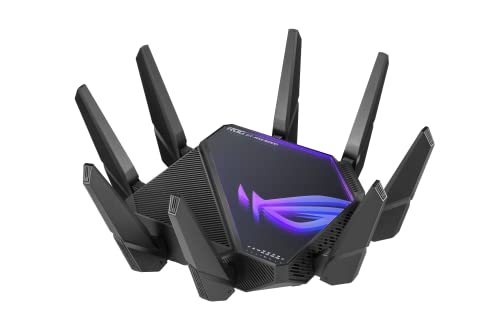
ASUS ROG Rapture Quad-Band Wi-Fi 6E Router
Best for: multi-gigabit wired and 6 GHz gaming networks
- Use Case
- Gaming (what this guide is about)
- Wi-Fi Standard
- WiFi 6E
- Speed Rating
- AXE16000
- Frequency Bands
- Quad-Band
- Max Port Speed
- 10 Gbps
- Dimensions
- 13.9 × 13.9 × 7.6 inches
The ASUS ROG Rapture Quad-Band WiFi 6E Router gives you a quad-band network featuring a dedicated 6 GHz frequency band for lower latency and less interference. It includes two 10 Gbps WAN/LAN ports alongside a dedicated 2.5 Gbps WAN port for high-speed wired connections. Rated for speeds up to 16000 Mbps with RangeBoost Plus coverage, it suits competitive gamers operating multi-gigabit wired hardware alongside dedicated 6 GHz wireless devices.
Pros
- Quad-band design with dedicated 6 GHz band
- Two 10 Gbps WAN/LAN ports for high-bandwidth data transfers
- Dedicated 2.5 Gbps WAN port for multi-gigabit connections
- Total wireless speeds rated up to 16000 Mbps
Cons
- Large physical footprint measuring 13.94 by 13.94 inches
- Substantial weight at 5.35 pounds
- Uses Wi-Fi 6E rather than the newer Wi-Fi 7 standard
Good fit if
- You need dual 10 Gbps wired ports alongside a 2.5 Gbps WAN port.
- You have devices capable of connecting to the 6 GHz frequency band.
- You want quad-band wireless capacity reaching up to 16000 Mbps.
Skip if
- You want the newer Wi-Fi 7 wireless standard.
- You have limited desk or shelf space for a 13.94-inch square chassis.
- You do not require multi-gigabit wired networking ports.
Verdict: ASUS ROG Rapture Quad-Band WiFi 6E Router pairs high-bandwidth 6 GHz wireless access with dual 10 Gbps wired ports for demanding setups. It provides expansive quad-band capacity and fast wired throughput for high-performance home networks.
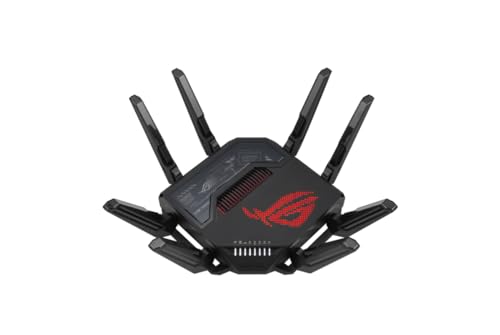
ASUS ROG Rapture GT-BE98 WiFi 7 Router
Best for: dense multi-device wired and wireless gaming setups
- Use Case
- Gaming (what this guide is about)
- Wi-Fi Standard
- WiFi 7
- Frequency Bands
- Quad-Band
- Ethernet Ports
- 8
- Dimensions
- 13.8 × 13.8 × 8.69 inches
- Weight
- 4.41 pounds
The ASUS ROG Rapture Quad-Band WiFi 7 Router delivers next-generation wireless performance for demanding home setups. You get quad-band Wi-Fi 7 connectivity, eight external antennas, and 4x4 MU-MIMO support to handle dense network traffic. It also features eight wired ports and dual WAN support for redundant internet connections. This router suits you if you need extensive wired connectivity alongside high-bandwidth wireless coverage for multiple gaming rigs.
Pros
- Quad-band Wi-Fi 7 wireless connectivity
- Eight wired network ports for connected hardware
- Dual WAN support for parallel internet connections
- Eight antennas with 4x4 MU-MIMO
Cons
- Large footprint measuring over 13.7 inches wide and long
- Heavy unit weighing over 4.4 pounds
Good fit if
- You need eight wired LAN ports for consoles, PCs, and smart TVs.
- You run dual internet connections to prevent downtime.
- You prioritize ROG devices across a quad-band Wi-Fi 7 network.
Skip if
- You have limited shelf space for a 13.8-inch square chassis.
- You only require basic dual-band Wi-Fi coverage for everyday browsing.
Verdict: ASUS ROG Rapture Quad-Band WiFi 7 Router combines eight wired ports, dual WAN redundancy, and quad-band Wi-Fi 7 into a high-capacity networking hub. It provides the physical ports and wireless bandwidth required for hardware-heavy gaming environments.

ASUS Dual-Band 8-Port Gaming Router
Best for: Gaming setups with many wired devices
- Use Case
- Gaming, Streaming (what this guide is about)
- Speed Rating
- AC3100
- Frequency Bands
- Dual Band
- Coverage Area
- Up to 5000 square feet
- Max Port Speed
- Gigabit
- Ethernet Ports
- 8
The ASUS RT-AC88U is a dual-band AC3100 router designed for gaming and streaming. It features a 1.4 GHz dual-core processor and eight Gigabit Ethernet ports. The 4T4R antenna design provides coverage up to 5000 square feet. This model supports 1024 QAM for faster speeds on the 5 GHz band. It suits users who need extensive wired connectivity for multiple devices in a large home.
Pros
- Eight Gigabit Ethernet ports for extensive wired connections
- 1.4 GHz dual-core processor for fast data handling
- Coverage up to 5000 square feet with 4T4R antennas
- 1024 QAM technology for 80% faster 5 GHz speeds
Cons
- Gigabit port speeds limit performance for 2.5G+ internet plans
- Dual-band WiFi 5 standard is older than WiFi 6/7 options
- Large physical footprint at 18.8 inches in height
Good fit if
- You have more than four wired devices needing Ethernet connections
- You have a home up to 5000 square feet
- You want robust wired throughput for gaming consoles and PCs
Skip if
- You require WiFi 6 or WiFi 7 speeds
- You have internet plans faster than 1 Gbps
- You prefer compact routers that fit in small spaces
Verdict: ASUS RT-AC88U AC3100 Gaming Router is a wired-heavy solution for gamers with many devices. It fits homes needing eight Ethernet ports and wide coverage. It is less suitable for those prioritizing the latest wireless standards.

ASUS AX6000 Dual-Band 8-Port Router
Best for: wired gaming setups needing eight LAN ports
- Use Case
- Gaming (what this guide is about)
- Wi-Fi Standard
- Wi-Fi 6
- Speed Rating
- AX6000
- Frequency Bands
- Dual-Band
- Ethernet Ports
- 8
- Dimensions
- 7.4 × 2.4 × 11.8 inches
This ASUS dual-band Wi-Fi 6 router delivers AX6000 speeds up to 6000 Mbps. It features eight LAN ports and a 1G WAN port, making it suitable if you need direct wired connections for multiple gaming consoles and PCs. It also includes Target Wake Time and AiMesh compatibility. This setup fits you if you run a wired-heavy home network and need reliable local bandwidth without moving to tri-band hardware.
Pros
- Eight wired LAN ports for local devices
- AX6000 total speed rating across dual bands
- AiMesh support for whole-home coverage
- Target Wake Time schedules client transmissions
Cons
- Dual-band design lacks a third wireless band
- WAN connection tops out at 1G
Good fit if
- You need eight Ethernet LAN ports for wired gaming gear.
- You want AX6000 Wi-Fi 6 performance across dual bands.
- You plan to expand coverage using an ASUS AiMesh network.
Skip if
- You require WAN speeds faster than 1G.
- You need a tri-band router with a 6 GHz channel.
Verdict: ASUS AX6000 8-Port Dual-Band WiFi 6 Router provides extensive wired connectivity with eight LAN ports alongside dual-band Wi-Fi 6 wireless coverage. It is a practical choice if you prioritize multiple wired gaming rigs over multi-gigabit internet ports.

ASUS AX5700 Dual-Band WiFi 6 Router
Best for: multi-gigabit wired and mobile gaming
- Use Case
- Gaming (what this guide is about)
- Wi-Fi Standard
- WiFi 6
- Speed Rating
- AX5700
- Frequency Bands
- Dual Band
- Max Port Speed
- 2.5 Gbps
- Features
- VPN
This dual-band WiFi 6 router delivers aggregate speeds up to 5700 Mbps using 160MHz channels. It features a dedicated 2.5 Gbps port, a hardware gaming port, and support for 2 Gbps WAN aggregation. You can also prioritize handheld devices using the Mobile Game Mode in the companion app. It suits you if you want multi-gigabit wired connections and AiMesh extendability for your home gaming network without needing a tri-band system.
Pros
- Dedicated 2.5 Gbps port and 2 Gbps WAN aggregation support
- WiFi 6 dual-band throughput up to 5700 Mbps with 160MHz channels
- Mobile Game Mode via companion app to minimize latency
- AiMesh support for expanding coverage with compatible routers
- AiProtection Pro security and Instant Guard VPN included
Cons
- Dual-band design lacks a dedicated third gaming frequency band
- WiFi 6 standard rather than newer WiFi 6E or WiFi 7
Good fit if
- You want a multi-gigabit 2.5 Gbps port for a wired gaming PC or console.
- You need mobile gaming traffic prioritization alongside standard home traffic.
- You plan to link additional extendable routers using AiMesh.
Skip if
- You require tri-band or quad-band frequency separation.
- You want WiFi 7 connectivity for newer compatible clients.
Verdict: ASUS AX5700 Dual-Band WiFi 6 Router delivers reliable dual-band throughput and 2.5 Gbps wired connectivity for your gaming setup. It fits households that prioritize low-latency gaming ports and AiMesh compatibility.
Specifications side by side
| Spec | ASUS TUF Gaming Dual-Band WiFi 7 Router | ASUS Dual-Band WiFi 6 Router | ASUS ROG Quad-Band WiFi 7 Gaming Router | ASUS Dual-Band WiFi 6 Gaming Router | ASUS ROG Rapture Tri-Band WiFi 6 Router | ASUS Dual-Band WiFi 6 Gaming Router | ASUS ROG Rapture Tri-Band WiFi 6 Gaming Router | ASUS ROG Rapture Quad-Band WiFi 7 Router | ASUS Dual-Band WiFi 7 Gaming Router | ASUS ROG Rapture Tri-Band WiFi 6 Router | ASUS ROG Rapture Quad-Band Wi-Fi 6E Router | ASUS ROG Rapture GT-BE98 WiFi 7 Router | ASUS Dual-Band 8-Port Gaming Router | ASUS AX6000 Dual-Band 8-Port Router | ASUS AX5700 Dual-Band WiFi 6 Router |
|---|---|---|---|---|---|---|---|---|---|---|---|---|---|---|---|
| Wi-Fi Standard | Wi-Fi 7 | Wi-Fi 6 | WiFi 7 | WiFi 6 | WiFi 6 | WiFi 6 | WiFi 6 | WiFi 7 | WiFi 7 | WiFi 6 | WiFi 6E | WiFi 7 | not specified | Wi-Fi 6 | WiFi 6 |
| Speed Rating | BE6500 | AX1800 | not specified | AX5400 | not specified | AX5400 | not specified | not specified | BE6800 | AX11000 | AXE16000 | not specified | AC3100 | AX6000 | AX5700 |
| Frequency Bands | Dual-Band | Dual-Band | Quad-Band | Dual-Band | Tri-Band | Dual Band | Tri-Band | Quad-Band | Dual-Band | Tri-Band | Quad-Band | Quad-Band | Dual Band | Dual-Band | Dual Band |
| Coverage Area | not specified | not specified | not specified | not specified | not specified | not specified | not specified | not specified | not specified | not specified | not specified | not specified | Up to 5000 square feet | not specified | not specified |
| Max Port Speed | 2.5 Gbps | 1 Gbps | 10G | not specified | 2.5G | not specified | 10G | 10 Gbps | 10 Gbps | 10 Gbps | 10 Gbps | not specified | Gigabit | not specified | 2.5 Gbps |
| Ethernet Ports | 4 | 5 | not specified | not specified | not specified | not specified | not specified | 6 | not specified | not specified | not specified | 8 | 8 | 8 | not specified |
| Frequency Band | Dual-Band | Dual-Band | Quad-Band | Dual-Band | Tri-Band | Dual-Band | Tri-Band | Quad-Band | Dual-Band | Tri-Band | Quad-Band | Quad-Band | Dual-Band | Dual-Band | Dual-Band |
| Use Case | Gaming | Gaming, Streaming | Gaming | Gaming | Gaming | Gaming | Gaming | Gaming | Gaming | Gaming | Gaming | Gaming | Gaming, Streaming | Gaming | Gaming |
| Features | VPN | VPN, Parental Controls | not specified | MU-MIMO | not specified | VPN | not specified | not specified | VPN | not specified | not specified | not specified | MU-MIMO | not specified | VPN |
| Port Speed | 2.5G | not specified | not specified | not specified | Gigabit, 2.5G | not specified | 2.5G, 10G | 10G | not specified | 2.5G, 10G | 2.5G, 10G | not specified | Gigabit | not specified | 2.5G |
| Intended Use | not specified | Home | not specified | not specified | not specified | not specified | not specified | not specified | not specified | not specified | not specified | not specified | not specified | not specified | not specified |
| Dimensions | 6.9 × 8.4 × 11.9 inches | 9.06 × 5.28 × 2.2 inches | 13.7 × 8.6 × 13.7 inches | 11 × 7.26 × 6.5 inches | 11.3 × 4.74 × 14.9 inches | 11 × 7.26 × 6.5 inches | 13.9 × 13.9 × 7.6 inches | 13.7 × 8.6 × 13.7 inches | 12.4 × 9.3 × 3.5 inches | 13.9 × 13.9 × 7.6 inches | 13.9 × 13.9 × 7.6 inches | 13.8 × 13.8 × 8.69 inches | 30 × 6.5 × 18.8 inches | 7.4 × 2.4 × 11.8 inches | 9.53 × 3.94 × 12.8 inches |
| Weight | 1.7 pounds | 13.1 ounces | 4.4 pounds | 1.57 pounds | 4.1 pounds | 1.57 pounds | 4.81 pounds | 4.4 pounds | 1.9 pounds | 4.81 pounds | 5.35 pounds | 4.41 pounds | 2.6 pounds | 5.25 pounds | 1.83 pounds |
| Size | Dual-Band | Router | Quad-Band | not specified | ax | not specified | not specified | not specified | not specified | Large | not specified | ROG | AC | 1G WAN | AX5700 | 2.5G Port |
| Color | BLACK | BLACK | BLACK | not specified | Black | BLACK | BLACK | BLACK | BLACK | BLACK | BLACK | black | Black | Black | Black |
| Model | TUF-BE6500 | RT-AX1800S | GT-BE98 | AX5400 | GT-AX11000 | RT-AX82U | GT-AX11000 PRO | GT-BE98 PRO | RT-BE86U | GT-AX11000 PRO | GT-AXE16000 | 90IG08F0-MO9A0V | RT-AC88U | RT-AX88U | RT-AX86U |
For a complete gaming setup, compare these routers against the best ASUS gaming laptops.
Choosing the Right ASUS Gaming Router
-
Evaluate Wired Port Speeds
Examine the Ethernet port speeds if you connect gaming PCs, consoles, or network storage with cables. Standard Gigabit ports cap wired throughput at 1,000 Mbps. If your internet tier exceeds 1 Gbps or you transfer large files across a local network, look for 2.5G or 10G ports. The RT-BE86U includes a 10 Gigabit port alongside standard ports, which prevents wired bottlenecks. Matching your router port speeds to your incoming modem speed or switch hardware ensures you get full multi-gigabit performance across your wired devices.
-
Count Physical LAN Ports
Count how many wired devices you plan to connect directly to the router. Most standard gaming routers provide four local LAN ports for consoles, PCs, and smart TVs. If your setup includes multiple gaming systems, network printers, and hubs, an eight-port model eliminates the need for an external network switch. The RT-AC88U features eight Gigabit LAN ports on its back panel. Selecting a chassis with adequate built-in ports simplifies cable management and keeps all your wired gaming gear connected without adding extra hardware.
-
Match Wi-Fi Standard Generations
Check which Wi-Fi standard your client hardware supports before picking a router. Wi-Fi 6 remains reliable and common across current-generation laptops and consoles. Wi-Fi 6E introduces access to the cleaner 6 GHz wireless frequency, reducing interference from legacy home devices. The GT-AXE16000 provides Wi-Fi 6E capabilities for compatible devices that benefit from the 6 GHz space. If your devices already feature Wi-Fi 7 chips, a Wi-Fi 7 model unlocks newer protocols like Multi-link Operation. Choosing the generation that matches your client devices ensures full protocol compatibility without unnecessary hardware complexity.
-
Check Dimensions and Weight
Measure your shelf or desk space before choosing a high-performance router. Entry-level dual-band routers feature compact footprints and light builds that fit into small entertainment centers. In contrast, multi-band enthusiast routers use heavy chassis with expansive external antenna arrays to dissipate heat and maximize coverage. For example, the GT-BE98 measures 13.7 inches long and weighs 4.4 pounds. Checking the physical dimensions and weight ensures your chosen router fits your tabletop or media cabinet while maintaining adequate airflow around the exterior vents.
-
Plan for AiMesh Expansion
Consider whether you might need to expand your wireless coverage in the future. ASUS routers equipped with AiMesh allow you to link multiple compatible units into a single unified mesh system. This lets you roam throughout your home without dropping your gaming session or manually changing network names. The RT-AX82U supports AiMesh, allowing you to use it as a primary router today and pair it with another unit later. Verify AiMesh compatibility in the router specifications if you live in a multi-story home.
Frequently asked questions
Which ASUS gaming routers offer 10G Ethernet ports?
You can find 10G Ethernet ports on select premium models such as the ROG Rapture GT-BE98, GT-BE98 PRO, GT-AX11000 PRO, GT-AXE16000, and RT-BE86U. These multi-gigabit interfaces allow you to handle high-bandwidth wired networking between compatible PCs and switches. Models like the GT-BE98 PRO even include dual 10G ports paired alongside quad 2.5G ports for expansive high-speed setups.
What is the advantage of a quad-band ASUS router for gaming?
Quad-band ASUS routers provide additional dedicated wireless bands to help reduce network congestion when many devices connect simultaneously. For example, the ROG Rapture GT-BE98 and GT-BE98 PRO offer Wi-Fi 7 quad-band access with speeds up to 30 Gbps. The ROG Rapture GT-AXE16000 uses its quad-band design to give you a dedicated 6 GHz frequency band for compatible devices.
Can you create a mesh network using ASUS gaming routers?
Yes, you can expand your network coverage using ASUS models that support AiMesh technology. Routers like the AX5400, RT-AX82U, RT-AX86U, and GT-AC5300 feature AiMesh compatibility. This system lets you connect multiple compatible units together to form a unified wireless network throughout your home while keeping your primary gaming traffic prioritized on your main router.
Which ASUS gaming routers include eight built-in LAN ports?
The ASUS RT-AC88U, ROG Rapture GT-AC5300, and ROG Rapture GT-BE98 feature eight physical wired ports directly on the chassis. Having eight ports allows you to connect multiple gaming consoles, desktop computers, and network appliances directly with Ethernet cables without purchasing a separate standalone switch. The GT-AC5300 provides eight Gigabit ports, while the GT-BE98 incorporates eight wired ports with dual WAN redundancy.
Does Wi-Fi 7 provide spec advantages over Wi-Fi 6 on ASUS routers?
Wi-Fi 7 hardware introduces higher maximum throughput and newer features such as Multi-link Operation. For instance, the TUF-BE6500 reaches wireless speeds up to 6.5 Gbps, while the ROG Rapture GT-BE98 models reach up to 30 Gbps. In contrast, dual-band Wi-Fi 6 alternatives like the AX5400 and RT-AX82U are rated for 5,400 Mbps across 160MHz channels.
Do ASUS gaming routers include built-in VPN support?
Several ASUS gaming routers come with built-in VPN support directly in their firmware specifications. Models such as the TUF-BE6500, RT-AX1800S, RT-AX82U, RT-BE86U, and RT-AX86U list VPN functionality among their core attributes. This feature allows you to manage secure remote connections or route specific device traffic through network encryption without needing third-party software installed on every connected console.
How much physical space do ROG Rapture gaming routers require?
ROG Rapture routers use larger physical chassis that require substantial desk or shelf space. For example, the GT-AXE16000 and GT-AX11000 PRO measure 13.94 inches long and 13.94 inches wide, weighing up to 5.35 pounds. The GT-BE98 measures 13.7 inches by 13.7 inches at 4.4 pounds. In comparison, compact options like the RT-AX1800S weigh just 0.82 pounds.