15 Best Unmanaged Network Switches, Compared
As an Amazon Associate we earn from qualifying purchases. Links on this page are affiliate links.
An unmanaged network switch expands your wired local connections without software setup or configuration overhead. We compared 15 models strictly using the specifications published on their product listings.
The TP-Link 5-Port Gigabit Unmanaged Switch leads the list by delivering five gigabit Ethernet ports with desktop and wall mounting options in a compact 0.26-pound form factor. This guide helps you identify the right port count, network throughput speed, PoE capability, and mounting style for your specific wired setup.
Quick picks
The best fit for you
- You need basic gigabit wired expansion for your desk TP-Link 5-Port Gigabit Unmanaged Switch It provides five gigabit Ethernet ports with desktop and wall-mounting options.
- You need fiber uplinks with high port density Zyxel 24-Port Gigabit Switch with SFP The switch includes 24 gigabit ports plus dual SFP uplink slots.
- You need maximum unmanaged capacity for network racks TP-Link 48-Port Gigabit Unmanaged Switch This rackmount model delivers 48 gigabit ports with a 96Gbps switching capacity.
- You need to power desktop hardware over Ethernet TP-Link 8-Port Gigabit Switch with 4 PoE+ Ports It features eight gigabit ports, including four PoE+ ports delivering up to 64W.
Our 15 picks

TP-Link 5-Port Gigabit Unmanaged Switch
Best for: basic home desk or media setups
- Management Type
- Unmanaged (what this guide is about)
- Port Count
- 5
- Port Speed
- 10/100/1000 Mbps
- Mounting Type
- Desktop, Wall-Mount
- Number of Ports
- 5 Ports
- Dimensions
- 1.1 × 6.5 × 4.3 inches
The TP-Link 5-Port Gigabit Switch is an unmanaged desktop and wall-mountable network switch designed to expand your wired network. It gives you five 10/100/1000 Mbps auto-negotiation Ethernet ports with Auto-MDI/MDIX support, removing the need for crossover cables. Its fanless design keeps operation silent, while IEEE 802.3x flow control maintains stable data transfer. This compact plastic-cased unit suits home offices or media setups needing simple plug-and-play wired connections for a few devices.
Pros
- Five 10/100/1000 Mbps gigabit RJ45 ports
- Fanless design for silent operation
- Auto-MDI/MDIX support eliminates crossover cables
- Supports both desktop and wall-mount placement
Cons
- Plastic casing rather than metal
- Five ports provide limited expansion capacity
- No Power over Ethernet (PoE) support
Good fit if
- You need five gigabit ports to connect wired gear to your router.
- You want silent, fanless operation on a desk or mounted on a wall.
- You prefer an unmanaged switch requiring zero software setup.
Skip if
- You need more than five Ethernet connections for your devices.
- You require Power over Ethernet (PoE) ports.
- You prefer a metal chassis for durability.
Verdict: TP-Link 5-Port Gigabit Switch provides essential unmanaged wired expansion in a silent, lightweight form factor. It gives you reliable gigabit speeds with zero required setup.

TP-Link 5-Port Gigabit Metal Switch
Best for: compact desktop wired network expansion
- Management Type
- Unmanaged (what this guide is about)
- Port Count
- 5
- Port Speed
- 10/100/1000 Mbps
- Mounting Type
- Desktop or wall-mounting
- Number of Ports
- 5 Ports
- Dimensions
- 3.9 × 3.9 × 1 inches
This TP-Link unmanaged switch adds five gigabit Ethernet ports to your home network without requiring configuration or software setup. Its compact metal housing measures 3.9 by 3.9 inches and supports desktop placement or wall mounting. The fanless design ensures silent operation while expanding wired connections for your computers, printers, or gaming consoles. It suits you if you need a sturdy, basic wired network expansion.
Pros
- Five 10/100/1000 Mbps auto-negotiation RJ45 ports
- Plug-and-play operation with no software setup required
- Durable fanless metal casing for quiet operation
- Supports both desktop and wall-mount placement
Cons
- Limited capacity with only five network ports
- No Power over Ethernet support listed
- Unmanaged format provides no configuration or traffic control
Good fit if
- You need to add up to four wired devices to a single router port.
- You want a silent, fanless switch for a desktop or entertainment setup.
- You prefer a sturdy metal build with wall-mounting options.
Skip if
- You need more than five total Ethernet connections.
- You require Power over Ethernet to run access points or security cameras.
- You want managed switch options like VLANs or network management settings.
Verdict: TP-Link 5-Port Gigabit Metal Switch offers straightforward, silent plug-and-play wired expansion in a durable metal chassis. It delivers dependable gigabit speeds for everyday networking without setup complexity.

NETGEAR 5-Port Gigabit Unmanaged Switch
Best for: quiet desktop or wall-mounted wired expansion
- Management Type
- Unmanaged (what this guide is about)
- Port Count
- 5
- Port Speed
- 1.0 Gbps
- Mounting Type
- Desktop, Wall-Mount
- Number of Ports
- 5 Ports
- Dimensions
- 4.02 × 1.06 × 3.9 inches
This unmanaged switch gives you five auto-negotiating gigabit Ethernet ports in a compact metal housing. It operates silently using a fanless design and supports desktop or wall mounting. With no software or configuration required, you simply plug in Cat5e or Cat6 cables to expand your wired network. It fits home offices or entertainment centers where you need reliable gigabit connections for up to four devices without extra noise.
Pros
- Five auto-negotiating 1.0Gbps Gigabit Ethernet ports
- Fanless design for silent operation
- Compact metal casing with desktop and wall-mount support
- Supports IEEE 802.3az Energy Efficient Ethernet
Cons
- Offers only five ports with no PoE capability
- Specified for use in the US and Canada only
Good fit if
- You need a silent, fanless switch for a desktop or media console.
- You want simple plug-and-play wiring using Cat5e or Cat6 cables.
- You require wall-mounting hardware support in a compact footprint.
Skip if
- You need Power over Ethernet to power IP cameras or access points.
- You need to connect more than four client devices.
- You operate your network equipment outside the US or Canada.
Verdict: NETGEAR 5-Port Gigabit Metal Switch provides straightforward, silent gigabit expansion in a durable metal chassis. It delivers dependable unmanaged connectivity for compact desktop and wall-mounted setups.

D-Link 24-Port Gigabit Unmanaged Switch
Best for: silent high-density wired network expansion
- Management Type
- Unmanaged (what this guide is about)
- Port Count
- 24
- Port Speed
- 10/100/1000BASE-T
- Switching Capacity
- 48 Gbps
- Mounting Type
- Desktop, Rackmount, Wall-Mount
- Number of Ports
- 24 Ports
This D-Link unit expands your wired network across 24 dedicated Gigabit ports without requiring configuration. Built inside a compact metal chassis, it operates silently thanks to a fanless thermal design. Automatic link-status detection and Energy-Efficient Ethernet lower power draw across idle connections, while integrated flow and storm control maintain stable packet delivery. It suits you if you need silent, high-density wired distribution for multiple rooms or workstations.
Pros
- 24 Gigabit Ethernet ports with auto-negotiating speeds
- Fanless metal chassis provides silent desktop or wall-mounted operation
- Built-in flow control, storm control, and port isolation
- Energy-Efficient Ethernet dynamically reduces power on idle links
Cons
- No Power over Ethernet (PoE) output for connected equipment
- Unmanaged switch architecture provides no web interface or manual configuration
Good fit if
- You need to connect up to 24 wired Gigabit devices without network setup.
- You want silent network hardware suitable for living spaces or quiet work environments.
- You want automatic energy-saving features that power down unused ports.
Skip if
- You need to deliver power to access points or cameras over Ethernet cables.
- You require managed switch controls such as custom VLAN tagging or browser-based monitoring.
Verdict: D-Link 24-Port Fanless Gigabit Switch delivers high-density wired capacity in a durable, silent metal chassis. It gives your network simple plug-and-play expansion without configuration overhead.

D-Link 5-Port Gigabit Metal Switch
Best for: desktop gaming setups needing automated traffic prioritization
- Management Type
- Unmanaged (what this guide is about)
- Port Count
- 5
- Port Speed
- 1 Gbps
- Switching Capacity
- 10 Gbps
- Mounting Type
- Desktop, Wall-Mount
- Number of Ports
- 5 Ports
The D-Link 5-Port Gigabit Ethernet Switch gives you five auto-negotiating gigabit ports backed by a 10 Gbps non-blocking switching engine. It features 802.1p Quality of Service traffic classes to prioritize gaming and video packets, along with IGMP snooping to manage multicast streams. The fanless metal chassis keeps operation completely silent. It suits you if you need low-latency wired desktop expansion for gaming consoles, PCs, and media devices.
Pros
- 802.1p QoS traffic prioritization for gaming and media packets
- 10 Gbps non-blocking switching capacity across five gigabit ports
- Silent fanless metal housing with desktop and wall-mount support
- IGMP snooping for efficient multicast and streaming transmission
Cons
- Provides only five Ethernet ports for wired devices
- Does not supply Power over Ethernet (PoE)
- Unmanaged design lacks manual VLAN configuration
Good fit if
- You need 802.1p QoS prioritization for desktop gaming or media gear.
- You want a fanless metal switch suitable for desktop or wall placement.
- You need IGMP snooping to handle multicast traffic cleanly.
Skip if
- You need more than five wired Ethernet ports.
- You require Power over Ethernet (PoE) to run connected devices.
- You want managed switch controls for custom network settings.
Verdict: D-Link 5-Port Gigabit Ethernet Switch is a fanless metal unit featuring 802.1p QoS and IGMP snooping to prioritize traffic without manual configuration. It gives you silent, plug-and-play gigabit expansion for desktop consoles and media devices.

TP-Link 5-Port Fast Ethernet Switch
Best for: low-bandwidth wired device connections
- Management Type
- Unmanaged (what this guide is about)
- Port Count
- 5
- Port Speed
- 10/100 Mbps
- Mounting Type
- Desktop
- Number of Ports
- 5 Ports
- PoE Support
- PoE
This TP-Link switch provides five 10/100 Mbps Fast Ethernet ports for basic wired local network expansion. The unmanaged hardware requires zero configuration or software setup, operating immediately once connected to your router. Its fanless desktop chassis measures roughly four inches long and weighs under a quarter pound, keeping operation silent. You get IEEE 802.3x flow control and Auto-MDI/MDIX on every port for simple low-bandwidth home device connectivity.
Pros
- Five 10/100 Mbps Fast Ethernet RJ45 ports
- Fanless design for silent desktop operation
- Auto-MDI/MDIX eliminates crossover cable requirements
- IEEE 802.3x flow control for data transfer reliability
- Compact footprint measuring 4.07 by 2.74 by 0.87 inches
Cons
- Fast Ethernet ports cap throughput at 100 Mbps rather than Gigabit speeds
- Offers only 5 total network ports
Good fit if
- You need wired connectivity for low-bandwidth gear like printers or basic media streamers.
- You want silent, fanless operation in a compact desktop format.
- You require a zero-configuration plug-and-play setup without management software.
Skip if
- You require Gigabit throughput for high-speed file transfers or fast internet connections.
- You need more than four added wired ports on your network.
Verdict: TP-Link 5-Port Fast Ethernet Desktop Switch delivers silent, plug-and-play wired connectivity for basic home devices that do not require Gigabit speeds. It is an effective solution when compact size and zero-configuration setup are your priorities.

TP-Link 16-Port Gigabit Unmanaged Switch
Best for: dense wired home or office networks
- Management Type
- Unmanaged (what this guide is about)
- Port Count
- 16
- Port Speed
- Gigabit
- Switching Capacity
- 32Gbps
- Number of Ports
- 16 Ports
- Dimensions
- 17.3 × 7.1 × 1.7 inches
This TP-Link unmanaged switch gives you 16 Gigabit Ethernet ports to expand your wired network. It offers a 32Gbps switching capacity with non-blocking wire-speed throughput and auto MDI/MDIX on every port. Setup requires no configuration thanks to plug-and-play operation. It suits your setup if you need to connect numerous wired devices across your home or office without managing software settings or network traffic rules.
Pros
- 16 Gigabit Ethernet ports
- 32Gbps non-blocking switching capacity
- Auto MDI/MDIX eliminates crossover cables
- Plug-and-play operation with no setup
Cons
- No Power over Ethernet support listed
- Large 17.3-inch wide footprint
- No managed features like VLANs or traffic control
Good fit if
- You need 16 dedicated Gigabit Ethernet connections for wired gear.
- You want a zero-configuration plug-and-play switch.
- You have space for a 17.3-inch wide networking chassis.
Skip if
- You need Power over Ethernet to power cameras or access points.
- You require managed switch features like VLAN segmentation.
Verdict: TP-Link 16-Port Gigabit Unmanaged Switch delivers reliable high-capacity wired expansion with plug-and-play simplicity and 32Gbps switching capacity. It provides an efficient way to connect up to 16 devices without configuration hassle.

Tenda 24-Port Gigabit Unmanaged Switch
Best for: silent 24-port wired network expansion
- Management Type
- Unmanaged (what this guide is about)
- Port Count
- 24
- Port Speed
- 10/100/1000Mbps
- Mounting Type
- Desktop, Rack Mount
- Number of Ports
- 24 Ports
- Dimensions
- 11.6 × 7.01 × 1.73 inches
The Tenda 24-Port Gigabit Fanless Switch provides 24 auto-negotiating 10/100/1000 Mbps Ethernet ports in a metal enclosure. It operates silently due to its fanless design and supports IEEE 802.3x flow control for reliable traffic management. You can mount it in a standard rack or place it on a desktop. This unmanaged switch suits you if you need expanded wired capacity for your network without configuration overhead or fan noise.
Pros
- 24 gigabit Ethernet ports (10/100/1000 Mbps)
- Fanless design for silent operation
- Metal casing for durability and heat dissipation
- Supports desktop or rack-mount installation
- IEEE 802.3x flow control for data transfer stability
Cons
- Unmanaged with no VLAN or QoS configuration options
- No Power over Ethernet (PoE) ports provided
- Lacks 2.5G or faster uplink ports
Good fit if
- You need 24 wired gigabit connections for desktop or rack setups.
- You want silent, fanless operation in a metal enclosure.
- You require a plug-and-play unmanaged switch without software setup.
Skip if
- You need Power over Ethernet to power access points or IP cameras.
- You require managed switch features like VLANs or traffic monitoring.
Verdict: Tenda 24-Port Gigabit Fanless Switch provides high-density wired connectivity in a silent, durable metal form factor. It gives you reliable plug-and-play Ethernet expansion for desktop or rack environments without setup complexity.

TRENDnet 24-Port Unmanaged Gigabit Switch
Best for: silent high-density desktop wired networking
- Management Type
- Unmanaged (what this guide is about)
- Port Count
- 24
- Port Speed
- Gigabit
- Switching Capacity
- 48Gbps
- Mounting Type
- Desktop, Rack Mount
- Number of Ports
- 24 Ports
This TRENDnet unmanaged switch provides 24 Gigabit Ethernet ports and a 48Gbps switching capacity for your wired local network. Its fanless metal housing ensures silent desktop operation, while the built-in power supply eliminates external adapter clutter. GREENnet technology automatically reduces power consumption by adjusting energy use across inactive ports. It suits you if you need dense, silent Gigabit connectivity across your home or office workstations without configuration.
Pros
- 24 Gigabit RJ-45 ports with 48Gbps switching capacity
- Fanless metal chassis for silent operation
- Built-in internal power supply
- NDAA and TAA compliant
Cons
- Rack-mount brackets not included and sold separately
- No Power over Ethernet support listed
Good fit if
- You need 24 Gigabit Ethernet connections in a quiet workspace.
- You want plug-and-play setup without software configuration.
- You require NDAA and TAA compliance for your deployment.
Skip if
- You need Power over Ethernet to power access points or cameras.
- You require included mounting hardware for standard server racks.
Verdict: TRENDnet 24-Port Gigabit Desktop Switch delivers high-density wired connectivity in a compact, fanless metal chassis with an internal power supply. It provides dependable unmanaged switching for spaces where silent operation is required.

Zyxel 24-Port Gigabit Switch with SFP
Best for: quiet networks needing unmanaged SFP uplinks
- Management Type
- Unmanaged (what this guide is about)
- Port Count
- 24
- Port Speed
- Gigabit
- Uplink Ports
- 2 x SFP
- Number of Ports
- 24 Ports
- Dimensions
- 5.16 × 17.4 × 1.73 inches
This Zyxel unmanaged switch gives you 24 Gigabit Ethernet ports alongside two dedicated SFP uplink ports for fiber or long-distance connections. Built with a fanless design for silent operation, it delivers non-blocking, wire-speed transmission across your local hardware without complex software configuration. It suits you if you need high-density wired capacity and fiber connectivity for a quiet home office or workspace network without managing switch settings.
Pros
- Two SFP ports for long-distance uplinks
- 24 Gigabit Ethernet ports
- Fanless design for quiet operation
- Non-blocking, wire-speed transmission
- Auto MDI/MDI-X support
Cons
- No Power over Ethernet (PoE) support
- Unmanaged with no traffic management or configuration interface
- Wide chassis measuring 17.36 inches across
Good fit if
- You need 24 Gigabit Ethernet ports and two SFP slots for fiber uplinks.
- You require silent, fanless operation in a quiet work environment.
- You want a plug-and-play unmanaged device with Auto MDI/MDI-X support.
Skip if
- You need PoE to power access points or IP cameras directly.
- You require managed switch capabilities such as VLAN segmentation or QoS controls.
Verdict: Zyxel 24-Port Gigabit Switch with SFP combines high-density gigabit networking with dual SFP uplinks in a silent, fanless chassis. It is an ideal unmanaged choice when you need plug-and-play fiber connectivity without noisy cooling fans.

TP-Link 48-Port Gigabit Unmanaged Switch
Best for: silent high-density unmanaged rack installations
- Management Type
- Unmanaged (what this guide is about)
- Port Count
- 48
- Port Speed
- 10/100/1000 Mbps
- Switching Capacity
- 96 Gbps
- Mounting Type
- Rackmount
- Number of Ports
- 48 Ports
This TP-Link switch provides 48 Gigabit Ethernet ports in a standard rackmount chassis for high-density wired networks. It features a fanless build for silent operation, a 96Gbps switching capacity, and an 8K MAC address table. Setup requires no configuration software or management interface. It suits you if you need to connect dozens of wired devices across your home or office without adding cooling noise to your equipment rack.
Pros
- 48 Gigabit RJ45 ports with auto-negotiation and auto MDI/MDIX
- 96Gbps total switching capacity with non-blocking wire-speed architecture
- Fanless design for silent operation inside a rack
- Sturdy metal rackmount casing with shielded ports
Cons
- Unmanaged architecture provides no VLAN configuration or traffic prioritization controls
- Large rackmount footprint measures over 17 inches wide and weighs over 9 pounds
Good fit if
- You need 48 wired Gigabit ports in a single silent, fanless unit.
- You want a plug-and-play rackmount switch without software setup.
Skip if
- You need managed features like VLAN tagging or port aggregation.
- You have limited space and need a compact desktop form factor.
Verdict: TP-Link 48-Port Fanless Gigabit Switch delivers high-density wired capacity and silent operation for rack setups that do not require network management. Its plug-and-play architecture provides 96Gbps switching throughput across 48 ports straight out of the box.

TP-Link 8-Port Gigabit Switch with 4 PoE+ Ports
Best for: powering up to four desktop PoE devices
- Management Type
- Unmanaged (what this guide is about)
- Port Count
- 8
- Port Speed
- 10/100/1000 Mbps
- PoE Support
- PoE+ (802.3at/af)
- PoE Power Budget
- 64 W
- Mounting Type
- Desktop, Wall-Mount
View on Amazon: TP-Link 8-Port Gigabit Switch with 4 PoE+ Ports
This unmanaged switch gives you eight Gigabit Ethernet ports in a sturdy metal desktop casing. Four ports supply PoE+ power under the 802.3at and 802.3af standards, with up to 30W per port and a 64W total budget. A fanless design keeps operation quiet, and setup requires no software configuration. It suits you if you need wired network expansion with dedicated power delivery for up to four PoE devices.
Pros
- Four PoE+ ports deliver up to 30W each with a 64W overall power budget
- Fanless construction provides quiet operation
- Plug-and-play setup requires no software installation or configuration
- Supports 802.1p/DSCP QoS and IGMP Snooping for traffic prioritization
- Durable metal casing supports desktop or wall mounting
Cons
- Only four of the eight ports supply PoE power
- Total PoE budget is limited to 64W across all ports
- Unmanaged operation lacks web or software management controls
Good fit if
- You need to power up to four PoE or PoE+ devices without separate adapters.
- You want a silent, fanless Gigabit switch for a desktop or wall setup.
- You want simple plug-and-play hardware without software configuration.
Skip if
- You need PoE capability on more than four ports.
- You require more than 64W of total PoE power across your connected hardware.
- You need managed switch features to configure ports individually.
Verdict: TP-Link 8-Port Gigabit PoE Switch provides a compact metal design with four PoE+ ports and silent fanless operation. It delivers straightforward plug-and-play Gigabit networking for setups requiring local device power up to 64W.

Linksys 8-Port Gigabit Unmanaged Switch
Best for: desktop media and home office streaming setups
- Management Type
- Unmanaged (what this guide is about)
- Port Count
- 8
- Port Speed
- Gigabit
- Number of Ports
- 8 Ports
- Dimensions
- 2.36 × 7.4 × 2.36 inches
- Weight
- 1.2 pounds
The Linksys 8-Port Gigabit Unmanaged Switch adds eight auto-sensing Gigabit Ethernet ports to your wired network setup. It features integrated IEEE 802.1p QoS traffic prioritization for audio and video feeds, non head-of-line blocking architecture, and an advanced power-saving mode that detects unused ports. It suits you if you need simple wired expansion for media hardware without network configuration.
Pros
- Eight Gigabit Ethernet ports with auto MDI/MDI-X detection
- Hardware-based IEEE 802.1p QoS prioritization for audio and video
- Power-saving mode detects unused ports
- Non head-of-line blocking architecture with IEEE 802.3x flow control
Cons
- Unmanaged design provides no VLAN or port configuration options
- No Power over Ethernet support listed in specifications
Good fit if
- You need eight Gigabit Ethernet connections with zero configuration.
- You want automatic QoS traffic prioritization for video and audio streaming.
- You want automatic power reduction across unused ports.
Skip if
- You need Power over Ethernet to power IP cameras or access points.
- You require managed network capabilities such as VLAN separation.
- You need more than eight physical switch ports.
Verdict: Linksys 8-Port Gigabit Unmanaged Switch provides reliable wired expansion with built-in traffic prioritization and energy-saving port detection. It delivers simple connectivity for home and office equipment without software management.

Linksys 16-Port Gigabit Unmanaged Switch
Best for: expanding wired home and office networks
- Management Type
- Unmanaged (what this guide is about)
- Port Count
- 16
- Port Speed
- Gigabit
- Mounting Type
- Wall Mount or Desktop
- Number of Ports
- 16 Ports
- Recommended Use
- Office
The Linksys 16-Port Gigabit Unmanaged Switch gives you 16 auto-sensing Gigabit Ethernet ports in a compact metal housing. It supports speeds up to 1000 Mbps alongside Quality of Service traffic prioritization and the EEE 802.3az energy-efficiency standard. You can deploy it flat on a desktop or mount it on a wall without any software setup. This unit suits you if you need reliable, plug-and-play wired capacity for a busy home or office network.
Pros
- 16 auto-sensing Gigabit Ethernet ports reaching up to 1000 Mbps
- Quality of Service (QoS) traffic prioritization
- Flexible desktop and wall mount options
- Complies with EEE 802.3az energy-efficient standard
Cons
- No Power over Ethernet (PoE) capability listed
- Unmanaged design lacks web or software configuration options
Good fit if
- You need 16 wired Gigabit ports for a home or office network.
- You prefer a plug-and-play switch with desktop or wall mounting options.
- You want automated Quality of Service traffic prioritization without software configuration.
Skip if
- You need Power over Ethernet to supply power to connected network gear.
- You require managed switch features like VLANs or manual port configuration.
Verdict: Linksys 16-Port Gigabit Unmanaged Switch delivers plug-and-play Gigabit expansion with built-in traffic prioritization and flexible mounting options. It is a straightforward hardware solution for home or office wired setups that do not require PoE or network management.
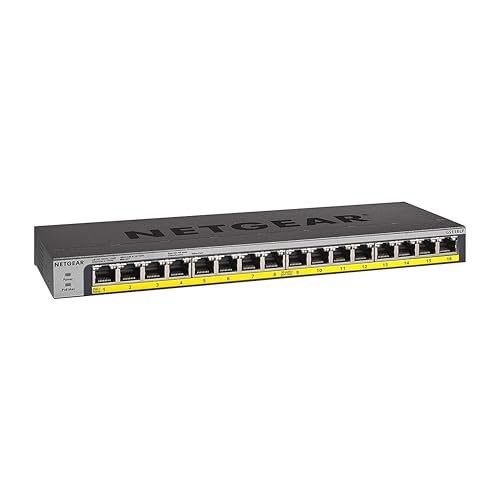
NETGEAR 16-Port Gigabit Fanless PoE+ Switch
Best for: silent 16-port PoE+ network expansions
- Management Type
- Unmanaged (what this guide is about)
- Port Count
- 16
- Port Speed
- 1.0Gbps
- PoE Support
- PoE+
- PoE Power Budget
- 76W
- Mounting Type
- Desktop, Wall-mount, Rack-mount
This NETGEAR unmanaged switch supplies 16 gigabit Ethernet ports, each capable of delivering PoE+ power. It provides a base 76W total PoE power budget to run IP cameras, access points, or VoIP phones without separate power adapters. The fanless metal chassis ensures silent desktop, wall, or rack operation. You get straightforward plug-and-play installation if you need compact high-density wired connections and device power with zero configuration.
Pros
- All 16 gigabit ports support PoE+
- Base 76W PoE power budget expandable up to 183W
- Fanless design for silent desktop, wall, or rack placement
- Plug-and-play setup requires no software or configuration
Cons
- Reaching 183W requires buying a separate power supply
- Unmanaged design provides no VLAN or network traffic controls
- Base 76W budget averages under 5W per port across all 16 ports
Good fit if
- You need PoE+ power across up to 16 gigabit connections without noise.
- You want versatile mounting options for desktop, wall, or rack installations.
- You prefer simple unmanaged hardware with zero software configuration.
Skip if
- You require managed switch capabilities like VLANs or traffic prioritization.
- You plan to run multiple high-draw PoE+ devices simultaneously on the base 76W budget.
Verdict: NETGEAR 16-Port PoE+ Gigabit Unmanaged Switch delivers silent, versatile PoE+ connectivity across all 16 ports for setup-free deployments. It fits small offices or home networks needing reliable power delivery without managed network complexity.
Specifications side by side
| Spec | TP-Link 5-Port Gigabit Unmanaged Switch | TP-Link 5-Port Gigabit Metal Switch | NETGEAR 5-Port Gigabit Unmanaged Switch | D-Link 24-Port Gigabit Unmanaged Switch | D-Link 5-Port Gigabit Metal Switch | TP-Link 5-Port Fast Ethernet Switch | TP-Link 16-Port Gigabit Unmanaged Switch | Tenda 24-Port Gigabit Unmanaged Switch | TRENDnet 24-Port Unmanaged Gigabit Switch | Zyxel 24-Port Gigabit Switch with SFP | TP-Link 48-Port Gigabit Unmanaged Switch | TP-Link 8-Port Gigabit Switch with 4 PoE+ Ports | Linksys 8-Port Gigabit Unmanaged Switch | Linksys 16-Port Gigabit Unmanaged Switch | NETGEAR 16-Port Gigabit Fanless PoE+ Switch |
|---|---|---|---|---|---|---|---|---|---|---|---|---|---|---|---|
| Port Count | 5 | 5 | 5 | 24 | 5 | 5 | 16 | 24 | 24 | 24 | 48 | 8 | 8 | 16 | 16 |
| Port Speed | 10/100/1000 Mbps | 10/100/1000 Mbps | 1.0 Gbps | 10/100/1000BASE-T | 1 Gbps | 10/100 Mbps | Gigabit | 10/100/1000Mbps | Gigabit | Gigabit | 10/100/1000 Mbps | 10/100/1000 Mbps | Gigabit | Gigabit | 1.0Gbps |
| Management Type | Unmanaged | Unmanaged | Unmanaged | Unmanaged | Unmanaged | Unmanaged | Unmanaged | Unmanaged | Unmanaged | Unmanaged | Unmanaged | Unmanaged | Unmanaged | Unmanaged | Unmanaged |
| PoE Support | not specified | not specified | not specified | not specified | not specified | not specified | not specified | not specified | not specified | not specified | not specified | PoE+ (802.3at/af) | not specified | not specified | PoE+ |
| PoE Power Budget | not specified | not specified | not specified | not specified | not specified | not specified | not specified | not specified | not specified | not specified | not specified | 64 W | not specified | not specified | 76W |
| Uplink Ports | not specified | not specified | not specified | not specified | not specified | not specified | not specified | not specified | not specified | 2 x SFP | not specified | not specified | not specified | not specified | not specified |
| Switching Capacity | not specified | not specified | not specified | 48 Gbps | 10 Gbps | not specified | 32Gbps | not specified | 48Gbps | not specified | 96 Gbps | not specified | not specified | not specified | not specified |
| Mounting Type | Desktop, Wall-Mount | Desktop or wall-mounting | Desktop, Wall-Mount | Desktop, Rackmount, Wall-Mount | Desktop, Wall-Mount | Desktop | not specified | Desktop, Rack Mount | Desktop, Rack Mount | not specified | Rackmount | Desktop, Wall-Mount | not specified | Wall Mount or Desktop | Desktop, Wall-mount, Rack-mount |
| Number of Ports | 5 Ports | 5 Ports | 5 Ports | 24 Ports | 5 Ports | 5 Ports | 16 Ports | 24 Ports | 24 Ports | 24 Ports | 48 Ports | 8 Ports | 8 Ports | 16 Ports | 16 Ports |
| Use Case | not specified | not specified | not specified | not specified | Gaming | not specified | not specified | not specified | not specified | not specified | not specified | not specified | not specified | not specified | not specified |
| Uplink Port Type | not specified | not specified | not specified | not specified | not specified | not specified | not specified | not specified | not specified | SFP | not specified | not specified | not specified | not specified | not specified |
| Recommended Use | not specified | not specified | not specified | not specified | Office | not specified | not specified | not specified | not specified | not specified | not specified | not specified | not specified | Office | not specified |
| Intended Use | not specified | not specified | not specified | not specified | not specified | not specified | not specified | not specified | not specified | not specified | not specified | not specified | not specified | Home | not specified |
| Dimensions | 1.1 × 6.5 × 4.3 inches | 3.9 × 3.9 × 1 inches | 4.02 × 1.06 × 3.9 inches | 11.1 × 7.1 × 1.75 inches | 3.94 × 3.86 × 1.1 inches | 4.07 × 2.74 × 0.87 inches | 17.3 × 7.1 × 1.7 inches | 11.6 × 7.01 × 1.73 inches | 3.46 × 4.72 × 0.98 inches | 5.16 × 17.4 × 1.73 inches | 17.3 × 8.66 × 1.73 inches | 3.9 × 6.7 × 1.1 inches | 2.36 × 7.4 × 2.36 inches | 4.72 × 11 × 0.98 inches | 4.02 × 1.06 × 11.3 inches |
| Weight | 4.23 ounces | 7.76 ounces | 7.05 ounces | 2.4 pounds | 9.6 ounces | 3.53 ounces | 4.41 pounds | 1.98 pounds | 1.1 pounds | 4.41 pounds | 9.22 pounds | 1.15 pounds | 1.2 pounds | 1.72 pounds | 1.94 pounds |
| Size | 5 Port Gigabit | 5-Port Gigabit | 5-Port | 24-Port Gigabit | 5-Port Switch | 5 Port | 16 Port | 24-Port | 24-Port | 24-Port | 2x SFP | 48 Port, 1 Gigabit | 8 Port w/ 4-Port PoE+ | 1-Pack | 16-Port | 16 Port, PoE+ @ 76W |
| Color | Black | Black | Gray | Black | Black | 5 | Black | Blue | Black | Black | Black | Black | Black,Blue | Black/Blue | Silver / black |
| Model | TL-SG1005D | TL-SG105 | GS105NA | DGS-1024D | 124889 | TL-SF1005D | TL-SG1016 | TEG1024D | TEG-S24DG | GS1100-24 | TL-SG1048 | TL-SG1008P | SE3008-AMZ | LGS116-AMZ | GS116LP-100NAS |
You can also check the best kasa smart smart switches for more options.
How to Choose an Unmanaged Switch
-
Mounting Style and Installation Location
Check where you plan to install the switch before choosing a chassis. Compact units fit flat desks or mount directly to drywall using dedicated slots. High-density models require standard server racks or network cabinets. If you need a rack installation, verify that the unit includes mounting brackets and conforms to standard rack widths. The TP-Link 48-Port Gigabit Unmanaged Switch provides dedicated rackmount hardware for structured equipment cabinets. Choosing the right mounting type keeps cables organized, prevents physical strain on Ethernet connectors, and ensures adequate airflow around the switch housing.
-
Dedicated Power over Ethernet
Examine whether your connected gear requires power delivery over standard network cabling. Switches with PoE+ capabilities eliminate external power adapters for access points, IP cameras, and VoIP phones. Check the total power budget in watts alongside individual port allocations. Some models supply power across every port, while others designate only a subset for power delivery. The NETGEAR 16-Port Gigabit Fanless PoE+ Switch delivers power across all 16 ports with a 76W total power budget. Match your connected devices to both the per-port standard and total wattage rating to avoid unexpected device shutdowns.
-
Fiber Uplink Port Availability
Consider your uplink distance between network distribution points or secondary switches. Standard copper RJ-45 Ethernet cables face signal attenuation over long runs, whereas optical connections maintain signal integrity across greater distances. If you need to link switches between floors or separate buildings, look for dedicated SFP ports. The Zyxel 24-Port Gigabit Switch with SFP features two dedicated SFP uplink slots alongside standard copper connections. This allows you to insert compatible fiber transceivers without sacrificing regular RJ-45 ports. Choose SFP connectivity when your network architecture spans beyond standard twisted-pair Ethernet limits.
-
Automated Traffic Prioritization Protocols
Because unmanaged switches lack software management consoles, traffic handling must happen at the hardware level. Look for built-in protocols like 802.1p Quality of Service and IGMP snooping. These features allow the switch to automatically prioritize latency-sensitive data packets, such as real-time gaming streams or media broadcasts, ahead of general background file downloads. The D-Link 5-Port Gigabit Metal Switch includes both 802.1p QoS and IGMP snooping directly out of the box. Selecting a model with hardware-based prioritization ensures smooth multimedia performance across your connected hardware without requiring manual port configuration or complex software setup.
-
Total Switching Capacity
Review the total switching capacity before deploying multiple high-throughput devices on the same switch. Switching capacity, measured in gigabits per second, indicates the maximum volume of traffic the internal architecture can process simultaneously without dropping frames. For full duplex gigabit links, each port requires 2Gbps of backplane capacity to operate at peak speed concurrently. The TP-Link 16-Port Gigabit Unmanaged Switch features a 32Gbps switching capacity to support all 16 gigabit ports running concurrently at maximum bandwidth. Compare the switching fabric rating against your concurrent data demands to prevent bottlenecks during simultaneous local backups.
Frequently asked questions
Do unmanaged network switches require any configuration?
No, unmanaged switches operate entirely without software setup or manual configuration. You plug in power and connect network cables to start transferring data instantly. Models like the NETGEAR GS105NA and D-Link DGS-1024D handle local network traffic automatically at the hardware level. This design suits situations where you need immediate port expansion without managing virtual networks or access rules.
What is the difference between Fast Ethernet and Gigabit switch ports?
Gigabit ports provide data transmission rates up to ten times faster than Fast Ethernet ports. A switch like the TP-Link TL-SF1005D runs at Fast Ethernet, which handles low-bandwidth tasks. In contrast, models like the TP-Link TL-SG105 use Gigabit ports to deliver faster local throughput across your devices. You should select Gigabit hardware whenever you transfer large files or stream high-definition media.
Can you power network devices through an unmanaged switch?
Yes, you can power connected hardware if the switch specifically includes Power over Ethernet support. The TP-Link TL-SG1008P provides four PoE+ ports with a 64W total power budget to supply compatible devices directly through Ethernet cables. Similarly, the NETGEAR GS116LP-100NAS supplies PoE+ power across all 16 ports with a 76W capacity, eliminating separate electrical adapters for supported equipment.
What is an SFP uplink port used for on an unmanaged switch?
An SFP uplink port accepts Small Form-factor Pluggable transceivers to connect fiber optic cabling or high-speed uplinks over long distances. The Zyxel GS1100-24 includes two dedicated SFP uplink ports alongside 24 standard Gigabit Ethernet connections. This hardware feature allows you to bridge distant switches or network drops without relying entirely on traditional copper twisted-pair Ethernet cables.
Does an unmanaged switch produce audible fan noise?
Most unmanaged desktop and rack switches run completely silent because they use fanless passive cooling. Models such as the 24-port D-Link DGS-1024D and the 48-port TP-Link TL-SG1048 operate without internal cooling fans. This silent operation makes these high-density metal units suitable for quiet workspaces, media rooms, and home offices where continuous fan noise would cause unwanted distractions.
Can unmanaged switches prioritize gaming or streaming traffic?
Yes, select unmanaged switches feature automatic hardware-level prioritization without requiring manual software adjustments. The D-Link 124889 incorporates 802.1p QoS and IGMP snooping to streamline time-sensitive data for gaming consoles and media hardware automatically. Similarly, Linksys models like the SE3008-AMZ and LGS116-AMZ include built-in traffic prioritization to maintain steady performance during intense local streaming.
How do you mount an unmanaged network switch?
Mounting options depend on the chassis design and integrated brackets of your specific model. Compact units like the TP-Link TL-SG1005D and Linksys LGS116-AMZ support both flat desktop placement and vertical wall mounting. Larger hardware, such as the 48-port TP-Link TL-SG1048, is built for standard rackmount installation to secure high-density wiring inside an equipment rack or enclosure.