Best Managed Network Switches: 15 Spec-Based Picks
As an Amazon Associate we earn from qualifying purchases. Links on this page are affiliate links.
A managed network switch gives you granular control over local traffic, VLAN segmentation, and connected hardware. We compared 15 models using only the specifications published on their product listings to find the most capable options.
The STEAMEMO 16-Port 240W Managed PoE+ Switch takes the top spot by pairing a 240W power budget with 16 ports and dedicated SFP uplinks. This breakdown helps you decide on the right port density, uplink throughput, and power allocation for your wired network setup.
Quick picks
The best fit for you
- You need silent PoE+ power for surveillance cameras STEAMEMO 16-Port 240W Managed PoE+ Switch It supplies 240W across 16 PoE+ ports with SFP and Gigabit uplinks in a fanless enclosure.
- You need high port density with 10G uplinks YuanLey 48-Port Gigabit PoE+ Managed Switch Its 48 PoE+ Gigabit ports and six 10Gbps SFP uplinks deliver extensive high-capacity switching.
- You need both 10G copper and fiber connections QNAP 16-Port 10GbE Managed Switch Eight 10G NBASE-T copper ports and eight 10G SFP+ slots bridge multi-gigabit hardware.
- You need compact multi-gigabit Ethernet with fast uplinks YuLinca 6-Port 2.5G Managed Switch Four 2.5G Ethernet ports combine with dual 10G SFP+ uplinks in a wall-mountable build.
Our 15 picks

STEAMEMO 16-Port 240W Managed PoE+ Switch
Best for: IP surveillance networks needing silent PoE+ management
- Management Type
- Managed (what this guide is about)
- Port Count
- 16
- Port Speed
- 100 Mbps
- PoE Support
- PoE+ (802.3at)
- PoE Power Budget
- 240W
- Uplink Ports
- 2 x Gigabit Uplink, 1 x 1.25G SFP
The STEAMEMO 16-Port 240W Managed PoE+ Switch provides power and network control for IP cameras and smart devices. You get 16 100Mbps PoE+ ports with a 240W total power budget, alongside two Gigabit uplinks and one 1.25G SFP slot. Network management tools include 802.1Q VLAN tagging, QoS traffic prioritization, and DHCP snooping via web, desktop, or mobile apps. Its fanless design suits quiet desktop, rackmount, or wall deployments.
Pros
- 240W total PoE+ power budget with up to 30W output per port
- Dedicated dual Gigabit RJ45 and single 1.25G SFP uplink ports
- Silent, fanless operation with desktop, wall, and rackmount support
- Includes 802.1Q VLAN, QoS, DHCP snooping, and port mirroring
Cons
- Downlink PoE ports run at 100Mbps rather than Gigabit speeds
- SFP uplink port maxes out at 1.25Gbps without 10G SFP+ support
Good fit if
- You need to power multiple IP cameras or IoT devices with up to 240W total PoE+ draw.
- You want L2 management features like 802.1Q VLANs and QoS without cooling fan noise.
- You need flexible mounting options across desktop, wall, or rack setups.
Skip if
- You require Gigabit or multi-gigabit speeds directly on your PoE endpoint ports.
- You need high-bandwidth 10G SFP+ uplink connections for your network core.
Verdict: STEAMEMO 16-Port 240W Managed PoE+ Switch delivers capable L2 management and a generous power budget in a silent, fanless enclosure. It is an effective setup for IP surveillance systems and smart home hubs that do not need Gigabit speeds on individual PoE runs.

Ubiquiti UniFi Managed 10G Aggregation Switch
Best for: High-speed 10G SFP network aggregation
- Management Type
- Managed (what this guide is about)
- Mounting Type
- Rack mounting, 1U
- Port Speed
- 10G
- Uplink Port Type
- SFP
- Dimensions
- 4.72 × 17.4 × 1.72 inches
- Weight
- 2.2 pounds
View on Amazon: Ubiquiti UniFi Managed 10G Aggregation Switch
If you need high-bandwidth links across your local network, this Ubiquiti managed Layer 2 switch offers 10G port speeds with SFP uplinks. Measuring 17.42 inches wide and 1.72 inches tall, it fits standard rack spacing with a shallow 4.72-inch depth. It weighs 2.2 pounds and includes a three-year warranty against factory defects. This unit fits setups requiring managed 10G aggregation without standard RJ45 copper ports.
Pros
- 10G port speed for high-throughput connections
- Managed Layer 2 switching support
- Compact 4.72-inch depth and 2.2-pound chassis
- Three-year warranty against factory defects
Cons
- Uses SFP uplinks with no native RJ45 ports listed
- Limited to Layer 2 management without Layer 3 routing
Good fit if
- You need 10G network speeds using SFP connectivity.
- You manage your network using Layer 2 switching features.
- You need a shallow-depth rack device under five inches deep.
Skip if
- You require native RJ45 copper Ethernet ports.
- You need advanced Layer 3 routing features on your switch.
Verdict: Ubiquiti UniFi Managed 10G SFP Switch delivers managed Layer 2 aggregation at 10G speeds in a shallow 4.72-inch rack-width chassis. It provides high-throughput SFP connectivity backed by a three-year warranty.

STEAMEMO 10-Port Gigabit Cloud Managed PoE+ Switch
Best for: small-scale PoE+ access point and camera setups
- Management Type
- Managed (what this guide is about)
- Port Count
- 10
- Port Speed
- 10/100/1000 Mbps
- PoE Support
- PoE+ (802.3af/at)
- PoE Power Budget
- 120W
- Uplink Ports
- 2 x Gigabit
View on Amazon: STEAMEMO 10-Port Gigabit Cloud Managed PoE+ Switch
You get a desktop managed switch with ten gigabit RJ45 ports, including eight PoE+ ports delivering up to 120 watts of total power and two non-PoE uplinks. It features cloud app management, per-port PoE scheduling, and VLAN support for traffic segmentation. An ultra-far mode extends power delivery up to 250 meters for remote devices. This switch suits you if you need compact, managed power delivery for access points or security cameras.
Pros
- Eight PoE+ ports with a 120W total power budget
- Cloud app management with per-port PoE scheduling
- Ultra-Far transmission mode reaching up to 250 meters
- Built-in 4KV port and power supply lightning protection
Cons
- Desktop form factor with no rackmount kit listed
- Lacks SFP fiber slots or multi-gigabit uplink options
- Requires internet access to complete first-time device activation
Good fit if
- You need to manage and power up to eight PoE devices under 120 watts.
- You want remote app controls to schedule and toggle PoE power per port.
- You deploy IP cameras or access points at long distances up to 250 meters.
Skip if
- You need multi-gigabit speeds or SFP+ fiber uplinks for your network backbone.
- You plan to install the switch inside a standard server rack.
Verdict: STEAMEMO 10-Port Gigabit Managed PoE Switch delivers eight PoE+ ports, mobile cloud management, and long-range connectivity in a compact desktop enclosure. It gives you flexible power scheduling and network segmentation for small deployments.

TP-Link 8-Port 10G SFP+ Managed Switch
Best for: all-SFP+ 10 Gbps Omada network aggregation
- Management Type
- Managed (what this guide is about)
- Port Count
- 8
- Port Speed
- 10 Gbps
- Number of Ports
- 8 Ports
- Uplink Port Type
- SFP
- Dimensions
- 17.3 × 7.09 × 1.73 inches
The TP-Link Omada switch gives you eight 10 Gbps SFP+ ports designed for high-bandwidth non-blocking switching capacity. You can operate it in standalone mode or integrate it into the Omada Software Defined Networking platform using hardware, software, or cloud-based controllers. Built-in network security tools include 802.1Q VLAN, ACL, and 802.1X radius authentication. This unit fits your network if you need dedicated 10G SFP+ links managed centrally from one interface.
Pros
- Eight 10 Gbps SFP+ ports with non-blocking switching capacity
- Supports Omada SDN hardware, software, and cloud controllers plus standalone mode
- Comprehensive security options including 802.1Q VLAN, ACL, and 802.1X radius authentication
- Remote cloud management access available through the Omada app
Cons
- Lacks standard RJ45 copper Ethernet ports
- No Power over Ethernet capabilities listed
- SDN functionality requires compatible SDN controllers or firmware
Good fit if
- You need eight dedicated 10 Gbps SFP+ ports for high-bandwidth connections.
- You manage your network devices using the TP-Link Omada SDN ecosystem.
- You require L2+ security features such as IP-MAC-Port binding and DoS defense.
Skip if
- You need standard RJ45 ports for copper network drops.
- You require PoE to provide power directly to connected hardware.
- You rely on non-SDN controllers that cannot manage Omada SDN hardware.
Verdict: TP-Link Omada 8-Port 10G SFP+ Managed Switch delivers non-blocking 10 Gbps SFP+ connectivity with extensive L2+ security and flexible Omada SDN controller support. It serves as a dedicated high-speed aggregation hub if you do not require RJ45 copper ports.

TRENDnet 12-Port 10G SFP+ Managed Switch
Best for: all-SFP+ 10G high-bandwidth backbone aggregation
- Management Type
- Managed (what this guide is about)
- Port Count
- 12
- Uplink Ports
- 12 x 10G SFP+
- Switching Capacity
- 240Gbps
- Mounting Type
- Rackmount
- Dimensions
- 8.26 × 9.06 × 1.73 inches
This managed Layer 2 switch gives you twelve dedicated 10G SFP+ ports with a 240Gbps switching capacity. It includes an RJ-45 console port for out-of-band management along with traffic controls like 802.1Q VLAN, link aggregation, and QoS queue scheduling. It suits you if you need a high-density aggregation switch to connect multiple high-speed switches or storage devices in a compact rack setup.
Pros
- Twelve 10G SFP+ ports supporting 1Gbps and 10Gbps links
- 240Gbps switching capacity
- Dedicated RJ-45 out-of-band console port
- L2 features including 802.1Q VLAN, link aggregation, and QoS scheduling
Cons
- No built-in RJ-45 copper Ethernet network ports
- No Power over Ethernet support
- Dual-switch 1U rackmount bracket sold separately
Good fit if
- You need twelve 10G SFP+ fiber or direct-attach connections.
- You manage high-bandwidth traffic using Layer 2 features like link aggregation.
- You require out-of-band setup via an RJ-45 console port.
Skip if
- You need standard RJ-45 Ethernet ports without purchasing extra transceivers.
- You require PoE power for connected devices.
Verdict: TRENDnet 12-Port 10G SFP+ Managed Switch delivers high-bandwidth aggregation with 240Gbps capacity and complete Layer 2 management. It is an effective option when your network backbone relies on high-speed SFP+ connections.

MokerLink 12-Port 10G SFP+ Managed Switch
Best for: high-density 10G fiber aggregation and routing
- Management Type
- Managed (what this guide is about)
- Port Count
- 12
- Uplink Ports
- 12 x 10G SFP+
- Switching Capacity
- 240Gbps
- Port Speed
- Gigabit, 10G
- Weight
- 6.7 pounds
This MokerLink switch provides 12 dedicated 10Gbps SFP+ fiber ports alongside Layer 3 management capabilities, including OSPF routing and DHCP server support. You get a non-blocking 240Gbps switching capacity to handle high-bandwidth optical connections across your core or distribution network. It suits you if you need an all-fiber aggregation setup with Web and CLI controls, standard open SFP module compatibility, and active cooling inside a durable metal enclosure.
Pros
- 12 auto-adaptive 1G/10G SFP+ ports with 240Gbps non-blocking switching capacity
- Layer 3 routing features including OSPF, DHCP server, and IPv4/IPv6 support
- Open SFP architecture compatible with standard unencrypted optical and RJ45 modules
- Dedicated RJ45 console port for CLI management alongside Web interface controls
Cons
- No native RJ45 copper ports included without separate SFP transceivers
- Optical modules are not included in the package
- Active industrial-grade cooling fan runs continuously
Good fit if
- You need 12 high-speed 10Gbps SFP+ fiber links for aggregation or core network layers.
- You require Layer 3 routing features such as OSPF, DHCP server, and static VLAN binding.
- You want open SFP slots that accept standard third-party transceivers.
Skip if
- You need integrated copper RJ45 ports without purchasing extra adapters.
- You require Power over Ethernet (PoE) to power access points or cameras.
- You require a fanless, passively cooled switch for silent desktop operation.
Verdict: MokerLink 12-Port 10G SFP+ L3 Managed Switch delivers robust Layer 3 routing and full 240Gbps forwarding across 12 high-speed optical ports. It is an effective backbone solution if your setup relies primarily on 10G fiber runs rather than direct copper connections.

YuanLey 48-Port Gigabit PoE+ Managed Switch
Best for: High-density PoE deployments needing 10G uplinks
- Management Type
- Managed (what this guide is about)
- Port Count
- 54
- Port Speed
- 10/100/1000 Mbps
- PoE Support
- PoE+ (802.3at/af)
- PoE Power Budget
- 460W
- Uplink Ports
- 6 x 10G SFP+
This managed rackmount switch delivers 48 Gigabit PoE+ ports and six 10Gbps SFP+ uplink slots backed by a 216Gbps switching capacity. It supplies up to 460W of total PoE power across its RJ-45 ports with support for 802.3at and 802.3af hardware. You get Layer 3 routing features, VLAN partitioning, and SNMP or CLI control. It suits your setup if you deploy high-density access points and cameras needing high-bandwidth uplinks.
Pros
- 48 Gigabit PoE+ ports with 460W total power budget
- Six 10Gbps SFP+ uplink slots
- 216Gbps switching capacity with Layer 3 management
- Web, CLI console/Telnet, and SNMP management options
Cons
- 460W total budget averages under 10W per port across all 48 ports
- Base RJ-45 ports max out at 1Gbps rather than multi-gigabit speeds
Good fit if
- You need to power dozens of PoE cameras or access points from one unit.
- You require 10Gbps SFP+ uplinks to connect servers or core switches.
- You want Layer 3 routing, VLAN controls, and standard rackmount sizing.
Skip if
- You require 2.5Gbps or 10Gbps copper Ethernet connections on access ports.
- You need maximum 30W PoE+ power delivered simultaneously to all 48 ports.
Verdict: YuanLey 48-Port Gigabit PoE+ Managed Switch combines extensive port density, Layer 3 control, and six 10Gbps uplinks for demanding network backbones. Its 460W total power allocation requires careful budget planning if you run multiple high-draw devices.

XikeStor 12-Port 10G SFP+ L3 Managed Switch
Best for: high-bandwidth all-fiber 10G local network aggregation
- Management Type
- Managed (what this guide is about)
- Port Count
- 12
- Uplink Ports
- 12 x 10G SFP+
- Switching Capacity
- 240 Gbps
- Dimensions
- 13 × 9.06 × 1.69 inches
This managed Layer 3 network switch gives you twelve 10Gbps SFP+ ports with auto-negotiation down to 2.5Gbps. It delivers a 240Gbps switching capacity alongside a 178.56Mpps packet forwarding rate for high-bandwidth setups. You get hardware routing features including IPv4/IPv6 routing, VLAN support, and fast ERPS failover under 50 milliseconds. It fits your setup if you manage fiber-connected workstations, network storage, and multi-gigabit uplinks across a high-speed local network.
Pros
- Twelve 10Gbps SFP+ ports supporting 10G and 2.5G speeds
- 240Gbps switching capacity with 178.56Mpps forwarding rate
- Layer 3 routing features including IPv4/IPv6 routes and ARP
- Ethernet Ring Protection Switching with sub-50ms failover
- Supports up to 12KB jumbo frames
Cons
- Does not include SFP optical modules in the package
- Lacks native RJ45 copper Ethernet ports
- No Power over Ethernet support
Good fit if
- You need twelve dedicated 10G SFP+ fiber connections for your network.
- You require Layer 3 routing protocols, IPv4/IPv6 management, and VLAN controls.
- You need rapid ERPS ring protection with under 50ms recovery time.
Skip if
- You need native copper RJ45 ports without buying separate SFP-to-RJ45 adapters.
- You require Power over Ethernet to power access points or cameras.
Verdict: XikeStor 12-Port 10G SFP+ Managed Switch provides 240Gbps switching capacity and Layer 3 routing across twelve high-speed SFP+ ports. It delivers robust ring protection and multi-gigabit routing for fiber-heavy local network environments.

QNAP 16-Port 10GbE Managed Switch
Best for: mixed 10GbE copper and fiber network backbones
- Management Type
- Managed (what this guide is about)
- Port Count
- 16
- Port Speed
- 10 Gbps
- Uplink Ports
- 8 x 10G SFP+
- Switching Capacity
- 320 Gbps
- Mounting Type
- Rackmount
This managed switch provides sixteen 10GbE ports divided evenly between eight multi-gigabit RJ45 ports and eight SFP+ fiber slots. It delivers 160 Gbps non-blocking throughput and a 320 Gbps switching capacity using the browser-based QNAP Switch System. You get Layer 2 management tools including VLAN, LACP, and ACL support. It suits you if you need balanced copper and fiber 10-gigabit links across a compact half-width rackmount setup.
Pros
- Eight 10GbE RJ45 ports and eight 10GbE SFP+ fiber ports
- 320 Gbps switching capacity with 160 Gbps non-blocking throughput
- Layer 2 management including LACP, VLAN, ACL, and LLDP
- Multi-gigabit RJ45 support across 100M, 1G, 2.5G, 5G, and 10G
Cons
- No Power over Ethernet (PoE) capability listed
- Limited to Layer 2 features without Layer 3 routing
Good fit if
- You need an equal split between 10G copper and 10G SFP+ fiber connections.
- You require Layer 2 features like VLANs and link aggregation via a web GUI.
- You want multi-gigabit speed negotiation on copper Ethernet lines.
Skip if
- You need to power access points or cameras over Ethernet.
- You require Layer 3 enterprise switching capabilities.
Verdict: QNAP 16-Port 10GbE Managed Switch pairs eight multi-gigabit copper ports with eight SFP+ slots for versatile high-bandwidth bridging. It handles standard Layer 2 management tasks through an accessible web interface.

MokerLink 8-Port 10G Managed Switch
Best for: High-speed 10GbE copper network setups
- Management Type
- Managed (what this guide is about)
- Port Count
- 8
- Port Speed
- 10 Gbps
- Mounting Type
- Desktop, Wall-Mount, Rackmount
- Number of Ports
- 8 Ports
- Weight
- 4.01 pounds
This MokerLink unit gives you eight multi-gigabit copper ports capable of running at 10G, 5G, 2.5G, 1G, or 100M speeds. It features full Layer 3 and Layer 2 management via web interface or command-line interface, including static routing, VLANs, QoS, and ACL controls. Housed in a metal chassis with an internal cooling fan, it suits you if you need high-speed multi-gigabit switching for local workstations and storage without optical transceivers.
Pros
- Eight 10Gbps copper ports supporting 10G, 5G, 2.5G, 1G, and 100M speeds
- Layer 3 routing features including IPv4 and IPv6 route tables
- Management options via Web GUI, CLI, SSH, Telnet, and SNMP
- Comprehensive Layer 2 support for VLANs, QoS, ACLs, and STP/RSTP/MSTP
Cons
- No Power over Ethernet (PoE) capability listed
- Uses an internal cooling fan rather than passive silent cooling
- Lacks dedicated SFP+ fiber transceivers or slots
Good fit if
- You need full multi-gigabit 10GbE copper connectivity for local high-bandwidth devices.
- You require Layer 3 routing alongside granular CLI and web controls.
- You connect systems using standard RJ45 cabling rather than fiber transceivers.
Skip if
- You require Power over Ethernet to run access points or IP cameras.
- You want a completely silent, fanless switch for quiet desk environments.
- You rely on SFP+ optical fiber uplinks.
Verdict: MokerLink 8-Port 10G Managed Switch delivers high-bandwidth multi-gigabit Ethernet with full Layer 3 routing capabilities across eight copper ports. It provides deep administrative control for network setups that do not need PoE or fiber interfaces.
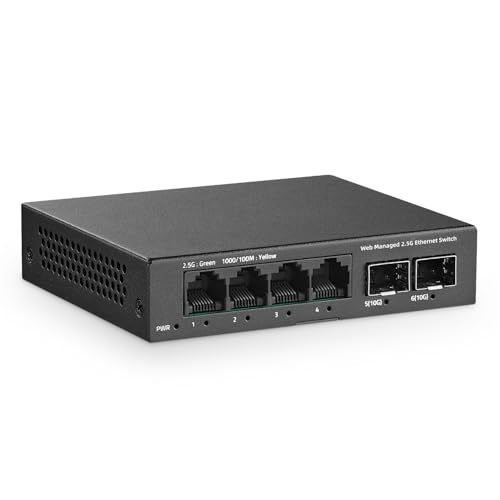
YuLinca 6-Port 2.5G Managed Switch
Best for: compact multi-gigabit networks needing silent operation
- Management Type
- Managed (what this guide is about)
- Port Count
- 6
- Port Speed
- 2.5 Gbps
- Uplink Ports
- 2 x 10G SFP+
- Switching Capacity
- 60Gbps
- Mounting Type
- Wallmount
The YuLinca 6-Port 2.5G Managed Switch combines four 2.5G RJ45 ports with two 10G SFP+ uplink slots in a compact metal casing. It delivers 60Gbps backplane bandwidth and supports Layer 2 features, including VLAN, QoS, and LACP link aggregation via a web management interface. This switch suits you if you need multi-gigabit speeds for NAS units or access points alongside silent, fanless operation.
Pros
- Two 10G SFP+ uplink slots alongside four 2.5Gbps RJ45 ports
- Fanless design in a durable metal casing for silent operation
- Web-managed Layer 2 tools including VLAN, QoS, and LACP
- 60Gbps total backplane bandwidth
Cons
- Only four standard RJ45 Ethernet ports
- No Power over Ethernet (PoE) output listed
- LACP link aggregation requires firmware version 1.9 or above
Good fit if
- You need 2.5G Ethernet connections with 10G SFP+ uplinks.
- You want silent, fanless operation in a wall-mountable metal chassis.
- You configure local network traffic using VLANs, QoS, or link aggregation.
Skip if
- You need PoE to power access points or cameras directly.
- You need more than four RJ45 wired ports on a single switch.
Verdict: YuLinca 6-Port 2.5G Managed Switch provides 2.5G Ethernet and dual 10G SFP+ uplinks in a silent, fanless build. It delivers essential Layer 2 management tools for small multi-gigabit networks.

Goalake 16-Port Fanless Gigabit Easy Managed Switch
Best for: quiet office networks needing 16 managed ports
- Management Type
- Managed (what this guide is about)
- Port Count
- 16
- Port Speed
- 10/100/1000 Mbps
- Mounting Type
- Desktop, Wall-Mount
- Number of Ports
- 16 Ports
- PoE Support
- PoE
View on Amazon: Goalake 16-Port Fanless Gigabit Easy Managed Switch
This Goalake switch provides 16 gigabit Ethernet ports inside a compact, fanless metal housing designed for quiet workspaces. It features easy management through a web browser or mobile app, supporting 802.1Q VLAN segmentation, QoS traffic prioritization, and storm control. With silent passive cooling and wall-mounting options, you get network monitoring and traffic control without cooling noise. It suits office setups needing wired connections for computers, printers, and storage.
Pros
- 16 gigabit Ethernet ports supporting 10/100/1000 Mbps speeds
- Fanless metal enclosure ensures silent desktop or wall operation
- App and web management with 802.1Q VLAN and QoS support
- Includes storm control, port mirroring, and cable quality detection
Cons
- Lacks 10G or SFP uplink ports for high-speed fiber backbones
- No command-line interface for enterprise configuration scripting
Good fit if
- You need 16 gigabit wired ports in a quiet office environment.
- You prefer managing VLANs and QoS via a web portal or smartphone app.
- You want to mount a silent, metal-cased switch on a desk or wall.
Skip if
- You require multi-gigabit or 10G SFP+ uplink connections.
- You rely on a traditional command-line interface for network provisioning.
Verdict: Goalake 16-Port Fanless Gigabit Easy Managed Switch delivers 16 silent gigabit ports with accessible web and app management for office device traffic. It provides practical VLAN and QoS controls without the noise of fan-cooled hardware.

TP-Link Omada 8-Port Gigabit PoE+ Switch
Best for: small PoE-powered networks needing SFP uplinks
- Management Type
- Managed (what this guide is about)
- Port Count
- 8
- Port Speed
- Gigabit
- PoE Support
- PoE+
- PoE Power Budget
- 123W
- Number of Ports
- 8 Ports
The TP-Link Omada 8-Port Gigabit PoE+ Switch is a compact managed switch designed to power and connect your local network hardware. You get eight Gigabit PoE+ ports delivering up to 30W each with a 123W total budget, alongside a Gigabit RJ45 port and a Gigabit SFP combo port. This setup suits you if you need to run access points, cameras, and wired gear without adding separate power injectors.
Pros
- 123W total PoE power budget with up to 30W per port
- Eight Gigabit 802.3at/af PoE+ RJ45 ports
- One dedicated Gigabit RJ45 port and one Gigabit SFP/RJ45 combo port
- Compact footprint measuring 8.23 by 4.96 inches
Cons
- No multi-gigabit 2.5G or 10G port options
- SFP port is a shared combo port with RJ45
Good fit if
- You need to power multiple PoE+ devices within a 123W total power budget.
- You want an SFP combo uplink for fiber connectivity alongside Gigabit Ethernet.
- You have limited space and need a compact managed unit.
Skip if
- You require faster multi-gigabit or 10G data transfer rates.
- You need more than eight PoE-capable connections.
Verdict: TP-Link Omada 8-Port Gigabit PoE+ Switch delivers 123W of total PoE+ power alongside flexible SFP and RJ45 uplink ports in a compact chassis.

TP-Link Omada 24-Port Gigabit Fanless PoE Switch
Best for: silent 24-port Gigabit PoE network deployments
- Management Type
- Managed (what this guide is about)
- Port Count
- 24
- Port Speed
- 1 Gbps
- PoE Support
- PoE+
- Number of Ports
- 24 Ports
- Dimensions
- 8.7 × 17.3 × 1.7 inches
View on Amazon: TP-Link Omada 24-Port Gigabit Fanless PoE Switch
This managed switch gives you 24 Gigabit Ethernet ports with Power over Ethernet support for your wired client devices. A completely fanless passive cooling design keeps your setup silent in office or home environments. You can configure and maintain the network via a local web interface, command line, or centralized Omada cloud management. It suits setups requiring silent multi-device power delivery alongside advanced security and VLAN network segmentation.
Pros
- Fanless design provides completely silent passive cooling
- 24 Gigabit ports with PoE power integration
- Multiple management modes including web GUI, CLI, and Omada cloud platform
- Comprehensive security tools including 802.1X, ACL, and DHCP snooping
- Includes a 5-year manufacturer warranty
Cons
- Lacks 2.5G or 10G multi-gigabit port options
- Requires substantial space with a 17.3-inch chassis width
Good fit if
- You need 24 Gigabit ports with PoE power in noise-sensitive spaces.
- You manage your network centrally using the Omada platform or standalone CLI.
- You require advanced network segmentation features like 802.1Q VLANs and IGMP.
Skip if
- You require 2.5G or 10G multi-gigabit connections for high-speed hardware.
- You need a compact switch footprint for tight spaces.
Verdict: TP-Link Omada 24-Port Gigabit Fanless PoE Switch delivers silent, centrally managed power and connectivity across 24 wired endpoints. It provides complete security controls, VLAN segmentation, and zero-noise operation for office or home deployments.

Reidubo 10-Port Gigabit Managed PoE+ Switch
Best for: scheduled PoE power delivery and cloud management
- Management Type
- Managed (what this guide is about)
- Port Count
- 10
- Port Speed
- Gigabit
- PoE Support
- PoE+ (IEEE 802.3af/at)
- PoE Power Budget
- 120W
- Uplink Ports
- 2 x Gigabit
The Reidubo 10-Port Gigabit Managed PoE+ Switch gives you eight 802.3af/at PoE+ ports delivering up to 30W each across a 120W total budget, alongside two dedicated Gigabit uplinks. It provides local web configuration and mobile app cloud management. Built-in network controls include 802.1Q VLAN support, QoS, bandwidth throttling, and a PoE scheduler. It suits your setup if you deploy powered endpoints like access points while requiring scheduled power automation.
Pros
- 8 PoE+ Gigabit ports with a 120W total budget and up to 30W per port
- Hardware PoE scheduler to automate device power by day and time
- Management options via local web GUI or mobile cloud app
- Layer 2 management tools including 802.1Q VLAN, QoS, and bandwidth control
Cons
- Uplinks limited to Gigabit copper without 10G or SFP+ fiber slots
- Does not deliver power to passive PoE equipment
Good fit if
- You need to power and manage up to eight PoE+ devices within a 120W pool.
- You want to shut down connected devices on a set schedule to save power.
- You want the option to manage network settings via a mobile app or local browser.
Skip if
- You need 10G or SFP+ fiber ports for high-capacity backhaul connections.
- You operate passive PoE hardware that requires proprietary power delivery.
Verdict: Reidubo 10-Port Gigabit Managed PoE+ Switch delivers practical Layer 2 management and energy-saving power scheduling for small network environments. Its dual web and cloud app interfaces give you straightforward remote control over connected PoE devices.
Specifications side by side
| Spec | STEAMEMO 16-Port 240W Managed PoE+ Switch | Ubiquiti UniFi Managed 10G Aggregation Switch | STEAMEMO 10-Port Gigabit Cloud Managed PoE+ Switch | TP-Link 8-Port 10G SFP+ Managed Switch | TRENDnet 12-Port 10G SFP+ Managed Switch | MokerLink 12-Port 10G SFP+ Managed Switch | YuanLey 48-Port Gigabit PoE+ Managed Switch | XikeStor 12-Port 10G SFP+ L3 Managed Switch | QNAP 16-Port 10GbE Managed Switch | MokerLink 8-Port 10G Managed Switch | YuLinca 6-Port 2.5G Managed Switch | Goalake 16-Port Fanless Gigabit Easy Managed Switch | TP-Link Omada 8-Port Gigabit PoE+ Switch | TP-Link Omada 24-Port Gigabit Fanless PoE Switch | Reidubo 10-Port Gigabit Managed PoE+ Switch |
|---|---|---|---|---|---|---|---|---|---|---|---|---|---|---|---|
| Port Count | 16 | not specified | 10 | 8 | 12 | 12 | 54 | 12 | 16 | 8 | 6 | 16 | 8 | 24 | 10 |
| Port Speed | 100 Mbps | not specified | 10/100/1000 Mbps | 10 Gbps | not specified | not specified | 10/100/1000 Mbps | not specified | 10 Gbps | 10 Gbps | 2.5 Gbps | 10/100/1000 Mbps | Gigabit | 1 Gbps | Gigabit |
| Management Type | Managed | Managed | Managed | Managed | Layer 2 Managed | L3 Managed | L3 Managed | L3 Managed | Layer 2 Managed | Managed | Smart Web Managed | Easy Managed | Easy Managed | Managed | Managed |
| PoE Support | PoE+ (802.3at) | not specified | PoE+ (802.3af/at) | not specified | not specified | not specified | PoE+ (802.3at/af) | not specified | not specified | not specified | not specified | not specified | PoE+ | PoE+ | PoE+ (IEEE 802.3af/at) |
| PoE Power Budget | 240W | not specified | 120W | not specified | not specified | not specified | 460W | not specified | not specified | not specified | not specified | not specified | 123W | not specified | 120W |
| Uplink Ports | 2 x Gigabit Uplink, 1 x 1.25G SFP | not specified | 2 x Gigabit | not specified | 12 x 10G SFP+ | 12 x 10G SFP+ | 6 x 10G SFP+ | 12 x 10G SFP+ | 8 x 10G SFP+ | not specified | 2 x 10G SFP+ | not specified | not specified | not specified | 2 x Gigabit |
| Switching Capacity | not specified | not specified | not specified | not specified | 240Gbps | 240Gbps | 216 Gbps | 240 Gbps | 320 Gbps | not specified | 60Gbps | not specified | not specified | not specified | not specified |
| Mounting Type | Wall Mount, Rack Mount | Rack mounting, 1U | Desktop, Wall-Mount | not specified | Rackmount | not specified | Rackmount | not specified | Rackmount | Desktop, Wall-Mount, Rackmount | Wallmount | Desktop, Wall-Mount | not specified | not specified | not specified |
| Number of Ports | 16 Ports | not specified | 10 Ports | 8 Ports | not specified | not specified | 48 Ports | not specified | 16 Ports | 8 Ports | not specified | 16 Ports | 8 Ports | 24 Ports | 10 Ports |
| Uplink Port Type | SFP, Gigabit Uplink | SFP | not specified | SFP | SFP | SFP | SFP | SFP | SFP | not specified | SFP | not specified | not specified | not specified | Gigabit Uplink |
| Recommended Use | not specified | not specified | not specified | not specified | not specified | not specified | not specified | not specified | not specified | not specified | not specified | Office | not specified | not specified | not specified |
| Intended Use | not specified | not specified | not specified | not specified | not specified | not specified | not specified | not specified | not specified | not specified | not specified | Home | not specified | not specified | not specified |
| Dimensions | 10.6 × 7 × 1.8 inches | 4.72 × 17.4 × 1.72 inches | 7.5 × 5.5 × 1.7 inches | 17.3 × 7.09 × 1.73 inches | 8.26 × 9.06 × 1.73 inches | not specified | not specified | 13 × 9.06 × 1.69 inches | 7.48 × 6.61 × 1.73 inches | not specified | not specified | 10 × 3.14 × 1.02 inches | 8.23 × 4.96 × 1.02 inches | 8.7 × 17.3 × 1.7 inches | not specified |
| Weight | 3.88 pounds | 2.2 pounds | 2.07 pounds | 3.64 pounds | 3.5 pounds | 6.7 pounds | not specified | not specified | 5 pounds | 4.01 pounds | not specified | 1.8 ounces | 1.34 pounds | 6.83 pounds | not specified |
| Size | 19 Ports | 240 W 16 x PoE+ | not specified | 8 Gigabit Ports|120W 8xPoE+ | 8 Port | not specified | not specified | 54 Port PoE Switch(Managed) | 12×10G SFP ports | 8 x 10G NBASE-T + 8 x 10G SFP+ | not specified | not specified | 16 Ports | 8 Port | 24 Port, 1 Gigabit | not specified |
| Color | black | White | Black | black | Black | Black | Blue | L3 | 12×10G SFP+ | Multicolor | Black | Black | Blue | multicolor | Black | Black4 |
| Model | 19 Ports|240W 16xPoE+ | USW-Aggregation | 8 Gigabit Ports|120W 8xPoE+ | SX3008F | TL2-F7120 | 12*10G SFP Managed | 54 Port | 48*PoE+ (1000Mbps) | 12*10G SFP+(L3 Managed) | QSW-M3216R-8S8T-US | 8x10G Eth Managed | Mini 4x2.5G + 2x10G SFP Managed | 16 Gigabit Ports|Easy Managed | ES210GMP | SG2428LP | 8 Port Gigabit Managed PoE Switch |
For those interested in smart home automation, see our list of the best kasa smart smart switches.
How to Choose a Managed Network Switch
-
Port Speed Requirements
Check the throughput needs of your connected hardware before selecting a base port speed. Standard Gigabit interfaces handle standard internet streaming, smart home gear, and standard office workstations. If you run multi-gigabit broadband or transfer large local files between workstations, look for 2.5G or 10G copper connections. The MokerLink 8-Port 10G Managed Switch offers multi-gigabit speeds across eight copper ports. Matching switch port speeds to network interface cards prevents bottlenecks without dedicating resources to unsupported link rates.
-
PoE Total Power Budget
Review the total wattage demands of your powered hardware when choosing a PoE switch. Access points, IP cameras, and VoIP phones draw varying amounts of electricity over Ethernet cables. Calculate the combined wattage of all endpoints and ensure the switch exceeds that number with room to spare. The TP-Link Omada 8-Port Gigabit PoE+ Switch supplies a 123W total budget for compact setups. An inadequate power budget causes connected devices to reboot unexpectedly or fail to power up under heavy loads.
-
Layer 2 Versus Layer 3
Determine whether your local network requires on-switch routing between different subnets. Layer 2 switches handle VLAN segregation, traffic prioritization, and basic security, passing inter-VLAN routing tasks back to your primary router. Layer 3 switches manage traffic routing internally, which reduces congestion on your router during heavy local subnet transfers. The MokerLink 12-Port 10G SFP+ Managed Switch provides dedicated Layer 3 routing for fiber connections. Choose Layer 2 for simple office segmentations and Layer 3 for multi-VLAN networks with heavy inter-subnet traffic.
-
Uplink Port Types
Examine how the switch links back to your core router or secondary aggregation switches. Standard Gigabit uplinks rely on traditional copper patch cords, which work well over short distances within a single room. Optical SFP and 10G SFP+ slots allow fiber-optic connections that travel across long distances without electromagnetic interference. The YuLinca 6-Port 2.5G Managed Switch includes dual 10G SFP+ uplinks alongside multi-gigabit access ports. Choose optical uplinks if your network topology requires linking switches situated in different server racks or across separate floors.
-
Port Media Flexibility
Check whether your devices require standard RJ45 copper ports or direct optical transceivers. All-SFP+ aggregation switches require separate SFP+ modules or direct-attach copper cables for every connected machine. A hybrid model combines fixed copper ports with optical slots on the same chassis. The QNAP 16-Port 10GbE Managed Switch includes eight 10G copper ports and eight 10G SFP+ slots. Pick a hybrid switch if you have both Ethernet-equipped network storage units and optical-linked switches sharing the same rack.
-
Mounting and Form Factor
Check the physical dimensions and mounting specifications against your available installation space. Compact desktop models fit onto shelves or desks, while 19-inch rackmount hardware requires an equipment cabinet or server rack frame. Some switches include wall-mounting slots on the underside for structured wiring enclosures. The Goalake 16-Port Fanless Gigabit Easy Managed Switch supports both desktop placement and wall mounting in quiet spaces. Verify that your planned installation location provides adequate physical clearance and ventilation around the switch enclosure to maintain reliable operation.
Frequently asked questions
What is the difference between Layer 2 and Layer 3 managed switches?
A Layer 2 switch directs traffic using MAC addresses within a local network, while a Layer 3 switch handles IP routing between separate subnets. Layer 2 models handle VLAN tagging and basic traffic segregation. Layer 3 hardware, such as the MokerLink 12-Port 10G or YuanLey 48-Port, routes packets internally across different subnets. This offloads routing tasks from your main router and accelerates local data transfers.
Can you mix fiber SFP+ and copper Ethernet connections on the same managed switch?
Yes, you can mix both media types if your switch includes combo ports, dedicated SFP slots, or hybrid port configurations. Models like the QNAP 16-Port 10GbE provide eight multi-gigabit copper ports alongside eight 10G SFP+ slots in a single chassis. Other switches, such as the YuLinca 6-Port, pair four 2.5G copper ports with two 10G SFP+ uplinks to bridge copper gear to high-speed fiber backbones.
How does Power over Ethernet power budgeting work on a managed switch?
A PoE power budget is the maximum total wattage a switch can deliver across all connected devices simultaneously. Every connected access point or camera consumes a specific wattage. For example, the STEAMEMO 10-Port switch supplies up to 120W across eight PoE+ ports, while the TP-Link Omada 8-Port provides 123W. You must ensure the combined power draw of your hardware remains below the switch's total rated allocation.
What is an SFP aggregation switch used for?
An SFP aggregation switch connects multiple downstream switches, storage servers, and core routers into a single central high-bandwidth hub. Instead of connecting individual client devices, aggregation hardware links high-capacity trunk lines across your network. Models like the Ubiquiti UniFi Managed 10G switch, TRENDnet TL2-F7120, or TP-Link SX3008F provide dedicated SFP+ ports with up to 240Gbps switching capacity to consolidate traffic between different network branches without bottlenecking.
Can a managed network switch operate completely silently?
Yes, managed network switches can operate completely silently if they use a passive, fanless thermal design. Many multi-port switches rely on internal cooling fans that produce constant background noise. However, fanless options like the Goalake 16-Port Gigabit and the TP-Link Omada SG2428LP 24-Port dissipate heat through their metal enclosures without fans. This lets you place managed hardware directly inside quiet home offices or shared workspaces.
How do cloud management and web management differ on a network switch?
Web management requires connecting directly to a switch's local IP address on your local network, whereas cloud management allows remote administration through an external platform or app. Local browser interfaces keep configuration internal to your building. Cloud-managed models, such as the STEAMEMO 10-Port and Reidubo 10-Port, let you modify port settings, schedule PoE delivery, and monitor connectivity status away from your local desk.