Best 10G Wifi Routers in 2026: 15 Picks Ranked by Specs
As an Amazon Associate we earn from qualifying purchases. Links on this page are affiliate links.
A 10G wifi router handles multi-gigabit internet plans and high-bandwidth local data transfers without wired bottlenecks. This guide ranks 15 models based strictly on specifications published on their listings. The TP-Link Quad-Band WiFi 7 Router with Dual 10G takes the top spot because dual 10 Gbps ports alongside quad-band Wi-Fi 7 support deliver extensive wired and wireless capacity.
Use this guide to decide which Ethernet port layout, frequency bands, and hardware features match your home network in 2026.
Quick picks
The best fit for you
- You need quad-band Wi-Fi 7 with dual 10G ports TP-Link Quad-Band WiFi 7 Router with Dual 10G It provides quad-band Wi-Fi 7 wireless connectivity paired with dual 10 Gbps Ethernet ports for multi-gigabit setups.
- You want a 10G router with smart home integration Amazon eero Max 7 Wi-Fi 7 Router It features dual 10 Gbps ports alongside built-in Matter, Thread, and Zigbee hub support.
- You need to connect over 200 wireless network devices Linksys Velop WRT Pro 7 Tri-Band WiFi 7 Router Its hardware is rated to manage 200 or more connected devices across a 3,000 square foot area.
- You need wired dual-WAN redundancy with 10G throughput NETGEAR Multi-Gigabit Dual WAN Router It includes dedicated dual-WAN support alongside 10G Ethernet and SFP+ ports for wired networks.
Our 15 picks

TP-Link Quad-Band WiFi 7 Router with Dual 10G
Best for: multi-gigabit wired and quad-band wireless networks
- Port Speed
- 10G (what this guide is about)
- Wi-Fi Standard
- Wi-Fi 7
- Speed Rating
- BE24000
- Frequency Bands
- Quad-Band
- Max Port Speed
- 10 Gbps
- Dimensions
- 11.9 × 10.3 × 3.8 inches
View on Amazon: TP-Link Quad-Band WiFi 7 Router with Dual 10G
The TP-Link Quad-Band WiFi 7 Router gives you two 10 Gbps ports, including one Ethernet and fiber combo WAN/LAN port. It runs quad-band Wi-Fi 7 alongside four 2.5 Gbps ports, a 1 Gbps port, and two USB ports. An integrated touchscreen and LED screen display status updates directly on the hardware. This router fits your home if you need high-bandwidth multi-gigabit wired backhaul, fast local routing, and broad Wi-Fi coverage.
Pros
- Two 10 Gbps ports, including an Ethernet and fiber combo port
- Quad-band Wi-Fi 7 connectivity with 12 positioned antennas
- Four 2.5 Gbps ports, one 1 Gbps port, and two USB ports
- Built-in touchscreen and LED status screen
Cons
- Incompatible with TP-Link Deco mesh hardware
- Requires a separate standalone modem
Good fit if
- You need dual 10 Gbps ports for multi-gigabit WAN and LAN traffic.
- You want quad-band Wi-Fi 7 wireless capacity.
- You plan to expand coverage using EasyMesh-compatible devices.
Skip if
- You already own a TP-Link Deco mesh system.
- You need an integrated modem in the same unit.
Verdict: TP-Link Quad-Band WiFi 7 Router delivers dual 10 Gbps ports alongside quad-band Wi-Fi 7 and extensive multi-gigabit wired expansion. It serves as a comprehensive networking hub for multi-gigabit broadband setups.

ASUS Tri-Band WiFi 7 Router with 10G Port
Best for: entry-level 10G Wi-Fi 7 networks
- Port Speed
- 10G (what this guide is about)
- Wi-Fi Standard
- Wi-Fi 7
- Frequency Bands
- Tri-Band
- Max Port Speed
- 10 Gbps
- Dimensions
- 11.3 × 4 × 9.7 inches
- Weight
- 1.7 pounds
This ASUS tri-band Wi-Fi 7 router delivers up to 9.7 Gbps total throughput and features dedicated 10G wired connectivity alongside dual WAN support. Its 6 GHz band uses 320MHz channels and Multi-Link Operation for stable, high-capacity transfers. Built-in USB mobile tethering provides an alternate connection path. This setup suits you if you need 10G input speeds, modern Wi-Fi 7 wireless capacity, and flexible backup WAN options for your home network.
Pros
- Dedicated 10G wired port speed
- Wi-Fi 7 tri-band wireless reaching up to 9.7 Gbps
- 320MHz channel bandwidth on the 6 GHz frequency band
- Dual WAN support with USB 4G and 5G mobile tethering
- Integrated AiMesh support and site-to-site VPN tools
Cons
- Tri-band design rather than quad-band configuration
- Physical footprint measures 11.3 inches long by 9.7 inches high
Good fit if
- You need a 10G wired port combined with tri-band Wi-Fi 7 speeds.
- You want redundant internet connectivity using dual WAN or USB cellular tethering.
- You plan to expand coverage across your home using AiMesh nodes.
Skip if
- You require a quad-band setup with a dedicated secondary wireless backhaul band.
- You need a compact router designed for tight shelf spaces.
Verdict: ASUS Tri-Band WiFi 7 10G Router delivers fast 10G wired throughput, 320MHz Wi-Fi 7 channels, and flexible dual WAN failover in a single device.

Amazon eero Max 7 Wi-Fi 7 Router
Best for: 10 Gbps connections and smart home integration
- Port Speed
- 10G (what this guide is about)
- Wi-Fi Standard
- Wi-Fi 7
- Coverage Area
- Up to 2,500 sq. ft.
- Device Capacity
- 250+ devices
- Max Port Speed
- 10 Gbps
- Pack Size
- 1-Pack
The eero Max 7 is a Wi-Fi 7 mesh router equipped with two 10 Gigabit Ethernet ports and wireless speeds reaching up to 4.3 Gbps. It supports wired throughput up to 9.4 Gbps across a 2,500-square-foot coverage area. You also get built-in hub support for Thread, Matter, and Zigbee smart home devices. This setup fits your network if you want multi-gigabit wired backhaul and smart home connectivity in a single unit.
Pros
- Two 10 Gigabit Ethernet ports supporting wired speeds up to 9.4 Gbps
- Wi-Fi 7 wireless speeds reaching up to 4.3 Gbps
- Covers up to 2,500 square feet and supports 250+ connected devices
- Integrated smart home hub for Thread, Matter, and Zigbee
Cons
- Advanced digital security requires an optional eero Plus subscription
- Offers only two wired 10 Gigabit Ethernet ports
- Requires the eero mobile app for setup and management
Good fit if
- You have an internet plan up to 10 Gbps requiring dual 10G ports.
- You need integrated hub control for Matter, Thread, and Zigbee smart home devices.
- You want coverage for up to 2,500 square feet and over 250 devices.
Skip if
- You require more than two 10 Gigabit Ethernet ports on your main router.
- You prefer configuring your router through a web browser instead of a mobile app.
Verdict: eero Max 7 10G Mesh Router delivers dual 10 Gbps Ethernet ports and Wi-Fi 7 speeds up to 4.3 Gbps for high-bandwidth networks. It combines multi-gigabit routing with built-in Matter, Thread, and Zigbee smart home hub functionality.

ASUS Tri-Band WiFi 7 Router with Dual 10G
Best for: dual-10G wired setups using Wi-Fi 7
- Port Speed
- 10G (what this guide is about)
- Wi-Fi Standard
- WiFi 7
- Speed Rating
- BE19000
- Frequency Bands
- Tri-Band
- Max Port Speed
- 10 Gbps
- Dimensions
- 13.8 × 13.8 × 8 inches
This is a tri-band Wi-Fi 7 router built for high-throughput local and internet connections. It provides two 10 Gbps WAN/LAN ports, combined wireless bandwidth up to 19 Gbps, and support for 320 MHz channels on the 6 GHz band. It also includes Multi-Link Operation and AiMesh support for expanding coverage. This suits you if you need multi-gigabit wired connections alongside high-speed Wi-Fi 7 hardware.
Pros
- Two 10 Gbps WAN/LAN ports
- Tri-band Wi-Fi 7 with 320 MHz bandwidth and 4096-QAM
- Multi-Link Operation (MLO) support
- Built-in AiMesh extendability
Cons
- Large physical footprint at 13.8 by 13.8 inches
- Heavier build weighing 4.12 pounds
- Lacks a fourth wireless band found on quad-band alternatives
Good fit if
- You need two 10 Gbps ports for multi-gigabit WAN and LAN routing.
- You want 320 MHz channel access on the 6 GHz wireless band.
- You plan to connect other compatible nodes using AiMesh.
Skip if
- You require a quad-band configuration with an extra wireless band.
- You have limited desk or shelf space for a wide router base.
Verdict: ASUS Tri-Band WiFi 7 Router with Dual 10G delivers dual 10 Gbps wired connectivity alongside high-speed 6 GHz wireless features. It provides substantial throughput if you have space for its oversized chassis.

ASUS Tri-Band WiFi 7 10G Gaming Router
Best for: multi-gigabit wired networking and smart home automation
- Port Speed
- 10G (what this guide is about)
- Wi-Fi Standard
- WiFi 7
- Speed Rating
- BE19000
- Frequency Bands
- Tri-Band
- Max Port Speed
- 10G
- Use Case
- Gaming
The ASUS Tri-Band WiFi 7 10G Gaming Router provides high-throughput networking for multi-gigabit setups. You get dual 10G ports, four 2.5G ports, and up to 19 Gbps across three wireless bands using 320MHz channels. Internally, a quad-core 2.6GHz processor, an NPU, and 4GB of RAM manage traffic prioritization and smart home services. This unit suits you if you run heavy local network transfers, smart home automations, or competitive gaming setups.
Pros
- Dual 10G ports, four 2.5G ports, and 20G link aggregation support
- Tri-band WiFi 7 throughput up to 19 Gbps with 320MHz channel width
- Quad-core 2.6GHz processor with dedicated NPU, 4GB RAM, and 32GB flash
- Hardware support for up to five VLANs and AiMesh mesh expansion
Cons
- Tri-band wireless configuration lacks a fourth dedicated band
- Large physical footprint measuring 13.8 by 13.8 inches and weighing 4.4 pounds
Good fit if
- You need dual 10G ports alongside multiple 2.5G wired connections.
- You want 320MHz channel bandwidth on the 6GHz band for compatible devices.
- You plan to run network automations with Home Assistant or isolate traffic across VLANs.
Skip if
- You require a quad-band router to maintain a dedicated wireless backhaul band.
- You have limited shelf space for a 13.8-inch wide, 4.4-pound unit.
Verdict: ASUS Tri-Band WiFi 7 10G Gaming Router delivers substantial wired capacity through dual 10G ports paired with strong onboard processing specs. It is an ideal pick if you require multi-gigabit switching and detailed local network control.

TP-Link Omada 10-Gigabit VPN Router
Best for: High-density multi-WAN Omada wired networks
- Port Speed
- Gigabit, 10G (what this guide is about)
- Frequency Bands
- Dual-Band
- Device Capacity
- 1000+
- Max Port Speed
- 10G
- Features
- VPN
- Dimensions
- 17.3 × 8.66 × 1.73 inches
The TP-Link Omada 10G VPN Router is a dual-band network gateway built for high-capacity wired routing. You get two 10G SFP+ ports for high-speed WAN or LAN connectivity, alongside eight Gigabit RJ45 ports and a Gigabit SFP port. It supports up to 10 WAN ports with load balancing and handles over 1,000 clients. This unit fits you if you need centralized Omada SDN management and multi-WAN connectivity.
Pros
- Two 10G SFP+ ports for high-speed WAN and LAN connections
- Supports up to 10 WAN ports with traffic load balancing
- Capacity for over 1,000 clients and 2,300,000 concurrent sessions
- Omada SDN support for standalone, hardware, software, or cloud control
- Two USB 3.0 ports including support for mobile LTE backup
Cons
- 10G connections require SFP+ transceivers rather than standard RJ45 ports
- Standard RJ45 Ethernet ports are limited to Gigabit speeds
- Large physical chassis measuring over 17 inches in length
Good fit if
- You need dual 10G SFP+ ports for high-throughput WAN or LAN links.
- You manage networks requiring multi-WAN load balancing across multiple connections.
- You run an Omada SDN setup needing controller or standalone management.
Skip if
- You require native 10G RJ45 copper ports without using separate SFP+ hardware.
- You want a compact router footprint rather than a 17-inch wide device.
Verdict: TP-Link Omada 10G VPN Router delivers dual 10G SFP+ throughput and multi-WAN balancing for networks with heavy client loads. Its Omada SDN integration makes it a flexible routing core for complex wired deployments.

ASUS ZenWiFi Tri-Band WiFi 7 Mesh Router
Best for: tri-band Wi-Fi 7 coverage with 10G ports
- Port Speed
- 10G (what this guide is about)
- Wi-Fi Standard
- Wi-Fi 7
- Frequency Bands
- Tri-Band
- Coverage Area
- 3,000 sq ft
- Max Port Speed
- 10 Gbps
- Pack Size
- 1-Pack
This ASUS ZenWiFi system is a single-pack tri-band Wi-Fi 7 mesh router designed for high-throughput home networks. It delivers wireless speeds up to 18 Gbps across bands, including 6GHz with MLO and 4K-QAM support. With dual 10G ports and up to 3,000 square feet of coverage, it suits you if you need multi-gigabit wired connections across a medium home.
Pros
- Dual 10G ports for high-bandwidth wired connections
- Tri-band Wi-Fi 7 speeds up to 18 Gbps with 6GHz band support
- Rated coverage up to 3,000 square feet per single pack
- Smart Home Master Network supports up to three separate SSIDs
Cons
- Single-pack configuration covers up to 3,000 square feet out of the box
- Tri-band design provides fewer dedicated bands than quad-band alternatives
Good fit if
- You need dual 10G ports for multi-gigabit routing and local devices.
- You want Wi-Fi 7 tri-band speeds up to 18 Gbps in areas up to 3,000 square feet.
Skip if
- You need a pre-bundled multi-pack to cover spaces larger than 3,000 square feet immediately.
- You require a quad-band router with two 5GHz or dual 6GHz bands.
Verdict: ASUS ZenWiFi Tri-Band WiFi 7 Mesh Router combines dual 10G connectivity with 18 Gbps wireless speeds for high-demand networks. It provides dependable coverage for single-unit layouts up to 3,000 square feet.

ASUS ZenWiFi Quad-Band WiFi 7 Router
Best for: quad-band multi-gigabit mesh home networking
- Port Speed
- 10G (what this guide is about)
- Wi-Fi Standard
- WiFi 7
- Frequency Bands
- Quad-Band
- Coverage Area
- 4,000 sq ft
- Max Port Speed
- 10 Gbps
- Pack Size
- 1-Pack
The ASUS ZenWiFi BQ16 Pro WiFi 7 Router is a standalone mesh-ready unit designed for high-throughput networking. It features two 10G ports and quad-band WiFi 7 delivering transfer rates up to 30000 Mbps. With twelve internal antennas, a single pack provides up to 4,000 square feet of coverage. It suits you if you run multi-gigabit wired hardware, require IoT segmentation through Smart Home Master, and plan to build an AiMesh network.
Pros
- Two 10G ports for high-bandwidth wired networking
- Quad-band WiFi 7 with total throughput up to 30000 Mbps
- Single-unit coverage up to 4,000 square feet
- Twelve internal antennas and sixteen front-end modules
- USB port supports 4G LTE and 5G mobile tethering
Cons
- Single pack covers 4,000 square feet rather than the 8,000 square feet of the two-pack
- Only available in white
Good fit if
- You need dual 10G ports for multi-gigabit WAN and LAN configurations.
- You want quad-band WiFi 7 capable of handling throughput up to 30000 Mbps.
- You need whole-home coverage up to 4,000 square feet with expandable AiMesh capability.
Skip if
- You need out-of-the-box multi-node coverage exceeding 4,000 square feet.
- You require black networking hardware to match your setup.
Verdict: ASUS ZenWiFi BQ16 Pro WiFi 7 Router delivers quad-band WiFi 7 speeds up to 30000 Mbps alongside dual 10G ports for high-demand multi-gigabit networks.
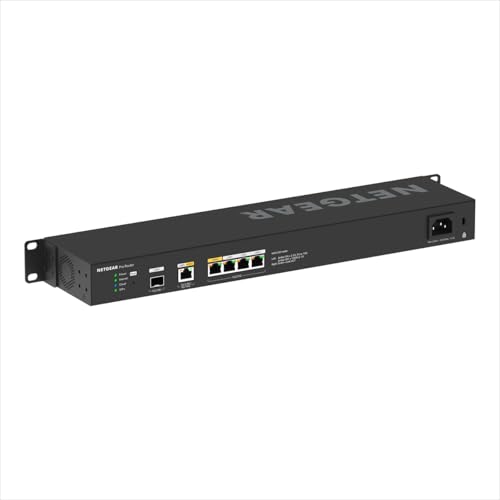
NETGEAR Multi-Gigabit Dual WAN Router
Best for: wired dual-WAN redundancy and 10G backhaul
- Port Speed
- Gigabit, 10G (what this guide is about)
- Device Capacity
- 100 devices
- Max Port Speed
- 10 Gbps
- Features
- Dual WAN
This wired router provides dual WAN connections with automated failover and traffic load balancing. You get one 10G multi-gigabit port, one 10G SFP+ port for fiber or direct-attach backhaul, plus four 2.5G Ethernet ports. Because it lacks integrated wireless radios, you must pair it with standalone access points for wireless coverage. It suits small business environments or advanced home networks needing high-throughput multi-gigabit routing, VLAN segmentation, and hardware-level VPN support.
Pros
- One 10G multi-gigabit Ethernet port and one 10G SFP+ port
- Dual WAN support with failover and traffic load balancing
- Supports WireGuard, OpenVPN, and IPSec with up to 30 tunnels
- Handles up to 32 separate VLANs for network segmentation
Cons
- No built-in Wi-Fi radios (requires separate access points)
- Insight cloud management requires renewal after the included 1-year subscription
Good fit if
- You need redundant internet connections with dual-WAN failover and load balancing.
- You require 10G copper and 10G SFP+ connectivity for multi-gigabit backhaul.
- You manage remote access using WireGuard, OpenVPN, or IPSec tunnels.
Skip if
- You want an all-in-one router with integrated Wi-Fi antennas.
- You want a device that does not use subscription-based cloud management.
Verdict: NETGEAR Dual WAN Multi-Gigabit Pro Router delivers dedicated 10G and SFP+ throughput alongside robust dual-WAN redundancy for wired network cores. You will need separate wireless access points to deliver Wi-Fi to your client devices.

ASUS ROG Rapture Quad-Band WiFi 7 Router
Best for: multi-gigabit wired and quad-band wireless gaming setups
- Port Speed
- 10G (what this guide is about)
- Wi-Fi Standard
- WiFi 7
- Frequency Bands
- Quad-Band
- Max Port Speed
- 10 Gbps
- Ethernet Ports
- 6
- Use Case
- Gaming
The ASUS ROG Rapture Quad-Band WiFi 7 Router delivers ultra-high-speed connectivity using dual 10G ports and four 2.5G ports. It features quad-band Wi-Fi 7 with 320MHz channels in the 6 GHz band and transfer rates reaching 30 Gbps. Multi-Link Operation links multiple wireless bands simultaneously. If you require multi-gigabit wired backhaul, high-bandwidth local networking, and dedicated hardware for PC gaming traffic, this router gives you extensive port speeds and multi-band capacity.
Pros
- Dual 10G ports and quad 2.5G ports
- Quad-band Wi-Fi 7 throughput up to 30 Gbps
- Supports 320MHz channels in the 6 GHz band and 4096-QAM
- Multi-link Operation across multiple bands simultaneously
Cons
- Large footprint measuring 13.7 by 13.7 inches and weighing 4.4 pounds
- Product listing designates a renewed unit
Good fit if
- You need dual 10G ports alongside four 2.5G wired connections.
- You want quad-band Wi-Fi 7 support with wide 320MHz channels.
Skip if
- You do not have enough desk space for a 13.7-inch wide unit.
- You prefer a brand-new device over a renewed model.
Verdict: ASUS ROG Rapture Quad-Band WiFi 7 Router combines dual 10G wired interfaces with high-bandwidth quad-band Wi-Fi 7 capability. It is a solid choice if you need maximum local transfer speeds and have space for its 4.4-pound chassis.

ASUS ROG Rapture Tri-Band WiFi 6 Router
Best for: single-port 10G multi-gigabit Wi-Fi 6 gaming
- Port Speed
- 2.5G, 10G (what this guide is about)
- Wi-Fi Standard
- WiFi 6
- Speed Rating
- AX11000
- Frequency Bands
- Tri-Band
- Max Port Speed
- 10 Gbps
- Use Case
- Gaming
The ASUS ROG Rapture Tri-Band 10G Router is a Wi-Fi 6 gaming router designed for high-bandwidth home networks. You get a single 10G port and a 2.5G port, both configurable for WAN or LAN setups, alongside tri-band Wi-Fi 6 capable of speeds up to 11,000 Mbps. It runs on a 2.0 GHz quad-core processor with 160 MHz channel support, making it suitable if you need multi-gigabit wired routing.
Pros
- One 10G port and one 2.5G port configurable for WAN or LAN
- Tri-band Wi-Fi 6 with cumulative speeds up to 11,000 Mbps
- 64-bit 2.0 GHz quad-core processor
- Supports 160 MHz wide channels
Cons
- Only one 10G port included
- Limited to Wi-Fi 6 without access to the 6 GHz band
- Large physical footprint measuring 13.94 by 13.94 inches
Good fit if
- You need a configurable 10G WAN or LAN port alongside a 2.5G port.
- You want a tri-band Wi-Fi 6 setup supporting 160 MHz bandwidth.
- You have adequate space for a 4.81-pound hardware chassis.
Skip if
- You require more than one 10G wired port.
- You want newer wireless standards such as Wi-Fi 6E or Wi-Fi 7.
Verdict: ASUS ROG Rapture Tri-Band 10G Router pairs a flexible 10G port with a 2.0 GHz quad-core processor for demanding local networks. It provides fast multi-gigabit throughput if you do not yet need Wi-Fi 7.
ASUS ROG Rapture Tri-Band WiFi 6 Gaming Router
Best for: 10G wired gaming setups using Wi-Fi 6
- Port Speed
- 2.5G, 10G (what this guide is about)
- Wi-Fi Standard
- WiFi 6
- Frequency Bands
- Tri-Band
- Max Port Speed
- 10G
- Use Case
- Gaming
- Dimensions
- 13.9 × 13.9 × 7.6 inches
View on Amazon: ASUS ROG Rapture Tri-Band WiFi 6 Gaming Router
The ASUS ROG Tri-Band Wi-Fi 6 Gaming Router provides wired multi-gigabit connectivity alongside wireless networking. You get a dedicated 10G port and a 2.5G port for high-speed wired devices or fast internet setups. It runs on the Wi-Fi 6 standard across three operational frequency bands. This tri-band setup suits you if you want high-throughput wired connections for a gaming environment.
Pros
- Equipped with both 10G and 2.5G ports
- Tri-band Wi-Fi 6 connectivity
- Hardware WPS button included
Cons
- Limited to Wi-Fi 6 rather than newer Wi-Fi 6E or Wi-Fi 7
- Large physical footprint measuring 13.94 inches square and weighing 4.81 pounds
Good fit if
- You need 10G and 2.5G wired connectivity for local hardware.
- You want a tri-band Wi-Fi 6 router designed for gaming use.
Skip if
- You want newer Wi-Fi 7 or Wi-Fi 6E wireless standards.
- You have limited shelf space for a 13.94-inch wide router.
Verdict: ASUS ROG Tri-Band Wi-Fi 6 Gaming Router delivers 10G and 2.5G wired connectivity with tri-band Wi-Fi 6 coverage. It provides high-speed wired performance for gaming setups that do not require Wi-Fi 7 hardware.

NETGEAR Orbi Quad-Band WiFi 6E Router
Best for: homes up to 3,000 sq ft with 200 devices
- Port Speed
- 10G (what this guide is about)
- Wi-Fi Standard
- WiFi 6E
- Speed Rating
- AXE11000
- Frequency Bands
- Quad-Band
- Coverage Area
- 3,000 sq. ft.
- Device Capacity
- 200 devices
The NETGEAR Orbi RBRE960 is a Quad-Band WiFi 6E router with an AXE11000 speed rating. It features a 10 Gigabit port for high-speed fiber connections. The unit covers up to 3,000 square feet and supports 200 devices. You can expand the mesh system by adding satellites. This setup suits homes needing strong whole-home coverage for many connected devices.
Pros
- Quad-Band WiFi 6E architecture
- 10 Gigabit internet port
- AXE11000 speed rating
- Supports up to 200 devices
- Expandable mesh system
Cons
- Limited to 3,000 square feet coverage
- WiFi 6E standard instead of WiFi 7
- Single router unit for 3,000 sq ft
Good fit if
- You need a 10 Gigabit port for fiber internet
- You want to connect up to 200 devices
- You prefer a Quad-Band WiFi 6E setup
Skip if
- You require WiFi 7 speeds
- Your home exceeds 3,000 square feet
- You need a WiFi 6E router with more than 200 device capacity
Verdict: NETGEAR Orbi RBRE960 Quad-Band WiFi 6E is a solid choice for homes up to 3,000 square feet that need a 10 Gigabit port and support for 200 devices.
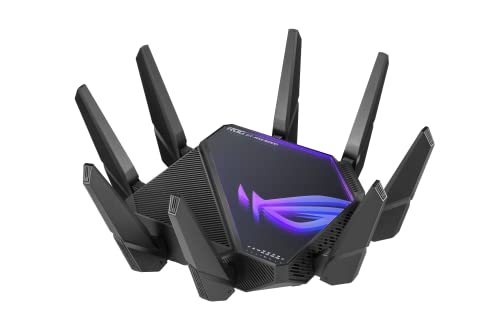
ASUS ROG Rapture Quad-Band Wi-Fi 6E Router
Best for: dual 10G wired multi-gigabit gaming setups
- Port Speed
- 2.5G, 10G (what this guide is about)
- Wi-Fi Standard
- WiFi 6E
- Speed Rating
- AXE16000
- Frequency Bands
- Quad-Band
- Max Port Speed
- 10 Gbps
- Use Case
- Gaming
The ASUS ROG Rapture Quad-Band WiFi 6E Router gives you two 10 Gbps ports alongside a dedicated 2.5 Gbps WAN port for multi-gigabit networking. Operating across four wireless bands, including 6 GHz, it delivers combined speeds up to 16000 Mbps. This setup suits you if you need high-bandwidth wired connections for local storage or fast internet feeds while managing heavy gaming traffic over clear wireless channels.
Pros
- Dual 10 Gbps ports for WAN or LAN configurations
- Dedicated 2.5 Gbps WAN port for incoming multi-gigabit connections
- Quad-band Wi-Fi 6E architecture including the 6 GHz band
- Maximum aggregate wireless speed of up to 16000 Mbps
Cons
- Uses Wi-Fi 6E rather than the newer Wi-Fi 7 standard
- Large physical footprint measuring 13.94 by 13.94 inches and weighing 5.35 pounds
Good fit if
- You need dual 10 Gbps wired ports for high-bandwidth devices
- You want quad-band connectivity with access to the 6 GHz band
Skip if
- You want the newer Wi-Fi 7 standard
- You have limited shelf space for a wide, heavy router
Verdict: ASUS ROG Rapture Quad-Band WiFi 6E Router pairs dual 10 Gbps ports with quad-band capacity for high-speed local and internet traffic. It offers extensive multi-gigabit connectivity if you do not need Wi-Fi 7.

Linksys Velop WRT Pro 7 Tri-Band WiFi 7 Router
Best for: managing networks with 200 or more devices
- Port Speed
- 2.5G, 10G (what this guide is about)
- Wi-Fi Standard
- WiFi 7
- Frequency Bands
- Tri-Band
- Coverage Area
- up to 3,000 sq. ft.
- Device Capacity
- 200+ Devices
- Max Port Speed
- 2.5 Gbps
View on Amazon: Linksys Velop WRT Pro 7 Tri-Band WiFi 7 Router
The Linksys Velop WRT Pro 7 is a tri-band WiFi 7 router designed for advanced setups. It delivers aggregate wireless speeds up to 10680 Mbps across 6 GHz, 5 GHz, and 2.4 GHz bands, handling over 200 connected devices across 3,000 square feet. You get a 2.5 Gbps WAN port alongside four 1 Gbps LAN ports. Because it runs the OpenWrt LuCI interface, this unit suits developers and technical users needing deep network control.
Pros
- Supports total tri-band WiFi 7 speeds up to 10680 Mbps
- Handles 200+ connected devices across 3,000 square feet
- Uses OpenWrt LuCI web interface for developer-grade management
- Equipped with a 1.5GHz quad-core processor and 2.5 Gbps WAN port
Cons
- Local Ethernet LAN ports are limited to 1 Gbps
- Internet WAN port tops out at 2.5 Gbps
- Requires OpenWrt expert knowledge to configure and manage
Good fit if
- You need to manage coverage for 200 or more connected devices.
- You have OpenWrt expert knowledge and want custom firmware controls.
- You want tri-band WiFi 7 wireless bandwidth reaching up to 10680 Mbps.
Skip if
- You need multi-gigabit wired connections for your LAN clients.
- You prefer a standard consumer setup without advanced LuCI menus.
- You require a native 10 Gbps wired Ethernet port.
Verdict: Linksys Velop WRT Pro 7 OpenWrt Router provides high-capacity WiFi 7 performance and deep firmware customization for high-density environments. Its physical Ethernet array stops at 2.5 Gbps WAN and 1 Gbps LAN, making it ideal for large wireless client pools rather than ultra-fast wired networks.
Specifications side by side
| Spec | TP-Link Quad-Band WiFi 7 Router with Dual 10G | ASUS Tri-Band WiFi 7 Router with 10G Port | Amazon eero Max 7 Wi-Fi 7 Router | ASUS Tri-Band WiFi 7 Router with Dual 10G | ASUS Tri-Band WiFi 7 10G Gaming Router | TP-Link Omada 10-Gigabit VPN Router | ASUS ZenWiFi Tri-Band WiFi 7 Mesh Router | ASUS ZenWiFi Quad-Band WiFi 7 Router | NETGEAR Multi-Gigabit Dual WAN Router | ASUS ROG Rapture Quad-Band WiFi 7 Router | ASUS ROG Rapture Tri-Band WiFi 6 Router | ASUS ROG Rapture Tri-Band WiFi 6 Gaming Router | NETGEAR Orbi Quad-Band WiFi 6E Router | ASUS ROG Rapture Quad-Band Wi-Fi 6E Router | Linksys Velop WRT Pro 7 Tri-Band WiFi 7 Router |
|---|---|---|---|---|---|---|---|---|---|---|---|---|---|---|---|
| Wi-Fi Standard | Wi-Fi 7 | Wi-Fi 7 | Wi-Fi 7 | WiFi 7 | WiFi 7 | not specified | Wi-Fi 7 | WiFi 7 | not specified | WiFi 7 | WiFi 6 | WiFi 6 | WiFi 6E | WiFi 6E | WiFi 7 |
| Speed Rating | BE24000 | not specified | not specified | BE19000 | BE19000 | not specified | not specified | not specified | not specified | not specified | AX11000 | not specified | AXE11000 | AXE16000 | not specified |
| Frequency Bands | Quad-Band | Tri-Band | not specified | Tri-Band | Tri-Band | Dual-Band | Tri-Band | Quad-Band | not specified | Quad-Band | Tri-Band | Tri-Band | Quad-Band | Quad-Band | Tri-Band |
| Coverage Area | not specified | not specified | Up to 2,500 sq. ft. | not specified | not specified | not specified | 3,000 sq ft | 4,000 sq ft | not specified | not specified | not specified | not specified | 3,000 sq. ft. | not specified | up to 3,000 sq. ft. |
| Device Capacity | not specified | not specified | 250+ devices | not specified | not specified | 1000+ | not specified | not specified | 100 devices | not specified | not specified | not specified | 200 devices | not specified | 200+ Devices |
| Max Port Speed | 10 Gbps | 10 Gbps | 10 Gbps | 10 Gbps | 10G | 10G | 10 Gbps | 10 Gbps | 10 Gbps | 10 Gbps | 10 Gbps | 10G | 10 Gbps | 10 Gbps | 2.5 Gbps |
| Ethernet Ports | not specified | not specified | not specified | not specified | not specified | not specified | not specified | not specified | not specified | 6 | not specified | not specified | not specified | not specified | not specified |
| Frequency Band | Quad-Band | Tri-Band | not specified | Tri-Band | Tri-Band | Dual-Band | Tri-Band | Quad-Band | not specified | Quad-Band | Tri-Band | Tri-Band | Quad-Band | Quad-Band | Tri-Band |
| Pack Size | not specified | not specified | 1-Pack | not specified | not specified | not specified | 1-Pack | 1-Pack | not specified | not specified | not specified | not specified | not specified | not specified | not specified |
| Use Case | not specified | not specified | not specified | not specified | Gaming | not specified | not specified | not specified | not specified | Gaming | Gaming | Gaming | not specified | Gaming | not specified |
| Features | not specified | not specified | not specified | not specified | not specified | VPN | not specified | VPN, Parental Controls | Dual WAN | not specified | not specified | not specified | not specified | not specified | OpenWrt |
| Port Speed | 10G | 10G | 10G | 10G | 10G | Gigabit, 10G | 10G | 10G | Gigabit, 10G | 10G | 2.5G, 10G | 2.5G, 10G | 10G | 2.5G, 10G | 2.5G, 10G |
| Intended Use | not specified | not specified | not specified | not specified | not specified | not specified | not specified | Home | not specified | not specified | not specified | not specified | not specified | not specified | Home |
| Dimensions | 11.9 × 10.3 × 3.8 inches | 11.3 × 4 × 9.7 inches | 7.24 × 8.74 × 3.54 inches | 13.8 × 13.8 × 8 inches | 13.8 × 8.7 × 13.8 inches | 17.3 × 8.66 × 1.73 inches | 2.83 × 7.32 × 6.26 inches | 6.9 × 2.8 × 8.6 inches | not specified | 13.7 × 8.6 × 13.7 inches | 13.9 × 13.9 × 7.6 inches | 13.9 × 13.9 × 7.6 inches | not specified | 13.9 × 13.9 × 7.6 inches | not specified |
| Weight | not specified | 1.7 pounds | 3.2 pounds | 4.12 pounds | 4.4 pounds | 6.26 pounds | 1.88 pounds | 2.9 pounds | not specified | 4.4 pounds | 4.81 pounds | 4.81 pounds | not specified | 5.35 pounds | 1 pounds |
| Size | 11.9 x 10.3 x 3.8 inches | 10G Port | 1-pack | Tri-Band | 8.7" x 13.8" x 13.8" | 10 Gigabit | 1-Pack | 1-Pack | not specified | not specified | Large | not specified | not specified | not specified | not specified |
| Color | Red | BLACK | WHITE | BLACK | WHITE | Black | WHITE | WHITE | not specified | BLACK | BLACK | BLACK | White | BLACK | Black |
| Model | Archer BE900 | RT-BE9700 | V010001 | RT-BE96U | GT-BE19000AI | ER8411 | BT10 1PK | BQ16 Pro(W-1-PK) | PR60X-100NAS | GT-BE98 PRO | GT-AX11000 PRO | GT-AX11000 PRO | RBRE960-100NAS-cr | GT-AXE16000 | LN6001 |
You might also want to review the best mini PCs with WiFi 6, compared, for other networking hardware options.
How to Choose a 10G WiFi Router
-
Compare Wi-Fi Generation Standards
Review the wireless standard to match your client hardware. Routers supporting Wi-Fi 7 provide 320MHz channels and the highest maximum throughput for newer devices. If your devices primarily use earlier standards, a Wi-Fi 6 model like the ASUS ROG Rapture Tri-Band WiFi 6 Router delivers reliable 10G wired routing without unnecessary wireless overhead. Check whether your phones, laptops, and adapters support 6 GHz bands before prioritizing Wi-Fi 7 specifications. Choose the standard that matches your active hardware.
-
Examine Ethernet versus SFP Ports
Look closely at the physical interface type for 10G connectivity. Standard RJ45 copper ports accept typical Ethernet patch cables and connect directly to broadband modems or network switches. In contrast, SFP+ optical ports require dedicated transceivers or direct-attach copper cables. The TP-Link Omada 10-Gigabit VPN Router features dual 10G SFP+ ports designed for fiber uplinks and high-bandwidth infrastructure. Verify your existing wall jacks, patch panels, and switch interfaces before choosing a router equipped with SFP+ connections.
-
Evaluate Coverage and Mesh Expansion
Check the rated coverage area to ensure the signal reaches throughout your floor plan. The ASUS ZenWiFi Tri-Band WiFi 7 Mesh Router lists coverage up to 3,000 square feet for a single unit. Large homes or multi-story structures often require multiple broadcast points to eliminate dead zones. If you live in an expansive layout, confirm whether the model functions as part of a scalable mesh system. Choosing mesh-capable hardware allows you to add compatible satellite units later without replacing your primary router.
-
Check Device Capacity and Firmware
Examine client capacity ratings and operating system features if you manage an active network. High-density environments demand stable routing when handling dozens of simultaneous connections. The Linksys Velop WRT Pro 7 Tri-Band WiFi 7 Router handles over 200 devices and supports OpenWrt software. OpenWrt firmware provides deep customization for traffic rules, routing policies, and system monitoring. If your home has numerous smart devices or complex routing requirements, select a router built specifically for high client pools and advanced software modification.
-
Decide Between Wireless and Wired
Determine whether you need an all-in-one wireless router or a dedicated wired machine. Most consumer models include internal antennas to broadcast Wi-Fi directly to client devices. In contrast, the NETGEAR Multi-Gigabit Dual WAN Router functions strictly as a wired gateway with dual-WAN failover. It provides robust 10G wired routing but requires standalone access points to deliver wireless connectivity. If your building already features wired Ethernet drops and separate ceiling access points, a dedicated wired router avoids redundant wireless hardware.
-
Consider Physical Size and Clearance
Review equipment dimensions and weight before choosing an installation location. High-performance 10G network processing produces heat, requiring substantial heatsinks and larger enclosures. For instance, the ASUS ROG Rapture Quad-Band Wi-Fi 6E Router weighs 5.35 pounds and measures nearly 14 inches on each side. Installing an oversized horizontal chassis requires dedicated shelf or desk clearance. If your installation space is tight, look for vertically oriented desktop models or compact units that occupy a significantly smaller physical footprint.
Frequently asked questions
What type of cable do you need for a 10G wifi router?
You need at least Cat 6 or Cat 6a Ethernet cabling to utilize 10 Gbps wired connections over standard RJ45 ports. Cat 6 supports 10G speeds over shorter distances, while Cat 6a supports 10G up to 100 meters. If you use routers with optical ports like the TP-Link ER8411 or NETGEAR R9000-100NAS, you must use compatible SFP+ fiber modules or direct-attach copper cables instead.
Do all 10G routers include wireless capabilities?
Not all routers with 10G ports broadcast Wi-Fi signals. Hardware like the NETGEAR PR60X-100NAS and the TP-Link ER8411 are dedicated wired routers designed for network backbones and multi-WAN balancing. When you deploy these units, you must attach standalone wireless access points to provide connectivity for wireless client devices across your home or office.
Can you use a 10G router with gigabit internet plans?
Yes, 10G Ethernet ports are backward compatible with standard gigabit, 2.5 Gbps, and 5 Gbps connections. The port automatically negotiates down to match the speed of your internet service provider modem or incoming ONT. You can also utilize the 10G connection for high-speed local data transfers between compatible network-attached storage devices and PCs, even if your broadband speed is lower.
What is the difference between SFP+ and standard 10G RJ45 ports?
Standard RJ45 ports use standard copper twisted-pair cables, whereas SFP+ ports use modular transceivers for fiber optic cables or direct-attach copper connections. Routers like the TP-Link Omada ER8411 and NETGEAR Nighthawk X10 feature SFP+ ports to integrate with enterprise switches or fiber uplinks. Standard 10G RJ45 ports are more common for consumer multi-gigabit modems and local desktop network cards.
How much coverage can a single 10G router provide?
Coverage varies by chassis design and internal antenna configuration. In this lineup, standalone units like the Amazon eero Max 7 and NETGEAR Nighthawk X10 list coverage ratings of up to 2,500 square feet. Larger standalone models like the ASUS ZenWiFi BT10 1PK and Linksys Velop WRT Pro 7 specify coverage up to 3,000 square feet for a single unit.
What processor speeds do 10G routers use to handle traffic?
Routing 10 Gbps traffic requires capable internal processors to prevent throughput drops. Among listed hardware, the ASUS Dual-Band WiFi 7 RT-BE86U includes a 2.6 GHz quad-core processor to manage multi-gigabit throughput. Similarly, the ASUS ROG Rapture GT-AX11000 PRO operates on a 2.0 GHz quad-core processor to handle traffic across its 10G and 2.5G ports.
Can a 10G router support hundreds of connected client devices?
Yes, specific 10G routers are engineered to manage dense hardware environments without crashing. For example, the Linksys Velop WRT Pro 7 specifies a capacity of 200 or more devices, utilizing OpenWrt firmware support to optimize client handling. Wired multi-WAN units like the TP-Link Omada ER8411 are also specifically built to balance traffic loads across high-density client environments.