Best Wifi Routers for Home: 15 Spec-Based Picks
As an Amazon Associate we earn from qualifying purchases. Links on this page are affiliate links.
Choosing the best wifi routers for home requires looking at the numbers, not just the marketing. We compared 15 models based strictly on the specifications published on their listings. Our top pick is the TP-Link Deco Tri-Band WiFi 7 Mesh Router because it uses Wi-Fi 7 and tri-band architecture for future-proof capacity. This guide helps you decide which router fits your home's size, device count, and wired port needs without guessing.
Quick picks
The best fit for you
- You want the highest capacity for future homes TP-Link Deco Tri-Band WiFi 7 Mesh Router It uses Wi-Fi 7 and tri-band architecture for high device capacity.
- You need 10G ports for a future-proof mesh ASUS ZenWiFi Quad-Band WiFi 7 Router It features 10G ports and quad-band Wi-Fi 7 for high-speed expansion.
- You want 2.5G wired backhaul for stability TP-Link Deco AX3000 Mesh System 3-Pack It includes dual 2.5 Gbps ports for reliable wired backhaul connections.
- You need smart home integration with a hub Amazon eero Pro 6 Tri-Band Mesh Router It includes a built-in Zigbee hub for direct smart home control.
- You prioritize privacy with built-in VPN and ad blocking GL.iNet Flint 3e Wi-Fi 7 Router It offers Wi-Fi 7 speeds with essential VPN and ad blocking features.
Our 15 picks

TP-Link Deco Tri-Band WiFi 7 Mesh Router
Best for: Future-proof homes needing high device capacity
- Intended Use
- Home (what this guide is about)
- Wi-Fi Standard
- WiFi 7
- Speed Rating
- BE10000
- Frequency Bands
- Tri-Band
- Coverage Area
- 3,000 sq.ft.
- Device Capacity
- over 200 devices
The TP-Link Deco 7 Pro BE63 is a single-pack Wi-Fi 7 mesh router designed for whole-home coverage up to 3,000 square feet. It supports over 200 devices with tri-band speeds totaling BE10000. The unit includes four 2.5G WAN/LAN ports and a 10G port option for future-proofing. This setup suits performance-focused homeowners who need high capacity and fast wired connections for multiple devices.
Pros
- Wi-Fi 7 standard with BE10000 speed rating
- Covers up to 3,000 square feet
- Supports over 200 connected devices
- Four 2.5G WAN/LAN ports included
- Tri-band architecture for dedicated backhaul
Cons
- Single-pack size limits initial coverage area
- Backhaul performance requires multiple units
- No mention of built-in parental controls
Good fit if
- You need high device capacity for a busy home
- You want Wi-Fi 7 speeds for future-proofing
- You require multiple 2.5G ports for wired devices
Skip if
- You need a multi-pack system for large homes
- You only require basic Wi-Fi 6 coverage
- You have a small apartment under 1,000 square feet
Verdict: The TP-Link Deco 7 Pro BE63 Tri-Band Mesh is a high-capacity starter node for homes needing Wi-Fi 7 speeds and robust wired connectivity. It fits users who plan to expand the mesh system later and need strong individual unit performance.

TP-Link AX3000 Dual-Band Wi-Fi 6 Router
Best for: homes needing reliable dual-band Wi-Fi 6 coverage
- Intended Use
- Home (what this guide is about)
- Wi-Fi Standard
- Wi-Fi 6
- Speed Rating
- AX3000
- Frequency Bands
- Dual-Band
- Max Port Speed
- Gigabit
- Dimensions
- 13 × 9.45 × 2.87 inches
The TP-Link Archer AX55 is a dual-band Wi-Fi 6 router with an AX3000 speed rating. It delivers up to 2402 Mbps on the 5 GHz band and 574 Mbps on the 2.4 GHz band. Four high-gain external antennas and beamforming technology help extend coverage throughout your home. The device includes a larger heat sink for improved cooling and supports Target Wake Time to reduce device power consumption.
Pros
- AX3000 speed rating with 2402 Mbps on 5 GHz and 574 Mbps on 2.4 GHz
- Four high-gain external antennas and beamforming for extended coverage
- Wi-Fi 6 OFDMA support to cut latency and jitter
- Target Wake Time to improve device battery life
- Built-in heat sink for stable performance
Cons
- Dual-band only, lacking the 6 GHz band found in newer Wi-Fi 6E or Wi-Fi 7 models
- Single Gigabit Ethernet port speed limits wired connections to 1 Gbps
- No mention of tri-band capability for dedicated backhaul in a mesh setup
Good fit if
- You need solid Wi-Fi 6 speeds for streaming and gaming
- You want a router with external antennas for better range
- You prefer a device with dedicated cooling for stability
Skip if
- You require Wi-Fi 6E or Wi-Fi 7 for the 6 GHz band
- You need multi-gigabit wired speeds for your network
- You are building a large mesh system requiring tri-band backhaul
Verdict: The TP-Link Archer AX55 Dual-Band Wi-Fi 6 is a capable single router for homes that do not require the extra capacity of tri-band or multi-gigabit connections. It suits users who prioritize reliable dual-band coverage and efficient power management for connected devices.

ASUS Dual-Band WiFi 6 Router
Best for: Single-unit home networks needing gigabit ports
- Intended Use
- Home (what this guide is about)
- Wi-Fi Standard
- Wi-Fi 6
- Speed Rating
- AX1800
- Frequency Bands
- Dual-Band
- Max Port Speed
- 1 Gbps
- Ethernet Ports
- 5
The ASUS RT-AX1800S is a dual-band Wi-Fi 6 router designed for home use. It delivers AX1800 speeds using MU-MIMO and OFDMA to handle multiple devices efficiently. The unit includes five gigabit Ethernet ports for wired connections. Security features like AiProtection Classic and a one-click secure VPN are built in. It suits users who want reliable coverage and strong security without subscription fees.
Pros
- Wi-Fi 6 standard with MU-MIMO and OFDMA
- Five gigabit Ethernet ports
- Built-in AiProtection Classic security
- One-click secure VPN via ASUS Instant Guard
Cons
- Dual-band only, lacking 6 GHz support
- No mention of an included mobile app
- Single router unit, not a mesh system
Good fit if
- You need a simple, secure home router
- You want wired gigabit connectivity for devices
- You prefer subscription-free network security
Skip if
- You require tri-band or Wi-Fi 7 speeds
- You need a whole-home mesh system
- You want to control the router via a dedicated app
Verdict: The ASUS RT-AX1800S Dual-Band Wi-Fi 6 Router is a solid choice for renters or small homes that prioritize wired connectivity and built-in security over advanced mesh features.

TP-Link Deco AX3000 Mesh System 3-Pack
Best for: homes needing 2.5G wired backhaul and wide coverage
- Intended Use
- Home (what this guide is about)
- Wi-Fi Standard
- Wi-Fi 6
- Speed Rating
- AX3000
- Coverage Area
- 6,500 square feet
- Device Capacity
- more than 150 devices
- Max Port Speed
- 2.5 Gbps
This AX3000 Wi-Fi 6 mesh system covers up to 6,500 square feet with three units. It supports more than 150 connected devices and includes dual 2.5 Gbps ports per node for superior wired backhaul and multi-gigabit connectivity. The system uses AI-driven mesh technology to optimize conditions for your home. It is designed for households needing robust coverage and high-speed wired connections for devices like NAS.
Pros
- Dual 2.5 Gbps ports on each unit for fast wired backhaul
- Covers up to 6,500 square feet of home space
- Supports more than 150 connected devices simultaneously
- Includes AI-driven mesh technology for network optimization
Cons
- Limited to Wi-Fi 6 standard instead of newer Wi-Fi 6E or Wi-Fi 7
- No mention of 10 Gbps port options for future-proofing
- Larger physical footprint with 4.48-inch height per node
Good fit if
- You have internet speeds above 1 Gigabit and need multi-gig device connectivity
- You require wired backhaul for stable mesh performance across a large home
- You need to connect more than 150 devices reliably
Skip if
- You require Wi-Fi 7 speeds for the latest devices
- You need 10 Gbps ports for extreme future-proofing
- You prefer a single compact router over a multi-unit mesh system
Verdict: TP-Link Deco X55 Pro 3-Pack is a strong option for users needing dual 2.5 Gbps ports and wide coverage for over 150 devices. It suits homes where wired backhaul stability is a priority over the latest wireless standards.

GL.iNet Flint 3e Wi-Fi 7 Router
Best for: Privacy-focused homes needing VPN and ad blocking
- Intended Use
- Home (what this guide is about)
- Wi-Fi Standard
- Wi-Fi 7
- Speed Rating
- BE6500
- Coverage Area
- Up to 2,500 sq ft
- Use Case
- Gaming
- Features
- VPN
The GL.iNet Flint 3e is a Wi-Fi 7 router rated BE6500. It covers up to 2,500 square feet and supports over 100 devices. You get dedicated VPN speeds up to 1100 Mbps and AdGuard Home for ad blocking. It also includes Bark parental controls. This model suits gamers and privacy-focused users who want built-in network security features.
Pros
- Wi-Fi 7 standard with BE6500 speed rating
- WireGuard and OpenVPN speeds up to 1100 Mbps
- Supports over 100 connected devices
- AdGuard Home for DNS-based ad blocking
- Integrated Bark parental controls
Cons
- Coverage limited to 2,500 square feet
- No mention of a companion mobile app
- Physical dimensions are bulkier than compact routers
Good fit if
- You need strong built-in VPN performance for gaming or privacy
- You want native ad blocking without third-party software
- You require support for more than 100 connected devices
Skip if
- You need coverage for a home larger than 2,500 square feet
- You prefer a compact router with minimal physical footprint
- You rely on a dedicated mobile app for all settings
Verdict: The GL.iNet Flint 3e BE6500 Wi-Fi 7 Router fits users who prioritize network security and device capacity over maximum coverage area. It is ideal for homes where VPN speed and ad blocking are essential requirements.
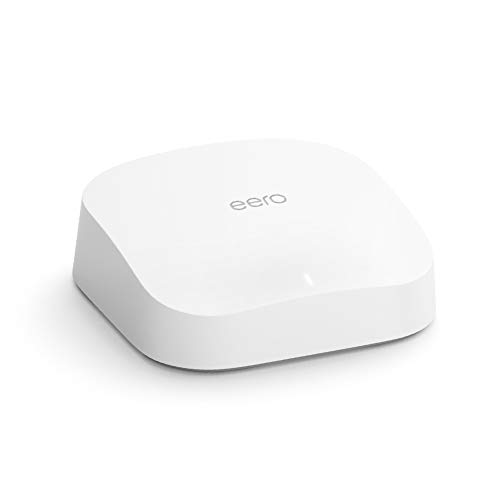
Amazon eero Pro 6 Tri-Band Mesh Router
Best for: Small homes needing smart home integration
- Intended Use
- Home (what this guide is about)
- Wi-Fi Standard
- Wi-Fi 6
- Frequency Bands
- Tri-Band
- Coverage Area
- Up to 2,000 sq ft
- Device Capacity
- 75+ connected devices
- Dimensions
- 5.47 × 5.47 × 2.07 inches
The eero Pro 6 is a tri-band Wi-Fi 6 mesh router covering up to 2,000 square feet. It supports 75 or more connected devices, making it suitable for homes with multiple screens and smart gadgets. A built-in Zigbee hub lets you control compatible devices directly. The system adapts to your space to reduce dead spots. You manage the network through the eero app.
Pros
- Tri-band Wi-Fi 6 architecture for reduced congestion
- Built-in Zigbee smart home hub for direct device control
- Supports 75 or more connected devices simultaneously
- Covers up to 2,000 square feet per unit
Cons
- Refurbished condition may show cosmetic wear
- 2,000 square foot coverage is limited for large homes
- Requires the eero app for management and setup
Good fit if
- You need a smart home hub built into your router
- You have a small to medium sized home under 2,000 square feet
- You want a simple mesh system with automatic updates
Skip if
- You require Wi-Fi 7 speeds for future proofing
- You have a large home exceeding 2,000 square feet
- You prefer a brand new device with original packaging
Verdict: eero Pro 6 Tri-Band Mesh Router offers reliable tri-band coverage and a Zigbee hub for smart homes. It fits users with smaller spaces who value integrated smart home control over raw speed.

Google Nest Wifi Pro Wi-Fi 6E Router
Best for: Small homes needing easy mesh setup
- Intended Use
- Home (what this guide is about)
- Wi-Fi Standard
- Wi-Fi 6E
- Frequency Bands
- three bands
- Coverage Area
- up to 2200 square feet
- Pack Size
- 1-Pack
- Dimensions
- 5.16 × 4.65 × 3.35 inches
The Google Nest WiFi Pro is a Wi-Fi 6E router designed for home use. It covers up to 2200 square feet on a single unit. The system uses three frequency bands: 2.4 GHz, 5 GHz, and 6 GHz. It automatically adjusts network performance and fixes common issues. You can expand coverage by adding more units. It fits homes needing reliable whole-home mesh coverage.
Pros
- Wi-Fi 6E standard with three bands
- Covers up to 2200 square feet per unit
- Self-healing network diagnostics
- Automatic performance adjustment
Cons
- No compatibility with previous Google Wifi generations
- Single unit covers limited area
- No mention of Ethernet port count
Good fit if
- You want easy mesh expansion
- You need 6 GHz band support
- You prefer automatic network management
Skip if
- You need legacy Google Wifi compatibility
- You require a single unit for large homes
- You want detailed manual control
Verdict: Google Nest WiFi Pro 1-Pack offers solid Wi-Fi 6E coverage for small to medium homes. It suits users who want simple setup and automatic network management.

ASUS ZenWiFi Quad-Band WiFi 7 Router
Best for: Future-proof homes needing 10G ports
- Intended Use
- Home (what this guide is about)
- Wi-Fi Standard
- WiFi 7
- Frequency Bands
- Quad-Band
- Coverage Area
- 4,000 sq ft
- Max Port Speed
- 10 Gbps
- Pack Size
- 1-Pack
The ASUS ZenWiFi BQ16 Pro is a single-pack WiFi 7 mesh router designed for homes up to 4,000 square feet. It features quad-band connectivity and dual 10 Gbps ports for high-speed wired connections. This system supports AiMesh scaling and includes Smart Home Master for IoT management. You will get robust coverage with twelve internal antennas and commercial-grade security. It suits users needing future-proofed, high-throughput networking for smart homes.
Pros
- Quad-band WiFi 7 standard with 30,000 Mbps potential throughput
- Dual 10 Gbps ports for high-speed wired backhaul or LAN
- Covers up to 4,000 square feet with twelve internal antennas
- Smart Home Master allows separate SSIDs for IoT device management
- AiProtection Pro security powered by Trend Micro
Cons
- Single-pack size limits coverage to 4,000 square feet
- Sold as a 1-Pack unit requiring additional nodes for larger homes
- Large physical footprint at 8.6 inches in height
Good fit if
- You need 10 Gbps wired connectivity for workstations or NAS
- You want to start a WiFi 7 mesh network with room to scale
- You have a home under 4,000 square feet that needs quad-band performance
Skip if
- You require a complete multi-pack system in the box for larger homes
- You are on a tight budget and need entry-level dual-band coverage
- You have a small apartment under 1,500 square feet needing basic WiFi 6
Verdict: The ASUS ZenWiFi BQ16 Pro Quad-Band WiFi 7 is a high-spec single node for users who need 10 Gbps ports and plan to expand their network later. It fits tech-savvy homeowners building a future-proof mesh system.

Tenda Dual-Band AX1500 Wi-Fi 6 Router
Best for: Small home single-router coverage
- Intended Use
- Home (what this guide is about)
- Wi-Fi Standard
- WiFi 6
- Speed Rating
- AX1500
- Frequency Bands
- Dual Band
- Max Port Speed
- Gigabit
- Ethernet Ports
- 4
The Tenda RX2Pro is a dual-band Wi-Fi 6 router rated at AX1500. It offers gigabit Ethernet ports and uses MU-MIMO with OFDMA to improve network efficiency. Five external antennas help extend range for medium homes. You get app control for remote management and parental controls. WPA3 security adds protection. This model suits users who need basic, reliable home coverage without complex mesh setups.
Pros
- Wi-Fi 6 standard with AX1500 speed rating
- Gigabit Ethernet ports for wired connections
- Five external 6dBi antennas for signal enhancement
- Tenda app for remote management and parental controls
- WPA3 security protocol for network privacy
Cons
- Dual-band design lacks the capacity of tri-band systems
- Single router unit may not cover large homes alone
- No mention of Wi-Fi 6E or 6GHz band support
Good fit if
- You need a simple, single-router solution for a small to medium home
- You want app-based parental controls and remote management
- You require gigabit wired ports for stationary devices
Skip if
- You need tri-band speeds to reduce congestion in a busy home
- You have a large home requiring whole-home mesh coverage
- You want the latest Wi-Fi 6E or Wi-Fi 7 technology
Verdict: Tenda RX2Pro AX1500 Wi-Fi 6 Router provides solid gigabit performance and app management for smaller households. It fits buyers who prioritize straightforward setup and parental controls over high-end mesh capabilities.

TP-Link Deco Dual-Band Wi-Fi 6 2-Pack
Best for: Small to medium homes needing basic mesh
- Intended Use
- Home (what this guide is about)
- Wi-Fi Standard
- Wi-Fi 6
- Speed Rating
- AX1500
- Frequency Bands
- Dual-Band
- Coverage Area
- up to 3,900 Sq. ft.
- Pack Size
- 2-Pack
The TP-Link Deco AX1500 is a dual-band Wi-Fi 6 mesh system designed for home use. This 2-pack covers up to 3,900 square feet. It delivers AX1500 speeds across two frequency bands. The system uses AI-driven technology to manage connections. It suits small to medium homes needing reliable whole-home coverage without complex setup.
Pros
- Wi-Fi 6 standard for improved efficiency
- Dual-band AX1500 speed rating
- Covers up to 3,900 square feet
- Includes 2 units for mesh networking
Cons
- Dual-band only lacks dedicated backhaul speed
- AX1500 is lower tier than Wi-Fi 7 options
- No mention of Wi-Fi 6E support
Good fit if
- You need coverage for under 4,000 square feet
- You want a simple dual-band mesh setup
- You prefer Wi-Fi 6 over newer standards
Skip if
- You require tri-band or quad-band performance
- You need Wi-Fi 7 speeds for heavy loads
- You have a home larger than 3,900 square feet
Verdict: TP-Link Deco AX1500 2-Pack Mesh is a solid entry-level mesh system for average homes. It provides reliable Wi-Fi 6 coverage for small to medium spaces. It is not ideal for large homes or users needing top-tier speeds.

ASUS AX5400 Dual-Band WiFi 6 Router
Best for: gaming and streaming on dual-band Wi-Fi 6
- Intended Use
- Home (what this guide is about)
- Wi-Fi Standard
- WiFi 6
- Speed Rating
- AX5400
- Frequency Bands
- Dual Band
- Use Case
- Gaming, Streaming
- Features
- VPN, Parental Controls
This home router delivers dual-band Wi-Fi 6 connectivity with an AX5400 speed rating. It includes built-in VPN functionality, parental controls, and Instant Guard security for your household devices. At 1.35 pounds and 8.91 inches wide, it provides you with dedicated throughput configured specifically for home streaming and gaming across your space.
Pros
- AX5400 speed rating on dual-band Wi-Fi 6
- Built-in VPN support and parental controls
- Lifetime internet security and Instant Guard features
- Extendable router design for home network setups
Cons
- Dual-band design lacks a third dedicated frequency band
- Wi-Fi 6 standard does not include 6 GHz frequency access
Good fit if
- You want an AX5400 Wi-Fi 6 router suited for gaming and streaming.
- You need integrated VPN features and parental control options.
- You plan to use an extendable router with Instant Guard security.
Skip if
- You need tri-band or quad-band wireless capacity.
- You prefer Wi-Fi 6E or Wi-Fi 7 hardware with 6 GHz band support.
Verdict: ASUS AX5400 Dual-Band WiFi 6 Router fits users who need AX5400 Wi-Fi 6 throughput for gaming and streaming paired with built-in VPN and Instant Guard tools. It delivers dual-band network capacity in a 1.35-pound extendable chassis.

ASUS ZenWiFi Tri-Band WiFi 6E Mesh 2-Pack
Best for: Large homes needing stable 6GHz coverage
- Intended Use
- Home (what this guide is about)
- Wi-Fi Standard
- WiFi 6E
- Frequency Bands
- Tri-band
- Coverage Area
- 5,500 sq.ft
- Pack Size
- 2-Pack
- Features
- Parental Controls
The ASUS ZenWiFi ET9 is a tri-band mesh system using Wi-Fi 6E. It covers up to 5,500 square feet with two units. The 6GHz band offers a dedicated backhaul for stable speeds up to 7800 Mbps. This setup suits large homes needing strong signal reach. It includes subscription-free security and parental controls. You get consistent coverage without dead zones in every corner.
Pros
- Tri-band Wi-Fi 6E with 6GHz band
- Covers up to 5,500 square feet
- Includes secure VPN and parental controls
- Subscription-free Trend Micro security scan
Cons
- No Wi-Fi 7 support
- No mention of Ethernet ports
- No mention of USB ports
Good fit if
- You need coverage for large homes
- You want dedicated 6GHz backhaul
- You prefer subscription-free security
Skip if
- You need Wi-Fi 7 speeds
- You require wired device connections
- You want USB storage sharing
Verdict: ASUS ZenWiFi ET9 Tri-Band Mesh covers large spaces with stable 6GHz backhaul. It fits homes needing wide reach without extra fees for security.

TP-Link N450 Single-Band Router
Best for: Basic home internet and light browsing
- Intended Use
- Home (what this guide is about)
- Wi-Fi Standard
- 802.11n
- Speed Rating
- N450
- Dimensions
- 5.7 × 9.1 × 1.4 inches
- Weight
- 10.6 ounces
The TP-Link N450 is a dual-band wireless router using 802.11n technology. It offers speeds up to 450Mbps, suitable for basic HD streaming and VoIP. The device includes three external antennas for coverage and features parental controls. It is designed for small homes or offices with modest bandwidth needs. This unit supports Windows and Mac operating systems and includes IP-based bandwidth control for managing device usage.
Pros
- 802.11n Wi-Fi standard with up to 450Mbps speed
- Three external antennas for increased coverage
- Built-in parental controls for managing internet access
- IP-based bandwidth control for individual devices
Cons
- Uses older 802.11n standard instead of Wi-Fi 6
- Lacks Gigabit Ethernet ports for wired connections
- No support for modern Wi-Fi 6E or Wi-Fi 7
Good fit if
- You need a basic router for light web browsing
- You have devices that only support 2.4GHz networks
- You want simple parental controls without a subscription
Skip if
- You require gigabit wired internet speeds
- You stream 4K video or play competitive online games
- You want the latest Wi-Fi 6 or 6E performance
Verdict: The TP-Link N450 Home Router fits small households with low bandwidth demands. It provides essential connectivity for basic tasks but lacks the speed and modern features needed for heavy media use.

ASUS ZenWiFi Tri-Band Mesh System 3-Pack
Best for: Large homes needing tri-band coverage
- Intended Use
- Home (what this guide is about)
- Wi-Fi Standard
- WiFi 6E
- Frequency Bands
- Tri-Band
- Coverage Area
- Up to 7,800 sq ft
- Pack Size
- 3-Pack
- Features
- Parental Controls
The ASUS ET9 is a tri-band mesh system using WiFi 6E. It covers up to 7,800 square feet with speeds reaching 7,800 Mbps. The three-pack design adds a dedicated 6 GHz band for less congestion. Each unit is compact, measuring 2.95 inches wide and weighing 1.57 pounds. It includes parental controls for home management. This setup suits larger homes needing stable, high-speed connections.
Pros
- Tri-band WiFi 6E architecture
- Covers up to 7,800 sq ft
- Includes parental controls
- Compact 2.95-inch width
Cons
- Heavier at 1.57 pounds per unit
- Only WiFi 6E, not WiFi 7
- No mention of Ethernet port counts
Good fit if
- You need coverage for large spaces
- You want a dedicated 6 GHz band
- You prefer a compact tri-band mesh
Skip if
- You require WiFi 7 speeds
- You have a small apartment
- You need detailed port specifications
Verdict: ASUS ET9 Tri-Band Mesh WiFi 6E covers large homes with three units and a dedicated 6 GHz band. It fits users prioritizing wide coverage and tri-band stability over the latest WiFi 7 standard.

Linksys Velop Wi-Fi 6 Mesh System
Best for: Whole home Wi-Fi 6 coverage
- Intended Use
- Home (what this guide is about)
- Wi-Fi Standard
- WiFi 6
- Dimensions
- 4.49 × 4.49 × 9.61 inches
- Weight
- 2.1 pounds
The Linksys Velop MX4200 is a Wi-Fi 6 whole home mesh system designed for reliable home coverage. It features a white finish and measures 4.49 by 4.49 by 9.61 inches. Each unit weighs 2.1 pounds. This system supports dual-band connectivity to extend your network across multiple rooms. It suits households that need consistent signal strength without complex setup.
Pros
- Supports Wi-Fi 6 standard for improved efficiency
- Whole home mesh design for extended coverage
- Compact vertical footprint at 9.61 inches tall
- Lightweight build at 2.1 pounds per unit
Cons
- Limited to dual-band Wi-Fi 6, not Wi-Fi 6E or 7
- No mention of tri-band capability for dedicated backhaul
- Physical dimensions are taller than standard flat routers
Good fit if
- You want a whole home mesh system with Wi-Fi 6
- You prefer a vertical design that saves shelf space
- You need lightweight units for easy placement
Skip if
- You require Wi-Fi 7 speeds for future-proofing
- You need tri-band performance for heavy congestion
- You prefer a low-profile flat router design
Verdict: Linksys Velop MX4200 Mesh System offers solid Wi-Fi 6 mesh coverage for average homes. It fits buyers who prioritize easy placement and reliable whole-home signals over cutting-edge Wi-Fi 7 speeds.
Specifications side by side
| Spec | TP-Link Deco Tri-Band WiFi 7 Mesh Router | TP-Link AX3000 Dual-Band Wi-Fi 6 Router | ASUS Dual-Band WiFi 6 Router | TP-Link Deco AX3000 Mesh System 3-Pack | GL.iNet Flint 3e Wi-Fi 7 Router | Amazon eero Pro 6 Tri-Band Mesh Router | Google Nest Wifi Pro Wi-Fi 6E Router | ASUS ZenWiFi Quad-Band WiFi 7 Router | Tenda Dual-Band AX1500 Wi-Fi 6 Router | TP-Link Deco Dual-Band Wi-Fi 6 2-Pack | ASUS AX5400 Dual-Band WiFi 6 Router | ASUS ZenWiFi Tri-Band WiFi 6E Mesh 2-Pack | TP-Link N450 Single-Band Router | ASUS ZenWiFi Tri-Band Mesh System 3-Pack | Linksys Velop Wi-Fi 6 Mesh System |
|---|---|---|---|---|---|---|---|---|---|---|---|---|---|---|---|
| Wi-Fi Standard | WiFi 7 | Wi-Fi 6 | Wi-Fi 6 | Wi-Fi 6 | Wi-Fi 7 | Wi-Fi 6 | Wi-Fi 6E | WiFi 7 | WiFi 6 | Wi-Fi 6 | WiFi 6 | WiFi 6E | 802.11n | WiFi 6E | WiFi 6 |
| Speed Rating | BE10000 | AX3000 | AX1800 | AX3000 | BE6500 | not specified | not specified | not specified | AX1500 | AX1500 | AX5400 | not specified | N450 | not specified | not specified |
| Frequency Bands | Tri-Band | Dual-Band | Dual-Band | not specified | not specified | Tri-Band | three bands | Quad-Band | Dual Band | Dual-Band | Dual Band | Tri-band | not specified | Tri-Band | not specified |
| Coverage Area | 3,000 sq.ft. | not specified | not specified | 6,500 square feet | Up to 2,500 sq ft | Up to 2,000 sq ft | up to 2200 square feet | 4,000 sq ft | not specified | up to 3,900 Sq. ft. | not specified | 5,500 sq.ft | not specified | Up to 7,800 sq ft | not specified |
| Device Capacity | over 200 devices | not specified | not specified | more than 150 devices | not specified | 75+ connected devices | not specified | not specified | not specified | not specified | not specified | not specified | not specified | not specified | not specified |
| Max Port Speed | 10G | Gigabit | 1 Gbps | 2.5 Gbps | not specified | not specified | not specified | 10 Gbps | Gigabit | not specified | not specified | not specified | not specified | not specified | not specified |
| Ethernet Ports | not specified | not specified | 5 | not specified | not specified | not specified | not specified | not specified | 4 | not specified | not specified | not specified | not specified | not specified | not specified |
| Frequency Band | Tri-Band | Dual-Band | Dual-Band | not specified | not specified | Tri-Band | not specified | Quad-Band | Dual-Band | Dual-Band | Dual-Band | Tri-Band | not specified | Tri-Band | not specified |
| Pack Size | 1-Pack | not specified | not specified | 3-Pack | not specified | not specified | 1-Pack | 1-Pack | 1-Pack | 2-Pack | not specified | 2-Pack | not specified | 3-Pack | not specified |
| Use Case | not specified | not specified | Gaming, Streaming | not specified | Gaming | not specified | not specified | not specified | not specified | not specified | Gaming, Streaming | not specified | not specified | not specified | not specified |
| Features | not specified | not specified | VPN, Parental Controls | not specified | VPN | not specified | not specified | VPN, Parental Controls | Parental Controls | not specified | VPN, Parental Controls | Parental Controls | not specified | Parental Controls | not specified |
| Port Speed | not specified | Gigabit | not specified | 2.5G | not specified | not specified | not specified | 10G | Gigabit | not specified | not specified | not specified | not specified | not specified | not specified |
| Intended Use | Home | Home | Home | Home | Home | Home | Home | Home | Home | Home | Home | Home | Home | Home | Home |
| Dimensions | 4.23 × 4.23 × 6.93 inches | 13 × 9.45 × 2.87 inches | 9.06 × 5.28 × 2.2 inches | 4.33 × 4.33 × 4.48 inches | 9.84 × 3.07 × 11 inches | 5.47 × 5.47 × 2.07 inches | 5.16 × 4.65 × 3.35 inches | 6.9 × 2.8 × 8.6 inches | 9.4 × 5.67 × 1.59 inches | not specified | 6.54 × 8.91 × 6.31 inches | 6.3 × 2.95 × 6.38 inches | 5.7 × 9.1 × 1.4 inches | 6.3 × 2.95 × 6.38 inches | 4.49 × 4.49 × 9.61 inches |
| Weight | 1.66 pounds | 1.66 pounds | 13.1 ounces | 2.91 pounds | 1.87 pounds | 1.49 pounds | not specified | 2.9 pounds | 1.68 pounds | not specified | 1.35 pounds | 1.57 pounds | 10.6 ounces | 1.57 pounds | 2.1 pounds |
| Size | 1 Pack | AX3000 | Router | 3 Pack | not specified | not specified | 1 Pack | 1-Pack | 1Pack | not specified | not specified | Compact | N450 | Compact | WIFI 6 |
| Color | White | Black | BLACK | White/Black | black | WHITE | Fog | WHITE | Black2 | not specified | BLACK | WHITE | black | WHITE | White |
| Model | Deco BE63(1-Pack) | Archer AX55 | RT-AX1800S | Deco X55 Pro(3-Pack) | GL-BE6500 | K010001 | Google Nest | BQ16 Pro(W-1-PK) | RX2Pro | not specified | RT-AX5400 | ET9 (W-2-PK) | TL-WR940N | ET9 | MX4200 |
You can also compare hardware specs for the best refrigerators for home when you update other major appliances.
How to choose the right one
-
Match Wi-Fi Standard to Use
Check the Wi-Fi standard first. Wi-Fi 7, like the TP-Link Deco Tri-Band WiFi 7 Mesh Router, offers the latest speeds and capacity for future-proofing. Wi-Fi 6E, such as the Google Nest Wifi Pro, adds the 6GHz band for less congestion. Wi-Fi 6 remains a solid choice for most homes, as seen in the ASUS Dual-Band WiFi 6 Router. Older standards like N450 suit only basic browsing. Select the standard that matches your current device count and upgrade plans.
-
Count Your Frequency Bands
Frequency bands determine how many channels your router uses. Tri-band models, like the eero Pro 6, add a dedicated backhaul channel, which helps mesh systems stay fast. Quad-band options, such as the ASUS ZenWiFi Quad-Band WiFi 7 Router, offer even more bandwidth for heavy traffic. Dual-band routers, including the TP-Link AX3000, share channels for all devices. Single-band units are limited to basic tasks. Choose tri-band or quad-band if you have many connected devices or plan to expand your mesh network later.
-
Verify Port Speeds for Wired
Wired port speed affects your maximum internet throughput. Look for 2.5G ports if your internet plan exceeds 1Gbps, as the TP-Link Deco AX3000 Mesh System 3-Pack provides. These ports allow faster wired backhaul between mesh nodes. Gigabit ports are standard for most home routers, including the ASUS AX5400. 10G ports, found on premium models like the ASUS ZenWiFi, are for advanced users. Ensure your modem and Ethernet cables support the port speed you choose for optimal performance.
-
Check Pack Size for Coverage
Pack size indicates how many units you get. Single units, like the TP-Link Deco Tri-Band WiFi 7 Mesh Router, work for small spaces or as starter nodes. Two-packs, such as the TP-Link Deco Dual-Band Wi-Fi 6 2-Pack, cover small to medium homes. Three-packs, like the Tenda Nova AX1500 Wi-Fi 6 3-Pack, provide wider coverage for larger areas. Always check the coverage area specification if provided. Buy enough units to ensure every room receives a strong signal without dead zones.
-
Review Special Features Needed
Some routers include specific features for security or management. The ASUS Dual-Band WiFi 6 Router offers VPN and parental controls. The GL.iNet Flint 3e Wi-Fi 7 Router focuses on privacy with ad blocking. The eero Pro 6 includes a Zigbee hub for smart home devices. Decide if you need these built-in tools or prefer to manage them separately. Matching features to your needs simplifies setup and reduces the need for additional hardware or third-party services.
Frequently asked questions
What is the best Wi-Fi 7 router for home use?
The TP-Link Deco Tri-Band WiFi 7 Mesh Router is the top pick. It uses Wi-Fi 7 and tri-band architecture for high device capacity. This model fits users who plan to expand their mesh system later. It also offers robust wired connectivity for future-proofing your home network.
Which router is best for small homes with smart devices?
The Amazon eero Pro 6 Tri-Band Mesh Router is ideal for smaller spaces. It includes a built-in Zigbee hub for smart home integration. This feature allows you to manage compatible devices directly through the network. It provides reliable tri-band coverage without requiring complex setup procedures.
How do I choose a router for gaming and streaming?
Look for models with high speed ratings and specific use cases. The ASUS RT-AX5400 offers AX5400 performance for gaming and streaming. It includes built-in security and controls. The Tongyu Zettabeam also supports these activities with MU-MIMO technology for better multi-device handling during peak usage times.
What is the best budget router for a single home?
The ASUS RT-AX1800S is a solid budget choice for single-unit networks. It features gigabit ports and Wi-Fi 6 standards. This router includes VPN and parental controls for security. It is well-suited for renters or small homes that prioritize wired connectivity over advanced mesh features.
Which mesh system offers the best wired backhaul speeds?
The TP-Link Deco AX3000 Mesh System 3-Pack is the best option for wired backhaul. It features dual 2.5 Gbps ports for high-speed connectivity. This system supports over 150 devices with wide coverage. It is ideal for homes where wired stability is more important than the latest wireless standards.
What router is best for large homes needing wide coverage?
The ASUS ZenWiFi Tri-Band WiFi 6E Mesh 2-Pack covers up to 5,500 square feet. It uses stable 6GHz backhaul for large spaces. This system provides wide reach without extra fees for security features. It is designed for homes that need extensive coverage with reliable performance across multiple rooms.
Which router is best for privacy-focused users needing VPN?
The GL.iNet Flint 3e Wi-Fi 7 Router is built for privacy. It supports VPN and ad blocking features natively. This model fits users who prioritize network security and device capacity. It is ideal for homes where VPN speed and content filtering are essential requirements for daily use.
How do I pick a router for basic internet browsing?
For basic tasks, the TP-Link N450 Single-Band Router is sufficient. It fits small households with low bandwidth demands. This model provides essential connectivity for light browsing. It lacks the speed for heavy media use but is adequate for simple home internet needs.