Best Rackmount Network Switches: 15 Spec-Based Picks
As an Amazon Associate we earn from qualifying purchases. Links on this page are affiliate links.
A reliable rackmount network switch organizes your hardware and expands wired connectivity across your local network. We compared 15 models based strictly on the specifications published on the listings. The D-Link 16-Port Fanless Gigabit Switch leads our list because it provides 16 unmanaged Gigabit ports in a silent metal chassis.
Whether you need high-power PoE for IP cameras, dedicated fiber uplinks, or simple expansion, this guide helps you decide on the right port density, management features, and power capacity for your rack.
Quick picks
The best fit for you
- You need silent unmanaged Gigabit expansion for equipment racks. D-Link 16-Port Fanless Gigabit Switch It delivers 16 unmanaged Gigabit ports inside a fanless metal chassis designed for quiet rack mounting.
- You need high-density Gigabit ports without network management complexity. TP-Link 48-Port Gigabit Unmanaged Switch It provides 48 unmanaged Gigabit ports delivering 96Gbps switching performance in a standard rackmount form factor.
- You need multi-gigabit speeds across both copper and fiber. QNAP 16-Port Unmanaged 10G Switch It delivers 16 unmanaged 10G ports divided across eight copper NBASE-T and eight SFP+ connections.
- You need quiet Layer 2 management for networked hardware. MokerLink 26-Port Gigabit Managed Switch It provides 24 Gigabit ports and dual SFP uplinks with smart management in a fanless chassis.
Our 15 picks

D-Link 16-Port Fanless Gigabit Switch
Best for: silent, unmanaged rackmount network expansion
- Mounting Type
- Desktop, Rackmount (what this guide is about)
- Port Count
- 16
- Port Speed
- Gigabit
- Management Type
- Unmanaged
- Number of Ports
- 16 Ports
- Dimensions
- 11 × 4.95 × 1.73 inches
This D-Link unit gives you 16 Gigabit Ethernet ports in a standard 1.73-inch rackmount metal chassis. Its fanless design ensures silent operation inside your server enclosure or home rack. Advanced hardware functions include Flow Control, Storm Control, and Port Isolation without requiring software setup. You get straightforward plug-and-play operation, making this switch suitable if you need reliable wired rack expansion without complex management overhead.
Pros
- 16 Gigabit Ethernet ports with shielded connections
- Fanless metal chassis for silent operation
- Hardware-level Flow Control, Storm Control, and Port Isolation
- Plug-and-play design with no software configuration needed
Cons
- Unmanaged with no web interface or custom VLAN settings
- No Power over Ethernet support for network devices
Good fit if
- You need a silent, fanless 16-port Gigabit switch for a rack.
- You want plug-and-play operation without managing network settings.
Skip if
- You need Power over Ethernet to supply power to connected gear.
- You require managed features, a configuration interface, or SFP ports.
Verdict: D-Link 16-Port Fanless Gigabit Switch provides dependable 16-port Gigabit connectivity in a silent, rackmount-ready metal chassis. It delivers basic hardware traffic controls without requiring any software setup or configuration.

Tenda 16-Port Gigabit Unmanaged Switch
Best for: silent unmanaged rackmount network expansion
- Mounting Type
- Rackmount (what this guide is about)
- Port Count
- 16
- Port Speed
- 10/100/1000 Mbps
- Management Type
- Unmanaged
- Number of Ports
- 16 Ports
- Dimensions
- 11.6 × 7.08 × 1.73 inches
The Tenda 16-Port Gigabit Rackmount Switch provides 16 auto-negotiating gigabit Ethernet ports inside a steel chassis designed for standard rack mounting. Operating as an unmanaged switch, it delivers plug-and-play connectivity without requiring software configuration or administrative overhead. Its fanless design ensures silent operation in small offices or home racks, while built-in lightning protection safeguards ports. This unit suits you if you need straightforward port expansion.
Pros
- 16 gigabit RJ45 ports supporting up to 2000 Mbps full duplex
- Fanless steel housing ensures silent operation and heat dissipation
- Integrated IV-class lightning protection on all 16 ports
- Plug-and-play unmanaged deployment without software setup
Cons
- Lacks Power over Ethernet (PoE) functionality
- No managed features such as VLANs or QoS controls
- No dedicated SFP or multi-gigabit uplink ports
Good fit if
- You need 16 gigabit Ethernet ports with zero software configuration
- You want a completely silent, fanless switch for a rack setup
- You require integrated hardware lightning protection on every port
Skip if
- You need to power devices using Power over Ethernet (PoE)
- You require managed switch capabilities like VLAN tagging or traffic shaping
- You want uplink speeds faster than standard 1 Gbps
Verdict: Tenda 16-Port Gigabit Rackmount Switch delivers reliable plug-and-play gigabit expansion in a fanless, rack-ready steel frame. It is an effective solution if your setup requires silent unmanaged connectivity without PoE or software overhead.

TP-Link 48-Port Gigabit Unmanaged Switch
Best for: silent high-density rackmount Gigabit expansion
- Mounting Type
- Rackmount (what this guide is about)
- Port Count
- 48
- Port Speed
- 10/100/1000 Mbps
- Management Type
- Unmanaged
- Switching Capacity
- 96 Gbps
- Number of Ports
- 48 Ports
This 1U rackmount switch provides 48 Gigabit Ethernet ports with 96Gbps switching capacity for high-density wired setups. It operates silently using a fanless design inside a metal chassis. The plug-and-play architecture requires no software configuration or network management. You get full wire-speed throughput and an 8K MAC address table. It suits you if you need extensive RJ45 capacity across standard rack installations without noise or complex setup.
Pros
- 48 Gigabit RJ45 ports with auto-negotiation
- 96Gbps non-blocking switching capacity
- Fanless design for silent rack operation
- 8K MAC address table
Cons
- Unmanaged with no software management interface
- No SFP or multi-gigabit uplink ports
Good fit if
- You need high port density with 48 Gigabit Ethernet connections.
- You require silent operation in your rack environment.
- You prefer plug-and-play hardware without setup software.
Skip if
- You need managed Layer 2 features like VLAN segmentation.
- You need fiber SFP ports or multi-gigabit uplinks.
Verdict: TP-Link 48-Port Fanless Gigabit Switch delivers high-density unmanaged connectivity with silent operation and 96Gbps wire-speed performance. It expands standard server racks efficiently when you do not need software configuration.

Real HD 10-Port Gigabit PoE+ Switch
Best for: compact rackmount IP camera setups
- Mounting Type
- Rackmount (what this guide is about)
- Port Count
- 10
- Port Speed
- 10/100/1000Mbps
- PoE Support
- PoE+ (802.3af/at)
- PoE Power Budget
- 120W
- Uplink Ports
- 2 x 1000Mbps
The Real HD 10-Port Gigabit PoE+ Switch provides eight Gigabit PoE+ ports and two dedicated Gigabit uplink ports inside a compact rackmount metal chassis. You get up to 30W per port with a 120W total power budget under IEEE 802.3af/at standards. Setup is plug-and-play with an integrated power supply. This switch fits your network if you need compact, basic rack-mounted power delivery for IP cameras without software configuration.
Pros
- Eight Gigabit PoE+ ports and two dedicated Gigabit uplinks
- 120W total PoE power budget with up to 30W per port
- Rackmount ears included with compact metal housing
- Built-in power adapter eliminates external power bricks
Cons
- Does not support 24V passive PoE hardware
- Unmanaged design lacks configuration and VLAN software
- Limited to 10 total ports for smaller setups
Good fit if
- You need rack-mounted power delivery for up to eight standard PoE devices.
- You want unmanaged plug-and-play operation with an internal power supply.
- You require dedicated Gigabit uplinks alongside eight PoE+ ports.
Skip if
- You deploy 24V passive PoE gear such as select access points.
- You need managed switch controls or traffic separation features.
Verdict: Real HD 10-Port Gigabit PoE+ Switch delivers 120W of total PoE+ power across eight Gigabit ports in a rack-mountable metal form factor. It provides straightforward, unmanaged connectivity for IP cameras and network endpoints without complex setup.

Real HD 16-Port Fast Ethernet PoE+ Switch
Best for: high-power IP surveillance installations
- Mounting Type
- Rackmount (what this guide is about)
- Port Count
- 16
- Port Speed
- 10/100 Mbps
- Management Type
- Unmanaged
- PoE Support
- PoE+ (802.3af/at)
- PoE Power Budget
- 300W
The Real HD 16-Port Fast Ethernet PoE Switch gives you 16 10/100 Mbps PoE+ ports alongside two Gigabit uplink connections in an unmanaged rackmount housing. It provides a 300W total power budget, supplying up to 30W per port for network devices. Designed with a fanless metal enclosure, it also includes hardware toggles for port isolation VLAN and an extend mode reaching up to 250 meters.
Pros
- 300W total PoE power budget with up to 30W per port
- Two dedicated Gigabit Ethernet uplink ports
- Extend mode supports data and power runs up to 250 meters
- Silent fanless design inside a durable metal case
- Port-based VLAN toggle for device isolation
Cons
- Device ports run at 10/100 Mbps Fast Ethernet instead of Gigabit
- Unmanaged design provides no remote software configuration
- Data transmission speed drops when extend mode is active
Good fit if
- You need a 300W PoE power budget for IP cameras or access points.
- You want silent, fanless operation inside an equipment rack.
- You run extended network cable lines up to 250 meters.
Skip if
- You require Gigabit transfer speeds across all 16 access ports.
- You need web management or advanced Layer 2 switching controls.
Verdict: Real HD 16-Port Fast Ethernet PoE Switch delivers a high 300W power budget and silent fanless cooling for multi-device setups. Its 10/100 Mbps downstream ports prioritize surveillance hardware over high-bandwidth local file transfers.

TP-Link 8-Port Gigabit PoE+ Switch
Best for: compact 8-port rackmount PoE+ setups
- Mounting Type
- Desktop, Rackmount (what this guide is about)
- Port Count
- 8
- Port Speed
- 10/100/1000 Mbps
- PoE Support
- PoE+ (802.3at/af)
- PoE Power Budget
- 153W
- Number of Ports
- 8 Ports
If you need compact rackmount power delivery, this TP-Link 8-Port Gigabit PoE+ Switch offers eight 10/100/1000 Mbps ports in a metal chassis measuring 1.73 inches high. Every port supports 802.3at/af PoE+ with up to 30W output, backed by a 153W total power budget and overload protection. It requires no configuration, making it a direct fit if you want unmanaged network expansion and powered connections for your rack gear.
Pros
- All 8 Gigabit ports supply 802.3at/af PoE+ up to 30W each
- 153W total PoE power budget with port priority overload protection
- Plug-and-play design requires no software installation or configuration
- Rackmount and desktop compatible metal enclosure
- IEEE 802.3x flow control for reliable data transfer
Cons
- Lacks dedicated uplink or SFP ports
- Provides no managed software features or configuration controls
Good fit if
- You need 8 full Gigabit PoE+ ports inside a rackmount enclosure.
- You want unmanaged plug-and-play setup without software configuration.
- You require up to 153W of combined PoE power across your connected hardware.
Skip if
- You need dedicated uplink ports separate from your 8 PoE connections.
- You require managed networking capabilities like VLANs or traffic shaping.
- You need more than 8 total Ethernet ports for your rack.
Verdict: TP-Link 8-Port Gigabit PoE+ Switch provides dedicated PoE+ power across all eight ports with a 153W budget in a rackmount metal case. It is a practical plug-and-play option when you do not need managed software controls or extra uplink ports.

YuanLey 26-Port 400W PoE+ Switch
Best for: high-capacity unmanaged IP camera and phone racks
- Mounting Type
- Rackmount (what this guide is about)
- Port Count
- 26
- Port Speed
- 10/100 Mbps
- Management Type
- Unmanaged
- PoE Support
- PoE+ (802.3af/at)
- PoE Power Budget
- 400W
This YuanLey unit is an unmanaged rackmount switch designed to power extensive hardware setups. You get 24 PoE+ ports running at 10/100Mbps alongside two dedicated Gigabit uplink ports for your network core. Its built-in 400W power budget supplies up to 30W per port under IEEE 802.3af/at standards. It suits you if you need to run dozens of IP cameras, access points, or VoIP phones across a rackmount deployment without complex configuration.
Pros
- 400W total PoE power budget with up to 30W per port
- 24 PoE+ ports plus 2 dedicated Gigabit uplink ports
- Extend mode supports 10Mbps transmission up to 250 meters
- Hardware VLAN isolation support for ports 1 through 24
Cons
- Downlink PoE ports run at 10/100Mbps rather than Gigabit
- Does not support passive PoE hardware
- Unmanaged design lacks web or command-line configuration
Good fit if
- You need high PoE power budget across up to 24 connected devices.
- You want plug-and-play installation without managing network software.
- You run long cable runs up to 250 meters using extend mode.
Skip if
- You require Gigabit transfer speeds across all downstream PoE ports.
- You need managed Layer 2 or Layer 3 switching capabilities.
- You power hardware that requires passive 24V PoE.
Verdict: YuanLey 26-Port 400W PoE+ Rackmount Switch delivers substantial power capacity and plug-and-play operation for high-density surveillance or phone setups. Its 10/100Mbps downlink speeds keep it focused strictly on standard-bandwidth powered endpoints.

STEAMEMO 16-Port 240W Managed PoE+ Switch
Best for: managed IP camera and surveillance deployments
- Mounting Type
- Wall Mount, Rackmount (what this guide is about)
- Port Count
- 16
- Port Speed
- 100 Mbps
- Management Type
- Managed
- PoE Support
- PoE+ (802.3at)
- PoE Power Budget
- 240W
This rackmount switch provides 16 Fast Ethernet PoE+ ports with a 240W total power budget, plus two Gigabit Ethernet and one 1.25G SFP uplink. You get smart management tools like 802.1Q VLANs, QoS, and DHCP snooping, along with a fanless metal chassis. It suits setups where you need centralized power and traffic control for lower-bandwidth hardware like IP cameras.
Pros
- 240W total PoE+ budget with up to 30W per port
- Dual Gigabit Ethernet and 1.25G SFP uplink ports
- Smart management with 802.1Q VLAN, QoS, and DHCP snooping
- Silent fanless operation with 4KV lightning protection
Cons
- Base 16 PoE ports run at 100Mbps instead of Gigabit
- Limited to a 1-year replacement warranty
Good fit if
- You need managed L2 features like VLANs and QoS on a PoE budget.
- You power multiple IP cameras or IoT hardware within 240W.
- You require silent, fanless operation inside your rack.
Skip if
- You require Gigabit throughput across all 16 access ports.
- You need 10Gbps uplink capacity.
Verdict: STEAMEMO 16-Port Managed PoE+ Switch pairs a 240W power budget with smart L2 management tools for controlled network setups. Its 100Mbps PoE ports suit surveillance hardware rather than high-speed local data transfers.

YuanLey 16-Port PoE+ Switch with 2 Uplinks
Best for: unmanaged high-power PoE rack installations
- Mounting Type
- Desktop, Rackmount (what this guide is about)
- Port Count
- 18
- Port Speed
- 1000Mbps
- Management Type
- Unmanaged
- PoE Support
- IEEE802.3af/at
- PoE Power Budget
- 250W
This YuanLey switch delivers 16 Gigabit PoE+ ports alongside two dedicated Gigabit uplink ports, providing a 250W total power budget in a rackmountable metal chassis. You get standard IEEE 802.3af/at support delivering up to 30W per port for powered devices like access points and cameras. Its unmanaged design includes hardware VLAN port isolation. It suits your setup if you need straightforward high-wattage power delivery across network hardware without complex configuration.
Pros
- 250W total PoE power budget with up to 30W per port
- 16 Gigabit PoE+ ports plus two dedicated Gigabit uplink ports
- Hardware VLAN isolation mode for ports 1 through 16
- Durable metal chassis compatible with rackmount setups
Cons
- Unmanaged design provides no browser or software management interface
- Uses an active industrial cooling fan rather than silent fanless cooling
Good fit if
- You need to power multiple PoE access points or cameras within a 250W power limit.
- You prefer plug-and-play unmanaged switching with physical port isolation.
- You want dedicated Gigabit uplinks that leave all 16 PoE ports available.
Skip if
- You require managed Layer 2 network control or remote administrative access.
- You need a silent fanless switch for a desktop or sound-sensitive workspace.
Verdict: YuanLey 16-Port Gigabit PoE+ Switch delivers high-power 250W PoE+ capability across 16 ports with simple unmanaged setup. It is a practical rackmount option for running powered network equipment without configuration overhead.

STEAMEMO 16-Port Smart Managed Gigabit PoE Switch
Best for: cloud-managed IP camera and access point deployments
- Mounting Type
- Desktop, Rackmount (what this guide is about)
- Port Count
- 16
- Port Speed
- 10/100/1000 Mbps
- Management Type
- Smart Managed
- PoE Support
- PoE+ (802.3af/at)
- PoE Power Budget
- 240W
View on Amazon: STEAMEMO 16-Port Smart Managed Gigabit PoE Switch
This STEAMEMO model is a smart managed Gigabit switch built for desktop or rackmount setups. It features 16 PoE+ ports with a 240-watt power budget and an integrated internal power supply. You can configure VLANs, track port statuses, and set PoE power schedules via cloud or mobile management tools. It suits you if you need remote port management and centralized power for IP cameras or access points across your rack.
Pros
- Total PoE power budget of 240W across 16 PoE+ ports
- Cloud and mobile app management for VLAN configuration and port monitoring
- Internal built-in power supply eliminates external power bricks
- Ultra-Far transmission mode extends power and data delivery up to 250 meters
Cons
- Requires an internet connection for initial device activation
- Lacks SFP or multi-gigabit uplink ports
Good fit if
- You need 16 PoE+ ports with up to 240W total power for network hardware.
- You want mobile app or cloud controls to monitor port activity and schedule PoE uptime.
- You deploy devices at extended distances up to 250 meters using Ultra-Far mode.
Skip if
- You need 10Gbps SFP+ or multi-gigabit uplink ports for backbone throughput.
- You operate an isolated offline network where initial internet activation is impossible.
Verdict: STEAMEMO 16-Port Smart Managed Gigabit PoE Switch delivers 240W of total PoE+ power alongside cloud-based scheduling and port controls. It is a capable rackmount networking option for powering access points and security hardware with remote visibility.
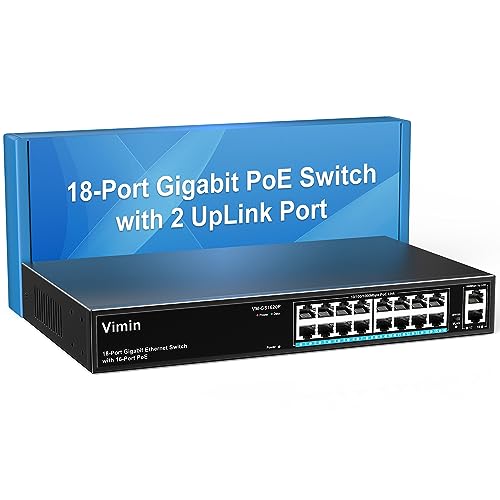
VIMIN 18-Port Gigabit PoE+ Rackmount Switch
Best for: unmanaged rackmount PoE deployments needing port isolation
- Mounting Type
- Rackmount (what this guide is about)
- Port Count
- 18
- Port Speed
- Gigabit
- Management Type
- Unmanaged
- PoE Support
- IEEE 802.3af/at
- PoE Power Budget
- 250W
This unmanaged rackmount switch provides 16 Gigabit PoE+ ports alongside two dedicated Gigabit uplink ports inside a metal chassis. You get a total power budget of 250W supporting up to 30W per port under IEEE 802.3af/at standards. A physical toggle enables One-Key VLAN isolation across client ports. It fits your setup when you need plug-and-play PoE power for hardware like access points without complex software configuration.
Pros
- 16 Gigabit PoE+ ports plus 2 dedicated Gigabit uplink ports
- 250W total PoE power budget supporting up to 30W per port
- Hardware One-Key VLAN toggle isolates ports 1 through 16
- Integrated 4KV lightning surge protection
Cons
- Unmanaged design lacks web management and software controls
- No SFP or fiber uplink interfaces
Good fit if
- You need up to 250W total PoE power distributed across 16 Gigabit devices.
- You want client port isolation via a physical switch without configuring software.
- You require a rack-mountable metal chassis with plug-and-play setup.
Skip if
- You require managed Layer 2 features, SNMP monitoring, or VLAN tagging.
- You need optical fiber SFP slots for long-distance uplink runs.
Verdict: VIMIN 18-Port Gigabit PoE+ Rackmount Switch delivers 250W of power across 16 PoE+ ports with straightforward hardware-level VLAN isolation. It provides an efficient plug-and-play option for powering network devices in a standard equipment rack.

NICGIGA 48-Port Gigabit PoE+ Switch with 2 SFP
Best for: high-density unmanaged PoE+ rackmount deployments
- Mounting Type
- Desktop, Rackmount (what this guide is about)
- Port Count
- 50
- Port Speed
- 10/100/1000 Mbps
- Management Type
- Unmanaged
- PoE Support
- PoE+ (IEEE 802.3af/at)
- PoE Power Budget
- 400W
View on Amazon: NICGIGA 48-Port Gigabit PoE+ Switch with 2 SFP
The NICGIGA 48-Port Gigabit PoE+ Switch provides high-density connectivity in a rackmount metal chassis. You get 48 Gigabit Ethernet ports with 802.3af/at PoE+ support alongside two 1G SFP uplink slots. It offers a 400W total power budget and up to 30W per port. Because it is unmanaged, you get simple plug-and-play installation without configuration, making it suitable if you need to power numerous IP cameras, access points, and network devices.
Pros
- 48 Gigabit PoE+ ports with 2 dedicated 1G SFP uplinks
- 400W total PoE power budget supporting up to 30W per port
- Built-in rackmount ears with a metal chassis
- 4KV lightning protection design
Cons
- Unmanaged design lacks VLAN and advanced network controls
- Does not support passive PoE hardware
- Uses an active cooling fan rather than a silent fanless setup
Good fit if
- You need to connect and power dozens of standard IEEE 802.3af/at PoE devices.
- You want a plug-and-play rackmount switch that requires no software configuration.
- You need dedicated 1G SFP ports for fiber or uplink lines.
Skip if
- You require managed L2 networking features such as VLAN tagging or QoS.
- You run equipment that requires passive PoE power.
- You need a silent fanless switch for noise-sensitive spaces.
Verdict: NICGIGA 48-Port Gigabit PoE+ Switch delivers high port density and 400W of total power in a straightforward rackmount build. It is a practical fit when you need simple plug-and-play deployment for multiple standard PoE endpoints without network management overhead.

QNAP 16-Port Unmanaged 10G Switch
Best for: unmanaged 10GbE copper and fiber rack networks
- Mounting Type
- Rackmount (what this guide is about)
- Port Count
- 16
- Port Speed
- 10 Gbps
- Uplink Ports
- 8 x 10G SFP+
- Switching Capacity
- 320 Gbps
- Number of Ports
- 16 Ports
This QNAP unit is a 16-port rackmount switch built for high-bandwidth local networking. You get eight 10GbE RJ45 ports supporting multi-gigabit speeds and eight 10GbE SFP+ fiber ports. It delivers 160 Gbps total non-blocking throughput alongside a 320 Gbps switching capacity. As an unmanaged hardware solution with automatic loop detection, it suits your rack if you need plug-and-play high-speed data transfers without configuring complex network settings.
Pros
- Eight 10GbE RJ45 ports with multi-gigabit negotiation
- Eight 10GbE SFP+ fiber ports
- 320 Gbps switching capacity and 160 Gbps non-blocking throughput
- Automatic loop detection and blocking
Cons
- Unmanaged with no software management or VLAN controls
- No Power over Ethernet (PoE) capability listed
Good fit if
- You need both 10G copper and 10G SFP+ fiber connections in your rack.
- You want unmanaged high-bandwidth switching with automatic loop prevention.
Skip if
- You require managed switch features like L2 controls or web management.
- You need to power devices directly over Ethernet using PoE.
Verdict: QNAP 16-Port 10GbE Rackmount Switch provides 16 high-speed 10G ports across copper and fiber for fast unmanaged networking. It delivers 320 Gbps switching capacity straight out of the box without setup overhead.

MokerLink 26-Port Gigabit Managed Switch
Best for: silent rackmount setups needing managed Gigabit ports
- Mounting Type
- Rackmount (what this guide is about)
- Port Count
- 26
- Port Speed
- 1 Gbps
- Management Type
- L2 Smart Web Managed
- Uplink Ports
- 2 x 1G SFP
- Switching Capacity
- 52 Gbps
The MokerLink 26-Port Gigabit Managed Switch is a 1U rackmount networking unit designed for silent deployment. It gives you 24 Gigabit Ethernet ports alongside two 1G SFP uplink slots, delivering a total switching capacity of 52 Gbps. The switch includes Layer 2 management via Web, CLI, and SNMP, with a fanless metal enclosure. It suits you if you need wired network segmentation without cooling noise.
Pros
- 24 Gigabit Ethernet ports and 2 Gigabit SFP uplink ports
- 52 Gbps total switching capacity
- Fanless silent design in a durable 1U metal rackmount housing
- Supports Web, CLI, SNMP, and RMON management methods
Cons
- Does not provide Power over Ethernet (PoE)
- SFP uplink slots are limited to 1 Gbps speeds
Good fit if
- You need 24 Gigabit ports and dual fiber uplinks in a silent rackmount chassis.
- You want Layer 2 management features such as VLANs, link aggregation, and QoS.
- You plan to manage network traffic using Web, CLI, or SNMP interfaces.
Skip if
- You need to power devices directly over Ethernet cables via PoE.
- You require 10 Gbps uplinks for high-speed network backbones.
Verdict: MokerLink 26-Port Gigabit Managed Switch offers 24 Gigabit ports and dual SFP uplinks in a completely fanless 1U rackmount chassis. It provides comprehensive Layer 2 management tools for quiet network installations.

Aumox PRO 18-Port Gigabit PoE Switch
Best for: high-capacity PoE setups needing hardware port isolation
- Mounting Type
- Rackmount (what this guide is about)
- Port Count
- 18
- Port Speed
- 10/100/1000 Mbps
- Management Type
- Unmanaged
- PoE Support
- 802.3af/at
- PoE Power Budget
- 250W
The Aumox PRO 18-Port Gigabit PoE Switch provides 16 PoE+ ports alongside two dedicated gigabit uplink ports for your rackmount network. It delivers up to 250W across its 802.3af/at ports, with up to 30W available per port. You get unmanaged plug-and-play setup, internal fans for cooling, and a physical one-key VLAN switch that isolates downlink ports. It suits you if you need straightforward power and traffic isolation for cameras or access points.
Pros
- 16 Gigabit PoE+ ports with 250W total power budget
- Up to 30W power delivery per port via 802.3af/at standards
- Two dedicated Gigabit uplink ports
- Hardware one-key VLAN mode isolates ports 1 through 16
- Plug-and-play operation requires no software configuration
Cons
- Unmanaged design provides no remote web or CLI configuration
- Internal fans prevent silent passive cooling
- Lacks SFP or multi-gigabit uplink ports
Good fit if
- You need up to 250W total PoE capacity across 16 gigabit devices.
- You want port isolation via a physical switch without configuring software.
- You require dedicated gigabit uplink ports to preserve all 16 PoE ports.
Skip if
- You need a managed switch with L2 software control and remote monitoring.
- You need completely silent fanless operation for an open workspace.
- You require fiber SFP or multi-gigabit uplink connectivity.
Verdict: Aumox PRO 18-Port Gigabit PoE Switch delivers 250W across 16 PoE+ ports with hardware port isolation and dedicated uplinks. It offers a practical rackmount option when you need high PoE wattage without management complexity.
Specifications side by side
| Spec | D-Link 16-Port Fanless Gigabit Switch | Tenda 16-Port Gigabit Unmanaged Switch | TP-Link 48-Port Gigabit Unmanaged Switch | Real HD 10-Port Gigabit PoE+ Switch | Real HD 16-Port Fast Ethernet PoE+ Switch | TP-Link 8-Port Gigabit PoE+ Switch | YuanLey 26-Port 400W PoE+ Switch | STEAMEMO 16-Port 240W Managed PoE+ Switch | YuanLey 16-Port PoE+ Switch with 2 Uplinks | STEAMEMO 16-Port Smart Managed Gigabit PoE Switch | VIMIN 18-Port Gigabit PoE+ Rackmount Switch | NICGIGA 48-Port Gigabit PoE+ Switch with 2 SFP | QNAP 16-Port Unmanaged 10G Switch | MokerLink 26-Port Gigabit Managed Switch | Aumox PRO 18-Port Gigabit PoE Switch |
|---|---|---|---|---|---|---|---|---|---|---|---|---|---|---|---|
| Port Count | 16 | 16 | 48 | 10 | 16 | 8 | 26 | 16 | 18 | 16 | 18 | 50 | 16 | 26 | 18 |
| Port Speed | Gigabit | 10/100/1000 Mbps | 10/100/1000 Mbps | 10/100/1000Mbps | 10/100 Mbps | 10/100/1000 Mbps | 10/100 Mbps | 100 Mbps | 1000Mbps | 10/100/1000 Mbps | Gigabit | 10/100/1000 Mbps | 10 Gbps | 1 Gbps | 10/100/1000 Mbps |
| Management Type | Unmanaged | Unmanaged | Unmanaged | not specified | Unmanaged | not specified | Unmanaged | Managed | Unmanaged | Smart Managed | Unmanaged | Unmanaged | not specified | L2 Smart Web Managed | Unmanaged |
| PoE Support | not specified | not specified | not specified | PoE+ (802.3af/at) | PoE+ (802.3af/at) | PoE+ (802.3at/af) | PoE+ (802.3af/at) | PoE+ (802.3at) | IEEE802.3af/at | PoE+ (802.3af/at) | IEEE 802.3af/at | PoE+ (IEEE 802.3af/at) | not specified | not specified | 802.3af/at |
| PoE Power Budget | not specified | not specified | not specified | 120W | 300W | 153W | 400W | 240W | 250W | 240W | 250W | 400W | not specified | not specified | 250W |
| Uplink Ports | not specified | not specified | not specified | 2 x 1000Mbps | 2 Gigabit Uplink Ethernet Ports | not specified | 2 x Gigabit | 2 x Gigabit Uplink, 1 x 1.25G SFP | 2 Gigabit UpLink | not specified | 2 x Gigabit | 2 x 1G SFP | 8 x 10G SFP+ | 2 x 1G SFP | 2 x Gigabit |
| Switching Capacity | not specified | not specified | 96 Gbps | not specified | not specified | not specified | 16 Gbps | not specified | not specified | not specified | not specified | not specified | 320 Gbps | 52 Gbps | not specified |
| Mounting Type | Desktop, Rackmount, Wall-Mount | Rackmount, Desktop | Rackmount | Rack Mount | Rack Mount, desktop or a wall | Desktop, Rackmount | Rackmount | Wall Mount, Rack Mount | Desktop/Rackmount | Desktop, Rackmount | Desktop, 19 inch Rack-Mount | Desktop, Rackmount | Rackmount | 1U rackmount | not specified |
| Number of Ports | 16 Ports | 16 Ports | 48 Ports | 10 Ports | 16 Ports | 8 Ports | 24 Ports | 16 Ports | 16 Ports | 16 Ports | 16 Ports | 48 Ports | 16 Ports | 24 Ports | 16 Ports |
| Uplink Port Type | not specified | not specified | not specified | not specified | Gigabit Uplink | not specified | Gigabit Uplink | SFP, Gigabit Uplink | Gigabit Uplink | not specified | not specified | SFP | SFP | SFP | not specified |
| Recommended Use | not specified | not specified | not specified | IP Cameras | not specified | not specified | not specified | not specified | not specified | not specified | not specified | not specified | not specified | not specified | not specified |
| Dimensions | 11 × 4.95 × 1.73 inches | 11.6 × 7.08 × 1.73 inches | 17.3 × 8.66 × 1.73 inches | 7.8 × 4.6 × 1.7 inches | not specified | 11.6 × 7.09 × 1.73 inches | 10.6 × 7.1 × 1.7 inches | 10.6 × 7 × 1.8 inches | 10.6 × 7.1 × 1.7 inches | 10.6 × 7 × 1.8 inches | not specified | not specified | 4 × 13 × 12 inches | not specified | 10.6 × 7.08 × 1.77 inches |
| Weight | 2.4 pounds | 1.1 pounds | 9.22 pounds | 2.47 pounds | 4.3 pounds | 14.8 ounces | 4.5 pounds | 3.88 pounds | 4.43 pounds | 3.84 pounds | 4.59 pounds | 9.81 pounds | 2.84 pounds | 6.6 pounds | not specified |
| Size | 16-Port Gigabit | 16-Port | 48 Port, 1 Gigabit | 8 POE Port | not specified | 8 Port w/ 8-Port PoE+ | 26 Port | 24*PoE+ (400w) | 19 Ports | 240 W 16 x PoE+ | 18 Port | 16*PoE+(1000Mbps) (250w) | 18 Gigabit Ports|240W 16xPoE+ | 18 Port Gigabit PoE Switch | not specified | 8 x 10G NBASE-T + 8 x 10G SFP+ | not specified | 18|16 Port PoE+2 Uplink 250W |
| Color | Red | Blue | Black | black | Black | black | Blue | black | Blue | Black | black | Black | Black | black | Black |
| Model | DGS-1016D/B | 4E10053 | TL-SG1048 | 8 port poe gigabit switch | 16 port poe switch | TL-SG1008MP | 26 Port | 24*PoE+ (400w) | 19 Ports|240W 16xPoE+ | 18 Port | 16*PoE+ (1000Mbps) (250w) | 18 Gigabit Ports|200W 16xPoE+ | 18 Port | 16xPoE + 250W | 2xUPLink | 50 Port | 48xPoE+ 400W+2xSFP | QSW-3216R-8S8T-US | 26*1G Managed | 18 Port| 16 Port PoE+2 Uplink 250W |
If you need wall controls, see our list of best kasa smart smart switches for home wiring.
How to Choose a Rackmount Switch
-
Calculate Total Port Density
Count all wired drops before buying. Rackmount switches provide anywhere from 8 to 48 ports in a single chassis. If you connect only a few servers and access points, an 8-port or 16-port unit keeps your patch panel tidy. Larger installations with patch cables running to multiple rooms require higher density to prevent adding extra hardware later. The TP-Link 48-Port Gigabit Unmanaged Switch provides 48 ports, giving you substantial expansion room for high-density network terminations without using multiple rack shelves.
-
Choose the Management Type
Decide whether you need software controls or simple plug-and-play operation. Unmanaged switches pass traffic automatically without any configuration screens or administrative setup. If your rack setup requires virtual local area networks, traffic prioritization, or remote port troubleshooting, choose a smart managed or managed switch instead. The MokerLink 26-Port Gigabit Managed Switch provides Layer 2 management tools for monitoring and network isolation. If you do not need administrative oversight, an unmanaged model avoids setup overhead and runs completely maintenance-free.
-
Evaluate Dedicated Uplink Ports
Check how the switch connects back to your main router or server stack. Standard switches use regular access ports for uplinks, which reduces the ports available for your endpoints. Models with dedicated uplink ports keep all primary ports open for client hardware. If you plan to link switches across long distances, look for fiber SFP slots instead of copper RJ45 ports. The NICGIGA 48-Port Gigabit PoE+ Switch with 2 SFP includes two dedicated fiber uplinks, preserving its full 48 copper ports for connected gear.
-
Check PoE Wattage Budget
Sum the power requirements of every connected PoE device before selecting a switch. Having PoE on every port does not mean the internal power supply can power them all simultaneously. Review the total PoE power budget, which ranges from 120W on compact switches up to 400W on high-capacity models. The YuanLey 26-Port 400W PoE+ Switch delivers a 400W budget across its powered ports, ensuring that multiple high-draw devices like surveillance cameras or access points run reliably without causing the switch to drop power.
-
Verify Mounting Options
Confirm how the switch physically installs in your work area. While all models here support rack mounting, some provide dual mounting flexibility. Standard rackmount-only models measure for 19-inch racks with dedicated brackets. Dual-mount switches support flat desktop placement as well as standard rack installation. The D-Link 16-Port Fanless Gigabit Switch lists both desktop and rackmount mounting types in its specifications. Choosing a model with dual-mounting flexibility lets you start on a shelf or desk and migrate into an equipment enclosure later if your setup evolves.
Frequently asked questions
What is the difference between managed and unmanaged rackmount switches?
Unmanaged switches work immediately upon connection without configuration, while managed switches let you configure traffic rules and virtual networks. Models like the D-Link DGS-1016D/B and Tenda 4E10053 require no setup. In contrast, smart managed switches like the STEAMEMO 16-Port model or MokerLink 26-Port switch provide Layer 2 management tools for network administrators who need granular software control over connected hardware.
Can you mount a desktop switch into a standard server rack?
You can mount a desktop switch into a rack only if it includes rackmount support and compatible mounting brackets. Several switches support dual installations, such as the D-Link 16-Port Fanless Gigabit Switch and the TP-Link TL-SG1008MP, which list both Desktop and Rackmount mounting types. If a switch lacks rackmount specifications or rack ears, it sits on a rack shelf instead of securing directly to rack rails.
How do SFP uplink ports work on a rackmount switch?
SFP uplink ports accept fiber or copper transceiver modules to connect switches together or link to upstream routers over longer distances. Dedicated uplinks prevent you from sacrificing standard downstream RJ45 ports for interconnectivity. For example, the YuanLey 16-Port switch features dedicated Gigabit uplinks, while the NICGIGA 48-Port PoE+ Switch and MokerLink 26-Port switch include SFP ports to facilitate high-capacity network backbones.
What is the benefit of fanless cooling in a rackmount network switch?
Fanless cooling eliminates mechanical noise and prevents internal dust accumulation caused by active ventilation fans. Passive cooling allows rack switches like the D-Link 16-Port Gigabit Switch, Tenda 16-Port Gigabit Switch, and Real HD 16-Port Fast Ethernet PoE Switch to operate completely silently. This makes fanless rack hardware suitable for open office spaces, home labs, or AV racks where equipment fan noise creates unwanted distractions.
Does a rackmount switch provide Power over Ethernet to all connected devices?
A rackmount switch supplies power only if its specifications explicitly include PoE support and sufficient total power budget. Standard switches like the D-Link DGS-1016D/B provide data connections without electric power. In contrast, PoE models supply dedicated power, ranging from 120W on the Real HD 10-Port switch to 250W on the VIMIN 18-Port and YuanLey 16-Port switches, up to 400W on the YuanLey 26-Port switch.
What network speed do you need for rackmount IP camera setups?
Most surveillance setups operate effectively on 10/100 Mbps Fast Ethernet downlinks, though Gigabit uplinks remain essential for central recording. IP cameras generate steady video streams that rarely exceed 100 Mbps. Switches like the Real HD 16-Port Fast Ethernet PoE+ Switch and YuanLey 26-Port switch combine standard 10/100 Mbps downstream ports with Gigabit uplink ports, which prevents bandwidth bottlenecks when routing combined video data to network video recorders.
When do you need a 10G rackmount switch over a Gigabit model?
You need a 10G rackmount switch when your local network handles high-throughput applications like direct network attached storage transfers or high-speed virtualization. Standard Gigabit switches top out at 1,000 Mbps per port. High-capacity hardware like the QNAP 16-Port Unmanaged 10G Switch (model QSW-3216R-8S8T-US) delivers 10G speeds across eight NBASE-T copper ports and eight SFP+ fiber ports, providing 320 Gbps total switching capacity for intensive local data workflows.