Best ASUS Wi-Fi 6 Mesh Wifi Systems: 9 Spec-Based Picks
As an Amazon Associate we earn from qualifying purchases. Links on this page are affiliate links.
Choosing the right ASUS Wi-Fi 6 mesh wifi system depends on your home layout and backhaul requirements. This comparison evaluates 9 models based strictly on the specifications published on their listings. The ASUS ROG Rapture Tri-Band Mesh System leads the lineup because it combines tri-band Wi-Fi 6 capability with 2.5G port speeds for spaces up to 5,800 square feet.
This guide helps you decide which pack size, coverage area, and backhaul type best match your living space and connectivity demands.
Quick picks
The best fit for you
- You need multi-gigabit gaming throughput across large spaces ASUS ROG Rapture Tri-Band Mesh System It features 2.5G ports, tri-band Wi-Fi 6, and coverage up to 5,800 square feet.
- You want to use coaxial wiring for wired backhaul ASUS ZenWiFi AX Hybrid MoCA 2-Pack It routes a 2.5Gbps backhaul through existing coaxial lines to cover up to 3,500 square feet.
- You need powerline transmission across a wide home layout ASUS ZenWiFi Hybrid Powerline WiFi 6 2-Pack The two-pack pairs Wi-Fi 6 with powerline technology to cover up to 5,500 square feet.
- You want three compact nodes covering broad square footage ASUS ZenWiFi AX Mini Dual-Band Mesh 3-Pack The three-pack provides AX3000 dual-band Wi-Fi 6 across 5,000 square feet using 0.67-pound nodes.
Our 9 picks
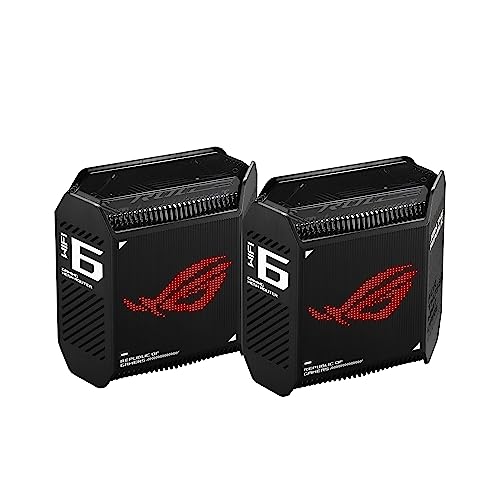
ASUS ROG Rapture Tri-Band Mesh System
Best for: large homes requiring multi-gigabit gaming throughput
- Wi-Fi Standard
- Wi-Fi 6 (what this guide is about)
- Speed Rating
- AX10000
- Coverage Area
- 5,800 sq ft
- Frequency Bands
- Tri-Band
- Pack Size
- 2-Pack
- Port Speed
- 2.5 Gbps
This 2-pack Wi-Fi 6 mesh system covers up to 5,800 square feet using nine internal antennas. You get tri-band AX10000 speeds with dedicated backhaul and 160 MHz channels. A 1.7 GHz tri-core processor powers the hardware, while a 2.5 Gbps WAN port and LAN aggregation handle fast wired connections. This setup suits you if you need wide coverage and dedicated gaming traffic prioritization.
Pros
- Tri-band AX10000 bandwidth with 160 MHz channels
- 2.5 Gbps WAN port and LAN aggregation support
- Coverage reaches up to 5,800 square feet
- Nine internal antennas with 1.7 GHz tri-core processor
Cons
- Provides only one 2.5 Gbps port per unit
- No Wi-Fi 6E 6 GHz frequency band
Good fit if
- You need coverage for spaces up to 5,800 square feet.
- You utilize multi-gigabit wired broadband connections up to 2.5 Gbps.
- You want tri-band operation with dedicated wireless backhaul.
Skip if
- You require 6 GHz wireless spectrum for Wi-Fi 6E devices.
- You live in a compact apartment where a multi-node system is redundant.
Verdict: ASUS ROG Rapture Tri-Band Wi-Fi 6 Mesh System delivers high tri-band throughput and 2.5 Gbps wired connectivity across large spaces up to 5,800 square feet. It provides dedicated backhaul and hardware-level game traffic optimization for demanding local networks.

ASUS ZenWiFi AX6600 Tri-Band Mesh Router
Best for: medium homes needing tri-band Wi-Fi 6
- Wi-Fi Standard
- Wi-Fi 6 (what this guide is about)
- Speed Rating
- AX6600
- Coverage Area
- up to 2750 sq.ft
- Frequency Bands
- Tri-Band
- Pack Size
- 1-Pack
- Features
- Parental Controls
This single-pack ASUS ZenWiFi system functions as a standalone Wi-Fi 6 mesh router or an expansion node. It provides tri-band connectivity with an AX6600 total speed rating and contains six internal antennas. You get coverage rated for up to 2,750 square feet and four or more rooms. It suits you if you need tri-band bandwidth across a medium-sized layout or plan to integrate it into an existing AiMesh network.
Pros
- Tri-band Wi-Fi 6 with up to 6600 Mbps total wireless speed
- Six internal antennas covering up to 2,750 square feet
- AiMesh support for pairing with compatible routers
- Built-in network protection powered by Trend Micro
Cons
- Single-pack design covers less area than multi-node bundles
- Wi-Fi 6 standard does not include the 6 GHz band
Good fit if
- You need standalone tri-band coverage for up to 2,750 square feet.
- You want to add an AX6600 node to an existing AiMesh system.
Skip if
- You require multi-pack coverage out of the box for a larger property.
- You specifically need Wi-Fi 6E hardware.
Verdict: ASUS ZenWiFi Tri-Band AX6600 Mesh Router (1-Pack) provides high-bandwidth tri-band performance for spaces up to 2,750 square feet. It works effectively as an individual router or an expansion point for an AiMesh setup.

ASUS ZenWiFi AX3000 MoCA Mesh Router
Best for: homes with coaxial wiring using MoCA backhaul
- Wi-Fi Standard
- Wi-Fi 6 (what this guide is about)
- Speed Rating
- AX3000
- Coverage Area
- up to 2,400 Sq.Ft.
- Pack Size
- 1pk
- Intended Use
- Home
- Dimensions
- 5.5 × 3.6 × 6.1 inches
This single-unit Wi-Fi 6 router delivers AX3000 speeds and covers spaces up to 2,400 square feet. It integrates MoCA 2.5 technology, allowing you to use existing coaxial cables for a 2.5 Gbps wired backhaul alongside Ethernet and dual-band wireless connections. It suits you if you want to extend an AiMesh network or supply a home using coaxial wiring instead of running new Ethernet cables.
Pros
- MoCA 2.5 integration enables 2.5Gbps wired backhaul over coaxial cable
- Supports hybrid backhaul across MoCA, Ethernet, 5GHz, and 2.4GHz
- Includes AiProtection Classic security and Instant Guard mobile VPN
- AiMesh compatibility connects with other ASUS mesh hardware
Cons
- Single-pack unit provides maximum coverage of 2,400 square feet
- AX3000 speed rating has a lower throughput ceiling than tri-band models
Good fit if
- You have coaxial cable outlets available to utilize MoCA 2.5 backhaul
- You need a single Wi-Fi 6 node to cover up to 2,400 square feet
- You want to expand an existing ASUS AiMesh home network
Skip if
- You need coverage for spaces over 2,400 square feet without adding units
- You lack coaxial wiring and need a dedicated wireless backhaul band
Verdict: ASUS ZenWiFi AX3000 MoCA Mesh Router provides reliable Wi-Fi 6 connectivity by turning home coaxial lines into a 2.5Gbps backhaul. It functions effectively as a standalone unit or as an expansion node within an AiMesh system.
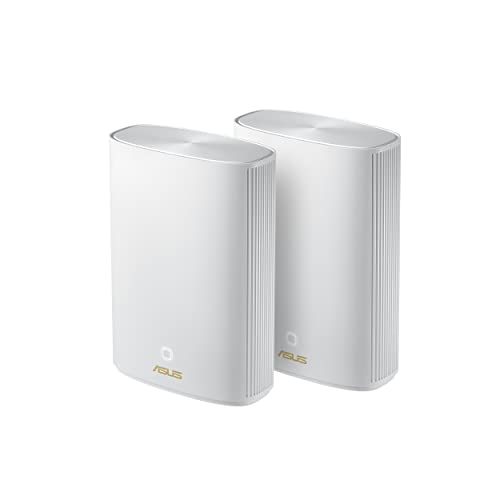
ASUS ZenWiFi Hybrid Powerline WiFi 6 2-Pack
Best for: large homes needing powerline Wi-Fi 6 coverage
- Wi-Fi Standard
- Wi-Fi 6 (what this guide is about)
- Coverage Area
- Up to 5,500 sq ft
- Pack Size
- 2PK
- Intended Use
- Home
- Dimensions
- 7.99 × 5.83 × 2.76 inches
- Weight
- 1.47 pounds
The ASUS ZenWiFi Hybrid Powerline 2-Pack is a dual-node home mesh setup built on Wi-Fi 6. It pairs wireless connectivity with powerline transmission to span spaces up to 5,500 square feet. Each black node measures 7.99 by 5.83 by 2.76 inches and weighs 1.47 pounds. You get broad network reach across two units designed for indoor layouts. This system suits you if your layout requires coverage over a large area via paired hardware.
Pros
- Wi-Fi 6 standard provides updated wireless networking
- Two-pack covers areas up to 5,500 square feet
- Powerline hybrid integration utilizes electrical wiring
- Compact footprint at 7.99 by 5.83 by 2.76 inches per unit
Cons
- Renewed hardware condition rather than factory-new
- Only available in black
- Comes with two units without extra expansion nodes included
Good fit if
- You need to cover indoor areas up to 5,500 square feet
- You want a Wi-Fi 6 setup that uses powerline hybrid networking
- You prefer a compact two-node system
Skip if
- You require brand-new equipment instead of a renewed package
- You need a white chassis to blend with your decor
- You need coverage for spaces significantly exceeding 5,500 square feet
Verdict: ASUS ZenWiFi Hybrid Powerline 2-Pack delivers Wi-Fi 6 coverage across 5,500 square feet using two compact powerline nodes. It suits homes needing wide network reach from a paired renewed system.

ASUS ZenWiFi AX Hybrid MoCA 2-Pack
Best for: Homes with existing coaxial cable wiring
- Wi-Fi Standard
- Wi-Fi 6 (what this guide is about)
- Speed Rating
- AX3000
- Coverage Area
- up to 3,500 Sq.Ft.
- Pack Size
- 2pk
- Intended Use
- Home
- Dimensions
- 5.5 × 3.6 × 6.1 inches
The ASUS ZenWiFi AX Hybrid MoCA 2-Pack is a Wi-Fi 6 mesh system rated at AX3000 speeds that covers up to 3,500 square feet. It includes two units that support a 4-way hybrid backhaul using MoCA 2.5, Ethernet, and dual-band wireless channels. This setup suits you if your home has coaxial cable outlets and you want a 2.5Gbps wired connection between your mesh nodes without running new Ethernet cables.
Pros
- MoCA 2.5 backhaul delivers up to 2.5Gbps speeds over coaxial lines
- Covers up to 3,500 square feet with AX3000 Wi-Fi 6 coverage
- Supports 4-way hybrid backhaul over MoCA, Ethernet, 5GHz, and 2.4GHz
- Includes AiProtection Classic network security and Instant Guard VPN
Cons
- AX3000 rating provides lower maximum wireless throughput than tri-band models
- Two-pack package limits total factory coverage to 3,500 square feet
Good fit if
- You have existing coaxial cable outlets near your node locations.
- You need up to 3,500 square feet of Wi-Fi 6 coverage across two nodes.
- You want a dedicated 2.5Gbps wired backhaul without installing Ethernet runs.
Skip if
- You do not have coaxial wiring available in the rooms you want to cover.
- You need higher wireless bandwidth than the AX3000 standard provides.
Verdict: ASUS ZenWiFi AX Hybrid MoCA 2-Pack uses existing coaxial lines to deliver a reliable 2.5Gbps backhaul alongside AX3000 Wi-Fi 6 coverage. It is an effective two-unit networking solution for homes up to 3,500 square feet wired with coax.

ASUS ZenWiFi AX Mini Dual-Band Mesh 3-Pack
Best for: 5,000 square foot dual-band home setups
- Wi-Fi Standard
- Wi-Fi 6 (what this guide is about)
- Speed Rating
- 3000Mbps
- Coverage Area
- up to 5000 sq ft
- Frequency Bands
- Dual-Band
- Pack Size
- 3 Pack
- Features
- Parental Controls
The ASUS ZenWiFi AX Mini 3-Pack is a Wi-Fi 6 dual-band mesh system built to cover up to 5,000 square feet. It delivers up to 3,000 Mbps aggregate speed across three compact nodes driven by 1.7 GHz quad-core processors. Built-in tools include parental controls, AiMesh compatibility, and cloud-based security. This fits you if you need broad home coverage across multi-room spaces without large hardware.
Pros
- Rated for up to 5,000 square feet of Wi-Fi 6 coverage
- AX3000 wireless throughput across dual frequency bands
- 1.7 GHz quad-core processor with 512 MB RAM per unit
- Includes cloud-based security and parental controls with URL filtering
Cons
- Dual-band design lacks a dedicated third band for wireless backhaul
- Maximum throughput is limited to AX3000
Good fit if
- You need up to 5,000 square feet of coverage using a three-pack system.
- You want built-in scheduling, URL filtering, and cloud security management.
Skip if
- You need a tri-band mesh system with a dedicated backhaul band.
- You require wireless speeds higher than the AX3000 specification.
Verdict: ASUS ZenWiFi AX Mini 3-Pack delivers 5,000 square feet of Wi-Fi 6 coverage with AX3000 speeds across three compact nodes. It is a practical dual-band setup if you want whole-home reach and integrated parental controls.
ASUS ZenWiFi Hybrid MoCA 2.5 Single Pack
Best for: single-node MoCA 2.5 home Wi-Fi setups
- Wi-Fi Standard
- Wi-Fi 6 (what this guide is about)
- Speed Rating
- AX3000
- Coverage Area
- 2,400 Sq.Ft.
- Pack Size
- 1pk
- Intended Use
- Home
- Dimensions
- 5.5 × 3.6 × 6.1 inches
This ASUS Wi-Fi 6 mesh unit combines AX3000 wireless speeds with wired MoCA 2.5 connectivity in a single white node. It delivers network coverage across areas up to 2,400 square feet while weighing 1.09 pounds. You get compact dimensions measuring 5.5 by 3.6 by 6.1 inches. It suits you if you want Wi-Fi 6 speeds alongside coaxial cable backhaul to cover mid-sized living spaces with one standalone hardware unit.
Pros
- MoCA 2.5 coaxial integration
- AX3000 Wi-Fi 6 speed rating
- Up to 2,400 square feet of coverage
- Compact 1.09-pound standalone form factor
Cons
- Package includes only a single node
- Coverage limited to 2,400 square feet without adding units
Good fit if
- You need up to 2,400 square feet of Wi-Fi 6 coverage from a single device.
- You want MoCA 2.5 connectivity to use existing coaxial cables.
- You prefer a lightweight unit weighing 1.09 pounds.
Skip if
- You require a multi-pack system out of the box for larger spaces.
- You need higher bandwidth than the AX3000 specification provides.
Verdict: ASUS ZenWiFi Hybrid MoCA 2.5 Single Pack delivers AX3000 Wi-Fi 6 performance and MoCA 2.5 integration for coverage up to 2,400 square feet. It works well if you want a single-unit setup utilizing coaxial lines.

ASUS ZenWiFi AX5400 3-Pack
Best for: three-node dual-band AX5400 home coverage
- Wi-Fi Standard
- Wi-Fi 6 (what this guide is about)
- Speed Rating
- AX5400
- Frequency Bands
- Dual-Band
- Pack Size
- 3-Pack
- Dimensions
- 4.96 × 2.32 × 5.08 inches
- Weight
- 15.4 ounces
This ASUS Wi-Fi 6 mesh setup comes with three dual-band units delivering combined speeds up to 5400 Mbps. You manage the network through the ASUS Router app, which includes built-in scheduling, URL filtering, and lifetime cloud security from Trend Micro. It also supports AiMesh to connect with compatible hardware. This three-pack suits you if you need multi-room Wi-Fi 6 coverage with high throughput and built-in network security tools across your home.
Pros
- AX5400 total wireless speed rating across dual bands
- Three-pack configuration provides three physical mesh nodes
- Lifetime cloud-based security powered by Trend Micro
- Built-in parental controls with URL filtering and scheduling
- AiMesh support for expanding with compatible ASUS routers
Cons
- Dual-band design lacks a dedicated third wireless backhaul band
- Hardware is available only in white
Good fit if
- You need a three-node Wi-Fi 6 mesh setup rated for AX5400 speeds.
- You want built-in URL filtering and scheduling without a paid subscription.
- You plan to expand coverage using other AiMesh-compatible hardware.
Skip if
- You require a tri-band mesh system with a dedicated wireless backhaul band.
- You want networking nodes finished in black.
Verdict: ASUS ZenWiFi AX5400 3-Pack delivers Wi-Fi 6 performance with AX5400 speeds, three nodes, and subscription-free Trend Micro security. It is a practical choice for multi-room homes that operate on a dual-band network.
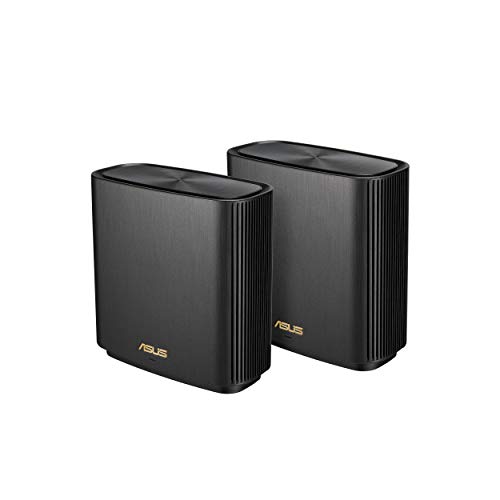
ASUS ZenWiFi AX Tri-Band Mesh 2-Pack
Best for: large homes needing high-speed tri-band coverage
- Wi-Fi Standard
- Wi-Fi 6 (what this guide is about)
- Speed Rating
- 6.6Gbps
- Coverage Area
- Up to 5,500 sq.ft
- Frequency Bands
- Tri-Band
- Pack Size
- 2 Pack
- Port Speed
- 2.5G
This ASUS ZenWiFi AX system gives you a Wi-Fi 6 tri-band mesh network designed for whole-home coverage. The two-pack setup covers up to 5,500 square feet and delivers combined wireless speeds up to 6,600 Mbps. It features a 2.5G port for high-speed wired connections, built-in USB connectivity, and OFDMA with MU-MIMO support. It suits you if you need wide multi-room coverage and dedicated tri-band capacity for multiple connected devices.
Pros
- Tri-band Wi-Fi 6 with total speed up to 6,600 Mbps
- Coverage spans up to 5,500 square feet
- Equipped with a 2.5G port and USB connection
- Supports OFDMA and MU-MIMO for simultaneous transmissions
Cons
- Package includes only two units
- Nodes stand 6.36 inches tall and weigh 1.58 pounds
Good fit if
- You need up to 5,500 square feet of Wi-Fi 6 coverage.
- You require a 2.5G port for fast wired connectivity.
- You run multiple active devices across a tri-band setup.
Skip if
- You need three or more mesh nodes in a single kit.
- You want a single standalone router rather than a two-pack system.
Verdict: ASUS ZenWiFi AX Tri-Band 2-Pack delivers up to 6,600 Mbps across 5,500 square feet with 2.5G wired capability. It offers dependable multi-room performance when you need dedicated tri-band Wi-Fi 6 coverage.
Specifications side by side
| Spec | ASUS ROG Rapture Tri-Band Mesh System | ASUS ZenWiFi AX6600 Tri-Band Mesh Router | ASUS ZenWiFi AX3000 MoCA Mesh Router | ASUS ZenWiFi Hybrid Powerline WiFi 6 2-Pack | ASUS ZenWiFi AX Hybrid MoCA 2-Pack | ASUS ZenWiFi AX Mini Dual-Band Mesh 3-Pack | ASUS ZenWiFi Hybrid MoCA 2.5 Single Pack | ASUS ZenWiFi AX5400 3-Pack | ASUS ZenWiFi AX Tri-Band Mesh 2-Pack |
|---|---|---|---|---|---|---|---|---|---|
| Wi-Fi Standard | WiFi 6 | WiFi 6 | WiFi 6 | WiFi 6 | WiFi 6 | WiFi 6 | WiFi 6 | Wi-Fi 6 | WiFi 6 |
| Speed Rating | AX10000 | AX6600 | AX3000 | not specified | AX3000 | 3000Mbps | AX3000 | AX5400 | 6.6Gbps |
| Coverage Area | 5,800 sq ft | up to 2750 sq.ft | up to 2,400 Sq.Ft. | Up to 5,500 sq ft | up to 3,500 Sq.Ft. | up to 5000 sq ft | 2,400 Sq.Ft. | not specified | Up to 5,500 sq.ft |
| Frequency Bands | Tri-Band | Tri-Band | not specified | not specified | not specified | Dual-Band | not specified | Dual-Band | Tri-Band |
| Pack Size | 2-Pack | 1-Pack | 1pk | 2PK | 2pk | 3 Pack | 1pk | 3-Pack | 2 Pack |
| Port Speed | 2.5 Gbps | not specified | not specified | not specified | not specified | not specified | not specified | not specified | 2.5G |
| Frequency Band | Tri-Band | Tri-Band | not specified | not specified | not specified | Dual-Band | not specified | Dual-Band | Tri-Band |
| Use Case | Gaming | not specified | not specified | not specified | not specified | not specified | not specified | not specified | not specified |
| Features | not specified | Parental Controls | not specified | not specified | not specified | Parental Controls | not specified | not specified | Parental Controls |
| Intended Use | not specified | Home | Home | Home | Home | Home | Home | not specified | Home |
| Dimensions | 6.77 × 3.07 × 6.93 inches | 6.3 × 2.95 × 6.36 inches | 5.5 × 3.6 × 6.1 inches | 7.99 × 5.83 × 2.76 inches | 5.5 × 3.6 × 6.1 inches | 3.54 × 3.54 × 3.35 inches | 5.5 × 3.6 × 6.1 inches | 4.96 × 2.32 × 5.08 inches | 6.3 × 2.95 × 6.36 inches |
| Weight | 1.94 pounds | 1.61 pounds | 1.09 pounds | 1.47 pounds | 1.09 pounds | 10.7 ounces | 1.09 pounds | 15.4 ounces | 1.58 pounds |
| Color | BLACK | White | WHITE | Black | WHITE | WHITE | WHITE | White | Black |
| Model | GT6 (B-2-PK) | XT8 (W-1-PK) | XC5 (W-1-PK) | not specified | XC5 (W-2-PK) | XD5 (W-3-PK) | not specified | XD6(W-3-Pk) | ZenWiFi AX 2PK Charcoal |
| Size | not specified | 1-Pack | 6.1 x 5.5 x 3.6 inches | 15-15.99 inches | 5.5 x 3.6 x 6.1 inches | 3 Packs | not specified | 3-Pack | ZenWiFi AX Charcoal 2PK |
If you build a desktop PC, you can review specifications for the best ASUS motherboards with Wi-Fi 6.
How to Choose an ASUS Mesh System
-
Square Footage and Pack Size
Match the pack size to your home layout. A single unit covers between 2,400 and 2,750 square feet. A two-pack extends reach from 3,500 to 5,800 square feet. For complex layouts or multi-story buildings, a three-pack distributes signal more evenly. For example, the ASUS ZenWiFi AX Mini Dual-Band Mesh 3-Pack supplies three physical nodes rated for 5,000 square feet of total coverage. Check your floor plan and choose the pack size that places a dedicated node near your primary client devices.
-
Select the AX Speed Rating
Review the throughput rating based on your client demand. The AX designation indicates total combined theoretical throughput across all wireless bands. Ratings in this lineup span from AX3000 up to AX6600. An AX3000 rating handles standard streaming and everyday web tasks across multiple household devices. If you transfer large local files or run bandwidth-heavy traffic across several rooms simultaneously, prioritize higher tier ratings. The ASUS ZenWiFi AX5400 3-Pack delivers AX5400 bandwidth across its three nodes to support heavier data loads throughout your network.
-
Compare Frequency Band Architecture
Examine whether a system uses dual-band or tri-band architecture. Dual-band models operate over two wireless channels, meaning connected devices and node-to-node communication share the same frequencies. Tri-band hardware adds a second 5 GHz channel. This additional band isolates node communication or segments high-priority clients to prevent congestion. If you do not have wired connections between nodes, tri-band keeps speeds consistent over wireless links. The ASUS ZenWiFi AX6600 Tri-Band Mesh Router features tri-band capability, making it suitable for maintaining high throughput across an AiMesh network.
-
Check Physical Port Speeds
Check the wired Ethernet specifications if you use hardwired devices or subscribe to high-speed internet. Standard gigabit ports max out at 1 Gbps, which caps local transfers and incoming wide-area network speeds. Hardware with 2.5G ports supports multi-gigabit data streams for compatible network-attached storage or gaming rigs. For example, the ASUS ROG Rapture Tri-Band Mesh System includes 2.5G port speed alongside game traffic optimization. If you plan to wire your nodes together or connect high-performance wired clients, confirm that the system provides 2.5G Ethernet connections on each unit.
-
Consider Powerline Network Bridging
Assess powerline connectivity if thick walls block wireless signals and your residence lacks coaxial or Ethernet cabling. Powerline mesh units transmit data across existing electrical wiring instead of depending entirely on radio frequencies between rooms. This bypasses structural barriers like concrete or plaster that degrade standard Wi-Fi transmissions. The ASUS ZenWiFi Hybrid Powerline WiFi 6 2-Pack utilizes this powerline setup to blanket spaces up to 5,500 square feet. If standard wireless propagation fails across your building materials, powerline hybrid hardware provides an alternate transmission path between mesh nodes.
Frequently asked questions
What is the difference between dual-band and tri-band ASUS Wi-Fi 6 mesh systems?
Dual-band ASUS systems share 2.4 GHz and 5 GHz bands between network devices and node communication. Tri-band options add a second 5 GHz band to preserve client bandwidth. If you select a dual-band kit like the ZenWiFi AX5400 XD6, nodes share frequency traffic, whereas tri-band models like the ZenWiFi XT8 offer separate spectrum paths.
Can you add a single ASUS router to an existing AiMesh network?
Yes, you can integrate standalone ASUS routers into an existing setup. Specifications for models such as the ZenWiFi AX6600 XT8 and the ZenWiFi AX3000 MoCA XC5 confirm they operate as primary routers or as expansion nodes. This lets you expand an AiMesh network without buying an entirely new multi-pack system.
How does a MoCA mesh router use existing home coaxial wiring?
A MoCA mesh router converts existing coaxial cable lines into a physical data network. Systems like the ZenWiFi AX Hybrid MoCA 2-Pack link nodes using these cables at 2.5Gbps wired speeds. This configuration frees wireless spectrum entirely for client devices, preventing speed drops caused by thick walls or structural interference between rooms.
What built-in network security features do ASUS Wi-Fi 6 mesh systems provide?
ASUS Wi-Fi 6 mesh hardware offers integrated software protection. For example, the ZenWiFi AX5400 XD6 3-Pack includes subscription-free Trend Micro security directly in the firmware. Other models, including the ZenWiFi AX6600 XT8 and ZenWiFi AX Mini XD5, specify built-in parental controls to manage internet access and restrict specific network activity by profile.
When should you choose a powerline hybrid mesh system instead of standard Wi-Fi?
You should choose a powerline hybrid system when solid interior walls block wireless transmissions and you lack coaxial or Ethernet cabling. The ASUS ZenWiFi Hybrid Powerline 2-Pack transmits data across your existing electrical lines to link nodes. This design delivers Wi-Fi 6 connectivity across spaces up to 5,500 square feet without relying strictly on line-of-sight wireless links.
What port speeds do ASUS Wi-Fi 6 mesh routers support for wired connections?
Wired port capabilities vary by model. Advanced hardware such as the ASUS ROG Rapture GT6 and the ZenWiFi AX Tri-Band 2-Pack includes 2.5G Ethernet ports for multi-gigabit wired transfers. Additionally, MoCA-equipped models like the XC5 support 2.5Gbps connections across coaxial ports, allowing faster local transmission than traditional 1 Gbps interfaces offer.
How do speed ratings like AX3000, AX5400, and AX6600 differ?
Speed ratings indicate total cumulative bandwidth across all broadcast bands under the Wi-Fi 6 standard. An AX3000 system, such as the ZenWiFi XD5, delivers up to 3,000 Mbps aggregate capacity. Higher-tier options like the AX5400 XD6 or AX6600 XT8 deliver up to 5,400 Mbps and 6,600 Mbps, providing higher throughput limits for concurrent network activities.