Best ASUS Tri-Band Mesh Wifi Systems: 9 Spec-Based Picks
As an Amazon Associate we earn from qualifying purchases. Links on this page are affiliate links.
Choosing the best ASUS tri band mesh wifi systems requires focusing on published specifications rather than marketing claims. We compared 9 models to help you find the right fit. Our top pick is the ASUS ZenWiFi BT10 2-Pack because it offers dual 10G ports for high-speed wired connections. This guide breaks down key specs like Wi-Fi standards, coverage area, and port speeds. You will learn which system matches your home size and internet plan. Use these details to decide which mesh network delivers the performance you need.
Quick picks
The best fit for you
- You need 10G ports for large homes ASUS ZenWiFi BT10 2-Pack The ASUS ZenWiFi BT10 2-Pack provides dual 10G ports for high-speed wired connections.
- You want maximum coverage area for large spaces ASUS ZenWiFi BT8 Tri-Band WiFi 7 Mesh The ASUS ZenWiFi BT8 3-Pack covers 8,850 square feet with WiFi 7 performance.
- You need a single node for small apartments ASUS ZenWiFi Tri-Band Wi-Fi 6E Router The ASUS ZenWiFi ET9 1-Pack covers 2,850 square feet with Wi-Fi 6E.
- You prioritize gaming acceleration and wired speed ASUS ROG Rapture Tri-Band Mesh System The ASUS ROG GT6 2-Pack offers dedicated gaming acceleration and a 2.5G port.
Our 9 picks

ASUS ZenWiFi BT10 2-Pack
Best for: Homes under 6,000 sq ft needing 10G ports
- Frequency Band
- Tri-Band (what this guide is about)
- Wi-Fi Standard
- Wi-Fi 7
- Speed Rating
- 18 Gbps
- Coverage Area
- 6,000 sq ft
- Frequency Bands
- Tri-Band
- Pack Size
- 2-Pack
The ASUS ZenWiFi BT10 is a two-pack WiFi 7 mesh system offering tri-band connectivity. It delivers up to 18 Gbps across 6,000 square feet. You get dual 10 Gigabit Ethernet ports for high-speed wired connections. The system uses AI to manage backhaul connections and includes Smart Home Master for network segmentation. It is designed for large homes needing robust, future-proof coverage.
Pros
- WiFi 7 standard with 18 Gbps speed rating
- Dual 10 Gigabit Ethernet ports
- Covers up to 6,000 square feet
- Smart Home Master for IoT management
Cons
- Smaller coverage area than the 8,000 sq ft BT8
- Lower speed rating than the 14-18 Gbps competitors
- Two-pack limits total home coverage compared to three-packs
Good fit if
- You need dual 10 Gigabit ports for wired devices
- You want WiFi 7 speeds in a mid-size home
- You prefer AI-managed network backhaul
Skip if
- You require coverage for over 6,000 square feet
- You need speeds exceeding 18 Gbps
- You want a three-pack for larger areas
Verdict: ASUS ZenWiFi BT10 Tri-Band Mesh provides solid 10G wired connectivity and WiFi 7 performance for homes up to 6,000 square feet. It is the right fit if you prioritize dual 10G ports over maximum coverage area.
ASUS ZenWiFi BT6 Tri-Band Mesh
Best for: Mid-sized homes needing WiFi 7 and 2.5G ports
- Frequency Band
- Tri-Band (what this guide is about)
- Wi-Fi Standard
- WiFi 7
- Speed Rating
- 9.4 Gbps
- Coverage Area
- 5800 sq.ft.
- Frequency Bands
- Tri-band
- Pack Size
- 2 PK
The ASUS ZenWiFi BT6 is a tri-band WiFi 7 mesh system sold in a 2-pack. It delivers up to 9.4 Gbps with MLO support and covers 5,800 square feet. The units feature seven internal antennas and 2.5G ports. This setup suits users needing strong whole-home coverage with modern WiFi standards without the bulk of higher-end models.
Pros
- Tri-band WiFi 7 with MLO and 4K-QAM
- Covers up to 5,800 sq. ft. in a 2-pack
- Includes 2.5G port speeds
- Seven internal antennas for signal strength
Cons
- Lower total throughput than the 14 Gbps BT8
- Smaller coverage area compared to the 8,000 sq. ft. BT8
- No 10G ports for future-proofing
Good fit if
- You need WiFi 7 speeds in a mid-range package
- You want 2.5G ports for faster wired connections
- You have a home up to 5,800 sq. ft.
Skip if
- You require 10G ports for high-speed wired devices
- You need coverage for homes larger than 5,800 sq. ft.
- You want the highest possible throughput available
Verdict: The ASUS ZenWiFi BT6 Tri-Band Mesh offers solid WiFi 7 performance for medium-sized homes. It fits buyers who want modern standards and 2.5G ports without paying for the largest coverage area.

ASUS ZenWiFi BT8 Tri-Band WiFi 7 Mesh
Best for: Large homes needing 8,850 sq. ft. coverage
- Frequency Band
- Tri-Band (what this guide is about)
- Wi-Fi Standard
- WiFi 7
- Speed Rating
- 14 Gbps
- Coverage Area
- 8850 sq. ft.
- Frequency Bands
- Tri-Band
- Pack Size
- 3 PK
The ASUS ZenWiFi BT8 is a tri-band WiFi 7 mesh system offering up to 14 Gbps of throughput. It covers 8,850 square feet with a three-pack configuration. The design uses seven internal antennas and eight high-power front-end modules to reduce dead zones. You get commercial-grade AiProtection Pro security and support for multiple devices via Smart Home Master SSIDs. It suits large homes needing high-speed whole-home coverage.
Pros
- Tri-band WiFi 7 speeds up to 14 Gbps
- Covers up to 8,850 sq. ft. in a 3-pack
- Seven internal antennas and eight high-power front-end modules
- Commercial-grade AiProtection Pro security
Cons
- Limited to 2.5G port speeds
- No mention of 10G ports in specifications
- Single 2.5G port option listed
Good fit if
- You need coverage for an 8,850 sq. ft. home
- You want WiFi 7 speeds and tri-band performance
- You prefer a three-pack setup for whole-home mesh
Skip if
- You require 10G networking ports
- You only need coverage for a small apartment
- You are looking for a single router unit
Verdict: ASUS ZenWiFi BT8 Tri-Band WiFi 7 delivers extensive 8,850 sq. ft. coverage and 14 Gbps speeds for large homes, making it ideal for users prioritizing maximum range and WiFi 7 performance over 10G connectivity.
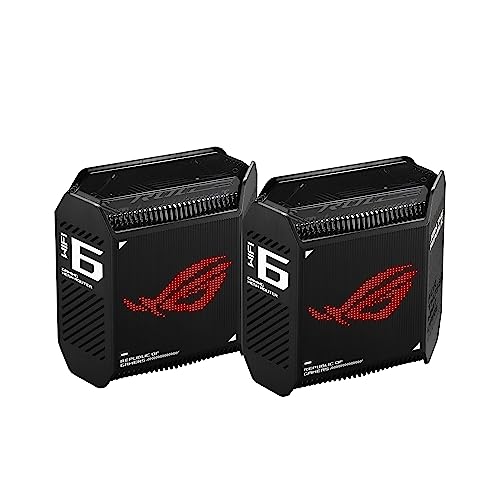
ASUS ROG Rapture Tri-Band Mesh System
Best for: gaming homes with 2.5G internet
- Frequency Band
- Tri-Band (what this guide is about)
- Wi-Fi Standard
- WiFi 6
- Speed Rating
- AX10000
- Coverage Area
- 5,800 sq ft
- Frequency Bands
- Tri-Band
- Pack Size
- 2-Pack
The ASUS ROG Rapture GT6 is a tri-band WiFi 6 mesh system designed for gaming. It covers 5,800 square feet with 10,000 Mbps aggregate speed. The set includes two nodes with a 2.5 Gbps port for faster wired connections. It uses a 1.7GHz tri-core processor and nine internal antennas. This system suits gamers who need low latency and strong coverage in larger homes.
Pros
- AX10000 tri-band WiFi 6 standard
- Covers up to 5,800 square feet
- Includes a 2.5 Gbps WAN port
- Dedicated high-performance backhaul
- Triple-Level Game Acceleration
Cons
- WiFi 6 standard instead of WiFi 6E or 7
- Smaller coverage area than some competitors
- Heavier build at 1.94 pounds per node
Good fit if
- You play online games and need low latency
- You have a 2.5 Gbps internet connection
- You need coverage for a home up to 5,800 sq ft
Skip if
- You require WiFi 7 speeds
- You need coverage larger than 5,800 square feet
- You want a lighter, more compact device
Verdict: The ASUS ROG GT6 AX10000 Tri-Band Mesh delivers dedicated gaming acceleration and a 2.5 Gbps port for gamers with large homes. It fits users who prioritize wired speed and tri-band stability over the latest WiFi standards.

ASUS ZenWiFi Tri-Band Wi-Fi 6E Router
Best for: small apartments needing single-node 6E coverage
- Frequency Band
- Tri-Band (what this guide is about)
- Wi-Fi Standard
- WiFi 6E
- Speed Rating
- 7800 Mbps
- Coverage Area
- Up to 2,850 sq ft
- Frequency Bands
- Tri-band
- Pack Size
- 1PK
The ASUS ZenWiFi ET9 is a single-pack tri-band mesh system using Wi-Fi 6E. It covers up to 2,850 square feet with speeds up to 7,800 Mbps. The 6GHz band helps reduce congestion. It includes secure VPN and parental controls. This unit suits smaller homes or users needing one node for specific areas.
Pros
- Wi-Fi 6E standard with 6GHz band support
- Tri-band configuration for dedicated backhaul
- 7,800 Mbps aggregate speed rating
- One-click secure VPN feature
- Subscription-free Trend Micro security scan
Cons
- Single-pack limits coverage to 2,850 sq ft
- Wi-Fi 6E instead of newer Wi-Fi 7
- No mention of multi-gig Ethernet ports
Good fit if
- You need a single node for a small apartment
- You want 6GHz band benefits in a compact setup
- You prioritize privacy features like secure VPN
Skip if
- You require whole-home coverage beyond 2,850 sq ft
- You need a multi-pack system for large areas
- You want the latest Wi-Fi 7 technology
Verdict: ASUS ZenWiFi ET9 Tri-Band Mesh System covers small spaces with 6E speeds. It fits users needing one node for privacy and basic tri-band performance.

ASUS ZenWiFi AX6600 Tri-Band Mesh Router
Best for: Starting a flexible AiMesh network
- Frequency Band
- Tri-Band (what this guide is about)
- Wi-Fi Standard
- WiFi 6
- Speed Rating
- AX6600
- Coverage Area
- up to 2750 sq.ft
- Frequency Bands
- Tri-Band
- Pack Size
- 1-Pack
The ASUS ZenWiFi XT8 is a single-unit tri-band mesh router built for WiFi 6. It covers up to 2,750 square feet and delivers a combined speed of 6,600 Mbps. The system uses OFDMA and MU-MIMO to handle multiple devices efficiently. You get lifetime security from Trend Micro and easy setup via the ASUS Router App. This unit is designed to anchor a home network where you can later add more nodes.
Pros
- Tri-band WiFi 6 technology for stable connections
- Covers up to 2,750 square feet
- Lifetime free network security from Trend Micro
- Supports AiMesh for expanding coverage with other routers
Cons
- Sold as a single pack, requiring separate purchases for full mesh coverage
- WiFi 6 standard is older than the WiFi 7 systems on this list
- Maximum coverage is lower than the 8,000 square foot range of other picks
Good fit if
- You need a single node to start a larger AiMesh system
- You have a small home under 2,750 square feet
- You prefer the stability of WiFi 6 over newer standards
Skip if
- You want a complete mesh system in one box
- You need WiFi 7 speeds for future-proofing
- Your home is larger than 2,750 square feet
Verdict: ASUS ZenWiFi XT8 1-Pack serves as a foundational node for expanding networks rather than a standalone solution. It fits users who already have compatible routers or plan to buy additional units to cover larger spaces.
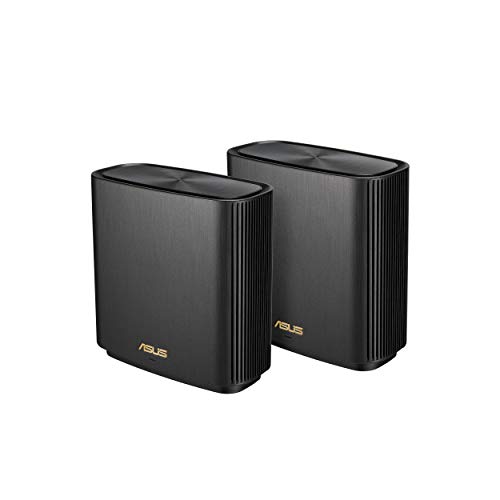
ASUS ZenWiFi AX Tri-Band Mesh 2-Pack
Best for: homes up to 5,500 sq ft with 2.5G internet
- Frequency Band
- Tri-Band (what this guide is about)
- Wi-Fi Standard
- WiFi 6
- Speed Rating
- 6.6Gbps
- Coverage Area
- Up to 5,500 sq.ft
- Frequency Bands
- Tri-Band
- Pack Size
- 2 Pack
The ASUS ZenWiFi AX XT8 is a two-pack tri-band mesh system built for WiFi 6. It covers up to 5,500 square feet with a combined speed rating of 6,600 Mbps. Each unit includes a 2.5G WAN port for higher throughput. The design uses OFDMA and MU-MIMO to manage multiple devices efficiently. It pairs with the ASUS Router App for setup and management. This system suits homes needing reliable whole-home coverage.
Pros
- Tri-band WiFi 6 technology for reduced congestion
- Covers up to 5,500 square feet
- Includes a 2.5G port for faster internet speeds
- Lifetime free network security from Trend Micro
Cons
- Limited to WiFi 6 standard, not WiFi 6E or 7
- No mention of dedicated backhaul bandwidth in specs
- Single 2.5G port per unit limits multi-gig wiring options
Good fit if
- You need reliable coverage for a home up to 5,500 square feet
- You want to use a 2.5G internet connection for faster speeds
- You prefer a simple setup managed via the ASUS Router App
Skip if
- You require WiFi 7 speeds for future-proofing
- You need coverage exceeding 5,500 square feet
- You want a tri-band system with multiple 2.5G ports per node
Verdict: ASUS ZenWiFi AX XT8 Tri-Band Mesh delivers solid WiFi 6 performance for medium to large homes. It fits users who prioritize stable coverage and 2.5G connectivity over next-gen WiFi standards.
ASUS ZenWiFi Tri-Band WiFi 7 Mesh 3-Pack
Best for: Large homes needing 8,850 sq ft coverage
- Frequency Band
- Tri-Band (what this guide is about)
- Wi-Fi Standard
- WiFi 7
- Speed Rating
- 14 Gbps
- Coverage Area
- 8850 sq.ft
- Frequency Bands
- Tri-Band
- Pack Size
- 3-Pack
The ASUS ZenWiFi BT8 is a tri-band WiFi 7 mesh system sold as a 3-pack. It covers up to 8,850 square feet with a combined speed rating of 14 Gbps. Each node includes dual 2.5G ports for high-speed wired connections. This setup suits large homes that need extensive coverage and high throughput for multiple devices.
Pros
- WiFi 7 standard for modern performance
- Tri-band architecture reduces congestion
- Covers 8,850 square feet total
- Dual 2.5G ports per node
Cons
- Larger physical footprint at 7.3 inches tall
- Heavier build at 1.9 pounds per unit
- Limited to 2.5G port speeds
Good fit if
- You need coverage for large spaces over 5,000 square feet
- You want the latest WiFi 7 technology
- You require multiple wired connections for devices
Skip if
- You have a small home under 2,000 square feet
- You prefer compact, low-profile nodes
- You need 10G networking capabilities
Verdict: ASUS ZenWiFi BT8 3-Pack Mesh is ideal for large households seeking maximum coverage and wired connectivity. It fits buyers who prioritize area size and modern standards over compact design.

ASUS ZenWiFi Pro Tri-Band WiFi 6E 2-Pack
Best for: homes needing 6 GHz capacity and 2.5G ports
- Frequency Band
- Tri-Band (what this guide is about)
- Wi-Fi Standard
- WiFi 6E
- Speed Rating
- AXE11000
- Coverage Area
- up to 6000 sq ft
- Frequency Bands
- Tri-Band
- Pack Size
- 2 Pack
The ASUS ET12 is a two-pack Wi-Fi 6E mesh system rated at AXE11000. It covers up to 6,000 square feet using the new 6 GHz band for increased capacity. Each node includes a 2.5G port for faster wired connections. The system uses RangeBoost Plus to extend signal reach. It includes AiProtection Pro security and parental controls without a subscription. This setup suits homes needing high-speed tri-band performance.
Pros
- Wi-Fi 6E standard with 6 GHz band
- AXE11000 speed rating for high throughput
- 2.5G port speed on each node
- Coverage up to 6,000 square feet
- Subscription-free AiProtection Pro security
Cons
- Smaller coverage area than some competitors
- Heavier build at 3.31 pounds per unit
- No mention of multi-gig WAN support
Good fit if
- You need Wi-Fi 6E on the 6 GHz band
- You want a 2.5G port for wired devices
- You prefer a two-pack mesh system
Skip if
- You require coverage larger than 6,000 square feet
- You need a three-pack system for larger spaces
- You want a lighter or more compact design
Verdict: ASUS ET12 Tri-Band Mesh System offers solid AXE11000 performance with 6E capabilities. It fits homes that need 6 GHz capacity and 2.5G ports but do not exceed 6,000 square feet.
Specifications side by side
| Spec | ASUS ZenWiFi BT10 2-Pack | ASUS ZenWiFi BT6 Tri-Band Mesh | ASUS ZenWiFi BT8 Tri-Band WiFi 7 Mesh | ASUS ROG Rapture Tri-Band Mesh System | ASUS ZenWiFi Tri-Band Wi-Fi 6E Router | ASUS ZenWiFi AX6600 Tri-Band Mesh Router | ASUS ZenWiFi AX Tri-Band Mesh 2-Pack | ASUS ZenWiFi Tri-Band WiFi 7 Mesh 3-Pack | ASUS ZenWiFi Pro Tri-Band WiFi 6E 2-Pack |
|---|---|---|---|---|---|---|---|---|---|
| Wi-Fi Standard | Wi-Fi 7 | WiFi 7 | WiFi 7 | WiFi 6 | WiFi 6E | WiFi 6 | WiFi 6 | WiFi 7 | WiFi 6E |
| Speed Rating | 18 Gbps | 9.4 Gbps | 14 Gbps | AX10000 | 7800 Mbps | AX6600 | 6.6Gbps | 14 Gbps | AXE11000 |
| Coverage Area | 6,000 sq ft | 5800 sq.ft. | 8850 sq. ft. | 5,800 sq ft | Up to 2,850 sq ft | up to 2750 sq.ft | Up to 5,500 sq.ft | 8850 sq.ft | up to 6000 sq ft |
| Frequency Bands | Tri-Band | Tri-band | Tri-Band | Tri-Band | Tri-band | Tri-Band | Tri-Band | Tri-Band | Tri-Band |
| Pack Size | 2-Pack | 2 PK | 3 PK | 2-Pack | 1PK | 1-Pack | 2 Pack | 3-Pack | 2 Pack |
| Port Speed | 10 Gbps | 1G | 2.5 Gbps | 2.5 Gbps | not specified | not specified | 2.5G | 2.5G | 2.5G |
| Frequency Band | Tri-Band | Tri-Band | Tri-Band | Tri-Band | Tri-Band | Tri-Band | Tri-Band | Tri-Band | Tri-Band |
| Use Case | not specified | not specified | not specified | Gaming | not specified | not specified | not specified | not specified | not specified |
| Features | Parental Controls | Parental Controls | Parental Controls | not specified | Parental Controls | Parental Controls | Parental Controls | not specified | VPN, Parental Controls |
| Intended Use | not specified | not specified | not specified | not specified | Home | Home | Home | Home | not specified |
| Dimensions | 7.3 × 2.8 × 6.26 inches | 7.32 × 2.83 × 6.26 inches | 6.3 × 2.8 × 7.3 inches | 6.77 × 3.07 × 6.93 inches | 6.3 × 2.95 × 6.38 inches | 6.3 × 2.95 × 6.36 inches | 6.3 × 2.95 × 6.36 inches | 6.3 × 2.8 × 7.3 inches | 4.53 × 4.53 × 9.49 inches |
| Weight | 1.8 pounds | 1.88 pounds | 1.9 pounds | 1.94 pounds | 1.57 pounds | 1.61 pounds | 1.58 pounds | 1.9 pounds | 3.31 pounds |
| Size | 2-Pack | 7.32L x 2.83W x 6.26H inch (Pack of 2) | WiFi 7 | BE14000 | not specified | 2850 sq.ft | 1-Pack | ZenWiFi AX Charcoal 2PK | 3 Pack | 2 Packs |
| Color | White | WHITE | WHITE | BLACK | WHITE | White | Black | WHITE | black |
| Model | BT10 (W-2-PK) | BT6 (W-2-PK) | BT8 (W-3-PK) | GT6 (B-2-PK) | ET9 (W-1-PK) | XT8 (W-1-PK) | ZenWiFi AX 2PK Charcoal | BT8 | ET12(2-PK) |
If you need wired hardware for your network, you can compare specs across the best ASUS motherboards.
How to choose the right one
-
Check the Wi-Fi standard
Wi-Fi 7 offers the latest performance with features like MLO for better stability. The ASUS ZenWiFi BT10 and BT6 both use this standard. If you do not need the newest technology, Wi-Fi 6 or 6E models like the ET12 or XT8 provide reliable performance. Consider your devices. If most are older, Wi-Fi 6 is sufficient. If you have new high-end devices, Wi-Fi 7 ensures future-proofing. Compare the standard in the specs to match your current and future hardware needs.
-
Match coverage area to your home
Coverage area determines how many nodes you need. The BT8 3-Pack covers 8,850 square feet, making it ideal for large homes. The BT10 covers 6,000 square feet, which suits most medium to large spaces. Smaller apartments might only need the single-node ET9, which covers 2,850 square feet. Check your home size against the spec. If you have a large property, ensure the total coverage of your chosen pack meets or exceeds your square footage to avoid dead zones.
-
Verify pack size and node count
Pack size defines the number of nodes included. The BT10 and BT6 come in 2-Packs, suitable for standard homes. The BT8 is available in a 3-Pack for larger areas. The ET9 is a 1-Pack, best for small spaces or as an additional node. The XT8 is also a 1-Pack, often used to expand existing networks. Choose a pack that covers your space without excess. If you buy a 1-Pack, you will need to purchase additional units separately to extend coverage effectively.
-
Consider speed ratings for bandwidth
Speed ratings like AXE11000 or BE14000 indicate total wireless capacity. The ET12 offers AXE11000 performance, providing high capacity for many devices. The BT8 is rated BE14000, supporting the higher throughput of Wi-Fi 7. Higher ratings generally mean better performance under heavy load. If you have many connected devices or stream high-quality video, look for higher speed ratings. Compare these numbers to ensure the system can handle your household's data demands without congestion.
-
Assess port speed for wired devices
Wired port speed affects how fast devices connect via cable. The BT10 features dual 10G ports, ideal for fiber connections over 2.5G. Most other models, like the BT6 and BT8, provide 2.5G ports. If your internet plan is below 2.5G, a 2.5G port is sufficient. For gigabit fiber or higher, the 10G ports on the BT10 prevent bottlenecks. Check your internet plan speed. Match the port speed to ensure your wired devices can utilize your full internet connection speed.
-
Evaluate gaming features if needed
Some models include specific features for gaming. The ROG Rapture GT6 is designed for gaming homes, offering dedicated acceleration. It uses Wi-Fi 6 but focuses on stability and low latency for gamers. If you are a serious gamer, this model might be a better fit than standard mesh systems. It includes a 2.5G port for wired console connections. Check if the system highlights gaming performance. For general use, standard mesh systems are sufficient, but gamers may prefer specialized hardware.
Frequently asked questions
Which ASUS tri-band mesh system is best for large homes?
The ASUS ZenWiFi BT8 3-Pack is the top choice for large homes. It provides 8,850 square feet of coverage and uses Wi-Fi 7 technology. This system is ideal if you need maximum range over 10G connectivity. It includes 2.5G ports for wired connections. The three-pack configuration ensures whole-home coverage for expansive spaces.
Does ASUS offer tri-band mesh with 10G ports?
Yes, the ASUS ZenWiFi BT10 2-Pack features dual 10G ports. This model is designed for homes under 6,000 square feet that require high-speed wired connectivity. It uses Wi-Fi 7 for strong wireless performance. If your internet plan exceeds 2.5G, these 10G ports prevent bottlenecks for connected devices.
What is the best ASUS mesh system for gaming?
The ASUS ROG Rapture Tri-Band Mesh System is built for gaming. It includes dedicated gaming acceleration and a 2.5 Gbps port. This system uses Wi-Fi 6 and tri-band technology for stable connections. It is suitable for large homes where wired speed and network stability are priorities for gamers.
Which ASUS mesh system covers the smallest area?
The ASUS ZenWiFi Tri-Band Wi-Fi 6E Router is designed for small spaces. It is sold as a single node and covers 2,850 square feet. This system uses Wi-Fi 6E for tri-band performance. It is ideal for apartments or small homes where a single unit provides sufficient coverage and basic tri-band speeds.
Can I expand an ASUS tri-band mesh network?
Yes, you can expand networks using models like the ASUS ZenWiFi AX6600. This unit is sold as a single pack and serves as a foundational node. It is designed for users who already have compatible routers or plan to add more units. This approach helps cover larger spaces flexibly.
Which ASUS mesh system supports Wi-Fi 6E?
The ASUS ZenWiFi Pro Tri-Band WiFi 6E 2-Pack supports Wi-Fi 6E. It offers AXE11000 performance with 6 GHz capacity. This system covers 6,000 square feet and includes 2.5G ports. It is a strong option for homes needing the extra capacity of the 6 GHz band without requiring Wi-Fi 7.
What is the difference between BT10 and BT6?
The main difference is port speed. The BT10 has dual 10G ports, while the BT6 has 2.5G ports. Both use Wi-Fi 7 and are sold in 2-packs. The BT10 is better for homes needing 10G connectivity. The BT6 is a solid choice for medium-sized homes that do not require 10G speeds.