Best Wifi Routers for 2,500 Sq. Ft. in 2026: 11 Picks Ranked by Specs
As an Amazon Associate we earn from qualifying purchases. Links on this page are affiliate links.
Finding the best wifi routers for 2500 sq ft requires matching your home size to specific network capabilities. We compared 11 options ranked by their published specifications to help you choose. The NETGEAR Nighthawk Tri-Band WiFi 7 Router leads because it delivers 9.3 Gbps throughput for multi-gig plans under 2,500 sq ft. This guide helps you decide which single unit or mesh system fits your coverage needs and device count.
Quick picks
The best fit for you
- You want the best overall performance for multi-gig plans NETGEAR Nighthawk Tri-Band WiFi 7 Router It delivers 9.3 Gbps throughput and Wi-Fi 7 speeds in a single unit.
- You need durable outdoor patio Wi-Fi coverage ASUS ZenWiFi Outdoor Mesh Router This router is designed specifically for outdoor placement with weatherproof durability.
- You want a budget-friendly entry into Wi-Fi 7 NETGEAR Nighthawk Dual-Band WiFi 7 Router It offers multi-gig wired routing and current-generation wireless coverage for up to 2,500 sq. ft.
Our 11 picks

NETGEAR Nighthawk Tri-Band WiFi 7 Router
Best for: Multi-gig internet plans under 2,500 sq ft
- Coverage Area
- 2,500 Sq. Ft. (what this guide is about)
- Wi-Fi Standard
- WiFi 7
- Frequency Bands
- Tri-Band
- Device Capacity
- 100
- Max Port Speed
- 2.5 Gbps
- Ethernet Ports
- 5
The NETGEAR RS300 delivers up to 9.3 Gbps across tri-band WiFi 7, covering 2,500 sq ft for up to 100 devices. It features a 2.5 Gbps WAN port and two 2.5 Gbps LAN ports for multi-gig internet. You get robust wired connectivity and app management. This router suits users needing high throughput and extensive device support in a single unit.
Pros
- WiFi 7 standard with 9.3 Gbps combined speed
- Tri-band architecture for dedicated high-speed connectivity
- 2.5 Gbps WAN port supports multi-gig plans
- Covers 2,500 sq ft with 100 device capacity
- Includes two 2.5 Gbps LAN ports
Cons
- Coverage is limited to 2,500 sq ft
- Security features require a separate subscription after trial
- Single router may struggle in larger or multi-story homes
Good fit if
- You need WiFi 7 speeds for future-proofing
- You have a multi-gigabit internet plan
- Your home is under 2,500 sq ft
Skip if
- You require coverage larger than 2,500 sq ft
- You want built-in security without a subscription
- You prefer a mesh system for multi-story homes
Verdict: NETGEAR RS300 Tri-Band WiFi 7 Router is the best overall pick for users with multi-gig internet plans who need high throughput in a single unit. It fits homes under 2,500 sq ft that demand WiFi 7 performance and extensive wired connectivity.
NETGEAR Nighthawk Tri-Band WiFi 7 Router
Best for: Multi-gig internet users with many devices
- Coverage Area
- 2,500 Sq. Ft. (what this guide is about)
- Wi-Fi Standard
- Wi-Fi 7
- Frequency Bands
- Tri-Band
- Device Capacity
- 100 devices
- Max Port Speed
- 2.5 Gbps
- Dimensions
- 10.8 × 7.17 × 7.13 inches
The NETGEAR Nighthawk BE9300 is a tri-band WiFi 7 router covering up to 2,500 square feet. It supports 100 devices and offers 9.3 Gbps speeds across 2.4, 5, and 6 GHz bands. You get a 2.5 Gig WAN port and two 2.5 Gig LAN ports for wired connections. The Nighthawk app manages setup and security. It fits homes needing high capacity and modern standards.
Pros
- Tri-band WiFi 7 with 6 GHz band
- 9.3 Gbps aggregate speed
- 2.5 Gig WAN and LAN ports
- Supports up to 100 devices
- 2,500 sq ft coverage
Cons
- Large footprint at 10.8 inches wide
- Heavy at 3.95 pounds
- NETGEAR Armor requires paid subscription
Good fit if
- You need WiFi 7 performance
- You have multi-gig internet plans
- You have many connected devices
Skip if
- You want a compact router
- You need included security subscription
- You have a small home
Verdict: The NETGEAR Nighthawk BE9300 Tri-Band WiFi 7 suits users with multi-gig internet and many devices. Its tri-band design and 2.5 Gig ports handle high traffic in 2,500 sq ft homes.

Amazon eero Max 7 Wi-Fi 7 Router
Best for: High-capacity networks with smart home integration
- Coverage Area
- 2,500 Sq. Ft. (what this guide is about)
- Wi-Fi Standard
- Wi-Fi 7
- Device Capacity
- 250+ devices
- Max Port Speed
- 10 Gbps
- Pack Size
- 1-Pack
- Dimensions
- 7.24 × 8.74 × 3.54 inches
The eero Max 7 delivers Wi-Fi 7 speeds up to 4.3 Gbps wirelessly and 9.4 Gbps wired. It covers up to 2,500 square feet and supports 250+ devices. TrueMesh technology optimizes data paths for reliability. It includes a smart home hub for Thread and Matter devices. This unit suits users needing high capacity and multi-gigabit support for dense networks.
Pros
- Wi-Fi 7 standard for higher capacity and lower latency
- Supports 250+ connected devices simultaneously
- Built-in smart home hub for Thread and Matter devices
- TrueMesh technology dynamically optimizes data paths
Cons
- Requires eero Plus subscription for advanced digital security features
- Single router covers only 2,500 square feet
- Limited to two 10 Gigabit Ethernet ports
Good fit if
- You have internet plans exceeding 1 Gbps
- You need a smart home hub for Thread devices
- You want Wi-Fi 7 performance in a single unit
Skip if
- You require extensive wired ports for multiple devices
- You need coverage beyond 2,500 square feet
- You prefer built-in security without a subscription
Verdict: The eero Max 7 Wi-Fi 7 Router fits users with high-speed internet plans who need a single unit to manage a dense network of 250+ devices and smart home gadgets.

ASUS ZenWiFi Outdoor Mesh Router
Best for: outdoor patio and garden Wi-Fi coverage
- Coverage Area
- 2,500 Sq. Ft. (what this guide is about)
- Wi-Fi Standard
- Wi-Fi 7
- Frequency Bands
- Dual-Band
- Max Port Speed
- 2.5 Gbps
- Intended Use
- Outdoors
- Dimensions
- 4.2 × 4.2 × 7.9 inches
The ASUS ZenWIFI BD5 is a dual-band Wi-Fi 7 router built for outdoor use. It covers up to 2,500 square feet with speeds reaching 5 Gbps. The unit features an IP65-rated enclosure for weather resistance and supports Power over Ethernet. This design allows for flexible mounting on walls or poles. It suits users needing reliable connectivity in outdoor environments like patios or gardens.
Pros
- Wi-Fi 7 standard with Dual-Band support
- IP65 weatherproof and dustproof enclosure
- Supports Power over Ethernet (PoE)
- Wide operating temperature range from -30°C to 60°C
Cons
- Limited to dual-band frequency
- Single unit size may restrict coverage for larger homes
- No mention of included mounting hardware
Good fit if
- You need Wi-Fi for an outdoor patio or garden
- You want a weather-resistant router with PoE support
- You require Wi-Fi 7 speeds in a compact outdoor unit
Skip if
- You need indoor-only coverage with tri-band speeds
- You require a multi-pack mesh system for large homes
- You prefer a router with built-in cable modem functionality
Verdict: ASUS ZenWIFI BD5 Outdoor Mesh Router is a specialized solution for outdoor connectivity. It fits users who need durable, weatherproof Wi-Fi 7 coverage for specific outdoor areas rather than whole-home indoor networking.

NETGEAR Nighthawk AX5400 WiFi 6 Router
Best for: Standard homes with under 25 devices
- Coverage Area
- 2,500 Sq. Ft. (what this guide is about)
- Wi-Fi Standard
- Wi-Fi 6
- Speed Rating
- AX5400
- Frequency Bands
- Dual-Band
- Device Capacity
- Up to 25 devices
- Max Port Speed
- 1 Gbps
The NETGEAR RAX50 is a dual-band Wi-Fi 6 router covering up to 2,500 square feet. It supports up to 25 devices with speeds reaching 5.4 Gbps. You get four gigabit Ethernet ports and one USB 3.0 port for storage. This model replaces your existing router and works with any ISP up to 1 Gbps. It is a solid option for standard homes needing reliable coverage.
Pros
- Wi-Fi 6 technology for efficient multi-device handling
- AX5400 speed rating up to 5.4 Gbps
- Four gigabit Ethernet ports for wired connections
- USB 3.0 port for personal cloud storage
Cons
- Limited to dual-band frequency instead of tri-band
- Max port speed capped at 1 Gbps
- Device capacity limited to 25 connected devices
Good fit if
- You need coverage for a single-story home under 2,500 sq ft
- You want to connect up to 25 devices simultaneously
- You require standard gigabit wired ports for gaming or streaming
Skip if
- You need speeds faster than 1 Gbps on wired ports
- You require tri-band performance for heavy congestion
- You plan to connect more than 25 devices at once
Verdict: The NETGEAR RAX50 AX5400 Dual-Band Router fits users who need reliable Wi-Fi 6 coverage for small to medium homes. It serves families with moderate device counts well, provided they do not require multi-gigabit wired speeds.

NETGEAR Nighthawk Dual-Band WiFi 7 Router
Best for: entry-level WiFi 7 home networking
- Coverage Area
- 2,500 Sq. Ft. (what this guide is about)
- Wi-Fi Standard
- WiFi 7
- Speed Rating
- BE6500
- Frequency Bands
- Dual-Band
- Device Capacity
- 80 Devices
- Max Port Speed
- 2.5 Gbps
This dual-band WiFi 7 router provides up to 2,500 sq. ft. of wireless coverage for up to 80 connected devices. It delivers wireless throughput up to 6.5 Gbps and includes a 2.5 Gbps internet port alongside four LAN ports. It suits you if you want WiFi 7 multi-gig speeds in a mid-sized home.
Pros
- Covers up to 2,500 sq. ft. and connects up to 80 devices
- Wireless throughput rated up to 6.5 Gbps
- Dedicated 2.5 Gbps internet port plus a 2.5 Gbps LAN port
Cons
- Limited to dual-band wireless rather than tri-band
- NETGEAR Armor security software is only a 30-day trial
Good fit if
- You want WiFi 7 coverage across a home up to 2,500 sq. ft.
- You use an internet plan requiring a 2.5 Gbps WAN port.
Skip if
- You prefer a tri-band router to separate high-demand wireless devices.
- You want ongoing security software included without an expiring trial.
Verdict: NETGEAR Dual-Band WiFi 7 Router gives you multi-gig wired routing and current-generation wireless coverage for spaces up to 2,500 sq. ft.

NETGEAR Orbi Tri-Band WiFi 6 Cable Modem Router
Best for: cable internet users wanting an all-in-one unit
- Coverage Area
- 2,500 Sq. Ft. (what this guide is about)
- Wi-Fi Standard
- WiFi 6
- Speed Rating
- AX4200
- Frequency Bands
- Tri-Band
- Device Capacity
- 40+
- Pack Size
- 1-Pack
View on Amazon: NETGEAR Orbi Tri-Band WiFi 6 Cable Modem Router
This NETGEAR Orbi unit combines a WiFi 6 router with a DOCSIS 3.1 cable modem. It covers up to 2,500 sq. ft. and supports 40+ devices on AX4200 tri-band speeds. It handles internet plans up to 4Gbps. You can expand coverage by adding optional satellites. The Orbi app helps you manage the network. It is designed for U.S. use only.
Pros
- Integrated DOCSIS 3.1 cable modem for plans up to 4Gbps
- Tri-band WiFi 6 with AX4200 speed rating
- Covers 2,500 sq. ft. for 40+ devices
- Expandable mesh system with optional satellites
Cons
- Single device handles both modem and router functions
- Limited to 40+ device capacity
- Made for U.S. use only
Good fit if
- You want to eliminate separate modem hardware
- You have a cable internet connection under 4Gbps
- You need tri-band performance for 2,500 sq. ft.
Skip if
- You live outside the United States
- You need to support more than 40 devices
- You have fiber or DSL internet service
Verdict: NETGEAR Orbi CBR750 Tri-Band Modem Router is a practical all-in-one solution for cable internet users who want to simplify their setup. It suits those who prioritize a single device for modem and routing duties in a medium-sized home.

NETGEAR Nighthawk AX5400 WiFi 6 Router
Best for: Small homes with under 25 devices
- Coverage Area
- 2,500 Sq. Ft. (what this guide is about)
- Wi-Fi Standard
- WiFi 6
- Speed Rating
- AX5400
- Frequency Bands
- Dual-Band
- Device Capacity
- 25 devices
- Max Port Speed
- 1 Gbps
The NETGEAR RAX54S covers up to 2,500 square feet with AX5400 dual-band Wi-Fi 6 speeds. It supports up to 25 devices, making it suitable for moderate households. The unit includes four Gigabit Ethernet ports and a USB 3.0 port for wired connections. You get a one-year subscription to NETGEAR Armor for automatic security updates and VPN protection. Setup is managed via the Nighthawk app.
Pros
- Covers up to 2,500 square feet
- Supports up to 25 connected devices
- Includes four Gigabit Ethernet ports
- One-year NETGEAR Armor security subscription included
- USB 3.0 port for storage or printers
Cons
- Limited to dual-band connectivity
- Max port speed is 1 Gbps
- Supports only 25 devices
Good fit if
- You need coverage for up to 2,500 square feet
- You have fewer than 25 connected devices
- You want built-in security features
Skip if
- You require tri-band performance
- You need speeds above 1 Gbps
- You have more than 25 connected devices
Verdict: NETGEAR RAX54S AX5400 Dual-Band Router fits homes under 2,500 square feet with a small device count. It offers solid AX5400 speeds and included security for standard broadband connections.

Linksys Hydra Pro 6E Mesh Router
Best for: homes needing 2,500 sq ft coverage
- Coverage Area
- 2,500 Sq. Ft. (what this guide is about)
- Wi-Fi Standard
- WiFi 6E
- Frequency Bands
- Tri-Band
- Device Capacity
- 50+ Devices
- Ethernet Ports
- 5
- Dimensions
- 5 × 9 × 15 inches
The Linksys Hydra Pro 6E covers 2,500 square feet with WiFi 6E tri-band speeds up to 5.4 Gbps. It supports 50+ devices and includes five Ethernet ports. Intelligent mesh technology helps eliminate dead zones. You get dedicated 6 GHz bands for stable connections. This router works with any internet service provider. It is a solid choice for homes needing reliable multi-device support.
Pros
- WiFi 6E tri-band architecture
- Covers 2,500 square feet
- Supports 50+ devices
- Five Ethernet ports
- Dedicated 6 GHz band
Cons
- Bulky 15-inch height
- Only 50 device capacity
- No mention of Wi-Fi 7
Good fit if
- You need coverage for 2,500 square feet
- You connect 50 or fewer devices
- You want tri-band stability
Skip if
- You require Wi-Fi 7 speeds
- You have more than 50 devices
- You need a compact router
Verdict: Linksys Hydra Pro 6E Tri-Band Router delivers solid 6E performance for medium homes. It suits users who prioritize wired connections and stable multi-device support over cutting-edge Wi-Fi 7 standards.

NETGEAR Nighthawk Tri-Band Wi-Fi 6E Router
Best for: WiFi 6E homes needing 2.5G ports
- Coverage Area
- 2,500 Sq. Ft. (what this guide is about)
- Wi-Fi Standard
- WiFi 6E
- Speed Rating
- AXE7800
- Frequency Bands
- Tri-Band
- Device Capacity
- 40 Devices
- Max Port Speed
- 2.5G
This NETGEAR router delivers AXE7800 speeds across three bands, including a dedicated 6GHz band for WiFi 6E devices. It covers up to 2,500 square feet and supports 40 connected devices. The unit features a 1.7GHz quad-core processor and includes one 2.5G Ethernet port alongside four gigabit ports. It is designed for homes needing robust wireless performance and wired connectivity options.
Pros
- AXE7800 tri-band WiFi 6E standard
- Dedicated 6GHz band for high-bandwidth tasks
- Supports up to 40 connected devices
- Includes one 2.5G Ethernet port
Cons
- Large physical footprint at 13.6 inches wide
- Heavier build at 2.23 pounds
- Device capacity limited to 40 units
Good fit if
- You have multiple WiFi 6E devices
- You need a dedicated 6GHz band
- You require a 2.5G wired port
Skip if
- You need WiFi 7 speeds
- You have limited space for large routers
- You require more than 40 device connections
Verdict: NETGEAR RAXE300 Tri-Band WiFi 6E Router fits users who want dedicated 6GHz performance and a 2.5G port for wired devices in a 2,500 sq. ft. home.
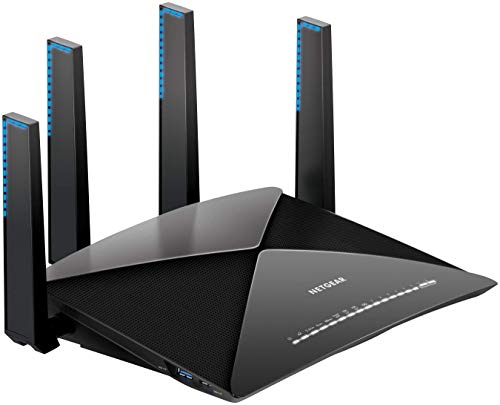
NETGEAR Nighthawk X10 AD7200 SFP+ Router
Best for: Users needing 10G SFP uplink and tri-band coverage
- Coverage Area
- 2,500 Sq. Ft. (what this guide is about)
- Speed Rating
- AD7200
- Frequency Bands
- Tri-band
- Device Capacity
- Up to 45 devices
- Max Port Speed
- 10G
- Ethernet Ports
- 7
The NETGEAR R9000 covers up to 2,500 square feet with AD7200 tri-band speeds. It includes one 10G SFP+ port and six gigabit Ethernet ports. The router supports up to 45 devices. You get two USB 3.0 ports for storage sharing. This model suits users who need wired uplink flexibility and moderate device capacity.
Pros
- Includes 10G SFP+ uplink port
- AD7200 tri-band wireless speeds
- Covers up to 2,500 sq ft
- Six gigabit Ethernet ports
- Supports up to 45 devices
Cons
- Only supports 45 devices
- Uses Wi-Fi 6, not Wi-Fi 7
- No Wi-Fi 6E support
Good fit if
- You need a 10G SFP uplink port
- You have up to 45 connected devices
- You want tri-band coverage for 2,500 sq ft
Skip if
- You need Wi-Fi 7 speeds
- You require more than 45 device connections
- You want Wi-Fi 6E performance
Verdict: NETGEAR R9000 Tri-Band Router with 10G SFP is a solid choice for homes needing a 10G SFP uplink and moderate device capacity. It fits users who prioritize wired connectivity options over the latest Wi-Fi standards.
Specifications side by side
| Spec | NETGEAR Nighthawk Tri-Band WiFi 7 Router | NETGEAR Nighthawk Tri-Band WiFi 7 Router | Amazon eero Max 7 Wi-Fi 7 Router | ASUS ZenWiFi Outdoor Mesh Router | NETGEAR Nighthawk AX5400 WiFi 6 Router | NETGEAR Nighthawk Dual-Band WiFi 7 Router | NETGEAR Orbi Tri-Band WiFi 6 Cable Modem Router | NETGEAR Nighthawk AX5400 WiFi 6 Router | Linksys Hydra Pro 6E Mesh Router | NETGEAR Nighthawk Tri-Band Wi-Fi 6E Router | NETGEAR Nighthawk X10 AD7200 SFP+ Router |
|---|---|---|---|---|---|---|---|---|---|---|---|
| Wi-Fi Standard | WiFi 7 | Wi-Fi 7 | Wi-Fi 7 | Wi-Fi 7 | Wi-Fi 6 | WiFi 7 | WiFi 6 | WiFi 6 | WiFi 6E | WiFi 6E | not specified |
| Speed Rating | not specified | not specified | not specified | not specified | AX5400 | BE6500 | AX4200 | AX5400 | not specified | AXE7800 | AD7200 |
| Frequency Bands | Tri-Band | Tri-Band | not specified | Dual-Band | Dual-Band | Dual-Band | Tri-Band | Dual-Band | Tri-Band | Tri-Band | Tri-band |
| Coverage Area | 2,500 sq ft | 2,500 sq ft | Up to 2,500 sq. ft. | 2,500 sq ft | Up to 2,500 sq ft | 2,500 sq. ft. | 2,500 sq. ft. | 2,500 sq. ft. | 2,500 Sq Ft | up to 2,500 sq. ft. | Up to 2500 sq ft |
| Device Capacity | 100 | 100 devices | 250+ devices | not specified | Up to 25 devices | 80 Devices | 40+ | 25 devices | 50+ Devices | 40 Devices | Up to 45 devices |
| Max Port Speed | 2.5 Gbps | 2.5 Gbps | 10 Gbps | 2.5 Gbps | 1 Gbps | 2.5 Gbps | not specified | 1 Gbps | not specified | 2.5G | 10G |
| Ethernet Ports | 5 | not specified | not specified | not specified | 4 | not specified | not specified | not specified | 5 | not specified | 7 |
| Frequency Band | not specified | not specified | not specified | not specified | Dual-Band | Dual-Band | Tri-Band | Dual-Band | Tri-Band | Tri-Band | not specified |
| Pack Size | not specified | not specified | 1-Pack | not specified | not specified | not specified | 1-Pack | not specified | not specified | not specified | not specified |
| Port Speed | not specified | not specified | 10G | not specified | not specified | not specified | not specified | not specified | not specified | Gigabit | Gigabit, 10G |
| Uplink Port Type | not specified | not specified | not specified | not specified | not specified | not specified | not specified | not specified | not specified | not specified | SFP |
| Intended Use | not specified | not specified | not specified | Outdoors | not specified | not specified | not specified | not specified | not specified | not specified | not specified |
| Placement | not specified | not specified | not specified | Outdoor | not specified | not specified | not specified | not specified | not specified | not specified | not specified |
| Dimensions | 9.8 × 4 × 9.8 inches | 10.8 × 7.17 × 7.13 inches | 7.24 × 8.74 × 3.54 inches | 4.2 × 4.2 × 7.9 inches | 14.7 × 10 × 4.6 inches | 7.2 × 2.6 × 4.8 inches | 10.2 × 8.55 × 6.5 inches | 9.84 × 7.87 × 3.15 inches | 5 × 9 × 15 inches | 13.6 × 8.16 × 6.47 inches | 8.81 × 6.61 × 2.91 inches |
| Weight | not specified | 3.95 pounds | 3.2 pounds | 3.68 pounds | 2.5 pounds | not specified | 3.1 pounds | not specified | 3.7 pounds | 2.23 pounds | 4.11 pounds |
| Size | 9.3 Gbps | 9.3 Gbps | 1-pack | 1-Pack | 25.4 cm x 76.2 cm x 10.2 cm | 7.2 x 2.6 x 4.8 inches | 571.28 cubic inches | Standard | WIFI 6E | Large | AD7200 |
| Color | black or white | black | WHITE | Black | Black | Black | White | Black | Black | Black | black |
| Model | RS300-100APS | BE9300-1AZPAS | V010001 | BD5 OUTDOOR (W-1-PK) | RAX50-100NAS | RS200 | CBR750-100NAS | RAX54S-2AZNAS | MR75MS | RAXE300-100NAS | R9000-100NAS |
If basement moisture affects your home network setup, specifications for the best dehumidifiers for 5000 sq ft outline coverage options.
How to choose the right one
-
Match Wi-Fi Standard to Speed
Check the Wi-Fi standard listed in the attributes. Wi-Fi 7 models like the NETGEAR RS300 offer 9.3 Gbps throughput for multi-gig internet plans. Wi-Fi 6 routers such as the NETGEAR RAX50 suit standard broadband connections. If you have high-speed internet, ensure the router supports the latest standard to avoid bottlenecks. Verify the spec matches your plan speed for optimal performance.
-
Select Frequency Band Type
Look at the frequency band attribute. Tri-band routers like the NETGEAR RS300 and eero Max 7 provide extra channels for dense device networks. Dual-band options like the NETGEAR RS200 are sufficient for smaller homes with fewer devices. Tri-band designs help manage traffic better in larger spaces. Choose based on your household device count and congestion needs.
-
Verify Coverage Area Requirements
Confirm the coverage area matches your home size. All listed products specify 2,500 Sq. Ft. coverage. This ensures single-unit or mesh solutions cover your entire space. If your layout is open, a single router may suffice. For complex layouts, consider mesh systems. Always check the coverage spec to avoid dead zones in your specific floor plan.
-
Check Port Speed Capabilities
Inspect the port speed attribute for wired connectivity. The eero Max 7 features 10G ports for high-speed wired devices. The NETGEAR RAXE300 includes 2.5G ports for fast connections. The NETGEAR R9000 offers a 10G SFP uplink for professional setups. Ensure your router ports match your wired device speeds to maximize throughput across your network.
-
Consider Intended Placement
Review the intended use and placement attributes. The ASUS ZenWiFi BD5 is designed specifically for outdoor placement. It provides weatherproof coverage for patios and gardens. Most other routers are for indoor use. If you need outdoor Wi-Fi, select a model with outdoor-specific ratings. Otherwise, choose indoor routers for better signal stability inside your home.
-
Evaluate Pack Size Options
Check the pack size attribute for your setup needs. The eero Max 7 and ASUS ZenWiFi BD5 come in 1-Pack sizes. Some systems may require multiple units for larger areas. Single units work for homes under 2,500 Sq. Ft. Ensure the pack size meets your coverage requirements. You may need additional nodes if the single unit cannot reach all areas effectively.
Frequently asked questions
Can a single router cover 2,500 square feet effectively?
Yes, several single-unit routers in this list are rated for 2,500 square feet. The NETGEAR Nighthawk Tri-Band WiFi 7 Router and the Amazon eero Max 7 both provide coverage for this size. These models handle high device counts and multi-gig internet speeds without needing multiple nodes for a standard home layout.
Which router is best for outdoor patio coverage?
The ASUS ZenWiFi Outdoor Mesh Router is designed specifically for outdoor use. It provides weatherproof Wi-Fi 7 coverage for patios and gardens. Unlike indoor models, this unit is built to withstand outdoor conditions while delivering dedicated connectivity to specific exterior areas rather than whole-home indoor networking.
Do I need Wi-Fi 7 for a 2,500 square foot home?
You do not strictly need Wi-Fi 7 if you have standard broadband. Wi-Fi 6 routers like the NETGEAR RAX50 or RAX54S cover 2,500 square feet well for homes with under 25 devices. However, if you have multi-gig internet plans, Wi-Fi 7 models like the RS300 offer higher throughput and future-proofing.
What is the best router for cable internet users?
The NETGEAR Orbi CBR750 is a tri-band modem router that combines modem and routing duties. This all-in-one unit suits cable internet users who want to simplify their setup. It provides 2,500 square feet of coverage in a single device, making it practical for medium-sized homes without extra hardware.
Which router supports the most devices for smart homes?
The Amazon eero Max 7 is built for high-capacity networks with dense device counts. It manages over 250 devices and smart home gadgets effectively. Its tri-band design and 10G port speed help maintain stability for large smart home ecosystems within a 2,500 square foot footprint.
Are there routers with 2.5 Gigabit ports for wired devices?
Yes, several models include 2.5 Gigabit ports for high-speed wired connections. The NETGEAR Nighthawk BE9300 features tri-band design and 2.5 Gig ports to handle high traffic. The NETGEAR RAXE300 also offers dedicated 6GHz performance alongside a 2.5G port, making it suitable for users needing fast wired speeds alongside Wi-Fi 6E.
What is the best budget option for entry-level Wi-Fi 7?
The NETGEAR Dual-Band WiFi 7 Router serves as a budget-friendly entry point. It provides multi-gig wired routing and current-generation wireless coverage for spaces up to 2,500 square feet. This model allows you to access Wi-Fi 7 standards without the higher cost of tri-band or premium mesh systems.