Choosing Mesh Wifi Systems in 2026: The Specs That Matter and 8 Picks
As an Amazon Associate we earn from qualifying purchases. Links on this page are affiliate links.
This mesh wifi system buying guide helps you choose the right setup for your home. You will learn which specifications matter most for your space and device count. We compare options based strictly on published data, not personal experience or pricing. The goal is to help you decide between Wi-Fi 6, 6E, and 7 standards, and determine the correct pack size for your layout. You can match coverage area and port speeds to your internet plan and room structure.
We selected eight systems from their technical sheets to cover a range of needs. The list includes single routers for small apartments and multi-pack systems for large homes with many connected devices. You will see how tri-band designs and dedicated backhaul channels affect performance. Each pick is ranked by its ability to handle specific demands, from basic smart home integration to 5 Gbps internet plans. Read on to find the configuration that fits your requirements.
Our top pick: TP-Link Deco X55 3-Pack Wi-Fi 6.
Key Specs for Mesh WiFi Selection
Wi-Fi Standard Generation
The Wi-Fi standard determines the underlying technology and efficiency of your network. Wi-Fi 6 is a mature standard that handles many devices well. Wi-Fi 6E adds the 6 GHz band for less congestion. Wi-Fi 7 offers the latest features like multi-link operation for future-proofing. You should match the standard to your internet plan and device age. If you have a fast plan, newer standards help. For budget setups, Wi-Fi 6 remains a reliable choice. The TP-Link Deco X55 uses Wi-Fi 6 for solid performance. The eero Pro 7 utilizes Wi-Fi 7 for maximum speed. Choose based on your need for current versus future capability.
- Wi-Fi 6 or newer
- Wi-Fi 6E or Wi-Fi 7
- Latest standard for future use
Frequency Band Configuration
Frequency bands affect how data moves between nodes and devices. Dual-band systems share the 2.4 GHz and 5 GHz bands for backhaul and client connections. This can reduce speed when nodes communicate. Tri-band systems add a dedicated 6 GHz band for node-to-node communication. This keeps client speeds higher. Wi-Fi 6E and Wi-Fi 7 systems often include this third band. You should prefer tri-band if you have many nodes or high bandwidth needs. The NETGEAR Orbi 770 is a tri-band Wi-Fi 7 system. The eero 6 is a dual-band option. Pick tri-band for large homes with many units.
- Tri-band for dedicated backhaul
- Dual-band for smaller setups
- 6 GHz band availability
Coverage Area Rating
Coverage area indicates the square footage the system can handle. This number is a baseline for your home size. You need enough nodes to cover every room. Large homes require systems with higher coverage ratings or more units. The eero Pro 7 covers 6,000 square feet in a 3-pack. The eero 6 covers 1,500 square feet as a single router. You must match the total coverage to your floor plan. If your home is large, buy a multi-pack. For apartments, a single unit may suffice. Check the square footage rating to ensure full coverage.
- Total square footage rating
- Number of units needed
- Coverage per unit size
Speed Rating Classification
Speed ratings like AX3000 or AXE5400 show the combined theoretical maximum speed. These numbers help compare performance tiers. Higher ratings usually mean faster potential speeds. The TP-Link Deco XE75 has an AXE5400 rating. The Deco X55 has an AX3000 rating. Your actual speed depends on your internet plan and device capabilities. You should check the rating if you have a fast internet connection. For slower plans, a lower rating is sufficient. The rating helps you avoid paying for unused speed. Match the rating to your internet service tier.
- AX or BE speed rating
- Rating matches internet plan
- Higher rating for faster plans
Device Capacity Limits
Device capacity states how many connected devices the system supports. Homes with many smart devices need higher capacity. The eero Pro 6E supports 100+ devices. The eero 6 supports 75+ devices. The eero 6+ 4-pack also supports 75+ devices. You should count your phones, laptops, and smart home gadgets. If you have many devices, choose a system with a higher limit. Low capacity systems may slow down with many connections. Check the device count if you have a smart home. Ensure the limit exceeds your total connected devices.
- Device capacity over 75
- Capacity for smart home gear
- Limit exceeds total devices
Pack Size and Nodes
Pack size determines how many units you receive. A 3-pack or 4-pack provides more nodes for coverage. The TP-Link Deco X55 comes in a 3-pack. The eero 6 is a 1-pack. You need enough nodes to cover your space. More nodes mean better coverage in large homes. Fewer nodes suit small apartments. The NETGEAR Orbi 370 offers a 4-pack for extensive coverage. You should buy a pack that matches your home size. Adding nodes later may be difficult. Choose the pack size that covers your area initially.
- Pack size matches home size
- Number of included nodes
- Expandable to more units
Port Speed and Types
Port speed affects wired device performance and backhaul options. Gigabit ports handle standard fast internet. 2.5G ports support internet plans faster than 1 Gbps. The eero Pro 6E includes 2.5G ports. The eero 6+ has Gigabit ports. You should check port speeds if you have a fast plan. 2.5G ports allow faster wired connections. They also enable faster backhaul if used between nodes. Match port speed to your internet plan. Use Gigabit ports for standard devices. Choose 2.5G ports for future-proofing or fast plans.
- 2.5G ports for fast plans
- Gigabit ports for standard use
- Port count per node
Types of Mesh WiFi Systems
Wi-Fi 6 Entry Systems
These systems use the mature Wi-Fi 6 standard to handle moderate device loads efficiently. They often come in single-router or small pack sizes, making them suitable for small apartments or renters. The eero 6 1-Pack covers up to 1,500 square feet and supports 75+ devices. You get reliable connectivity without the cost of newer standards. The trade-off is lower speed ratings and limited coverage area compared to larger mesh setups. It is a practical choice for basic home needs.
Wi-Fi 6 Mid-Range Mesh
Mid-range systems balance coverage and capacity for larger homes with many connected devices. The TP-Link Deco X55 3-Pack offers AX3000 speeds and extensive wired ports. It fits users who prioritize coverage area over next-generation wireless standards. These systems typically support hundreds of devices and cover several thousand square feet. You gain robust performance for streaming and work. The main limitation is the lack of 6 GHz band access, which can cause congestion in dense neighborhoods. It remains a solid, reliable option for most households.
Wi-Fi 6E Tri-Band Systems
Wi-Fi 6E adds the 6 GHz band for less congestion and higher speeds. The TP-Link Deco XE75 2-Pack and eero Pro 6E 3-Pack use tri-band architecture. This design dedicates a band for backhaul, keeping main network speeds fast. These systems support 100+ devices and cover up to 6,000 square feet. They suit large homes with gigabit-plus internet plans. You benefit from reduced interference and higher throughput. The trade-off is higher complexity and cost. You need compatible devices to utilize the 6 GHz band fully. It is ideal for performance-focused users.
Wi-Fi 7 Flagship Systems
Wi-Fi 7 represents the latest generation, offering significant speed and efficiency gains. Systems like the eero Pro 7 3-Pack and NETGEAR Orbi 770 3-Pack support 5 Gbps internet plans. They feature tri-band designs and high device capacities. These systems are built for large spaces and demanding users. You get the best available wireless technology for future-proofing. The main trade-off is premium pricing and the need for compatible client devices. It is the top choice for users who want maximum speed and capacity without compromise. Coverage often extends to 6,000 square feet or more.
Common Mistakes When Choosing Mesh WiFi
Ignoring the number of Ethernet ports
Many buyers overlook the limited wired ports on mesh nodes. You need enough ports for your router, console, and PC. Check the total count per unit. If you require more connections, select a system with additional ports or plan to add a separate switch to your network layout.
Assuming one pack covers large homes
Coverage claims often assume open spaces without walls. Thick concrete or metal studs block signals significantly. You must calculate your total square footage and add a buffer. Buying a single node for a large house usually results in dead zones. Start with a multi-pack or add nodes as needed.
Overlooking the backhaul connection type
Wireless backhaul shares bandwidth with your devices, reducing speed. Some systems use a dedicated radio for node communication. Others rely on the same bands as client devices. Check if the system supports dedicated backhaul. This ensures your streaming and gaming speeds remain high even with multiple nodes in use.
Choosing based on price alone
The cheapest mesh system may lack essential features like gigabit ports or modern Wi-Fi standards. This limits your speed and device capacity. Compare the specifications of each unit. Ensure the hardware matches your internet plan and device count. Paying slightly more for better specs prevents future upgrades.
Neglecting the parent router placement
The main node connects directly to your modem and sets the network foundation. Placing it in a closet or basement weakens the entire signal. Keep the primary unit in an open, central location. This ensures the strongest initial signal for all connected nodes and extends coverage more effectively throughout your home.
Quick picks
Our 8 picks

TP-Link Deco X55 3-Pack Wi-Fi 6
Best for: large homes with many connected devices
- Wi-Fi Standard
- Wi-Fi 6
- Speed Rating
- AX3000
- Coverage Area
- up to 6500 sq ft
- Pack Size
- 3-Pack
- Port Speed
- Gigabit
- Device Capacity
- up to 150
The TP-Link Deco X55 is a Wi-Fi 6 mesh system designed for homes up to 6500 square feet. It supports up to 150 connected devices and features three Gigabit Ethernet ports per unit for wired backhaul. This 3-pack setup provides whole-home coverage without dead zones. It includes HomeShield security features and app-based management. It suits users needing reliable coverage for moderate to large spaces with many connected gadgets.
Pros
- Wi-Fi 6 AX3000 speed rating
- Covers up to 6500 square feet
- Supports up to 150 connected devices
- Three Gigabit Ethernet ports per unit
- Includes HomeShield security features
Cons
- Wi-Fi 6 standard lacks Wi-Fi 7 speeds
- No mention of Wi-Fi 6E support
- Single band capacity lower than tri-band competitors
Good fit if
- You need coverage for a large home up to 6500 square feet
- You have many devices to connect, up to 150
- You want wired Gigabit ports for backhaul
Skip if
- You require the latest Wi-Fi 7 speeds
- You need Wi-Fi 6E on the 6 GHz band
- You have a small home under 2000 square feet
Verdict: TP-Link Deco X55 AX3000 3-Pack is a solid choice for large homes needing extensive device capacity and wired connectivity options. It fits users prioritizing coverage area and port availability over next-generation wireless standards.

TP-Link Deco Tri-Band WiFi 6E 2-Pack
Best for: large homes needing Wi-Fi 6E capacity
- Wi-Fi Standard
- WiFi 6E
- Speed Rating
- AXE5400
- Coverage Area
- Up to 5,500 Sq.Ft
- Frequency Bands
- Tri-Band
- Pack Size
- 2-Pack
- Device Capacity
- 200 devices
The TP-Link Deco XE75 is a Wi-Fi 6E mesh system offering AXE5400 speeds. It covers up to 5,500 square feet with tri-band connectivity. The 6 GHz band acts as a dedicated backhaul by default, reducing interference. It supports up to 200 devices. This setup suits larger homes needing high capacity and stable connections for multiple users.
Pros
- Wi-Fi 6E tri-band AXE5400 speed rating
- Dedicated 6 GHz band for stable backhaul
- Covers up to 5,500 square feet
- Supports up to 200 connected devices
Cons
- Sold as a 2-pack only
- Lacks a third node for maximum coverage
- No mention of wired backport ports
Good fit if
- You need Wi-Fi 6E speeds
- You have a large home up to 5,500 sq ft
- You want a dedicated backhaul band
Skip if
- You need more than two nodes
- You only require Wi-Fi 6
- You prefer a single-device setup
Verdict: TP-Link Deco XE75 Tri-Band Mesh is ideal for large homes requiring high-capacity Wi-Fi 6E performance with a dedicated 6 GHz backhaul. It fits users prioritizing speed and coverage over a single compact unit.

Amazon eero Pro 7 Tri-Band Mesh System (3-Pack)
Best for: 5 Gbps internet plans and large spaces
- Wi-Fi Standard
- Wi-Fi 7
- Speed Rating
- up to 3.9 Gbps
- Coverage Area
- up to 6,000 sq. ft.
- Frequency Bands
- Tri-Band
- Pack Size
- 3-pack
- Port Speed
- 5 GbE
View on Amazon: Amazon eero Pro 7 Tri-Band Mesh System (3-Pack)
The eero Pro 7 is a tri-band Wi-Fi 7 mesh system designed for high-bandwidth homes and small businesses. It supports internet plans up to 5 Gbps and includes two auto-sensing 5 GbE ports. The three-pack configuration covers up to 6,000 square feet and connects 600+ devices. It uses multi-link operation for reliability and includes TrueMesh software to maintain optimal connections across your space.
Pros
- Wi-Fi 7 standard with multi-link operation
- Supports internet plans up to 5 Gbps
- Two auto-sensing 5 GbE Ethernet ports
- Covers up to 6,000 square feet
- Handles 600+ connected devices
Cons
- Advanced security features require an optional eero Plus subscription
- Larger physical footprint than standard routers
- Premium price point for top-tier specs
Good fit if
- You need Wi-Fi 7 speeds for 5 Gbps internet plans
- You have a large home or small business covering 6,000 sq. ft.
- You connect 600 or more devices simultaneously
Skip if
- You only have internet speeds under 1 Gbps
- You need coverage for less than 2,000 square feet
- You want advanced security features without a subscription
Verdict: eero Pro 7 Tri-Band Wi-Fi 7 3-Pack is the right choice for users with 5 Gbps internet plans and large spaces needing extensive device capacity. It delivers next-generation performance where older standards fall short.

Amazon eero 6 Wi-Fi 6 Router (1-Pack)
Best for: small apartments with smart home needs
- Wi-Fi Standard
- Wi-Fi 6
- Speed Rating
- up to 900 Mbps
- Coverage Area
- up to 1,500 sq. ft.
- Pack Size
- 1-pack
- Device Capacity
- 75+
- Dimensions
- 3.91 × 3.82 × 2.42 inches
The Amazon eero 6 is a Wi-Fi 6 router designed for small spaces. It covers up to 1,500 square feet and supports speeds up to 900 Mbps. The system handles 75 or more connected devices. It includes a built-in Zigbee hub for smart home control. You get app-based management and automatic updates. This single-pack unit suits compact homes or renters who need reliable whole-home coverage without complex setup.
Pros
- Wi-Fi 6 standard for improved device handling
- Built-in Zigbee smart home hub
- Supports 75+ connected devices
- Covers up to 1,500 square feet
Cons
- Single router limits coverage area
- Dual-band speed capped at 900 Mbps
- No mention of Ethernet backhaul ports
Good fit if
- You live in a small apartment under 1,500 sq ft
- You want a simple app-controlled mesh system
- You have smart devices that use Zigbee
Skip if
- You need speeds above 900 Mbps
- You have a large home requiring multiple units
- You require dedicated wired backhaul connections
Verdict: Amazon eero 6 Single Router fits small apartments or renters who prioritize easy setup and smart home integration over raw speed. It is not suitable for large homes or high-bandwidth demands.
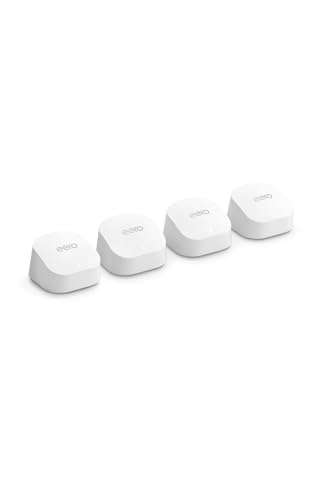
Amazon eero 6+ 4-Pack Mesh System
Best for: Large homes needing smart home hub integration
- Wi-Fi Standard
- Wi-Fi 6
- Speed Rating
- up to a Gigabit
- Coverage Area
- up to 6,000 sq. ft.
- Pack Size
- 4-pack
- Device Capacity
- 75+ devices
The eero 6+ is a Wi-Fi 6 mesh system supporting gigabit speeds and covering up to 6,000 square feet. It handles 75+ devices simultaneously. This 4-pack includes four routers. It features TrueMesh technology to reduce dead spots. The unit also includes a built-in smart home hub for Thread and Zigbee devices. It is designed for homes needing reliable whole-home coverage.
Pros
- Wi-Fi 6 standard with 160 MHz channel support
- Built-in smart home hub for Thread and Zigbee
- Supports up to 75 connected devices
- Covers up to 6,000 square feet
Cons
- Dual-band Wi-Fi 6, not tri-band or Wi-Fi 7
- Limited to gigabit port speeds
- No mention of dedicated backhaul radio
Good fit if
- You need coverage for large homes up to 6,000 sq ft
- You want to connect Thread or Zigbee smart devices
- You require support for over 50 connected devices
Skip if
- You need Wi-Fi 7 speeds
- You require tri-band performance
- You have internet plans exceeding gigabit speeds
Verdict: The eero 6+ 4-Pack Mesh System is a solid choice for large homes needing extensive coverage and smart home integration. It fits users who prioritize device capacity and whole-home reliability over cutting-edge Wi-Fi 7 speeds.

Eero Pro 6E 3-Pack Mesh System
Best for: large homes with gigabit-plus internet
- Wi-Fi Standard
- Wi-Fi 6E
- Speed Rating
- 2.3 Gbps
- Coverage Area
- 6,000 sq. ft.
- Pack Size
- 3-pack
- Port Speed
- 2.5 Gbps
- Device Capacity
- 100+
The eero Pro 6E is a Wi-Fi 6E mesh system designed for large homes. It covers up to 6,000 square feet and supports more than 100 connected devices. The system includes a 2.5 Gbps port, enabling gigabit-plus internet speeds for compatible plans. Wireless speeds reach 1.6 Gbps, while wired connections handle up to 1 Gbps. This 3-pack setup uses TrueMesh technology to route traffic intelligently, reducing dead spots across your network.
Pros
- Wi-Fi 6E support for lower latency on the 6 GHz band
- 2.5 Gbps Ethernet port for gigabit-plus internet plans
- Covers up to 6,000 square feet of space
- Supports 100+ connected devices simultaneously
- TrueMesh technology optimizes traffic routing
Cons
- Higher price point compared to standard Wi-Fi 6 models
- Requires eero app for full management and setup
- Bulkier physical design than compact dual-band units
Good fit if
- You have an internet plan faster than 1 Gbps
- You need coverage for a home larger than 4,000 square feet
- You own multiple Wi-Fi 6E devices
Skip if
- You only need coverage for a small apartment under 2,000 square feet
- Your internet plan is slower than 1 Gbps
- You prefer a minimal footprint for discreet placement
Verdict: eero Pro 6E 3-Pack Mesh System delivers robust Wi-Fi 6E performance and high-speed wired connectivity for large homes with fast internet plans. It suits users who need extensive coverage and high device capacity without sacrificing speed.

NETGEAR Orbi 770 Tri-Band WiFi 7 3-Pack
Best for: Large homes needing high-speed, multi-device support
- Wi-Fi Standard
- WiFi 7
- Speed Rating
- Up to 11 Gbps
- Coverage Area
- Up to 8,000 sq ft
- Frequency Bands
- Tri-Band
- Pack Size
- 3 Pack
- Device Capacity
- Up to 100 devices
The NETGEAR Orbi 770 3-Pack delivers Wi-Fi 7 speeds up to 11 Gbps across 8,000 square feet. This tri-band system supports up to 100 devices simultaneously, ensuring stable connections for streaming and gaming. It works with internet plans up to 2.5 Gbps and includes advanced security features enabled by default. You get guided setup via the Orbi app and the option to expand coverage with additional satellites.
Pros
- Wi-Fi 7 standard with up to 11 Gbps speeds
- Tri-band technology with enhanced backhaul
- Coverage up to 8,000 square feet
- Supports up to 100 connected devices
- Compatible with internet plans up to 2.5 Gbps
Cons
- Higher price point compared to Wi-Fi 6 options
- Requires separate subscription for NETGEAR Armor security
- Larger physical footprint than single-unit routers
Good fit if
- You need whole-home coverage for large spaces up to 8,000 sq ft
- You have many devices connecting simultaneously
- You want future-proof Wi-Fi 7 speeds
Skip if
- You live in a small apartment under 1,500 sq ft
- You want a budget-friendly mesh system
- You prefer a single router over a multi-unit system
Verdict: The NETGEAR Orbi 770 3-Pack is ideal for large homes needing high-speed, multi-device support. Its Wi-Fi 7 capabilities and tri-band design ensure reliable performance for demanding users.

NETGEAR Orbi 370 Series WiFi 7 4-Pack
Best for: Large homes needing high device capacity
- Wi-Fi Standard
- WiFi 7
- Speed Rating
- Up to 5 Gbps
- Coverage Area
- Up to 8,000 sq ft
- Frequency Bands
- Dual-Band
- Pack Size
- 4-Pack
- Device Capacity
- up to 70 devices
The NETGEAR Orbi 370 is a WiFi 7 mesh system sold as a four-unit pack. It covers up to 8,000 square feet and supports up to 70 devices on a single network. The system delivers speeds up to 5 Gbps using dual-band technology with enhanced backhaul. It works with internet plans up to 2.5 Gbps. You get guided setup via the Orbi app and automatic security updates. This pack suits larger homes needing high device capacity.
Pros
- WiFi 7 standard for next-gen speeds
- Four-pack configuration for 8,000 sq ft coverage
- Supports up to 70 connected devices
- Dual-band with enhanced backhaul
- Compatible with plans up to 2.5 Gbps
Cons
- Dual-band design lacks dedicated tri-band backhaul
- No mention of WiFi 6E or 6GHz support
- Requires subscription for advanced security features
Good fit if
- You need a four-unit pack for large spaces
- You want WiFi 7 speeds on a budget
- You have many devices connecting simultaneously
Skip if
- You require tri-band dedicated backhaul
- You need WiFi 6E support
- You prefer a smaller two-unit setup
Verdict: NETGEAR Orbi 370 4-Pack Mesh offers extensive coverage and high device capacity for large homes. It fits users who prioritize WiFi 7 speeds and broad area coverage over tri-band architecture.
Specifications side by side
| Spec | TP-Link Deco X55 3-Pack Wi-Fi 6 | TP-Link Deco Tri-Band WiFi 6E 2-Pack | Amazon eero Pro 7 Tri-Band Mesh System (3-Pack) | Amazon eero 6 Wi-Fi 6 Router (1-Pack) | Amazon eero 6+ 4-Pack Mesh System | Eero Pro 6E 3-Pack Mesh System | NETGEAR Orbi 770 Tri-Band WiFi 7 3-Pack | NETGEAR Orbi 370 Series WiFi 7 4-Pack |
|---|---|---|---|---|---|---|---|---|
| Wi-Fi Standard | Wi-Fi 6 | WiFi 6E | Wi-Fi 7 | Wi-Fi 6 | Wi-Fi 6 | Wi-Fi 6E | WiFi 7 | WiFi 7 |
| Speed Rating | AX3000 | AXE5400 | up to 3.9 Gbps | up to 900 Mbps | up to a Gigabit | 2.3 Gbps | Up to 11 Gbps | Up to 5 Gbps |
| Coverage Area | up to 6500 sq ft | Up to 5,500 Sq.Ft | up to 6,000 sq. ft. | up to 1,500 sq. ft. | up to 6,000 sq. ft. | 6,000 sq. ft. | Up to 8,000 sq ft | Up to 8,000 sq ft |
| Frequency Bands | not specified | Tri-Band | Tri-Band | not specified | not specified | not specified | Tri-Band | Dual-Band |
| Pack Size | 3-Pack | 2-Pack | 3-pack | 1-pack | 4-pack | 3-pack | 3 Pack | 4-Pack |
| Port Speed | Gigabit | not specified | 5 GbE | not specified | not specified | 2.5 Gbps | not specified | not specified |
| Device Capacity | up to 150 | 200 devices | 600+ | 75+ | 75+ devices | 100+ | Up to 100 devices | up to 70 devices |
| Frequency Band | not specified | Tri-Band | Tri-Band | not specified | not specified | not specified | not specified | not specified |
| Dimensions | 4.33 × 4.33 × 4.49 inches | 4.13 × 4.13 × 6.67 inches | 5.79 × 3.11 × 7.09 inches | 3.91 × 3.82 × 2.42 inches | not specified | 5.47 × 5.47 × 2.21 inches | not specified | not specified |
| Weight | 5.07 pounds | 2.69 pounds | 1.68 pounds | 10.6 ounces | not specified | 1.41 pounds | not specified | not specified |
| Size | 3 Pack | 2 Pack | not specified | 1 router | 4 routers | not specified | 3 Pack | 4-Pack |
| Color | Black, White | Black and White | WHITE | WHITE | not specified | WHITE | not specified | White |
| Model | Deco X55 | Deco XE75(2-pack) | ME10001 | N010111 | not specified | S010001 | RBE773-100NAS | RBE374-100NAS |
Frequently asked questions
How many devices can a mesh wifi system handle?
Device capacity varies by model. The eero 6 supports over 75 devices. The eero 6+ also handles 75+ devices. The eero Pro 6E supports 100+ devices. Check the specifications for your specific unit to ensure it meets your household needs.
What is the coverage area of a 3-pack mesh system?
Most 3-pack systems cover large spaces. The Amazon eero Pro 7 covers 6,000 square feet. The eero 6+ 3-Pack also covers 6,000 square feet. The eero Pro 6E 3-Pack covers 6,000 square feet. These systems are designed for extensive whole-home coverage.
Does a tri-band mesh wifi system use a dedicated backhaul?
Tri-band systems often include a dedicated backhaul. The TP-Link Deco XE75 uses Wi-Fi 6E with tri-band architecture. This design helps maintain speed between nodes. The eero Pro 6E also features tri-band capabilities. This setup reduces congestion on the main bands for connected devices.
Which mesh systems support Wi-Fi 7?
Several top picks feature the latest standard. The Amazon eero Pro 7 uses Wi-Fi 7. The NETGEAR Orbi 770 3-Pack uses Wi-Fi 7. The NETGEAR Orbi 370 4-Pack also uses Wi-Fi 7. These systems offer next-generation performance for high-speed internet plans.
Are there mesh systems with gigabit ethernet ports?
Some models include gigabit wired connectivity. The eero 6+ 4-Pack system features gigabit port speeds. This allows for stable wired connections to key devices. Check the port speed specifications to ensure compatibility with your internet plan and wired equipment.
What is the best mesh wifi for large homes with many devices?
High-capacity systems suit large homes. The TP-Link Deco X55 3-Pack is ideal for large homes with many devices. The NETGEAR Orbi 370 4-Pack offers extensive coverage and high device capacity. These systems prioritize coverage area and port availability for demanding environments.
Can a single mesh router cover a small apartment?
Single routers work for smaller spaces. The Amazon eero 6 is a single router. It covers 1,500 square feet. It supports over 75 devices. This setup fits small apartments or renters who need easy setup without the cost of a multi-pack system.