8 Best NETGEAR Network Switches with 8 Ports, Compared
As an Amazon Associate we earn from qualifying purchases. Links on this page are affiliate links.
Finding the best NETGEAR network switches with 8 Ports requires comparing published specifications to match your hardware needs. We analyzed 8 models to identify the most suitable options for your setup. The NETGEAR 8-Port Gigabit Unmanaged Switch leads as the top pick because its silent fanless metal housing ensures reliable operation without noise. These selections are based strictly on the specifications published on the listings. This guide helps you decide which switch fits your bandwidth and management requirements.
Quick picks
The best fit for you
- You want the best overall silent switch NETGEAR 8-Port Gigabit Unmanaged Switch It offers unmanaged gigabit speeds in a silent fanless metal housing.
- You need high-power PoE for devices NETGEAR 8-Port Gigabit PoE+ Switch It provides 123W of PoE+ power across all eight ports.
- You want the smallest and lightest unit NETGEAR 8-Port Unmanaged Gigabit Switch It weighs only 13.8 ounces and fits in tight spaces.
- You need faster 2.5Gbps multi-gigabit speeds NETGEAR 8-Port 2.5G Unmanaged Switch It delivers 2.5Gbps throughput without requiring complex network management.
Our 8 picks

NETGEAR 8-Port Gigabit Unmanaged Switch
Best for: silent plug-and-play home network expansion
- Number of Ports
- 8 Ports (what this guide is about)
- Port Count
- 8
- Port Speed
- 1.0Gbps
- Management Type
- Unmanaged
- Mounting Type
- Desktop or Wall-Mount
- Dimensions
- 8.54 × 6.5 × 4.29 inches
This NETGEAR unit gives you an eight-port unmanaged wired networking switch housed in a compact metal chassis. It features eight 1.0 Gbps auto-negotiating Ethernet ports compatible with Cat5e and Cat6 cabling. The fanless design ensures completely silent running, while IEEE 802.3az energy efficiency cuts electricity consumption. It fits you if you want dependable plug-and-play desktop or wall-mounted expansion without managing settings or installing software.
Pros
- Eight 1.0 Gbps auto-negotiating Ethernet ports
- Fanless metal chassis for silent operation
- Supports desktop or wall-mount placement
- IEEE 802.3az Energy Efficient Ethernet compliance
Cons
- Unmanaged design provides no software configuration or traffic control
- No Power over Ethernet support for connected devices
- Restricted to U.S. and Canada use only
Good fit if
- You need a simple plug-and-play wired expansion without software setup.
- You want silent operation in a desktop or wall-mounted space.
- You use standard Cat5e or Cat6 cables for 1.0 Gbps connections.
Skip if
- You need Power over Ethernet to power access points or cameras.
- You require managed switch capabilities like VLANs or network controls.
- You need network speeds higher than 1.0 Gbps.
Verdict: NETGEAR 8-Port Gigabit Unmanaged Switch delivers reliable plug-and-play gigabit connectivity with a silent fanless metal housing. It is the benchmark choice when you need basic port expansion without management overhead.

NETGEAR 8-Port Gigabit PoE+ Switch
Best for: high-power PoE+ devices needing silent operation
- Number of Ports
- 8 Ports (what this guide is about)
- Port Count
- 8
- Port Speed
- 1.0 Gbps
- Management Type
- Unmanaged
- PoE Support
- PoE+
- PoE Power Budget
- 123W
This unmanaged switch gives you eight Gigabit Ethernet ports that all deliver PoE+ power. With a 123W total power budget, it runs multiple power-hungry hardware devices like access points and IP cameras through single Ethernet runs. Its fanless metal chassis operates silently and mounts on a desk, wall, or standard rack. It fits your setup if you need high PoE output without managing software settings or switch configurations.
Pros
- Eight Gigabit ports all support PoE+ output
- 123W total PoE power budget
- Silent, fanless metal enclosure
- Supports desktop, wall, and rackmount placement
Cons
- Unmanaged with no VLAN, QoS, or traffic monitoring settings
- Port speeds cap at 1.0 Gbps with no multi-gigabit support
Good fit if
- You need up to 123W of PoE+ power distributed across up to eight devices.
- You want a silent, fanless switch suitable for quiet rooms or office spaces.
- You prefer a plug-and-play setup without software or web management.
Skip if
- You require managed features such as VLANs, port trunking, or remote configuration.
- You need network speeds exceeding 1.0 Gbps.
Verdict: NETGEAR 8-Port Gigabit PoE+ Switch delivers 123W of PoE+ power across all eight ports in a silent, plug-and-play metal design. It provides ample power for demanding network gear without the complexity of switch management.

NETGEAR 8-Port Unmanaged Gigabit Switch
Best for: silent plug-and-play home wired expansion
- Number of Ports
- 8 Ports (what this guide is about)
- Port Count
- 8
- Port Speed
- 1.0Gbps
- Management Type
- Unmanaged
- Mounting Type
- Desktop or wall-mount
- Dimensions
- 6.22 × 4.02 × 1.02 inches
The NETGEAR 8-Port Gigabit Unmanaged Switch adds wired connectivity to your local network setup. You get eight auto-negotiating 1.0Gbps Ethernet ports in a compact metal chassis that supports desktop or wall mounting. Its fanless architecture ensures completely silent operation alongside IEEE 802.3az energy-efficiency standards. This plug-and-play unit suits you if you need basic wired port expansion without configuration, software installation, or management menus.
Pros
- Eight auto-negotiating 1.0Gbps Gigabit Ethernet ports
- Fanless design for silent desktop or wall-mounted operation
- Plug-and-play setup requires no software or configuration
- Complies with IEEE 802.3az Energy Efficient Ethernet
Cons
- Unmanaged switch with no traffic management controls
- No Power over Ethernet support on any port
- Regional compatibility restricted to U.S. and Canada
Good fit if
- You need eight basic 1.0Gbps Ethernet connections without manual configuration.
- You plan to place the device in a quiet room requiring fanless hardware.
- You want desktop or wall mounting options in a metal chassis.
Skip if
- You need Power over Ethernet to power devices like access points.
- You require managed switch capabilities like traffic monitoring or VLANs.
- You intend to use hardware outside of the U.S. or Canada.
Verdict: NETGEAR 8-Port Gigabit Unmanaged Switch provides silent, plug-and-play wired expansion with eight standard 1.0Gbps ports. It delivers essential local network connectivity in a metal enclosure without requiring management.

NETGEAR 8-Port Smart Managed Gigabit Switch
Best for: silent network setups needing smart management controls
- Number of Ports
- 8 Ports (what this guide is about)
- Port Count
- 8
- Port Speed
- 1.0Gbps
- Management Type
- Smart Managed
- Mounting Type
- Desktop, Wall-Mount
- Dimensions
- 4.13 × 6.22 × 1.06 inches
This NETGEAR unit is an eight-port gigabit switch housed in a compact metal chassis. It delivers 1.0 Gbps speeds across eight auto-negotiating Ethernet ports, includes one power delivery port, and features smart software for secure access and SNMP management. A fanless design keeps operation completely silent on a desk or wall. It suits you if you need managed network controls and remote monitoring without adding noise to your workspace.
Pros
- Eight auto-negotiating 1.0 Gbps gigabit Ethernet ports
- Smart management with SNMP support and one year of remote cloud access
- Fanless metal enclosure provides silent operation
- Supports desktop and wall-mount installation
Cons
- Caps connection speeds at 1.0 Gbps with no multi-gigabit support
- Power delivery is limited to a single port rather than all eight
Good fit if
- You need smart managed switch features like SNMP or remote cloud configuration.
- You want silent, fanless operation on a desk or mounted to a wall.
- You need to power a single compatible device via a dedicated power delivery port.
Skip if
- You need multi-gigabit speeds exceeding 1.0 Gbps for faster local transfers.
- You need Power over Ethernet supplied across multiple ports.
Verdict: NETGEAR 8-Port Smart Managed Gigabit Switch gives you full gigabit speeds with smart management and silent, fanless hardware. It is an effective choice when you need network configuration tools and wall mounting in a compact setup.
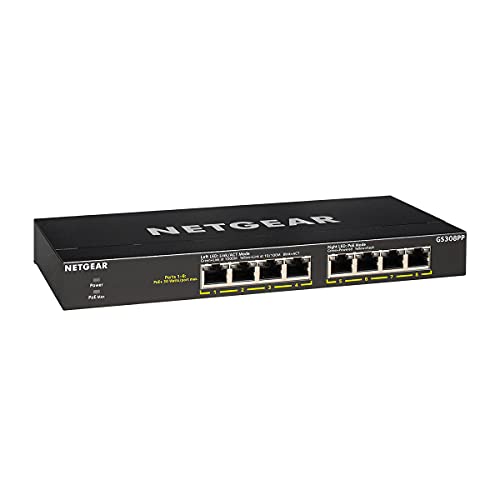
NETGEAR 8-Port Gigabit PoE+ Unmanaged Switch
Best for: silent plug-and-play PoE+ device setups
- Number of Ports
- 8 Ports (what this guide is about)
- Port Count
- 8
- Port Speed
- 1.0 Gbps
- Management Type
- Unmanaged
- PoE Support
- PoE+
- PoE Power Budget
- 83W
View on Amazon: NETGEAR 8-Port Gigabit PoE+ Unmanaged Switch
This unmanaged switch gives you eight 1.0 Gbps Gigabit Ethernet ports housed in a compact metal case. All eight ports support PoE+ with an 83W total power budget and dynamic power allocation, letting you power connected hardware directly over network cables. The fanless design ensures silent operation on a desk or wall. It suits you if you need straightforward plug-and-play PoE+ power without network configuration.
Pros
- Eight Gigabit Ethernet ports with 1.0 Gbps speeds
- 83W total PoE+ power budget across all eight ports
- Dynamic PoE allocation balances power across connected devices
- Fanless design for silent desktop or wall-mounted operation
Cons
- Unmanaged design lacks VLAN support and network configuration tools
- Maximum port speeds limited to 1.0 Gbps without multi-gigabit support
Good fit if
- You need to power multiple PoE+ devices within an 83W total limit.
- You want silent plug-and-play operation for desktop or wall placement.
- You do not need managed switch features or custom traffic control.
Skip if
- You need managed switch features, traffic monitoring, or VLAN segmentation.
- You require network speeds faster than 1.0 Gbps.
- Your connected PoE hardware exceeds an 83W combined power draw.
Verdict: NETGEAR 8-Port Gigabit PoE+ Unmanaged Switch delivers silent, plug-and-play power across all eight ports with an 83W PoE+ budget. It provides a simple, hardware-only setup when you need wired connections without configuration tasks.

NETGEAR 8-Port Smart Managed PoE+ Switch
Best for: Small businesses needing managed PoE
- Number of Ports
- 8 Ports (what this guide is about)
- Port Count
- 8
- Port Speed
- 1.0Gbps
- Management Type
- Easy Smart Managed
- PoE Support
- PoE+
- PoE Power Budget
- 62W
This NETGEAR switch provides 8 Gigabit Ethernet ports with PoE+ support and a 62W power budget. It features an Easy Smart Managed interface for VLANs and QoS. The fanless metal design ensures silent, energy-efficient operation. You can mount it on a desk or wall. It suits small businesses needing managed PoE without high power demands.
Pros
- 8 Gigabit Ethernet ports with PoE+ support
- 62W total PoE power budget
- Fanless design for silent operation
- Easy Smart Managed features like VLAN and QoS
- Compact metal chassis for desktop or wall mounting
Cons
- 62W PoE budget is lower than some competitors
- No mention of web browser management interface
- No mention of mobile app control
Good fit if
- You need managed PoE features for small business networks
- You require silent operation with a fanless design
- You want to mount the switch on a wall or desk
Skip if
- You need higher PoE power budgets for high-draw devices
- You require 2.5G multi-gigabit port speeds
- You prefer unmanaged switches for simplicity
Verdict: NETGEAR GS308EP 8-Port PoE+ Switch is a solid choice for small offices needing managed PoE features in a silent, compact form factor.

NETGEAR 8-Port 2.5G Unmanaged Switch
Best for: silent 2.5Gbps multi-gigabit plug-and-play networking
- Number of Ports
- 8 Ports (what this guide is about)
- Port Count
- 8
- Port Speed
- 2.5 Gbps
- Management Type
- Unmanaged
- Mounting Type
- Desktop, Wall-Mount
- Weight
- 1.65 pounds
This NETGEAR switch gives you eight 2.5Gbps Multi-Gigabit Ethernet ports in an unmanaged, plug-and-play format. It features a fanless metal housing that supports desktop or wall mounting while operating silently. Auto-negotiating ports run over existing Cat5e or Cat6 cabling with IEEE 802.3az energy efficiency. It suits you if you need faster local wired speeds than standard Gigabit without configuring software.
Pros
- Eight 2.5Gbps Multi-Gigabit Ethernet ports
- Fanless metal chassis for silent operation
- Desktop and wall-mount installation support
- Works over standard Cat5e and Cat6 cabling
Cons
- Unmanaged design lacks VLAN or traffic management tools
- No Power over Ethernet support provided
- Manufactured for use only in the US and Canada
Good fit if
- You need 2.5Gbps speeds across eight wired connections.
- You want simple plug-and-play setup without software management.
- You require a silent, fanless metal unit for a desk or wall.
Skip if
- You need managed switch controls or VLAN configurations.
- You require Power over Ethernet to run access points or cameras.
- You operate your network outside the United States or Canada.
Verdict: NETGEAR 8-Port 2.5G Unmanaged Switch delivers multi-gigabit Ethernet speeds in a quiet, zero-configuration metal package. It is an effective hardware choice when you need 2.5Gbps throughput without network management complexity.

NETGEAR 8-Port Easy Smart Gigabit Switch
Best for: silent, browser-based basic network segmentation
- Number of Ports
- 8 Ports (what this guide is about)
- Port Count
- 8
- Port Speed
- 1Gbps
- Management Type
- Easy Smart
This NETGEAR unit gives you eight 1Gbps Ethernet ports with Easy Smart management inside a fanless metal housing. You can configure network settings like traffic prioritization, loop detection, and up to 64 VLANs directly through an operating-system-agnostic web browser interface. It suits you if you want basic network segmentation and monitoring tools for your home or small office setup without stepping up to fully managed switch hardware.
Pros
- Web-based Easy Smart interface compatible with Windows, Mac, and Linux
- Supports up to 64 VLANs, QoS prioritization, and IGMP snooping
- Fanless metal chassis operating at 0 dBA
- Built-in protection tools including DoS prevention and loop detection
Cons
- Does not support Power over Ethernet (PoE)
- Port speeds are limited to 1Gbps without multi-gigabit options
Good fit if
- You need VLAN support to segment IoT devices or guest networks.
- You want traffic control through a web browser without platform-specific software.
- You require silent, fanless operation for a desktop or quiet room.
Skip if
- You need to power access points or cameras over Ethernet cables.
- You require network speeds faster than 1Gbps.
Verdict: NETGEAR 8-Port Easy Smart Gigabit Switch balances essential traffic controls with quiet reliability for wired setups. It provides network segmentation and silent operation without the overhead of enterprise-grade hardware.
Specifications side by side
| Spec | NETGEAR 8-Port Gigabit Unmanaged Switch | NETGEAR 8-Port Gigabit PoE+ Switch | NETGEAR 8-Port Unmanaged Gigabit Switch | NETGEAR 8-Port Smart Managed Gigabit Switch | NETGEAR 8-Port Gigabit PoE+ Unmanaged Switch | NETGEAR 8-Port Smart Managed PoE+ Switch | NETGEAR 8-Port 2.5G Unmanaged Switch | NETGEAR 8-Port Easy Smart Gigabit Switch |
|---|---|---|---|---|---|---|---|---|
| Port Count | 8 | 8 | 8 | 8 | 8 | 8 | 8 | 8 |
| Port Speed | 1.0Gbps | 1.0 Gbps | 1.0Gbps | 1.0Gbps | 1.0 Gbps | 1.0Gbps | 2.5 Gbps | 1Gbps |
| Management Type | Unmanaged | Unmanaged | Unmanaged | Smart Managed | Unmanaged | Easy Smart Managed | Unmanaged | Easy Smart |
| PoE Support | not specified | PoE+ | not specified | not specified | PoE+ | PoE+ | not specified | not specified |
| PoE Power Budget | not specified | 123W | not specified | not specified | 83W | 62W | not specified | not specified |
| Mounting Type | Desktop or Wall-Mount | Desktop, Wall-Mount, Rackmount | Desktop or wall-mount | Desktop, Wall-Mount | Desktop, Wall-mount | Desktop or wall-mount | Desktop, Wall-Mount | not specified |
| Number of Ports | 8 Ports | 8 Ports | 8 Ports | 8 Ports | 8 Ports | 8 Ports | 8 Ports | 8 Ports |
| Dimensions | 8.54 × 6.5 × 4.29 inches | 4.02 × 1.06 × 9.29 inches | 6.22 × 4.02 × 1.02 inches | 4.13 × 6.22 × 1.06 inches | not specified | 6.2 × 4 × 1.1 inches | not specified | not specified |
| Weight | 1.72 pounds | 1.3 pounds | 13.8 ounces | 15.2 ounces | 1.32 pounds | 2.43 pounds | 1.65 pounds | not specified |
| Size | 8-Port | 8 Port, PoE+ @ 123W | 8 Port | 8 Port | 8 Port, PoE+ @ 83W | 8 Port, PoE+ @ 62W | 8 Port, 2.5G, Unmanaged | 8-Port |
| Color | Blue | black | Yellow | Black | Black | Black | Black | Gray |
| Model | GS108-400NAS | GS108PP-100NAS | GS308-300PAS | GS108Tv3 | GS308PP-100NAS | GS308EP-100NAS | MS308-100NAS | GS308E-400NAS |
How to choose the right switch
-
Check port speed needs
You must verify the data rate your devices require. Most models provide standard Gigabit speeds, which handle typical home traffic well. If you plan to upgrade to faster internet plans or use high-speed local storage, you should look for 2.5G capabilities. The NETGEAR 8-Port 2.5G Unmanaged Switch supports 2.5Gbps throughput. This ensures your network does not become a bottleneck for modern hardware. Standard Gigabit ports remain sufficient for most basic wired connections.
-
Assess PoE power requirements
If you power devices like cameras or access points, you need PoE support. You must check the total power budget to ensure the switch can handle all connected gear. The NETGEAR 8-Port Gigabit PoE+ Switch offers 123W of power. This high budget suits demanding setups with multiple high-power devices. Other models, like the GS308PP, provide 83W. The GS308EP offers 62W. Match the wattage to your specific device list to avoid power shortages.
-
Decide on management level
You need to determine if you want plug-and-play simplicity or configuration tools. Unmanaged switches require no setup and work immediately upon connection. This suits users who just need more ports. Smart Managed options, like the GS108Tv3, allow you to configure VLANs and traffic prioritization. This is useful for small offices or advanced home labs. Easy Smart switches offer basic browser-based controls. Choose unmanaged for silence and ease, or smart for network segmentation and control.
-
Consider physical dimensions
You should measure the space where the switch will sit. Most units are compact, but sizes vary. The GS308-300PAS is notably small and light, weighing only 13.8 ounces. It fits easily in tight spots. The GS108-400NAS is larger, measuring 8.54 inches in length. You must ensure your mounting location or desk space can accommodate the chassis. Check the width, height, and length in the specs. This prevents fitment issues when installing the hardware in your home or office.
-
Evaluate noise and cooling
You should prioritize silent operation if placing the switch in a living area. All listed models use fanless metal housings. This design eliminates noise and improves reliability. You do not need to worry about cooling fans failing or creating sound. The metal casing also helps dissipate heat passively. This makes any of these switches suitable for bedrooms, home theaters, or quiet offices. You get reliable performance without the distraction of mechanical noise. This is a key advantage over older plastic switch designs.
Frequently asked questions
Which NETGEAR 8-port switch is best for silent operation?
Most models in this list are designed for silent, fanless operation. The top-ranked NETGEAR 8-Port Gigabit Unmanaged Switch features a metal housing that dissipates heat without fans. Other options like the GS108PP and GS308 also prioritize quiet performance. This makes them ideal for home offices or living spaces where noise is a concern.
Do all these switches support Power over Ethernet?
No, only specific models support Power over Ethernet. The NETGEAR 8-Port Gigabit PoE+ Switch provides 123W of power, while the GS308PP offers 83W. The GS308EP provides 62W for managed PoE needs. Standard unmanaged gigabit switches like the GS108 and GS308 do not include PoE capabilities, so you must check the attributes carefully.
Can I manage these switches remotely via a web interface?
Only the smart managed models offer this feature. The NETGEAR 8-Port Smart Managed Gigabit Switch and the Easy Smart Gigabit Switch allow for browser-based configuration. Unmanaged switches like the GS108 and GS308 operate with zero configuration and lack any management interface. You cannot remotely adjust settings on the unmanaged units.
Which switch offers the fastest port speeds?
The NETGEAR 8-Port 2.5G Unmanaged Switch provides the highest speeds. It supports 2.5Gbps multi-gigabit Ethernet, whereas most other models are limited to standard Gigabit speeds. This makes the MS308 suitable for high-throughput tasks or future-proofing your network against faster internet plans and local file transfers.
Are these switches suitable for wall mounting?
Yes, several models support wall mounting. The NETGEAR 8-Port Smart Managed Gigabit Switch is explicitly noted for its compact size and wall-mounting capability. Many other units, such as the GS108 and GS308, have compact metal enclosures that facilitate easy placement in tight spaces or on walls using standard mounting hardware.
Which is the lightest 8-port NETGEAR switch?
The NETGEAR 8-Port Unmanaged Gigabit Switch (GS308) is the lightest option. It weighs only 13.8 ounces. In comparison, the GS308EP weighs 2.43 pounds, and the GS108 weighs 1.72 pounds. The lighter weight makes the GS308 easier to transport or install in locations where minimal hardware mass is preferred.