Best NETGEAR Wifi Routers Under $200 in 2026: 8 Picks
As an Amazon Associate we earn from qualifying purchases. Links on this page are affiliate links.
Finding the best NETGEAR wifi routers under $200 requires matching your internet plan to the right hardware. We compared 8 models based strictly on their published specifications. The NETGEAR Nighthawk Tri-Band WiFi 7 Router leads because it supports Wi-Fi 7 and covers 2,500 square feet. This guide helps you decide which router fits your home size and device count. You will see options for gaming, mesh systems, and budget setups. Each pick addresses specific technical needs like tri-band separation or wired port speeds.
Quick picks
The best fit for you
- You have fast internet plans and WiFi 7 devices NETGEAR Nighthawk Tri-Band WiFi 7 Router It delivers 9.3 Gbps speeds and supports Wi-Fi 7 for top-tier performance.
- You need whole-home AX5400 mesh coverage Netgear Orbi Tri-Band WiFi 6 Mesh System This tri-band mesh system provides robust AX5400 coverage for larger homes.
- You want a compact router for small spaces NETGEAR Nighthawk AC1900 Gigabit Router It measures 1.97 inches in height, making it suitable for tight spots.
- You prioritize wired stability and low latency for gaming NETGEAR Nighthawk Pro Gaming AC2600 Router This router focuses on wired stability and traffic prioritization for gamers.
Our 8 picks

NETGEAR Nighthawk Tri-Band WiFi 7 Router
Best for: fast internet plans and WiFi 7 devices
- Wi-Fi Standard
- WiFi 7
- Frequency Bands
- Tri-Band
- Coverage Area
- 2,500 sq ft
- Device Capacity
- 100
- Max Port Speed
- 2.5 Gbps
- Ethernet Ports
- 5
The NETGEAR RS300 is a tri-band WiFi 7 router delivering up to 9.3 Gbps across 2.4 GHz, 5 GHz, and 6 GHz bands. It covers up to 2,500 square feet and supports 100 devices. You get multi-gig wired connections via two 2.5 Gig LAN ports and one 2.5 Gig WAN port. The Nighthawk app manages the network, including speed tests and guest access. This setup suits homes needing high throughput for streaming and gaming.
Pros
- WiFi 7 standard with 9.3 Gbps aggregate speed
- Tri-band operation on 2.4, 5, and 6 GHz
- Two 2.5 Gig LAN ports for fast wired devices
- Supports up to 100 connected devices
- Covers up to 2,500 square feet
Cons
- 2.5 Gig ports require compatible network hardware to utilize full speed
- Coverage is limited to 2,500 square feet for larger homes
- NETGEAR Armor security requires a paid subscription after the trial
Good fit if
- You have internet plans faster than 1 Gbps
- You want to use the latest WiFi 7 devices
- You need dedicated 6 GHz band for low latency
Skip if
- You live in a home larger than 2,500 square feet
- You do not have multi-gig capable devices or modem
- You want built-in advanced security without a subscription
Verdict: The NETGEAR RS300 WiFi 7 Router delivers top-tier wireless speeds and multi-gig wired options for tech-forward households. It is the best fit for users with fast internet plans and compatible devices who need high device capacity.

NETGEAR Nighthawk WiFi 7 Router
Best for: homes with multi-gig internet plans
- Wi-Fi Standard
- WiFi 7
- Frequency Bands
- Dual-Band
- Coverage Area
- Up to 2,500 sq ft
- Device Capacity
- Up to 80 devices
- Max Port Speed
- 2.5 Gbps
- Dimensions
- 10.9 × 7.13 × 7.05 inches
The NETGEAR RS180 is a dual-band WiFi 7 router offering up to 5.5 Gbps of wireless speed. It covers areas up to 2,500 square feet and supports up to 80 connected devices. The unit includes two 2.5 Gigabit ports for multi-gig internet plans and three 1 Gigabit LAN ports. You get app-based management and automatic firmware updates for security.
Pros
- WiFi 7 standard for faster speeds than WiFi 6
- Two 2.5 Gigabit WAN/LAN ports for multi-gig internet
- Supports up to 80 connected devices simultaneously
- Covers up to 2,500 square feet of space
Cons
- Limited to dual-band frequency configuration
- Coverage area is smaller than tri-band mesh options
- Requires subscription for advanced NETGEAR Armor security
Good fit if
- You have a multi-gigabit internet plan
- You need WiFi 7 speeds for future-proofing
- You want app-based network management
Skip if
- You need coverage larger than 2,500 square feet
- You require tri-band connectivity for heavy traffic
- You want comprehensive security without a subscription
Verdict: The NETGEAR RS180 WiFi 7 Router is a solid choice for users with multi-gig internet plans who need modern WiFi 7 speeds and app control. It suits homes up to 2,500 square feet that do not require tri-band separation.

NETGEAR Nighthawk AX5400 WiFi 6 Router
Best for: Small homes with under 25 devices
- Wi-Fi Standard
- Wi-Fi 6
- Speed Rating
- AX5400
- Frequency Bands
- Dual-Band
- Coverage Area
- Up to 2,500 sq ft
- Device Capacity
- Up to 25 devices
- Max Port Speed
- 1 Gbps
The NETGEAR RAX50 is a dual-band Wi-Fi 6 router offering AX5400 speeds up to 5.4 Gbps. It covers up to 2,500 square feet and supports up to 25 devices. You get four Gigabit Ethernet ports and one USB 3.0 port for storage sharing. It works with any ISP up to 1 Gbps. This router suits small to medium homes needing reliable performance for streaming and gaming without tri-band complexity.
Pros
- AX5400 Wi-Fi 6 speeds up to 5.4 Gbps
- Covers up to 2,500 square feet
- Supports up to 25 connected devices
- Four Gigabit Ethernet ports for wired connections
- One USB 3.0 port for network storage
Cons
- Dual-band only, lacking a dedicated 5 GHz backhaul for mesh
- Limited to 25 device capacity
- Only a 1-year limited warranty
Good fit if
- You need a reliable router for a home under 2,500 sq ft
- You have up to 25 devices connecting simultaneously
- You want Wi-Fi 6 performance without tri-band cost
Skip if
- You require coverage for larger homes over 2,500 sq ft
- You need to connect more than 25 devices
- You want tri-band speeds for dedicated mesh backhaul
Verdict: The NETGEAR RAX50 AX5400 Dual-Band Router delivers solid Wi-Fi 6 performance for small homes. It fits users with moderate device counts and standard internet plans under 1 Gbps.

NETGEAR Nighthawk AX5400 WiFi 6 Router
Best for: small homes needing strong security
- Wi-Fi Standard
- WiFi 6
- Speed Rating
- AX5400
- Frequency Bands
- Dual-Band
- Coverage Area
- 2,500 sq. ft.
- Device Capacity
- 25 devices
- Max Port Speed
- 1 Gbps
This NETGEAR Nighthawk RAX54S is a dual-band Wi-Fi 6 router delivering AX5400 speeds. It covers up to 2,500 square feet and supports 25 devices. The unit includes four Gigabit Ethernet ports and one USB 3.0 port. It features built-in security with automatic firmware updates and a one-year subscription to NETGEAR Armor. You can manage the network using the Nighthawk app.
Pros
- AX5400 dual-band Wi-Fi 6 speeds
- Covers up to 2,500 square feet
- Supports up to 25 connected devices
- Includes four Gigabit Ethernet ports
- One-year NETGEAR Armor security subscription
Cons
- Limited to 25 device capacity
- Dual-band only, lacks tri-band support
- Made for use in the U.S. only
Good fit if
- You need reliable coverage for a small to medium home
- You want a router with strong built-in security features
- You have up to 25 devices to connect simultaneously
Skip if
- You require Wi-Fi 7 speeds for future-proofing
- You need to connect more than 25 devices
- You live outside the United States
Verdict: NETGEAR Nighthawk RAX54S AX5400 Router is a solid choice for renters or small homeowners who prioritize security and ease of setup over raw capacity. It fits users with modest device counts who want a straightforward, app-managed connection.
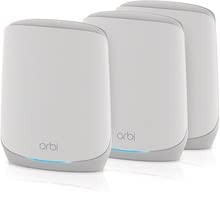
Netgear Orbi Tri-Band WiFi 6 Mesh System
Best for: Whole-home AX5400 mesh coverage
- Wi-Fi Standard
- WiFi 6
- Speed Rating
- AX5400
- Frequency Bands
- Tri-Band
- Weight
- 5 pounds
This NETGEAR Orbi AX5400 system uses Wi-Fi 6 tri-band technology to deliver speeds up to 5.4Gbps. It includes one router and two satellites for whole-home coverage. The setup features a dedicated wireless backhaul and seven gigabit LAN ports. You get reliable performance for streaming and gaming. The system supports voice control via Alexa or Google Assistant for easy management.
Pros
- AX5400 tri-band Wi-Fi 6 standard
- Includes router and two satellites
- Seven gigabit LAN ports
- Dedicated wireless backhaul
- Voice control support
Cons
- Sold as a renewed item
- Heavier build at 5 pounds
- No mention of Ethernet backhaul ports
Good fit if
- You need whole-home mesh coverage
- You want dedicated tri-band backhaul
- You have many wired devices
Skip if
- You prefer brand new units
- You need Wi-Fi 7 speeds
- You want a single router
Verdict: NETGEAR Orbi Tri-Band Mesh System provides robust AX5400 coverage for larger homes. It suits users who prioritize wired connections and mesh reliability over new condition status.

NETGEAR Nighthawk Tri-Band Wi-Fi 6E Router
Best for: Users needing 6GHz Wi-Fi and 2.5G ports
- Wi-Fi Standard
- WiFi 6E
- Speed Rating
- AXE7800
- Frequency Bands
- Tri-Band
- Coverage Area
- up to 2,500 sq. ft.
- Device Capacity
- 40 Devices
- Max Port Speed
- 2.5G
The NETGEAR RAXE300 is a tri-band Wi-Fi 6E router designed for homes up to 2,500 square feet. It supports up to 40 devices and delivers AXE7800 speeds. The system includes a 2.5G Ethernet port and four gigabit ports. You get built-in security features and app management. This router suits users who need the latest 6GHz band for high-bandwidth tasks like 8K streaming or VR gaming.
Pros
- Tri-band Wi-Fi 6E with a dedicated 6GHz band
- AXE7800 speed rating with a 1.7GHz quad-core processor
- One 2.5G Ethernet port and four 1G ports
- Supports up to 40 connected devices
- NETGEAR Armor security suite with a 30-day trial
Cons
- Coverage is limited to 2,500 square feet
- Maximum device capacity is 40 units
- Physical dimensions are large at 13.6 inches long
Good fit if
- You want to use the 6GHz band for low-latency gaming
- You have a gigabit internet plan and need wired 2.5G uplink
- You need to connect around 40 devices in a single home
Skip if
- You require a mesh system for coverage over 2,500 square feet
- You only have older Wi-Fi 5 devices and do not need 6E
- You need more than four wired Ethernet connections
Verdict: The NETGEAR RAXE300 Tri-Band Wi-Fi 6E Router is a solid choice for users who need 6GHz connectivity and a 2.5G port for their wired setup.

NETGEAR Nighthawk AC1900 Gigabit Router
Best for: small homes needing wired gigabit ports
- Speed Rating
- AC1900
- Frequency Bands
- Dual-Band
- Coverage Area
- 1800 sq ft
- Device Capacity
- 30 devices
- Max Port Speed
- 1 Gbps
- Ethernet Ports
- 4
The NETGEAR R7000 delivers AC1900 speeds across dual bands, covering up to 1800 square feet. It supports up to 30 devices, making it suitable for small homes. The unit includes four gigabit Ethernet ports, a 1GHz dual-core processor, and USB 3.0 and 2.0 ports for storage sharing. It features Beamforming+ and Smart Connect for optimized traffic. This router is a practical option for users needing reliable wired and wireless connectivity.
Pros
- AC1900 speed with 600 Mbps on 2.4 GHz and 1300 Mbps on 5 GHz
- Four gigabit Ethernet ports for wired connections
- Supports up to 30 connected devices
- Includes USB 3.0 and 2.0 ports for network storage
- 1GHz dual-core processor for handling traffic
Cons
- Coverage area is limited to 1800 square feet
- Maximum port speed is capped at 1 Gbps
- Device capacity is restricted to 30 units
Good fit if
- You need a reliable dual-band router for a small apartment or home
- You require wired gigabit connections for gaming consoles or PCs
- You want to share USB storage devices across your network
Skip if
- You need coverage larger than 1800 square feet
- You require speeds faster than AC1900
- You need to connect more than 30 devices simultaneously
Verdict: NETGEAR R7000 AC1900 Dual-Band Router is a solid choice for small spaces needing stable gigabit wired ports. It fits users who prioritize reliable connectivity over high-speed wireless capabilities.
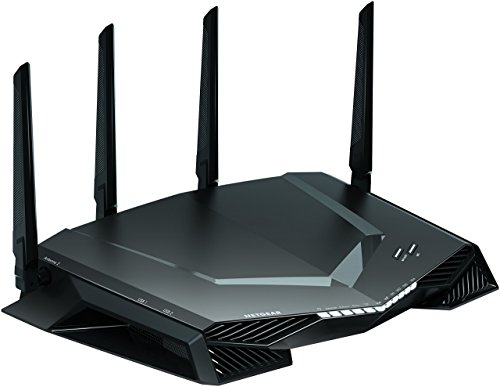
NETGEAR Nighthawk Pro Gaming AC2600 Router
Best for: Wired gaming setups with low latency needs
- Speed Rating
- AC2600
- Frequency Bands
- Dual-Band
- Max Port Speed
- 1 Gbps
- Ethernet Ports
- 4
- Use Case
- Gaming
- Dimensions
- 14.9 × 10.8 × 4.18 inches
This dual-band AC2600 router delivers up to 2.6 Gbps of wireless speed. It includes four 1-Gigabit Ethernet ports for wired connections. A 1.7 GHz dual-core processor handles network efficiency. Advanced Quality of Service prioritizes gaming traffic. Geo-filtering helps you connect to closer servers. It suits gamers who need low latency and stable wired links.
Pros
- AC2600 dual-band speeds up to 2.6 Gbps
- Four 1-Gigabit Ethernet ports for wired connectivity
- 1.7 GHz dual-core processor for network efficiency
- Advanced Quality of Service reduces lag spikes
Cons
- Dual-band only, lacking tri-band or WiFi 6 support
- No mention of USB ports for storage sharing
- No mention of WiFi 6E or WiFi 7 capabilities
Good fit if
- You prioritize wired connections for your console or PC
- You want dedicated QoS lanes for gaming traffic
- You play competitive games requiring low ping
Skip if
- You need WiFi 6E or WiFi 7 speeds
- You want to connect many devices wirelessly
- You require USB storage sharing features
Verdict: NETGEAR Nighthawk XR500 Gaming Router is a focused tool for gamers who value wired stability and traffic prioritization over raw wireless speed or modern WiFi standards.
Specifications side by side
| Spec | NETGEAR Nighthawk Tri-Band WiFi 7 Router | NETGEAR Nighthawk WiFi 7 Router | NETGEAR Nighthawk AX5400 WiFi 6 Router | NETGEAR Nighthawk AX5400 WiFi 6 Router | Netgear Orbi Tri-Band WiFi 6 Mesh System | NETGEAR Nighthawk Tri-Band Wi-Fi 6E Router | NETGEAR Nighthawk AC1900 Gigabit Router | NETGEAR Nighthawk Pro Gaming AC2600 Router |
|---|---|---|---|---|---|---|---|---|
| Wi-Fi Standard | WiFi 7 | WiFi 7 | Wi-Fi 6 | WiFi 6 | WiFi 6 | WiFi 6E | not specified | not specified |
| Speed Rating | not specified | not specified | AX5400 | AX5400 | AX5400 | AXE7800 | AC1900 | AC2600 |
| Frequency Bands | Tri-Band | Dual-Band | Dual-Band | Dual-Band | Tri-Band | Tri-Band | Dual-Band | Dual-Band |
| Coverage Area | 2,500 sq ft | Up to 2,500 sq ft | Up to 2,500 sq ft | 2,500 sq. ft. | not specified | up to 2,500 sq. ft. | 1800 sq ft | not specified |
| Device Capacity | 100 | Up to 80 devices | Up to 25 devices | 25 devices | not specified | 40 Devices | 30 devices | not specified |
| Max Port Speed | 2.5 Gbps | 2.5 Gbps | 1 Gbps | 1 Gbps | not specified | 2.5G | 1 Gbps | 1 Gbps |
| Ethernet Ports | 5 | not specified | 4 | not specified | not specified | not specified | 4 | 4 |
| Frequency Band | not specified | not specified | Dual-Band | Dual-Band | Tri-Band | Tri-Band | not specified | not specified |
| Use Case | not specified | not specified | not specified | not specified | not specified | not specified | not specified | Gaming |
| Port Speed | not specified | not specified | not specified | not specified | not specified | Gigabit | Gigabit | not specified |
| Dimensions | 9.8 × 4 × 9.8 inches | 10.9 × 7.13 × 7.05 inches | 14.7 × 10 × 4.6 inches | 9.84 × 7.87 × 3.15 inches | not specified | 13.6 × 8.16 × 6.47 inches | 11.2 × 7.26 × 1.97 inches | 14.9 × 10.8 × 4.18 inches |
| Weight | not specified | 3.33 pounds | 2.5 pounds | not specified | 5 pounds | 2.23 pounds | 1.77 pounds | not specified |
| Size | 9.3 Gbps | 5.5 Gbps | 25.4 cm x 76.2 cm x 10.2 cm | Standard | 7 | Large | AC1900 | Nighthawk Pro Gaming Router |
| Color | black or white | Black | Black | Black | 7 | Black | Black | Black |
| Model | RS300-100APS | RS180-100NAS | RAX50-100NAS | RAX54S-2AZNAS | RBK763 | RAXE300-100NAS | R7000-100PAS | XR500-100NAS-cr |
How to Choose the Right NETGEAR Router
-
Match Wi-Fi Standard to Plan
Start by checking your internet plan speed. If you have plans over 1 Gbps, choose a Wi-Fi 7 model like the RS300 for its 9.3 Gbps capacity. For standard plans under 1 Gbps, a Wi-Fi 6 AX5400 router is sufficient. The RS180 also offers Wi-Fi 7 speeds at 5.5 Gbps for multi-gig homes. Older AC1900 models like the R7000 work well for slower connections. Ensure the router standard matches your current or future internet speed needs.
-
Check Coverage Area Requirements
Look at the coverage area listed in the specifications. Most NETGEAR routers in this list cover 2,500 square feet. This size suits small to medium homes. The Nighthawk Tri-Band WiFi 7 Router and the WiFi 6 AX5400 models all share this coverage rating. If your home exceeds this size, consider a mesh system like the Orbi RBK763 for whole-home AX5400 mesh coverage. Measure your space first to ensure the single router can reach all corners effectively without dead zones.
-
Consider Frequency Band Options
Decide if you need dual-band or tri-band connectivity. Dual-band routers like the RAX50 and RAX54S are suitable for small homes with under 25 devices. Tri-band models like the RS300 and RAXE300 add a dedicated band for better performance. The RAXE300 also supports Wi-Fi 6E, providing access to the less crowded 6GHz spectrum. Choose tri-band if you have many connected devices or need dedicated bandwidth for gaming and streaming without interference from other household traffic.
-
Evaluate Wired Port Speeds
Check the port speed specifications if you use wired devices. The RAXE300 features a 2.5G port, ideal for users needing faster than gigabit wired connections. Most other models, like the R7000, offer standard gigabit ports. If you have a multi-gig internet plan, ensure your router has ports that can handle those speeds. The RS300 provides multi-gig wired options for tech-forward households. Match your wired device capabilities to the router ports to avoid bottlenecks in your network speed.
-
Assess Device Capacity Needs
Consider the number of devices you will connect. The RAX50 is best for small homes with under 25 devices. The RS300 supports high device capacity for tech-forward households. If you prioritize security and ease of setup, the RAX54S suits users with modest device counts. The XR500 focuses on wired stability for gaming setups. Estimate your total connected devices, including phones, laptops, and smart home gadgets, to select a router that can handle the load without slowing down.
Frequently asked questions
Which NETGEAR router is best for Wi-Fi 7?
The NETGEAR RS300 is the top choice for Wi-Fi 7. It supports the latest standard and delivers 9.3 Gbps of combined wireless speed. This model covers up to 2,500 square feet. It is ideal for homes with fast internet plans and compatible devices. The tri-band design helps manage high traffic efficiently.
Does NETGEAR offer a mesh system under $200?
Yes, the NETGEAR Orbi RBK763 is a tri-band Wi-Fi 6 mesh system. It provides AX5400 coverage for larger homes. The system weighs 5 pounds per unit. It is designed for users who prioritize wired connections and whole-home mesh reliability over single-router setups.
What is the best NETGEAR router for gaming?
The NETGEAR XR500 is optimized for gaming. It focuses on wired stability and traffic prioritization. This AC2600 dual-band router is suitable for gamers who value low latency. It does not emphasize raw wireless speed or modern Wi-Fi standards, making it a focused tool for wired gaming setups.
Is there a NETGEAR router with a 2.5G port?
The NETGEAR RAXE300 includes a 2.5G port for your wired setup. This tri-band Wi-Fi 6E router supports the 6GHz band. It covers 2,500 square feet and is designed for users needing high-speed wired connectivity. The model weighs 2.23 pounds and features gigabit port speeds.
Which NETGEAR router is best for small homes?
The NETGEAR RAX50 is a strong option for small homes. This AX5400 dual-band router covers 2,500 square feet. It is designed for users with moderate device counts and standard internet plans under 1 Gbps. The unit weighs 2.5 pounds and offers solid Wi-Fi 6 performance.
Does the NETGEAR RS180 support Wi-Fi 7?
Yes, the NETGEAR RS180 is a Wi-Fi 7 router. It delivers 5.5 Gbps of wireless speed. This model covers up to 2,500 square feet and is suitable for homes with multi-gig internet plans. It provides modern speeds without requiring tri-band separation, making it a solid premium choice.
What is the difference between RAX50 and RAX54S?
Both are AX5400 dual-band routers covering 2,500 square feet. The RAX50 is suited for small homes with under 25 devices. The RAX54S prioritizes security and ease of setup. It fits users with modest device counts who want straightforward, app-managed connections. Both models offer similar wireless standards.