Best Wi-Fi 7 WiFi Extenders: 5 Spec-Based Picks
As an Amazon Associate we earn from qualifying purchases. Links on this page are affiliate links.
Finding the best Wi-Fi 7 wifi repeaters requires looking at the actual hardware specifications rather than marketing claims. This guide compares 5 models based strictly on the data published in their listings. We prioritize technical details to help you match a device to your home’s layout and router capabilities.
The TP-Link Tri-Band Wi-Fi 7 Range Extender leads this list because its tri-band architecture supports higher bandwidth for dense networks. Use these spec-based picks to decide which extender fits your coverage needs and budget constraints.
Quick picks
| # | Product | Best for | Price |
|---|---|---|---|
| 1 | TP-Link Tri-Band Wi-Fi 7 Range Extender Best overall | high-bandwidth Wi-Fi 7 networks | Check price of TP-Link Tri-Band Wi-Fi 7 Range Extender on Amazon |
| 2 | ASUS Dual-Band WiFi 7 Range Extender Also great | Budget users with ASUS routers | Check price of ASUS Dual-Band WiFi 7 Range Extender on Amazon |
| 3 | WAVLINK BE5100 Outdoor WiFi 7 Extender Best premium | outdoor Wi-Fi 7 coverage with PoE | Check price of WAVLINK BE5100 Outdoor WiFi 7 Extender on Amazon |
| 4 | NETGEAR Nighthawk WiFi 7 Range Extender Best 1,500 sq. ft. | small spaces needing one wired port | Check price of NETGEAR Nighthawk WiFi 7 Range Extender on Amazon |
| 5 | TP-Link BE3200 Dual-Band Wi-Fi 7 Extender Best budget | Dual-band Wi-Fi 7 coverage expansion | Check price of TP-Link BE3200 Dual-Band Wi-Fi 7 Extender on Amazon |
The best fit for you
- You have a Wi-Fi 7 router and need maximum bandwidth TP-Link Tri-Band Wi-Fi 7 Range Extender The tri-band design supports higher throughput for many devices on Wi-Fi 7 networks.
- You want the most compact model on the list NETGEAR Nighthawk WiFi 7 Range Extender It weighs just 1.12 pounds and plugs directly into a wall for small spaces.
- You need weather-resistant Wi-Fi 7 for outdoor areas WAVLINK BE5100 Outdoor WiFi 7 Extender This outdoor extender supports PoE power and is built for garden or patio use.
- You already use ASUS routers and want a budget option ASUS Dual-Band WiFi 7 Range Extender This dual-band extender fits users prioritizing cost while expanding coverage for existing ASUS gear.
Our 5 picks

TP-Link Tri-Band Wi-Fi 7 Range Extender
Best for: high-bandwidth Wi-Fi 7 networks
- Wi-Fi Standard
- Wi-Fi 7 (what this guide is about)
- Speed Rating
- BE10000
- Frequency Bands
- Tri-Band
- Coverage Area
- Up to 2800 sq ft
- Operating Modes
- Range Extender, Repeater
- Antenna Count
- 4
View on Amazon: TP-Link Tri-Band Wi-Fi 7 Range Extender Affiliate link
The TP-Link RE653BE is a Wi-Fi 7 range extender with a BE10000 speed rating. It uses three frequency bands, including 6 GHz, and supports 6 streams for up to 10 Gbps total bandwidth. It covers 2,800 square feet and connects 128 devices. A 2.5 Gbps LAN port handles wired connections. This unit suits users needing high throughput and wide coverage for dense networks.
Pros
- Tri-band Wi-Fi 7 with 6 GHz support
- 10 Gbps total bandwidth across 6 streams
- 2.5 Gbps Ethernet LAN port
- Covers up to 2,800 square feet
Cons
- Larger physical footprint than dual-band models
- Does not increase internet speed from ISP
- Requires Wi-Fi 7 router for MLO benefits
Good fit if
- You have a Wi-Fi 7 router and want to extend its 6 GHz band
- You need to cover a large area up to 2,800 square feet
- You require a 2.5 Gbps wired port for high-speed devices
Skip if
- You only have dual-band Wi-Fi 6 routers
- You need a compact extender for tight spaces
- You expect the extender to boost your ISP speed tier
Verdict: The TP-Link RE653BE Tri-Band Wi-Fi 7 Extender is the right choice for users with Wi-Fi 7 routers who need maximum bandwidth and wide coverage. It delivers high throughput for many devices but offers no speed boost beyond your internet plan.

ASUS Dual-Band WiFi 7 Range Extender
Best for: Budget users with ASUS routers
- Wi-Fi Standard
- Wi-Fi 7 (what this guide is about)
- Speed Rating
- BE3600
- Frequency Bands
- Dual Band
- Operating Modes
- Range Extender
- Features
- Mesh
- Dimensions
- 2.8 × 3.4 × 5.9 inches
View on Amazon: ASUS Dual-Band WiFi 7 Range Extender Affiliate link
The ASUS RP-BE58 is a dual-band Wi-Fi 7 range extender rated at BE3600. It boosts speeds up to 3600 Mbps using 4096-QAM. The device supports Multi-link Operation for stable connections. It works with any router and integrates into AiMesh systems. You can set it up using the ASUS Router app. This model is a practical option for users needing basic coverage expansion.
Pros
- Supports Wi-Fi 7 (802.11be) standard
- BE3600 speed rating with 4096-QAM
- Multi-link Operation for stable connections
- Compatible with AiMesh systems
Cons
- Limited to dual-band frequencies
- Lower speed rating than tri-band competitors
- No 6 GHz band support
Good fit if
- You need a budget-friendly Wi-Fi 7 extender
- You already use an ASUS AiMesh system
- You want simple app-based setup
Skip if
- You require tri-band performance
- You need 6 GHz band support
- You want speeds above 3600 Mbps
Verdict: The ASUS RP-BE58 Dual-Band WiFi 7 Extender fits users who prioritize cost over raw speed. It is best for those who already use ASUS routers and need basic coverage expansion.

WAVLINK BE5100 Outdoor WiFi 7 Extender
Best for: outdoor Wi-Fi 7 coverage with PoE
- Wi-Fi Standard
- Wi-Fi 7 (what this guide is about)
- Speed Rating
- BE5100
- Frequency Bands
- Dual Band
- Coverage Area
- Up to 2800 sq.ft
- Ethernet Ports
- 1 x 2.5 Gbps
- Operating Modes
- Mesh, AP, Router, Repeater
View on Amazon: WAVLINK BE5100 Outdoor WiFi 7 Extender Affiliate link
This is a dual-band Wi-Fi 7 extender built for outdoor use. It offers BE5100 speeds across two bands with four detachable high-gain antennas. The unit features an IP67 waterproof housing and supports both active and passive PoE for flexible power options. You can use it in mesh, AP, router, or repeater modes. It is designed to withstand harsh weather while extending your network range outdoors.
Pros
- IP67 waterproof and dustproof housing for outdoor durability
- Supports active and passive PoE for flexible installation
- Four detachable 8dBi omni-directional antennas for extended range
- Operates in mesh, AP, router, and repeater modes
Cons
- Only supports dual-band Wi-Fi 7, unlike tri-band competitors
- Large physical footprint at 17.3 inches long
- Mesh mode is restricted to WAVLINK series products only
Good fit if
- You need to extend Wi-Fi to an outdoor area like a patio or garden
- You want to use Power over Ethernet for a clean outdoor setup
- You already own other WAVLINK devices for seamless mesh networking
Skip if
- You require a tri-band extender for maximum backhaul capacity
- You need to extend Wi-Fi inside a standard home
- You plan to mesh this unit with non-WAVLINK routers
Verdict: WAVLINK BE5100 Outdoor Wi-Fi 7 Extender is a specialized tool for outdoor connectivity. It fits users who need weather-resistant Wi-Fi 7 coverage and PoE power options for gardens or patios.
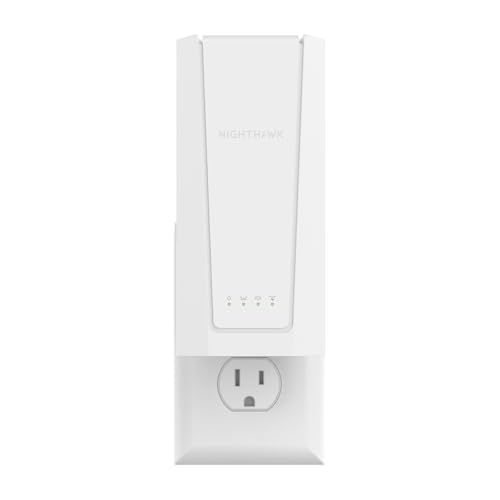
NETGEAR Nighthawk WiFi 7 Range Extender
Best for: small spaces needing one wired port
- Wi-Fi Standard
- Wi-Fi 7 (what this guide is about)
- Speed Rating
- 5 Gbps (BE5000)
- Coverage Area
- 1,500 sq ft
- Ethernet Ports
- 1x 2.5 Gigabit
- Placement
- Wall outlet
- Port Speed
- 2.5G
View on Amazon: NETGEAR Nighthawk WiFi 7 Range Extender Affiliate link
The NETGEAR EXS27 is a wall-plug WiFi 7 extender designed for spaces up to 1,500 square feet. It supports BE5000 speeds and connects up to 45 devices. A single 2.5 Gigabit Ethernet port allows wired connections for high-demand gear. It uses Smart Roaming to maintain one network name across your home. This model suits users needing compact coverage extension without complex setup.
Pros
- WiFi 7 standard for future-proof performance
- Covers up to 1,500 square feet
- Single 2.5 Gigabit Ethernet port
- Wall outlet placement saves space
- Supports up to 45 connected devices
Cons
- Only one Ethernet port limits wired options
- Dual-band speeds cap at BE5000
- No tri-band 6 GHz radio
Good fit if
- You need to cover a single large room or small apartment
- You want a plug-and-play solution without extra cables
- You require a wired port for a smart TV or console
Skip if
- You need to cover more than 1,500 square feet
- You require multiple Ethernet ports for wired backhaul
- You want tri-band 6 GHz speeds for less congestion
Verdict: NETGEAR EXS27 WiFi 7 Extender is a compact choice for small to medium spaces. It fits users who prioritize easy wall-plug installation and basic wired connectivity over high-speed tri-band performance.

TP-Link BE3200 Dual-Band Wi-Fi 7 Extender
Best for: Dual-band Wi-Fi 7 coverage expansion
- Wi-Fi Standard
- Wi-Fi 7 (what this guide is about)
- Speed Rating
- 3.2 Gbps
- Frequency Bands
- Dual-Band (2.4 GHz, 5 GHz)
- Coverage Area
- Up to 2400 sq. ft.
- Ethernet Ports
- Ethernet port
- Operating Modes
- Range Extender, Wireless Repeater
View on Amazon: TP-Link BE3200 Dual-Band Wi-Fi 7 Extender Affiliate link
The TP-Link BE3200 is a dual-band Wi-Fi 7 range extender designed to expand network coverage up to 2,400 square feet. It delivers a total bandwidth of 3.2 Gbps across 5 GHz and 2.4 GHz bands. This unit supports Multi-Link Operation for improved reliability when paired with a compatible router. It connects to any EasyMesh-compatible router, though it does not work with Deco mesh systems. It is a practical option for users seeking basic Wi-Fi 7 coverage expansion.
Pros
- Wi-Fi 7 standard with Multi-Link Operation support
- 3.2 Gbps total bandwidth across dual bands
- Covers up to 2,400 square feet
- Compatible with any EasyMesh router
Cons
- Lacks 6 GHz band support
- Not compatible with Deco mesh systems
- Does not increase router speeds, only coverage
Good fit if
- You need to extend coverage to 2,400 square feet
- You have a dual-band Wi-Fi 7 router
- You want EasyMesh compatibility with non-Deco routers
Skip if
- You require 6 GHz band connectivity
- You use a Deco mesh system
- You expect speed increases beyond your router's limit
Verdict: The TP-Link BE3200 Wi-Fi 7 Dual-Band Extender fits users who need reliable coverage expansion for up to 2,400 square feet using existing dual-band infrastructure. It is a solid choice for those prioritizing EasyMesh compatibility over 6 GHz performance.
Specifications side by side
| Spec | TP-Link Tri-Band Wi-Fi 7 Range Extender | ASUS Dual-Band WiFi 7 Range Extender | WAVLINK BE5100 Outdoor WiFi 7 Extender | NETGEAR Nighthawk WiFi 7 Range Extender | TP-Link BE3200 Dual-Band Wi-Fi 7 Extender |
|---|---|---|---|---|---|
| Wi-Fi Standard | Wi-Fi 7 | WiFi 7 | WiFi 7 | WiFi 7 | Wi-Fi 7 |
| Speed Rating | BE10000 | BE3600 | BE5100 | 5 Gbps (BE5000) | 3.2 Gbps |
| Frequency Bands | Tri-Band | Dual Band | Dual Band | not stated | Dual-Band (2.4 GHz, 5 GHz) |
| Coverage Area | Up to 2800 sq ft | not stated | Up to 2800 sq.ft | 1,500 sq ft | Up to 2400 sq. ft. |
| Ethernet Ports | not stated | not stated | 1 x 2.5 Gbps | 1x 2.5 Gigabit | Ethernet port |
| Operating Modes | Range Extender, Repeater | Range Extender | Mesh, AP, Router, Repeater | not stated | Range Extender, Wireless Repeater |
| Antenna Count | 4 | not stated | 4 | not stated | 4 |
| Placement | not stated | not stated | Outdoor IP67 | Wall outlet | not stated |
| Frequency Band | Tri-Band | Dual-Band | Dual-Band | not stated | Dual-Band |
| PoE Support | not stated | not stated | PoE | not stated | not stated |
| Features | not stated | Mesh | Mesh | not stated | not stated |
| Port Speed | 2.5G, 10G | not stated | 2.5G | 2.5G | not stated |
| Intended Use | Home | not stated | Outdoors | Home | Home |
| Operating Mode | not stated | not stated | Access Point Mode | not stated | not stated |
| Dimensions | 7.95 × 5.63 × 4.69 inches | 2.8 × 3.4 × 5.9 inches | 17.3 × 13 × 3.54 inches | 8.11 × 4.49 × 4.21 inches | not stated |
| Weight | 15.2 ounces | 8 ounces | 1.87 pounds | 1.12 pounds | 9.92 ounces |
| Color | White | WHITE | White | white | White |
| Model | RE653BE | RP-BE58 | WL-WN573HBE2 | EXS27 | not stated |
| Size | not stated | not stated | not stated | 5.0 Gbps, 1500 sq.ft. | not stated |
How to choose the right Wi-Fi 7 extender
-
Match the frequency band to your needs
You must decide between tri-band and dual-band models based on your network load. Tri-band units like the TP-Link RE653BE offer a dedicated band for backhaul, which helps maintain speed for high-bandwidth tasks. Dual-band options, such as the ASUS RP-BE58, share the same spectrum for client connections and backhaul. If you have many devices or stream heavily, the extra band provides necessary headroom. For basic browsing on a budget, dual-band is sufficient. Check the attributes list to confirm the band type before buying.
-
Check coverage area for your space
Coverage ratings tell you how much square footage a unit can handle. The NETGEAR EXS27 is rated for 1,500 square feet, making it suitable for small apartments or single rooms. Other models may support larger areas, such as the TP-Link BE3200 which covers up to 2,400 square feet. You should match this spec to your actual floor plan. Do not assume a single unit covers an entire large house. If your space exceeds the rating, you may need multiple extenders. Look for the coverage area in the product attributes to ensure adequate reach.
-
Consider outdoor requirements for patios
Standard extenders are designed for indoor use only. If you need Wi-Fi 7 coverage in a garden or on a patio, you must choose a weather-resistant model. The WAVLINK BE5100 is built for outdoor placement and resists environmental elements. Indoor units will fail quickly if exposed to rain or sun. Verify the intended use in the attributes. If the listing does not specify outdoor capability, assume it is for indoor use only. This distinction is critical for durability. Outdoor units also often include different mounting options for exterior walls.
-
Verify Power over Ethernet support
Power over Ethernet, or PoE, allows you to power the extender through the network cable. This is useful for outdoor setups or locations without nearby outlets. The WAVLINK BE5100 supports PoE, simplifying installation in gardens. Indoor models like the TP-Link RE653BE typically require a standard power adapter plugged into a wall socket. Check the specs or description for PoE mentions. If you lack a nearby power source, PoE support is essential. This feature reduces cable clutter and provides reliable power without extra adapters.
-
Ensure compatibility with your existing router
Wi-Fi 7 extenders work with Wi-Fi 7 routers to unlock full speeds. However, they can also support older standards. The TP-Link BE3200 supports EasyMesh, which helps coordinate with compatible routers for seamless roaming. The ASUS RP-BE58 is noted as a good fit for users who already use ASUS routers. Check your router brand and model to ensure smooth integration. While most Wi-Fi 7 extenders work with any Wi-Fi 7 router, brand-specific features may vary. Verify the attributes for mesh compatibility if you plan to expand your network later.
Frequently asked questions
Does a Wi-Fi 7 extender increase my internet speed?
No, an extender does not boost your internet plan’s maximum speed. It expands the range of your existing signal. For example, the TP-Link RE653BE delivers high throughput for many devices but offers no speed boost beyond your internet plan. You get better coverage, not faster base speeds.
What is the difference between dual-band and tri-band Wi-Fi 7 extenders?
Tri-band models provide a dedicated frequency for backhaul communication, which helps maintain speed for connected devices. The TP-Link RE653BE uses this tri-band design for maximum bandwidth. Dual-band options like the ASUS RP-BE58 are simpler and better for budget users who prioritize cost over raw speed.
Can I use a Wi-Fi 7 extender outdoors?
Yes, if you select a model designed for outdoor use. The WAVLINK BE5100 is a specialized tool for outdoor connectivity. It features weather-resistant construction and supports PoE power options, making it suitable for gardens or patios where standard indoor extenders would fail.
How much space does a Wi-Fi 7 extender cover?
Coverage varies by model and placement. The NETGEAR EXS27 is rated for 1,500 square feet, fitting small to medium spaces. Other models, like the TP-Link BE3200, support coverage for up to 2,400 square feet. You should match the square footage rating to your specific room layout.
Do I need a specific router brand for these extenders?
Not necessarily, but some brands offer better integration with their own routers. The ASUS RP-BE58 is best for users who already use ASUS routers. However, the TP-Link BE3200 supports EasyMesh compatibility, allowing it to work with other compatible mesh systems regardless of the primary router brand.
What size is the smallest Wi-Fi 7 extender on the list?
The NETGEAR EXS27 is the most compact choice, weighing just 1.12 pounds. It measures 4.49 by 4.21 by 8.11 inches. Its small form factor allows for easy wall-plug installation, making it ideal for users who prioritize a low profile over high-speed tri-band performance.