Best Wifi Routers with Access Point Mode: 7 Spec-Based Picks
As an Amazon Associate we earn from qualifying purchases. Links on this page are affiliate links.
Our top pick is the TP-Link Archer AX80: an AX6000 Wi-Fi 6 router with eight antennas and a 2.5G port, and its listing names AP mode, so it can sit behind an ISP gateway and only handle Wi-Fi. The Cudy WR6500 brings Wi-Fi 7 and five operating modes for about sixty dollars, the Tenda RE6L Pro adds a 2.5G port to Wi-Fi 7, and the Tenda AC8 is the cheapest way in. Access points, LTE outdoor units, Wi-Fi bridges and travel routers are left out; every pick is a home router whose listing states an access point mode. We ranked these 7 from their listings and did not test them.
Our top pick: TP-Link AX6000 Dual-Band Wi-Fi 6 Router.
Quick picks
| # | Product | Best for | Price |
|---|---|---|---|
| 1 | TP-Link AX6000 Dual-Band Wi-Fi 6 Router Best overall | Large homes that keep their ISP gateway | Check price of TP-Link AX6000 Dual-Band Wi-Fi 6 Router on Amazon |
| 2 | Cudy Tri-Band Wi-Fi 7 Router Best value | Upgraders on a budget | Check price of Cudy Tri-Band Wi-Fi 7 Router on Amazon |
| 3 | Tenda BE5100 Dual-Band WiFi 7 Router Best Wi-Fi 7 multi-gig | Gamers adding Wi-Fi to a wired setup | Check price of Tenda BE5100 Dual-Band WiFi 7 Router on Amazon |
| 4 | Cudy AX3000 4-Port Mesh Router | Small homes and offices | Check price of Cudy AX3000 4-Port Mesh Router on Amazon |
| 5 | WAVLINK AX3000 Dual-Band Mesh Router | Medium homes | Check price of WAVLINK AX3000 Dual-Band Mesh Router on Amazon |
| 6 | TP-Link AC1200 Dual-Band Gigabit Router | Garages, dens and basements | Check price of TP-Link AC1200 Dual-Band Gigabit Router on Amazon |
| 7 | Tenda AC8 AC1200 Dual-Band Router Best budget | Tight budgets | Check price of Tenda AC8 AC1200 Dual-Band Router on Amazon |
The best fit for you
- A fast Wi-Fi 6 radio behind a multi-gig gateway TP-Link AX6000 Dual-Band Wi-Fi 6 Router Archer AX80, 2.5G port.
- Wi-Fi 7 that can change roles Cudy Tri-Band Wi-Fi 7 Router Cudy WR6500, five modes.
- Wi-Fi 7 with a 2.5G uplink cheaply Tenda BE5100 Dual-Band WiFi 7 Router Tenda RE6L Pro.
- A Wi-Fi 6 box you may reuse as a repeater Cudy AX3000 4-Port Mesh Router Cudy WR3000.
- A stated 2,000 sq ft reach WAVLINK AX3000 Dual-Band Mesh Router WAVLINK AX3000.
- Four wired jacks after the switch to AP TP-Link AC1200 Dual-Band Gigabit Router Archer A6.
- Spending the least Tenda AC8 AC1200 Dual-Band Router Tenda AC8.
Our 7 picks
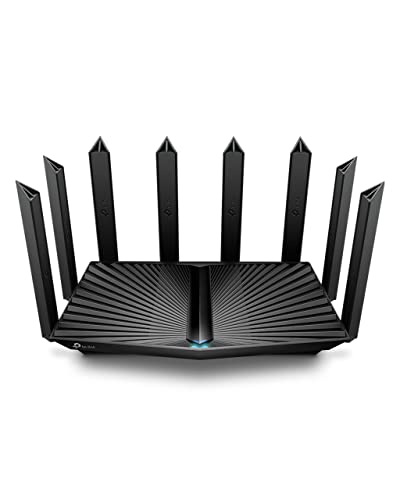
TP-Link AX6000 Dual-Band Wi-Fi 6 Router
Best for: Large homes that keep their ISP gateway
- Operating Mode
- Access Point Mode (what this guide is about)
- Wi-Fi Standard
- Wi-Fi 6
- Speed Rating
- AX6000
- Frequency Bands
- Dual Band
- Max Port Speed
- 2.5 Gbps
- Use Case
- Streaming
View on Amazon: TP-Link AX6000 Dual-Band Wi-Fi 6 Router Affiliate link
TP-Link Archer AX80: AX6000 dual-band Wi-Fi 6 (4804 Mbps on 5 GHz, 1148 Mbps on 2.4 GHz) with eight antennas, a 2.5G WAN/LAN port, VPN client, HomeShield basics and OneMesh. The title names AP mode, so it can hang off an existing gateway as a pure Wi-Fi radio.
Pros
- 2.5G port for a fast uplink in AP mode
- Eight beamforming antennas
- OneMesh extenders keep one network name
Cons
- Priciest pick here
- Wi-Fi 6, no 6 GHz band
Good fit if
- You want a strong Wi-Fi 6 radio to hang off a multi-gig modem or gateway
Skip if
- You only need a cheap wireless add-on for a small flat
Verdict: The most capable AP-mode router in this group.

Cudy Tri-Band Wi-Fi 7 Router
Best for: Upgraders on a budget
- Wi-Fi Standard
- Wi-Fi 7
- Speed Rating
- BE6500
- Frequency Bands
- Dual-Band
- Coverage Area
- 1,500 sq ft
- Device Capacity
- 512 devices
- Max Port Speed
- 1 Gbps
View on Amazon: Cudy Tri-Band Wi-Fi 7 Router Affiliate link
Cudy WR6500: 6-stream Wi-Fi 7 BE6500 (5765 plus 688 Mbps), a Broadcom 2 GHz quad-core CPU with 512 MB RAM, one gigabit WAN and four gigabit LAN, and five operating modes: Router, Access Point, Range Extender, WISP and Client.
Pros
- Wi-Fi 7 for about sixty dollars
- Five listed operating modes
- 200 recommended devices
Cons
- Gigabit ports only
- Rated for about 1,500 sq ft
Good fit if
- You want Wi-Fi 7 in access point mode without paying flagship money
Skip if
- Your uplink is faster than a gigabit
Verdict: Wi-Fi 7 that switches roles easily.

Tenda BE5100 Dual-Band WiFi 7 Router
Best for: Gamers adding Wi-Fi to a wired setup
- Operating Mode
- Access Point Mode (what this guide is about)
- Wi-Fi Standard
- WiFi 7
- Speed Rating
- BE5100
- Frequency Bands
- Dual-Band
- Max Port Speed
- 2.5Gbps
- Ethernet Ports
- 4
View on Amazon: Tenda BE5100 Dual-Band WiFi 7 Router Affiliate link
Tenda RE6L Pro: BE5100 dual-band Wi-Fi 7 (4,323 plus 688 Mbps) with MLO and 4K-QAM, one 2.5G and three gigabit WAN/LAN ports, five external antennas, WireGuard and OpenVPN clients, parental controls and Access Point Mode named in the title.
Pros
- 2.5G port at a low price
- MLO and 4K-QAM
- Parental controls in the Tenda app
Cons
- No 6 GHz band
- Coverage figure not stated
Good fit if
- You want a Wi-Fi 7 access point with a 2.5G uplink for under a hundred dollars
Skip if
- You need a stated square-footage rating
Verdict: Cheap multi-gig Wi-Fi 7 for AP duty.

Cudy AX3000 4-Port Mesh Router
Best for: Small homes and offices
- Wi-Fi Standard
- Wi-Fi 6
- Speed Rating
- AX3000
- Frequency Bands
- dual-band
- Coverage Area
- 1,400 ft²
- Device Capacity
- 128 devices
- Max Port Speed
- 1 Gigabit
View on Amazon: Cudy AX3000 4-Port Mesh Router Affiliate link
Cudy WR3000: AX3000 Wi-Fi 6 (2402 plus 574 Mbps), 1.2 GHz dual-core CPU, one gigabit WAN and three gigabit LAN, around 1,400 sq ft and 70 recommended devices, VPN server and client, and Router, Access Point, Range Extender, WISP and Client modes.
Pros
- Same five-mode menu as the WR6500
- WireGuard and OpenVPN
- Low price
Cons
- Three LAN ports
- Wi-Fi 6 only
Good fit if
- You want a plain Wi-Fi 6 radio that can also serve as a repeater later
Skip if
- You want Wi-Fi 7
Verdict: A flexible Wi-Fi 6 box for little money.

WAVLINK AX3000 Dual-Band Mesh Router
Best for: Medium homes
- Operating Mode
- Access Point Mode (what this guide is about)
- Wi-Fi Standard
- WiFi 6
- Speed Rating
- AX3000
- Frequency Bands
- Dual Band
- Coverage Area
- 2,000 sq.ft.
- Device Capacity
- 256+
View on Amazon: WAVLINK AX3000 Dual-Band Mesh Router Affiliate link
WAVLINK WN586X3-B: AX3000 dual-band Wi-Fi 6 with 160 MHz channels, a 1.3 GHz dual-core CPU, four external antennas plus one internal, a 2,000 sq ft rating, Everything Mesh and AP Mode in the title. Port speeds are given only as gigabit in the title.
Pros
- 2,000 sq ft rating
- 160 MHz and 1024-QAM
- Browser or WavRouter app setup
Cons
- Low stock
- Port count not listed
Good fit if
- You want a Wi-Fi 6 access point with a stated 2,000 sq ft reach
Skip if
- You need the port layout spelled out first
Verdict: Wider rated reach for an AP-mode Wi-Fi 6 box.

TP-Link AC1200 Dual-Band Gigabit Router
Best for: Garages, dens and basements
- Operating Mode
- Access Point Mode (what this guide is about)
- Wi-Fi Standard
- Wi-Fi 5
- Speed Rating
- AC1200
- Frequency Bands
- Dual-Band
- Max Port Speed
- Gigabit
- Features
- MU-MIMO
View on Amazon: TP-Link AC1200 Dual-Band Gigabit Router Affiliate link
TP-Link Archer A6: AC1200 Wi-Fi 5 (300 plus 900 Mbps), MU-MIMO on 5 GHz, four gigabit LAN ports, four external antennas with beamforming, WPA3, OneMesh and an Access Point Mode that turns a wired drop into Wi-Fi.
Pros
- Four gigabit LAN
- WPA3 on a Wi-Fi 5 router
- OneMesh support
Cons
- Wi-Fi 5 AC1200 class
- No OFDMA
Good fit if
- You need an inexpensive TP-Link radio to add Wi-Fi at the end of a cable run
Skip if
- Your phones and laptops are Wi-Fi 6 and you want their full speed
Verdict: A dependable budget AP.

Tenda AC8 AC1200 Dual-Band Router
Best for: Tight budgets
- Operating Mode
- Access Point Mode (what this guide is about)
- Speed Rating
- AC1200
- Frequency Bands
- Dual Band
- Max Port Speed
- Gigabit
- Ethernet Ports
- 3
- Features
- MU-MIMO
View on Amazon: Tenda AC8 AC1200 Dual-Band Router Affiliate link
Tenda AC8: AC1200 dual-band Wi-Fi 5 (867 plus 300 Mbps), three gigabit WAN/LAN ports, four 6 dBi antennas with beamforming, MU-MIMO, guest Wi-Fi, parental controls in the Tenda app and AP Mode. One bullet calls it the AC6, while the model field says AC8.
Pros
- Cheapest pick here
- Gigabit ports
- App setup and guest network
Cons
- Model name conflict in the listing
- Wi-Fi 5 only
Good fit if
- You want the lowest-cost way to turn a wired port into Wi-Fi
Skip if
- Your laptops would benefit from OFDMA and 160 MHz channels
Verdict: Basic AP mode for the least money.
Specifications side by side
| Spec | TP-Link AX6000 Dual-Band Wi-Fi 6 Router | Cudy Tri-Band Wi-Fi 7 Router | Tenda BE5100 Dual-Band WiFi 7 Router | Cudy AX3000 4-Port Mesh Router | WAVLINK AX3000 Dual-Band Mesh Router | TP-Link AC1200 Dual-Band Gigabit Router | Tenda AC8 AC1200 Dual-Band Router |
|---|---|---|---|---|---|---|---|
| Wi-Fi Standard | Wi-Fi 6 | Wi-Fi 7 | WiFi 7 | Wi-Fi 6 | WiFi 6 | Wi-Fi 5 | not stated |
| Speed Rating | AX6000 | BE6500 | BE5100 | AX3000 | AX3000 | AC1200 | AC1200 |
| Frequency Bands | Dual Band | Dual-Band | Dual-Band | dual-band | Dual Band | Dual-Band | Dual Band |
| Coverage Area | not stated | 1,500 sq ft | not stated | 1,400 ft² | 2,000 sq.ft. | not stated | not stated |
| Device Capacity | not stated | 512 devices | not stated | 128 devices | 256+ | not stated | not stated |
| Max Port Speed | 2.5 Gbps | 1 Gbps | 2.5Gbps | 1 Gigabit | not stated | Gigabit | Gigabit |
| Ethernet Ports | not stated | 5 | 4 | 4 | not stated | not stated | 3 |
| Frequency Band | Dual-Band | not stated | Dual-Band | not stated | Dual-Band | Dual-Band | Dual-Band |
| Number of Ports | not stated | 5 Ports | not stated | 4 Ports | not stated | not stated | not stated |
| Use Case | Streaming | not stated | Gaming | not stated | Gaming | not stated | not stated |
| Features | WPA3 | VPN, Mesh | VPN, Parental Controls | VPN, MU-MIMO, Mesh | MU-MIMO, Mesh, WPA3 | MU-MIMO | MU-MIMO |
| Port Speed | 2.5G | not stated | 2.5G | not stated | Gigabit | Gigabit | Gigabit |
| Recommended Use | not stated | not stated | not stated | not stated | Office | not stated | not stated |
| Intended Use | not stated | not stated | not stated | not stated | Home | not stated | not stated |
| Operating Mode | Access Point Mode | not stated | Access Point Mode | not stated | Access Point Mode | Access Point Mode | Access Point Mode |
| Dimensions | 9.84 × 7.87 × 3.15 inches | 9.96 × 6 × 1.9 inches | 10.1 × 8.49 × 2.36 inches | 7.87 × 6.69 × 1.38 inches | not stated | 8.46 × 4.92 × 1.81 inches | 7.87 × 5 × 1.32 inches |
| Weight | 2 pounds | 1.28 pounds | 10.5 ounces | 8.91 ounces | not stated | 11.4 ounces | not stated |
| Size | 10.9 x 7.2 x 2.3 inches | not stated | not stated | WR3000 | not stated | Wi-Fi 5 AC1200 | 1.3" x 5" x 7.9" |
| Color | Black | Black | Black | Black | WiFi 6, AX3000 | black | Black-AC8 |
| Model | Archer AX80 | WR6500 | RE6L Pro | WR3000 | WN586X3-B | Archer A6 | AC8 |
If your router will also support a checkout counter, our guide to the best monitors for point of sale covers screen specs for that side of the setup.
Setting up a router as an access point
-
Wire the AP to the main router
AP mode expects an Ethernet link to the device that hands out addresses. Without a cable, look at repeater or extender mode instead.
-
Match the uplink port
If your gateway has a 2.5G LAN port, the Archer AX80 and Tenda RE6L Pro can use it; the others top out at a gigabit.
-
Use the same network name for roaming
Giving the AP the same SSID and password as the main Wi-Fi lets phones move between them, though without mesh-style steering.
-
Expect fewer features in AP mode
Parental controls, QoS and VPN usually live on the router that does the routing, so they may switch off once a unit becomes an access point.
Frequently asked questions
What does access point mode do on a router?
It turns the router into a wireless bridge for your wired network: the main router keeps handing out addresses, and this unit just adds Wi-Fi.
Do I need AP mode if my ISP gateway already has Wi-Fi?
It helps when you cannot put the gateway in bridge mode. Run the new router as an AP, turn off the gateway's Wi-Fi if you like, and avoid double NAT.
Which pick lists the most operating modes?
The Cudy WR6500 and WR3000 each list Router, Access Point, Range Extender, WISP and Client modes.
Can a Wi-Fi 5 router work as an AP for Wi-Fi 6 devices?
Yes, but those devices connect at Wi-Fi 5 speed. The Archer A6 and Tenda AC8 are fine for light use; pick a Wi-Fi 6 or 7 model for heavier traffic.