Management Type in Network Switches: What It Is and Is It Worth It?
As an Amazon Associate we earn from qualifying purchases. Links on this page are affiliate links.
Network Switch Management Types Explained
The management type of a network switch defines how you control its settings. This specification determines the level of oversight you have over your local area network. You will typically see three categories on product listings: unmanaged, smart managed, and fully managed. Understanding this distinction helps you choose the right hardware for your home or small office setup.
An unmanaged switch is the simplest option. It requires zero configuration. You plug it in, and it works. These devices do not have software interfaces or configuration menus. They simply forward data between connected devices. This type is ideal for basic expansion where you just need more ports. There is no need for technical knowledge to operate it.
Smart managed switches offer a middle ground. They provide limited control through a web interface or mobile app. You can adjust basic settings like port speed, VLANs, or Quality of Service. This allows for some traffic prioritization. It is useful if you want to ensure video calls or gaming have better bandwidth than background downloads. The interface is usually simplified for non-experts.
Fully managed switches provide complete control. They support advanced protocols and detailed monitoring. You can configure complex routing, security policies, and network segmentation. This level of control is often unnecessary for typical Mesh WiFi users. It is better suited for IT professionals managing large or complex networks.
Why does this matter to you? Most home users rely on their router for network management. The switch in your setup is often just a passive connection point. If you use a Mesh system, the router handles traffic logic. An unmanaged switch is usually sufficient. You only need smart or fully managed features if you are building a specialized network. Check the product specifications to confirm which type you are buying. This ensures you do not pay for features you will never use.
Unmanaged, Smart, and Managed Switches
Unmanaged
Unmanaged switches operate as simple plug-and-play devices. You connect them to your network, and they forward data without requiring any configuration. This type offers no control over traffic flow, security settings, or device prioritization. It suits users who need basic wired expansion without complexity. The TP-Link 5-Port Gigabit Unmanaged Switch exemplifies this approach. It provides reliable connectivity for small setups where simplicity matters. You cannot create VLANs or monitor port usage. This lack of oversight is the primary trade-off. However, it ensures immediate functionality with zero learning curve. It is ideal for homes or small offices that do not need advanced network controls.
Smart Managed
Smart managed switches bridge the gap between basic and enterprise tools. They offer essential Layer 2 features like VLAN segmentation and traffic prioritization. You can configure these settings via a web interface or mobile app. This level of control helps optimize performance and security without overwhelming complexity. The TP-Link 24-Port Gigabit Smart Managed Switch demonstrates this balance. It allows users to manage dense networks with basic oversight tools. You gain visibility into network activity and can isolate devices for security. The trade-off is limited advanced features found in fully managed units. It suits small businesses or tech-savvy homeowners needing more than plug-and-play but less than full enterprise control.
Managed
Fully managed switches provide comprehensive control over every aspect of your network. You can configure advanced routing, QoS policies, and detailed security protocols. These devices often support remote management via cloud platforms or dedicated software. The STEAMEMO 16-Port Managed PoE+ Switch illustrates this capability. It allows precise control over power distribution and network segmentation. You can monitor traffic in real-time and troubleshoot issues remotely. This level of oversight is crucial for small business networks requiring high security and reliability. The trade-off is higher cost and steeper learning curves. It suits users who need granular control over network performance and security policies.
Who Needs Managed Switch Features
Who needs it
You should prioritize managed or smart managed switches if you require precise control over your local network traffic. This specification is essential for users who need to implement Quality of Service rules, ensuring that critical applications like video conferencing or online gaming receive priority over general web browsing. It is also vital for those who want to segment their network using Virtual LANs, isolating guest devices or IoT gadgets from your primary computers and servers for enhanced security. If you need to monitor bandwidth usage per port or troubleshoot connectivity issues by analyzing traffic patterns, a fully managed switch provides the necessary visibility. Smart managed options offer a middle ground, giving you access to basic configuration tools without the complexity of enterprise-grade interfaces. These features matter most when network stability, security, and performance optimization are non-negotiable requirements for your daily operations.
Who can skip it
You can safely ignore advanced management types if your primary goal is simple connectivity without configuration headaches. Unmanaged switches are sufficient for users who just need to add more Ethernet ports to their existing setup. If you do not need to prioritize specific traffic types, create separate network segments, or monitor data flow, the extra complexity and potential cost of managed features offer no practical benefit. Focus your attention on other specifications that impact your experience more directly, such as the number of ports, transfer speeds, and power consumption. For most home users and small offices with basic internet needs, plug-and-play reliability is preferable to configurable options. You save time by avoiding firmware updates and configuration menus. Stick to unmanaged models when you value simplicity and immediate usability over granular network control.
Switch Management Terms
Unmanaged Switch
A plug-and-play device with no configuration options. It automatically forwards data between connected devices. This type suits users who need simple expansion without technical setup or ongoing maintenance.
Smart Managed Switch
A switch offering basic configuration via a web interface. You can adjust VLANs and traffic prioritization. This level balances ease of use with enough control for small office or advanced home networks.
Fully Managed Switch
A device providing complete control over network operations. It supports advanced features like SNMP monitoring and detailed security policies. This type is ideal for large enterprises requiring precise traffic engineering and monitoring.
VLAN
Virtual Local Area Network. It segments a single physical switch into multiple isolated broadcast domains. This improves security and reduces network congestion by separating traffic types, such as guest Wi-Fi from main devices.
QoS
Quality of Service. This feature prioritizes specific traffic types over others. You can ensure video calls or gaming data flows smoothly even when the network is busy with large file downloads or backups.
PoE
Power over Ethernet. It delivers electrical power alongside data through standard network cables. This eliminates the need for separate power adapters for devices like access points, IP cameras, and VoIP phones.
Bandwidth
The maximum rate of data transfer across a network path. It is measured in megabits or gigabits per second. Higher bandwidth allows more devices to transfer large files simultaneously without slowing down.
Latency
The delay before data transfer begins after an instruction is given. Low latency is critical for real-time applications like video conferencing and online gaming. Managed switches can reduce jitter to stabilize these connections.
Quick picks
| # | Product | Best for | Price |
|---|---|---|---|
| 1 | TP-Link 5-Port Gigabit Unmanaged Switch | Simple wired expansion without configuration | Check price of TP-Link 5-Port Gigabit Unmanaged Switch on Amazon |
| 2 | TP-Link 24-Port Gigabit Smart Managed Switch | dense wired networks needing basic management | Check price of TP-Link 24-Port Gigabit Smart Managed Switch on Amazon |
| 3 | STEAMEMO 16-Port 240W Managed PoE+ Switch | Powering many devices with remote management | Check price of STEAMEMO 16-Port 240W Managed PoE+ Switch on Amazon |
| 4 | TP-Link 5-Port Gigabit Metal Switch | Simple wired expansion without configuration | Check price of TP-Link 5-Port Gigabit Metal Switch on Amazon |
| 5 | TP-Link 8-Port Smart Managed Gigabit Switch | Small networks needing basic VLAN and monitoring control | Check price of TP-Link 8-Port Smart Managed Gigabit Switch on Amazon |
| 6 | Ubiquiti UniFi Managed 10G Aggregation Switch | Rack-mounted 10G aggregation needs | Check price of Ubiquiti UniFi Managed 10G Aggregation Switch on Amazon |
Our 6 picks

TP-Link 5-Port Gigabit Unmanaged Switch
Best for: Simple wired expansion without configuration
- Management Type
- Unmanaged (what this guide is about)
- Port Count
- 5
- Port Speed
- 10/100/1000 Mbps
- Mounting Type
- Desktop, Wall-Mount
- Number of Ports
- 5 Ports
- Dimensions
- 1.1 × 6.5 × 4.3 inches
View on Amazon: TP-Link 5-Port Gigabit Unmanaged Switch Affiliate link
This TP-Link TL-SG1005D is an unmanaged 5-port Gigabit switch designed for simple wired expansion. It offers plug-and-play setup with no software or configuration required. The device features five 10/100/1000 Mbps RJ45 ports with auto-negotiation. It supports a fanless, quiet design suitable for desktop or wall mounting. This unit is ideal for users who need basic connectivity without the complexity of network management features.
Pros
- Five 10/100/1000 Mbps Gigabit ports for high-speed data transfer
- Plug-and-play operation requires no configuration or software
- Fanless design ensures quiet operation in home or office spaces
- Supports desktop or wall-mount installation for flexible placement
Cons
- Unmanaged interface provides no VLAN, QoS, or traffic monitoring controls
- Limited to only five ports, restricting expansion for larger setups
- No web or app-based management for remote configuration
Good fit if
- You need a simple, reliable wired connection for a few devices
- You prefer plug-and-play hardware without software configuration
- You have limited space and need a compact, wall-mountable unit
Skip if
- You require VLAN segmentation or traffic prioritization controls
- You need to monitor network traffic or manage ports remotely
- You have more than five devices requiring wired connections
Verdict: TP-Link 5 Port Unmanaged Gigabit Switch is a straightforward solution for users who need basic wired expansion without configuration complexity. It fits well in small setups where simplicity and quiet operation matter more than advanced network controls.

TP-Link 24-Port Gigabit Smart Managed Switch
Best for: dense wired networks needing basic management
- Management Type
- Smart Managed (what this guide is about)
- Port Count
- 24
- Port Speed
- Gigabit
- Mounting Type
- Desktop/Rackmount
- Number of Ports
- 24 Ports
- Dimensions
- 11.6 × 7.1 × 1.7 inches
View on Amazon: TP-Link 24-Port Gigabit Smart Managed Switch Affiliate link
The TP-Link TL-SG1024DE offers 24 Gigabit ports for high-speed data transfers. It features Easy Smart Managed capabilities, including VLAN segmentation for security and QoS for traffic control. The 9K Jumbo frame support handles large files efficiently. This switch suits users needing extensive port counts with basic management tools for network monitoring and optimization.
Pros
- 24 Gigabit Ethernet ports for connecting many devices
- Easy Smart Managed features like VLAN and QoS
- 9K Jumbo frame support for large data transfers
- Port Mirroring and Cable Diagnostics for monitoring
Cons
- No mention of PoE support for powered devices
- Web interface only, no dedicated mobile app listed
- Physical size is 11.6 inches long, requiring rack or shelf space
Good fit if
- You need a high port count for a dense network setup
- You want basic traffic segmentation without complex enterprise configs
- You require monitoring tools like cable diagnostics
Skip if
- You need Power over Ethernet for cameras or phones
- You prefer a compact desktop switch with fewer ports
- You require full Layer 3 routing capabilities
Verdict: TP-Link 24 Port Gigabit Easy Smart Switch provides ample ports and essential management tools for small offices or homes with many wired devices. It is ideal for users who need visibility and control without enterprise complexity.

STEAMEMO 16-Port 240W Managed PoE+ Switch
Best for: Powering many devices with remote management
- Management Type
- Managed (what this guide is about)
- Port Count
- 16
- Port Speed
- 100 Mbps
- PoE Support
- PoE+ (802.3at)
- PoE Power Budget
- 240W
- Uplink Ports
- 2 x Gigabit Uplink, 1 x 1.25G SFP
View on Amazon: STEAMEMO 16-Port 240W Managed PoE+ Switch Affiliate link
This is a managed switch with 16 PoE+ ports delivering up to 30W each, totaling 240W. It includes two Gigabit uplinks and one SFP port. You can control it via web, app, or desktop software. It supports VLANs, QoS, and port mirroring. The unit is fanless and mounts to walls or racks. It suits users needing power and control for many devices.
Pros
- 16 PoE+ ports with 240W total budget
- Managed via web, app, or desktop software
- Supports VLANs, QoS, and port mirroring
- Fanless design with wall or rack mounting
Cons
- PoE ports are limited to 100 Mbps
- Heavy at 3.88 pounds
- Only 1-year replacement warranty
Good fit if
- You need to power many devices over Ethernet
- You want remote network management tools
- You require VLAN segmentation for security
Skip if
- You need Gigabit speeds on all PoE ports
- You prefer a lighter, smaller device
- You want a longer warranty period
Verdict: STEAMEMO 16-Port Managed PoE+ Switch fits users who need to power many devices over Ethernet while retaining remote network management tools. It is a solid choice for small business networks requiring VLAN segmentation for security.

TP-Link 5-Port Gigabit Metal Switch
Best for: Simple wired expansion without configuration
- Management Type
- Unmanaged (what this guide is about)
- Port Count
- 5
- Port Speed
- 10/100/1000 Mbps
- Mounting Type
- Desktop or wall-mounting
- Number of Ports
- 5 Ports
- Dimensions
- 3.9 × 3.9 × 1 inches
View on Amazon: TP-Link 5-Port Gigabit Metal Switch Affiliate link
This TP-Link TL-SG105 is an unmanaged 5-port Gigabit switch designed for simple plug-and-play expansion. It features five 10/100/1000 Mbps RJ45 ports for wired connections. The sturdy metal case supports desktop or wall mounting. It requires no configuration or software. This unit suits users who need basic wired connectivity without network management features or VLAN capabilities.
Pros
- Five Gigabit Ethernet ports for 10/100/1000 Mbps speeds
- Plug-and-play setup with no configuration needed
- Sturdy metal case with fanless quiet design
Cons
- Unmanaged design offers no VLAN or traffic prioritization
- Only five ports limit expansion for larger setups
- No web interface for remote monitoring or control
Good fit if
- You need simple wired expansion for a few devices
- You prefer zero-configuration network hardware
- You want a compact desktop or wall-mountable unit
Skip if
- You require VLAN segmentation for network security
- You need to manage traffic prioritization or QoS
- You have more than five devices needing wired ports
Verdict: TP-Link 5 Port Unmanaged Gigabit Switch fits users who need basic, reliable wired expansion without the complexity of network management. It is ideal for small setups where plug-and-play simplicity is the priority.
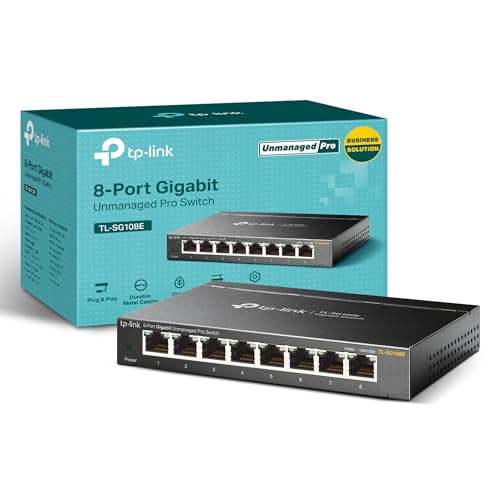
TP-Link 8-Port Smart Managed Gigabit Switch
Best for: Small networks needing basic VLAN and monitoring control
- Management Type
- Smart Managed (what this guide is about)
- Port Count
- 8
- Port Speed
- Gigabit
- Mounting Type
- Desktop/Wall-Mount
- Number of Ports
- 8 Ports
- Dimensions
- 6.2 × 4 × 1 inches
View on Amazon: TP-Link 8-Port Smart Managed Gigabit Switch Affiliate link
This TP-Link TL-SG108E is an 8-port Gigabit switch with Easy Smart Management. You can configure it via a web interface or free software. It supports up to 32 VLANs for traffic segmentation. Layer 2 features include port mirroring, loop prevention, and IGMP snooping. The sturdy metal case allows desktop or wall mounting. It suits users who need basic network control without full managed complexity.
Pros
- 8 Gigabit Ethernet ports for high-speed connectivity
- Easy Smart Management via web interface or software
- Supports up to 32 simultaneous VLANs
- Sturdy metal construction with shielded ports
- Layer 2 features like port mirroring and loop prevention
Cons
- Limited to 8 ports compared to larger 16 or 24-port options
- Lacks full managed features like SNMP or CLI access
- No mention of PoE support for powering devices
Good fit if
- You need basic VLAN segmentation for home or small office use
- You prefer a compact, wall-mountable device for tight spaces
- You want simple web-based configuration without complex setup
Skip if
- You require Power over Ethernet (PoE) for cameras or phones
- You need more than 8 wired connections
- You want advanced enterprise features like CLI or SNMP
Verdict: TP-Link 8 Port Easy Smart Managed Switch offers essential Layer 2 control for users who need VLANs and monitoring without the complexity of full managed switches.

Ubiquiti UniFi Managed 10G Aggregation Switch
Best for: Rack-mounted 10G aggregation needs
- Management Type
- Managed (what this guide is about)
- Mounting Type
- Rack mounting, 1U
- Port Speed
- 10G
- Uplink Port Type
- SFP
- Dimensions
- 4.72 × 17.4 × 1.72 inches
- Weight
- 2.2 pounds
View on Amazon: Ubiquiti UniFi Managed 10G Aggregation Switch Affiliate link
This is a 1U rack-mountable Layer 2 switch designed for aggregation. It features 10G port speed and SFP uplink ports. The device is managed, allowing for detailed network control. It measures 17.4 inches wide and weighs 2.2 pounds. You should choose this if you need a robust, enterprise-grade switch for a structured rack environment.
Pros
- Managed Layer 2 switching capability
- 10G port speed
- SFP uplink ports
- 1U rack mounting design
- Three-year warranty
Cons
- Requires rack mounting space
- Limited to SFP uplink connections
- Large physical footprint
Good fit if
- You need a managed switch for a server rack
- You require 10G aggregation ports
- You use SFP fiber connections
Skip if
- You need desktop plug-and-play use
- You require RJ45 uplink ports
- You want a compact desktop switch
Verdict: Ubiquiti UniFi Aggregation Switch is a specialized tool for rack-mounted setups needing 10G aggregation. It suits users who prioritize managed control and SFP connectivity over desktop convenience.
Specifications side by side
| Spec | TP-Link 5-Port Gigabit Unmanaged Switch | TP-Link 24-Port Gigabit Smart Managed Switch | STEAMEMO 16-Port 240W Managed PoE+ Switch | TP-Link 5-Port Gigabit Metal Switch | TP-Link 8-Port Smart Managed Gigabit Switch | Ubiquiti UniFi Managed 10G Aggregation Switch |
|---|---|---|---|---|---|---|
| Port Count | 5 | 24 | 16 | 5 | 8 | not stated |
| Port Speed | 10/100/1000 Mbps | Gigabit | 100 Mbps | 10/100/1000 Mbps | Gigabit | not stated |
| Management Type | Unmanaged | Easy Smart | Managed | Unmanaged | Easy Smart | Managed |
| PoE Support | not stated | not stated | PoE+ (802.3at) | not stated | not stated | not stated |
| PoE Power Budget | not stated | not stated | 240W | not stated | not stated | not stated |
| Uplink Ports | not stated | not stated | 2 x Gigabit Uplink, 1 x 1.25G SFP | not stated | not stated | not stated |
| Mounting Type | Desktop, Wall-Mount | Desktop/Rackmount | Wall Mount, Rack Mount | Desktop or wall-mounting | Desktop/Wall-Mount | Rack mounting, 1U |
| Number of Ports | 5 Ports | 24 Ports | 16 Ports | 5 Ports | 8 Ports | not stated |
| Uplink Port Type | not stated | not stated | SFP, Gigabit Uplink | not stated | not stated | SFP |
| Dimensions | 1.1 × 6.5 × 4.3 inches | 11.6 × 7.1 × 1.7 inches | 10.6 × 7 × 1.8 inches | 3.9 × 3.9 × 1 inches | 6.2 × 4 × 1 inches | 4.72 × 17.4 × 1.72 inches |
| Weight | 4.23 ounces | 3.75 pounds | 3.88 pounds | 7.76 ounces | 1.12 pounds | 2.2 pounds |
| Size | 5 Port Gigabit | 24 Port | Enhanced Features | 19 Ports | 240 W 16 x PoE+ | 5-Port Gigabit | 8 Port (Pack of 1) | not stated |
| Color | Black | Black | black | Black | Black | White |
| Model | TL-SG1005D | TL-SG1024DE | 19 Ports|240W 16xPoE+ | TL-SG105 | TL-SG108E | USW-Aggregation |
Frequently asked questions
What is the difference between smart managed and managed switches?
Smart managed switches provide basic Layer 2 controls via a web interface, such as VLANs and traffic monitoring. Managed switches offer advanced enterprise features like QoS, ACLs, and SNMP. The TP-Link 8-Port Smart Managed Gigabit Switch offers essential Layer 2 control, while the Ubiquiti UniFi Managed 10G Aggregation Switch provides deeper managed control for complex aggregation needs.
Can I use a managed switch for home networking?
Yes, you can use a managed switch at home if you need specific network controls. The STEAMEMO 16-Port Managed PoE+ Switch supports VLAN segmentation for security and remote management tools. This setup suits users who want to power many devices over Ethernet while retaining oversight of their local network traffic without enterprise complexity.
Do unmanaged switches support VLANs?
No, unmanaged switches do not support VLANs or any configuration options. They operate as simple plug-and-play devices that automatically forward data. The TP-Link 5-Port Gigabit Unmanaged Switch fits small setups where simplicity matters. You cannot configure traffic flow or security settings on these devices.
What is a smart managed switch good for?
Smart managed switches are ideal for small offices or homes with many wired devices needing basic oversight. The TP-Link 24-Port Gigabit Smart Managed Switch provides ample ports and essential management tools. It offers visibility and control without the complexity of full enterprise managed switches, making it suitable for dense wired networks.
Which switch supports 10G uplinks?
The Ubiquiti UniFi Managed 10G Aggregation Switch supports 10G port speeds. It features SFP uplink ports for high-speed connectivity. This specialized tool suits rack-mounted setups needing 10G aggregation. It prioritizes managed control and SFP connectivity over desktop convenience, distinguishing it from standard Gigabit unmanaged or smart managed options.
Does the TP-Link 24-Port switch support PoE?
The product data for the TP-Link 24-Port Gigabit Smart Managed Switch does not mention PoE support. It focuses on providing ample ports and basic management tools for small offices. If you need to power devices over Ethernet, consider the STEAMEMO 16-Port Managed PoE+ Switch, which explicitly supports PoE+ for powering many devices.