TP-Link Archer GE400 BE6500 Wi-Fi 7 Gaming Router Review
As an Amazon Associate we earn from qualifying purchases. Links on this page are affiliate links.
The Archer GE400 is TP-Link's dual-band BE6500 Wi-Fi 7 router with gaming extras: a dedicated multi-gig gaming port, game traffic priority, WTFast server acceleration, a Game Panel dashboard and RGB lighting. Radio-wise it is 5,765 Mbps on 5 GHz plus 688 Mbps on 2.4 GHz, with MLO and no 6 GHz band, rated for 2,600 sq ft and 90 devices. Pick it if the gaming port and WTFast matter to you. If not, the plain Archer BE400 has the same BE6500 class for clearly less, and the tri-band Archer BE550 adds a 6 GHz band for about the same money or less. This review rests on TP-Link's listing, not on games played through it.
What stands out
- Dedicated 2.5G gaming port + game QoS
- WTFast game server acceleration
- BE6500 dual-band Wi-Fi 7 with MLO
- 2,600 sq ft, 90 devices
Who it fits
Good fit for
Gamers with a wired PC or console who want that device prioritized automatically, a dashboard of network stats and WTFast routing, on a plan up to 2.5 Gbps.
Who should skip it
Buyers who just want Wi-Fi 7: the Archer BE400 costs less for the same class, and the Archer BE550 adds 6 GHz. Also skip it if you use Deco mesh; EasyMesh here does not work with Deco.
Verdict: A well-equipped gaming router, but you pay a clear premium for the gaming features over TP-Link's plain Wi-Fi 7 models.
Archer GE400: key specs
BE6500 dual-band Wi-Fi 7
5,765 Mbps on 5 GHz plus 688 Mbps on 2.4 GHz; no 6 GHz band.
1 x 2.5G WAN/LAN, 1 x 2.5G LAN, 3 x 1G LAN
One 2.5G port is the dedicated gaming port.
WTFast + game QoS
Prioritizes game traffic and routes to game servers.
2,600 sq ft, 90 devices
Six antennas with beamforming.
EasyMesh
Works with EasyMesh routers, extenders and powerline; not with Deco.
10.6 x 6.0 x 2.3 in, 1.43 lb
Flat gaming-style body with RGB lighting.
Gaming looks, sensible ports
The GE400 is a flat 10.6 x 6 inch router with six antennas and RGB lighting you control from the Game Panel. The port layout is the useful part for gamers: a 2.5G WAN/LAN for the modem, a second 2.5G port set aside for your gaming PC or console, and three gigabit LAN ports for everything else.
Setup and daily use
You configure the GE400 from TP-Link's Tether phone app or its browser page. The Game Panel shows network and router stats, lets you set RGB, and shows which PC or console is being accelerated. HomeShield's free tier covers network security, QoS and basic parental controls.
MLO lets Wi-Fi 7 devices use 5 GHz and 2.4 GHz together for a steadier link; without a 6 GHz band, crowded apartment buildings may still see congestion on 5 GHz.
GE400, BE400 or BE550?
Choose the GE400 for a dedicated gaming port, WTFast and the Game Panel. Choose the Archer BE400 for the same BE6500 dual-band class, dual 2.5G ports and USB 3.0 at a much lower price. Choose the Archer BE550 if you want a 6 GHz band: it is tri-band BE9300 with full 2.5G ports and costs about the same as the GE400 or less.
Check before you buy
- Wired gaming PC or console
- Plan of up to 2.5 Gbps
- No Deco mesh in the house
- Fine without 6 GHz
The product at a glance
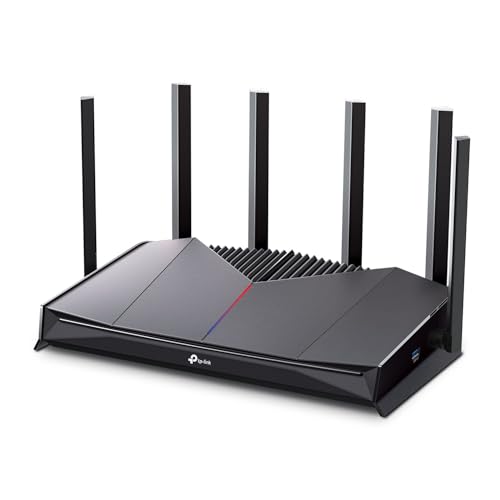
TP-Link Dual-Band Wi-Fi 7 Gaming Router
Best for: Wired gaming setups
- Wi-Fi Standard
- WiFi 7
- Speed Rating
- BE6500
- Frequency Bands
- Dual-Band
- Coverage Area
- 2,600 sq ft
- Device Capacity
- 90 devices
- Max Port Speed
- 2.5 Gbps
View on Amazon: TP-Link Dual-Band Wi-Fi 7 Gaming Router Affiliate link
Dual-band BE6500 Wi-Fi 7 gaming router with a dedicated 2.5G gaming port, WTFast and RGB.
Pros
- Dedicated 2.5G gaming port
- WTFast and game QoS built in
- 2,600 sq ft, 90 devices
Cons
- No 6 GHz band
- Costs more than the BE400
- EasyMesh does not work with Deco
Good fit if
- You game on a wired PC or console
Skip if
- You only want plain Wi-Fi 7
Verdict: Buy it for the gaming features, not the radios.
Specifications side by side
| Spec | TP-Link Dual-Band Wi-Fi 7 Gaming Router |
|---|---|
| Wi-Fi Standard | WiFi 7 |
| Speed Rating | BE6500 |
| Frequency Bands | Dual-Band |
| Coverage Area | 2,600 sq ft |
| Device Capacity | 90 devices |
| Max Port Speed | 2.5 Gbps |
| Ethernet Ports | 5 |
| Frequency Band | Dual-Band |
| Use Case | Gaming |
| Port Speed | Gigabit, 2.5G |
| Dimensions | 10.6 × 6.02 × 2.31 inches |
| Weight | 1.43 pounds |
| Size | 10.57 x 6.02 x 2.31 inches |
| Color | Black |
| Model | Archer GE400 |
Frequently asked questions
Does the Archer GE400 have a 6 GHz band?
No. It is dual-band BE6500 Wi-Fi 7 on 5 GHz and 2.4 GHz; TP-Link notes it does not support 6 GHz.
What is the dedicated gaming port?
One of the two 2.5G ports, whose traffic the router prioritizes for a gaming PC or console.
How many devices and how much area does it cover?
TP-Link rates it for up to 2,600 sq ft and 90 devices.
Can I add Deco units to it?
No. It supports EasyMesh routers, extenders and powerline adapters, but not Deco systems.
Is the Archer BE400 the same router without gaming features?
Close: both are BE6500 dual-band with two 2.5G ports, and the BE400 costs less; the GE400 adds the gaming port, WTFast, Game Panel and RGB.
Featured in
See also
- asus rt ax5400 wifi 6 router review
- kuwfi cpf905 outdoor 4g lte cpe review
- google nest wifi pro ga03030 ca 1 pack review
- tp link ax1800 wifi 6 router review
- tp link dual band be3600 wi fi 7 review
- TP-Link Deco 7 BE23 Dual-Band Wi-Fi 7 Review: Who It Fits and Who Should Skip It
- TP-Link Deco 7 Pro BE63 Tri-Band WiFi 7 Review: Specs, Pros and Cons
- TP-Link Archer BE400 Dual-Band WiFi 7 Review: Who It Fits and Who Should Skip It
- tp link archer tri band wi fi 7 review
- best dual band wi fi security cameras