Best Wi-Fi Routers for 75+ Devices in 2026: 6 Picks Ranked by Specs
As an Amazon Associate we earn from qualifying purchases. Links on this page are affiliate links.
Our top pick is the TP-Link Archer BE400: its listing rates it for 90 devices, the most in this group, with Wi-Fi 7, two 2.5G ports and USB 3.0 for well under $150. The NETGEAR RS200 states the widest reach at 2,500 sq ft for 80 devices, the Archer BE260 is the cheapest Wi-Fi 7 option, and the eero 6 is the lowest-priced way to connect 75+ devices with a smart home hub built in. Each of these 6 is a single router rated for 75 to 90 devices; mesh kits and renewed units are left out. We picked them from listing specs and did not test them.
Our top pick: TP-Link Archer Dual-Band WiFi 7 Router.
Quick picks
| # | Product | Best for | Price |
|---|---|---|---|
| 1 | TP-Link Archer Dual-Band WiFi 7 Router Best overall | Busy family homes | Check price of TP-Link Archer Dual-Band WiFi 7 Router on Amazon |
| 2 | NETGEAR Nighthawk Dual-Band WiFi 7 Router Best value | Medium to large homes | Check price of NETGEAR Nighthawk Dual-Band WiFi 7 Router on Amazon |
| 3 | TP-Link Dual-Band WiFi 7 BE5000 Router | Value-minded upgraders | Check price of TP-Link Dual-Band WiFi 7 BE5000 Router on Amazon |
| 4 | Amazon eero 6 Wi-Fi 6 Router (1-Pack) Best budget | Smart-home flats | Check price of Amazon eero 6 Wi-Fi 6 Router (1-Pack) on Amazon |
| 5 | Amazon eero 6+ Wi-Fi 6 Router | eero households | Check price of Amazon eero 6+ Wi-Fi 6 Router on Amazon |
| 6 | TP-Link Dual-Band Wi-Fi 7 Gaming Router Best for gaming | Gamers in shared homes | Check price of TP-Link Dual-Band Wi-Fi 7 Gaming Router on Amazon |
The best fit for you
- The most devices per dollar TP-Link Archer Dual-Band WiFi 7 Router Archer BE400, 90 devices.
- The widest stated reach NETGEAR Nighthawk Dual-Band WiFi 7 Router RS200, 2,500 sq ft.
- Cheapest Wi-Fi 7 for about 80 devices TP-Link Dual-Band WiFi 7 BE5000 Router Archer BE260.
- Smart-home gadgets on a tight budget Amazon eero 6 Wi-Fi 6 Router (1-Pack) eero 6, Zigbee hub.
- Thread devices and an eero network Amazon eero 6+ Wi-Fi 6 Router eero 6+.
- Gaming on a crowded network TP-Link Dual-Band Wi-Fi 7 Gaming Router Archer GE400.
Our 6 picks

TP-Link Archer Dual-Band WiFi 7 Router
Best for: Busy family homes
- Wi-Fi Standard
- Wi-Fi 7
- Speed Rating
- BE6500
- Frequency Bands
- Dual-Band
- Coverage Area
- 2,400 sq. ft.
- Device Capacity
- 90 devices
- Max Port Speed
- 2.5 Gbps
View on Amazon: TP-Link Archer Dual-Band WiFi 7 Router Affiliate link
TP-Link Archer BE400: 6-stream BE6500 dual-band Wi-Fi 7 (5764 plus 688 Mbps) with MLO, rated for 90 devices over 2,400 sq ft, one 2.5G WAN/LAN, one 2.5G LAN and three gigabit LAN, USB 3.0, a quad-core CPU, VPN client and server, HomeShield and EasyMesh (not Deco).
Pros
- 90 devices, the top rating in this band
- Two 2.5G ports and USB 3.0
- VPN client and server
Cons
- No 6 GHz band
- EasyMesh only, not Deco
Good fit if
- You have dozens of phones, TVs and smart plugs and want Wi-Fi 7 at a mid price
Skip if
- Your devices need 6 GHz
Verdict: The most device headroom per dollar here.

NETGEAR Nighthawk Dual-Band WiFi 7 Router
Best for: Medium to large homes
- Wi-Fi Standard
- Wi-Fi 7
- Speed Rating
- BE6500
- Frequency Bands
- Dual-Band
- Coverage Area
- 2,500 sq ft
- Device Capacity
- 80 devices
- Max Port Speed
- 2.5 Gbps
View on Amazon: NETGEAR Nighthawk Dual-Band WiFi 7 Router Affiliate link
NETGEAR Nighthawk RS200: dual-band Wi-Fi 7 up to 6.5 Gbps with MU-MIMO and OFDMA, rated for 80 devices across 2,500 sq ft, a 2.5G WAN, a second 2.5G LAN and three gigabit LAN, set up in the Nighthawk app. Armor security is a 30-day trial, then a subscription.
Pros
- Widest coverage rating in this list
- Two 2.5G ports
- Easy Nighthawk app setup
Cons
- 80 devices, a little under the BE400
- Armor costs extra after the trial
Good fit if
- You want NETGEAR's app and the widest stated reach for around a hundred dollars
Skip if
- You want free built-in security
Verdict: Strong reach and ports for the money.

TP-Link Dual-Band WiFi 7 BE5000 Router
Best for: Value-minded upgraders
- Wi-Fi Standard
- WiFi 7
- Speed Rating
- BE5000
- Frequency Bands
- Dual-Band
- Coverage Area
- 2,400 sq ft
- Device Capacity
- 80 devices
- Max Port Speed
- 2.5 Gbps
View on Amazon: TP-Link Dual-Band WiFi 7 BE5000 Router Affiliate link
TP-Link Archer BE260: 5-stream BE5000 dual-band Wi-Fi 7 (4324 plus 688 Mbps), 80 devices over 2,400 sq ft, one 2.5G WAN, one 2.5G LAN and three gigabit LAN, five antennas, VPN client and server, HomeShield and EasyMesh. One bullet names the Archer BE770 by mistake.
Pros
- Wi-Fi 7 under a hundred dollars
- Two 2.5G ports
- VPN server
Cons
- 5 streams versus 6 on the BE400
- Listing copy mixes in another model name
Good fit if
- You want Wi-Fi 7 for about 80 devices and the lowest Wi-Fi 7 price here
Skip if
- You need USB storage
Verdict: Wi-Fi 7 for many devices on a budget.

Amazon eero 6 Wi-Fi 6 Router (1-Pack)
Best for: Smart-home flats
- Device Capacity
- 75+ Devices (what this guide is about)
- Coverage Area
- 1,500 Sq. Ft.
- Pack Size
- 1-Pack
- Features
- Mesh
- Dimensions
- 3.91 × 3.82 × 2.42 inches
- Weight
- 10.6 ounces
View on Amazon: Amazon eero 6 Wi-Fi 6 Router (1-Pack) Affiliate link
Amazon eero 6 (1-pack): Wi-Fi 6 mesh router for 75+ devices, about 1,500 sq ft and wifi speeds up to 900 Mbps, with TrueMesh routing, a built-in Zigbee smart home hub for Alexa and the eero app. You can add more eero units later.
Pros
- Lowest price
- Zigbee hub built in
- Simple app and automatic updates
Cons
- Smallest coverage
- Wi-Fi tops out at 900 Mbps
Good fit if
- You want a cheap router for many smart-home gadgets in a smaller home
Skip if
- You want every wireless laptop to see more than 900 Mbps
Verdict: The low-cost way to handle 75 devices.

Amazon eero 6+ Wi-Fi 6 Router
Best for: eero households
- Device Capacity
- 75+ Devices (what this guide is about)
- Wi-Fi Standard
- Wi-Fi 6
- Coverage Area
- 1,500 sq ft
- Pack Size
- 1-Pack
- Features
- Mesh
- Port Speed
- Gigabit
View on Amazon: Amazon eero 6+ Wi-Fi 6 Router Affiliate link
Amazon eero 6+ (1-pack): Wi-Fi 6 with 160 MHz channels for gigabit wifi, 75+ devices, about 1,500 sq ft, a Thread and Zigbee smart home hub, and TrueMesh. Any eero 6+ can be the gateway or join an existing eero network. Extra security and management features need a subscription.
Pros
- Gigabit Wi-Fi in a small unit
- Thread and Zigbee hub
- Joins any eero network
Cons
- Same coverage as the cheaper eero 6
- Costs as much as the BE400
Good fit if
- You already use eero or want Thread support for smart-home gear
Skip if
- You would rather put about $140 toward a Wi-Fi 7 router
Verdict: eero simplicity with gigabit Wi-Fi.
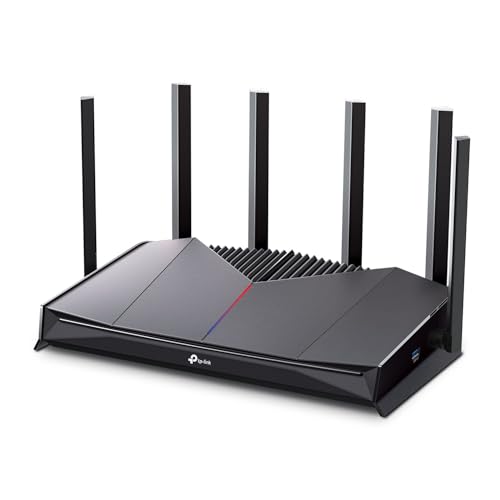
TP-Link Dual-Band Wi-Fi 7 Gaming Router
Best for: Gamers in shared homes
- Wi-Fi Standard
- WiFi 7
- Speed Rating
- BE6500
- Frequency Bands
- Dual-Band
- Coverage Area
- 2,600 sq ft
- Device Capacity
- 90 devices
- Max Port Speed
- 2.5 Gbps
View on Amazon: TP-Link Dual-Band Wi-Fi 7 Gaming Router Affiliate link
TP-Link Archer GE400: 6-stream BE6500 Wi-Fi 7 gaming router (5765 plus 688 Mbps), 90 devices over 2,600 sq ft, a dedicated multi-gig gaming port, two 2.5G ports in all plus three gigabit LAN, WTFast game server acceleration, a game panel with RGB control and EasyMesh.
Pros
- Gaming port and WTFast
- 2,600 sq ft and 90 devices
- Game dashboard
Cons
- Costs more than the BE400
- Low stock
Good fit if
- You game on a busy network and want traffic priority built in
Skip if
- You do not game and want to save money
Verdict: BE400 capacity with gaming extras.
Specifications side by side
| Spec | TP-Link Archer Dual-Band WiFi 7 Router | NETGEAR Nighthawk Dual-Band WiFi 7 Router | TP-Link Dual-Band WiFi 7 BE5000 Router | Amazon eero 6 Wi-Fi 6 Router (1-Pack) | Amazon eero 6+ Wi-Fi 6 Router | TP-Link Dual-Band Wi-Fi 7 Gaming Router |
|---|---|---|---|---|---|---|
| Wi-Fi Standard | Wi-Fi 7 | Wi-Fi 7 | WiFi 7 | not stated | Wi-Fi 6 | WiFi 7 |
| Speed Rating | BE6500 | BE6500 | BE5000 | not stated | not stated | BE6500 |
| Frequency Bands | Dual-Band | Dual-Band | Dual-Band | not stated | not stated | Dual-Band |
| Coverage Area | 2,400 sq. ft. | 2,500 sq ft | 2,400 sq ft | not stated | 1,500 sq ft | 2,600 sq ft |
| Device Capacity | 90 devices | 80 devices | 80 devices | not stated | 75+ devices | 90 devices |
| Max Port Speed | 2.5 Gbps | 2.5 Gbps | 2.5 Gbps | not stated | not stated | 2.5 Gbps |
| Ethernet Ports | 5 | not stated | 5 | not stated | not stated | 5 |
| Frequency Band | Dual-Band | Dual-Band | Tri-Band | not stated | not stated | Dual-Band |
| Pack Size | not stated | not stated | not stated | 1-Pack | 1-Pack | not stated |
| Use Case | not stated | not stated | not stated | not stated | not stated | Gaming |
| Features | not stated | not stated | VPN, Mesh | Mesh | Mesh | not stated |
| Port Speed | 2.5G | Gigabit, 2.5G | Gigabit, 2.5G | not stated | Gigabit | Gigabit, 2.5G |
| Dimensions | 4.72 × 1.57 × 7.09 inches | 10.8 × 7.1 × 7 inches | not stated | 3.91 × 3.82 × 2.42 inches | 3.94 × 3.82 × 2.6 inches | 10.6 × 6.02 × 2.31 inches |
| Weight | 1.37 pounds | 3.37 pounds | 1.34 pounds | 10.6 ounces | 11 ounces | 1.43 pounds |
| Size | 10.6 x 6 x 1.9 inches | 6.5 Gbps | Compact | 1 router | 1 router | 10.57 x 6.02 x 2.31 inches |
| Color | Black | Black | Black | WHITE | WHITE | Black |
| Model | Archer BE400 | RS200-100APS | Archer BE260 | N010111 | R010001 | Archer GE400 |
If you are also setting up a desk around your new network, our guide to the best 75 mechanical keyboards compares compact layouts by their published specs.
Planning for a crowded network
-
Count what is connected now
Phones, laptops, TVs, speakers, cameras, plugs and bulbs add up fast. Add a margin for guests and new gadgets.
-
Wi-Fi 7 helps crowded networks
MLO and OFDMA on the Wi-Fi 7 picks share airtime more efficiently when many devices are active at once.
-
Use the 2.5G ports for heavy hitters
Wire a NAS, desktop or console to a 2.5G LAN port to take load off the Wi-Fi.
-
Smart home hubs reduce clutter
The eero units include Zigbee (and Thread on the 6+), which can replace a separate hub for compatible devices.
Frequently asked questions
Which router here supports the most devices?
The Archer BE400 and Archer GE400 are rated for 90 devices; the NETGEAR RS200 and Archer BE260 for 80; the eero 6 and 6+ for 75+.
Do I need mesh for 75 devices?
Not for device count alone. Mesh is for coverage; a single router rated for 80 or 90 devices handles the load if it reaches every room.
Are the eero routers Wi-Fi 7?
No. The eero 6 and eero 6+ are Wi-Fi 6, while the TP-Link and NETGEAR picks are dual-band Wi-Fi 7.
Does a higher device rating mean faster internet?
No. It means the router can keep more devices connected smoothly; your plan speed is still shared among them.