TP-Link vs NETGEAR Network Switches: Which Brand Fits You?
As an Amazon Associate we earn from qualifying purchases. Links on this page are affiliate links.
When you compare a TP-Link vs NETGEAR network switch, you are looking at two reliable unmanaged options. Both devices offer five Gigabit Ethernet ports and support desktop or wall mounting. They share a plug-and-play design that requires no software configuration. The main difference lies in their physical build and power efficiency features. TP-Link uses a plastic case with specific power-saving algorithms, while NETGEAR opts for a metal chassis and Energy Efficient Ethernet standards. This guide breaks down how these specs affect your home network.
Key differences
| Aspect | TP-Link 5-Port Gigabit Unmanaged Switch | NETGEAR 5-Port Gigabit Unmanaged Switch |
|---|---|---|
| Case Material | Plastic | Metal |
| Power Saving Feature | Adjusts power by link status and cable length | IEEE 802.3az Energy Efficient Ethernet |
| Color | Black | Gray |
| Dimensions (L x W x H) | 6.5 x 1.1 x 4.3 inches | 4.02 x 1.06 x 3.9 inches |
| Weight | 4.23 ounces | 7.05 ounces |
| Warranty | Limited lifetime | Not listed |
Which one should you choose?
Choose TP-Link 5-Port Gigabit Unmanaged Switch if
- You prefer a lighter device that is easier to mount on a wall.
- You want a switch with a stated limited lifetime warranty.
- You need a plastic case that is less prone to denting.
Choose NETGEAR 5-Port Gigabit Unmanaged Switch if
- You prefer a metal chassis for potentially better heat dissipation.
- You want a more compact footprint that fits in tight spaces.
- You prioritize IEEE 802.3az Energy Efficient Ethernet standards.
Verdict: Choose the TP-Link if you value a lighter weight, a longer warranty, and specific power adjustments based on cable length. Select the NETGEAR if you prefer a metal build, a smaller physical footprint, and standard Energy Efficient Ethernet compliance. Both switches perform identically in terms of port count and speed for typical home use.
TP-Link vs NETGEAR Switch Specs
Build material
The NETGEAR GS105NA features a compact metal design, which often provides better heat dissipation and durability for long-term use. In contrast, the TP-Link TL-SG1005D uses a plastic case. Plastic enclosures are lighter and generally sufficient for indoor desktop placement, but they may not offer the same rigid structural integrity as metal. If you prioritize a sturdy chassis that feels solid on a desk or shelf, the metal construction of the NETGEAR unit is a clear advantage. For users who prefer a lighter device that is easy to move, the plastic TP-Link model works well.
Power efficiency
Both switches are fanless and energy-efficient, but they use different standards. The NETGEAR model supports IEEE 802.3az Energy Efficient Ethernet, which reduces power consumption by lowering energy use during periods of low activity. The TP-Link switch automatically adjusts power based on link status and cable length, claiming up to 80% power saving. While both are quiet and cool-running, the specific IEEE 802.3az certification on the NETGEAR device offers a standardized metric for energy savings. The TP-Link approach is practical but relies on proprietary adjustment logic rather than a named industry standard for efficiency.
Port count
Both the TP-Link TL-SG1005D and the NETGEAR GS105NA provide exactly five Gigabit Ethernet ports. This is the standard configuration for small home offices or apartments where you need to connect a few wired devices like a gaming console, printer, or smart TV. Since neither model offers more or fewer ports in this specific comparison, there is no difference in capacity. You get the same number of connections from either brand. If you need more ports, you would need to look at their respective 8-port or higher models, but for this head-to-head, the port count is identical.
Port speed
Each switch features five ports that support 10/100/1000 Mbps speeds. This Gigabit rating ensures that data transfers between your wired devices and your router occur at high speeds, suitable for 4K streaming, large file transfers, and online gaming. Both the TP-Link and NETGEAR units support auto-negotiation, meaning they detect the optimal speed for each connected device. There is no performance difference in the maximum throughput you can expect from either switch. Both will deliver full Gigabit speeds to compatible devices, making this a tie for everyday network performance.
Warranty support
The TP-Link TL-SG1005D comes with a limited lifetime warranty and includes free 24/7 technical support. This is a significant advantage for long-term ownership, as it covers the device for its entire usable life. The NETGEAR GS105NA data does not explicitly list its warranty terms in the provided specifications. While NETGEAR is known for support, the explicit lifetime coverage from TP-Link offers more certainty regarding long-term protection. If you want peace of mind regarding hardware defects years down the line, the stated lifetime warranty on the TP-Link model is a clear benefit.
Physical dimensions
The two switches differ in size and shape. The TP-Link model is 6.5 inches long, 4.3 inches high, and 1.1 inches thick, weighing 4.23 ounces. The NETGEAR unit is 4.02 inches long, 3.9 inches high, and 1.06 inches thick, weighing 7.05 ounces. The TP-Link is longer but lighter, while the NETGEAR is more compact in footprint but heavier due to its metal build. For tight spaces, the NETGEAR’s smaller length might fit better behind a router. For stability on a flat surface, the TP-Link’s wider base may feel more secure. Your choice depends on your available space.
Which Switch Fits Your Setup
Users needing silent, cool operation
The TP-Link TL-SG1005D features a fanless design that ensures quiet performance. It also includes IEEE 802.3x flow control for reliable data transfer. This model automatically adjusts power consumption based on link status and cable length. You get a lightweight plastic case that saves space without adding noise to your environment.
Buyers wanting durable metal build
The NETGEAR GS105NA uses a compact metal design. Metal enclosures often provide better heat dissipation and durability for long-term use. It supports desktop or wall-mount placement for versatile installation. The unit is made for use in the U.S. and Canada only, ensuring regional compatibility for your specific network needs.
Those seeking compact dimensions
The NETGEAR GS105NA measures 4.02 inches in length and 1.06 inches in width. Its small footprint allows for easy placement in tight spaces. The metal construction adds slight weight but enhances stability. This size is ideal for users who need a discreet switch that does not dominate their desk or wall area.
The products compared

TP-Link 5-Port Gigabit Unmanaged Switch
Best for: Simple home wired expansion
- Port Count
- 5
- Port Speed
- 10/100/1000 Mbps
- Management Type
- Unmanaged
- Mounting Type
- Desktop, Wall-Mount
- Number of Ports
- 5 Ports
- Dimensions
- 1.1 × 6.5 × 4.3 inches
View on Amazon: TP-Link 5-Port Gigabit Unmanaged Switch Affiliate link
This TP-Link TL-SG1005D is a 5-port unmanaged switch with Gigabit speeds. It expands your wired network for devices like laptops or consoles. The unit supports both desktop and wall mounting. It features a fanless design for quiet operation. Power saving adjusts to link status. You get reliable data transfer with IEEE 802.3x flow control. It requires no software or configuration.
Pros
- 5 Gigabit Ethernet ports for 10/100/1000 Mbps speeds
- Fanless design for quiet, passive operation
- Supports desktop placement or wall mounting
- Auto-negotiation eliminates need for crossover cables
- Up to 80% power saving based on link status
Cons
- Unmanaged type offers no VLAN or traffic control
- Plastic case may feel less durable than metal
- No web interface for remote monitoring or settings
Good fit if
- You need extra wired ports for basic home devices
- You want a silent, fanless connection for bedrooms
- You prefer simple plug-and-play setup without software
Skip if
- You require advanced traffic management or VLANs
- You need more than 5 wired connections
- You want remote configuration via a web app
Verdict: TP-Link 5 Port Gigabit Unmanaged Switch is a straightforward, quiet solution for expanding wired connectivity in small homes. It fits users who value simplicity and silent operation over advanced network controls.
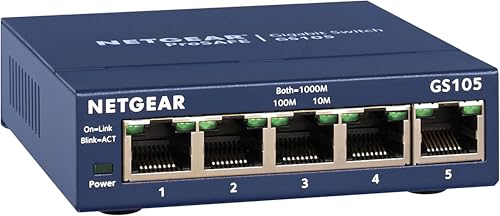
NETGEAR 5-Port Gigabit Unmanaged Switch
Best for: Small home offices needing simple wired expansion
- Port Count
- 5
- Port Speed
- 1.0 Gbps
- Management Type
- Unmanaged
- Mounting Type
- Desktop, Wall-Mount
- Number of Ports
- 5 Ports
- Dimensions
- 4.02 × 1.06 × 3.9 inches
View on Amazon: NETGEAR 5-Port Gigabit Unmanaged Switch Affiliate link
The NETGEAR GS105NA provides five 1.0 Gbps Ethernet ports for reliable wired connectivity. It operates as an unmanaged switch, requiring no software or configuration. The compact metal chassis supports both desktop and wall-mount placement. A fanless design ensures silent operation while IEEE 802.3az energy efficiency reduces power use. This unit is built for U.S. and Canadian markets.
Pros
- Five 1.0 Gbps auto-negotiating ports
- Fanless design for silent operation
- Supports desktop or wall-mount installation
- IEEE 802.3az energy efficient
Cons
- Unmanaged configuration limits advanced network control
- Only five ports available
- Regional compatibility restricted to U.S. and Canada
Good fit if
- You need a simple plug-and-play connection for a few devices
- You want a silent, fanless unit for a quiet space
- You prefer a compact metal chassis for wall mounting
Skip if
- You require more than five wired connections
- You need managed features like VLANs or traffic prioritization
- You live outside the U.S. or Canada
Verdict: NETGEAR 5-Port Gigabit Unmanaged Switch fits users who need a straightforward, silent, and compact wired connection for a small number of devices without complex setup.
Specifications side by side
| Spec | TP-Link 5-Port Gigabit Unmanaged Switch | NETGEAR 5-Port Gigabit Unmanaged Switch |
|---|---|---|
| Port Count | 5 | 5 |
| Port Speed | 10/100/1000 Mbps | 1.0 Gbps |
| Management Type | Unmanaged | Unmanaged |
| Mounting Type | Desktop, Wall-Mount | Desktop, Wall-Mount |
| Number of Ports | 5 Ports | 5 Ports |
| Dimensions | 1.1 × 6.5 × 4.3 inches | 4.02 × 1.06 × 3.9 inches |
| Weight | 4.23 ounces | 7.05 ounces |
| Size | 5 Port Gigabit | 5-Port Gigabit, Desktop/Wall Mount (GS105NA) |
| Color | Black | Blue |
| Model | TL-SG1005D | GS105NA |
Frequently asked questions
Which switch is smaller for tight spaces?
The NETGEAR GS105NA is more compact. Its dimensions are 4.02 inches in length and 1.06 inches in height. The TP-Link TL-SG1005D measures 6.5 inches wide and 4.3 inches high. You should choose the NETGEAR model if your desk or wall space is limited. The smaller footprint allows for easier placement in crowded areas.
Do these switches require power adapters?
Both devices use external power supplies. The data does not specify internal battery or PoE capabilities. You will need to plug both switches into a wall outlet. The TP-Link unit weighs 4.23 ounces, while the NETGEAR unit weighs 7.05 ounces. This weight difference comes from the internal power components and casing materials.
Can I mount these on a wall?
Yes, the TP-Link TL-SG1005D supports wall mounting. The NETGEAR GS105NA is designed for desktop use. Check the NETGEAR manual for specific mounting hole locations if you plan to install it vertically. The TP-Link includes mounting points for secure wall attachment. This makes the TP-Link option better for clean cable management in fixed locations.
Are these switches silent during operation?
Both units operate without fans. They rely on passive cooling to dissipate heat. You will not hear any noise from either device during normal use. This makes them suitable for home offices or living rooms. The lack of moving parts also reduces the risk of mechanical failure over time.
What is the difference in build material?
The NETGEAR GS105NA uses a metal casing. The TP-Link TL-SG1005D uses a plastic enclosure. Metal cases often provide better heat dissipation and durability. Plastic cases are lighter and cost-effective. Both materials are sufficient for indoor home networking. Choose metal for perceived robustness or plastic for lighter weight.
Do I need software to set these up?
No software is required for either switch. Both are unmanaged devices. You simply connect the Ethernet cables to the Gigabit ports. The switches automatically detect and configure network speeds. This plug-and-play design saves time and eliminates configuration errors. It is ideal for users who want immediate wired connectivity without technical setup.