NETGEAR vs Ztyuav: Network Switches Compared by Specs
As an Amazon Associate we earn from qualifying purchases. Links on this page are affiliate links.
This NETGEAR vs ztyuav network switch comparison focuses on unmanaged Ethernet hardware. Both devices provide gigabit connectivity and plug-and-play simplicity without configuration software. They differ significantly in scale and capability. The NETGEAR GS105NA is a compact 5-port unit for basic home networking. The Ztyuav model offers 18 ports with 16 PoE+ outputs and a 250W budget. You need to decide if you require simple data expansion or power delivery for devices like cameras and access points.
Key differences
| Aspect | NETGEAR 5-Port Gigabit Unmanaged Switch | Ztyuav 18-Port Gigabit PoE+ Switch |
|---|---|---|
| Port Count | 5 ports | 18 ports |
| PoE Support | Not listed | PoE+ (16 ports) |
| PoE Budget | Not listed | 250W total |
| Mounting Options | Desktop, Wall-Mount | Desktop, Wall-Mount, Rackmount |
| Management | Unmanaged | Unmanaged |
Which one should you choose?
Choose NETGEAR 5-Port Gigabit Unmanaged Switch if
- You only need to connect a few wired devices like a console or PC.
- You want a silent, fanless unit that fits easily on a desk.
- You do not need to power devices like cameras or phones via Ethernet.
Choose Ztyuav 18-Port Gigabit PoE+ Switch if
- You need to power multiple devices such as IP cameras or access points.
- You require more than five wired connections for a larger network.
- You plan to mount the switch in a standard equipment rack.
Verdict: Choose the NETGEAR GS105NA if you need a simple, compact switch for basic data connectivity. Select the Ztyuav switch if your setup requires powering multiple devices via PoE or demands a higher port count for a larger network.
NETGEAR vs Ztyuav Switch Specs
Port count and scale
The NETGEAR GS105NA provides five Gigabit Ethernet ports. This compact size suits small offices or single rooms with few wired devices. You connect up to five devices directly. The Ztyuav switch offers eighteen ports total. Sixteen of these support Power over Ethernet Plus. Two additional ports serve as dedicated uplinks for connecting to your main router or other switches. This higher port count allows you to connect many more devices simultaneously. If you need to wire multiple cameras or access points, the Ztyuav scale is much larger. The NETGEAR model is strictly for minimal setups.
PoE power budget
The NETGEAR GS105NA does not provide Power over Ethernet. You must use separate power adapters for connected devices like IP phones or cameras. This keeps the switch simple and inexpensive to operate, but requires more wall outlets. The Ztyuav switch includes a 250W PoE budget across its sixteen PoE ports. It supports IEEE 802.3af/at standards. This allows you to power devices directly through the Ethernet cable. You can reduce cable clutter significantly. The Ztyuav also features auto-detection to protect non-PoE devices. For any setup requiring powered endpoints, the NETGEAR option lacks this capability entirely.
Physical dimensions and weight
The NETGEAR GS105NA is a small desktop unit. It measures 4.02 inches in length and weighs only 7.05 ounces. Its compact metal design allows easy placement on a desk or mounting on a wall. The Ztyuav switch is significantly larger and heavier. It measures 10.6 inches in length and weighs 3.2 pounds. This size accommodates the extra ports and internal components for PoE distribution. While the NETGEAR unit is easier to hide in tight spaces, the Ztyuav requires more room. You might need a rack mount for the Ztyuav in a professional setting.
Mounting flexibility
Both switches support desktop and wall-mount installations. The NETGEAR GS105NA uses a compact metal design that fits easily in home environments. The Ztyuav switch also supports wall mounting but adds rack-mount capability. This makes the Ztyuav suitable for server racks or structured wiring closets. The additional mounting options on the Ztyuav provide greater flexibility for professional installations. If you only need a small desktop unit, the NETGEAR is sufficient. However, for environments requiring rack integration, the Ztyuav offers more versatility in placement options.
Network management features
Both devices are unmanaged switches. This means you do not need to install software or configure settings to use them. They operate on a plug-and-play basis. However, the Ztyuav switch includes a VLAN isolation mode. This feature allows you to isolate broadcast storms and prevent communication between specific PoE ports. This improves network security and data transmission stability in larger setups. The NETGEAR GS105NA lacks this advanced feature. It operates strictly in standard mode. If you require basic segmentation or security isolation without complex configuration, the Ztyuav provides a useful advantage over the simpler NETGEAR unit.
Which switch fits your home setup
Small home with few wired devices
The NETGEAR GS105NA offers five gigabit ports in a compact metal chassis. Its fanless design ensures silent operation, making it ideal for bedrooms or living rooms. You get plug-and-play simplicity without configuration. The low power consumption aligns with Energy Efficient Ethernet standards for basic connectivity needs.
Security system with multiple cameras
The Ztyuav switch provides sixteen PoE+ ports with a 250W budget, perfect for powering IP cameras. It includes two uplink ports for network expansion. VLAN isolation mode helps prevent broadcast storms and enhances security. The sturdy metal casing offers lightning protection, ensuring stable operation for surveillance setups.
Office needing extensive wired connections
With eighteen total ports, the Ztyuav unit supports many devices simultaneously. It supports desktop, wall, or rack mounting for flexible installation in office environments. The gigabit speeds handle high bandwidth demands, while the PoE capability simplifies cabling for phones and access points. This scale suits growing business networks.
The products compared
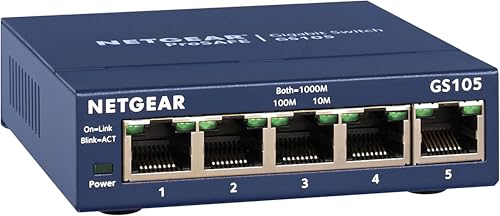
NETGEAR 5-Port Gigabit Unmanaged Switch
Best for: small homes needing simple Gigabit expansion
- Port Count
- 5
- Port Speed
- 1.0 Gbps
- Management Type
- Unmanaged
- Mounting Type
- Desktop, Wall-Mount
- Number of Ports
- 5 Ports
- Dimensions
- 4.02 × 1.06 × 3.9 inches
View on Amazon: NETGEAR 5-Port Gigabit Unmanaged Switch Affiliate link
This NETGEAR GS105NA is a 5-port unmanaged switch with 1.0 Gbps Ethernet ports. It auto-negotiates speed and works with Cat5e or Cat6 cables. The compact metal design supports desktop or wall mounting. It features a fanless, silent operation and IEEE 802.3az energy efficiency. This unit is made for use in the U.S. and Canada only, making it a simple plug-and-play solution for small home networks.
Pros
- 5 ports of 1.0 Gbps Ethernet connectivity
- Fanless design ensures silent operation
- Compact metal case allows desktop or wall mounting
- Energy Efficient Ethernet reduces power consumption
Cons
- Only 5 ports limit expansion for larger setups
- Unmanaged type offers no advanced traffic control
- Regional compatibility restricted to U.S. and Canada
Good fit if
- You need a simple plug-and-play connection for a few devices
- You want a silent, fanless switch for a living space
- You are expanding a small home network with Gigabit speeds
Skip if
- You require more than 5 Ethernet connections
- You need managed features for network monitoring
- You live outside the U.S. or Canada
Verdict: NETGEAR 5-Port Gigabit Unmanaged Switch is a compact, silent option for users who only need to connect a few devices. It fits small homes where simplicity and low power use matter more than port count or advanced settings.

Ztyuav 18-Port Gigabit PoE+ Switch
Best for: Simple PoE deployments with VLAN needs
- Port Count
- 18
- Port Speed
- 100/1000Mbps
- Management Type
- Unmanaged
- PoE Support
- PoE+, IEEE802.3af/at
- PoE Power Budget
- 250W
- Uplink Ports
- 2 UpLink Ports
View on Amazon: Ztyuav 18-Port Gigabit PoE+ Switch Affiliate link
This Ztyuav switch offers 18 Gigabit ports with a 250W PoE budget. It includes 16 PoE+ ports for devices like cameras and 2 uplink ports for network expansion. The unit supports VLAN isolation to manage traffic and prevent broadcast storms. Its metal casing allows for desktop, wall, or rack mounting. It is designed for users who need reliable power and data delivery in security or office networks without complex configuration.
Pros
- 16 PoE+ ports with 250W total budget
- VLAN isolation mode for traffic control
- 6KV lightning protection
- Metal casing with multiple mounting options
Cons
- Unmanaged interface limits advanced configuration
- No web or app-based management
- Fixed 250W PoE budget may limit large deployments
Good fit if
- You need to power multiple IP cameras
- You want simple plug-and-play setup
- You require VLAN isolation for security
Skip if
- You need smart management features
- You require 10Gb uplink speeds
- You need more than 16 PoE ports
Verdict: Ztyuav 18-Port Gigabit PoE Switch fits users who need a straightforward, high-port-count solution for powering devices like cameras without managing complex network settings.
Specifications side by side
| Spec | NETGEAR 5-Port Gigabit Unmanaged Switch | Ztyuav 18-Port Gigabit PoE+ Switch |
|---|---|---|
| Port Count | 5 | 18 |
| Port Speed | 1.0 Gbps | 100/1000Mbps |
| Management Type | Unmanaged | Unmanaged |
| PoE Support | not stated | PoE+, IEEE802.3af/at |
| PoE Power Budget | not stated | 250W |
| Uplink Ports | not stated | 2 UpLink Ports |
| Mounting Type | Desktop, Wall-Mount | Desktop, Wall-Mount, Rackmount |
| Number of Ports | 5 Ports | 18 Ports |
| Dimensions | 4.02 × 1.06 × 3.9 inches | 10.6 × 7.13 × 1.73 inches |
| Weight | 7.05 ounces | 3.2 pounds |
| Size | 5-Port Gigabit, Desktop/Wall Mount (GS105NA) | 1G 18-Port | 16 PoE+ 250W |
| Color | Blue | Black |
| Model | GS105NA | Z-BZQQ1620 |
Frequently asked questions
Can the Ztyuav switch power security cameras?
Yes, it supports Power over Ethernet. The Ztyuav 18-Port Gigabit PoE+ Switch includes sixteen PoE+ ports. This allows you to connect devices like IP cameras directly without separate power adapters. The unit provides a total PoE budget of 250 watts for these connected devices.
Is the NETGEAR switch suitable for a whole house?
It is best for small spaces only. The NETGEAR 5-Port Gigabit Unmanaged Switch has only five ports. This limits the number of wired devices you can connect. It is ideal for a single room or a small home office where simplicity matters more than high port count.
Do I need software to configure these switches?
No configuration is required for either device. Both the NETGEAR GS105NA and the Ztyuav 18-Port switch are unmanaged. You simply plug in your Ethernet cables, and they begin working immediately. There are no settings to adjust or apps to install for basic operation.
Which switch is quieter for a bedroom?
The NETGEAR model is the better choice for quiet environments. It is a compact, fanless unit designed for silent operation. The Ztyuav switch is larger and heavier, measuring 10.6 inches in length. It is better suited for closets or utility areas where noise is less of a concern.
What is the maximum speed on these ports?
Both switches offer Gigabit Ethernet speeds. Every port on the NETGEAR GS105NA and the Ztyuav 18-Port switch supports Gigabit connectivity. This allows data transfer rates up to 1000 Mbps. This speed is sufficient for most home networking tasks, including streaming and large file transfers.
How many devices can the Ztyuav switch support?
It supports up to eighteen connected devices. The Ztyuav model features eighteen total Gigabit Ethernet ports. Sixteen of these ports provide PoE+ power for devices like cameras or access points. The remaining two ports are for uplink connections to your router or main network backbone.
Does the NETGEAR switch need a power outlet nearby?
Yes, it requires a power connection. Although it is compact and lightweight at 7.05 ounces, it still needs to be plugged in. The Ztyuav switch also requires power, but its larger 3.2-pound frame suggests a more robust internal power supply to handle the eighteen ports and PoE load.