Best NETGEAR Network Switches with 5 Ports in 2026: 7 Picks
As an Amazon Associate we earn from qualifying purchases. Links on this page are affiliate links.
Finding the best NETGEAR network switches with 5 Ports requires looking at the published specifications for each model. We compared 7 options to help you identify the right hardware for your setup. The NETGEAR 5-Port Gigabit Unmanaged Switch leads this list because its unmanaged design ensures reliable, silent connectivity for standard devices without complex configuration. These picks are based strictly on the technical data provided by NETGEAR. This guide helps you decide which switch fits your bandwidth and management needs.
Quick picks
The best fit for you
- You need silent operation for basic home networking NETGEAR 5-Port Gigabit Unmanaged Switch The GS105NA is an unmanaged gigabit switch designed for reliable, silent connectivity.
- You want faster local transfers for a home office NETGEAR 5-Port 2.5G Unmanaged Switch The MS305 offers 2.5G port speeds for reliable multi-gigabit performance.
- You need simple VLAN control for a small office NETGEAR 5-Port Gigabit Smart Managed Switch The GS305E provides smart managed features like VLANs without enterprise bulk.
- You require silent PoE management for cameras and APs NETGEAR 5-Port Gigabit PoE+ Smart Switch The GS305EP delivers managed PoE+ power with essential smart features.
- You need straightforward PoE+ connectivity for security cameras NETGEAR GS105PP 5-Port PoE+ Switch The GS105PP provides reliable PoE+ power in a compact, silent unit.
Our 7 picks
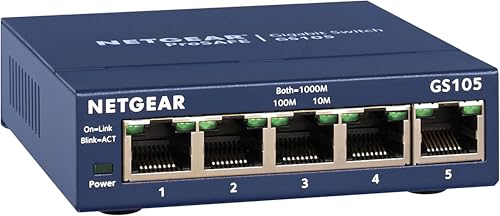
NETGEAR 5-Port Gigabit Unmanaged Switch
Best for: Basic home networking and silent operation
- Number of Ports
- 5 Ports (what this guide is about)
- Port Count
- 5
- Port Speed
- 1.0 Gbps
- Management Type
- Unmanaged
- Mounting Type
- Desktop, Wall-Mount
- Dimensions
- 4.02 × 1.06 × 3.9 inches
View on Amazon: NETGEAR 5-Port Gigabit Unmanaged Switch Affiliate link
This NETGEAR GS105NA is a 5-port unmanaged Gigabit Ethernet switch designed for straightforward home networking. It features five 1.0 Gbps ports that auto-negotiate speeds for compatible devices. The compact metal chassis supports both desktop and wall-mount placement. Its fanless design ensures silent operation, while Energy Efficient Ethernet technology helps reduce power consumption. It requires no software or configuration, making it a plug-and-play solution for basic connectivity needs.
Pros
- Five 1.0 Gbps Ethernet ports for high-speed connectivity
- Fanless design for silent operation
- Supports desktop or wall-mount installation
- Energy Efficient Ethernet reduces power usage
Cons
- Unmanaged interface offers no advanced traffic control
- Limited to 1.0 Gbps speeds, not Multi-Gig
- Regional compatibility restricted to U.S. and Canada
Good fit if
- You need a simple, plug-and-play switch for basic home networking
- You require silent operation without fan noise
- You want a compact unit for wall-mounting in tight spaces
Skip if
- You need PoE support to power devices like cameras or phones
- You require 2.5G or higher speeds for fast file transfers
- You want to manage network traffic or configure VLANs
Verdict: NETGEAR GS105NA 5-Port Gigabit Switch fits users who need reliable, silent connectivity for standard devices without the need for complex network management or advanced features.

NETGEAR 5-Port Gigabit Smart Managed Switch
Best for: Small offices needing simple VLAN control
- Number of Ports
- 5 Ports (what this guide is about)
- Port Count
- 5
- Port Speed
- 1.0Gbps
- Management Type
- Easy Smart Managed
- Mounting Type
- Desktop or Wall Mount
- Recommended Use
- Office
View on Amazon: NETGEAR 5-Port Gigabit Smart Managed Switch Affiliate link
The NETGEAR GS305E is a 5-port Gigabit switch with Easy Smart Managed features. It offers VLAN configuration, QoS traffic prioritization, and port monitoring. The compact metal chassis supports desktop or wall mounting. It operates silently with a fanless design and reduces energy use. This unit suits small businesses needing basic network control without complex enterprise gear.
Pros
- 5 Gigabit Ethernet ports for high-speed connectivity
- Easy Smart Managed interface for VLAN and QoS setup
- Fanless design ensures silent operation
- Compact metal build allows desktop or wall mounting
Cons
- Lacks web-based management for advanced configuration
- Regionally restricted to U.S. and Canada use
- No PoE support for connected devices
Good fit if
- You need basic VLAN segmentation for a small office
- You want silent operation without fan noise
- You prefer a compact metal switch for wall mounting
Skip if
- You require Power over Ethernet for cameras or phones
- You need advanced web management for complex networks
- You are outside the U.S. or Canada
Verdict: NETGEAR GS305E 5-Port Smart Switch fits small offices needing simple VLAN and QoS control without the bulk of enterprise gear.

NETGEAR 5-Port Gigabit Unmanaged Switch
Best for: Basic home networks needing silent operation
- Number of Ports
- 5 Ports (what this guide is about)
- Port Count
- 5
- Port Speed
- 1 Gbps
- Management Type
- Unmanaged
- Mounting Type
- Desktop, Wall-Mount
- Recommended Use
- Office
View on Amazon: NETGEAR 5-Port Gigabit Unmanaged Switch Affiliate link
This NETGEAR GS305 is a 5-port unmanaged switch with Gigabit Ethernet speeds. It features a fanless, silent design that reduces power consumption. The compact metal body supports desktop or wall mounting. It offers plug-and-play setup with no software required. This model is suitable for basic home networks needing reliable, high-speed connectivity without configuration complexity.
Pros
- 5 Gigabit Ethernet ports for fast data transfer
- Fanless design ensures silent operation
- Supports desktop and wall mounting
- Energy-efficient IEEE 802.3az standard
Cons
- Unmanaged configuration limits advanced network control
- Restricted to U.S. and Canada compatibility
- No Power over Ethernet (PoE) support
Good fit if
- You need simple plug-and-play connectivity
- You require silent operation for living spaces
- You want a compact, wall-mountable switch
Skip if
- You need Power over Ethernet for devices
- You require advanced network management features
- You are outside the U.S. or Canada
Verdict: NETGEAR GS305 5-Port Gigabit Switch fits users who need reliable, silent connectivity without the need for complex setup or PoE capabilities.

NETGEAR 5-Port Gigabit PoE+ Smart Switch
Best for: Silent PoE management for small offices
- Number of Ports
- 5 Ports (what this guide is about)
- Port Count
- 5
- Port Speed
- 1.0 Gbps
- Management Type
- Easy Smart
- PoE Support
- PoE+
- PoE Power Budget
- 63W
View on Amazon: NETGEAR 5-Port Gigabit PoE+ Smart Switch Affiliate link
The NETGEAR GS305EP is a 5-port Gigabit switch with Easy Smart Managed features. It includes four PoE+ ports delivering a total of 63W for powered devices. The fanless metal design ensures silent operation and supports wall or desktop mounting. It suits small offices needing VLANs, QoS, and port monitoring without the noise of active cooling.
Pros
- Four PoE+ ports with 63W total budget
- Easy Smart Managed for VLAN and QoS
- Fanless silent metal design
- Wall or desktop mounting options
Cons
- 63W power budget limits high-power device count
- No 2.5G multi-gigabit uplink ports
- Web interface only, no dedicated mobile app
Good fit if
- You need to power IP cameras or access points
- You want silent operation for office environments
- You require VLAN segmentation for network security
Skip if
- You need more than four powered devices
- You require 2.5G speeds for NAS transfers
- You prefer plug-and-play unmanaged simplicity
Verdict: NETGEAR GS305EP 5-Port PoE+ Switch fits small businesses that need silent, managed PoE for cameras and APs. It offers essential smart features like VLANs without the noise of a fan.

NETGEAR 5-Port 2.5G Unmanaged Switch
Best for: home offices needing faster local transfers
- Number of Ports
- 5 Ports (what this guide is about)
- Port Count
- 5
- Port Speed
- 2.5 Gbps
- Management Type
- Unmanaged
- Mounting Type
- Desktop, Wall Mount
- Dimensions
- 4 × 9 × 9 inches
View on Amazon: NETGEAR 5-Port 2.5G Unmanaged Switch Affiliate link
The NETGEAR MS305 provides five 2.5 Gbps Ethernet ports for high-speed connectivity. It features auto-negotiation to detect optimal speeds for connected devices. The unmanaged design requires no software or configuration. You can mount it on a desk or wall. The fanless metal build ensures silent operation. This switch suits users needing faster local transfer rates without management complexity.
Pros
- Five 2.5 Gbps multi-gigabit Ethernet ports
- Auto-negotiating ports for compatible devices
- Fanless design for silent performance
- Supports desktop or wall-mount placement
Cons
- Unmanaged interface offers no traffic control
- No PoE support for powered devices
- Limited to U.S. and CA regions
Good fit if
- You need speeds faster than standard Gigabit
- You want a silent, fanless network device
- You prefer simple plug-and-play setup
Skip if
- You require Power over Ethernet for cameras
- You need VLAN or traffic management features
- You live outside the U.S. or Canada
Verdict: NETGEAR 5-Port 2.5G Unmanaged Switch delivers reliable multi-gigabit speeds for home offices. It fits users who prioritize speed and silence over advanced network controls.

NETGEAR GS305P 5-Port PoE+ Switch
Best for: small setups needing unmanaged 63W PoE+ delivery
- Number of Ports
- 5 Ports (what this guide is about)
- Port Count
- 5
- Port Speed
- 1.0 Gbps
- Management Type
- Unmanaged
- PoE Support
- PoE+
- PoE Power Budget
- 63W
View on Amazon: NETGEAR GS305P 5-Port PoE+ Switch Affiliate link
This NETGEAR unit gives you five 1.0Gbps Gigabit Ethernet ports inside a metal housing. Four of the ports supply PoE+ power with a shared 63W budget and dynamic allocation. Because it is an unmanaged switch with fanless operation, setup requires zero software configuration. It suits you if you need silent desktop or wall-mounted power for access points or cameras.
Pros
- Four PoE+ ports with dynamic power allocation and a 63W budget
- Fanless design for silent desktop or wall-mounted operation
- Plug-and-play unmanaged setup requires no software configuration
- Five auto-negotiating 1.0Gbps Gigabit Ethernet ports
Cons
- Unmanaged design provides no VLAN or QoS configuration controls
- 63W total PoE budget is lower than 83W alternatives
- Port speeds are limited to standard 1.0Gbps Gigabit
Good fit if
- You want plug-and-play power for up to four PoE+ devices without software setup.
- You need a silent, fanless switch for a desktop or wall installation.
- Your connected PoE hardware draws less than 63W combined.
Skip if
- You need managed network tools such as VLANs or port monitoring.
- You require multi-gigabit transfer speeds above 1.0Gbps.
- Your devices exceed the 63W total PoE power budget.
Verdict: NETGEAR 5-Port Unmanaged PoE+ Switch delivers four powered Gigabit connections and silent cooling for networks requiring up to 63W of total hardware power.

NETGEAR GS105PP 5-Port PoE+ Switch
Best for: Silent PoE+ connectivity for cameras and APs
- Number of Ports
- 5 Ports (what this guide is about)
- Port Count
- 5
- Port Speed
- 1.0Gbps
- Management Type
- Unmanaged
- PoE Support
- PoE+
- PoE Power Budget
- 83W
View on Amazon: NETGEAR GS105PP 5-Port PoE+ Switch Affiliate link
This unmanaged switch offers five Gigabit Ethernet ports with four supporting PoE+. You get an 83W total power budget to connect devices like cameras or access points without separate power adapters. The fanless metal design runs silently and saves energy. It supports both desktop and wall mounting. This model suits users who need simple plug-and-play PoE connectivity in the U.S. or Canada.
Pros
- Four PoE+ ports with 83W total budget
- Five Gigabit Ethernet ports for high-speed data
- Fanless metal design ensures silent operation
- Supports desktop or wall-mount installation
Cons
- Only four of five ports support PoE+
- Unmanaged configuration limits network control options
- Restricted to U.S. and Canada compatibility
Good fit if
- You need to power devices like cameras or Wi-Fi access points
- You want a silent, fanless switch for home use
- You prefer simple plug-and-play setup without software
Skip if
- You require all five ports to support PoE
- You need advanced network management features
- You live outside the U.S. or Canada
Verdict: NETGEAR GS105PP 5-Port PoE+ Switch provides reliable PoE+ power for most devices in a compact, silent unit. It fits users who need straightforward connectivity for security cameras or access points without complex configuration.
Specifications side by side
| Spec | NETGEAR 5-Port Gigabit Unmanaged Switch | NETGEAR 5-Port Gigabit Smart Managed Switch | NETGEAR 5-Port Gigabit Unmanaged Switch | NETGEAR 5-Port Gigabit PoE+ Smart Switch | NETGEAR 5-Port 2.5G Unmanaged Switch | NETGEAR GS305P 5-Port PoE+ Switch | NETGEAR GS105PP 5-Port PoE+ Switch |
|---|---|---|---|---|---|---|---|
| Port Count | 5 | 5 | 5 | 5 | 5 | 5 | 5 |
| Port Speed | 1.0 Gbps | 1.0Gbps | 1 Gbps | 1.0 Gbps | 2.5 Gbps | 1.0 Gbps | 1.0Gbps |
| Management Type | Unmanaged | Easy Smart Managed | Unmanaged | Easy Smart | Unmanaged | Unmanaged | Unmanaged |
| PoE Support | not stated | not stated | not stated | PoE+ | not stated | PoE+ | PoE+ |
| PoE Power Budget | not stated | not stated | not stated | 63W | not stated | 63W | 83W |
| Mounting Type | Desktop, Wall-Mount | Desktop or Wall Mount | Desktop, Wall-Mount | Desktop, Wall-Mount | Desktop, Wall Mount | Desktop, Wall-Mount | Desktop or Wall-Mount |
| Number of Ports | 5 Ports | 5 Ports | 5 Ports | 5 Ports | 5 Ports | 5 Ports | 5 Ports |
| Recommended Use | not stated | Office | Office | not stated | not stated | not stated | not stated |
| Intended Use | not stated | Home | Home | not stated | not stated | not stated | not stated |
| Dimensions | 4.02 × 1.06 × 3.9 inches | 3.7 × 3.9 × 1.1 inches | 6.2 × 4 × 1.1 inches | 6.2 × 4 × 1.1 inches | 4 × 9 × 9 inches | 9.5 × 6.7 × 3.4 inches | 4 × 6.2 × 1.1 inches |
| Weight | 7.05 ounces | 8.8 ounces | 8.8 ounces | 2.2 pounds | 1.06 pounds | not stated | not stated |
| Size | 5-Port Gigabit, Desktop/Wall Mount (GS105NA) | 5-Port | 5 Port | 5 Port, PoE+ @ 63W | 5 Port, 2.5G, Unmanaged | 5 Port, PoE+ @ 63W | 5 Port, PoE+ @ 83W |
| Color | Blue | black | Purple | black | Black | Black | Information Not Available |
| Model | GS105NA | GS305E-100NAS | GS305-300PAS | GS305EP-100NAS | MS305-100NAS | GS305P-300NAS | GS105PP |
If you need wall power controls instead of network hardware, you can compare specs for the best TREATLIFE smart switches.
How to Choose the Right 5-Port Switch
-
Check management type
Decide if you need plug-and-play simplicity or traffic control. Unmanaged switches like the GS105NA require no setup and work instantly for basic home networks. Smart Managed models, such as the GS305E, allow you to configure VLANs and QoS for small offices. Choose unmanaged for silent, zero-config operation. Select smart managed if you need to isolate devices or prioritize bandwidth for specific applications without enterprise complexity.
-
Verify PoE requirements
Determine if you need to power devices like cameras or access points through the network cable. Unmanaged PoE+ switches like the GS305P provide essential power for four devices with an 83W budget. Smart Managed PoE+ options, such as the GS305EP, offer similar power delivery but add VLAN control. If you do not need to power endpoints, skip PoE models to save space and cost. Match the wattage budget to your device needs.
-
Assess speed needs
Standard gigabit ports handle most home traffic efficiently. However, home offices benefiting from faster local transfers should consider 2.5G capabilities. The MS305 offers 2.5G unmanaged ports for multi-gigabit performance. This upgrade supports faster file transfers between computers and NAS drives. If your current devices only support 1Gbps, standard gigabit models like the GS105NA are sufficient and more cost-effective for basic connectivity.
-
Consider physical size
Measure your installation space before buying. Unmanaged models vary in footprint. The GS105NA is compact at 4.02 inches long, fitting easily in tight spots. The GS305 is slightly wider at 6.2 inches. PoE models tend to be larger due to power components. The GS305P measures 9.5 inches in length. Ensure your rack or shelf can accommodate the specific dimensions of the model you select, especially for PoE variants.
-
Evaluate noise levels
Place switches in quiet areas like living rooms or bedrooms only if they are fanless. All listed NETGEAR models operate silently without fans. The GS105NA is designed for silent operation in standard home environments. The GS305EP provides silent PoE management for small offices. Avoid placing any switch near sensitive audio equipment if you are unsure about electromagnetic interference, though these models are generally designed for low-noise residential and light commercial use.
Frequently asked questions
Which NETGEAR 5-port switch is best for basic home networking?
The NETGEAR GS105NA is the top pick for basic home setups. It is an unmanaged gigabit switch that requires no complex configuration. Its compact gray design measures 4.02 inches in length. The unit weighs just 7.05 ounces. This model is ideal for users who want silent, reliable connectivity without advanced features.
Does NETGEAR offer a 5-port switch with 2.5G speeds?
Yes, the NETGEAR MS305 supports 2.5G port speeds. It is an unmanaged switch designed for home offices needing faster local transfers. The black unit measures 9 inches by 9 inches. It weighs 1.06 pounds. This model prioritizes speed and silence over advanced network controls for your devices.
Can I use a NETGEAR 5-port switch to power cameras?
Several models support Power over Ethernet for cameras and access points. The GS305EP is a smart managed PoE+ switch with a 63W budget. The GS305P is an unmanaged option also supporting PoE+ at 63W. The GS105PP offers an 83W PoE+ budget. These models provide silent power delivery for your devices.
Which NETGEAR 5-port switch allows VLAN configuration?
The NETGEAR GS305E is a smart managed switch that supports VLANs. It is designed for small offices needing simple traffic control. The black unit measures 3.7 inches in length. It weighs 8.8 ounces. This model provides essential management features like QoS without the bulk of enterprise-grade hardware for your network.
Are all NETGEAR 5-port switches silent?
All listed models are fanless and operate silently. The GS105NA is an unmanaged gigabit switch with no moving parts. The GS305E is a smart managed unit that also runs quietly. The MS305 and PoE+ models like the GS305EP are designed for silent operation. You can place these units in any room without noise.
What is the difference between unmanaged and smart managed switches?
Unmanaged switches like the GS105NA plug in and work instantly with no setup. Smart managed versions, such as the GS305E, allow you to configure VLANs and QoS. The GS305EP adds smart features to PoE+ connectivity. Choose unmanaged for simplicity. Choose smart managed if you need traffic control for your network.
Which NETGEAR switch is the most compact?
The NETGEAR GS105NA is the most compact unmanaged option. It measures 1.06 inches in height and 4.02 inches in length. It weighs only 7.05 ounces. The GS305E is also small, measuring 3.7 inches in length. These models fit easily into tight spaces while providing reliable 5-port gigabit connectivity for your home.
Does the NETGEAR GS105PP support high-power PoE devices?
The NETGEAR GS105PP provides an 83W PoE+ budget. This is higher than the 63W budget found in the GS305P and GS305EP models. It is an unmanaged switch designed for cameras and access points. The unit measures 6.2 inches in length. It delivers reliable power without complex configuration for your devices.