NETGEAR vs YuanLey Network Switches: Which Brand Fits You?
As an Amazon Associate we earn from qualifying purchases. Links on this page are affiliate links.
The NETGEAR vs YuanLey network switch comparison highlights two unmanaged options for expanding your wired connections. Both brands offer plug-and-play setup and fanless operation for quiet, reliable performance. The main difference lies in their purpose and port configuration. NETGEAR provides a simple 5-port solution for general devices, while YuanLey delivers 8 PoE+ ports to power devices like cameras and access points directly through the network cable.
Key differences
| Aspect | NETGEAR 5-Port Gigabit Unmanaged Switch | YuanLey 8-Port Gigabit 120W PoE Switch |
|---|---|---|
| Port Count | 5 | 8 |
| PoE Support | No | PoE+ (802.3af/at) |
| PoE Power Budget | Not listed | 120W |
| Switching Capacity | Not listed | 12 Gbps |
| Weight | 7.05 ounces | 2.16 pounds |
Which one should you choose?
Choose NETGEAR 5-Port Gigabit Unmanaged Switch if
- You need to connect standard computers, consoles, or routers without requiring power over the Ethernet cable.
- You prefer a lighter, more compact unit that fits easily into tight spaces or on a desk.
- You want a dedicated switch for non-PoE devices to keep your power budget separate.
Choose YuanLey 8-Port Gigabit 120W PoE Switch if
- You are installing security cameras, wireless access points, or VoIP phones that require PoE power.
- You need more wired connections for a larger home or office network setup.
- You want all ports to support high-speed data transfer and power delivery simultaneously.
Verdict: Choose the NETGEAR switch if you simply need to expand ports for standard devices without the complexity of power delivery. Select the YuanLey switch if your network includes PoE devices like cameras or APs, as it provides the necessary power budget and port count in one unit.
NETGEAR vs YuanLey Switch Comparison
Port Count
The NETGEAR GS105NA offers five Gigabit Ethernet ports. This compact size fits well in smaller setups where only a few devices need wired connections. In contrast, the YuanLey switch provides eight ports. This extra capacity allows you to connect more devices simultaneously without needing an additional switch. If you are expanding a network with many endpoints, the YuanLey model gives you more connectivity options out of the box. The NETGEAR unit is better for minimal setups.
PoE Support
Power over Ethernet is a key differentiator here. The YuanLey switch supports PoE+ (802.3af/at) on all eight ports, with a total budget of 120W. This allows you to power devices like security cameras or wireless access points directly through the network cable. The NETGEAR GS105NA does not list PoE support in its specifications. It is designed strictly for data connectivity. If you need to power devices without separate electrical outlets, the YuanLey option is the clear choice.
Switching Capacity
Backplane bandwidth determines how much data the switch can handle at once. The YuanLey switch features a switching capacity of 12 Gbps. This higher capacity supports better performance when multiple devices are transferring large files simultaneously. The NETGEAR GS105NA lists port speeds of 1.0 Gbps but does not specify its total switching capacity. For general home use, both will handle typical traffic well, but the YuanLey spec suggests higher overall throughput capability.
Build and Size
Physical dimensions matter for placement. The NETGEAR GS105NA is very small, measuring 1.06 by 4.02 inches and weighing just 7.05 ounces. Its metal design allows for desktop or wall mounting in tight spaces. The YuanLey switch is larger and heavier at 2.16 pounds, with dimensions of 7.48 by 9.06 inches. While both use fanless metal cases for silent operation, the NETGEAR unit is far more compact and discreet for small rooms.
Mounting Options
Both switches offer flexible installation methods. The NETGEAR GS105NA supports both desktop placement and wall mounting, thanks to its compact form factor. The YuanLey switch includes hanging ears for wall installation and also works on a desktop. Both are unmanaged and require no configuration. The NETGEAR model is easier to hide in small spaces due to its size. The YuanLey model is robust for permanent wall mounts in utility areas.
Which NETGEAR or YuanLey Switch Fits You
Simple home network expansion
You need a basic, compact switch for a few devices. The NETGEAR GS105NA offers five Gigabit ports in a small metal chassis. Its plug-and-play design requires no configuration. The fanless operation ensures silent performance. This makes it ideal for desktop or wall-mount placement in small home offices or living rooms.
Security camera or AP setup
You are powering multiple PoE devices like cameras or access points. The YuanLey switch provides eight ports with a 120W power budget. Each port supports up to 30W via 802.3af/at standards. This single unit delivers both data and power, eliminating the need for separate power adapters for each connected device.
Max port density needs
You require more wired connections than a standard five-port switch provides. The YuanLey model offers eight Gigabit ports compared to NETGEAR’s five. This extra capacity supports larger setups with more computers, consoles, or smart home hubs. The 12Gbps backplane bandwidth ensures smooth data flow across all connected devices without bottlenecks.
The products compared
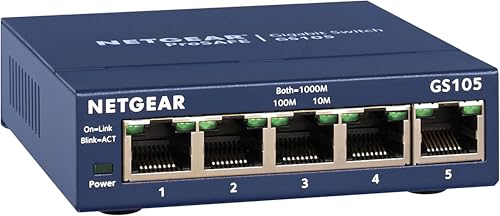
NETGEAR 5-Port Gigabit Unmanaged Switch
Best for: small offices needing silent, simple wired expansion
- Port Count
- 5
- Port Speed
- 1.0 Gbps
- Management Type
- Unmanaged
- Mounting Type
- Desktop, Wall-Mount
- Number of Ports
- 5 Ports
- Dimensions
- 4.02 × 1.06 × 3.9 inches
View on Amazon: NETGEAR 5-Port Gigabit Unmanaged Switch Affiliate link
This NETGEAR GS105NA is a 5-port unmanaged switch with 1.0 Gbps ports. It auto-negotiates speed and works with Cat5e or Cat6 cables. The fanless, metal design runs silent and saves energy. It mounts on desktops or walls. This unit fits small offices or homes needing simple plug-and-play expansion without software setup.
Pros
- 5 Gigabit Ethernet ports for high-speed connectivity
- Fanless design ensures silent operation
- Supports desktop or wall-mount placement
- IEEE 802.3az energy-efficient Ethernet reduces power use
Cons
- Only 5 ports limit expansion needs
- Unmanaged type offers no advanced traffic settings
- Made for U.S. and CA only
Good fit if
- You need a simple plug-and-play expansion for a few devices
- You want silent operation in a living space
- You prefer a compact metal unit for wall mounting
Skip if
- You require more than 5 wired connections
- You need managed features for network traffic control
- You live outside the U.S. or Canada
Verdict: NETGEAR 5-Port Gigabit Unmanaged Switch is a compact, silent solution for users who need basic wired expansion without configuration. It suits small spaces where noise and size matter more than advanced network management.

YuanLey 8-Port Gigabit 120W PoE Switch
Best for: powering up to eight PoE network devices
- Port Count
- 8
- Port Speed
- 1000 Mbps
- Management Type
- Unmanaged
- PoE Support
- PoE+ (802.3af/at)
- PoE Power Budget
- 120W
- Switching Capacity
- 12 Gbps
View on Amazon: YuanLey 8-Port Gigabit 120W PoE Switch Affiliate link
This unmanaged switch provides eight Gigabit Ethernet ports with full 802.3af/at PoE+ support. It delivers a 120W total power budget with up to 30W per port, alongside a 12 Gbps switching capacity. Encased in fanless metal housing with built-in power, it suits you if you need silent power delivery for PoE access points or IP security cameras.
Pros
- 120W total PoE budget with up to 30W per port
- All eight Gigabit ports support 802.3af/at PoE+
- Fanless metal enclosure with integrated power supply
- Includes mounting ears for fixed installation
Cons
- 12 Gbps switching capacity is below full bidirectional wire speed for eight Gigabit ports
- Unmanaged design provides no VLAN segmentation, traffic prioritization, or port monitoring
Good fit if
- You need to power multiple PoE access points or security cameras up to 120W total.
- You prefer unmanaged plug-and-play setup with zero network configuration.
- You want silent, fanless operation in a metal chassis.
Skip if
- You require managed switch features like VLANs, QoS, or remote port controls.
- You need full non-blocking switching throughput across all ports simultaneously.
Verdict: YuanLey 8-Port Gigabit PoE+ Switch fits home and small office setups requiring direct power for up to eight networked devices without software management.
Specifications side by side
| Spec | NETGEAR 5-Port Gigabit Unmanaged Switch | YuanLey 8-Port Gigabit 120W PoE Switch |
|---|---|---|
| Port Count | 5 | 8 |
| Port Speed | 1.0 Gbps | 1000 Mbps |
| Management Type | Unmanaged | Unmanaged |
| PoE Support | not stated | PoE+ (802.3af/at) |
| PoE Power Budget | not stated | 120W |
| Switching Capacity | not stated | 12 Gbps |
| Mounting Type | Desktop, Wall-Mount | not stated |
| Number of Ports | 5 Ports | 8 Ports |
| Dimensions | 4.02 × 1.06 × 3.9 inches | 9.06 × 7.48 × 2.76 inches |
| Weight | 7.05 ounces | 2.16 pounds |
| Size | 5-Port Gigabit, Desktop/Wall Mount (GS105NA) | 8 Port | 8*PoE+ (120w) |
| Color | Blue | Black |
| Model | GS105NA | 8 Port 1G PoE Unmanaged Switch (120W) |
Frequently asked questions
Can the NETGEAR 5-Port Gigabit Unmanaged Switch power PoE devices?
No, it cannot. This model provides only five Gigabit Ethernet ports for data transmission. It lacks Power over Ethernet support, so you must plug powered devices into a separate power outlet. Use it only for expanding network connections, not for supplying power to cameras or phones.
Does the YuanLey 8-Port switch support managed features like VLANs?
No, it does not. The YuanLey switch is an unmanaged device, meaning it offers plug-and-play operation without configuration options. You cannot set up VLANs, traffic prioritization, or remote management. It is designed for simple, automatic data forwarding without user intervention.
Is the NETGEAR GS105NA suitable for mounting on a wall?
Its compact dimensions make it easy to place in tight spaces. The unit measures 1.06 inches wide, 3.9 inches high, and 4.02 inches long. While the data does not specify mounting brackets, its small metal chassis allows it to fit discreetly behind a monitor or in a small office corner.
How much PoE power does the YuanLey switch provide in total?
It provides up to 120 watts of total PoE power. This budget is shared across all eight ports. This capacity suits basic security camera setups or access points. You cannot exceed the 120-watt limit, so high-power devices may require external power sources if they draw more than the allocated share.
Which switch is quieter for a home office environment?
Both switches are fanless, ensuring silent operation. The NETGEAR model is smaller and lighter, weighing just 7.05 ounces. The YuanLey switch is heavier at 2.16 pounds due to its larger chassis and PoE components. Neither unit generates noise, making both suitable for quiet workspaces.
Do I need to install drivers for these unmanaged switches?
No, you do not need to install any drivers or software. Both the NETGEAR and YuanLey switches are unmanaged. You simply plug them into power and connect your Ethernet cables. The devices handle data forwarding automatically, requiring zero configuration or software updates on your computer.
Can I use the YuanLey switch with fiber optic cables?
No, it does not support fiber optic uplinks. All eight ports are Gigabit Ethernet copper connections. If you need to connect to a fiber network, you must use a separate media converter or a switch with SFP ports. This unit is designed strictly for standard Ethernet cabling.