NETGEAR vs STEAMEMO: Network Switches Compared by Specs
As an Amazon Associate we earn from qualifying purchases. Links on this page are affiliate links.
This NETGEAR vs STEAMEMO network switch comparison highlights two very different tools for your home or office. Both devices connect Ethernet cables to expand your wired network. The NETGEAR GS105NA is a simple, unmanaged 5-port gigabit switch. The STEAMEMO unit is a complex, managed 16-port switch with Power over Ethernet. You need to decide if you just need more ports or if you require power delivery and advanced traffic control for devices like security cameras.
Key differences
| Aspect | NETGEAR 5-Port Gigabit Unmanaged Switch | STEAMEMO 16-Port 240W Managed PoE+ Switch |
|---|---|---|
| Port Count | 5 Ports | 16 PoE+ Ports + 2 Uplink |
| Port Speed | 1.0 Gbps | 100 Mbps (PoE ports) |
| PoE Support | Not listed | PoE+ (802.3at), 240W budget |
| Management Type | Unmanaged | Managed (Web, App, Software) |
| Mounting Type | Desktop, Wall-Mount | Wall Mount, Rack Mount |
Which one should you choose?
Choose NETGEAR 5-Port Gigabit Unmanaged Switch if
- You only need to connect a few computers or consoles and want a plug-and-play setup.
- You require 1.0 Gbps speeds for all connected devices.
- You prefer a small, silent device that fits on a desk or shelf.
Choose STEAMEMO 16-Port 240W Managed PoE+ Switch if
- You need to power and connect many devices like IP cameras or access points.
- You want to manage network traffic, create VLANs, or monitor port status remotely.
- You plan to install the switch in a rack or need higher port density.
Verdict: Choose the NETGEAR switch if you simply need more high-speed gigabit ports for existing devices without any configuration. Choose the STEAMEMO switch if you are building a network that requires Power over Ethernet and advanced management features for security cameras or smart devices.
NETGEAR vs STEAMEMO Switch Specs
Port Count and Speed
The NETGEAR GS105NA offers five ports, each running at 1.0 Gbps. This provides high-speed connectivity for up to five devices. The STEAMEMO unit provides sixteen 100 Mbps PoE ports. It also includes two gigabit uplink ports and one 1.25G SFP port for backbone connections. You get more wired endpoints with the STEAMEMO, but the base ports are slower. The NETGEAR ports are faster for individual device connections, while the STEAMEMO offers higher density with specialized uplinks.
Power over Ethernet
The NETGEAR switch does not support Power over Ethernet. It only transmits data to connected devices. You must use separate power adapters for devices like cameras or access points. The STEAMEMO switch supports PoE+ (802.3at) with a total budget of 240W. Each of the sixteen ports can deliver up to 30W. This allows you to power devices directly through the Ethernet cable. The STEAMEMO is the only choice if you need to power hardware without extra outlets.
Management Features
The NETGEAR GS105NA is an unmanaged switch. It requires no software installation or configuration. You simply plug it in and it works. The STEAMEMO unit is a managed switch. It offers web interface, desktop software, and mobile app control. You can configure VLANs, set QoS, and monitor traffic remotely. The NETGEAR is better for simple plug-and-play needs. The STEAMEMO is better if you need to segment your network or prioritize traffic for specific devices.
Physical Design and Mounting
The NETGEAR switch is compact, measuring 4.02 inches in length and weighing 7.05 ounces. It supports desktop or wall-mount placement. The STEAMEMO switch is larger, measuring 10.6 inches in length and weighing 3.88 pounds. It supports wall mount and rack mount options. The NETGEAR fits easily on a desk or in a small space. The STEAMEMO is designed for more permanent installations in racks or on walls due to its size and weight.
Build and Protection
Both switches feature fanless designs for silent operation. The NETGEAR uses a metal casing and includes Energy Efficient Ethernet to reduce power consumption. The STEAMEMO also uses a rugged casing with advanced heat dissipation. It adds 4KV lightning protection and short-circuit protection mechanisms. The STEAMEMO includes overcurrent and overload protection for connected devices. The NETGEAR focuses on energy efficiency. The STEAMEMO focuses on physical protection and durability for harsher environments.
Which switch fits your setup
Simple home network user
You need a basic plug-and-play solution for a few wired devices. The NETGEAR GS105NA offers five gigabit ports for high-speed data transfer. Its unmanaged design requires no software or configuration. The fanless, silent operation ensures it runs quietly on your desk or mounted on a wall without adding noise to your home environment.
User powering IP cameras
You require power and data over a single cable for security devices. The STEAMEMO switch provides sixteen PoE+ ports, delivering up to 30W per port with a 240W total budget. This eliminates the need for separate power adapters for your cameras or access points. The managed features allow you to prioritize traffic and monitor device status remotely.
Small business network admin
You need advanced network control and security for a growing office. The STEAMEMO unit supports VLANs, QoS, and DHCP Snooping for better traffic management. It includes two gigabit uplinks and an SFP port for flexible connectivity options. The rugged design with lightning protection and fanless cooling ensures reliable performance under heavy loads in a professional setting.
The products compared
NETGEAR 5-Port Gigabit Unmanaged Switch
Best for: Small home networks needing basic expansion
- Port Count
- 5
- Port Speed
- 1.0 Gbps
- Management Type
- Unmanaged
- Mounting Type
- Desktop, Wall-Mount
- Number of Ports
- 5 Ports
- Dimensions
- 4.02 × 1.06 × 3.9 inches
View on Amazon: NETGEAR 5-Port Gigabit Unmanaged Switch Affiliate link
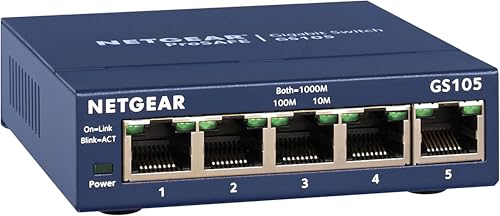
This NETGEAR GS105NA is a 5-port unmanaged switch with 1.0 Gbps Ethernet ports. It supports auto-negotiation for optimal speed on Cat5e or Cat6 cables. The fanless metal design ensures silent operation and reduces power consumption. You can mount it on a desk or wall. It requires no software or configuration. It is suitable for small home networks needing basic expansion.
Pros
- Five 1.0 Gbps ports for high-speed connectivity
- Fanless design for silent performance
- Supports desktop or wall-mount installation
- Energy-efficient IEEE 802.3az standard
- No software installation or configuration needed
Cons
- Only 5 ports, limiting device capacity
- Unmanaged type offers no traffic control
- 1.0 Gbps speed lacks multi-gig support
Good fit if
- You need to add a few wired connections
- You want a silent, fanless device
- You prefer simple plug-and-play setup
Skip if
- You need more than 5 ports
- You require managed network features
- You need speeds above 1 Gbps
Verdict: NETGEAR 5-Port Gigabit Unmanaged Switch is a compact, silent option for users who only need to add a few wired connections. It fits small setups where simplicity and quiet operation matter more than advanced control or higher speeds.

STEAMEMO 16-Port 240W Managed PoE+ Switch
Best for: Users needing many PoE ports for cameras or APs
- Port Count
- 16
- Port Speed
- 100 Mbps
- Management Type
- Managed
- PoE Support
- PoE+ (802.3at)
- PoE Power Budget
- 240W
- Uplink Ports
- 2 x Gigabit Uplink, 1 x 1.25G SFP
View on Amazon: STEAMEMO 16-Port 240W Managed PoE+ Switch Affiliate link
This STEAMEMO switch offers 16 PoE+ ports with a 240W budget. It includes two Gigabit uplinks and one 1.25G SFP port. The device supports VLANs, QoS, and web management. It operates fanlessly and mounts to walls or racks. It suits users needing many powered ports for cameras or access points in small offices or home labs.
Pros
- 16 PoE+ ports delivering up to 30W each
- 240W total PoE power budget
- Web, desktop, and mobile app management
- Fanless design for silent operation
- Wall and rack mounting options
Cons
- PoE ports are limited to 100 Mbps
- No mention of a physical display panel
- 1-year replacement warranty is standard
Good fit if
- You need to power many devices like cameras or APs
- You want remote management via a mobile app
- You require VLAN and QoS network controls
Skip if
- You need Gigabit speeds on all PoE ports
- You prefer a fully unmanaged plug-and-play device
- You require a longer warranty period than one year
Verdict: STEAMEMO 16-Port Managed PoE+ Switch provides high port density for powered devices, making it ideal for users who need extensive PoE coverage with manageable network features.
Specifications side by side
| Spec | NETGEAR 5-Port Gigabit Unmanaged Switch | STEAMEMO 16-Port 240W Managed PoE+ Switch |
|---|---|---|
| Port Count | 5 | 16 |
| Port Speed | 1.0 Gbps | 100 Mbps |
| Management Type | Unmanaged | Managed |
| PoE Support | not stated | PoE+ (802.3at) |
| PoE Power Budget | not stated | 240W |
| Uplink Ports | not stated | 2 x Gigabit Uplink, 1 x 1.25G SFP |
| Mounting Type | Desktop, Wall-Mount | Wall Mount, Rack Mount |
| Number of Ports | 5 Ports | 16 Ports |
| Uplink Port Type | not stated | SFP, Gigabit Uplink |
| Dimensions | 4.02 × 1.06 × 3.9 inches | 10.6 × 7 × 1.8 inches |
| Weight | 7.05 ounces | 3.88 pounds |
| Size | 5-Port Gigabit, Desktop/Wall Mount (GS105NA) | 19 Ports | 240 W 16 x PoE+ |
| Color | Blue | black |
| Model | GS105NA | 19 Ports|240W 16xPoE+ |
Frequently asked questions
Can I use the STEAMEMO switch for home security cameras?
Yes, the STEAMEMO 16-Port Managed PoE+ Switch supports Power over Ethernet. This allows you to connect cameras directly without separate power adapters. It provides sixteen PoE ports, making it ideal for setups requiring extensive powered device coverage. The managed features help you monitor and control each connected camera from a central interface.
Is the NETGEAR switch suitable for a large office?
No, the NETGEAR 5-Port Gigabit Unmanaged Switch is designed for small home networks. It only offers five ports, which limits how many wired devices you can connect. It lacks advanced management features needed for larger, complex office environments. For bigger setups, you would need a switch with higher port density and configurable options.
Does the STEAMEMO switch support rack mounting?
Yes, the STEAMEMO unit supports both wall mounting and rack mounting. This flexibility allows you to install it in standard server racks or on a wall. Its dimensions are 7 inches wide and 10.6 inches long, fitting typical rack spaces. This makes it a practical choice for organized network closets or equipment rooms.
Will the NETGEAR switch make noise in a quiet room?
No, the NETGEAR GS105NA operates silently. It is a fanless design, which means it produces no audible noise during operation. This makes it suitable for placement in living rooms, bedrooms, or home offices where quiet is important. You can expand your wired network without worrying about disruptive fan sounds.
Can I manage the NETGEAR switch remotely?
No, the NETGEAR GS105NA is an unmanaged switch. It does not offer remote management capabilities or a web interface. You simply plug in your Ethernet cables, and it handles data traffic automatically. For remote control, you would need a managed switch like the STEAMEMO model, which allows configuration via software.
Does the STEAMEMO switch have fiber optic ports?
Yes, the STEAMEMO switch includes SFP uplink ports. These allow you to connect fiber optic cables for high-speed data transmission over longer distances. It also has gigabit copper uplink ports for standard Ethernet connections. This dual uplink option provides flexibility for integrating with different types of network infrastructure.
How much power does the STEAMEMO switch consume?
The STEAMEMO switch provides a total PoE budget of 240 watts. This power is distributed across its sixteen PoE ports to power connected devices like access points or cameras. The switch itself draws power from your outlet. Its weight is 3.88 pounds, indicating a robust internal power supply necessary for this high wattage output.