NETGEAR or MokerLink? Network Switches Compared in 2026
As an Amazon Associate we earn from qualifying purchases. Links on this page are affiliate links.
This NETGEAR vs MokerLink network switch comparison highlights two distinct tools for home and office connectivity. Both devices expand your wired network, but they serve different needs. The NETGEAR unit is a simple, fanless Gigabit switch for basic home use. The MokerLink model is a high-density, managed 10G switch for professional or advanced setups. You choose based on speed requirements and management complexity.
Key differences
| Aspect | NETGEAR 5-Port Gigabit Unmanaged Switch | MokerLink 12-Port 10G SFP+ Managed Switch |
|---|---|---|
| Port Count | 5 | 12 |
| Port Speed | 1.0 Gbps | 10 Gbps (SFP+) |
| Management Type | Unmanaged | L3 Managed |
| Switching Capacity | not listed | 240Gbps |
| Port Type | RJ45 | SFP+ |
Which one should you choose?
Choose NETGEAR 5-Port Gigabit Unmanaged Switch if
- You need a simple plug-and-play switch for standard home devices.
- You prefer silent, fanless operation for quiet living spaces.
- You only require Gigabit speeds for everyday internet use.
Choose MokerLink 12-Port 10G SFP+ Managed Switch if
- You need high-bandwidth connections for servers or NAS devices.
- You require advanced network management features like VLANs or QoS.
- You plan to use fiber optic SFP+ modules for long-distance links.
Verdict: The NETGEAR switch is the practical choice for basic home networking where simplicity and silence matter. The MokerLink switch suits users who need 10G speeds and granular control over their network traffic. Your decision depends on whether you prioritize ease of use or advanced performance capabilities.
NETGEAR vs MokerLink Switch Comparison
Port Count
The NETGEAR GS105NA provides five Gigabit Ethernet ports for connecting wired devices. This count suits small home offices or single-room setups where only a few devices need a direct link. In contrast, the MokerLink switch offers twelve SFP+ ports. This higher density allows you to connect significantly more fiber or copper devices in a rack or server closet. If you have many devices, the MokerLink provides more physical connections. The NETGEAR unit is limited to five ports, which may require additional switches for larger homes.
Port Speed
Speed capabilities differ greatly between these two switches. The NETGEAR model features five 1.0 Gbps ports. This standard Gigabit speed is sufficient for most home internet plans and local file transfers. The MokerLink switch supports 10 Gbps speeds on its SFP+ ports. This tenfold increase in bandwidth is ideal for high-performance workstations, 8K media streaming, or fast server-to-server transfers. While the NETGEAR handles basic traffic well, the MokerLink offers significantly higher throughput for data-intensive tasks or future-proofing your network infrastructure.
Management Type
Configuration options vary between these devices. The NETGEAR switch is unmanaged, meaning it is plug-and-play. You simply connect cables, and it works without software or configuration. This simplicity is perfect for users who want immediate connectivity without technical setup. The MokerLink switch is L3 managed, supporting CLI and web interfaces. It allows advanced settings like VLANs, QoS, and routing protocols. If you need granular control over network traffic or segmentation, the MokerLink is necessary. For basic use, the NETGEAR requires no effort.
Physical Design
Build and form factor suit different environments. The NETGEAR unit is compact, measuring 4.02 inches in length and weighing just 7.05 ounces. Its fanless metal design ensures silent operation, making it suitable for living rooms or bedrooms. The MokerLink is a heavier industrial-grade unit weighing 6.7 pounds. It includes an industrial fan for heat dissipation, which generates noise. The MokerLink is built for server racks or equipment rooms where noise is not a concern. The NETGEAR is quieter and smaller, while the MokerLink is more robust.
Switching Capacity
Internal processing power determines how well a switch handles traffic. The NETGEAR GS105NA does not list a specific switching capacity in the provided data. However, its five Gigabit ports suggest standard home-grade throughput. The MokerLink switch explicitly states a 240 Gbps switching capacity. This allows all twelve ports to achieve non-blocking 10G line-speed forwarding simultaneously. This high capacity prevents bottlenecks when multiple devices transfer large files at once. The MokerLink offers superior internal bandwidth for demanding network environments compared to the unspecified capacity of the NETGEAR.
Which switch fits your specific needs
Home users needing simple plug-and-play expansion
The NETGEAR GS105NA offers five Gigabit Ethernet ports with a fanless, silent design. Its unmanaged nature means no software installation or configuration is required. You simply connect Cat5e or Cat6 cables for immediate high-speed connectivity. The compact metal chassis supports desktop or wall mounting, making it ideal for quiet, basic home office setups.
Network admins requiring advanced L3 management features
The MokerLink switch provides L3 management capabilities, including IPv4/IPv6 support, OSPF, and VLAN configuration. You gain control through CLI or web interfaces, allowing for complex network segmentation and security policies like ACLs and QoS. This level of control is essential for professionals who need to monitor device status and manage traffic flow precisely.
Users needing high-bandwidth fiber connectivity
With twelve 10G SFP+ ports, the MokerLink switch delivers 240Gbps switching capacity. It supports auto-adaptive 1G/10G optical modules, enabling high-speed fiber connections for demanding applications. The industrial-grade fan ensures stable operation under heavy loads. This device is designed for commercial environments where non-blocking line speed forwarding is critical for performance.
The products compared
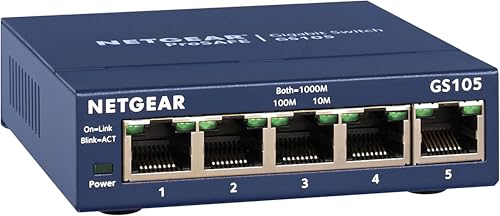
NETGEAR 5-Port Gigabit Unmanaged Switch
Best for: small home networks needing simple wired connections
- Port Count
- 5
- Port Speed
- 1.0 Gbps
- Management Type
- Unmanaged
- Mounting Type
- Desktop, Wall-Mount
- Number of Ports
- 5 Ports
- Dimensions
- 4.02 × 1.06 × 3.9 inches
View on Amazon: NETGEAR 5-Port Gigabit Unmanaged Switch Affiliate link
This NETGEAR GS105NA is a 5-port unmanaged switch with 1.0 Gbps Ethernet ports. It auto-negotiates speeds and works with Cat5e or Cat6 cables. The fanless design ensures silent operation and reduces power consumption. Its compact metal build supports desktop or wall-mount placement. This unit is ideal for small home networks needing simple plug-and-play connectivity without configuration software.
Pros
- 5 Gigabit Ethernet ports for high-speed connectivity
- Fanless design for silent performance
- Supports desktop or wall-mount placement
- IEEE 802.3az Energy Efficient Ethernet reduces power use
Cons
- Only 5 ports limit expansion needs
- Unmanaged type offers no advanced traffic settings
- Regional compatibility restricted to U.S. and Canada
Good fit if
- You need a simple plug-and-play switch for a small office
- You want a silent, fanless device for a quiet room
- You only need to connect a few wired devices
Skip if
- You require more than 5 Ethernet ports
- You need 10Gbps SFP+ uplink speeds
- You want managed features for network control
Verdict: NETGEAR 5-Port Gigabit Unmanaged Switch is a compact, silent solution for basic home networking. It fits users who need simple, reliable wired connections without complex setup.

MokerLink 12-Port 10G SFP+ Managed Switch
Best for: High-density fiber networks needing L3 control
- Port Count
- 12
- Management Type
- L3 Managed
- Uplink Ports
- 12 x 10G SFP+
- Switching Capacity
- 240Gbps
- Port Speed
- Gigabit, 10G
- Weight
- 6.7 pounds
View on Amazon: MokerLink 12-Port 10G SFP+ Managed Switch Affiliate link
This MokerLink unit offers 12 SFP+ ports for 10G connectivity. It delivers 240Gbps of switching capacity and supports L3 management. You get full control via CLI or web interface. The metal case and industrial fan ensure stable operation. It suits users needing high-density fiber connections for commercial or advanced home networks.
Pros
- 12 SFP+ ports for 10Gbps connections
- 240Gbps non-blocking switching capacity
- L3 management with CLI and web access
- Supports standard open SFP modules
Cons
- No RJ45 copper ports included
- SFP modules not included
- Heavy 6.7-pound metal build
Good fit if
- You need 12 fiber uplinks
- You require L3 routing features
- You want CLI management access
Skip if
- You need copper Ethernet ports
- You prefer plug-and-play simplicity
- You want included transceivers
Verdict: MokerLink 12-Port 10G Managed Switch is a dense fiber solution for users who need L3 control. It fits networks requiring high bandwidth and specific routing protocols.
Specifications side by side
| Spec | NETGEAR 5-Port Gigabit Unmanaged Switch | MokerLink 12-Port 10G SFP+ Managed Switch |
|---|---|---|
| Port Count | 5 | 12 |
| Port Speed | 1.0 Gbps | not stated |
| Management Type | Unmanaged | L3 Managed |
| Uplink Ports | not stated | 12 x 10G SFP+ |
| Switching Capacity | not stated | 240Gbps |
| Mounting Type | Desktop, Wall-Mount | not stated |
| Number of Ports | 5 Ports | not stated |
| Uplink Port Type | not stated | SFP |
| Dimensions | 4.02 × 1.06 × 3.9 inches | not stated |
| Weight | 7.05 ounces | 6.7 pounds |
| Size | 5-Port Gigabit, Desktop/Wall Mount (GS105NA) | not stated |
| Color | Blue | Black |
| Model | GS105NA | 12*10G SFP Managed |
Frequently asked questions
Is the NETGEAR switch managed or unmanaged?
The NETGEAR GS105NA is an unmanaged switch. This means it operates without software configuration or a web interface. You plug in your cables, and it works immediately. This design suits users who want simple, reliable wired connections without complex setup steps.
Does the MokerLink switch support fiber optics?
Yes, the MokerLink 12-Port switch uses SFP+ ports for uplinks. These slots accept fiber optic transceivers, allowing for high-density fiber networks. This feature supports high bandwidth requirements and specific routing protocols, making it ideal for advanced network environments rather than basic home use.
How many ports does the NETGEAR switch have?
The NETGEAR model provides five Gigabit Ethernet ports. This port count is sufficient for small home offices or single-room setups. It allows you to connect a few key devices directly to your router for stable, high-speed wired links without needing complex management tools.
What is the port speed on the MokerLink device?
The MokerLink switch supports both Gigabit and 10G port speeds. This dual-speed capability allows for high-bandwidth connections on specific ports while maintaining standard Gigabit speeds on others. It is designed for networks that require significant throughput and flexible connectivity options for various devices.
Is the NETGEAR switch noisy?
No, the NETGEAR GS105NA is a silent solution. It features a fanless design, which means it generates no audible noise during operation. This makes it suitable for placement in living spaces or quiet home offices where sound sensitivity is a priority for comfort.
Can the MokerLink switch handle Layer 3 routing?
Yes, the MokerLink unit offers L3 control capabilities. As a managed switch, it supports specific routing protocols and advanced network management features. This functionality is essential for users who need to configure network paths and manage traffic flow across different segments of their network.