NETGEAR vs D-Link Network Switches: Which Brand Fits You?
As an Amazon Associate we earn from qualifying purchases. Links on this page are affiliate links.
When you compare NETGEAR vs d link network switch options, you are looking at two unmanaged hardware choices. Both provide Gigabit Ethernet speeds and require no software setup. The main difference lies in scale. The NETGEAR unit offers five ports for small setups. The D-Link model provides twenty-four ports for larger environments. You need to decide if you need a compact desktop unit or a high-density solution for your home or office.
Key differences
| Aspect | NETGEAR 5-Port Gigabit Unmanaged Switch | D-Link 24-Port Gigabit Unmanaged Switch |
|---|---|---|
| Port Count | 5 | 24 |
| Mounting Type | Desktop, Wall-Mount | Desktop, Rackmount, Wall-Mount |
| Switching Capacity | not listed | 48 Gbps |
| Warranty | not listed | Limited Lifetime Product Coverage |
Which one should you choose?
Choose NETGEAR 5-Port Gigabit Unmanaged Switch if
- You only need to connect a few devices to your network.
- You want a compact switch that fits easily on a desk.
- You prefer a silent, fanless design for quiet spaces.
Choose D-Link 24-Port Gigabit Unmanaged Switch if
- You need to connect many devices, such as in a small office.
- You plan to mount the switch in a standard equipment rack.
- You want a limited lifetime warranty for long-term reliability.
Verdict: Choose the NETGEAR switch if you have a small number of devices and need a simple, compact solution. Pick the D-Link switch if you require high port density and rack-mount capabilities for a larger network. Both options deliver unmanaged Gigabit performance without configuration.
Port Count and Physical Scale
Port capacity
The NETGEAR GS105NA provides five Gigabit Ethernet ports. This count suits small offices or home setups with few wired devices. The D-Link DGS-1024D offers twenty-four ports. This higher capacity supports larger homes or small businesses with many connected devices. Both switches maintain Gigabit speeds across all ports. You choose based on how many devices need a wired connection. If you have fewer than five devices, the NETGEAR is sufficient. If you need to connect twenty devices, the D-Link is the better fit. The port count is the primary differentiator between these two models.
Physical dimensions
Size matters for placement. The NETGEAR unit measures 4.02 inches in length, 1.06 inches in width, and 3.9 inches in height. It weighs 7.05 ounces. The D-Link switch is larger, measuring 11.1 inches in length, 7.1 inches in width, and 1.75 inches in height. It weighs 2.4 pounds. The NETGEAR design is compact and lightweight, making it easy to hide on a desk or shelf. The D-Link is a substantial piece of hardware. It is designed for rack mounting or secure wall placement. Consider your available space. A small desk favors the NETGEAR. A server rack favors the D-Link.
Mounting options
Both brands support flexible installation. The NETGEAR switch supports desktop or wall-mount placement. Its compact metal design allows it to sit flat or hang securely. The D-Link switch supports desktop, wall-mount, and rack-mount installation. This additional rack-mount capability is crucial for IT environments. You can slide the D-Link into a standard equipment rack. The NETGEAR lacks rack-mount specifications in its data. If you plan to install the switch in a dedicated server rack, the D-Link is the only viable option. For simple desktop use, both are suitable.
Network efficiency features
Both switches are unmanaged, meaning they require no software configuration. However, the D-Link includes advanced traffic management features. It incorporates Flow Control, Storm Control, and Port Isolation. These features reduce packet loss and help mitigate rogue software or malware threats. The NETGEAR data does not list these specific advanced controls. It relies on standard auto-negotiation for speed. If you are concerned about network storms or need to isolate specific devices without complex configuration, the D-Link offers built-in safeguards. For basic connectivity, both perform similarly.
Energy efficiency
Both switches prioritize energy conservation. The NETGEAR uses IEEE 802.3az Energy Efficient Ethernet. This standard reduces power consumption when data activity is low. It also features a fanless design for silent operation. The D-Link also supports Energy Efficient Ethernet. Additionally, it includes link status detection. This feature automatically powers down ports that have no link, cutting power for unused ports. The D-Link provides an extra layer of power saving for idle ports. Both are fanless and silent. The D-Link offers slightly more granular power management for unused connections.
Choose the right switch for your needs
Home users with few wired devices
The NETGEAR GS105NA provides five Gigabit Ethernet ports. This compact unit fits easily on a desk or mounts to a wall. Its fanless design ensures silent operation. You get plug-and-play connectivity without needing software. This makes it ideal for small setups with minimal wired equipment.
Small offices needing simple expansion
You need a straightforward way to add wired connections. The NETGEAR switch offers five ports with auto-negotiation for optimal speed. It supports Cat5e or Cat6 cables. The metal case provides durability. You avoid complex configuration. This unit delivers reliable performance for small teams requiring basic network expansion.
Small businesses with many devices
The D-Link DGS-1024D offers twenty-four Gigabit ports. This high capacity supports numerous connected devices. It includes flow control and storm control features. These help reduce packet loss and mitigate threats. You get robust performance for larger environments. The unit supports rack, desktop, or wall mounting.
Users requiring high port density
You need extensive wired connectivity in one place. The D-Link switch provides twenty-four ports with Gigabit speeds. It features energy-efficient Ethernet to conserve power. Link status detection powers down unused ports. This design supports large homes or small businesses. You benefit from high density and efficient operation.
The products compared
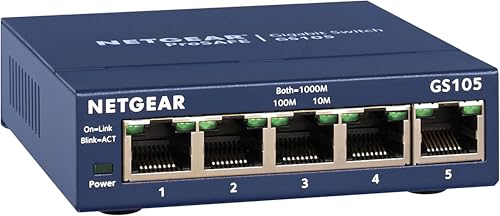
NETGEAR 5-Port Gigabit Unmanaged Switch
Best for: expanding a few wired connections silently
- Port Count
- 5
- Port Speed
- 1.0 Gbps
- Management Type
- Unmanaged
- Mounting Type
- Desktop, Wall-Mount
- Number of Ports
- 5 Ports
- Dimensions
- 4.02 × 1.06 × 3.9 inches
View on Amazon: NETGEAR 5-Port Gigabit Unmanaged Switch Affiliate link
This NETGEAR GS105NA is a 5-port unmanaged switch with Gigabit Ethernet ports. It offers plug-and-play setup with no software required. The fanless metal design supports silent operation and wall or desktop mounting. It fits small offices or home setups needing simple expansion. You get high-speed connectivity for up to five devices without configuration.
Pros
- 5 Gigabit Ethernet ports for high-speed data transfer
- Fanless design ensures silent operation
- Supports desktop or wall-mount placement
- Plug-and-play setup with no configuration
Cons
- Limited to only 5 ports
- Unmanaged switch lacks advanced network controls
- Made for use in U.S. & CA only
Good fit if
- You need to add a few wired connections
- You want a silent, fanless device
- You prefer simple plug-and-play setup
Skip if
- You need more than 5 ports
- You require managed switch features
- You live outside the U.S. or CA
Verdict: NETGEAR 5-Port Gigabit Unmanaged Switch is ideal for users needing a compact, silent expansion for a few devices. It suits small homes or offices where simple, reliable connectivity is all you need.

D-Link 24-Port Gigabit Unmanaged Switch
Best for: high-density silent wired network expansion
- Port Count
- 24
- Port Speed
- 10/100/1000BASE-T
- Management Type
- Unmanaged
- Switching Capacity
- 48 Gbps
- Mounting Type
- Desktop, Rackmount, Wall-Mount
- Number of Ports
- 24 Ports
View on Amazon: D-Link 24-Port Gigabit Unmanaged Switch Affiliate link
This unmanaged switch gives you 24 Gigabit Ethernet ports inside a fanless metal enclosure. It provides a 48 Gbps switching capacity and handles legacy 10/100 connections alongside Gigabit devices with no setup required. Its silent hardware supports desktop, wall, and rack mounting, making it suitable if your home office or small business needs high wired port density without extra network configuration.
Pros
- 24 auto-sensing Gigabit Ethernet ports with 48 Gbps switching capacity
- Fanless metal case for silent operation
- Desktop, wall-mount, and rackmount placement options
- Automatic power-down on unused ports via link status detection
Cons
- Unmanaged design lacks custom VLAN or remote management settings
- Port speeds max out at 1 Gbps without multi-gigabit support
- Larger 11.1-inch desktop footprint compared to compact switches
Good fit if
- You need up to 24 wired Gigabit connections without configuring software.
- You require silent, fanless operation in a desk, wall, or rack setup.
Skip if
- You want managed features like custom VLANs or traffic shaping.
- You require multi-gigabit speeds faster than standard 1 Gbps.
Verdict: D-Link 24-Port Gigabit Fanless Switch provides straightforward high-density wired expansion for users who want plug-and-play Gigabit speeds without active cooling noise. It gives small office networks reliable unmanaged switching across 24 devices.
Specifications side by side
| Spec | NETGEAR 5-Port Gigabit Unmanaged Switch | D-Link 24-Port Gigabit Unmanaged Switch |
|---|---|---|
| Port Count | 5 | 24 |
| Port Speed | 1.0 Gbps | 10/100/1000BASE-T |
| Management Type | Unmanaged | Unmanaged |
| Switching Capacity | not stated | 48 Gbps |
| Mounting Type | Desktop, Wall-Mount | Desktop, Rackmount, Wall-Mount |
| Number of Ports | 5 Ports | 24 Ports |
| Dimensions | 4.02 × 1.06 × 3.9 inches | 11.1 × 7.1 × 1.75 inches |
| Weight | 7.05 ounces | 2.4 pounds |
| Size | 5-Port Gigabit, Desktop/Wall Mount (GS105NA) | 24-Port Gigabit |
| Color | Blue | Black |
| Model | GS105NA | DGS-1024D |
Frequently asked questions
Is a 5-port or 24-port switch better for my home?
A 5-port switch suits homes with few wired devices. The NETGEAR GS105NA offers five Gigabit ports in a compact form. It fits small spaces. A 24-port switch is better for larger setups. The D-Link DGS-1024D provides twenty-four ports. This higher density supports more devices simultaneously.
Do these switches require software installation?
No, both switches are unmanaged. You do not need to install any software or drivers. They operate as plug-and-play devices. Simply connect your Ethernet cables to the Gigabit ports. The hardware handles traffic routing automatically without configuration.
Can I mount the D-Link switch on a wall?
The D-Link DGS-1024D is designed for desktop use. Its mounting type is listed as desktop. It does not explicitly support wall mounting. The NETGEAR GS105NA is also compact and fits on a desk. Check your specific model for wall-mounting brackets if needed.
Are these switches quiet during operation?
Yes, both units are designed for silent operation. The NETGEAR 5-Port Gigabit Unmanaged Switch is compact and fanless. The D-Link 24-Port Gigabit Unmanaged Switch also prioritizes silent performance. You will not hear noise from either device during normal use.
What is the maximum speed per port?
Both switches provide Gigabit Ethernet speeds. Each port supports up to 1000 Mbps. The NETGEAR GS105NA and D-Link DGS-1024D both use Gigabit technology. This ensures fast data transfer for connected devices like computers and NAS drives.
Which switch is smaller in size?
The NETGEAR GS105NA is significantly smaller. It measures 1.06 inches wide and 4.02 inches long. The D-Link DGS-1024D is much larger due to its twenty-four ports. It measures 7.1 inches wide and 11.1 inches long. Choose NETGEAR for minimal footprint.
Do I need to configure VLANs on these switches?
No, neither switch supports VLAN configuration. Both are unmanaged devices. They do not offer advanced features like VLAN tagging or QoS settings. You simply plug in your devices. They work immediately without any network management tasks.