NETGEAR 5-Port Gigabit Unmanaged Switch or NETGEAR 5-Port Gigabit Smart Managed? Which NETGEAR Model to Buy
As an Amazon Associate we earn from qualifying purchases. Links on this page are affiliate links.
This comparison looks at the netgear 5 port gigabit unmanaged switch vs 5 port gigabit smart options. Both models provide five 1.0 Gbps Ethernet ports and share a fanless, metal design for silent operation. They also support desktop or wall mounting. The main difference lies in control. One unit is unmanaged for simple plug-and-play use. The other offers easy smart management features for network configuration.
Key differences
| Aspect | NETGEAR 5-Port Gigabit Unmanaged Switch | NETGEAR 5-Port Gigabit Smart Managed Switch |
|---|---|---|
| Management Type | Unmanaged | Easy Smart Managed |
| Model Number | GS105NA | GS305E-100NAS |
| Color | Gray | Black |
| Weight | 7.05 ounces | 8.8 ounces |
| Smart Features | Not listed | VLANs, QoS, port monitoring |
Which one should you choose?
Choose NETGEAR 5-Port Gigabit Unmanaged Switch if
- You want a simple plug-and-play setup with no software to install.
- You prefer a lighter device that weighs 7.05 ounces.
- You do not need to configure VLANs or traffic prioritization.
Choose NETGEAR 5-Port Gigabit Smart Managed Switch if
- You need to configure VLANs to segment your network.
- You want to prioritize traffic using QoS settings.
- You require port monitoring and basic network security controls.
Verdict: Choose the unmanaged model if you need a straightforward connection without configuration. Select the smart managed version if you require control over traffic and network segmentation. Both devices offer identical port speeds and silent operation.
Unmanaged Versus Smart Managed Features
Management capabilities
The NETGEAR 5-Port Gigabit Unmanaged Switch (GS105NA) operates with zero configuration. You simply plug devices in and they connect. This model relies on auto-negotiation to detect optimal speeds for your Cat5e or Cat6 cables. The NETGEAR 5-Port Gigabit Smart Managed Switch (GS305E) adds an intuitive software interface. It provides Easy Smart Managed Essentials for configuring VLANs. You can prioritize traffic with QoS settings. The smart model also allows you to monitor ports and manage network security. This gives you control over data flow and isolation that the unmanaged version lacks entirely.
Setup complexity
Setup for the NETGEAR 5-Port Gigabit Unmanaged Switch is straightforward plug-and-play. There is no software to install and no configuration required. This makes it ideal for users who want immediate connectivity without technical steps. The NETGEAR 5-Port Gigabit Smart Managed Switch requires more initial effort. You must access the software interface to configure VLANs and QoS rules. While the interface is described as intuitive, you still need to understand network settings to use its features. If you prefer a no-fuss connection, the unmanaged model is simpler. If you need network segmentation, the smart model demands more attention.
Physical dimensions
Both switches are compact and built for desktop or wall-mount placement. The NETGEAR 5-Port Gigabit Unmanaged Switch measures 1.06 inches in width, 3.9 inches in height, and 4.02 inches in length. It weighs 7.05 ounces. The NETGEAR 5-Port Gigabit Smart Managed Switch is slightly different in shape. It measures 3.9 inches in width, 1.1 inches in height, and 3.7 inches in length. It weighs 8.8 ounces. The unmanaged model is taller and narrower. The smart model is wider and flatter. Both fit standard spaces, but their footprints differ. You should check your mounting location to ensure the specific orientation fits your available space.
Power efficiency
Both models share the same approach to power management. They both feature a fanless design, which ensures silent operation without moving parts. Neither switch generates noise during use. Both also support IEEE 802.3az Energy Efficient Ethernet. This standard reduces power consumption without compromising high-speed network performance. You get energy savings in either case. The specifications do not list wattage differences, so you can assume similar efficiency profiles. The silent operation is a shared benefit, making either model suitable for offices or home environments where noise matters.
Port configuration
Each switch offers five 1.0 Gbps Ethernet ports. The port count and speed are identical for both models. Auto-negotiating ports on both devices detect the optimal speed for connected devices. They work with existing Cat5e or Cat6 Ethernet cables. There is no difference in the number of connections or the maximum throughput per port. You get the same connectivity options regardless of which model you choose. The choice depends entirely on whether you need the management features of the smart model or the simplicity of the unmanaged version.
Which NETGEAR 5-Port Switch Fits You
Users wanting zero-config plug-and-play simplicity
The unmanaged GS105NA requires no software installation or configuration. You simply connect your Cat5e or Cat6 cables and devices start communicating immediately. This model is ideal if you want a silent, fanless switch that works instantly without managing settings or accessing a web interface for network adjustments.
Small business owners needing traffic control and security
The Easy Smart Managed GS305E provides an intuitive interface to configure VLANs and prioritize traffic with QoS. You can monitor ports and manage network security directly. These features allow you to isolate devices and ensure critical applications receive bandwidth, which is essential for small business operations requiring reliable network management.
Home users who prefer unmanaged reliability
If you do not need to segment your network or prioritize specific devices, the unmanaged switch offers a straightforward solution. It supports Energy Efficient Ethernet to reduce power consumption while maintaining silent operation. Its compact metal design fits easily on a desk or mounts to a wall without complex setup steps.
The products compared
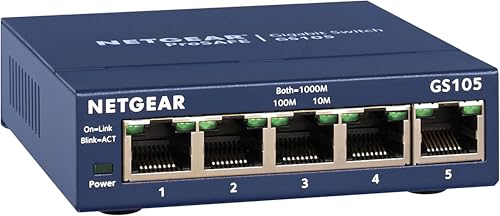
NETGEAR 5-Port Gigabit Unmanaged Switch
Best for: basic home networks needing five ports
- Port Count
- 5
- Port Speed
- 1.0 Gbps
- Management Type
- Unmanaged
- Mounting Type
- Desktop, Wall-Mount
- Number of Ports
- 5 Ports
- Dimensions
- 4.02 × 1.06 × 3.9 inches
View on Amazon: NETGEAR 5-Port Gigabit Unmanaged Switch Affiliate link
This is the NETGEAR GS105NA, a 5-port gigabit unmanaged switch. It offers five 1.0 Gbps Ethernet ports for high-speed connectivity. The device uses a fanless design for silent operation and includes Energy Efficient Ethernet to reduce power use. You can mount it on a desk or wall. It requires no software or configuration. This model is made for use in the U.S. and Canada only.
Pros
- Five 1.0 Gbps Ethernet ports for fast data transfer
- Fanless design ensures silent performance
- Supports desktop or wall-mount placement
- IEEE 802.3az Energy Efficient Ethernet reduces power consumption
Cons
- Unmanaged type lacks configuration settings
- No web interface for network monitoring
- Limited to U.S. and Canada regions
Good fit if
- You need a simple plug-and-play switch
- You want silent operation without fans
- You only need five gigabit ports
Skip if
- You require managed network features
- You need more than five ports
- You live outside the U.S. or Canada
Verdict: NETGEAR 5-Port Gigabit Unmanaged Switch suits users who need basic connectivity without setup. It fits homes requiring five gigabit ports with silent operation.

NETGEAR 5-Port Gigabit Smart Managed Switch
Best for: Small offices needing basic VLAN and QoS control
- Port Count
- 5
- Port Speed
- 1.0Gbps
- Management Type
- Easy Smart Managed
- Mounting Type
- Desktop or Wall Mount
- Number of Ports
- 5 Ports
- Recommended Use
- Office
View on Amazon: NETGEAR 5-Port Gigabit Smart Managed Switch Affiliate link
This NETGEAR model adds VLANs and QoS to standard gigabit connectivity. It features five 1.0Gbps ports for high-speed data transfer. The fanless metal design ensures silent operation and energy efficiency. You get flexible mounting options for desktop or wall placement. This switch suits users who need basic network management without complex configuration.
Pros
- Five 1.0Gbps auto-negotiating Ethernet ports
- Easy Smart Managed features for VLANs and QoS
- Fanless design for silent operation
- Compact metal chassis for desktop or wall mounting
Cons
- Limited to Easy Smart Managed Essentials; lacks full advanced management
- Regional compatibility restricted to U.S. and Canada only
- No mention of PoE support for connected devices
Good fit if
- You need VLAN segmentation for small business networks
- You want silent operation without fans
- You prefer a compact metal build for wall mounting
Skip if
- You require full enterprise-grade management features
- You live outside the U.S. or Canada
- You need to power devices via Ethernet cables
Verdict: NETGEAR 5-Port Easy Smart Managed Switch offers essential VLAN and QoS controls in a silent, compact metal chassis. It fits users who need basic network segmentation without the complexity of full enterprise management.
Specifications side by side
| Spec | NETGEAR 5-Port Gigabit Unmanaged Switch | NETGEAR 5-Port Gigabit Smart Managed Switch |
|---|---|---|
| Port Count | 5 | 5 |
| Port Speed | 1.0 Gbps | 1.0Gbps |
| Management Type | Unmanaged | Easy Smart Managed |
| Mounting Type | Desktop, Wall-Mount | Desktop or Wall Mount |
| Number of Ports | 5 Ports | 5 Ports |
| Recommended Use | not stated | Office |
| Intended Use | not stated | Home |
| Dimensions | 4.02 × 1.06 × 3.9 inches | 3.7 × 3.9 × 1.1 inches |
| Weight | 7.05 ounces | 8.8 ounces |
| Size | 5-Port Gigabit, Desktop/Wall Mount (GS105NA) | 5-Port |
| Color | Blue | black |
| Model | GS105NA | GS305E-100NAS |
Frequently asked questions
Does the smart managed switch require a license?
The NETGEAR 5-Port Gigabit Smart Managed Switch (GS305E-100NAS) includes essential VLAN and QoS controls without mentioning additional license fees. It offers network segmentation for small offices. You get these features directly out of the box in a compact metal chassis designed for silent operation.
Can I wall mount these switches?
Both the unmanaged GS105NA and the smart managed GS305E-100NAS support desktop or wall mounting. This flexibility allows you to place the device in tight spaces. The unmanaged model weighs 7.05 ounces, while the smart version weighs 8.8 ounces, both fitting easily into standard mounting setups.
Is the smart switch noisy?
No, the NETGEAR 5-Port Gigabit Smart Managed Switch operates silently. It features a fanless design with a metal chassis that dissipates heat passively. This makes it suitable for quiet environments like home offices or small workspaces where noise from cooling fans would be distracting.
Do I need to install software for the unmanaged switch?
You do not need to install any software for the NETGEAR 5-Port Gigabit Unmanaged Switch (GS105NA). It provides zero-config plug-and-play connectivity. Simply connect your Cat5e or Cat6 cables, and the auto-negotiation feature detects the optimal speeds for your devices immediately upon connection.
Which model is better for VLANs?
The NETGEAR 5-Port Gigabit Smart Managed Switch (GS305E-100NAS) is the correct choice for VLANs. It offers essential VLAN controls for network segmentation. The unmanaged GS105NA lacks these advanced features and is strictly for basic connectivity without configuration options or traffic prioritization capabilities.
What is the weight difference between the two models?
The unmanaged GS105NA weighs 7.05 ounces, while the smart managed GS305E-100NAS weighs 8.8 ounces. Both are compact devices with similar dimensions. The slight weight difference reflects the internal components required for smart management features, though both maintain a small footprint for easy placement.