NETGEAR 16-Port Gigabit Fanless PoE+ vs NETGEAR 24-Port Gigabit Unmanaged Switch: Spec Comparison
As an Amazon Associate we earn from qualifying purchases. Links on this page are affiliate links.
The netgear 16 port poe gigabit ethernet vs 24 port poe gigabit ethernet comparison highlights two unmanaged switches. Both devices offer plug-and-play setup, fanless silent operation, and gigabit speeds. They share PoE+ support and metal construction. The main difference lies in capacity and power. The 16-port model provides a compact footprint with a 76W budget. The 24-port unit delivers more ports and a 190W budget. You should choose based on your port count needs and power requirements.
Key differences
| Aspect | NETGEAR 16-Port Gigabit Fanless PoE+ Switch | NETGEAR 24-Port Gigabit Unmanaged Switch with PoE+ |
|---|---|---|
| Port Count | 16 | 24 |
| PoE Power Budget | 76W | 190W |
| PoE Ports | 16 PoE+ ports | 16 PoE+ ports |
| Mounting Options | Desktop, Wall-mount, Rack-mount | Desktop, Rack-mount |
| Dimensions | 11.3 x 4.02 x 1.06 inches | 13 x 8.1 x 1.7 inches |
| Weight | 1.94 pounds | 5.38 pounds |
Which one should you choose?
Choose NETGEAR 16-Port Gigabit Fanless PoE+ Switch if
- You need a compact switch that fits tight spaces.
- You want wall-mounting capability for flexible placement.
- You require fewer than 16 powered devices.
Choose NETGEAR 24-Port Gigabit Unmanaged Switch with PoE+ if
- You need more than 16 Ethernet connections.
- You plan to power multiple high-draw devices simultaneously.
- You prefer a standard rack-mount footprint.
Verdict: Choose the 16-port model if you need a smaller device with wall-mount options and have fewer powered endpoints. Pick the 24-port switch if you need higher port density and a larger power budget for more devices. Both offer simple unmanaged operation.
Port Count and Power Budget
Port Capacity
You get 16 Gigabit Ethernet ports on the NETGEAR 16-Port PoE Gigabit Fanless PoE+ Switch (GS116LP). This model fits smaller setups where you need to connect fewer devices. The NETGEAR 24-Port Gigabit Unmanaged Switch with PoE+ (GS324P) provides 24 Gigabit Ethernet ports. This higher count supports larger networks with more endpoints like cameras, access points, and phones. If your installation requires connecting many devices to a single switch, the 24-port model offers significantly more connectivity options for your infrastructure.
PoE Power Budget
Power delivery is critical for your PoE devices. The 16-port switch includes a 76W total power budget. This limits how many power-hungry devices you can run simultaneously. The 24-port switch offers a much larger 190W total power budget. It also features dynamic PoE allocation, which redistributes unused power to devices that need more energy. This means you can support more high-drain equipment without running out of power, making the higher budget a practical advantage for dense deployments.
Mounting Flexibility
Placement options matter for installation. The 16-port switch supports desktop, wall-mount, and rack-mount placement. This versatility allows you to place it on a shelf, hang it on a wall, or install it in a standard rack. The 24-port switch supports desktop and rack-mount placement. It does not list wall-mount capability. If you need to mount the switch on a wall to save space or keep cables organized, the 16-port model provides that specific mounting option that the larger switch lacks.
Physical Dimensions
Size impacts where you can put the hardware. The 16-port switch measures 11.3 inches in height, 4.02 inches in length, and 1.06 inches in width. It weighs 1.94 pounds. The 24-port switch is wider at 13 inches, but much shorter in height at 1.7 inches and 8.1 inches in width. It weighs 5.38 pounds. The 16-port unit is more compact in height, which may fit better in tight vertical spaces. The 24-port unit is heavier and wider, requiring more horizontal surface area or rack space.
PoE Port Count
Not all ports provide power. The 16-port switch has 16 PoE+ ports, meaning every port can deliver power. This ensures no device is left without potential power support. The 24-port switch has 16 PoE+ ports out of its 24 total ports. This means eight ports do not support Power over Ethernet. If you need every single connection to potentially carry power, the 16-port model offers full PoE coverage across all ports, whereas the 24-port model only powers a portion of its connections.
Which switch fits your setup needs
Small office with limited device count
You need exactly 16 Gigabit Ethernet ports for a compact workspace. This model provides a 76W PoE+ power budget, which supports standard power-hungry devices like access points and cameras. Its fanless design ensures silent operation, while the compact metal chassis allows for flexible desktop or wall mounting without taking up much space.
Large deployment requiring more ports
You require 24 Gigabit Ethernet ports to connect more devices in a growing network. This switch offers a higher 190W PoE+ power budget with dynamic allocation, allowing unused power to support devices that need more energy. The extra ports and increased power capacity make it suitable for larger installations with many connected endpoints.
Installer needing wall mount flexibility
You prefer a switch that supports wall-mounting in addition to desktop and rack options. This 16-port model explicitly lists wall-mount capability, offering versatile placement choices for tight spaces. Its lighter weight and smaller footprint make it easier to install in locations where space is limited and silent, fanless operation is a priority.
The products compared
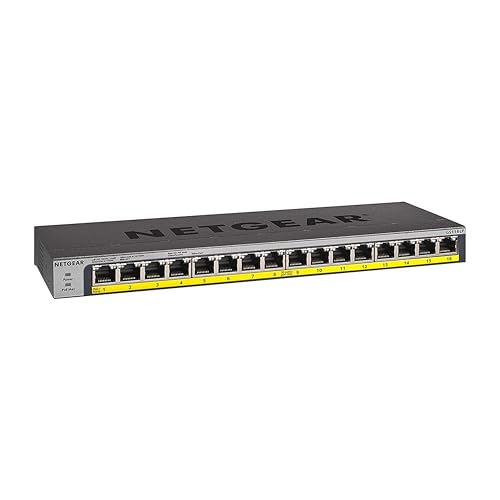
NETGEAR 16-Port Gigabit Fanless PoE+ Switch
Best for: Small offices needing basic PoE
- Port Count
- 16
- Port Speed
- 1.0Gbps
- Management Type
- Unmanaged
- PoE Support
- PoE+
- PoE Power Budget
- 76W
- Mounting Type
- Desktop, Wall Mount, Rack Mount
View on Amazon: NETGEAR 16-Port Gigabit Fanless PoE+ Switch Affiliate link
This unmanaged switch offers 16 Gigabit Ethernet ports with PoE+ support. It provides a 76W total power budget for connected devices. The fanless metal design ensures silent operation. You can mount it on a desk, wall, or in a rack. It requires no software or configuration. This unit suits small offices needing basic PoE connectivity without management features.
Pros
- 16 PoE+ ports with 76W total budget
- Fanless design for silent operation
- Supports desktop, wall, and rack mounting
- Plug-and-play unmanaged setup
Cons
- Lower 76W power budget compared to higher-end models
- Unmanaged interface lacks advanced configuration options
- No app or web management available
Good fit if
- You need to power 16 PoE devices simultaneously
- You require silent operation in a quiet space
- You want a simple plug-and-play setup
Skip if
- You need more than 16 ports
- You require advanced network management features
- You need a higher power budget than 76W
Verdict: NETGEAR GS116LP 16-Port PoE+ Switch is a compact, silent solution for small networks needing basic PoE distribution. It fits users who prioritize simplicity and quiet operation over advanced control.

NETGEAR 24-Port Gigabit Unmanaged Switch with PoE+
Best for: Large offices needing 24 ports
- Port Count
- 24
- Port Speed
- 1 Gbps
- Management Type
- Unmanaged
- PoE Support
- PoE+
- PoE Power Budget
- 190W
- Mounting Type
- Desktop, Rackmount
View on Amazon: NETGEAR 24-Port Gigabit Unmanaged Switch with PoE+ Affiliate link
This NETGEAR unit offers 24 Gigabit Ethernet ports with 16 supporting PoE+. It delivers a 190W total power budget and features dynamic allocation to support power-hungry devices. The fanless, unmanaged design ensures silent operation and simple plug-and-play setup. You can mount it on a desk or in a rack. It suits users needing high port density without configuration complexity.
Pros
- 24 Gigabit Ethernet ports for high-speed connectivity
- 16 PoE+ ports with 190W total budget
- Dynamic PoE allocation for power-hungry devices
- Fanless design for silent operation
- Supports desktop or rack-mount placement
Cons
- Unmanaged interface lacks remote configuration options
- 190W budget limits simultaneous high-power device count
- 5.38 pounds weight adds bulk for compact setups
Good fit if
- You need 24 ports for a large office
- You want silent, fanless operation
- You prefer simple plug-and-play setup
Skip if
- You require managed switch features
- You need more than 190W of PoE power
- You have limited rack space
Verdict: NETGEAR 24-Port PoE+ Unmanaged Switch fits users who need maximum port density and silent operation without management complexity. It is ideal for offices requiring 24 connections with moderate PoE needs.
Specifications side by side
| Spec | NETGEAR 16-Port Gigabit Fanless PoE+ Switch | NETGEAR 24-Port Gigabit Unmanaged Switch with PoE+ |
|---|---|---|
| Port Count | 16 | 24 |
| Port Speed | 1.0Gbps | 1 Gbps |
| Management Type | Unmanaged | Unmanaged |
| PoE Support | PoE+ | PoE+ |
| PoE Power Budget | 76W | 190W |
| Mounting Type | Desktop, Wall Mount, Rack Mount | Desktop, Rackmount |
| Number of Ports | 16 Ports | 24 Ports |
| Dimensions | 4.02 × 1.06 × 11.3 inches | 13 × 8.1 × 1.7 inches |
| Weight | 1.94 pounds | 5.38 pounds |
| Size | 16 Port, PoE+ @ 76W | 24 Port, PoE+ @ 190W |
| Color | Silver / black | silver |
| Model | GS116LP-100NAS | GS324P-100NAS |
Frequently asked questions
Does the NETGEAR 16-Port switch support PoE+ for devices?
Yes, the NETGEAR 16-Port Gigabit Fanless PoE+ Switch provides PoE+ support. It delivers a total power budget of 76 watts. This allows you to connect and power devices like wireless access points and security cameras without needing separate power adapters for each unit.
How much PoE power does the 24-Port model provide?
The NETGEAR 24-Port Gigabit Unmanaged Switch with PoE+ offers a 190-watt power budget. This higher capacity supports more connected devices simultaneously. It is designed for larger offices that require maximum port density and moderate PoE needs for various network equipment.
Are these switches managed or unmanaged?
Both switches are unmanaged devices. This means they operate on a plug-and-play basis without requiring complex configuration. You do not need to access a management interface to set them up. They automatically handle traffic forwarding for your network connections.
Do these switches use fans for cooling?
No, both models are fanless. They rely on passive cooling to operate quietly. This design ensures silent operation, making them suitable for small offices or workspaces where noise is a concern. The lack of moving parts also reduces potential maintenance needs.
What is the port speed on these NETGEAR switches?
Both switches feature Gigabit Ethernet port speeds. Each port supports data transfer rates up to 1000 Mbps. This ensures fast connectivity for all attached devices. The Gigabit standard is suitable for most modern networking requirements, including high-bandwidth applications.
Which switch is better for a small office?
The NETGEAR 16-Port model is ideal for small offices needing basic PoE. It provides a compact, silent solution with 16 ports and a 76W budget. If you have fewer devices and prioritize simplicity, this smaller unit fits your workspace better than the larger 24-port alternative.
How many ports does the larger NETGEAR switch have?
The NETGEAR 24-Port Gigabit Unmanaged Switch with PoE+ has 24 Ethernet ports. This higher density is beneficial for environments with many connected devices. It allows you to expand your network significantly without adding additional switches for basic connectivity needs.