6 Best NETGEAR Network Switches with 24 Ports, Compared
As an Amazon Associate we earn from qualifying purchases. Links on this page are affiliate links.
Finding the best NETGEAR network switches with 24 Ports requires matching your power and management needs to the hardware specs. We compared 6 models using only the specifications published on the listings. The NETGEAR 24-Port Gigabit Unmanaged Switch with PoE+ leads because it delivers 190W of PoE+ power in a compact, silent design. This guide helps you decide which switch fits your deployment by comparing port counts, power budgets, and management types.
Quick picks
| # | Product | Best for | Price |
|---|---|---|---|
| 1 | NETGEAR 24-Port Gigabit Unmanaged Switch with PoE+ Best overall | Silent, unmanaged PoE deployments | Check price of NETGEAR 24-Port Gigabit Unmanaged Switch with PoE+ on Amazon |
| 2 | NETGEAR 24-Port PoE+ and PoE++ Unmanaged Switch Best premium | High PoE budget unmanaged setups | Check price of NETGEAR 24-Port PoE+ and PoE++ Unmanaged Switch on Amazon |
| 3 | NETGEAR 24-Port Unmanaged Gigabit Switch Best budget | basic silent port expansion | Check price of NETGEAR 24-Port Unmanaged Gigabit Switch on Amazon |
| 4 | NETGEAR 26-Port PoE+ Smart Switch Also great | High PoE power and fiber uplinks | Check price of NETGEAR 26-Port PoE+ Smart Switch on Amazon |
| 5 | NETGEAR 24-Port Fanless Smart Managed Switch Also great | Silent smart managed networking with fiber uplinks | Check price of NETGEAR 24-Port Fanless Smart Managed Switch on Amazon |
| 6 | NETGEAR GS524 24-Port Unmanaged Switch Also great | Silent, unmanaged Gigabit networking | Check price of NETGEAR GS524 24-Port Unmanaged Switch on Amazon |
The best fit for you
- You need silent PoE power for basic devices NETGEAR 24-Port Gigabit Unmanaged Switch with PoE+ This unmanaged switch offers 190W of PoE+ power in a silent, fanless design.
- You require high PoE budget for power-hungry gear NETGEAR 24-Port PoE+ and PoE++ Unmanaged Switch It provides 480W of combined PoE and PoE++ power for demanding equipment.
- You want simple port expansion without configuration NETGEAR 24-Port Unmanaged Gigabit Switch This unmanaged Gigabit switch adds ports without any complex network management setup.
- You need fiber uplinks and smart control NETGEAR 26-Port PoE+ Smart Switch It includes two 1G SFP ports and smart management for 380W of PoE.
- You want silent smart management without PoE NETGEAR 24-Port Fanless Smart Managed Switch This fanless smart switch allows VLANs and remote monitoring without active cooling noise.
Our 6 picks

NETGEAR 24-Port Gigabit Unmanaged Switch with PoE+
Best for: Silent, unmanaged PoE deployments
- Number of Ports
- 24 Ports (what this guide is about)
- Port Count
- 24
- Port Speed
- 1 Gbps
- Management Type
- Unmanaged
- PoE Support
- PoE+
- PoE Power Budget
- 190W
View on Amazon: NETGEAR 24-Port Gigabit Unmanaged Switch with PoE+ Affiliate link
This NETGEAR switch offers 24 Gigabit Ethernet ports, with 16 supporting PoE+ for a total budget of 190W. It features dynamic power allocation to prioritize devices. The unmanaged design requires no software or configuration. Its fanless, silent operation and compact metal build suit desktop or rack mounting. You get reliable connectivity for standard office or home networks without complex setup.
Pros
- 16 PoE+ ports with 190W total budget
- Dynamic PoE power redistribution
- Fanless silent operation
- Desktop or rack-mountable
Cons
- Unmanaged interface lacks remote monitoring
- No web-based configuration options
- Limited to 190W power budget
Good fit if
- You need simple plug-and-play PoE power
- You want silent operation for quiet spaces
- You prefer unmanaged ease over configuration
Skip if
- You require smart management features
- You need more than 190W PoE power
- You want remote network monitoring
Verdict: NETGEAR GS324P 24-Port PoE Switch delivers straightforward PoE+ power for devices needing up to 190W total. It fits users who value silent, unmanaged reliability over advanced control.

NETGEAR 24-Port PoE+ and PoE++ Unmanaged Switch
Best for: High PoE budget unmanaged setups
- Number of Ports
- 24 Ports (what this guide is about)
- Port Count
- 24
- Port Speed
- 1.0Gbps
- Management Type
- Unmanaged
- PoE Support
- PoE+, Ultra60 PoE++
- PoE Power Budget
- 480W
View on Amazon: NETGEAR 24-Port PoE+ and PoE++ Unmanaged Switch Affiliate link
This unmanaged switch provides 24 Gigabit Ethernet ports with a 480W PoE budget. It includes 8 PoE+ ports and 16 Ultra60 PoE++ ports. The fanless design ensures silent operation and energy efficiency. You can mount it on a desktop or in a rack. It requires no software configuration for setup.
Pros
- 480W total PoE power budget
- 16 Ultra60 PoE++ ports
- Fanless silent operation
- Desktop or rack-mount options
Cons
- Unmanaged configuration limits advanced control
- No web interface for monitoring
- Fixed port speeds at 1.0Gbps
Good fit if
- You need high PoE power for cameras
- You prefer plug-and-play simplicity
- You want silent operation
Skip if
- You require VLAN management
- You need 10Gbps uplinks
- You want remote access
Verdict: NETGEAR GS524UP 24-Port PoE Switch delivers high PoE power in a silent, unmanaged package. It fits users who want simple setup for power-hungry devices without needing network controls.

NETGEAR 24-Port Unmanaged Gigabit Switch
Best for: basic silent port expansion
- Number of Ports
- 24 Ports (what this guide is about)
- Port Count
- 24
- Port Speed
- 1 Gbps
- Management Type
- Unmanaged
- Mounting Type
- Desktop, Wall-Mount, Rackmount
- Dimensions
- 13.5 × 11.1 × 3.12 inches
View on Amazon: NETGEAR 24-Port Unmanaged Gigabit Switch Affiliate link
The NETGEAR GS324 is a 24-port unmanaged switch with 1.0Gbps Ethernet ports. It features a fanless, silent metal design that reduces power consumption. The unit supports desktop, wall, or rack mounting. You get simple plug-and-play setup with no software or configuration required. This model is made for use in the U.S. and Canada only. It suits users needing basic, high-speed connectivity without management features.
Pros
- 24 Gigabit Ethernet ports for high-speed connectivity
- Fanless design ensures silent operation
- Supports desktop, wall, or rack mounting
- Energy-efficient IEEE 802.3az standard
Cons
- Unmanaged interface lacks remote configuration options
- Regional compatibility limited to U.S. and Canada
- No PoE support for connected devices
Good fit if
- You need a simple, plug-and-play network expansion
- You require silent operation in a quiet space
- You want flexible mounting options for your setup
Skip if
- You need to manage VLANs or traffic prioritization
- You require PoE power for connected devices
- You live outside the U.S. or Canada
Verdict: NETGEAR GS324 24-Port Gigabit Unmanaged Switch is a solid choice for users who need basic, silent connectivity without configuration complexity. It fits homes or offices needing simple port expansion in restricted regions.

NETGEAR 26-Port PoE+ Smart Switch
Best for: High PoE power and fiber uplinks
- Number of Ports
- 24 Ports (what this guide is about)
- Port Count
- 26
- Port Speed
- 1.0 Gbps
- Management Type
- Smart Managed
- PoE Support
- PoE+
- PoE Power Budget
- 380W
View on Amazon: NETGEAR 26-Port PoE+ Smart Switch Affiliate link
This NETGEAR switch offers 24 PoE+ ports with a 380W budget for power-hungry devices. It includes two 1G SFP uplink ports for fiber connections. You get smart managed features with SNMP support and one year of NETGEAR Insight. The metal chassis supports desktop or rack mounting. It suits users needing robust power delivery and fiber connectivity in a compact form factor.
Pros
- 24 PoE+ ports with 380W total power budget
- Two 1G SFP ports for fiber optic expansion
- Smart managed interface with SNMP and NETGEAR Insight
- Compact metal design for desktop or rack mounting
Cons
- Larger footprint than unmanaged alternatives
- Heavier build due to metal chassis
- Limited to 1G SFP uplinks
Good fit if
- You need high PoE power for many devices
- You require fiber optic uplink connections
- You want smart management features
Skip if
- You only need basic unmanaged connectivity
- You have strict space constraints
- You do not need PoE power
Verdict: NETGEAR GS724TPP 24-Port PoE Smart Switch delivers strong PoE power and fiber uplinks for complex setups. It fits users who need smart management and high power budgets in a single unit.
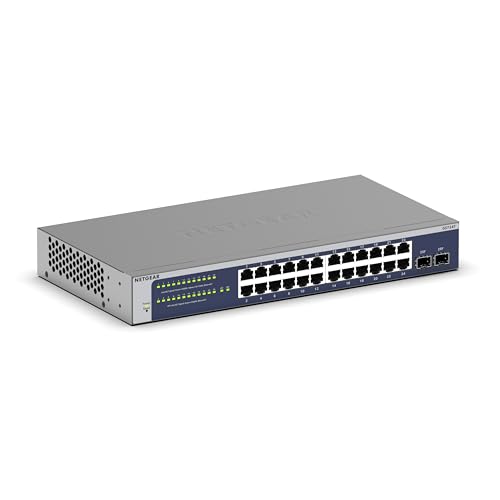
NETGEAR 24-Port Fanless Smart Managed Switch
Best for: Silent smart managed networking with fiber uplinks
- Number of Ports
- 24 Ports (what this guide is about)
- Port Count
- 24
- Port Speed
- 1.0 Gbps
- Management Type
- Smart Managed
- Uplink Ports
- 2 x 1G SFP
- Mounting Type
- Desktop, Rack Mount
View on Amazon: NETGEAR 24-Port Fanless Smart Managed Switch Affiliate link
This NETGEAR switch offers 24 Gigabit Ethernet ports plus two 1G SFP uplinks for fiber connections. It is a smart managed device, allowing you to configure VLANs and access controls via a web interface or the NETGEAR Insight app. The fanless metal design runs silently and uses less power. It fits on a desk or in a rack. You get one year of Insight service for remote monitoring.
Pros
- 24 Gigabit Ethernet ports for standard devices
- Two 1G SFP ports for fiber uplinks
- Smart managed features via web or app
- Fanless design for silent operation
- Supports desktop or rack mounting
Cons
- No Power over Ethernet (PoE) support
- Smart managed interface requires configuration
- Heavier and bulkier than unmanaged models
Good fit if
- You need remote management for network security
- You require fiber uplinks for backbone connections
- You want silent operation in a living space
Skip if
- You need to power devices like cameras via Ethernet
- You prefer plug-and-play unmanaged simplicity
- You want the smallest possible footprint
Verdict: NETGEAR GS724T 24-Port Smart Switch suits users who need advanced control and fiber connectivity without the noise of a fan. It is a solid choice for small offices or tech-savvy homes that require VLANs and remote monitoring.

NETGEAR GS524 24-Port Unmanaged Switch
Best for: Silent, unmanaged Gigabit networking
- Number of Ports
- 24 Ports (what this guide is about)
- Port Count
- 24
- Port Speed
- 1.0Gbps
- Management Type
- Unmanaged
- Mounting Type
- Desktop, Wall-Mount, Rackmount
- Dimensions
- 1.7 × 6.9 × 13 inches
View on Amazon: NETGEAR GS524 24-Port Unmanaged Switch Affiliate link
The NETGEAR GS524 is a 24-port Gigabit Ethernet switch designed for straightforward connectivity. It features unmanaged operation, meaning you get plug-and-play setup without configuration software. The unit supports desktop, wall, or rack mounting. Its fanless design ensures silent, energy-efficient performance. This model is ideal for users who need reliable, high-speed connections in a compact, versatile form factor.
Pros
- 24 Gigabit Ethernet ports for high-speed data transfer
- Fanless design for silent operation
- Supports rack, wall, and desktop mounting
- Energy Efficient Ethernet reduces power consumption
Cons
- Unmanaged interface lacks advanced network controls
- No PoE support for connected devices
- Limited to U.S. and CA regions
Good fit if
- You need a simple, reliable switch for basic networking
- You require silent operation in a quiet space
- You want flexible mounting options for your setup
Skip if
- You need Power over Ethernet for cameras or phones
- You require remote management or traffic monitoring
- You need to use the switch outside the U.S. or Canada
Verdict: NETGEAR GS524 24-Port Unmanaged Switch fits users who need a quiet, easy-to-install switch for standard Gigabit networks without the need for complex configuration or PoE features.
Specifications side by side
| Spec | NETGEAR 24-Port Gigabit Unmanaged Switch with PoE+ | NETGEAR 24-Port PoE+ and PoE++ Unmanaged Switch | NETGEAR 24-Port Unmanaged Gigabit Switch | NETGEAR 26-Port PoE+ Smart Switch | NETGEAR 24-Port Fanless Smart Managed Switch | NETGEAR GS524 24-Port Unmanaged Switch |
|---|---|---|---|---|---|---|
| Port Count | 24 | 24 | 24 | 26 | 24 | 24 |
| Port Speed | 1 Gbps | 1.0Gbps | 1 Gbps | 1.0 Gbps | 1.0 Gbps | 1.0Gbps |
| Management Type | Unmanaged | Unmanaged | Unmanaged | Smart Managed | Smart Managed | Unmanaged |
| PoE Support | PoE+ | PoE+, Ultra60 PoE++ | not stated | PoE+ | not stated | not stated |
| PoE Power Budget | 190W | 480W | not stated | 380W | not stated | not stated |
| Uplink Ports | not stated | not stated | not stated | 2 x 1G SFP | 2 x 1G SFP | not stated |
| Mounting Type | Desktop, Rackmount | Desktop or Rack Mount | Desktop, Wall-Mount, Rackmount | Desktop, Rackmount | Desktop, Rack Mount | Desktop, Wall-Mount, Rackmount |
| Number of Ports | 24 Ports | 24 Ports | 24 Ports | 24 Ports | 24 Ports | 24 Ports |
| Uplink Port Type | not stated | not stated | not stated | SFP | SFP | not stated |
| Dimensions | 13 × 8.1 × 1.7 inches | 9 × 15 × 2 inches | 13.5 × 11.1 × 3.12 inches | 20.7 × 13.8 × 4.09 inches | 16.2 × 10.7 × 4.6 inches | 1.7 × 6.9 × 13 inches |
| Weight | 5.38 pounds | 8.6 pounds | 2.87 pounds | 1.32 pounds | 5.54 pounds | 5.07 pounds |
| Size | 24 Port, PoE+ @ 190W | 24 Port, PoE+/PoE++ @ 480W | 24 Port | 24 Port, PoE+ @ 380W, 2 x 1G SFP | 24 Port | 24-Port Gigabit, Desktop/Rack Mount (GS524) |
| Color | silver | black | Black | grey | Gray | Gray |
| Model | GS324P-100NAS | GS524UP-100NAS | GS324-200NAS | GS724TPP-300NAS | GS724T-600NAS | GS524-300NAS |
How to choose the right switch
-
Check PoE power budgets
You must match the switch’s total PoE wattage to your connected devices. The NETGEAR GS324P provides 190W of power, which suits basic cameras or access points. If you have many power-hungry devices, the GS524UP offers 480W. This higher budget supports more demanding equipment without overloading the system. Always calculate the total power draw of your endpoints before buying. A sufficient budget prevents dropped connections and ensures stable performance for all powered devices in your network.
-
Decide on management type
Choose between unmanaged and smart managed switches based on your technical comfort. Unmanaged models like the GS324P plug in and work immediately. They lack configuration options, making them ideal for simple setups. Smart managed switches, such as the GS724T, offer advanced controls like VLANs and remote monitoring. You need these features for small offices or tech-savvy homes that require network segmentation. Select the type that matches your desire for control versus simplicity.
-
Verify fiber uplink needs
You may need fiber connections for long-distance data transfer or high bandwidth. The GS724TPP includes two 1G SFP ports for fiber uplinks. These ports allow you to connect to other switches or routers over longer distances than copper cables permit. If your network layout requires fiber connectivity, this feature is essential. Other models in this list do not list SFP ports, so you would need separate hardware for fiber links. Check the specifications carefully if you rely on fiber infrastructure.
-
Consider physical mounting options
The physical installation method depends on your equipment rack or desk space. The GS524 is designed for rack mounting, fitting standard server racks. This option keeps your network gear organized and secure in a dedicated cabinet. Most other switches, like the GS324, are desktop units with rubber feet. You place these on shelves or desks. Choose a rackmount model if you have a server room. Otherwise, a desktop form factor offers easier placement in various locations.
-
Assess noise and cooling
Noise levels matter if you place the switch in a living or working space. The GS724T is fanless, ensuring silent operation. This design is ideal for quiet environments where fan noise would be distracting. Other models may use fans for cooling, which can generate audible hum. Check the product description for fanless claims if silence is a priority. Silent operation also often correlates with lower energy consumption. You get a quieter, more energy-efficient network component with a fanless design.
Frequently asked questions
Which NETGEAR 24-port switch is best for silent operation?
The NETGEAR GS324P is ideal for silent, unmanaged PoE deployments. It delivers straightforward PoE+ power with a total budget of 190W. The unit operates without fan noise, making it suitable for offices or homes where quiet is a priority. Its unmanaged design requires no configuration, offering reliable connectivity for basic devices.
What is the highest PoE power budget available in this list?
The NETGEAR GS524UP offers the highest PoE budget at 480W. It supports both PoE and PoE++ standards, making it suitable for power-hungry devices like advanced access points or cameras. This unmanaged switch provides high power output in a silent package, fitting users who need simple setup for demanding equipment without smart controls.
Can I manage these switches remotely or via a web interface?
Yes, the NETGEAR GS724TPP and GS724T support smart managed features. The GS724TPP includes 2 x 1G SFP uplinks and offers smart management for complex setups. The GS724T is a fanless smart switch that suits users needing VLANs and remote monitoring. These models allow advanced control compared to the unmanaged options.
Which switch supports fiber uplinks for extended network distances?
The NETGEAR GS724TPP supports fiber connectivity with two 1G SFP ports. It delivers strong PoE power with a 380W budget alongside these uplinks. This model fits users who need smart management and high power in a single unit. The GS724T also offers fiber connectivity but lacks PoE support in its specifications.
Is there a rackmount option for these 24-port switches?
The NETGEAR GS524 is designed for rackmount installation. It provides silent, unmanaged Gigabit networking without the need for complex configuration or PoE features. This gray unit fits users who need a quiet, easy-to-install switch for standard networks. Its rackmount design allows for organized placement in server racks or equipment closets.
Which model is the most lightweight for easy installation?
The NETGEAR GS724TPP is the lightest model at 1.32 pounds. Despite its low weight, it includes smart management and 2 x 1G SFP uplinks. It delivers 380W of PoE+ power for complex setups. This grey switch is suitable for users needing high power and fiber connectivity in a compact, lightweight form factor.