YuanLey 8-Port Gigabit PoE+ Switch Review (2026): A Spec-Based Look
As an Amazon Associate we earn from qualifying purchases. Links on this page are affiliate links.
This yuanley 8 port gigabit poe switch review covers a compact unmanaged device designed for straightforward network expansion. It features 11 total ports, including eight PoE+ ports and two Gigabit uplinks, plus one SFP slot for fiber connections. The unit provides a 120W power budget, allowing each PoE port to deliver up to 30W. This makes it suitable for powering high-demand devices like wireless access points or cameras without needing separate power adapters. The switch operates silently and requires no configuration, offering a plug-and-play solution for basic networking needs.
What stands out
- Eight 1000Mbps PoE+ ports with a total 120W budget
- Two Gigabit uplink ports and one SFP port for flexible connectivity
- Built-in industrial power supply eliminates the need for external adapters
- VLAN isolation on PoE ports reduces network congestion between devices
- AI WatchDog feature automatically restarts offline PoE devices
Who it fits
Good fit for
This switch suits users who need to power multiple devices like IP cameras or Wi-Fi access points without complex setup. The VLAN isolation helps keep traffic separate, which is useful for small offices or home labs. The SFP port allows for longer-distance connections using fiber optics. If you require simple, reliable power delivery for up to eight devices with minimal configuration, this unmanaged switch fits your needs.
Who should skip it
You should look elsewhere if you need advanced management features. This is an unmanaged switch with no web interface or app for detailed monitoring or traffic shaping. It does not support 24V passive PoE, so check your device compatibility. If you require more than eight PoE ports, consider the larger variations in the series. Users needing granular control over QoS beyond ports 1 and 2 may find the options limited.
Verdict: The YuanLey 8-Port Gigabit PoE+ Switch offers a simple, unmanaged solution for powering and connecting multiple devices. Its 120W budget and VLAN support make it a practical choice for basic networking setups.
Key specs explained for YuanLey
Port Count: 11
This switch offers eleven total connection points. You get eight ports for PoE devices, two standard Gigabit uplinks, and one SFP slot for fiber. This count lets you connect multiple cameras and access points without needing extra switches. It is ideal for small offices or homes where you need to expand wired connections efficiently. Compare this to single-port extenders, which offer far less capacity for your network infrastructure.
PoE Power Budget: 120W
The device provides a total of 120 watts to power connected devices. Each PoE port can deliver up to 30 watts, supporting both 802.3af and 802.3at standards. This budget suits most standard security cameras and wireless access points. It does not support high-power devices like PTZ cameras with heaters. When shopping, check your device power needs to ensure they fit within this 120W limit for stable operation.
Port Speed: 1000Mbps
All ports operate at Gigabit speeds, allowing data transfer up to 1000 megabits per second. This ensures smooth video streaming and fast file transfers for connected devices. It matches the speed of modern Gigabit internet plans and internal network traffic. If you have slower 100Mbps devices, they will still work but at their maximum speed. This speed is essential for high-bandwidth mesh nodes or 4K security cameras.
Management Type: Unmanaged
This switch is unmanaged, meaning it requires no software configuration or setup. You simply plug it in, and it works immediately. This simplifies installation for users who do not need advanced network controls. It is perfect for basic home networks or small businesses that want reliability without complexity. Compare this to managed switches, which offer VLANs and traffic shaping but require technical knowledge to configure properly.
Compact Blue Metal Build
According to the listing, this unit features a blue finish and measures 7.9 inches in length, 4.7 inches in width, and 1.7 inches in height. It weighs 2.13 pounds. The compact dimensions allow it to fit in tight spaces, such as under desks or in small utility closets. The low profile ensures it does not take up much desk or shelf space, making it suitable for office or home environments where floor space is limited.
The device is an unmanaged switch, meaning it has no external controls or display screens. You do not need to configure settings or manage traffic manually. This design choice simplifies installation for users who prefer a plug-and-play experience. You simply connect the power cord and network cables. The lack of manual controls reduces potential points of failure and keeps the interface clean. This approach is ideal for users who want reliable connectivity without technical overhead.
The build includes an internal industrial power supply, so you do not need an external adapter. This reduces cable clutter and makes mounting easier. The metal casing helps with heat dissipation, allowing the switch to run quietly without a fan. This silent operation is beneficial for residential or office settings where noise is a concern. The sturdy construction supports long-term use in various locations, from homes to commercial spaces, providing a stable foundation for your network expansion.
Setup and Everyday Use Guide
This switch is unmanaged, which means you do not need to install software or log into a web interface. Setup is strictly plug and play. You simply connect the power cord to the built-in industrial power supply. Then, plug your network cables into the appropriate ports. The listing confirms no configuration is required for basic operation. This simplicity reduces setup time and potential errors for users who want a direct connection without complex networking knowledge.
Regarding compatibility, the device supports 802.3af and 802.3at standards. You can connect PoE cameras, wireless access points, routers, and computers. It also handles non-PoE devices on the standard Gigabit uplinks. The listing explicitly warns that it is not compatible with 24V passive PoE. You must ensure your powered devices match the supported standards to avoid damage or malfunction. The total power budget is 120W, with up to 30W per port.
In daily use, the switch operates silently. This allows installation in offices, homes, or commercial spaces without noise disturbance. The unit features AI WatchDog technology, which automatically restarts connected devices if they crash or go offline. This helps maintain stable connections for critical equipment like security cameras. Additionally, ports one and two support QoS. If network congestion occurs, these ports prioritize data forwarding. This ensures important devices maintain connectivity during heavy traffic periods. VLAN isolation is also available on PoE ports to reduce network congestion by isolating traffic from uplinks.
Before You Buy This Switch
This unmanaged switch simplifies your network by handling power and data in one cable. However, you must verify that your devices support standard 802.3af/at PoE+. The listing explicitly warns that it is not compatible with 24V passive PoE systems. Using the wrong power standard will not work and may damage equipment. Since the unit has a 120W budget, you should calculate the total power draw of all connected cameras and access points to ensure you stay within limits. Each port delivers up to 30W, which suits most standard devices. You will need a separate router or managed switch for advanced features like VLANs or QoS, as this unit only offers basic traffic prioritization on ports one and two. It fits well as a straightforward expansion tool in a home or small office setup where ease of use matters more than complex configuration.
Check before you buy
- Verify your devices use standard 802.3af/at PoE, not 24V passive.
- Calculate total power draw to stay under the 120W budget.
- Ensure you have a managed router for advanced network control.
- Check that your cameras support Gigabit speeds for full performance.
The product at a glance
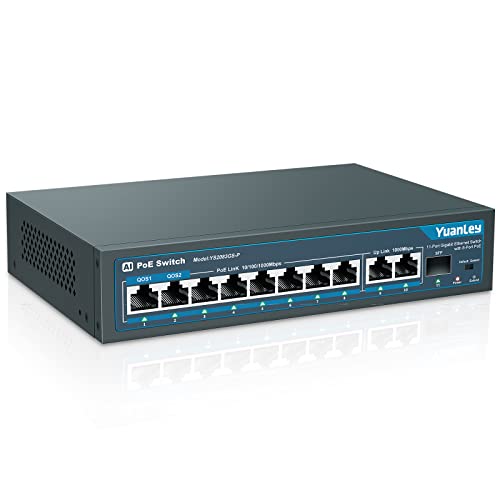
YuanLey 8-Port Gigabit PoE+ Switch with SFP
Best for: Simple PoE deployments needing SFP uplinks
- Port Count
- 11
- Port Speed
- 1000Mbps
- Management Type
- Unmanaged
- PoE Support
- 802.3af/at
- PoE Power Budget
- 120W
- Uplink Ports
- 2 Gigabit uplink, 1 SFP
View on Amazon: YuanLey 8-Port Gigabit PoE+ Switch with SFP Affiliate link
This unmanaged switch offers 11 total ports, including eight PoE+ ports with a 120W budget. It includes two Gigabit uplinks and one SFP port for flexible connectivity. The device supports 802.3af/at standards and features AI watchdog capabilities to restart offline devices. You get VLAN isolation and QoS on specific ports. It is designed for simple plug-and-play installation in offices or homes requiring reliable PoE power delivery.
Pros
- 120W PoE+ power budget with 30W per port
- Includes 1 SFP port for longer distance transmission
- AI WatchDog automatically restarts failed PoE devices
- VLAN isolation reduces network congestion on PoE ports
- QoS prioritizes data on ports 1 and 2
Cons
- Not compatible with 24V passive PoE devices
- Only ports 1 and 2 support QoS prioritization
- Unmanaged design limits advanced network configuration
Good fit if
- You need a simple plug-and-play PoE solution
- You require SFP connectivity for extended distances
- You want automatic device recovery via AI WatchDog
Skip if
- You use 24V passive PoE equipment
- You need per-port QoS settings
- You require managed switch features
Verdict: YuanLey 8-Port Gigabit PoE+ Switch fits users who need reliable PoE power with automatic device recovery and SFP flexibility without complex management.
Specifications side by side
| Spec | YuanLey 8-Port Gigabit PoE+ Switch with SFP |
|---|---|
| Port Count | 11 |
| Port Speed | 1000Mbps |
| Management Type | Unmanaged |
| PoE Support | 802.3af/at |
| PoE Power Budget | 120W |
| Uplink Ports | 2 Gigabit uplink, 1 SFP |
| Number of Ports | 8 Ports |
| Uplink Port Type | SFP, Gigabit Uplink |
| Dimensions | 7.9 × 4.7 × 1.7 inches |
| Weight | 2.13 pounds |
| Size | 11 Port | 8*PoE+(1000Mbps) (120w) |
| Color | Blue |
| Model | 11 Port | 8*PoE+ (1000Mbps) (120w) |
Frequently asked questions
Does this switch support SFP fiber connections?
Yes, it includes one SFP slot for fiber uplinks. This allows you to connect to high-speed fiber networks or extend your network distance beyond standard copper limits. The device also features two Gigabit Ethernet uplink ports for standard wired connections to your router or main switch.
What is the total PoE power budget?
The switch provides a 120W power budget across its eight PoE+ ports. This total capacity determines how many power-hungry devices you can run simultaneously. You can connect multiple cameras and access points, but you must ensure the combined power draw of all devices stays under 120W.
Is management software required for setup?
No, this is an unmanaged switch, so no software or web interface is needed. You simply plug in the power and connect your devices. It handles data forwarding automatically, making it ideal for users who want a straightforward, plug-and-play solution without complex configuration steps.
Can I use this with 24V passive PoE devices?
No, the listing explicitly warns that it is not compatible with 24V passive PoE systems. It supports standard 802.3af/at PoE+ devices only. Using it with passive PoE equipment could damage your devices, so you must verify your cameras or access points use standard PoE+ protocols.
How big is the physical unit?
The switch measures 7.9 inches in length, 4.7 inches in width, and 1.7 inches in height. It weighs 2.13 pounds and features a blue metal finish. These compact dimensions allow it to fit easily into tight spaces, such as ceiling mounts or small network closets.
How many total ports does this model have?
The model has 11 total ports. This includes eight PoE+ ports for powering devices, two Gigabit Ethernet ports for standard data uplinks, and one SFP slot for fiber connections. This configuration provides flexible options for connecting various network components without needing additional switches.