The Best YuanLey Network Switches in 2026: 4 Picks
As an Amazon Associate we earn from qualifying purchases. Links on this page are affiliate links.
This guide reviews the best YuanLey network switches to help you choose the right hardware for your setup. We compared 4 models based strictly on the specifications published on the listings. YuanLey offers unmanaged switches in various port counts, including 8, 10, and 18-port options, with some featuring Gigabit or 2.5G speeds and SFP uplinks. The top pick is the YuanLey 8-Port Gigabit 120W PoE Switch, which leads for small offices needing simple PoE power. These devices provide reliable data and power delivery without complex configuration, fitting quiet home or office environments.
Quick picks
| # | Product | Best for | Price |
|---|---|---|---|
| 1 | YuanLey 8-Port Gigabit 120W PoE Switch Best overall | Small offices needing simple PoE power | Check price of YuanLey 8-Port Gigabit 120W PoE Switch on Amazon |
| 2 | YuanLey 10-Port Fast Ethernet PoE+ Switch Best budget | Basic PoE camera networks with uplink needs | Check price of YuanLey 10-Port Fast Ethernet PoE+ Switch on Amazon |
| 3 | YuanLey 8-Port Gigabit PoE+ Switch with SFP Also great | Users needing SFP uplink and auto-restart | Check price of YuanLey 8-Port Gigabit PoE+ Switch with SFP on Amazon |
| 4 | YuanLey 18-Port 2.5G Switch with 10G SFP+ Best premium | High-density 2.5G networks with fiber uplinks | Check price of YuanLey 18-Port 2.5G Switch with 10G SFP+ on Amazon |
Our 4 picks

YuanLey 8-Port Gigabit 120W PoE Switch
Best for: Small offices needing simple PoE power
- Port Count
- 8
- Port Speed
- 1000 Mbps
- Management Type
- Unmanaged
- PoE Support
- PoE+ (802.3af/at)
- PoE Power Budget
- 120W
- Switching Capacity
- 12 Gbps
View on Amazon: YuanLey 8-Port Gigabit 120W PoE Switch Affiliate link
This unmanaged switch offers eight 1000 Mbps ports with full PoE+ support. It delivers a 120W power budget, allowing up to 30W per port for devices like cameras and access points. The 12 Gbps switching capacity handles high-speed traffic efficiently. Its fanless metal design ensures quiet operation in various environments. This model suits users needing reliable power and data over a single cable for multiple endpoints.
Pros
- All eight ports support 1000 Mbps speeds
- 120W total PoE+ power budget
- Fanless metal construction for silent operation
- Plug and play unmanaged setup
Cons
- Limited to 1000 Mbps port speeds
- No dedicated uplink ports specified
- Lacks remote management capabilities
Good fit if
- You need to power multiple PoE devices
- You want a quiet, fanless design
- You prefer simple plug-and-play setup
Skip if
- You require 2.5G or higher speeds
- You need managed switch features
- You want dedicated high-speed uplinks
Verdict: YuanLey 8-Port Gigabit PoE Switch fits users who need reliable power and data for cameras or APs without complex configuration. It is ideal for small offices or homes where quiet, simple networking is a priority.

YuanLey 10-Port Fast Ethernet PoE+ Switch
Best for: Basic PoE camera networks with uplink needs
- Port Count
- 10
- Port Speed
- 10/100 Mbps
- Management Type
- Unmanaged
- PoE Support
- PoE+ (802.3af/at)
- PoE Power Budget
- 120W
- Uplink Ports
- 2 x Gigabit
View on Amazon: YuanLey 10-Port Fast Ethernet PoE+ Switch Affiliate link
This YuanLey unmanaged switch offers eight 10/100 Mbps PoE+ ports and two 1 Gigabit uplink ports. It provides a 120W power budget, allowing up to 30W per port. The metal chassis supports VLAN isolation and a 250m extend mode. It suits users needing basic PoE connectivity for cameras or access points without configuration complexity.
Pros
- 120W total PoE power budget
- Two Gigabit uplink ports for higher bandwidth
- Supports 250m transmission in extend mode
- VLAN isolation for network safety
- Durable metal casing with passive cooling
Cons
- PoE ports limited to 100 Mbps speeds
- No managed remote control or app access
- Incompatible with 24V passive PoE devices
Good fit if
- You need a simple plug-and-play PoE solution
- You require Gigabit uplinks for your main network
- You want VLAN segmentation for security
Skip if
- You need Gigabit speeds for connected PoE devices
- You use 24V passive PoE equipment
- You require remote management capabilities
Verdict: YuanLey 8-Port 100Mbps PoE Switch fits users who need reliable 100 Mbps PoE delivery with Gigabit uplinks. It is ideal for small setups where remote management is unnecessary.
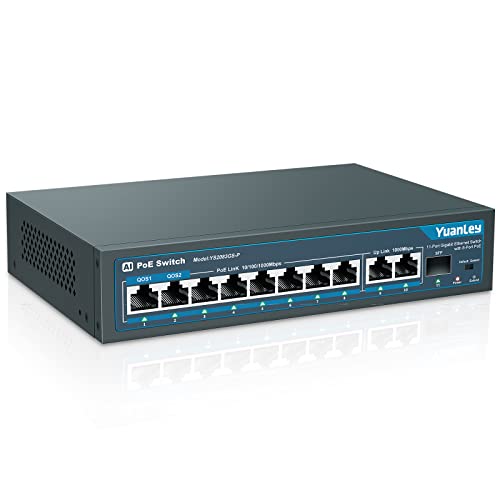
YuanLey 8-Port Gigabit PoE+ Switch with SFP
Best for: Users needing SFP uplink and auto-restart
- Port Count
- 11
- Port Speed
- 1000Mbps
- Management Type
- Unmanaged
- PoE Support
- 802.3af/at
- PoE Power Budget
- 120W
- Uplink Ports
- 2 Gigabit uplink, 1 SFP
View on Amazon: YuanLey 8-Port Gigabit PoE+ Switch with SFP Affiliate link
This unmanaged switch offers 11 gigabit ports, including eight PoE+ ports with a 120W total budget. It features two gigabit uplinks and one SFP port for flexible connectivity. The device supports 802.3af/at standards, delivering up to 30W per port. AI watchdog and QoS features help maintain stability for critical devices. It is suitable for users needing reliable power and data for cameras or access points.
Pros
- 120W PoE+ power budget with 30W per port
- Includes 1 SFP port for fiber connections
- AI watchdog automatically restarts offline devices
- QoS prioritizes traffic on ports 1 and 2
- VLAN isolation reduces network congestion
Cons
- Only ports 1 and 2 support QoS
- Not compatible with 24V passive PoE
- Lacks web management interface
Good fit if
- You need SFP uplink capability
- You require automatic device recovery
- You want VLAN isolation without configuration
Skip if
- You need per-port QoS settings
- You use 24V passive PoE devices
- You need web management tools
Verdict: YuanLey 11-Port 120W PoE+ Switch fits users who need SFP uplink and automatic device recovery for their network infrastructure.

YuanLey 18-Port 2.5G Switch with 10G SFP+
Best for: High-density 2.5G networks with fiber uplinks
- Port Count
- 18
- Port Speed
- 2.5 Gbps
- Management Type
- Unmanaged
- Uplink Ports
- 2 x 10G SFP+
- Switching Capacity
- 120 Gbps
- Mounting Type
- Desktop, Rackmount
View on Amazon: YuanLey 18-Port 2.5G Switch with 10G SFP+ Affiliate link
This YuanLey switch offers 18 ports, including 16 copper 2.5G Base-T ports and 2 fiber 10G SFP+ uplinks. It delivers 120 Gbps of switching capacity for high-bandwidth tasks like 4K video or NAS access. The unmanaged design requires no configuration, making it plug-and-play. Its fanless metal build ensures silent operation. This unit suits users needing dense 2.5G connectivity with fiber uplink options for future-proofing.
Pros
- 16 ports support 2.5G speeds for faster local transfers
- 2 SFP+ ports provide 10G uplink capability
- 120 Gbps switching capacity handles heavy data traffic
- Fanless design operates silently without noise
Cons
- SFP modules are not included with the switch
- Unmanaged interface lacks remote configuration or monitoring
- No Power over Ethernet (PoE) support for connected devices
Good fit if
- You need many 2.5G ports for multiple devices
- You require fiber uplinks for high-speed backbone connections
- You prefer silent, fanless operation in your network setup
Skip if
- You need to power devices via Ethernet cables
- You require web-based management for network settings
- You only need standard Gigabit speeds for light use
Verdict: YuanLey 18-Port 2.5G Unmanaged Switch is ideal for users needing high-density 2.5G connectivity with fiber uplink options. It fits homes or offices with multiple high-speed devices and NAS systems.
Specifications side by side
| Spec | YuanLey 8-Port Gigabit 120W PoE Switch | YuanLey 10-Port Fast Ethernet PoE+ Switch | YuanLey 8-Port Gigabit PoE+ Switch with SFP | YuanLey 18-Port 2.5G Switch with 10G SFP+ |
|---|---|---|---|---|
| Port Count | 8 | 10 | 11 | 18 |
| Port Speed | 1000 Mbps | 10/100 Mbps | 1000Mbps | 2.5 Gbps |
| Management Type | Unmanaged | Unmanaged | Unmanaged | Unmanaged |
| PoE Support | PoE+ (802.3af/at) | PoE+ (802.3af/at) | 802.3af/at | not stated |
| PoE Power Budget | 120W | 120W | 120W | not stated |
| Uplink Ports | not stated | 2 x Gigabit | 2 Gigabit uplink, 1 SFP | 2 x 10G SFP+ |
| Switching Capacity | 12 Gbps | not stated | not stated | 120 Gbps |
| Mounting Type | not stated | not stated | not stated | Desktop, Rackmount |
| Number of Ports | 8 Ports | 10 Ports | 8 Ports | 18 Ports |
| Uplink Port Type | not stated | Gigabit Uplink | SFP, Gigabit Uplink | SFP |
| Operating Mode | not stated | not stated | not stated | Access Point Mode |
| Dimensions | 9.06 × 7.48 × 2.76 inches | 7.9 × 4.7 × 1.7 inches | 7.9 × 4.7 × 1.7 inches | not stated |
| Weight | 2.16 pounds | 2.12 pounds | 2.13 pounds | 4.06 pounds |
| Size | 8 Port | 8*PoE+ (120w) | 10 Port | 8*PoE+ (120w) | 11 Port | 8*PoE+(1000Mbps) (120w) | 16x2.5G +2x10G SFP |
| Color | Black | Blue | Blue | Black |
| Model | 8 Port 1G PoE Unmanaged Switch (120W) | 10 Port | 8*PoE+ (120w) | 11 Port | 8*PoE+ (1000Mbps) (120w) | 16 Port 2.5G Switch |
YuanLey Network Switches at a Glance
YuanLey offers unmanaged switches with varying port counts and speeds. The 8-Port Gigabit PoE Switch suits small offices needing simple power delivery. The 10-Port Fast Ethernet model provides budget-friendly 100 Mbps ports with Gigabit uplinks for basic camera networks. These options prioritize straightforward connectivity without complex configuration.
For higher density, the 18-Port 2.5G Switch supports multiple high-speed devices and NAS systems. It includes 10G SFP+ uplinks for fiber connections. The 8-Port Gigabit PoE+ Switch with SFP adds automatic device recovery. Choose based on your port needs and whether you require PoE power or faster 2.5G speeds.
Who YuanLey Switches Suit
YuanLey’s range spans from compact 8-port units to dense 18-port racks. You find simple Gigabit PoE for small offices, budget Fast Ethernet for cameras, and high-speed 2.5G models with SFP uplinks for NAS systems. The switches are unmanaged, prioritizing plug-and-play simplicity over complex configuration. Sizes vary from small desktop boxes to heavier rackmount chassis. None of these models offer smart or managed features. If you need VLANs, traffic shaping, or remote monitoring, this brand does not provide those tools. You get straightforward hardware for basic connectivity needs.
Choosing the Right YuanLey Switch
-
Select PoE Budget for Devices
Check the total PoE wattage before buying. The top-rated 8-Port Gigabit model offers 120W of power. This supports multiple cameras or access points without external adapters. If you need to power fewer devices, the budget-friendly 10-Port Fast Ethernet switch also provides 120W. Ensure your total device draw stays under this limit. Exceeding the budget causes devices to lose power. Always calculate the sum of your connected equipment requirements first.
-
Match Port Speed to Traffic
Choose your port speed based on data needs. Most models offer Gigabit speeds for standard office or home use. The 18-Port 2.5G switch provides faster 2.5G connectivity for high-bandwidth tasks. This is ideal for NAS systems or heavy file transfers. The budget 10-Port model uses Fast Ethernet at 100 Mbps. This is sufficient for basic security cameras but may bottleneck modern data traffic. Match the speed to your heaviest connected devices.
-
Use SFP for Fiber Links
Look for SFP ports if you need fiber connectivity. The 8-Port Gigabit PoE+ model includes an SFP uplink. This allows connection to fiber optic networks for longer distances. It also supports automatic device recovery for stability. The 18-Port 2.5G switch features two 10G SFP+ ports. These handle high-speed backbone connections. If you do not use fiber, standard copper uplinks are sufficient. SFP ports add flexibility for future network expansions.
-
Check Physical Dimensions for Space
Measure your installation area before purchasing. The 18-Port 2.5G switch is larger and weighs 4.06 pounds. It supports rackmounting for server rooms or dense office setups. The smaller 10-Port and 8-Port PoE+ models are more compact. They weigh around 2.1 pounds and fit easily on desks. Ensure your shelf or rack has enough depth and weight capacity. The unmanaged design means no fans, so ventilation remains simple.
-
Confirm Unmanaged Simplicity
All listed YuanLey switches are unmanaged. This means they require no configuration or software setup. You plug in cables and they work immediately. This is best for users who want plug-and-play reliability. If you need VLANs or traffic shaping, these models do not support those features. The lack of management software reduces complexity. It also removes the need for dedicated admin time. Simple setups benefit most from this unmanaged approach.
Frequently asked questions
Do YuanLey switches require a management app or software?
No, all listed YuanLey models are unmanaged switches. This means they do not require any software, apps, or complex configuration to operate. You simply plug in your devices, and the switch handles data traffic automatically. This design prioritizes plug-and-play simplicity for home or small office networks without technical overhead.
Which YuanLey switch is best for powering security cameras?
The YuanLey 8-Port Gigabit PoE Switch is the top choice for powering security cameras. It provides 120W of total PoE power across eight ports. This allows you to connect and power multiple cameras or access points without needing separate power adapters for each device, simplifying your installation significantly.
Can I use a YuanLey switch with fiber optic cables?
Yes, if you select a model with an SFP port. The YuanLey 8-Port Gigabit PoE+ Switch includes an SFP uplink for fiber connections. Additionally, the 18-Port 2.5G Switch features two 10G SFP+ ports. These ports allow you to connect to fiber networks or high-speed backbone links efficiently.
Are all YuanLey switches compatible with 2.5G devices?
No, only the largest model supports 2.5G speeds. The YuanLey 18-Port Switch offers 16 ports running at 2.5G for high-speed devices like NAS systems. The other models offer Gigabit or Fast Ethernet speeds. You should choose the 18-Port model only if your devices require speeds faster than 1 Gbps.
Do these switches need special mounting hardware?
Most models are designed for desktop use due to their compact size. However, the 18-Port 2.5G Switch supports both desktop and rackmount mounting. This flexibility allows you to install it in a standard equipment rack if you have limited desk space or prefer a more organized server room setup.
How much power do these PoE switches consume?
The PoE models listed are rated for a maximum budget of 120W. This total wattage is shared across the PoE ports to power connected devices like cameras or APs. The switch itself draws power from your outlet, but the 120W limit defines how many powered devices you can connect simultaneously.