XikeStor 16-Port 2.5G L3 Managed Switch Review: 12 x 2.5G + 4 x 10G
As an Amazon Associate we earn from qualifying purchases. Links on this page are affiliate links.
The XikeStor 16-port switch pairs twelve 2.5G RJ45 ports with two 10G RJ45 and two 10G SFP+ ports, and adds Layer 3 features: IPv4 and IPv6 static routes, ARP, ACLs and VLANs. Switching capacity is listed at 140 Gbps with a 208 Mpps forwarding rate and jumbo frames up to 12 KB. It suits a home lab or small office that has outgrown an 8-port 2.5G switch and wants to route between VLANs without a separate router.
Verdict: A strong port count for the price if you will use the Layer 3 tools. Its closest rival is MokerLink's 8 x 2.5G L3 switch, which costs about the same, trades four 2.5G ports for two extra SFP+ slots, and uses the same wording for its L3 feature set. Pick XikeStor for more 2.5G edge ports, MokerLink for more fiber.
Spec sheet in plain terms
12 x 2.5G RJ45
Edge ports for 2.5G NICs, NAS units and access points; they also run at 1G.
2 x 10G RJ45 + 2 x 10G SFP+
Uplinks to a 10G NAS, server or core switch; all four also accept 1G.
140 Gbps / 208 Mpps
Enough capacity to run every port at full speed at once.
Layer 3 static routing
Routes between VLANs and subnets for IPv4 and IPv6; the listing names no dynamic routing protocols.
Security
IP+MAC+port binding, anti-ARP spoofing and flooding, SSHv2 and SNMPv3.
Build
The case measures about 9.8 x 8.3 x 1.7 in, sized for a desk or shelf rather than a 19-inch rack. Power comes in through a dedicated power port. The listing does not say whether the switch has a fan, so plan for some noise until the seller confirms.
Setup
Management is through a web page at 192.168.10.12 with admin as both username and password; give your PC a 192.168.10.x address first. Change that password straight away. The listing warns that changes are lost on power-off or a firmware update unless you click Save, so save after every change. One bullet calls it an 8-port 10G switch, a copy error: the port list above is what the title and specs describe.
Checks before ordering
Count your 2.5G devices and your 10G uplinks. Decide whether you need routing on the switch or whether VLANs alone will do, because L2 switches with the same ports cost less. Buy SFP+ modules or DAC cables separately.
Check before you buy
- More than eight 2.5G devices to connect
- At least one 10G link planned
- Comfortable setting a static IP to reach the web page
- Money set aside for SFP+ optics or DACs
- No PoE devices to power from it
The product at a glance
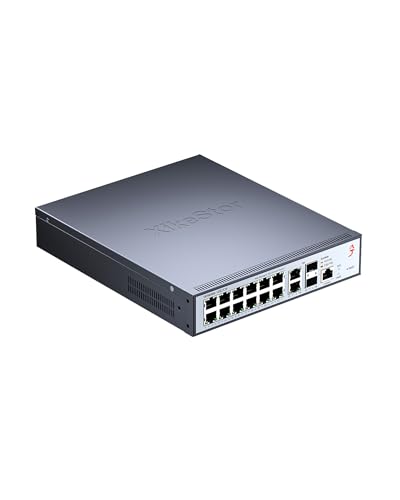
XikeStor 16-Port L3 Managed 10G Switch
Best for: 2.5G home labs
- Port Count
- 16
- Port Speed
- 2.5 Gbps
- Management Type
- L3 Managed
- Uplink Ports
- 2 x 10G SFP+
- Switching Capacity
- 140 Gbps
- Number of Ports
- 16 Ports
View on Amazon: XikeStor 16-Port L3 Managed 10G Switch Affiliate link
XikeStor L3 managed switch with 12 x 2.5G RJ45, 2 x 10G RJ45 and 2 x 10G SFP+ ports, 140 Gbps capacity, static IPv4/IPv6 routing, ACLs and jumbo frames.
Pros
- Twelve 2.5G ports
- Copper and fiber 10G uplinks
- Inter-VLAN routing
Cons
- No PoE
- Fan and warranty not stated
- Settings lost unless saved
Good fit if
- You need many 2.5G ports and routing between VLANs
Skip if
- You only need eight ports or want PoE
Verdict: The 2.5G port count leader at this price.
Specifications side by side
| Spec | XikeStor 16-Port L3 Managed 10G Switch |
|---|---|
| Port Count | 16 |
| Port Speed | 2.5 Gbps |
| Management Type | L3 Managed |
| Uplink Ports | 2 x 10G SFP+ |
| Switching Capacity | 140 Gbps |
| Number of Ports | 16 Ports |
| Uplink Port Type | SFP |
| Dimensions | 9.84 × 8.26 × 1.73 inches |
| Size | 12×2.5G RJ45+2×10G RJ45+2×10G SFP Ports |
| Color | Grey |
| Model | L3管理 | 12×2.5G +2×10G(RJ45/SFP+) |
Frequently asked questions
Is the XikeStor 16-port switch Layer 3?
Yes. The listing lists static IPv4/IPv6 routes, ARP and loopback interfaces on top of Layer 2 VLAN, ACL and QoS.
Does it supply PoE?
No. It has a dedicated power input and no PoE output.
What is the default login?
Browse to 192.168.10.12 from a PC set to the 192.168.10.x range; the username and password are both admin.
Why did my settings disappear?
Changes must be saved with the Save button, or the switch reverts after a power cycle or upgrade, per the listing.
XikeStor or MokerLink 8 x 2.5G L3?
XikeStor has twelve 2.5G ports and two SFP+; MokerLink has eight 2.5G ports and four SFP+. The two cost about the same.
See also
- tp link deco x55 ax3000 wifi review
- tp link ax1800 wifi 6 router review
- tp link deco xe75 axe5400 tri band review
- best mesh wifi systems under 100
- best mesh wifi systems under 150
- Best Mesh Wifi Systems Under $200: 10 Spec-Based Picks
- 9 Best Mesh Wifi Systems Under $300, Compared
- Best Mesh Wifi Systems Under $500 in 2026: 8 Picks Ranked by Specs
- thule hull a port rooftop kayak carrier review
- dell 16 review