TP-Link 8-Port Smart Managed Gigabit Review (2026): A Spec-Based Look
As an Amazon Associate we earn from qualifying purchases. Links on this page are affiliate links.
This tp link 8 port gigabit switch review focuses on the TL-SG108E, a compact networking device designed for users who need more control than a standard plug-and-play switch offers. It features eight Gigabit Ethernet ports and Easy Smart Managed capabilities. The metal chassis provides durability while keeping the footprint small at just 4 by 6.2 inches. You get access to web-based configuration tools without needing expensive hardware controllers. This model sits between basic unmanaged switches and complex enterprise gear, offering essential Layer 2 features for home labs or small offices.
What stands out
- 8 Gigabit Ethernet ports for high-speed connectivity
- Support for up to 32 VLANs to segment traffic
- QoS settings to prioritize latency-sensitive applications
- Desktop or wall-mount mounting options for flexible placement
- Cable diagnostics and port mirroring for network monitoring
Who it fits
Good fit for
This switch suits small business owners and advanced home users who need traffic segmentation without the cost of enterprise infrastructure. If you run a home lab with virtual machines or need to isolate guest Wi-Fi traffic via VLANs, the Easy Smart interface provides the necessary control. It is also ideal for users who want QoS to ensure video calls remain smooth during heavy downloads. The compact metal design fits well on desks or in low-profile equipment racks.
Who should skip it
You should look elsewhere if you require Layer 3 routing capabilities, as this device is strictly Layer 2. Users who need Wi-Fi access point integration will find this unit lacks wireless features entirely. It is also not suitable for those who want a mobile app for remote management, as configuration relies on a web browser or desktop software. If you need more than eight ports, consider the 16-port variation instead, as this model does not support expansion modules.
Verdict: The TL-SG108E delivers solid Layer 2 management features in a durable, compact metal chassis. It is a practical choice for users who need VLANs and QoS without the complexity of enterprise gear.
Key specs explained for TP-Link TL-SG108E
Port Count: 8
You get eight physical Gigabit Ethernet ports on this device. This count allows you to connect multiple wired devices, such as desktop computers, gaming consoles, or smart TVs, without needing additional hubs. If your home network has more than eight wired endpoints, you will need a larger 16-port model or a second switch. This specification is critical for determining if the switch fits your current cabling setup.
Port Speed: Gigabit
Each port supports speeds up to 1000 Mbps. This ensures that wired connections do not become a bottleneck for high-bandwidth activities like 4K streaming or large file transfers. When comparing mesh WiFi systems, note that wired backhaul benefits significantly from this speed. It is the standard for modern home networking, ensuring compatibility with most current routers and network attached storage devices.
Management Type: Easy Smart Managed
This switch offers more control than a basic plug-and-play unit. You can configure settings via a web interface or dedicated software to optimize traffic. Features like VLANs and QoS allow you to prioritize video calls or segment guest networks. This level of management is ideal for users who want advanced control without the complexity of enterprise-grade hardware, bridging the gap between simple switches and professional equipment.
Mounting Type: Desktop/Wall-Mount
The compact metal chassis allows flexible placement. You can set it on a desk or shelf, or mount it on a wall to save space. This versatility is useful for tight home office setups or utility closets. The sturdy construction also provides some protection against physical damage. Consider your available space and cable routing needs when deciding between desktop and wall installation for optimal airflow and access.
Design and Build Quality
The TP-Link TL-SG108E features a sturdy metal chassis with a black finish. According to the listing, this construction includes shielded ports. This material choice suggests durability and potential heat dissipation benefits for continuous operation. The compact dimensions are listed as 4 inches in width, 1 inch in height, and 6.2 inches in length. At 1.12 pounds, the unit is lightweight yet solid. These physical attributes allow for flexible placement options. You can position the switch on a desktop or mount it to a wall using the included hardware. The low profile ensures it does not obstruct other devices or cables in tight spaces. The layout includes eight Gigabit Ethernet ports on the front panel. There are no visible external controls or status lights mentioned in the provided data. Management is handled via a web interface or free software rather than physical buttons. This design keeps the exterior clean and uncluttered. The metal body provides a stable base for the desktop setup. Wall mounting options offer space-saving benefits for home offices or server racks. The shielded ports help protect against electromagnetic interference. This build quality suits users who prioritize reliable connectivity and efficient use of space. The simple aesthetic fits well in various home environments. The physical design supports both casual and professional networking needs.
Setup And Daily Use Guide
The TL-SG108E is labeled as plug-and-play for basic connectivity. You simply connect Ethernet cables to the eight Gigabit ports. Power it on, and it begins forwarding data. However, its Easy Smart Managed nature means you likely want to configure it. You access these settings via a web interface or free software. This management layer lets you adjust how traffic flows. You can set up to 32 VLANs. This feature segments your network. It isolates specific devices or groups for better security and performance. You might use this to separate guest devices from your main computers. The switch also supports QoS. This allows you to prioritize latency-sensitive traffic. You can ensure that video calls or gaming packets move smoothly even if other devices are downloading large files. For monitoring, you can enable port mirroring. This copies traffic from one port to another for analysis. Loop prevention helps avoid network crashes from accidental cable loops. Cable diagnostics assist in identifying physical connection issues. The device supports IGMP Snooping. This improves multicast application performance. It reduces unnecessary traffic on your network. Installation is flexible. You can place it on a desktop or mount it on a wall. The compact metal chassis with shielded ports fits in tight spaces. Daily use involves minimal intervention after initial setup. The switch handles data forwarding automatically. You only need to return to the management interface if you change network policies or troubleshoot connectivity.
Before You Buy This Switch
You need Cat5e or better Ethernet cables to utilize Gigabit speeds. This switch works best with standard 10/100/1000 Mbps devices. It does not replace your router or mesh nodes. Use it to add wired ports to existing network infrastructure. Check your router’s management interface for VLAN compatibility if you plan to segment traffic. The Easy Smart Managed interface requires a computer or mobile device for initial configuration. You will need access to the web portal or free software to set up Quality of Service rules. Keep the unit in a well-ventilated area. The metal chassis helps with heat, but airflow remains important. This device sits between basic unmanaged switches and expensive enterprise gear. It suits users who want more control than a plug-and-play unit offers but do not need full Layer 3 routing. If you only connect a few devices, a cheaper unmanaged switch may suffice. If you need complex routing, look at managed routers instead.
Check before you buy
- Verify your router supports VLAN tagging for traffic segmentation
- Ensure you have Cat5e or higher Ethernet cables on hand
- Confirm your router’s IP range matches the switch’s default settings
- Check if your current network requires Layer 3 routing features
The product at a glance
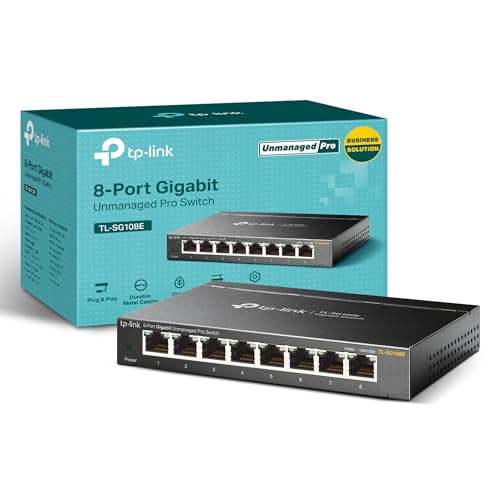
TP-Link 8-Port Smart Managed Gigabit Switch
Best for: Small offices needing VLANs and QoS
- Port Count
- 8
- Port Speed
- Gigabit
- Management Type
- Easy Smart
- Mounting Type
- Desktop/Wall-Mount
- Number of Ports
- 8 Ports
- Dimensions
- 6.2 × 4 × 1 inches
View on Amazon: TP-Link 8-Port Smart Managed Gigabit Switch Affiliate link
This TP-Link TL-SG108E is an 8-port Gigabit switch with smart management capabilities. It supports up to 32 VLANs, QoS, and IGMP snooping for traffic control. The metal chassis allows desktop or wall mounting. It suits users who need basic network segmentation and monitoring without complex enterprise hardware. The compact 4x6.2x1 inch size fits tight spaces while providing reliable Gigabit speeds for connected devices.
Pros
- 8 Gigabit Ethernet ports for high-speed connectivity
- Supports up to 32 simultaneous VLANs
- Includes QoS and IGMP snooping for traffic optimization
- Sturdy metal construction with shielded ports
- Supports desktop and wall mounting
Cons
- No mention of mobile app control in specifications
- Limited to Layer 2 management features only
- Web interface required for configuration setup
Good fit if
- You need VLAN segmentation for network security
- You want QoS to prioritize latency-sensitive traffic
- You prefer a compact metal switch for wall mounting
Skip if
- You require Layer 3 routing capabilities
- You need mobile app-based management
- You want more than 8 Ethernet ports
Verdict: TP-Link 8-Port Smart Managed Gigabit Switch is a solid choice for small offices needing VLANs and QoS. It fits users who value metal durability and wall-mount flexibility over advanced Layer 3 features.
Specifications side by side
| Spec | TP-Link 8-Port Smart Managed Gigabit Switch |
|---|---|
| Port Count | 8 |
| Port Speed | Gigabit |
| Management Type | Easy Smart |
| Mounting Type | Desktop/Wall-Mount |
| Number of Ports | 8 Ports |
| Dimensions | 6.2 × 4 × 1 inches |
| Weight | 1.12 pounds |
| Size | 8 Port (Pack of 1) |
| Color | Black |
| Model | TL-SG108E |
Frequently asked questions
Is the TP-Link 8-Port Smart Managed Gigabit Switch suitable for small offices?
Yes, this device is designed for small offices requiring VLANs and QoS. It provides the necessary control for managing network traffic and segmenting devices. The metal chassis offers durability for professional environments. It supports wall mounting, saving desk space in compact office setups.
Can I mount this switch on a wall?
Yes, the TP-Link TL-SG108E supports wall mounting. It also works as a desktop unit. This flexibility allows you to place it in various locations without cluttering your workspace. The compact dimensions make it easy to install in tight spaces or behind desks.
What management features does this switch offer?
It features Smart Managed capabilities. This allows you to configure VLANs and QoS settings for better network control. You can prioritize traffic and isolate devices for security. It is not a Layer 3 switch, so it does not handle routing between subnets.
Does this switch support Gigabit speeds on all ports?
Yes, all eight ports support Gigabit speeds. You can connect multiple high-bandwidth devices like desktops or smart TVs. This ensures fast data transfer for each connected device. It is compatible with standard 10/100/1000 Mbps devices for seamless integration into your network.
How heavy is the TP-Link TL-SG108E?
The switch weighs 1.12 pounds. This weight comes from its sturdy metal chassis. The metal construction helps with heat dissipation during continuous operation. It is light enough for easy installation but substantial enough to feel durable and stable on any surface.
Is this switch plug-and-play?
It works as plug-and-play for basic connectivity. You can connect devices and power it on for immediate use. However, to use VLANs or QoS, you must configure the Smart Managed settings. This dual nature allows simple setup or advanced customization as needed.