Starlink Standard Kit Review: Satellite Internet Dish and Wi-Fi Router
As an Amazon Associate we earn from qualifying purchases. Links on this page are affiliate links.
The Starlink Standard Kit is a satellite internet system, not just a router: a weather-resistant dish that talks to Starlink's satellites, a Gen 3 Wi-Fi router, a kickstand, cables and a power supply. Plug it in, point the dish at an open patch of sky, and the router shares the connection over Wi-Fi. It works almost anywhere the dish has a clear view of the sky, which is why it appeals to rural homes, cabins and RVs beyond cable or fiber. Nothing works without a paid Starlink service plan, and the listing's new-customer credit comes with conditions. This review summarizes the listing and published specs; we did not set up the kit ourselves.
What stands out
- Dish plus Gen 3 Wi-Fi router in one kit
- Works anywhere with a clear sky view
- Weather-resistant dish
- Setup and plans managed in the Starlink app
Who it fits
Good fit for
Rural homes, cabins and travelers with no good cable, fiber or cellular option who can place the dish with an open view of the sky.
Who should skip it
Anyone with decent wired broadband or strong 5G (usually cheaper per month), and sites with heavy tree cover or tall buildings blocking the sky.
Verdict: The simplest route to broadband where wired lines do not reach; budget for the monthly plan, not just the hardware.
Standard Kit key specs
Satellite dish, weather resistant
Mounts or stands outside; it needs an open view of the sky.
Gen 3 Wi-Fi router included
Shares the satellite link over Wi-Fi; it is made for Starlink hardware only.
Kickstand, cables, power supply
Everything needed for a ground setup in the box.
Service plan required
Household or travel plans, chosen in the app.
Starlink app
Checks plans in your area and helps pick the dish spot.
Listed at 23.4 x 15.1 x 1.5 in, 7 lb
Reads as the dish size; plan a flat, open spot for it.
Design
The kit centers on a flat, rectangular dish, listed at about 23.4 x 15.1 x 1.5 inches and 7 pounds, that rests on a kickstand or a mount. The dish is designed to handle a wide range of temperatures and weather.
The Gen 3 router sits indoors and handles Wi-Fi for the home.
Setup and daily use
Download the Starlink app first: it shows which plans are open where you live and helps find a dish spot without obstructions. Then plug the system in and aim the dish at the sky; Starlink describes the setup as two steps.
The listing's credit applies to new customers only, one per household, and does not cover hardware, taxes or fees. Standby Mode does not qualify.
Starlink kit or another way online?
Choose the Starlink Standard Kit if no wired line reaches you and cellular signal is weak. Choose a 5G home router such as the Hitron D60 if T-Mobile or AT&T 5G is strong where you live: the hardware and plans usually cost less. Choose a 4G LTE router such as the Cudy LT500 for a light-use cabin with LTE coverage.
Check before you buy
- Clear view of the sky at the dish spot
- Starlink plan available at your address
- Monthly plan in the budget
- Power outlet near the router
The product at a glance
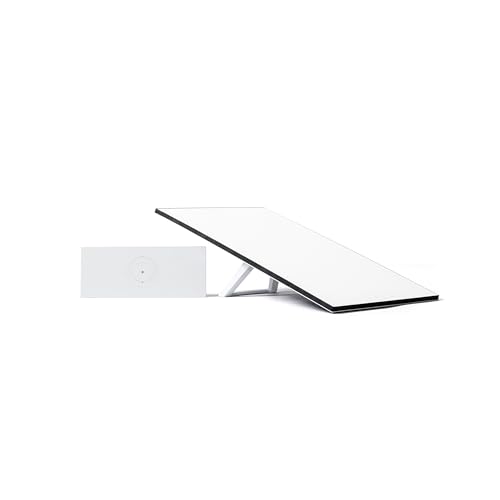
Starlink Standard Kit AX 4 X Tri Band Wi-Fi System
Best for: Rural homes and cabins
- Frequency Bands
- Tri Band
- Dimensions
- 23.4 × 15.1 × 1.5 inches
- Weight
- 7 pounds
View on Amazon: Starlink Standard Kit AX 4 X Tri Band Wi-Fi System Affiliate link
Starlink Standard Kit: satellite dish, Gen 3 Wi-Fi router, kickstand, cables and power supply; weather resistant, set up in the app, service plan required.
Pros
- Broadband almost anywhere
- Complete kit in the box
- Simple app-led setup
Cons
- Monthly plan required
- Needs open sky
- Pricier than wired or 5G where available
Good fit if
- You live beyond cable, fiber and good 5G
Skip if
- You have good wired or 5G internet
Verdict: The go-to kit where wired internet does not reach.
Specifications side by side
| Spec | Starlink Standard Kit AX 4 X Tri Band Wi-Fi System |
|---|---|
| Frequency Bands | Tri Band |
| Frequency Band | Tri-Band |
| Dimensions | 23.4 × 15.1 × 1.5 inches |
| Weight | 7 pounds |
| Color | White |
| Model | 02534001-AMSB |
If you are also outfitting a garage or yard alongside your home network, our greenworks 24v brushless 4 tool kit review covers that kit's published specs.
Frequently asked questions
Does the Starlink Standard Kit need a subscription?
Yes. Starlink only works with an active service plan.
What is in the Starlink Standard Kit?
The dish, a Gen 3 router, a kickstand, cables and a power supply.
Does Starlink work anywhere?
It works where the dish has a clear view of the sky and service is offered; check your address in the Starlink app.
Is the dish weatherproof?
It is built to handle a wide range of temperatures and weather.
Does the kit work without the Starlink app?
Plug-in setup works on its own, but the app is where you check plans, pick a dish spot and manage the system.