NETGEAR 5-Port Gigabit Unmanaged Switch Review: Specs, Pros and Cons
As an Amazon Associate we earn from qualifying purchases. Links on this page are affiliate links.
This netgear 5 port gigabit ethernet unmanaged review covers the NETGEAR GS105NA. It is a compact switch designed for basic home networking needs. The device features five Gigabit Ethernet ports, each supporting speeds up to 1.0 Gbps. This allows for fast data transfer between connected devices. It operates as an unmanaged switch, meaning there is no software to install or configuration required. You simply plug it in and use it. The metal housing keeps the unit small, measuring 4.02 inches in length. It fits easily on a desk or mounts on a wall. This setup provides reliable connectivity without complexity.
What stands out
- Five Gigabit Ethernet ports for high-speed connectivity
- Plug-and-play unmanaged design with no software needed
- Fanless operation for silent performance
- Compact metal case supports desktop or wall mounting
Who it fits
Good fit for
This switch suits users who need to add more wired connections to their home network. It is ideal for connecting desktop computers, gaming consoles, or smart TVs that benefit from stable Gigabit speeds. The plug-and-play nature makes it perfect for renters or those who dislike technical setup. If you want a simple, silent device to expand your Ethernet ports without managing settings, this model fits your needs. It works well with existing Cat5e or Cat6 cables.
Who should skip it
You should look at another option if you require advanced network management features. This unmanaged switch does not offer VLANs, QoS, or remote monitoring. It also lacks multiple speed tiers like 2.5G ports, which are available in other NETGEAR variations. If you need to connect more than five devices, consider the 8-port or 16-port versions instead. Additionally, this specific model is made for use in the U.S. and Canada only, so it may not be compatible with power standards in other regions.
Verdict: The NETGEAR GS105NA is a straightforward, reliable choice for expanding a home network with basic Gigabit connectivity. Its simple design and silent operation make it a practical addition for most households.
NETGEAR GS105NA Key Specs Explained
Port Count: 5
This switch provides exactly five Ethernet ports for wired connections. You can plug in five devices, such as a console, smart TV, or desktop PC, directly to your router or modem. This count is sufficient for small setups but may require additional switches if you have more than five wired devices. It is a basic capacity for home networking expansion.
Port Speed: 1.0 Gbps
Each port supports speeds up to 1.0 Gigabit per second. This ensures fast data transfer for streaming 4K video, online gaming, and large file transfers. It matches the standard Gigabit Ethernet speed found in most modern routers and mesh systems. You will not see speeds higher than 1 Gbps on these ports, even if your internet plan is faster.
Management Type: Unmanaged
This device requires no software installation or configuration. You simply plug it in, and it works immediately. There are no settings to adjust for traffic prioritization or VLANs. This makes it ideal for users who want a simple, reliable connection without technical setup. It is best for basic home networks where plug-and-play convenience is the priority.
Mounting Type: Desktop, Wall-Mount
The compact metal design allows flexible placement. You can set it on a desk or shelf, or mount it on a wall to save space. This versatility helps you hide the switch in less visible areas while keeping cables organized. It fits well in tight spaces where a larger router might not fit, offering practical installation options for various home layouts.
Design and Build Details
The NETGEAR GS105NA features a compact metal design, which provides durability while keeping the unit lightweight. According to the listing, the switch measures 4.02 inches in length, 3.9 inches in height, and 1.06 inches in width. It weighs only 7.05 ounces. This small footprint allows it to fit discreetly on a desk or shelf without taking up much space. The gray finish blends easily into most home office or entertainment setups.
The device supports both desktop and wall-mount placement, offering flexible installation options. You can position it horizontally for easy cable access or secure it vertically to save surface area. The unmanaged nature of the switch means there are no buttons, LEDs, or configuration interfaces to navigate. You simply plug in your Ethernet cables. This plug-and-play approach eliminates the need for software installation or manual setup. The fanless design ensures silent operation, making it suitable for quiet environments like bedrooms or home offices. The energy-efficient construction reduces power consumption without affecting performance. Overall, the physical build prioritizes simplicity and space-saving utility for basic networking tasks.
Setup and everyday use
Setting up the NETGEAR GS105NA requires no software installation or configuration. The listing describes this as a plug-and-play unmanaged network switch. You simply connect the included power adapter and plug Ethernet cables into the five Gigabit ports. This straightforward process works with existing Cat5e or Cat6 Ethernet cables. The auto-negotiating ports detect the optimal speed for each connected device automatically. This means you do not need to manually adjust settings for different devices on your network. The unit supports desktop placement or wall-mount installation. Its compact metal design allows for flexible positioning in your home or office. You can place it on a shelf or attach it to a wall to save space. Daily use involves silent operation. The fanless design ensures the switch runs without noise. This makes it suitable for quiet environments like living rooms or bedrooms. The device also features IEEE 802.3az Energy Efficient Ethernet. This technology reduces power consumption without compromising high-speed network performance. You can leave it running continuously without worrying about excessive energy use or heat generation. The switch is designed for use in the U.S. and Canada only. Ensure your location matches this regional compatibility before purchasing. The gray color helps it blend into most home networking setups. Overall, the setup is immediate, and everyday use is reliable and quiet.
Before You Buy This Switch
You should verify that your current network cables are Cat5e or Cat6. This switch supports auto-negotiation, so it works with existing cables, but older Cat5 may limit speeds. Ensure you have a compatible power outlet nearby. The unit is made for use in the U.S. and Canada only, so check your region. Keep the space around the switch clear. The fanless design relies on passive cooling, so airflow matters. Dust can accumulate over time, so wipe the metal casing occasionally with a dry cloth. This switch fits well alongside mesh WiFi systems. It extends wired connections for devices that need stability, like gaming consoles or smart TVs. You might need a separate power strip if you lack enough outlets. Consider if five ports are enough for your setup. If you have more devices, look at the 8-Port or 16-Port variations listed. This model is best for small homes or offices with basic wiring needs.
Check before you buy
- Check if your cables are Cat5e or Cat6 for optimal speed.
- Confirm the product is intended for use in the U.S. or Canada.
- Ensure you have a nearby power outlet for the adapter.
- Verify five ports meet your current device connection needs.
The product at a glance
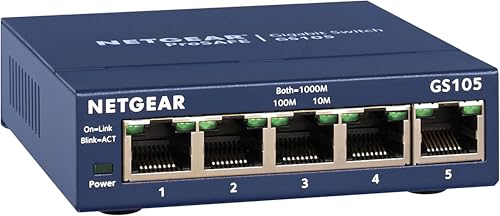
NETGEAR 5-Port Gigabit Unmanaged Switch
Best for: Simple home network expansion with zero configuration
- Port Count
- 5
- Port Speed
- 1.0 Gbps
- Management Type
- Unmanaged
- Mounting Type
- Desktop, Wall-Mount
- Number of Ports
- 5 Ports
- Dimensions
- 4.02 × 1.06 × 3.9 inches
View on Amazon: NETGEAR 5-Port Gigabit Unmanaged Switch Affiliate link
This NETGEAR GS105NA is a 5-port Gigabit Ethernet switch designed for simple, high-speed connectivity. It features five 1.0 Gbps ports that auto-negotiate speeds for existing Cat5e or Cat6 cables. The compact metal chassis supports both desktop and wall-mount placement. You get silent, fanless operation with energy-efficient design. It requires no software or configuration, making it ideal for basic network expansion.
Pros
- Five 1.0 Gbps Ethernet ports for high-speed data transfer
- Fanless design ensures completely silent operation
- Compact metal build supports desktop or wall mounting
- Plug-and-play setup with no software required
- IEEE 802.3az Energy Efficient Ethernet reduces power use
Cons
- Limited to only 5 ports for expansion
- Regionally restricted to U.S. and CA use only
- Unmanaged interface offers no advanced network controls
Good fit if
- You need to add a few wired connections to an existing network
- You prefer a silent, fanless device for quiet spaces
- You want a simple plug-and-play solution without configuration
Skip if
- You require more than 5 Ethernet ports
- You need advanced management features or VLAN support
- You live outside the U.S. or Canada
Verdict: NETGEAR 5-Port Gigabit Unmanaged Switch is a reliable, silent expansion tool for users needing a few extra wired connections without setup hassle. It fits homes or small offices that prioritize simplicity and quiet operation over advanced network management.
Specifications side by side
| Spec | NETGEAR 5-Port Gigabit Unmanaged Switch |
|---|---|
| Port Count | 5 |
| Port Speed | 1.0 Gbps |
| Management Type | Unmanaged |
| Mounting Type | Desktop, Wall-Mount |
| Number of Ports | 5 Ports |
| Dimensions | 4.02 × 1.06 × 3.9 inches |
| Weight | 7.05 ounces |
| Size | 5-Port Gigabit, Desktop/Wall Mount (GS105NA) |
| Color | Blue |
| Model | GS105NA |
Frequently asked questions
Does the NETGEAR GS105NA require a power outlet to function?
Yes, this switch needs external power to operate. It uses an included power adapter rather than drawing energy from the connected Ethernet cables. You must have a nearby electrical outlet to plug in the adapter. This ensures stable performance for all five connected devices without relying on passive power delivery.
Is this switch suitable for connecting a gaming console?
Yes, it is well-suited for gaming consoles. The five Gigabit ports provide the bandwidth needed for fast online gaming and updates. Its unmanaged design means zero configuration, allowing you to plug in your console and start playing immediately. The silent operation also ensures no noise during gameplay.
Can I stack this switch to add more ports later?
The product data does not specify stacking capabilities for the GS105NA. It is designed as a standalone unit with a fixed five-port configuration. You can place multiple units near each other, but there is no information about daisy-chaining or stacking hardware. You would need separate switches for additional ports.
Does the GS105NA support Power over Ethernet (PoE)?
No, this model does not support Power over Ethernet. The ports are standard Gigabit Ethernet connections for data transfer only. You must power connected devices like IP cameras or access points using their own separate power adapters. The switch focuses solely on expanding your wired network connectivity.
Is the metal casing durable for home use?
Yes, the unit features a metal design that offers durability. This construction helps protect the internal components while keeping the overall weight low at 7.05 ounces. The compact size allows it to fit discreetly on a desk or shelf. The metal body also aids in heat dissipation during continuous operation.
Will this switch work with my existing Cat5e cables?
Yes, it works seamlessly with Cat5e cables. The Gigabit ports support auto-negotiation, which automatically adjusts to the speed and duplex settings of your connected devices and cables. This ensures compatibility with standard Ethernet cables found in most homes. You can plug them in without any manual configuration.
Does the NETGEAR GS105NA have LED indicators?
The provided specifications do not mention LED indicators. You cannot confirm the presence of status lights for link activity or speed from the data. The focus is on the five physical ports and the compact gray design. You will rely on connected device behavior to confirm connectivity rather than switch lights.