Best Wireless Access Points Under $100 in 2026: 8 Picks Ranked by Specs
As an Amazon Associate we earn from qualifying purchases. Links on this page are affiliate links.
Under $100 you can now buy a Wi-Fi 6 or even Wi-Fi 7 access point, so there is little reason to settle for old hardware. Our top pick is the TP-Link Omada EAP650: AX3000 Wi-Fi 6, a DC adapter in the box, free cloud management and a 5-year warranty for well under $100. The Tenda i24 is the cheapest AP here, the Omada EAP720 adds Wi-Fi 7 and a 2.5G port at about $100, and the NETGEAR WAX210PA is the simplest single-AP setup. We also include the UniFi nanoHD for UniFi networks, the app-managed Festa F52, the desktop TL-WA1201 and the EAP603-Outdoor for yards. These picks are based on product listings, not hands-on testing.
Our top pick: TP-Link Omada AX3000 Wi-Fi 6 Access Point.
Quick picks
The best fit for you
- Best Wi-Fi 6 value TP-Link Omada AX3000 Wi-Fi 6 Access Point AX3000 with adapter and 5-year warranty.
- Lowest price Tenda I24 AC1200 Access Point AC1200 with PoE or adapter.
- Wi-Fi 7 on a budget Omada 7, BE5000 Wireless Access Point, 2.5G Port, w/ DC Adapter(EAP720) | WiFi 7 Dual Band, 5yr Warranty, PoE Powered(PoE160s, PoE5430G-M2), Mesh/WPA3/Roaming, Omada Managed, Business WiFi Experience BE5000 and 2.5G.
- Browser setup, single AP NETGEAR AX1800 WiFi 6 Access Point No app or controller.
- UniFi add-on Ubiquiti UniFi nanoHD Wave 2 Access Point nanoHD on 802.3af PoE.
- Outdoors TP-Link Omada AX1800 Outdoor Access Point IP65 Wi-Fi 6 for under $100.
Our 8 picks

TP-Link Omada AX3000 Wi-Fi 6 Access Point
Best for: Most buyers
- Wi-Fi Standard
- Wi-Fi 6
- Speed Rating
- AX3000
- Frequency Band
- Dual Band
- PoE Support
- 802.3at PoE plus, 48V Passive PoE
- Operating Mode
- Access Point, Mesh
- Ethernet Port Speed
- 1G Port
View on Amazon: TP-Link Omada AX3000 Wi-Fi 6 Access Point Affiliate link
TP-Link Omada EAP650 is an AX3000 Wi-Fi 6 ceiling access point rated up to 2976 Mbps, with a DC adapter in the box, PoE support, WPA3, free Omada cloud management and a 5-year warranty.
Pros
- AX3000 well under $100
- Adapter or PoE
- Five-year warranty
Cons
- Gigabit port
- Omada controller needed for mesh features
Good fit if
- You want the most Wi-Fi 6 AP you can get for under $100
Skip if
- You need Wi-Fi 7 or a 2.5G port
Verdict: The value leader under $100.

Tenda I24 AC1200 Access Point
Best for: Tight budgets
- Wi-Fi Standard
- Wi-Fi 5 (802.11ac Wave 2)
- Speed Rating
- AC1200
- Frequency Band
- Dual-Band
- PoE Support
- 802.3af PoE
- Operating Mode
- Access Point
- Ethernet Port Speed
- Gigabit
View on Amazon: Tenda I24 AC1200 Access Point Affiliate link
Tenda i24 is a low-cost AC1200 ceiling AP: 1167 Mbps Wave 2, gigabit port, standard PoE or the included DC adapter, fast roaming, VLAN-tagged SSIDs and app, cloud or web management.
Pros
- Lowest price in the list
- Fast roaming 802.11k/v/r
- Three-year warranty
Cons
- Wi-Fi 5
- Coverage claim of 1,300 sq ft
Good fit if
- You need several basic APs for little money
Skip if
- Your devices would benefit from Wi-Fi 6
Verdict: The cheapest sensible ceiling AP.

Omada 7, BE5000 Wireless Access Point, 2.5G Port, w/ DC Adapter(EAP720) | WiFi 7 Dual Band, 5yr Warranty, PoE Powered(PoE160s, PoE5430G-M2), Mesh/WPA3/Roaming, Omada Managed, Business WiFi Experience
Best for: Wi-Fi 7 on a budget
- Wi-Fi Standard
- Wi-Fi 7
- Frequency Band
- Dual-Band
- PoE Support
- PoE
- Features
- Mesh, Seamless Roaming, WPA3
- Port Speed
- 2.5G
- Management Type
- Managed
TP-Link Omada EAP720: Wi-Fi 7 BE5000 dual-band AP (4324 + 688 Mbps), 2.5G port, 802.3at PoE or the included DC adapter, 250+ concurrent clients, VLANs and PPSK through Omada, 5-year warranty.
Pros
- Wi-Fi 7 for about $100
- 2.5G port
- Adapter included
Cons
- Right at the $100 limit
- Dual-band, no 6 GHz
Good fit if
- You want Wi-Fi 7 and a 2.5G uplink on a small budget
Skip if
- Your router and switch are gigabit-only and you will not upgrade
Verdict: The most future-proof pick here.

NETGEAR AX1800 WiFi 6 Access Point
Best for: Single rooms or shops
- Wi-Fi Standard
- Wi-Fi 6 (802.11ax)
- Speed Rating
- AX1800
- Frequency Band
- Dual-Band (2.4 GHz, 5 GHz)
- PoE Support
- PoE
- Operating Mode
- Access Point
- Ethernet Port Speed
- 1G
View on Amazon: NETGEAR AX1800 WiFi 6 Access Point Affiliate link
NETGEAR WAX210PA: AX1800 Wi-Fi 6 AP with power adapter and a 1G PoE port, 128 registered and 30 active devices, roughly 1,500 sq ft, WPA3, four SSIDs, browser-based setup.
Pros
- Cheap Wi-Fi 6
- Clear coverage and device numbers
- No app or controller required
Cons
- 30 active devices
- Only four SSIDs
Good fit if
- You want one Wi-Fi 6 AP set up in a browser
Skip if
- You plan to centrally manage a fleet of APs
Verdict: A simple Wi-Fi 6 pick.
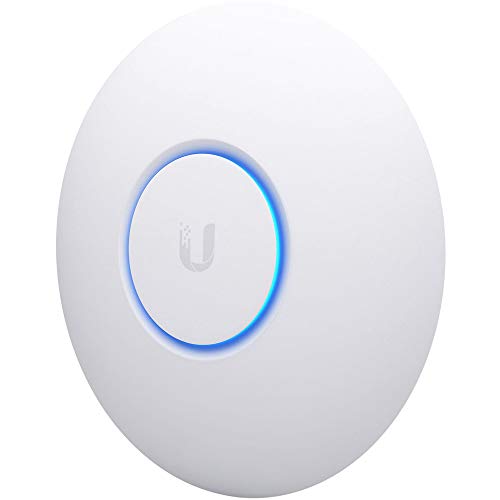
Ubiquiti UniFi nanoHD Wave 2 Access Point
Best for: UniFi networks
- Wi-Fi Standard
- 802.11ac Wave 2
- PoE Support
- 802.3af PoE
- Operating Mode
- Access Point
- Features
- MU-MIMO
- Dimensions
- 6.3 × 6.3 × 1.3 inches
- Weight
- 1.5 pounds
View on Amazon: Ubiquiti UniFi nanoHD Wave 2 Access Point Affiliate link
Ubiquiti UniFi nanoHD: compact four-stream 802.11ac Wave 2 MU-MIMO AP, 200+ concurrent users, 802.3af PoE, optional covers to blend into the ceiling; Wi-Fi 5 and a short listing.
Pros
- Cheapest way into UniFi
- 200+ user claim
- Standard 802.3af PoE
Cons
- Wi-Fi 5
- No power supply listed
Good fit if
- You use UniFi and want an inexpensive extra AP
Skip if
- You are not on UniFi and want a simple setup
Verdict: A budget UniFi add-on.

TP-Link Festa F52, AC1350 Wireless Access Point Gigabit Port Mesh | Seamless Roaming, MU-MIMO, Self-Organizing Network, Free Cloud Management, PoE Powered, Not Work with Omada
Best for: Small offices
- PoE Support
- PoE
- Features
- MU-MIMO, Mesh, Seamless Roaming
- Port Speed
- Gigabit
- Operating Mode
- Access Point Mode
- Placement
- Indoor
- Dimensions
- 8.09 × 7.15 × 1.47 inches
TP-Link Festa F52: AC1350 Wave 2 AP (867 + 450 Mbps), gigabit port, mesh, seamless roaming, load balancing, 802.3af or 24 V passive PoE with power option included, free Festa cloud; not Omada compatible.
Pros
- Free cloud and app
- Self-organizing mesh
- Low price
Cons
- Wi-Fi 5
- Does not work with Omada
Good fit if
- You want app-managed APs for a small office without a controller
Skip if
- You already run Omada
Verdict: Easy multi-AP coverage on a budget.
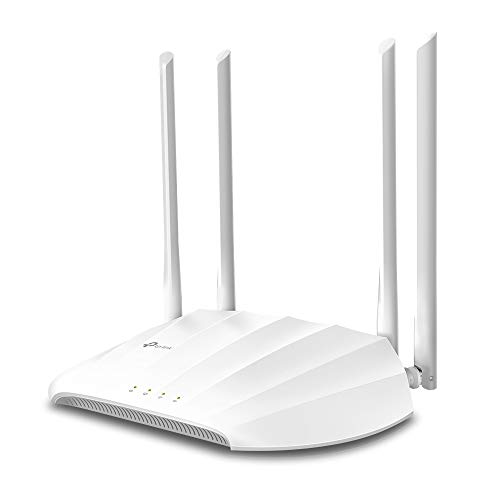
TP-Link TL-WA1201, AC1200 Dual Band Wireless Gigabit Access Point | Desktop WiFi Bridge, MU-MIMO Beamforming, Support Multi SSID Client Range Extender Mode, 4 Fixed Antennas
Best for: Desks and shelves
- Frequency Band
- Dual-Band
- Speed Rating
- AC1200
- Features
- MU-MIMO
- Port Speed
- Gigabit
- Mounting Type
- Desktop
- Operating Mode
- Access Point Mode, Bridge Mode
TP-Link TL-WA1201: AC1200 desktop access point with four fixed beamforming antennas, MU-MIMO, client, multi-SSID, range extender and AP modes, gigabit port, passive PoE adapter included, WPA/WPA2.
Pros
- Four modes including extender
- Sits on a desk or shelf
- PoE adapter included
Cons
- No WPA3 listed
- Wi-Fi 5
Good fit if
- You want a standalone AP on a shelf with no cloud
Skip if
- You want ceiling mounting
Verdict: A flexible desktop option.
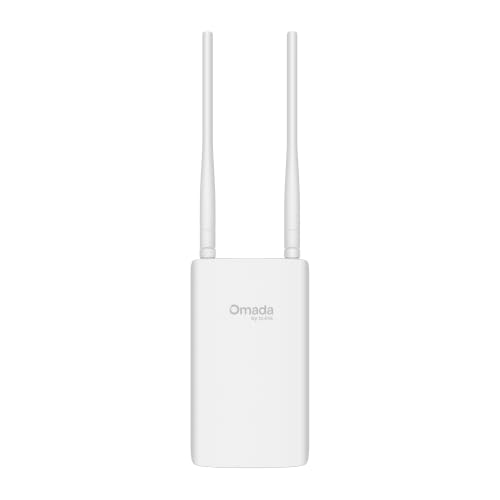
TP-Link Omada AX1800 Outdoor Access Point
Best for: Yards and patios
- Wi-Fi Standard
- Wi-Fi 6
- Speed Rating
- AX1800
- Frequency Band
- Dual Band
- PoE Support
- 802.3at PoE+, Passive PoE
- Operating Mode
- Access Point, Extender, Mesh
- Weatherproof Rating
- IP65
View on Amazon: TP-Link Omada AX1800 Outdoor Access Point Affiliate link
TP-Link Omada EAP603-Outdoor: AX1800 Wi-Fi 6 outdoor AP, IP65, -40 to 158 F, 6 kV lightning protection, wall or pole mount, extender function, PoE+ or passive PoE with adapter, 2-year warranty.
Pros
- Outdoor Wi-Fi 6 under $100
- Lightning protection
- Pole or wall mount
Cons
- Two-year warranty
- IP65 only
Good fit if
- You want Wi-Fi 6 in the yard without spending over $100
Skip if
- You need IP67 or a long warranty
Verdict: The budget outdoor Wi-Fi 6 pick.
Specifications side by side
| Spec | TP-Link Omada AX3000 Wi-Fi 6 Access Point | Tenda I24 AC1200 Access Point | Omada 7, BE5000 Wireless Access Point, 2.5G Port, w/ DC Adapter(EAP720) | WiFi 7 Dual Band, 5yr Warranty, PoE Powered(PoE160s, PoE5430G-M2), Mesh/WPA3/Roaming, Omada Managed, Business WiFi Experience | NETGEAR AX1800 WiFi 6 Access Point | Ubiquiti UniFi nanoHD Wave 2 Access Point | TP-Link Festa F52, AC1350 Wireless Access Point Gigabit Port Mesh | Seamless Roaming, MU-MIMO, Self-Organizing Network, Free Cloud Management, PoE Powered, Not Work with Omada | TP-Link TL-WA1201, AC1200 Dual Band Wireless Gigabit Access Point | Desktop WiFi Bridge, MU-MIMO Beamforming, Support Multi SSID Client Range Extender Mode, 4 Fixed Antennas | TP-Link Omada AX1800 Outdoor Access Point |
|---|---|---|---|---|---|---|---|---|
| Wi-Fi Standard | Wi-Fi 6 | Wi-Fi 5 (802.11ac Wave 2) | not stated | Wi-Fi 6 (802.11ax) | 802.11ac Wave 2 | not stated | not stated | Wi-Fi 6 |
| Speed Rating | AX3000 | AC1200 | not stated | AX1800 | not stated | not stated | not stated | AX1800 |
| Frequency Band | Dual Band | Dual-Band | not stated | Dual-Band (2.4 GHz, 5 GHz) | not stated | not stated | not stated | Dual Band |
| PoE Support | 802.3at PoE plus, 48V Passive PoE | 802.3af PoE | not stated | PoE | 802.3af PoE | not stated | not stated | 802.3at PoE+, Passive PoE |
| Operating Mode | Access Point, Mesh | Access Point | not stated | Access Point | Access Point | not stated | not stated | Access Point, Extender, Mesh |
| Weatherproof Rating | not stated | not stated | not stated | not stated | not stated | not stated | not stated | IP65 |
| Ethernet Port Speed | 1G Port | Gigabit | not stated | 1G | not stated | not stated | not stated | not stated |
| Features | Mesh, Seamless Roaming, WPA3 | MU-MIMO, Seamless Roaming | Mesh, Seamless Roaming, WPA3 | WPA3 | MU-MIMO | MU-MIMO, Mesh, Seamless Roaming | MU-MIMO | Mesh, Seamless Roaming, WPA3 |
| Port Speed | Gigabit | Gigabit | 2.5G | Gigabit | not stated | Gigabit | Gigabit | not stated |
| Management Type | Managed | Smart Managed | Managed | not stated | not stated | not stated | not stated | Managed |
| Mounting Type | not stated | not stated | not stated | not stated | not stated | not stated | Desktop | not stated |
| Intended Use | not stated | not stated | not stated | not stated | not stated | not stated | not stated | Outdoors |
| Placement | Indoor | not stated | Indoor | not stated | not stated | Indoor | not stated | Outdoor |
| Dimensions | 6.3 × 6.3 × 1.32 inches | 9.06 × 7.28 × 1.89 inches | not stated | not stated | 6.3 × 6.3 × 1.3 inches | 8.09 × 7.15 × 1.47 inches | 8.86 × 5.73 × 1.46 inches | not stated |
| Weight | 13.8 ounces | 1.01 pounds | 14.4 ounces | 15.2 ounces | 1.5 pounds | 12.6 ounces | 10.6 ounces | 1.85 pounds |
| Size | AX3000, 1G Port | 6.25 inches | BE5000, 2.5G Port | compact | 1-Pack | 7.1 x 8.1 x 1.5 inches | AC1200 | 1 Count |
| Color | Wi-Fi 6 Indoor | white | Wi-Fi 7 Indoor | white | White | White | White | PVC |
| Model | EAP650 | I24 AC1200 Access Point | EAP720 | WAX210PA-100NAS | UAP-NANOHD-US | Festa F52 | TL-WA1201 | EAP603-Outdoor |
If you are also sorting out airflow for a warm network closet or office, our guide to the best fans under 100 compares options by their published specs.
How to choose an access point under $100
-
Wi-Fi 5 or Wi-Fi 6 under $100
Wi-Fi 6 APs such as the EAP650 and WAX210PA now cost little more than Wi-Fi 5 models; buy Wi-Fi 5 (Tenda i24, nanoHD, Festa F52) only to save money or match existing gear.
-
Choose the management style
Omada and Festa offer free cloud apps, UniFi needs a UniFi controller, and the WAX210PA and TL-WA1201 are set up in a browser. Festa does not work with Omada.
-
Power options
The EAP650, EAP720, WAX210PA, Tenda i24 and TL-WA1201 include adapters; the nanoHD lists only 802.3af PoE.
-
The $100 line
The EAP720 sits right at $100; if its price moves up, the EAP650 is the next best choice.
-
Outdoor needs a rating
Only the EAP603-Outdoor here is built for outdoor mounting.
Frequently asked questions
What is the best access point under $100?
The TP-Link Omada EAP650: AX3000 Wi-Fi 6 with a DC adapter, free cloud management and a 5-year warranty.
Can I get Wi-Fi 7 for under $100?
Yes, the Omada EAP720 BE5000 with a 2.5G port, priced right at $100 when we checked.
What is the cheapest AP here?
The Tenda i24, an AC1200 ceiling AP with PoE or an included DC adapter.
Do I need a UniFi controller for the nanoHD?
UniFi APs are managed through UniFi software, so plan on a UniFi controller or console.
Is there an outdoor AP under $100?
The Omada EAP603-Outdoor, an IP65 AX1800 Wi-Fi 6 unit with lightning protection.