Best Wi-Fi 6 Wifi Routers in 2026: 15 Picks Ranked by Specs
As an Amazon Associate we earn from qualifying purchases. Links on this page are affiliate links.
Upgrading your home network with a dedicated Wi-Fi 6 wifi router delivers improved efficiency and throughput across modern wireless devices. The TP-Link Archer AX1800 Wi-Fi 6 Router leads our ranking because its AX1800 speed rating and dual-band design handle everyday household traffic without complex setup.
We compared 15 products based strictly on the specifications published on the listings. This guide helps you decide which wireless capacity, port speeds, and coverage limits best match your home networking setup.
Quick picks
The best fit for you
- You need a standard dual-band router for your home TP-Link Archer AX1800 Wi-Fi 6 Router It delivers dual-band AX1800 speeds and dedicated VPN hosting for everyday home networks.
- You need a portable travel router with OpenWrt support GL.iNet Beryl AX Travel Router It provides OpenWrt package support, integrated VPN features, and a 2.5G WAN port in an ultra-portable footprint.
- You want an integrated cable modem and Wi-Fi router NETGEAR Nighthawk Cable Modem WiFi 6 Router It combines a DOCSIS 3.1 cable modem, AX2700 wireless throughput, and four Gigabit ports in one unit.
- You need whole-home mesh coverage with multi-gigabit wired backhaul TP-Link Deco AX3000 Mesh System 3-Pack This three-pack covers up to 6,500 square feet and equips every node with dual 2.5 Gbps ports.
Our 15 picks

TP-Link Archer AX1800 Wi-Fi 6 Router
Best for: everyday dual-band Wi-Fi 6 home networks
- Wi-Fi Standard
- Wi-Fi 6 (what this guide is about)
- Speed Rating
- AX1800
- Frequency Bands
- Dual-Band
- Dimensions
- 10.3 × 5.3 × 1.61 inches
- Weight
- 1.1 pounds
The TP-Link AX1800 Dual-Band Wi-Fi 6 Router gives you entry-level 802.11ax networking for your home setup. It provides dual-band throughput rated at up to 1200 Mbps on 5 GHz and 574 Mbps on 2.4 GHz. Four external antennas direct signals using beamforming, and OFDMA handles simultaneous transmissions. This suits you if you need standard dual-band coverage with built-in OpenVPN and PPTP server capabilities.
Pros
- Up to 1200 Mbps on 5 GHz and 574 Mbps on 2.4 GHz
- Built-in OpenVPN and PPTP server support
- Four high-gain antennas with beamforming
- OFDMA support for simultaneous data transmission
Cons
- No 6 GHz band support
- Requires a separate modem
Good fit if
- You need dual-band Wi-Fi 6 speeds up to 1.8 Gbps.
- You want built-in OpenVPN or PPTP server support.
- You connect multiple devices concurrently via OFDMA.
Skip if
- You need tri-band connectivity or the 6 GHz band.
- You want an integrated cable modem in one unit.
Verdict: TP-Link AX1800 Dual-Band Wi-Fi 6 Router delivers solid dual-band AX1800 speeds and dedicated VPN hosting for everyday home networks. It provides core Wi-Fi 6 efficiency features without the complexity of multi-band configurations.

GL.iNet Beryl AX Travel Router
Best for: portable OpenWrt setups and encrypted travel networking
- Wi-Fi Standard
- Wi-Fi 6 (what this guide is about)
- Frequency Bands
- Dual Band
- Max Port Speed
- 2.5 Gbps
- Use Case
- Travel
- Features
- VPN, OpenWrt
- Dimensions
- 4.53 × 3.15 × 1.18 inches
The GL.iNet Beryl AX Travel Router is a compact dual-band Wi-Fi 6 router running OpenWrt 21.02. It delivers speeds up to 574 Mbps on 2.4 GHz and 2402 Mbps on 5 GHz, paired with a 2.5G WAN port and one gigabit LAN port. Built-in OpenVPN and WireGuard support client and server modes simultaneously. It suits you if you need portable network security, hardware VPN encryption, and modular open-source firmware configuration on the go.
Pros
- 2.5G multi-gigabit WAN port and 1G gigabit LAN port
- OpenWrt 21.02 firmware supporting over 5,000 modular plug-ins
- Pre-installed WireGuard up to 300 Mbps and OpenVPN up to 150 Mbps
- Dual-band Wi-Fi 6 delivering up to 2402 Mbps on 5 GHz and 574 Mbps on 2.4 GHz
Cons
- Only provides a single LAN port for wired local clients
- Physical toggle button requires setup in admin panel before functioning
- VPN transfer speed tops out at 300 Mbps for WireGuard and 150 Mbps for OpenVPN
Good fit if
- You need a travel-ready Wi-Fi 6 router with extensible OpenWrt firmware.
- You run simultaneous VPN client and server connections using WireGuard or OpenVPN.
- You want a multi-gigabit 2.5G WAN port in a lightweight pocket enclosure.
Skip if
- You need multiple local Ethernet ports for wired devices.
- You require VPN encryption speeds greater than 300 Mbps.
Verdict: GL.iNet Beryl AX Travel Router provides capable dual-band Wi-Fi 6 performance and deep OpenWrt package support in an ultra-portable footprint. Its integrated VPN features and 2.5G WAN connection make it an efficient networking option for mobile setups.

Smart Air Minions Bob AX1800 Wi-Fi 6 Router
Best for: novelty dual-band Wi-Fi 6 desk setups
- Wi-Fi Standard
- Wi-Fi 6 (what this guide is about)
- Speed Rating
- AX1800
- Frequency Bands
- Dual-Band
- Max Port Speed
- 1 Gbps
- Ethernet Ports
- 2
- Use Case
- Gaming
The Smart Air Minions Wi-Fi 6 Router is a dual-band AX1800 networking unit featuring an officially licensed Minions design. It delivers wireless speeds up to 1.2Gbps on the 5GHz band and 573Mbps on the 2.4GHz band, backed by one Gigabit WAN port and one Gigabit LAN port. It works as a standalone router, access point, extender, or mesh node, making it a functional fit if you want basic Wi-Fi 6 speeds in a compact character casing.
Pros
- AX1800 dual-band throughput with up to 1.2Gbps on 5GHz and 573Mbps on 2.4GHz
- Supports router, access point, range extender, and mesh operation modes
- Includes one Gigabit WAN port and one Gigabit LAN port
- Built-in WPA3 wireless encryption standard
Cons
- Only one Gigabit LAN port for wired client devices
- Mesh networking requires a compatible Davolink Minions router
Good fit if
- You need a compact dual-band Wi-Fi 6 router for basic streaming, PCVR, or gaming.
- You want versatile hardware that also operates as an access point or Wi-Fi extender.
- You prefer a novelty Minions-themed upright design for a desk or shelf.
Skip if
- You need multiple wired LAN ports to connect several Ethernet devices.
- You want to build a mesh system using standard non-Minions third-party hardware.
Verdict: Smart Air Minions AX1800 Wi-Fi 6 Router pairs dual-band Wi-Fi 6 throughput with multi-mode operating flexibility inside a compact Minions shell. It gives you capable AX1800 performance and basic Gigabit wired connectivity without looking like standard networking gear.

NETGEAR Nighthawk Cable Modem WiFi 6 Router
Best for: cable internet subscribers wanting an integrated setup
- Wi-Fi Standard
- Wi-Fi 6 (what this guide is about)
- Speed Rating
- AX2700
- Frequency Bands
- Dual-Band
- Coverage Area
- 2,000 sq ft
- Device Capacity
- 25+ devices
- Max Port Speed
- Gigabit
This two-in-one unit combines a DOCSIS 3.1 cable modem with an AX2700 Wi-Fi 6 router. It delivers wireless speeds up to 2.7 Gbps and covers up to 2,000 square feet for 25 or more devices. You also get four Gigabit Ethernet ports for wired gear. It suits cable internet subscribers on compatible providers who want to run a single networking box instead of separate modem and router hardware.
Pros
- Integrated DOCSIS 3.1 cable modem and AX2700 Wi-Fi 6 router
- Four Gigabit Ethernet ports for wired devices
- Coverage up to 2,000 sq ft and handles 25+ devices
- Built-in WPA3 security, firewall protection, and DoS prevention
Cons
- Incompatible with fiber and DSL providers like Verizon, AT&T, and CenturyLink
- Does not support bundled voice plans
Good fit if
- You subscribe to cable internet via Xfinity, Spectrum, or Cox.
- You prefer an integrated modem and router to save physical space.
- You need four Gigabit Ethernet connections for stationary wired hardware.
Skip if
- You use a DSL or fiber provider such as Verizon, AT&T, or CenturyLink.
- You require landline phone service bundled with your internet plan.
Verdict: NETGEAR Nighthawk Cable Modem WiFi 6 Router combines a DOCSIS 3.1 modem and AX2700 wireless networking into a single unit for compatible cable internet plans. It delivers four Gigabit ports and multi-room coverage without needing separate hardware.

GL.iNet Flint 2 Dual 2.5G Wi-Fi 6 Router
Best for: gamers needing VPN performance and 2.5G ports
- Wi-Fi Standard
- Wi-Fi 6 (what this guide is about)
- Device Capacity
- over a hundred devices
- Max Port Speed
- 2.5G
- Use Case
- Gaming
- Dimensions
- 5.39 × 2.09 × 9.17 inches
- Weight
- 1.68 pounds
The GL.iNet Flint 2 is an 8-stream Wi-Fi 6 router designed for gaming and network customization. It delivers wireless speeds up to 6 Gbps and features dual 2.5G ports for multi-gigabit connections. With 1GB of DDR4 memory, 8GB eMMC storage, and support for AdGuard Home and high-speed WireGuard VPN, this router suits you if you need advanced network tools and strong throughput across more than 100 connected devices.
Pros
- Wi-Fi 6 speeds up to 6 Gbps across 8 streams
- Dual 2.5G Ethernet ports
- WireGuard VPN speeds up to 900 Mbps and OpenVPN up to 880 Mbps
- 1GB DDR4 RAM and 8GB eMMC storage supporting over 100 devices
- Native AdGuard Home DNS ad-blocking and tracker filtering support
Cons
- Requires a firmware update upon initial setup for enhanced performance
- Initial web admin setup requires an Ethernet cable connection to a computer
Good fit if
- You need hardware-accelerated VPN speeds up to 900 Mbps with WireGuard.
- You want dual 2.5G ports for multi-gig wired networking.
- You plan to run AdGuard Home or DIY plugins across more than 100 devices.
Skip if
- You want to set up your router entirely using a smartphone app rather than a computer.
- You want an appliance that does not require an immediate firmware update out of the box.
Verdict: GL.iNet Flint 2 Wi-Fi 6 Gaming Router delivers up to 6 Gbps wireless bandwidth, dual 2.5G ports, and fast VPN processing. It provides extensive control and high capacity for networks managing over 100 active devices.

ASUS Dual-Band WiFi 6 Router
Best for: home streaming setups needing multiple Gigabit ports
- Wi-Fi Standard
- Wi-Fi 6 (what this guide is about)
- Speed Rating
- AX1800
- Frequency Bands
- Dual-Band
- Max Port Speed
- 1 Gbps
- Ethernet Ports
- 5
- Use Case
- Gaming, Streaming
The ASUS Dual-Band Wi-Fi 6 Router is a standalone desktop home router built for media playback and everyday connectivity. It operates on dual-band Wi-Fi 6 with four external antennas, OFDMA, and 1024-QAM to maintain efficient wireless throughput across multiple active devices. With four dedicated Gigabit LAN ports and built-in VPN support, it suits you if you need reliable wired connections for streaming hardware.
Pros
- Four Gigabit LAN ports and one Gigabit WAN port for wired setups
- Four external antennas with MU-MIMO and OFDMA support
- Integrated VPN support via ASUS Instant Guard
- Built-in AiProtection Classic network security and parental controls
Cons
- No multi-gigabit Ethernet ports for connections exceeding 1 Gbps
- Dual-band design lacks an extra 5 GHz or 6 GHz frequency band
- No USB ports listed for attached network storage
Good fit if
- You stream media and need four dedicated Gigabit Ethernet ports for wired devices.
- You want built-in network security and VPN features included on the device.
- You connect several Wi-Fi 6 client devices simultaneously using OFDMA.
Skip if
- You have multi-gigabit internet plans requiring 2.5G or faster ports.
- You need tri-band wireless connectivity for dedicated wireless backhaul traffic.
Verdict: ASUS Dual-Band Wi-Fi 6 Router delivers standard Gigabit wired expansion and modern Wi-Fi 6 features for everyday home streaming. It covers basic multi-device household demands through its four external antennas and built-in network security tools.

NETGEAR Nighthawk Dual-Band WiFi 6 Router
Best for: Small homes needing wired Gigabit ports
- Wi-Fi Standard
- Wi-Fi 6 (what this guide is about)
- Frequency Bands
- Dual-Band
- Coverage Area
- Up to 1,500 sq ft
- Device Capacity
- Up to 20 devices
- Max Port Speed
- 1 Gbps
- Ethernet Ports
- 5
The NETGEAR Nighthawk Dual-Band WiFi 6 Router delivers speeds up to 1.8 Gbps across dual 2.4 GHz and 5 GHz bands. It provides wireless coverage up to 1,500 square feet and supports up to 20 devices simultaneously. Equipped with four 1 Gig LAN ports and one 1 Gig WAN port, it suits small homes or apartments where you need dependable Wi-Fi 6 connections and wired Ethernet ports for your core gear.
Pros
- Speeds up to 1.8 Gbps across 2.4 GHz and 5 GHz bands
- Four 1 Gig Ethernet LAN ports and one 1 Gig WAN port
- Built-in WPA3 encryption and automatic firmware updates
- Covers up to 1,500 square feet for up to 20 devices
Cons
- Device capacity limited to 20 connected devices
- Coverage limited to 1,500 square feet without mesh expansion
- NETGEAR Armor requires separate subscription after 30-day trial
Good fit if
- You live in an apartment or small home up to 1,500 square feet.
- You connect 20 or fewer devices across your home network.
- You require four dedicated Gigabit Ethernet LAN ports for wired hardware.
Skip if
- You live in a large or multi-story home exceeding 1,500 square feet.
- You need to connect more than 20 devices simultaneously.
- You want advanced network security without an ongoing paid subscription.
Verdict: NETGEAR Nighthawk Dual-Band WiFi 6 Router provides dependable entry-level Wi-Fi 6 performance and four Gigabit LAN ports for smaller spaces. It handles up to 20 connected devices across a 1,500-square-foot coverage area.

Amazon eero 6 Mesh Wi-Fi Extender
Best for: expanding coverage on an existing eero network
- Wi-Fi Standard
- Wi-Fi 6 (what this guide is about)
- Frequency Bands
- Dual-Band
- Coverage Area
- 1,500 sq. ft.
- Dimensions
- 3.91 × 3.82 × 2.42 inches
- Weight
- 10.1 ounces
The Amazon eero 6 Mesh Wi-Fi Extender expands an existing eero network with dual-band Wi-Fi 6 coverage. It adds up to 1,500 square feet of signal using TrueMesh technology to route data and limit drop-offs. App-based setup pairs it directly with your current hardware. This compact add-on suits you if your home has dead zones and you already run an eero system.
Pros
- Adds up to 1,500 square feet of Wi-Fi 6 coverage
- TrueMesh technology routes traffic to minimize drop-offs
- Compact footprint under four inches wide and weighing 0.63 pounds
- Automatic background updates maintain network software
Cons
- Requires an existing eero mesh network to function
- Cannot operate as a standalone primary router
- No Ethernet ports listed for wired connections
Good fit if
- You already own an eero network and need up to 1,500 square feet more coverage.
- You want seamless TrueMesh roaming managed via an app.
- You prefer a small wall- or shelf-friendly unit under four inches wide.
Skip if
- You need a standalone primary router to connect directly to an ISP modem.
- You do not own an existing eero system.
- You need physical Ethernet ports to plug in wired gear.
Verdict: Amazon eero 6 Mesh Wi-Fi Extender adds up to 1,500 square feet of Wi-Fi 6 coverage to an existing eero installation. It provides seamless TrueMesh roaming, but it cannot function as an independent base router.

GL.iNet Slate AX Pocket Wi-Fi 6 Router
Best for: secure travel networking and VPN encryption
- Wi-Fi Standard
- Wi-Fi 6 (what this guide is about)
- Speed Rating
- AXT1800
- Frequency Bands
- Dual-Band
- Device Capacity
- up to 120 devices
- Use Case
- Travel
- Features
- VPN
The GL.iNet Slate AX Wi-Fi 6 Travel Router is a compact networking device built for travel. You get dual-band Wi-Fi 6 speeds reaching 1200 Mbps on 5 GHz and 600 Mbps on 2.4 GHz. It measures 125 by 82 by 36 millimeters and weighs 0.54 pounds. It includes OpenVPN and WireGuard client support plus OpenWrt firmware. It suits you if you need secure networking away from home.
Pros
- WireGuard speeds reach up to 550 Mbps and OpenVPN up to 500 Mbps
- Pocket-sized dimensions at 125 x 82 x 36 mm and 0.54 pounds
- Pre-installed OpenWrt 21.02 operating system allows custom package installation
- Connects up to 120 devices using OFDMA and MU-MIMO
Cons
- Physical toggle switch requires manual setup in the admin panel before functioning
- Top speed caps at 1200 Mbps on the 5 GHz band
Good fit if
- You need a travel router that supports captive portals and public Wi-Fi repetition
- You want hardware-level OpenVPN or WireGuard network encryption while traveling
- You want to attach external USB storage to share files via SAMBA or WebDav
Skip if
- You require wireless bandwidth above AX1800 ratings
- You prefer full-sized stationary home routers with larger antennas
Verdict: GL.iNet Slate AX Wi-Fi 6 Travel Router delivers pocket-sized AX1800 connectivity with integrated VPN protocols. It provides customizable OpenWrt security for users managing connections across hotel and public networks.

TP-Link Archer Dual-Band WiFi 6 Router
Best for: everyday dual-band streaming and Gigabit wired setups
- Wi-Fi Standard
- Wi-Fi 6 (what this guide is about)
- Frequency Bands
- Dual-Band
- Max Port Speed
- Gigabit
- Ethernet Ports
- 4
- Dimensions
- 10.2 × 4.96 × 1.3 inches
- Weight
- 13.4 ounces
This dual-band router provides entry-level Wi-Fi 6 connectivity for your home network. You get up to 1201 Mbps on the 5 GHz band alongside 300 Mbps on the 2.4 GHz frequency. Four Gigabit LAN ports offer dedicated wired connections for desktop systems or game consoles. It suits you if you want standard Wi-Fi 6 features like OFDMA and beamforming alongside OneMesh compatibility for future coverage expansion without multi-gigabit requirements.
Pros
- Up to 1201 Mbps throughput on the 5 GHz Wi-Fi 6 band
- Four Gigabit LAN ports for reliable wired device connections
- OneMesh compatibility for pairing with matching extenders
- Equipped with OFDMA, MU-MIMO, and beamforming technologies
Cons
- 2.4 GHz frequency operates on older 802.11n up to 300 Mbps
- Processor limited to dual cores clocked at 900 MHz
- Lacks multi-gigabit Ethernet interfaces
Good fit if
- You need 1201 Mbps Wi-Fi 6 throughput on the 5 GHz band.
- You plug in multiple wired devices using Gigabit LAN ports.
- You want to build a mesh setup with OneMesh extenders.
Skip if
- You need modern Wi-Fi 6 protocols on the 2.4 GHz band.
- You require Ethernet speeds faster than 1 Gbps.
Verdict: TP-Link Archer Gigabit Wi-Fi 6 Router delivers dual-band connectivity with 1201 Mbps on 5 GHz and four Gigabit LAN ports for everyday networking. It offers essential Wi-Fi 6 features and OneMesh capability without multi-gigabit ports.

TP-Link Roam 6 Portable Wi-Fi 6 Router
Best for: portable travel networking with VPN security
- Wi-Fi Standard
- Wi-Fi 6 (what this guide is about)
- Speed Rating
- AX1500
- Frequency Bands
- Dual-Band
- Device Capacity
- Up to 60 devices
- Max Port Speed
- 1 Gbps
- Ethernet Ports
- 2
The TP-Link Roam 6 AX1500 Travel Router is a portable Wi-Fi 6 router designed for travel and remote use. It delivers AX1500 dual-band throughput, offering up to 1,201 Mbps on the 5 GHz band and 300 Mbps on the 2.4 GHz band. Equipped with two Gigabit Ethernet ports, USB-C power input, and WireGuard VPN support, it suits you if you need a compact networking hub for hotel Wi-Fi and mobile connectivity.
Pros
- Dual-band Wi-Fi 6 speeds up to 1,201 Mbps on 5 GHz
- Built-in WireGuard and OpenVPN client encryption
- Flexible USB-C power compatible with 5V/3A power banks
- Compact pocket dimensions weighing 0.42 pounds
Cons
- Only two total 1 Gbps Ethernet ports
- 2.4 GHz band ceiling limited to 300 Mbps
- Lacks 2.5 Gbps multi-gigabit port options
Good fit if
- You need a compact travel router that runs from USB-C power banks.
- You want hardware-level WireGuard or OpenVPN support on public networks.
- You require multiple operating options including USB tethering and access point modes.
Skip if
- You need more than two wired Ethernet connections for local devices.
- You require multi-gigabit WAN or LAN speeds beyond 1 Gbps.
- You want higher aggregate wireless throughput than AX1500 specs provide.
Verdict: TP-Link Roam 6 AX1500 Travel Router delivers entry-level Wi-Fi 6 wireless performance, VPN protocols, and versatile USB-C power in a compact chassis. It provides a reliable private network setup whenever you connect through public sources.
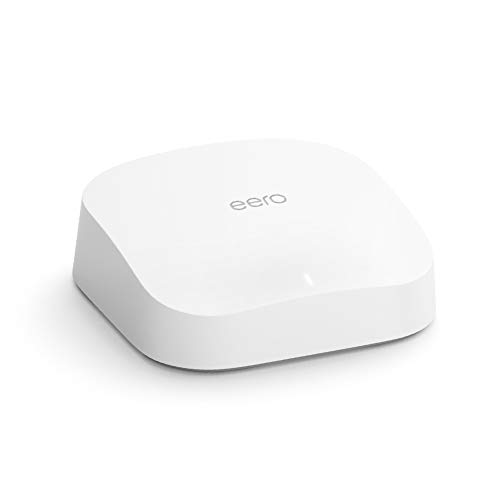
Amazon eero Pro 6 Tri-Band Mesh Router
Best for: tri-band coverage and smart home integration
- Wi-Fi Standard
- Wi-Fi 6 (what this guide is about)
- Frequency Bands
- Tri-Band
- Coverage Area
- Up to 2,000 sq ft
- Device Capacity
- 75+ connected devices
- Intended Use
- Home
- Dimensions
- 5.47 × 5.47 × 2.07 inches
The Amazon eero Pro 6 is a tri-band Wi-Fi 6 mesh router designed for home networking. It delivers wireless coverage up to 2,000 square feet, supports speeds up to a gigabit, and handles 75 or more connected devices. An integrated Zigbee hub allows you to connect compatible smart home devices directly. It suits you if you need reliable multi-band coverage across a medium-sized home.
Pros
- Tri-band Wi-Fi 6 connectivity
- Coverage up to 2,000 square feet
- Built-in Zigbee smart home hub
- Supports 75+ connected devices
- Gigabit wireless speed capability
Cons
- Refurbished unit rather than brand new
- May ship in generic packaging
- Requires the eero mobile app for configuration
Good fit if
- You need tri-band Wi-Fi 6 coverage for up to 2,000 square feet.
- You use Alexa and compatible Zigbee smart home hardware.
- You have up to 75 devices connecting to your network simultaneously.
Skip if
- You want brand-new, factory-sealed hardware.
- You prefer configuring your router through a web browser instead of a mobile app.
Verdict: Amazon eero Pro 6 Tri-Band Router delivers gigabit Wi-Fi 6 throughput, extensive coverage, and an integrated smart home hub in a compact design. It is a capable choice if you need mesh expandability and separate frequency bands for multiple devices.

TP-Link Deco AX3000 Mesh System 3-Pack
Best for: large homes needing multi-gigabit wired mesh backhaul
- Wi-Fi Standard
- Wi-Fi 6 (what this guide is about)
- Speed Rating
- AX3000
- Coverage Area
- 6,500 square feet
- Device Capacity
- more than 150 devices
- Max Port Speed
- 2.5 Gbps
- Pack Size
- 3-Pack
The TP-Link Deco AX3000 3-Pack Mesh is a whole-home Wi-Fi 6 system designed for large spaces up to 6,500 square feet. It provides dual-band throughput up to 2,402 Mbps on 5 GHz and 574 Mbps on 2.4 GHz. Each node includes two 2.5 Gbps Ethernet ports for multi-gig wired backhaul or fast local devices. You will find this setup practical if you need seamless coverage for up to 150 connected devices.
Pros
- Two 2.5 Gbps Ethernet ports on every unit
- Wi-Fi 6 coverage reaching up to 6,500 square feet
- Capacity to connect over 150 devices
- Free network security scan, parental controls, and QoS
Cons
- Only two Ethernet ports per unit
- Dual-band design lacks a dedicated third band for wireless backhaul
Good fit if
- You subscribe to an internet plan above 1 Gbps and want 2.5G ports.
- You need to cover up to 6,500 square feet across multiple rooms.
- You run a high-density home network with up to 150 active devices.
Skip if
- You need more than two wired LAN ports at each node without using a separate switch.
- You prefer a tri-band mesh system with a dedicated wireless backhaul frequency.
Verdict: TP-Link Deco AX3000 3-Pack Mesh delivers wide-reaching coverage up to 6,500 square feet and features dual 2.5 Gbps ports on every node. It gives multi-gigabit internet connections room to perform throughout large homes.

TP-Link Roam 6 AX3000 Travel Router
Best for: secure multi-gigabit portable Wi-Fi 6 networking
- Wi-Fi Standard
- Wi-Fi 6 (what this guide is about)
- Speed Rating
- AX3000
- Frequency Bands
- Dual-Band
- Max Port Speed
- 2.5 Gbps
- Ethernet Ports
- 2
- Use Case
- Travel
The TP-Link Roam 6 AX3000 Travel Router provides dual-band Wi-Fi 6 speeds in a pocket-sized form factor weighing 0.33 pounds. It delivers up to 2402 Mbps on 5 GHz and 574 Mbps on 2.4 GHz, paired with a 2.5 Gbps WAN/LAN port and a 1 Gbps LAN port. You get dedicated VPN support for WireGuard and OpenVPN alongside flexible USB-C power options, making it suitable if you need secure, fast networking on the go.
Pros
- Multi-gigabit 2.5 Gbps WAN/LAN port plus 1 Gbps LAN port
- WireGuard and OpenVPN support for both client and server modes
- Powers via standard 5V USB-C power bank or included adapter
- Integrated USB 3.0 port and microSD slot supporting up to 512GB
Cons
- Offers only two wired Ethernet ports
- Dual-band design lacks a dedicated third wireless band
Good fit if
- You need a compact router with built-in WireGuard and OpenVPN client features while traveling.
- You want multi-gigabit throughput from a 2.5 Gbps port on a portable device.
- You rely on 5V USB-C power banks or cellular tethering for connectivity.
Skip if
- You need more than two wired Ethernet connections for client devices.
- You require a tri-band router for a large home network.
Verdict: TP-Link Roam 6 AX3000 Travel Router delivers fast Wi-Fi 6 speeds, multi-gigabit wired routing, and built-in VPN support in a lightweight format. It is a capable pick if you need secure, portable connectivity powered via USB-C.

NETGEAR Nighthawk Dual-Band AX3000 WiFi 6 Router
Best for: homes up to 2,000 square feet
- Wi-Fi Standard
- Wi-Fi 6 (what this guide is about)
- Speed Rating
- AX3000
- Frequency Bands
- Dual-Band
- Coverage Area
- 2,000 sq. ft.
- Device Capacity
- 25 devices
- Max Port Speed
- 1 Gbps
View on Amazon: NETGEAR Nighthawk Dual-Band AX3000 WiFi 6 Router
This NETGEAR Nighthawk is a standalone Wi-Fi 6 router built for standard home setups. You get AX3000 dual-band throughput reaching up to 3 Gbps and wireless coverage across spaces up to 2,000 square feet. It supports up to 25 connected devices and includes four Gigabit Ethernet ports for wired gear. If you have an existing modem and want Gigabit-class routing for streaming and gaming, this unit meets your requirements.
Pros
- Coverage area up to 2,000 sq ft
- AX3000 dual-band speeds up to 3 Gbps
- Four 1 Gbps Ethernet LAN ports
- Supports up to 25 connected devices
Cons
- No built-in cable modem included
- Ethernet ports capped at 1 Gbps
Good fit if
- You need coverage for spaces up to 2,000 square feet.
- You connect 25 or fewer wireless devices at once.
- You already have a standalone modem or ONT.
Skip if
- You require an integrated cable modem in one box.
- You subscribe to multi-gigabit internet plans exceeding 1 Gbps.
Verdict: NETGEAR Nighthawk Dual-Band AX3000 WiFi 6 Router provides solid 3 Gbps wireless throughput and four Gigabit LAN ports for mid-sized homes up to 2,000 square feet. It serves as a dependable upgrade for any standard modem connection up to 1 Gbps.
Specifications side by side
| Spec | TP-Link Archer AX1800 Wi-Fi 6 Router | GL.iNet Beryl AX Travel Router | Smart Air Minions Bob AX1800 Wi-Fi 6 Router | NETGEAR Nighthawk Cable Modem WiFi 6 Router | GL.iNet Flint 2 Dual 2.5G Wi-Fi 6 Router | ASUS Dual-Band WiFi 6 Router | NETGEAR Nighthawk Dual-Band WiFi 6 Router | Amazon eero 6 Mesh Wi-Fi Extender | GL.iNet Slate AX Pocket Wi-Fi 6 Router | TP-Link Archer Dual-Band WiFi 6 Router | TP-Link Roam 6 Portable Wi-Fi 6 Router | Amazon eero Pro 6 Tri-Band Mesh Router | TP-Link Deco AX3000 Mesh System 3-Pack | TP-Link Roam 6 AX3000 Travel Router | NETGEAR Nighthawk Dual-Band AX3000 WiFi 6 Router |
|---|---|---|---|---|---|---|---|---|---|---|---|---|---|---|---|
| Wi-Fi Standard | Wi-Fi 6 | Wi-Fi 6 | Wi-Fi 6 | WiFi 6 | Wi-Fi 6 | Wi-Fi 6 | WiFi 6 | Wi-Fi 6 | Wi-Fi 6 | Wi-Fi 6 | Wi-Fi 6 | Wi-Fi 6 | Wi-Fi 6 | Wi-Fi 6 | WiFi 6 |
| Speed Rating | AX1800 | not specified | AX1800 | AX2700 | not specified | AX1800 | not specified | not specified | AXT1800 | not specified | AX1500 | not specified | AX3000 | AX3000 | AX3000 |
| Frequency Bands | Dual-Band | Dual Band | Dual-Band | Dual-Band | not specified | Dual-Band | Dual-Band | Dual-Band | Dual-Band | Dual-Band | Dual-Band | Tri-Band | not specified | Dual-Band | Dual-Band |
| Coverage Area | not specified | not specified | not specified | 2,000 sq ft | not specified | not specified | Up to 1,500 sq ft | 1,500 sq. ft. | not specified | not specified | not specified | Up to 2,000 sq ft | 6,500 square feet | not specified | 2,000 sq. ft. |
| Device Capacity | not specified | not specified | not specified | 25+ devices | over a hundred devices | not specified | Up to 20 devices | not specified | up to 120 devices | not specified | Up to 60 devices | 75+ connected devices | more than 150 devices | not specified | 25 devices |
| Max Port Speed | not specified | 2.5 Gbps | 1 Gbps | Gigabit | 2.5G | 1 Gbps | 1 Gbps | not specified | not specified | Gigabit | 1 Gbps | not specified | 2.5 Gbps | 2.5 Gbps | 1 Gbps |
| Ethernet Ports | not specified | not specified | 2 | not specified | not specified | 5 | 5 | not specified | not specified | 4 | 2 | not specified | not specified | 2 | 4 |
| Frequency Band | not specified | not specified | Dual-Band | not specified | not specified | Dual-Band | not specified | not specified | not specified | Dual-Band | Dual-Band | Tri-Band | not specified | Dual-Band | Dual-Band |
| Pack Size | not specified | not specified | not specified | not specified | not specified | not specified | not specified | not specified | not specified | not specified | not specified | not specified | 3-Pack | not specified | not specified |
| Use Case | not specified | Travel | Gaming | not specified | Gaming | Gaming, Streaming | not specified | not specified | Travel | not specified | Travel | not specified | not specified | Travel | Gaming |
| Features | not specified | VPN, OpenWrt | not specified | not specified | not specified | VPN, Parental Controls | not specified | not specified | VPN | not specified | not specified | not specified | not specified | not specified | VPN |
| Port Speed | not specified | 2.5G | Gigabit | Gigabit | 2.5G | not specified | not specified | not specified | not specified | Gigabit | not specified | not specified | 2.5G | not specified | Gigabit |
| Intended Use | not specified | not specified | not specified | not specified | not specified | Home | not specified | not specified | not specified | not specified | not specified | Home | Home | not specified | not specified |
| Dimensions | 10.3 × 5.3 × 1.61 inches | 4.53 × 3.15 × 1.18 inches | 4.2 × 4.8 × 5.5 inches | not specified | 5.39 × 2.09 × 9.17 inches | 9.06 × 5.28 × 2.2 inches | not specified | 3.91 × 3.82 × 2.42 inches | 3.23 × 1.42 × 4.92 inches | 10.2 × 4.96 × 1.3 inches | 4.09 × 1.1 × 3.54 inches | 5.47 × 5.47 × 2.07 inches | 4.33 × 4.33 × 4.48 inches | 3.6 × 1.18 × 4.13 inches | 11.3 × 9.33 × 4.72 inches |
| Weight | 1.1 pounds | 6.91 ounces | not specified | not specified | 1.68 pounds | 13.1 ounces | not specified | 10.1 ounces | 8.64 ounces | 13.4 ounces | 6.72 ounces | 1.49 pounds | 2.91 pounds | 5.28 ounces | 2.38 pounds |
| Size | WiFi 6, AX1800 | 4.7 x 3.2 x 1.3 Inch | 4.2 inches (L) x 4.8 inches (W) x 5.5 inches (H) | Pack of 1 | not specified | Router | 1.8 Gbps | not specified | 125 x 82 x 36 mm | WiFi 6 Router | Portable | not specified | 3 Pack | Compact | 3.0 Gbps |
| Color | Black | Blue | Yellow, Blue | Black | Black | BLACK | Black | WHITE | Black | Black | Black | WHITE | White/Black | Black | Black |
| Model | Archer AX21 | GL-MT3000 | AXE-5400 | CAX30-200NAS | GL-MT6000 | RT-AX1800S | R6700AX-3AZPAS | Q010001 | GDB008W3-050400ZX | Archer AX10 | TL-WR1512X | K010001 | Deco X55 Pro(3-Pack) | TL-WR3002X | RAX36-100PAS |
How to Choose a Wi-Fi 6 Router
-
Select the Right Frequency Band
You need to check whether a router is dual-band or tri-band. Dual-band models supply one 2.4 GHz band and one 5 GHz band. This design handles standard household web traffic and basic streaming without issue. Tri-band routers provide an additional 5 GHz band. This extra band separates device congestion and acts as a dedicated communication path in multi-node setups. If you have dozens of active wireless clients competing for bandwidth, check for tri-band hardware like the Amazon eero Pro 6 Tri-Band Mesh Router to maintain low interference across your local network.
-
Evaluate the Speed Rating
You should verify the AX speed rating listed on the specification sheet. This rating represents the cumulative maximum link speed across all internal wireless radios. An entry-level AX1500 tier, seen on the TP-Link Roam 6 Portable Wi-Fi 6 Router, handles everyday video playback and browsing across a few devices. Moving up to AX1800 or AX3000 tiers provides wider bandwidth channels and higher physical layer rates. Choose a higher number if you regularly transfer large local files, connect multiple 4K video streams, or manage demanding wireless schedules simultaneously.
-
Verify Standalone or Combo Modems
You must verify whether your network requires a standalone router or an integrated modem router. Most Wi-Fi 6 routers require an external modem or fiber optical network terminal to access the internet. If you use cable internet, a 2-in-1 combo unit like the NETGEAR Nighthawk Cable Modem WiFi 6 Router combines a DOCSIS 3.1 modem and router in one chassis. This eliminates an extra power cord and standalone modem box. However, fiber or DSL subscribers need a standalone unit, as integrated cable modems are incompatible with non-cable incoming feeds.
-
Distinguish Extenders from Base Routers
You should check the functional role of the hardware before purchasing. Dedicated routers manage your local IP assignments, run firewalls, and connect directly to your primary broadband feed. Mesh extenders, such as the Amazon eero 6 Mesh Wi-Fi Extender, only expand an existing wireless network and lack standalone gateway capabilities. If you are building a new network from scratch or replacing an existing gateway, ensure the product is labeled as a router rather than an add-on node. Extenders cannot establish your initial internet connection without an active host system.
-
Check Firmware and VPN Support
You must review the operating system and management capabilities if you require custom routing rules. Standard home routers use locked proprietary firmware that limits configuration to basic settings. Conversely, models featuring OpenWrt support, such as the GL.iNet Beryl AX Travel Router, let you install modular software packages, enforce strict firewall rules, and configure native VPN client protocols. This allows you to encrypt all outgoing home or travel traffic at the router level. If you need fine-grained control over DNS routing or encrypted tunneling, look for documented OpenWrt or VPN support.
-
Consider Physical Size and Power
You should compare router physical dimensions and power supply specifications to match your placement needs. Desktop units often measure over nine inches wide and need dedicated AC wall outlets. If you travel frequently or need a minimalist desk setup, compact units offer significant advantages. For example, the TP-Link Roam 6 AX3000 Travel Router weighs only 0.33 pounds and runs via standard USB-C power. Check the dimensions and weight if your deployment requires tight shelf placement, backpack portability, or the flexibility to run using external USB battery packs instead of standard wall plugs.
Frequently asked questions
Can you use a Wi-Fi 6 mesh extender as a standalone router?
No, you cannot operate a dedicated extender as an independent primary unit. The Amazon eero 6 Mesh Wi-Fi Extender, for example, requires an existing eero network to function. It connects via TrueMesh technology to broadcast an additional 1,500 square feet of Wi-Fi 6 coverage. Without a compatible base router managing your broadband connection and network addressing, the extender cannot establish an internet link on its own.
What is the difference between a cable modem router combo and a standalone router?
A cable modem router integrates a DOCSIS internet receiver and wireless transmitter into one chassis. The NETGEAR Nighthawk CAX30-200NAS combines a DOCSIS 3.1 cable modem with an AX2700 Wi-Fi 6 router and four Gigabit LAN ports. Standalone routers lack an internal modem, requiring you to plug an external modem into a dedicated WAN port to access broadband service.
How do portable Wi-Fi 6 travel routers receive power?
Portable travel routers typically rely on USB-C connections for electrical power rather than bulky fixed wall adapters. Models like the TP-Link Roam 6 AX1500 and Roam 6 AX3000 use compact chassis powered via USB-C. This design lets you run your private travel network from USB wall chargers, battery power banks, or laptop ports while configuring VPN security on public networks.
What hardware specs do you need for large mesh Wi-Fi 6 networks?
You need multiple interconnected nodes and high-bandwidth wired ports to maintain stable throughput across extensive areas. The TP-Link Deco AX3000 3-pack covers spaces up to 6,500 square feet. Each individual node features dual 2.5G Ethernet ports. These multi-gigabit connections allow you to establish fast wired backhaul links between nodes or connect high-speed wired client hardware without bottlenecks.
Can you run VPN client protocols on a Wi-Fi 6 router?
Yes, select Wi-Fi 6 routers include integrated firmware support for VPN encryption protocols. Models such as the GL.iNet Flint 2, GL.iNet Beryl AX, and ASUS RT-AX1800S offer dedicated VPN functions directly in their software. This capability allows your router to encrypt outbound network traffic or host incoming connections, securing every connected device on your local network without individual client configuration.
How many wired Ethernet ports do standard Wi-Fi 6 routers include?
Most standard desktop Wi-Fi 6 routers provide four Gigabit LAN ports alongside a dedicated WAN port. Models like the NETGEAR Nighthawk R6700AX, NETGEAR RAX36, and TP-Link Archer AX10 feature four wired Gigabit ports for desktop computers, media consoles, or storage drives. Compact travel routers or smaller nodes often reduce port counts to save physical space.